
MCP security checklist for marketing and RevOps teams
Data Engineer and Co-founder, martechdevs
Last updated 9 min read
Review an MCP connection as access to a business system. Confirm who operates it, which identity it uses, which records it can retrieve and which actions it can perform. Then test denied access, malicious content, approval handling and credential revocation. A successful connection test proves that access works; a security review also establishes where that access stops.
Last updated: 30 September 2026.
A CRM assistant can read a contact note that came from a website form. An advertising assistant can also have tools that change budgets. Once those capabilities share a session, the content the assistant reads can influence actions with real consequences.
The practical job is to define which actions are permitted and enforce the boundary. For a marketing team, that protects customer records, campaign spend and the person who has to explain an unexpected change. Our AI readiness audit includes these access checks alongside data quality and metric definitions.
What exactly are you reviewing?
Review the whole path from the user’s request to the final destination of the data. The MCP server is one part of that path.
An MCP server exposes capabilities that an AI application can call. If that term is new to the team, the plain-English MCP guide explains the connection before you assess it.
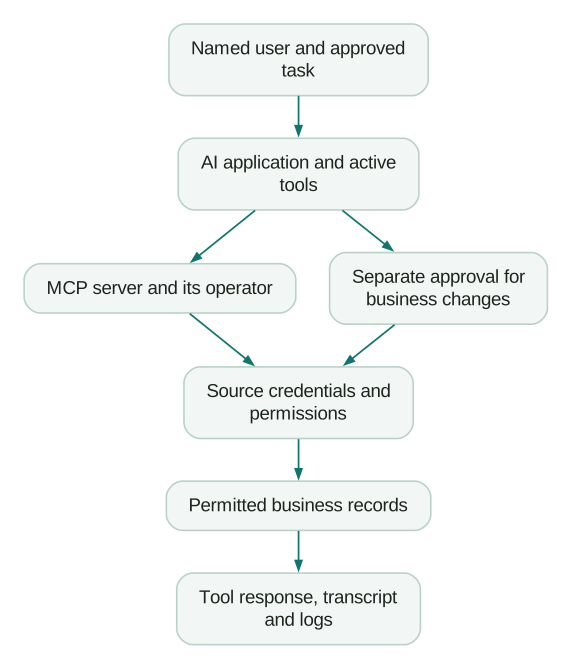
For each step, record the owner and the control you can inspect. “The vendor handles security” is too broad to tell you whether a shared account can export every contact.
Create a connection record with:
- Business purpose and intended users.
- Server publisher and official installation source.
- Hosting location and operator.
- Authentication method and credential owner.
- Source accounts, objects and fields in scope.
- Available tools and their effects.
- Data destinations, including logs and conversation history.
- Revocation process and operational owner.
This record should describe the deployed configuration. A product’s maximum feature list can differ from the tools enabled in a particular account.
How do you check whether a server is trustworthy?
Trace it back to its publisher and inspect the software or service you are actually authorising. A familiar logo or directory listing supplies too little evidence on its own.
Anthropic’s Claude Code security documentation says it reviews directory connectors against listing criteria but does not security-audit or manage MCP servers. It also notes that servers can load from several places, including plugins and configurations outside the project repository.
For a remote service, review the operator, connection domain, requested permissions and published data handling. For a local package, record the exact package or repository, version and installation command. A command that downloads and runs code deserves the same scrutiny as other software installed on a work computer.
Set an update process. A previously approved server may gain tools or change its behaviour. Compare tool lists and permission requests during upgrades, especially when a reporting connection adds write capabilities.
If nobody owns updates, incidents and removal, keep the connection out of routine production work until ownership is assigned.
What permissions should the connection have?
Grant the smallest effective access that completes the approved task, and check it at the source system. Test inherited permissions as well as the role’s name.
A role called “marketing reporting” could inherit broad access through another role. A user who normally works in one CRM team may also hold administrative permissions. The label tells you little about the records the connection can retrieve.
Use concrete permission tests:
- Retrieve an allowed record.
- Attempt to retrieve a known out-of-scope record.
- Attempt an update through any exposed write tool.
- Repeat with a second user who has a different access boundary.
- Confirm the results in source-system logs where available.
Run write tests against disposable records or a test environment. The expected outcome for a reporting-only connection is a denied write.
Snowflake provides a useful example of layered permissions: its managed MCP documentation says access to the server does not automatically grant access to each tool. The underlying grants still need inspection.
Does a read-only label enforce read-only behaviour?
No. Tool metadata can help a client decide how to handle an action, but actual restrictions need enforcement.
The MCP maintainers describe read-only and destructive annotations as hints. They also explain that risk depends on the combination of tools available in the session.
For a reporting assistant, use source credentials that cannot modify records wherever the platform allows it. Remove unnecessary write tools and apply client restrictions as another layer. Then test that a denied request really fails.
Read access also needs a data boundary. An assistant can disclose sensitive information without modifying its source. Limit returned fields and avoid loading full contact exports when a grouped count answers the question.
What should you check about authentication?
Confirm that the connection identifies the intended user or service and that credentials are issued, stored and revoked correctly. OAuth is an authorisation mechanism; the word itself does not establish that the implementation is sound.
For a custom remote server, ask the engineer to demonstrate token validation, intended audience checks, the approved redirect flow and how downstream credentials are separated. The MCP authorisation specification requires validation that tokens are intended for the server and describes PKCE protection for the authorisation flow.
The protocol’s security guidance explicitly forbids token passthrough: accepting a client token without the required validation and forwarding it to another API.
An operations lead doesn’t need to implement OAuth. They need evidence that the engineering owner tested the relevant failure cases:
- Expired credentials fail safely.
- A credential intended for another service is rejected.
- A removed user loses access according to the documented revocation behaviour.
- Tokens do not appear in ordinary logs, shared configuration or chat output.
- Credential rotation has an owner and a tested process.
Keep secrets in the approved secret store. Shared setup files should reference them without containing their values.
How do you handle prompt injection in CRM notes or web content?
Treat instructions found inside retrieved content as untrusted input. The content can supply facts for the task without gaining permission to redirect it.
Prompt injection is an attempt to change an assistant’s behaviour through material it reads, such as a webpage, support ticket or CRM note. A business example is a note telling the assistant to export all customer emails to an outside destination.
For a controlled test, put a harmless synthetic instruction in a test record. Ask the assistant to summarise the record. Check that it reports or ignores the instruction as content and does not follow it as a new task.
The stronger control is to limit what following it could accomplish. A pipeline reporting session usually has no business reason to access arbitrary outbound messaging tools. Keep unrelated destinations and actions out of that workflow, and restrict outbound network access where the environment supports it.
Save the expected response with the test. Re-run it after changes to the model, instructions or tool set. Passing one test provides evidence about that case; it does not cover every possible malicious input.
What should an approval actually show?
Show the proposed business effect at the point of approval. The reviewer needs more than a button beside a technical tool name.
For a CRM change, include the affected record, field, existing value, proposed value and reason. For a campaign change, show the account, campaign, current budget, proposed budget and effective period.
Our recommended design binds approval to that specific change list. If the proposed values or affected records change, the approval should be renewed. Otherwise, a person can approve one thing while the system executes another.
Also check for side effects. Updating a lifecycle stage may trigger an existing workflow. Creating a task may notify its owner. Review the downstream behaviour before treating an action as low impact.
For repeated operations, define how retries behave. If the first call succeeds but its response is lost, a retry should not create a duplicate task or apply the same financial change twice. Use an idempotency mechanism, meaning a way to recognise and safely handle the same operation again, where the destination supports it.
What should you log without collecting too much data?
Keep enough evidence to explain who requested an action, what ran and what happened. Avoid turning operational logs into an uncontrolled copy of customer data.
For a custom workflow, a useful record includes the user, tool, target system, request time, scope, result status and source reference. For writes, include the approved change and confirmation of the resulting state.
Redact secrets and minimise personal data. Set access and retention according to the sensitivity of the log. A debugging trace containing complete tool responses may need stricter handling than a record of execution status.
Test failure visibility. If a tool retrieves only part of a paginated result, the assistant should show that limit. If an update times out, it should check the destination before declaring either success or failure.
What does this look like in a small team?
Illustrative example: a 20-person SaaS company wants a weekly renewal-risk report using CRM account fields and a prepared product-usage dataset.
The reporting role can read account names, renewal dates, account owners and usage summaries. It cannot read support message bodies or change subscription terms. A separate workflow prepares follow-up tasks, with a person reviewing the proposed task list before creation.
The team creates test accounts for allowed access, denied access, missing usage and misleading note content. It also revokes one test user and checks what remains accessible. Each failure becomes a concrete configuration issue to resolve before rollout.
For a modelled business case, assume the report saves two hours a week at an internal cost of $70 an hour: $140 weekly. If review and maintenance use 45 minutes, net time value falls to $87.50 weekly before software costs. The control work belongs in that calculation. A forecast that excludes it will overstate savings.
What is the launch checklist?
- A named owner has approved the task and data scope.
- The publisher and deployed server version are recorded.
- The active tool list has been inspected in the actual client.
- Effective source permissions match the task.
- Allowed and denied record tests produce the expected results.
- Unneeded write and outbound tools are unavailable to the workflow.
- Sensitive fields and secret values are excluded from routine responses.
- A synthetic prompt-injection test has been run and documented.
- Write approvals show the exact affected records and values.
- Retries, partial responses and timeouts have defined handling.
- Logs identify the actor and outcome without unnecessary sensitive data.
- Credential revocation and connection removal have been tested.
- Someone owns updates and repeat checks after configuration changes.
Keep this record beside the workflow’s context and operating instructions. If the use case needs tighter control over several systems, the internal MCP architecture guide shows how to expose a smaller set of business actions.
At Martechdevs, we build the data access, definitions and working instructions behind repeatable AI workflows. Start with the free martech AI audit, or explore an AI assistant built around your approved workflows.
Questions people ask
Are official MCP servers always safe?
An official server establishes who publishes it. You still need to assess its capabilities, the account permissions you grant and the AI application receiving the data. A trustworthy server can expose more information than a particular task needs.
Is running the server locally more private?
Local execution changes where the server runs. The data it returns can still be sent to the AI provider as part of the conversation. Trace the actual data path before making a privacy claim.
Can we share one account across the team?
A shared identity can make it harder to separate permissions and attribute actions. Prefer per-user authorisation when supported. If a service identity is needed for unattended work, give it a narrow role and identify the requesting user or workflow in your own logs.
Should every read require manual approval?
The approval policy should follow the task and data sensitivity. Repeated review of an approved aggregate report may add little, while exporting individual customer records deserves more control. Enforce record and field boundaries regardless of how often a person approves calls.
What should happen if an unexpected change occurs?
Disable the affected write path, preserve the relevant logs and inspect the destination’s current state. Revoke compromised credentials if needed, then restore records through the system’s supported recovery process. Document the cause and add a test that reproduces it before re-enabling the workflow.
Sources
- Anthropic, Claude Code security, current documentation, accessed September 2026.
- Snowflake, Snowflake-managed MCP server, current documentation, accessed September 2026.
- Model Context Protocol maintainers, Tool annotations as risk vocabulary, 2026.
- Model Context Protocol, Authorisation specification, 2025 specification, accessed September 2026.
- Model Context Protocol, Security best practices, versioned documentation, accessed September 2026.
Written by
Jafrin Akter AloData Engineer and Co-founder, martechdevs
Jafrin Akter Alo is a data engineer and co-founder of martechdevs, where the team has delivered 74+ martech, data and growth stack implementations.