
How to Build a Customer Preference Centre That Works
Data Engineer and Co-founder, martechdevs
Last updated 9 min read
A customer preference centre works when the choices people make reliably control later messages across every connected sender. Build it around clear topics, channels and scope, then record changes, synchronise them safely and verify enforcement. A polished settings page is only one part of the system; the critical test is whether a newer opt-out survives an older data sync.
Last updated: 14 October 2026.
A customer turns off promotional emails. The CRM still says “subscribed”, so tomorrow's warehouse sync restores the old value. The preference page worked perfectly. The customer experience failed.
For a product or lifecycle team, the job is to make the promise on the page match the behaviour of the complete messaging stack. This guide describes that implementation problem. It does not prescribe a universal legal consent policy for every country, channel or message.
What should customers actually be able to choose?
Start with categories a customer can understand and that the team can consistently enforce.
“Product tips” describes a recognisable type of communication. “Lifecycle cohort B” describes an internal campaign structure. The second belongs in your operating system, not in the customer's settings.
A useful initial design might offer:
- Product tips: guidance on using the product.
- Events and learning: invitations and educational sessions.
- Offers and announcements: commercial updates.
- Optional channels: email, SMS or push where relevant.
- A clearly scoped way to stop all optional marketing.
Keep essential account communications separately classified under an approved policy. Do not put promotions into an “essential” bucket to avoid a preference choice.
Our CRM and lifecycle work connects these customer-facing categories to the actual sending rules. Before building a page, inventory the messages that will obey each control.
Avoid offering a frequency slider unless you can enforce it. “Monthly” needs a definition: one digest, one campaign of each topic, or a total across the programme. Use the lifecycle frequency cap guide to resolve that promise.
How do topics, channels and global choices differ?
A topic describes what the message is about. A channel describes how it arrives. A global choice describes the scope of a broader restriction.
Those concepts are not implemented identically in every platform. Customer.io, for example, documents independent topic and channel preferences that must both permit a message when its subscription centre is enabled. It does not provide a native per-topic-per-channel matrix. Its global unsubscribe covers email, SMS, WhatsApp and push, while in-app and Slack behave differently. Customer.io subscription overview
Therefore, do not draw a settings grid that your backend cannot represent. If the product offers “tips by email but events by SMS”, prove that the selected platform or your custom enforcement layer can store and apply that exact combination.
Write a mapping for every visible control: customer wording, internal scope ID, affected senders and exception policy. Keep the scope ID stable if the marketing team renames the label.
A multi-brand business needs another decision: whether “all marketing” means one brand, one account or the whole group. State that scope on the page and in the confirmation.
Why is a preference different from permission evidence?
Current state answers “what should the system do now?” A history record answers “what changed, when and through which interaction?”
Neither automatically proves that a particular message is appropriate to send.
Customer.io's consent-record documentation explicitly separates history from sending eligibility. It also explains that a starting record created from an existing preference does not establish how the original choice was collected. Customer.io consent records
Maintain both a current operational state and an appropriate change history. The history should retain the scope and collection context needed for your approved policy, without collecting unrelated personal information just because storage is available.
For a custom system, an illustrative internal change event could look like this:
{
  "change_id": "pref_change_1042",
  "subject_id": "customer_482",
  "brand_id": "main_brand",
  "scope_type": "topic",
  "scope_id": "product_tips",
  "channel": "email",
  "choice": "off",
  "source": "preference_centre",
  "recorded_at": "2026-10-14T09:15:00Z",
  "server_sequence": 1042,
  "notice_version": "tips_v3"
}
This is a proposed application schema, not an API payload for any vendor. Your implementation may use independent channel and topic records instead of the combination shown.
The important properties are an unambiguous subject and scope, an identifiable action, an authoritative ordering method and a reference to the explanation the customer saw.
How do you stop old systems from resubscribing people?
Choose an authoritative preference writer. Other systems may display a copy or submit a proposed change, but a stale mirror should not overwrite the authority.
Use the CRM property ownership guide to name the owner of subscription fields. Mark warehouse and CRM copies as derived when that is their role.
For a custom implementation, process changes as explicit commands rather than full-profile replacements. “Turn off product tips” should modify that scope, not replace every preference with whatever the browser loaded ten minutes earlier.
Use a server-assigned version or another trusted ordering mechanism. Client clocks and the arrival time of delayed imports are poor evidence of which customer action happened last.
A stale-write example
Consider this illustrative sequence:
- At 09:00, a warehouse export contains “product tips: on”.
- At 09:15, the customer turns tips off; the authority records version 1042.
- At 09:20, the old export reaches the CRM.
- At 09:25, the CRM tries to sync “on” back to the messaging platform.
The correct result is still “off”. The export carried a stale copy, not a new customer request.
Reject or ignore the stale write and record why. If the customer later explicitly turns tips on through an authorised interaction, process that as a new command under the appropriate permission policy.
This is more reliable than declaring that an opt-out can never change again. Customers need to be able to change their minds; integrations should not change their minds for them.
What should happen when a sender is unavailable?
Save the customer's choice durably before showing a successful confirmation. Then deliver the change to downstream systems through a retryable process.
A transactional outbox is one possible design: store the preference update and a delivery task together, then let a worker synchronise each sender. Track acknowledgement separately from the source choice.
If a sender has not received a restrictive change, prevent optional messages through that path until it catches up, according to the failure policy you have designed. Do not label the whole stack “synchronised” just because the webpage saved.
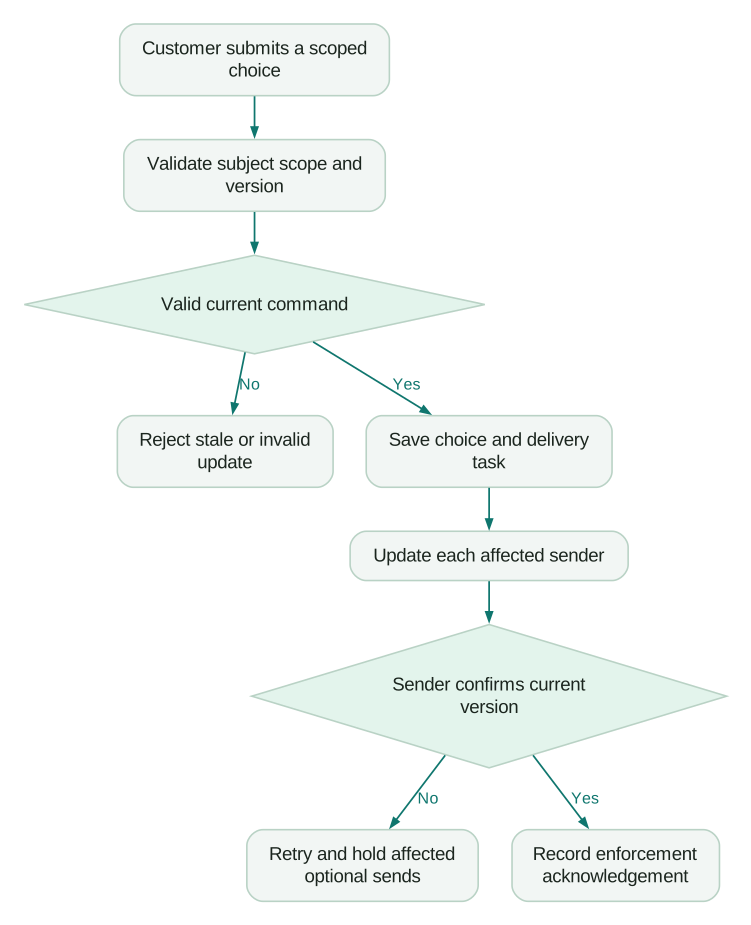
This model requires integration work; it is not a promise that a native preference centre provides a transactional outbox. For a simpler stack, the vendor's hosted centre may be sufficient if the sender itself is authoritative and there are no conflicting writers.
How should unsubscribe links relate to the centre?
Keep “manage preferences” and “unsubscribe” clear. A person asking to stop messages should not have to complete a retention survey or inspect several promotional choices first.
Gmail's bulk-sender rules require qualifying marketing and subscribed messages to support one-click unsubscribe and include a visible body link. A preference page does not replace the one-click mechanism. Gmail sender guidelines
RFC 8058 specifies the email-header mechanism using an HTTPS POST, with the relevant headers covered by DKIM. It does not depend on a logged-in browser session. Use your provider's supported implementation or build against the specification carefully. RFC 8058
For a custom browser page, use an appropriately scoped, hard-to-forge link or authenticated session. Do not expose a public endpoint that lets anyone change arbitrary email addresses. An opt-out link should not grant permission to view billing data or modify unrelated account settings.
Keep increases in permission, such as resubscription, subject to stronger verification appropriate to your policy. Possession of a forwarded unsubscribe email should not become broad authority over the original customer's profile.
What does “global” mean inside your provider?
Test the actual platform settings instead of assuming the label matches your product language.
Braze distinguishes global email state from subscription groups. It also separates a hard-bounced invalid address from a customer's unsubscribe choice. Its documentation describes several ways subscription state can change, including API updates, imports and preference-centre actions. Braze email subscriptions
That distinction matters for support. “We could not deliver” and “you asked us to stop” require different explanations and different remedies.
Create an internal diagnostic view with current choice, delivery restriction, last accepted customer change and downstream sync status. Keep any sensitive evidence appropriately restricted. The support agent should be able to explain a missing message without guessing that the customer unsubscribed.
Review single customer view design if several profiles can represent the same person. A preference attached to an obsolete identity may not protect the active sending record.
What should the confirmation page say?
Use concrete, scoped language.
“You will no longer receive product tips by email from Brand A” is clearer than “preferences updated”. If essential account messages are handled separately, explain the relevant distinction in plain language using the policy your team has approved.
When a downstream system is delayed, avoid making a precise completion promise your integration cannot meet. Record the choice immediately, apply the failure policy and surface operational alerts to the team.
Do not turn every opt-out into a new promotional message. A settings confirmation can appear on the page itself. If another communication is necessary, review its purpose and delivery route separately.
Measure completion and error rates, time to enforce a change, stale-write attempts and messages sent after a restrictive change. A low unsubscribe rate is not a success metric if the interface makes leaving difficult.
How do you test the complete system?
Use controlled profiles and actual sending paths. A template preview can show a link that behaves differently from one sent to a real profile.
Checklist
- Turn off one topic and confirm another topic remains unchanged.
- Turn off one channel and verify the intended scope across all topics.
- Use the all-marketing control and inspect every affected sender.
- Replay an older CRM or warehouse update and verify it cannot restore a stale choice.
- Submit the same change twice and confirm the result remains consistent.
- Test a queued message whose recipient opts out before delivery.
- Simulate a sender-sync failure and inspect the hold, retry and alert behaviour.
- Use the email client's one-click unsubscribe and compare its scope with the body link.
- Test a forwarded or expired link without exposing unrelated account information.
- Verify that support can distinguish a preference restriction from a delivery failure.
The goal is a trustworthy customer control, not the most elaborate settings screen. Start with a few understandable choices, one clear owner and evidence that each connected sender obeys them. Expand the page only when the underlying system can keep the additional promises.
Questions people ask
Do we need a custom preference centre?
Not always. A provider-hosted centre can be sufficient when its scopes match your requirements and it is the authoritative sender. Build custom controls when the product needs cross-provider, multi-brand or more specific preference behaviour that the native model cannot represent.
Should an old CRM value ever override an opt-out?
A stale copied value should not. An explicit, authorised later customer action can change a preference, but it must be distinguishable from an integration replay.
Can one global unsubscribe control every channel?
Only if you implement and verify that scope. Providers use different global rules, and some channel or sender-level restrictions sit outside the main preference record.
Does storing a consent record make a message permissible?
No. A historical record is evidence about a captured action, not automatic validation of how it was obtained or what future messages it permits. Apply the relevant approved policy and enforce the current sending state separately.
What is the most useful ongoing metric?
Measure how reliably and quickly a saved restrictive choice reaches every affected sender. Investigate messages sent after that choice, alongside failed updates and stale-write attempts, rather than optimising only for fewer unsubscribes.
Sources
- Customer.io: Overview of consent and subscriptions. Accessed 14 October 2026.
- Customer.io: Consent records. Accessed 14 October 2026.
- Google: Email sender guidelines. Accessed 14 October 2026.
- RFC Editor: RFC 8058 one-click unsubscribe. Accessed 14 October 2026.
- Braze: Email subscriptions. Accessed 14 October 2026.
Written by
Jafrin Akter AloData Engineer and Co-founder, martechdevs
Jafrin Akter Alo is a data engineer and co-founder of martechdevs, where the team has delivered 74+ martech, data and growth stack implementations.