
SaaS onboarding email sequences built around product progress
A useful onboarding email helps someone complete the next step toward value. It arrives when that step is relevant, goes to the person who can do it and stops when the work is already done. Design the sequence from product state and customer obstacles, then use timing to decide when help is appropriate.
On this page
This guide uses a hypothetical reporting software-as-a-service (SaaS) product: a workspace owner connects a data source, the product prepares a report, and a human opens that report to answer a business question. The messages, events and timings below are original examples to adapt. Match them to the actual product state, permissions and support capacity, then measure whether they help customers reach first value.
What outcome should the onboarding sequence help someone reach?
Start with the job the customer came to complete. In this example, the early outcome is viewing a successfully generated, non-empty report based on live data in the correct workspace. Creating an account, clicking an email and connecting an empty source are steps toward that outcome, not proof that it happened.
Use a candidate activation window, such as seven days, to organise analysis. Validate that window against your product's actual setup time and whether early progress predicts continued use. A tool requiring an administrator's approval may have a different sensible window from a self-serve browser extension.
The SaaS activation-metrics guide explains how to define the population, event and time window. For the sequence, identify the specific obstacles between those steps: missing access, failed authorisation, incomplete data, an unclear next action or lack of a relevant use case.
Use the lifecycle journeys built on product events to place onboarding alongside retention and expansion. Our lifecycle messaging implementation connects those events to the intended recipient and send or skip decision.
An email can explain a permission requirement or bring someone back to a ready report. It cannot repair a broken connector. Route product failures to the team that can resolve them instead of repeatedly asking the customer to try harder.
How do you model the person, workspace and onboarding episode?
Keep person, workspace, episode and event identities separate. Business-to-business (B2B) onboarding often happens across several people. An administrator grants access, an analyst prepares the report and a manager reads it. Sending every person the administrator's checklist creates work they may be unable to complete.
Use the following identity contract so the message can be matched to the work it is meant to help.
| Identifier | What it identifies | Check before the next message |
|---|---|---|
| Person | The recipient | They still have the required role and access |
| Workspace | The relevant account context | Progress belongs to this workspace |
| Onboarding episode | This trial, new workspace or approved restart | The episode is current and has not expired |
| Event | One occurrence being processed | A retry has not become another business occurrence |
Record role and permission changes as well as progress. Someone who leaves a workspace should not receive its next setup reminder. A report viewed in Workspace A should not complete onboarding for Workspace B merely because the same person belongs to both.
Use stable identifiers from your application and a documented relationship model. If the messaging platform cannot express the required workspace-specific condition, compute the eligible state upstream. Do not flatten several workspaces into one has_connected_source property and assume the ambiguity will disappear in the email editor. Compare Braze or Customer.io for workspace-aware onboarding using the actual account relationships and conditions you need to express.
Which product events should drive onboarding?
Use events that confirm completed work, with a current-state check before a dependent message. For the example product, an event contract might include workspace_created, source_connected, report_ready, report_viewed and report_shared. These are illustrative names. Define their semantics in the tracking plan and keep them consistent with your existing naming convention.
Emit source_connected after a successful connection, not when somebody clicks the connect button. Emit report_ready only when generation and the required data checks pass. Restrict report_viewed to the qualifying human interaction you intend to measure, excluding test fixtures and automated previews.
Include the workspace, episode, occurrence time and relevant resource ID. Keep processing time separately so you can detect late arrivals. Customer-visible claims such as “your report is ready” must come from a current, verified state.
Events explain what happened. Current state answers whether a message is still appropriate. Use both: a successful connection event can start the next step, but a later permission revocation may make the original success state obsolete.
Treat missing evidence carefully. If the event pipeline is delayed, “no report viewed event” does not necessarily mean that nobody viewed a report. Check data freshness before sending a reminder built around that absence.
What rule should govern each message?
Every message needs an entry condition, recipient, wait, final eligibility check, action and exit condition. Add an expiry so a delayed message does not remain relevant forever.
For example: send a connection-help email to the current workspace owner after a day without a successful source connection, provided the workspace is still eligible, the data is fresh, the person can perform the action and the message has not already been sent for this episode.
The day is an illustrative starting delay. Use product behaviour and customer expectations to decide whether your real delay should be shorter or longer. A fixed wait is useful for pacing; the final state check prevents it from becoming a stale reminder.
Prefer a small set of independently understandable messages to a long sequence whose later steps depend on assumptions made at signup. The customer-journey guide can help choose the moments where assistance matters most.
Which six email templates fit this reporting-product journey?
Choose the template for the unfinished step or decision; a fast-moving customer may need only a subset. The button labels below stand in for authenticated links to the correct workspace and resource. The recipient still needs permission when the destination opens. Replace placeholders with verified values, and remove any promise your product or support team cannot fulfil.
1. Welcome the owner with one useful next step
Send after a new eligible workspace is created, once the owner can access it. If setup is already complete, choose the next relevant step instead. Invited members need a different welcome focused on joining the existing workspace.
Subject: Connect the data for your first report
Your workspace is ready. Start by connecting the source you want to report on. You will need permission to authorise that connection. If someone else manages access, send them the setup request from your workspace. Once live data is available, you can build your first report.
Button: Connect a data source
The message names the prerequisite and the action. It avoids a tour of features the person cannot use yet. If the product has no setup-request feature, replace that instruction with the real handoff method.
2. Offer connection help when progress stalls
Send after the agreed wait only if a successful connection is still missing. Stop when a connection succeeds, the workspace becomes ineligible or the owner no longer has access. If a known connector outage explains the delay, use an accurate incident update instead.
Subject: What is blocking your data connection?
You can finish setup from the connection screen. If authorisation failed, check that you are signing in with an account that has the required access. If access belongs to a teammate, ask them to complete that step. If the error persists, share the error reference through the support link in the app so we can investigate.
Button: Review the connection
Use a more specific explanation when a verified error code supports one. Never ask people to send passwords, application programming interface (API) secrets or customer exports in an email reply.
3. Bring the user to a result that is actually ready
Send when a qualifying report becomes ready and remains available, provided the intended user has not already viewed it. The report must contain the relevant live data; an empty preview should not trigger this message.
Subject: Your first report is ready to review
Your report is ready in your workspace. Open it and check the date range, included data and metric definitions before using the numbers. Start with the question you wanted to answer when you signed up. If the result looks wrong, the data details will help you see what was included.
Button: Review the report
Do not claim the report found a particular problem unless the product has verified that finding. A reliable invitation to inspect a result is more useful than manufactured excitement.
4. Help a person use the result
Send after the first qualifying view if the next useful action remains incomplete. In a collaborative account, that action might be sharing with a teammate. In a solo account, it may be saving the report for the next reporting cycle. Choose one branch; do not force collaboration into every product journey.
Subject: Bring this report into your next review
If this report answers a question your team reviews regularly, share it with the people who use that answer. Check their access and the report's data scope first. Add the question you want them to consider so the report arrives with a purpose.
Button: Review sharing options
Stop this message once the relevant sharing action is complete or the recipient loses permission. Sharing is optional in this example; it is not silently added to the activation definition.
5. Offer targeted help before the opportunity expires
Send a limited assistance message when the workspace has not reached the chosen early outcome and there is still time to act. Select the body from the current obstacle. Do not send the connection version to a workspace that has data but is waiting for a report to finish.
Subject: Need help getting your first report working?
If setup is still blocking you, open the help request in your workspace and tell us which step you are on. Include the error reference if one is shown. We can use that context to point you to the right next step without asking you to start again.
Button: Get setup help
Only promise a human response if that channel is staffed. Route enterprise implementation work to the responsible team rather than giving every customer the same generic rescue message.
6. Explain the real trial boundary
If the product has a trial, use its authoritative end time and current commercial state. Send the relevant notice to someone authorised to make the decision. Stop or replace it when the trial is extended, converted or cancelled.
Subject: Your trial ends on [verified date]
Your trial ends on [verified date and time zone]. After that, [accurate access or billing consequence]. You can review the available plans and your current workspace status before deciding what to do next.
Button: Review trial and plan details
This template deliberately leaves the consequence unspecified. Fill it from the real product policy and account state. Do not imply an automatic charge where none exists, invent a discount deadline or threaten data deletion that will not occur.
How should the workflow branch as product state changes?
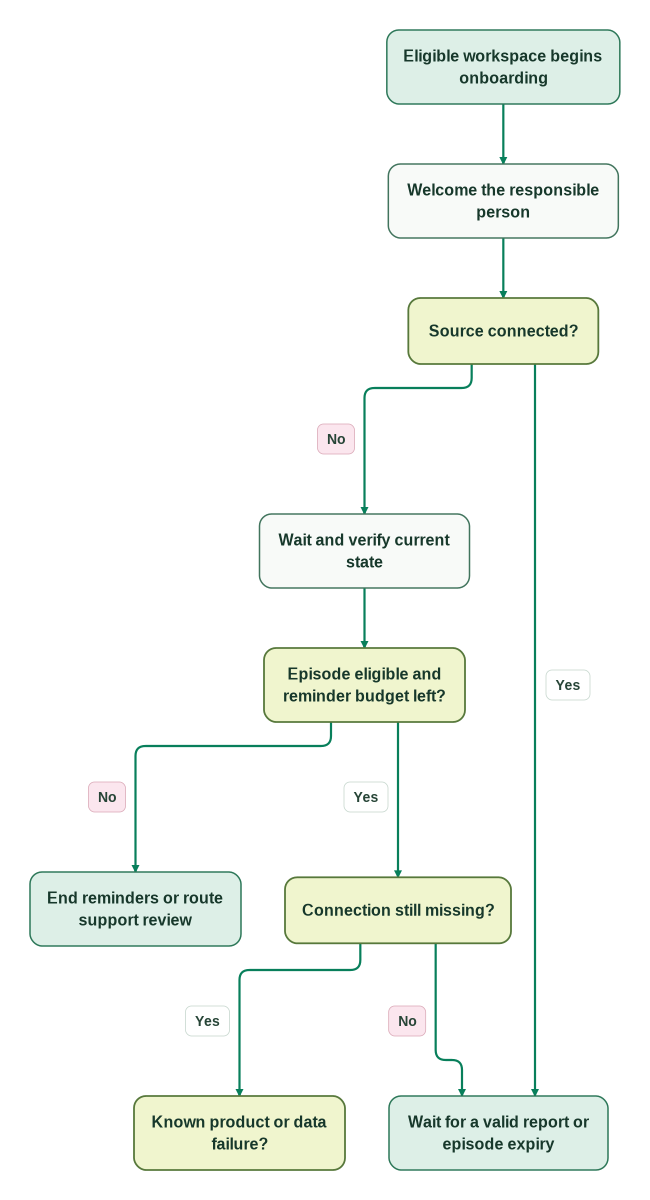
Branch on current connection, report and permission state, with explicit completion and expiry. The core progression for the reporting example is:
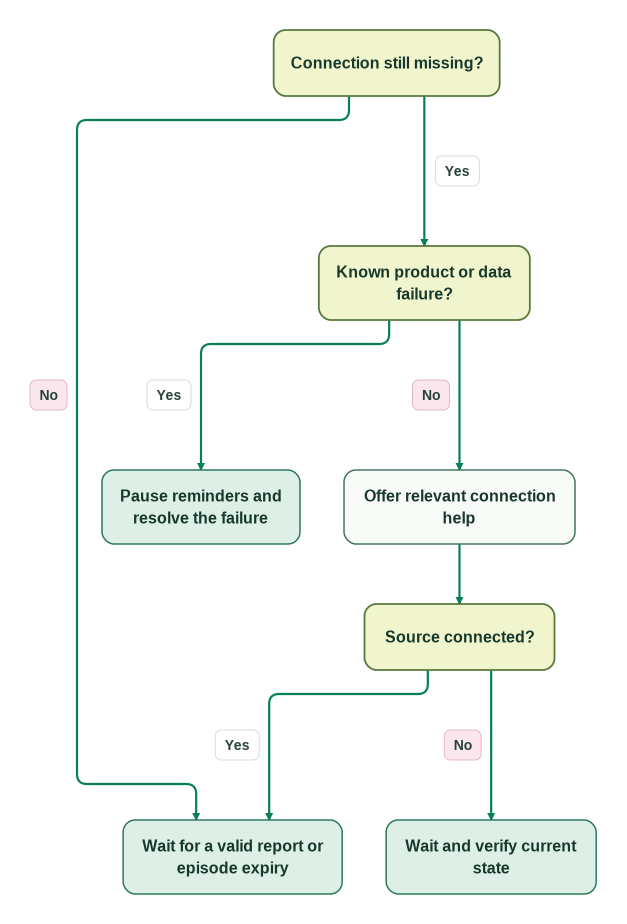
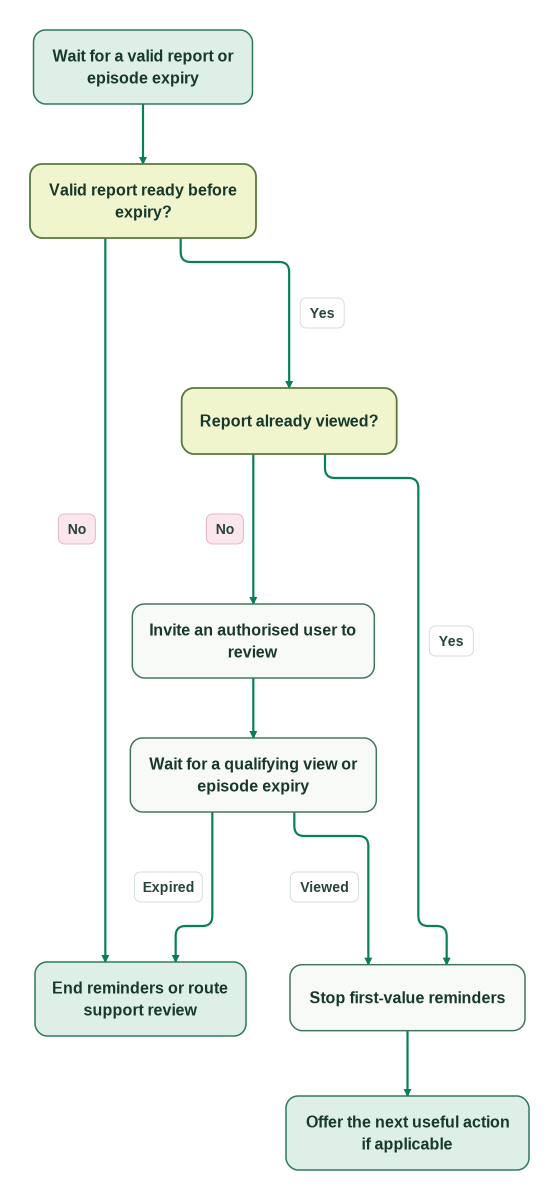
Read the workflow in three connected views: current connection state, missing-connection help, then first-value completion. Repeated nodes are the same workspace and episode state. Sending an invitation never completes the first-value outcome.
Entry and current connection state
At “Known product or data failure?” continue in Missing-connection help. At “Wait for a valid report or episode expiry” continue in First-value completion. Shared nodes refer to this same episode, not a second action.
Missing-connection help
Continue from the connection-missing check in Entry and current connection state. If the source is still missing after help, the wait node returns to the eligibility and reminder-budget checks in the first view. A connected source continues to First-value completion. Repeated nodes are the same episode states.
First-value completion
Continue from the report-wait node in either earlier view. An actual qualifying view completes first value; an invitation does not. Shared expiry and stop nodes are the same episode states.
Read diagram as text
- Eligible workspace begins onboarding to Welcome the responsible person.
- Welcome the responsible person to Source connected?.
- Source connected? to Wait and verify current state: No.
- Wait and verify current state to Episode eligible and reminder budget left?.
- Episode eligible and reminder budget left? to End reminders or route support review: No.
- Episode eligible and reminder budget left? to Connection still missing?: Yes.
- Connection still missing? to Wait for a valid report or episode expiry: No.
- Connection still missing? to Known product or data failure?: Yes.
- Known product or data failure? to Pause reminders and resolve the failure: Yes.
- Known product or data failure? to Offer relevant connection help: No.
- Offer relevant connection help to Source connected?.
- Source connected? to Wait for a valid report or episode expiry: Yes.
- Wait for a valid report or episode expiry to Valid report ready before expiry?.
- Valid report ready before expiry? to End reminders or route support review: No.
- Valid report ready before expiry? to Report already viewed?: Yes.
- Report already viewed? to Invite an authorised user to review: No.
- Report already viewed? to Stop first-value reminders: Yes.
- Invite an authorised user to review to Wait for a qualifying view or episode expiry.
- Wait for a qualifying view or episode expiry to Stop first-value reminders: Viewed.
- Wait for a qualifying view or episode expiry to End reminders or route support review: Expired.
- Stop first-value reminders to Offer the next useful action if applicable
Set a maximum number of reminders, a maximum episode age and a route for unresolved problems. Only a qualifying product outcome completes the first-value branch; sending the invitation does not.
In Customer.io, use the current Automations trigger controls and select the relevant person, event, object or relationship conditions. Its newer attribute-or-segment trigger does not inherit the older automatic timing logic; backfilled profiles can enter unless you explicitly restrict the cohort and timing. Trigger and frequency rules.
The Wait until action can branch on conditions or a maximum wait. People already meeting a condition can move through immediately, and simultaneous matching paths have an ordering rule. Make the completed-state path explicit, then re-check eligibility before a reminder. Wait-until behaviour.
Configure exit conditions for outcomes that make the journey obsolete. Customer.io's exit criteria use OR logic, so satisfying any configured exit condition can end the journey. Confirm that the rule refers to the correct workspace and episode, especially when a person has several memberships. Exit conditions.
A conversion goal helps reporting. It should not be treated as evidence that every queued or retried message is cancelled under all circumstances. Test the exact workflow and delivery behaviour you intend to use.
How should preferences, message limits and retries work together?
Give onboarding guidance a deliberate subscription policy. Keep essential account or security messages separately classified and configured according to their actual purpose. Calling a promotional sequence “transactional” does not make the content or the recipient's preferences disappear.
Customer.io's subscription centre supports topic and channel preferences. These settings govern message sending, rather than automatically stopping entry or other workflow actions. Inspect each topic's default: subscribed by default is a delivery setting, not proof of a person's agreement. Subscription-centre behaviour. Keep preference center choices consistent with the message's purpose and the available channels.
Set an initial frequency policy across competing lifecycle messages. For example, a team might start with at most one optional onboarding email per person per day, then adapt based on product timing, audience feedback and other campaigns. This is an illustrative cap, not a universal best practice.
Customer.io message limits must be assigned to the relevant workflows or individual messages; creating a limit alone does not apply it everywhere. Automatic retries are off by default, and overrides need inspection. Message-limit configuration.
The documented retry window is up to 48 hours. A blocked message can still retry after its recipient exits the originating automation. Disabling automatic retries lets already-scheduled attempts finish; custom retry overrides also need review. Do not treat an exit or a toggle change as proof that every queued reminder was cancelled.
For reminders tied to unfinished work, leave retries off unless the actual delivery path can enforce the required relevance and expiry. During cleanup, inspect pending attempts separately from future configuration. An obsolete reminder may be better dropped than delivered late. Test the resulting send and skip decisions before enabling the sequence.
Which failure cases should you test before enabling sends?
Test state changes, delayed events, identity boundaries and recipient permissions before judging the copy. Before enabling real sends, run representative test profiles through draft or test delivery. Check both message content and the recorded reason for sending or skipping.
- A user completes setup before the welcome message is processed.
- The source connects just before a reminder's wait ends.
- A delayed event arrives after newer state is already present.
- The same event is delivered twice.
- The person belongs to two workspaces with different progress.
- An invited member lacks permission to connect a source.
- The owner leaves or loses access while waiting.
- A product outage produces missing events or a failed report.
- The trial end date changes or the account becomes paid.
- The recipient unsubscribes or reaches the message limit before delivery.
Check names, pluralisation, missing values, date formats, time zones, mobile layout and authenticated destinations. Do not put sensitive information in a subject line or reveal another workspace's report name through a relationship mistake.
Verify that support replies reach a monitored destination and that the customer can complete the proposed action with their normal permissions. An attractive email with an inaccessible button is an onboarding failure.
How should you measure product progress and incremental usefulness?
Choose an outcome such as the share of eligible new workspaces reaching first value within seven days. Keep delivery, clicks, support requests, unsubscribes and complaints as diagnostic or guardrail measures. Add a later measure of repeated useful activity so the sequence is not optimised solely for one prompted visit.
Open rate is a weak basis for deciding who needs more onboarding. Apple's Mail Privacy Protection can prevent senders from observing whether a message was opened. Apple's explanation.
Compare the full optional sequence with a suitable holdout when you need to know whether it helps beyond the product experience. Keep essential verification, security and required account messages available in both groups. Randomise consistently at the workspace level when colleagues share the same activation outcome, and keep other interventions comparable.
Customer.io supports message-level holdout tests, where some people receive the message and others do not while conversions are still measured. A message test is narrower than a workspace-level test of the whole sequence; configure and analyse the experiment at the intended unit. Customer.io holdout support.
Consider the following fictional, fully observed seven-day cohort. Assume independent assignment of eligible workspaces, no cross-workspace spillover and one binary first-value outcome per workspace; no messaging experiment was run here.
| Assigned group | Eligible workspaces | Reached first value | First-value rate |
|---|---|---|---|
| Optional onboarding sequence | 600 | 144 | 24% |
| Holdout | 600 | 126 | 21% |
The observed difference is three percentage points, or about 14.3% relative lift, representing 18 workspaces across equally sized groups. A simple unpooled normal approximation gives a 95% interval of roughly −1.72 to 7.72 percentage points. That wide range includes no improvement; the point estimate is not proof of useful lift.
Calculate the standard error as the square root of 0.24 × 0.76 / 600 + 0.21 × 0.79 / 600, then add and subtract 1.96 standard errors from the rate difference. Different assignment units or dependent outcomes need an appropriate analysis rather than this example's formula. Plan the experiment and observation window before launch, and include adverse effects.
Avoid comparing only people who opened the emails with people who did not: that selects people based on behaviour after treatment and changes the question.
For low-volume products, combine cautious cohort analysis with support conversations and usability work. If ten customers all fail at the same permission screen, fixing the screen may be more valuable than rewriting the reminder subject.
What should the launch checklist confirm?
Confirm the product outcome, message relevance, delivery rules and measurement before expanding the audience.
Checklist
- The first-value outcome has an entity, event and observation window.
- Each message addresses a specific unfinished step or decision.
- Person, workspace, episode and event identities remain distinct.
- Role and access checks choose a recipient who can act.
- Events describe completed work and have freshness monitoring.
- Entry, wait, send, exit and expiry rules are explicit.
- Completed steps stop the corresponding reminders.
- Known outages and missing data pause inappropriate nudges.
- Preferences, caps and retry behaviour are verified at delivery.
- Links, fallback text and support destinations work for the recipient.
- Trial statements match actual account terms and dates.
- Measurement uses product outcomes and an appropriate comparison.
For help connecting the product events, account model and messaging rules, bring the current activation path and a few failed journeys to Martechdevs' CRM and lifecycle service. The deliverable should include the send and skip logic, working messages and evidence from those test cases.
Want a second pair of eyes on your stack? Get the $99 martech audit. For a defined onboarding flow, request a lifecycle implementation scope with the activation rule, six message options and the cases that should suppress delivery.
Keep reading
Browse all CRM & Lifecycle guides
 CRM & Lifecycle
How to Build a SaaS Renewal Workflow With Clear Ownership
Build a SaaS renewal workflow with clear owners, distinct commercial and billing states, reliable reminders, versioned dates and tested exception handling.
Jafrin Akter AloLast updated 11 min read
 CRM & Lifecycle
HubSpot Mailchimp Integration: Sync Contacts Without Undoing Unsubscribes
Choose the right HubSpot–Mailchimp app, map fields and subscription scopes, and test stale updates, opt-outs and missing campaign activity safely.
Jafrin Akter AloLast updated 13 min read
 CRM & Lifecycle
SaaS Dunning Workflows: Recover Payments Without Confusing Customers
Recover failed SaaS payments with one recovery case per invoice, no-code retry and email tools, and reminders that stop the moment the invoice is paid.
Jafrin Akter AloLast updated 13 min read
Lifecycle marketing
See the implementation scope, deliverables and acceptance checks.
Questions people ask
How should sales-assisted setup appear in onboarding results?
Label assisted completion separately while preserving the same underlying outcome definition. Record which steps the customer completed and which were performed by sales or implementation staff. A completed setup can still be useful, but it does not prove that the self-service instructions worked. Keep assistance comparable across experiment groups or report the imbalance so a change in staffing is not mistaken for an email effect.
What should change when the next onboarding action is not accessible to a customer?
Provide an accessible way to achieve the same task or reach someone who can help, and test it with the relevant permissions and assistive setup. Do not simply resend the original instructions. Record the blocked step so the product team can repair the experience. A fallback support route should be staffed and able to complete the promised handoff before it appears in the message.
How should a reply to an automated onboarding email affect the sequence?
Route the reply to a monitored owner with the workspace and current obstacle attached. Decide which optional reminders should pause while that conversation is active, then record when the pause ends. Do not assume the messaging platform knows that an off-platform support exchange solved the issue. Resume from verified product state and the agreed next action, rather than restarting the original sequence blindly.
How should onboarding differ for a beta feature with changing prerequisites?
Version the instructions and eligibility rules with the feature release. Confirm that the recipient has the relevant access and that the promised next step exists in their version. Keep a route for known limitations, and stop messages that refer to a withdrawn capability. Evaluate the beta cohort separately when its setup work differs materially from the generally available product's onboarding experience.
How should onboarding handle a customer-controlled test environment?
Define a separate validation milestone for the test environment, then state what must happen in production before the main activation metric is satisfied. Use test-appropriate links and avoid describing synthetic reports as live business results. Preserve environment on events and message eligibility. When the customer moves to production, verify the new state rather than carrying a completed test milestone across automatically.
Sources

Written by
Jafrin Akter AloData Engineer and Co-founder at Martechdevs and Growth and Analytics Partners
Jafrin writes practical guides to marketing technology, customer data, analytics and AI workflows. Martechdevs is a Growth and Analytics Partners company.