
How to Build a SaaS Renewal Workflow With Clear Ownership
Build a software-as-a-service (SaaS) renewal workflow around a specific subscription or contract cycle, its decision deadline, a named owner and evidence of the outcome. Separate commercial renewal, invoice collection and product access. Then connect customer relationship management (CRM) tasks, customer communications and billing events so a date change, cancellation or late payment updates the right work without creating duplicate outreach.
On this page
“Renewal date” often means several different things across a SaaS company. Sales means the contract decision. Finance means an invoice. Customer success means the point at which an account might leave. Product means continued access.
A reliable workflow lets those teams coordinate without pretending that one status answers every question.
This guide is an operational design for revenue operations (RevOps), customer success and growth teams. The examples use Stripe for billing signals, but the renewal record and ownership model apply beyond one provider.
What counts as a renewal in your business?
Define the unit first: one subscription, one contract or one agreed group of products renewing together.
A company can have several subscriptions with different dates. A single “customer renewal date” field will fail when one product renews monthly and another has an annual negotiated agreement.
Keep the dates separate because each governs different work. Entitlement means the customer's right to use the relevant product or service.
| Date | Meaning | Work it should govern |
|---|---|---|
| Commercial decision | When continuation or changes need agreement | Commercial discussion and approvals |
| Contract notice deadline | The applicable agreement's reviewed notice date | A task owned by the person responsible for those terms |
| Service period boundary | When the next entitlement period starts | Product-access reconciliation |
| Billing date | Invoice creation or a collection attempt | Billing readiness and event monitoring |
| Payment due date | When the issued invoice should be paid | Collection and overdue exceptions |
Do not infer contractual obligations from a billing timestamp. Store the approved terms and the person responsible for interpreting them.
Our CRM and lifecycle implementation work helps translate that model into tasks and customer journeys. A workflow becomes much easier to maintain once the team agrees which date drives which action.
Who should own the renewal?
Assign one accountable commercial owner for each renewal cycle. Other teams can own specific actions.
For a negotiated annual account, divide the actions without splitting accountability for the cycle. The following is a proposed ownership pattern, not a required organization chart.
| Action | Possible responsible team | Evidence of completion |
|---|---|---|
| Value review | Customer success | Customer outcome and unresolved requirements recorded |
| Commercial agreement | Sales or the renewal owner | Approved continuation, change or cancellation evidence |
| Invoice collection | Finance | Current invoice and payment outcome reconciled |
| Access enforcement | Product or engineering | Actual access matches the approved service policy |
For a self-service monthly plan, most actions may be automatic, with an exception owner responsible for failures. “Automated” does not mean “unowned”.
Record a next action, due date and responsible person or queue. A renewal marked “at risk” without an assigned action is a reporting label, not a working process.
Define backup ownership when someone leaves or is unavailable. Use the CRM property ownership guide to prevent billing integrations from overwriting commercial decisions or sales updates from inventing billing states.
What belongs in the renewal record?
Create one stable renewal-cycle ID and relate it to the customer, contract and billing subscription. A changed due date should normally revise the same cycle, not accidentally create a second opportunity.
An illustrative record includes:
{
  "renewal_id": "ren_annual_482_03",
  "account_id": "account_482",
  "subscription_id": "subscription_216",
  "cycle_sequence": 3,
  "commercial_owner": "renewals_queue",
  "decision_due_date": "2026-12-01",
  "service_period_start": "2027-01-01",
  "collection_method": "send_invoice",
  "commercial_state": "review_required",
  "billing_state": "not_invoiced",
  "access_state": "active",
  "schedule_revision": 1,
  "next_action": "confirm_buyer_and_requirements"
}
This is a proposed internal model, not a Stripe application programming interface (API) object. In production, keep provider IDs, approved amount and currency, contact roles, source timestamps and evidence references where needed.
Use a custom object for renewals or entitlements when the CRM needs a repeatable record linked to accounts and subscriptions; verify the required plan and associations before choosing that model.
Use separate fields for commercial state, billing state and access state. An invoice can remain unpaid after a contract is agreed. A cancellation can be scheduled while current access remains valid. Forcing both cases into one dropdown loses the distinction the team needs.
How should the timeline differ by renewal type?
Build separate paths for self-service and negotiated renewals. Do not make a small monthly customer pass through an enterprise sales pipeline.
A negotiated annual renewal
The following is an illustrative planning cadence, not an industry benchmark or a contractual recommendation:
- 90 days before the service boundary: confirm owner, buyer, notice deadline and product scope.
- 60 days before: review usage, unresolved issues and the customer's desired outcome.
- 30 days before: resolve commercial changes and internal approvals.
- Before the agreed decision deadline: record continuation, change, cancellation or an explicit unresolved state.
- At the service boundary: verify the new commercial and billing state, then reconcile access.
- After the payment due date: route unpaid invoices to the collection process.
Work backwards from the actual agreement. If the notice deadline occurs earlier, move the relevant tasks earlier.
A value review should answer what the customer accomplished and what remains blocked. Do not fill it with login counts that have no relationship to the purchase decision.
A self-service renewal
The normal path may require only an accurate upcoming charge notice, a working management link, a collection attempt and a clear outcome.
Stripe's built-in renewal reminder emails apply to subscriptions using charge_automatically; they do not cover send_invoice subscriptions. Invoice reminders are a separate configuration. The displayed date uses the customer's timezone, then the account timezone if unavailable, then Coordinated Universal Time (UTC). Stripe customer emails
That distinction is a useful audit: classify subscriptions by collection method before assuming a single setting covers the whole customer base.
Which messages should come from which system?
Give each customer-facing purpose one owner and one authoritative source of amounts, dates and status.
A customer should not receive a renewal notice from the CRM, another from the lifecycle tool and a third from billing with conflicting amounts.
Map these purposes separately:
- Value review or commercial discussion.
- Upcoming automatic charge notification.
- Invoice delivery and payment instructions.
- Failed-payment recovery.
- Confirmation of an agreed change or cancellation.
- Product-access notification when the approved policy requires one.
Use the system with the best authority for that purpose. Billing should supply the current amount and payment state. The CRM should supply the commercial owner. The product should supply actual access information.
Review SaaS dunning workflows for the failed-payment branch. A card failure and a customer's decision not to renew require different responses.
Keep promotional expansion campaigns out of sensitive recovery moments unless there is a clear reason and appropriate eligibility. Coordinate them through the customer preference centre and message-priority policy. Design expansion and retention journeys around the renewal so a commercial review, a payment failure and a product-adoption prompt do not compete blindly.
How do billing events update the workflow safely?
Use events as notifications that relevant state may have changed. Retrieve or reconcile the current authoritative state before making consequential decisions.
Stripe documents duplicate event delivery and does not guarantee event ordering. Its webhook guidance includes signature verification and duplicate handling. Stripe webhooks
Store processed event IDs, but also protect each business action from duplication. A second event relating to the same renewal should not create another sales task or send another confirmation.
For example, make the “renewal agreed” task completion specific to the renewal-cycle ID. Make a payment reminder specific to the invoice and reminder stage. A single event-deduplication list cannot express all those business rules.
Stripe's subscription documentation also warns that a paid invoice does not always make the related subscription active. It recommends checking the subscription state when extending access. The invoice.upcoming event is not sent for send_invoice collection. Stripe subscription webhooks
Do not treat an upcoming-invoice event as a universal contract-renewal trigger. Creating the next cycle requires confirmed continuation appropriate to the renewal type, plus reconciled billing and access. An unresolved commercial decision stays with its owner even if an invoice has been paid.
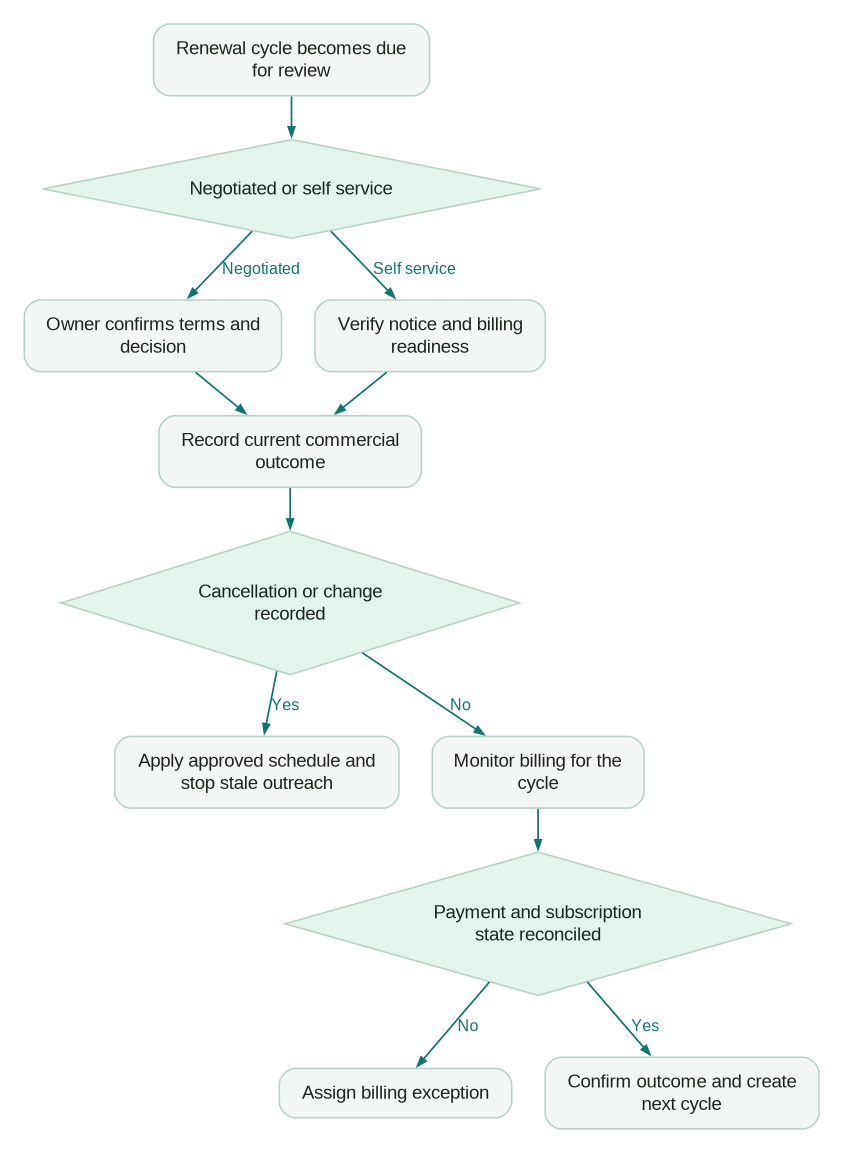
Read diagram as text
- Renewal cycle becomes due for review to Negotiated or self service.
- Negotiated or self service to Owner confirms terms and decision: Negotiated.
- Negotiated or self service to Verify notice and billing readiness: Self service.
- Owner confirms terms and decision to Record current commercial outcome.
- Verify notice and billing readiness to Record current commercial outcome.
- Record current commercial outcome to Cancellation or change recorded.
- Cancellation or change recorded to Apply approved schedule and stop stale outreach: Yes.
- Cancellation or change recorded to Monitor billing for the cycle: No.
- Monitor billing for the cycle to Renewal decision, billing and access confirmed?.
- Renewal decision, billing and access confirmed? to Assign unresolved cycle to its owner: No.
- Renewal decision, billing and access confirmed? to Confirm outcome and create next cycle once: Yes
What happens when the renewal date changes?
Version the schedule and invalidate work based on an older revision.
Suppose an annual agreement's service boundary moves from 1 January to 1 February. The original reminder, sales task and expected billing record may now be wrong. Updating the visible CRM date is only the first step.
Find pending actions for that cycle. Recalculate the ones governed by the changed date, preserve completed history and keep a reason for the revision. Do not quietly erase evidence of a notice already sent.
Before sending a queued message, check the current cycle state and schedule revision. If the customer has already agreed, cancelled or changed plans, the earlier message may need to be skipped or rewritten.
A change to the commercial schedule must not automatically alter the billing system. Route that update through the approved owner and verify the resulting provider state. Use Stripe and HubSpot integration design when the CRM and billing platform need an explicit division of responsibility.
How do you make self-service management links reliable?
Send the customer to an authenticated management route that creates the appropriate current session, rather than storing a temporary session URL for a future campaign.
Stripe's customer portal sessions are short-lived. Create one on demand when the authorised customer is ready to manage billing, rather than pre-generating a session URL for later use. Stripe portal session reference
A renewal email scheduled weeks in advance should not depend on a portal session generated at campaign creation.
Test the route for the actual billing customer and subscription. A company administrator may manage several subscriptions, while an ordinary product user may have no authority to change billing. The email recipient, application user and billing owner are related roles, not automatically the same identity.
What should appear in the renewal dashboard?
Show work that needs a decision, not just a forecast number.
Useful operational views include:
- Cycles within the review window without an owner or next action.
- Accounts whose decision deadline arrives before the next scheduled task.
- Commercially agreed renewals with missing billing changes.
- Paid invoices whose corresponding subscription or access state needs review.
- Scheduled cancellations still receiving renewal or expansion messaging.
- Billing exceptions with an overdue response.
Keep commercial continuation and collection outcomes separate. A customer who agreed but has an unpaid invoice belongs in a different queue from a customer who declined.
In a hypothetical review window, 80 cycles are due and 68 have an owner, a next action and a due date. The counts below illustrate work coverage; they are not customer results.
| Work status | Renewal cycles | Share of due cycles |
|---|---|---|
| Complete owner, action and due date | 68 | 85% |
| At least one of those fields missing | 12 | 15% |
| All cycles due for review | 80 | 100% |
The 12 incomplete cycles are specific work to assign; they are not automatically churn predictions. A completed task record also does not prove that the customer will renew. Keep work coverage separate from net revenue retention by renewal cohort, which tracks changes in the recurring value of the same starting accounts.
Use AI churn prediction only after the basic workflow is dependable. A risk score is useful when it helps an owner choose an action, not when it hides missing dates or responsibilities. An AI agent that monitors renewal risk should bring current usage, incidents and payment evidence into that owner’s queue without taking over the commercial decision.
What should pass before launch?
Accept the workflow only after controlled subscriptions and CRM records demonstrate the expected transitions. Use the following account tests as release acceptance cases:
Checklist
- One account with two subscriptions produces distinct renewal cycles.
- A duplicate event cannot create a duplicate task or customer message.
- An older event cannot restore an obsolete renewal date.
- A cancellation during a delay stops the intended future outreach.
- An invoice-based customer follows the correct reminder path.
- A paid invoice is reconciled with the current subscription and access state.
- A moved service boundary updates pending tasks while preserving completed history.
- The management link works for the authorised billing contact when opened later.
- A missing owner or failed integration produces an actionable exception.
- The next cycle is created once, after the defined outcome condition.
Launch with one renewal type and a small controlled cohort. Review every exception until the team can explain the cycle from commercial intent through billing and access. Expand automation only after those explanations are consistent.
Want a second pair of eyes on your stack? Get the $99 martech audit. For a defined renewal repair, request a lifecycle implementation scope with the renewal unit, source systems, exception owners and acceptance cases.
Keep reading
Browse all CRM & Lifecycle guides
 CRM & Lifecycle
HubSpot Mailchimp Integration: Sync Contacts Without Undoing Unsubscribes
Choose the right HubSpot–Mailchimp app, map fields and subscription scopes, and test stale updates, opt-outs and missing campaign activity safely.
Jafrin Akter AloLast updated 13 min read
 CRM & Lifecycle
SaaS Dunning Workflows: Recover Payments Without Confusing Customers
Recover failed SaaS payments with one recovery case per invoice, no-code retry and email tools, and reminders that stop the moment the invoice is paid.
Jafrin Akter AloLast updated 13 min read
 CRM & Lifecycle
SaaS onboarding email sequences built around product progress
Build SaaS onboarding emails around product progress: six templates, event and workspace rules, timing, suppression checks and activation measurement.
Jafrin Akter AloLast updated 16 min read
CRM & marketing automation
See the implementation scope, deliverables and acceptance checks.
Questions people ask
What if procurement needs a purchase order before the renewal invoice?
Record the purchase-order requirement as a separate readiness task, with its owner and deadline linked to the renewal cycle. Do not mark the commercial decision complete merely because a purchase order was requested. Before invoicing, verify the current buyer details and approved requirements with finance. Keep missing procurement paperwork distinct from a rejected renewal or failed payment so each reaches the appropriate queue.
Should a mid-term seat increase start another renewal cycle?
Usually treat it as a change to the current agreement or subscription, then determine whether it changes the next renewal boundary under the approved terms. Preserve the amendment, effective date and billing outcome separately. Creating a fresh renewal cycle solely because an amount changed can duplicate ownership and notices. Test a seat increase that leaves the renewal date unchanged alongside one that deliberately changes it.
How should several subscriptions be moved to one renewal date?
Treat alignment as an explicit commercial and billing change. Preserve the original subscription and cycle references, record the approved common boundary and identify any transitional charges or service periods. Reconcile each subscription before closing its old work. A shared date does not automatically mean the products have one invoice, one permission model or one cancellation rule; define the relationship the team intends to operate.
What should happen when the billing integration fails near a decision deadline?
Create a visible exception and give an authorized owner the last verified state, its timestamp and the pending decision. Confirm current billing information through the approved fallback process before making customer promises. Record any manual action against the same renewal cycle so recovery cannot repeat it. Keep the outage separate from customer risk; missing integration evidence alone is not a decision to renew or cancel.
How should a disputed charge affect the commercial renewal record?
Record the dispute and route it to the responsible finance or relationship owner without silently rewriting the customer's commercial decision. Check whether the dispute concerns the current cycle, an earlier invoice or a separate product. Preserve the source evidence and applicable access policy. A collection problem can require intervention while the customer still intends to continue, so resolve those states independently.
Sources

Written by
Jafrin Akter AloData Engineer and Co-founder at Martechdevs and Growth and Analytics Partners
Jafrin writes practical guides to marketing technology, customer data, analytics and AI workflows. Martechdevs is a Growth and Analytics Partners company.