
25 lifecycle marketing journeys built on real product events
Data Engineer and Co-founder, martechdevs
Last updated 11 min read
Useful lifecycle marketing responds to a customer's actual state: what they have completed, what is blocking them and what should happen next. Every journey needs an explicit trigger, enough context to select the right person, an exit condition and a business outcome. Start with a few reliable journeys, then expand as the data and operating capacity improve.
Last updated: 17 September 2026.
A seven-day onboarding sequence keeps sending the same advice whether someone activated in ten minutes or never finished connecting their account. Event-based journeys let the product's state determine the next message. The message earns its place by helping with a specific unfinished job.
The 25 examples below are implementation designs, not claims of results from client campaigns. Event names are suggested names; map them to your own tracking plan.
Define the journey contract first
For every journey, record the eligible entity, entry event, required properties, delay, channel, exit, re-entry rule and outcome. Distinguish the person who caused an event from the person who should receive the message. A failed invoice may belong to an account, while its recipient should be the billing administrator.
Use stable person and account IDs, event time and a unique event ID. Add a schema version so a future change to the event does not silently change eligibility. Critical commercial events should come from an authoritative system rather than a browser button click.
Martechdevs' CRM and lifecycle service implements these connections and rules. For platform selection, the Braze versus Customer.io guide shows how to test journeys with real account and channel conditions.
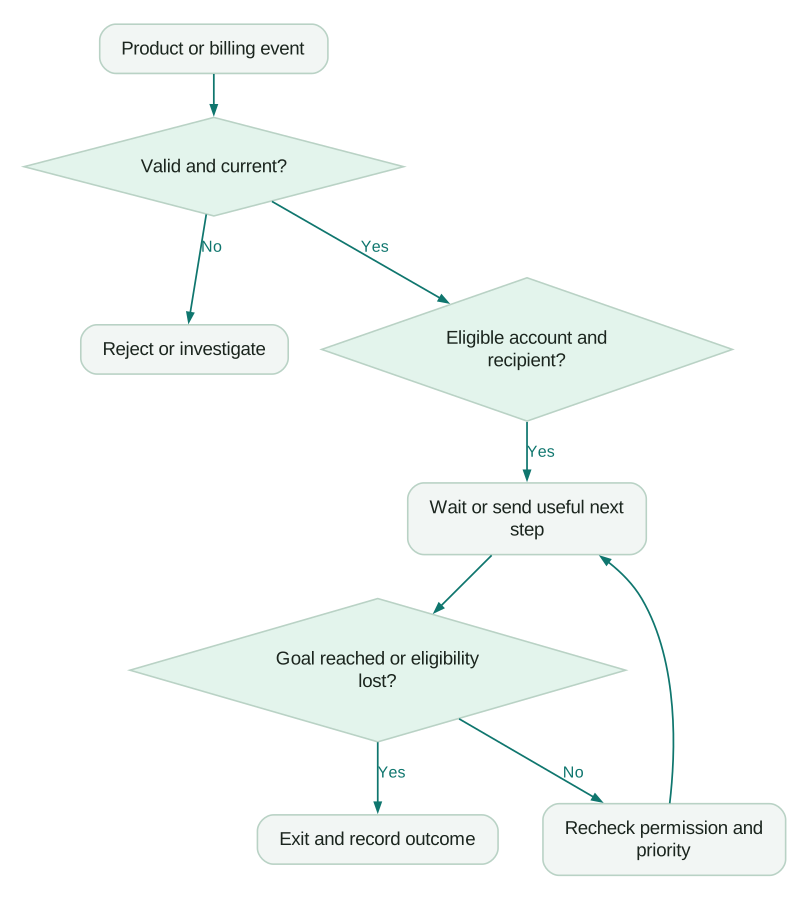
Journey tools have specific execution semantics. Customer.io documents configurable exit conditions; Braze documents that a frequency-capped message can be skipped while the person continues through Canvas. Translate the intended behaviour into the platform's actual controls. Customer.io exits, Braze frequency caps.
Activation: help the customer reach a first result
1. Finish an incomplete signup
Trigger: signup_started, with no signup_completed after an appropriate delay. Required context: stable signup reference, reachable address, permitted channel and the incomplete step. Message: link directly to the saved step without exposing sensitive details. Exit: completion, expiry or permission withdrawal. Metric: completed signups per eligible starter within a fixed window.
2. Connect the first data source
Trigger: workspace_created, with no successful connection. Required context: workspace ID, administrator role and intended source. Message: the shortest source-specific connection guide, including the permission needed. Exit: source_connected, workspace deletion or membership removal. Metric: connection rate and median time to connection. Do not send an administrator task to every invited user.
3. Recover a failed integration
Trigger: integration_failed. Required context: integration ID, error category, last successful sync and responsible administrator. Message: explain the actionable cause and link to reconnect or fix permissions. Exit: confirmed recovery or integration removal. Metric: recovered integrations and time to recovery. Group repeated failures into one incident so retries do not create an email flood.
4. Complete the first meaningful action
Trigger: source_connected, without the product's activation event. Required context: intended use case and the missing action. Message: one relevant task, such as publishing a report or inviting a collaborator. Exit: activation or source disconnection. Metric: account activation within the observation window. Avoid defining activation as opening the onboarding email.
5. Invite the first collaborator
Trigger: first successful result in a product where collaboration adds value. Required context: workspace role, existing membership count and invitation rights. Message: show what a teammate can contribute. Exit: accepted invitation or loss of permission. Metric: workspaces with two active members, not invitations sent. Solo users may be valid customers and should have an exclusion.
6. Rescue an unaccepted invitation
Trigger: member_invited, with no acceptance after the chosen delay. Required context: invitation ID, recipient, inviter and expiry. Message: a reminder with the valid acceptance route. Exit: accepted, revoked or expired invitation. Metric: invitation acceptance rate. Check that the same person has not already joined through another identity or invitation.
7. Show the first result to the account owner
Trigger: first_result_generated. Required context: result location, account owner and access permissions. Message: explain the result and a sensible next action. Exit: result viewed or invalidated. Metric: qualified result views and subsequent usage. Link to the authenticated product instead of copying private customer data into an email.
Conversion: respond to evidence of value and intent
8. Offer help to an inactive trial
Trigger: trial starts, followed by no meaningful activity for a defined interval. Required context: trial ID, expiry, completed setup steps and support status. Message: address the first unfinished step. Exit: renewed activity, conversion or trial closure. Metric: activated trials. A customer blocked by an incident should receive incident help, not a generic motivation email.
9. Explain an approaching trial expiry
Trigger: scheduled evaluation relative to the current trial end date. Required context: account, plan, expiry and billing permissions. Message: state what will change and how to preserve useful work. Exit: conversion, extension or cancellation. Metric: paid conversion, with complaint rate as a guardrail. Recalculate eligibility after a trial extension.
10. Route a product-qualified account to sales
Trigger: account crosses an agreed usage-and-fit threshold. Required context: score components, current subscription, owner and recent sales contact. Action: create a task with evidence and, where appropriate, a relevant outreach message. Exit: disqualification, accepted handoff or active sales engagement. Metric: accepted qualified accounts and opportunity conversion. Product data in HubSpot explains the account model.
11. Respond to a usage limit
Trigger: usage_threshold_reached. Required context: allowance, current usage, reset date, account tier and authorised buyer. Message: explain the limit and available choices. Exit: upgrade, reset or reduced usage. Metric: healthy upgrade rate and continued product use. Deduplicate by account, threshold and billing period so every additional event does not send another warning.
12. Follow up on a blocked premium feature
Trigger: premium_feature_requested. Required context: feature, account entitlement, requester role and buying stage. Message: show the relevant benefit or route to an administrator. Exit: entitlement granted, trial activated or explicit dismissal. Metric: qualified feature adoption and expansion. A junior user without purchasing authority needs a different next step from the buyer.
Adoption: make useful behaviour repeatable
13. Encourage the second successful use
Trigger: first value event, followed by no repeat within the product's natural usage cycle. Required context: first use case, expected cadence and account state. Message: help repeat the result with less effort. Exit: second success or account closure. Metric: repeat-value rate. Daily reminders make little sense for a product whose main job happens monthly.
14. Introduce an adjacent feature
Trigger: repeated use of a core feature, without adoption of a complementary one. Required context: entitlement, role and compatible use case. Message: connect the new feature to work the person already performs. Exit: meaningful adoption or dismissal. Metric: sustained use of the new feature, not the first click on its announcement.
15. Activate a newly invited team
Trigger: several invitations accepted within an account. Required context: roles, team objective, administrator and existing setup. Message: role-specific next steps with one shared outcome. Exit: team activation or membership removal. Metric: accounts with multiple active contributors. Coordinate messages so the administrator does not receive every team member's instructions.
16. Deliver a useful recurring summary
Trigger: scheduled weekly or monthly evaluation. Required context: fresh account-level results, comparison period, timezone and eligible recipients. Message: the change that matters and a link to investigate it. Exit: unsubscribe, no meaningful data or account closure. Metric: useful product actions after delivery. Suppress empty summaries and clearly label incomplete periods.
17. Close the loop after support resolution
Trigger: support_issue_resolved. Required context: issue category, affected feature, resolution state and recent survey history. Message: confirm the next usable step or request specific feedback. Exit: reopened issue or completed follow-up. Metric: successful return to the affected workflow and reopen rate. A ticket closure alone does not prove the customer can complete the task.
Retention: distinguish disengagement from a different usage pattern
18. Investigate a decline in account usage
Trigger: a material drop relative to the account's own baseline. Required context: baseline period, active seats, seasonality and known incidents. Action: contextual help or a customer-success task. Exit: recovery, explained seasonal pause or closure. Metric: retained active accounts. A fixed “no login for seven days” rule is weak for infrequent-use products.
19. Recover an expired credential
Trigger: authentication failure on an established connection. Required context: affected source, credential owner, failure time and last complete data period. Message: a secure reauthorisation route and the impact of delay. Exit: verified successful sync. Metric: restored connections. Do not ask customers to reply with passwords, tokens or private keys.
20. Resolve a failed payment
Trigger: authoritative invoice-payment failure. Required context: invoice, subscription, retry state, billing contact and current entitlement. Message: the appropriate secure payment-update route. Exit: paid invoice, voided invoice or completed cancellation. Metric: recovered recurring revenue, with duplicate-contact complaints tracked. Coordinate with the billing system's existing dunning. Stripe and HubSpot covers these state distinctions.
21. Prepare a renewal conversation
Trigger: account enters a defined pre-renewal window. Required context: renewal and notice dates, contract value, usage, open issues and account owner. Action: internal preparation before customer communication. Exit: completed renewal decision or changed contract schedule. Metric: on-time renewal decisions and retained value. An internal workflow may be more useful than another automated customer email.
22. Respond to cancellation intent
Trigger: cancellation_requested or a scheduled end-of-term cancellation. Required context: reason, effective date, available options and communication preference. Message: acknowledge the request and explain next steps accurately. Exit: cancellation withdrawn or effective closure. Metric: retained customers who remain active, alongside support complaints. Never obscure the cancellation route to manufacture a retention metric.
Expansion and return: make the timing credible
23. Offer capacity to a consistently growing account
Trigger: sustained growth across several observation periods. Required context: paid seats, active seats, limits and commercial ownership. Message: capacity planning tied to measured demand. Exit: expansion, declined offer or reduced demand. Metric: adopted expansion and retained revenue. Separate this from an emergency limit warning; the customer should have time to make a decision.
24. Ask for a referral after demonstrated success
Trigger: a meaningful success milestone, with no recent unresolved problem. Required context: milestone, relationship stage, prior requests and eligibility. Message: a specific, low-effort invitation. Exit: referral, decline or a new support escalation. Metric: qualified referred accounts. Avoid assuming that a high usage count means the customer is willing to endorse the product.
25. Invite a former customer back for a relevant change
Trigger: a released improvement addresses the recorded departure reason. Required context: former account, reason, current contact permission and the actual shipped change. Message: explain the improvement and a realistic return path. Exit: return, decline or loss of permission. Metric: reactivated paying accounts retained beyond the initial return period. A generic discount does not repair a missing capability.
Choose the first three journeys by recoverable value
Start where the event is reliable, the missing action is clear and the customer can act. For many SaaS teams, that means connection recovery, first activation and trial-expiry communication. A sophisticated churn prediction is less useful if basic account state is wrong.
Use an illustrative prioritisation calculation. Suppose 300 monthly trials fail to connect a source. If a tested intervention could help 10% complete connection, that is 30 recovered connections. If 40% of connected trials normally activate, the rough opportunity is 12 additional activations. These are planning assumptions, not a promised effect; a controlled test must establish the actual result.
Compare that opportunity with engineering effort and interruption risk. A failed-payment journey may have immediate revenue potential, but it can also duplicate existing Stripe messages. Integration recovery can improve both customer experience and data quality with a smaller messaging surface.
Prevent journeys from fighting each other
Create a priority policy across service, billing, onboarding, adoption and promotion. Define which messages bypass a promotional cap because they are necessary service communications. Channel eligibility and the applicable communication basis still need to be respected.
At each delayed step, recheck current state. The original entry event is history; it does not prove the account remains eligible. Customer.io's journey documentation describes trigger and filter behaviour, while object relationship rules help preserve the correct account context. Journeys, Object relationships.
Keep a decision log with journey version, entity, eligibility time, suppression reason, message attempt and outcome. This lets you answer “Why did this person receive this?” without reconstructing the account from screenshots.
Launch checklist
- The trigger represents a completed action or authoritative state.
- Person, account and recipient roles are explicit.
- Required fields have validation and freshness checks.
- Duplicate events cannot create duplicate journeys accidentally.
- Exits work after conversion, cancellation and permission withdrawal.
- Re-entry has a defined period and business purpose.
- Delayed messages recheck current eligibility.
- Caps, quiet hours and competing journeys are tested.
- The outcome is a product or commercial result with a fixed window.
- A named owner can pause the journey and inspect its decisions.
When unresolved support issues suppress promotional journeys, test the ticket-to-account connection and the release condition. The Zendesk implementation guide shows how to check routing, CRM sync and AI handoff together.
At Martechdevs, we connect CRM, product and billing data to the customer workflows your team needs to run. Start with the free martech AI audit, or explore an AI assistant built around your approved workflows.
Questions people ask
How is lifecycle marketing different from email marketing?
Lifecycle marketing coordinates actions around the customer's stage and needs. Email is one channel. A useful lifecycle response might be an in-app instruction, a push notification, a support task or no message because the customer has already completed the job.
Which events should trigger lifecycle messages?
Use events that materially change the next useful action: connection success or failure, first value, trial timing, payment state and meaningful changes in account usage. Avoid treating every page view or button click as a reason to contact someone.
How many journeys should a SaaS startup launch?
Launch the smallest number the team can monitor properly. Three reliable journeys with clear exits usually teach more than 25 partially tested flows. Expand when you can explain who enters, who exits and whether the intervention changes the intended outcome.
Should every journey use a holdout group?
Use controlled experiments where withholding the intervention is appropriate and sample size permits useful learning. Required service or billing notices need different treatment. For account-level outcomes, consider assigning whole accounts so colleagues do not contaminate treatment and control groups.
What should a lifecycle strategy document contain?
Record the customer stage, problem, event contract, recipient, channel, entry and exit rules, re-entry policy, owner and outcome metric. Include suppression and failure behaviour. Those details make the strategy executable and keep future campaign changes from breaking its intent.
Sources
- Customer.io campaign exit conditions. Accessed 17 September 2026.
- Customer.io journeys. Accessed 17 September 2026.
- Customer.io object relationships in automations. Accessed 17 September 2026.
- Braze frequency capping. Accessed 17 September 2026.
Written by
Jafrin Akter AloData Engineer and Co-founder, martechdevs
Jafrin Akter Alo is a data engineer and co-founder of martechdevs, where the team has delivered 74+ martech, data and growth stack implementations.