
CRM Property Ownership: Stop Integrations Overwriting Good Data
Data Engineer and Co-founder, martechdevs
Last updated 9 min read
CRM property ownership defines which system may set each field, when another source may propose a change and how conflicts are resolved. Assign ownership per property, not simply per application. Combine that policy with stable record identifiers, explicit blank-value rules and change history so a sync can preserve useful data instead of repeatedly replacing it.
Last updated: 2 September 2026.
A sales representative fixes an account's renewal date. Overnight, an integration puts the old date back. The representative fixes it again, then exports a spreadsheet because the CRM no longer feels dependable.
The immediate problem is an overwrite. The deeper problem is that two writers have authority without an agreement about which value is correct. Our martech integration work addresses that agreement before enabling broader synchronisation. Otherwise, faster sync only makes the disagreement happen more often.
What does ownership mean at the field level?
Ownership includes the business definition, authoritative writer, permitted secondary writers, validation and correction process. It does not mean the field belongs to the person whose name appears in the CRM's record-owner property.
For example, sales can own the commercial opportunity stage while billing owns the active subscription state. Product can own the last successful activation timestamp. A warehouse model can own a calculated engagement segment, provided its definition and refresh time are known.
One application can therefore own some properties while receiving others. “HubSpot is the source of truth” is too broad if a nightly product integration supplies usage and a billing platform supplies paid status. Identify the authoritative source for each decision-driving field.
Separate observations from judgments. last_active_at is an observation derived from defined product activity. account_risk_reason may be a customer-success assessment. Combining them into one editable health value lets an automated calculation erase a human explanation or vice versa.
Which fields should you document first?
Start with properties that trigger customer contact, route work, control access or appear in revenue reporting. A typo in an unused descriptive field is inconvenient. An overwritten opt-out, deal stage or renewal date can change customer treatment.
For each priority property, record:
- Business meaning and the entity it describes.
- Data type, permitted values and units or time zone.
- Authoritative source and the integration that writes it.
- Other processes that can currently change it.
- Whether a person can override it and for how long.
- Meaning of missing, blank, zero and explicitly cleared values.
- Freshness expectation and the action when data is stale.
- Downstream workflows, reports and exports that use it.
Keep this register close to the implementation. A spreadsheet can work for a small system if changes are reviewed and the integration owner uses it. A large stack may need versioned configuration and automated checks. The document's format matters less than whether it governs actual writers.
The HubSpot implementation checklist covers the wider rollout. Property ownership makes its data-model decisions enforceable once integrations and workflows start running.
How do you discover who is overwriting a value?
Pick one affected record and follow the property's history. HubSpot exposes historical values with change time and source, which can help distinguish a user edit, import, workflow or another process. Do not confuse record creation source with the source of a later property change. HubSpot property history.
Create a short timeline from observed evidence. For an illustrative renewal date:
- At 10:15, an account manager changes the date from 31 October to 30 November.
- At 02:00 the following morning, the billing integration writes 31 October.
- At 02:05, a CRM workflow copies that value into a reporting field.
- At 08:00, an alert treats the account as renewing this month.
This sequence does not prove the account manager's date was correct. It proves where the competing values entered and how the conflict affected operations. Check the signed contract or billing amendment before deciding what to restore.
Inventory all writers, including old imports, enrichment tools, workflow actions, reverse ETL jobs and custom scripts. A connector can be configured correctly while a forgotten workflow continues to undo it. Temporarily narrow the affected writer's scope when necessary, preserving unrelated business operations.
Why does two-way sync need more than a direction setting?
HubSpot data sync supports one-way and two-way configurations with conflict-resolution preferences. Its documentation says the selected default application can win a discrepancy, subject to the configured direction and blank-value behaviour. It also warns that sync filters govern initial inclusion; already-synced records can continue synchronising. HubSpot data sync.
That makes a broad instruction such as “CRM wins” dangerous when different fields have different owners. A salesperson's phone correction and the billing system's subscription status may need opposite precedence. If the connector cannot express that policy, separate mappings or use a controlled integration design rather than accepting the wrong winner.
Treat a default mapping as a proposal. HubSpot documents type and field-specific mapping constraints, including owner matching, dropdown options and one-way mappings. Review the actual connector's supported fields and entitlements. Data sync field mappings.
For a HubSpot and Salesforce sync, record the direction and conflict behaviour for each important property. Do not infer a connector's rules from a similarly named feature in another integration. Native connectors, generic sync products and custom API jobs can all behave differently.
How should blanks, stale data and manual overrides work?
A blank can mean unknown, intentionally removed, unavailable in this source or not applicable. Those meanings should not all trigger the same update.
For a company phone number, a blank in an enrichment response may mean the provider found nothing. Preserving the existing verified number is sensible. For a deliberately withdrawn optional preference, preserving the previous value could be wrong. Define an explicit clearing operation where the business needs one, then map it to the destination's documented API behaviour.
A recent arrival time does not establish a recent fact. A delayed export can reach the CRM today with a subscription state from last week. Compare the source's effective timestamp or version when available, and keep an observed-at value distinct from processed-at. If reliable ordering is unavailable, reconcile from the authoritative current record instead of inventing certainty.
Manual overrides need a lifecycle. Specify who may create them, the reason, an expiry or review date and the property that stores them. Prefer a separate override field plus an effective-value rule when the original source value still has diagnostic value.
For example, keep calculated_account_tier, account_tier_override and effective_account_tier. The effective value uses an approved active override when present; otherwise it uses the calculation. That makes the exception visible and avoids repeatedly fighting the automated writer.
Do not use an override to conceal incorrect source data indefinitely. If the contract changed, correct the contract or billing source through its approved process. An override should have a reason that another operator can understand.
What does a workable ownership contract look like?
Consider a fictional SaaS company that wants renewal dates in its CRM. Billing owns the contracted renewal date. Customer success can propose a correction but cannot silently change the source value.
The integration specification could be:
Property: subscription_renews_at
Entity: subscription, related to the customer account
Meaning: next contracted renewal instant
Source: billing subscription record
Writer: billing-to-CRM integration
Secondary write: correction request routed to billing owner
Blank input: preserve value and flag missing source data
Explicit removal: allowed only for a verified non-renewing state
Stale update: reject if older than accepted source version
Multi-subscription account: retain separate subscription values
Correction: repair source, reconcile CRM, inspect affected reminders
These fields and rules are illustrative. The contract needs to reflect your commercial model. Some agreements use dates rather than instants; some have notice deadlines distinct from the renewal date. A field named “renewal” should not silently mix those concepts.
Suppose billing changes the renewal from 31 October to 30 November at source version 18. A delayed version-17 job later arrives. The proposed policy rejects that stale update. If the provider supplies no usable version, the worker can retrieve current source state and compare it before writing, with appropriate concurrency handling.
Now suppose a second subscription renews on 15 December. Overwriting the account's single renewal field with whichever subscription synced last is wrong. Model the subscriptions separately and derive an account summary with a defined rule, such as the next upcoming renewal. The HubSpot custom-object guide explains when relationship modelling is needed.
Why is record matching part of ownership?
The best field policy still fails if an update reaches the wrong record. Match on a stable identifier whose uniqueness reflects the source entity. Names, shared domains and mutable email addresses can be inadequate in some business models.
Salesforce's external-ID upsert API illustrates the distinction: it can create or update based on the matching external value, while multiple matches produce an error. The documentation also distinguishes an external-ID field from one configured as unique. Salesforce external-ID upsert.
An upsert solves a record-location problem. It does not decide whether the incoming field value is authoritative, fresh or appropriate. Keep matching and update policy as separate review items.
For custom integrations, use a permitted-field list rather than serialising the entire source object into every update. The job should write only the properties it owns. A new source field should not acquire write authority just because an API response began including it.
How do you recover from an overwrite safely?
First stop or narrow the writer causing the unwanted change. Then identify the affected records and the last trustworthy values. Restoring data while the conflicting job continues to run is usually temporary repair.
Check which downstream actions already happened. A corrected field does not unsend an email, reverse an owner assignment or undo a forecast export. Record the impacted workflows and decide which need compensating action or human review.
Use a small restoration batch and inspect it through a complete sync cycle. Preserve an audit record of what changed and why. HubSpot's available property-history restoration actions depend on the change source, so do not assume every historical value has an equivalent one-click rollback. Property history and restoration.
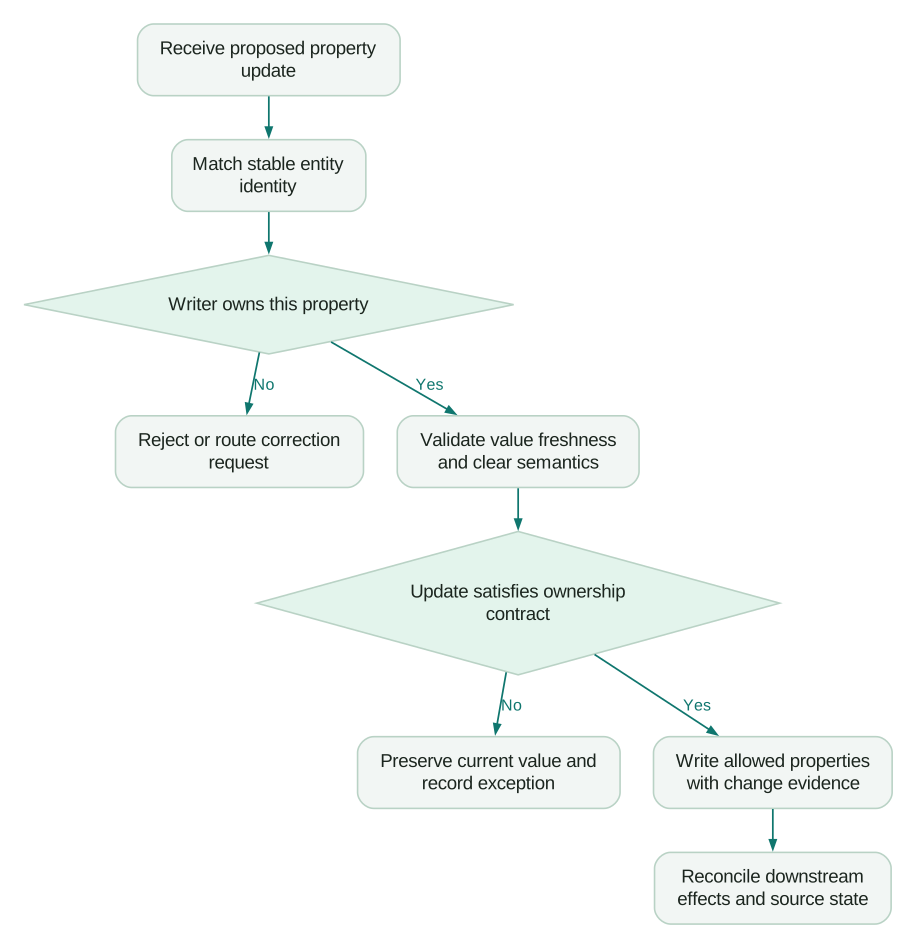
What should pass before a new integration can write?
- The job matches the intended entity using a tested stable key.
- Its permitted properties match the ownership register.
- Blank, zero, absent and explicit-clear cases have different tested outcomes where needed.
- An older update cannot overwrite a newer accepted source state under the chosen design.
- A manual correction follows a documented source repair or override route.
- Two integrations cannot repeatedly bounce the same value between systems.
- A failed record is visible without silently blocking or corrupting the rest of the batch.
- A small rollback exercise identifies both restored values and downstream effects.
Begin with a handful of fields that cause expensive mistakes. Once their writers and exception paths are stable, expand the policy. A compact register that protects renewal, consent and routing decisions is more useful than a complete inventory nobody enforces.
Questions people ask
Should the CRM own every customer field?
The CRM can present the operational view without authoring every value. Assign billing facts, product observations and commercial judgments to the systems or teams able to maintain them correctly. Make the source visible when users need to judge freshness or request a correction.
Is last-write-wins a reasonable conflict policy?
Only when arrival order genuinely represents authority and freshness for that field. Delayed exports, retries and manual edits can violate that assumption. Use source ownership and version or effective-time rules where the business consequence matters.
Should users be prevented from editing synced fields?
Restrict edits where supported and appropriate, but provide a correction route. Verify how UI permissions, workflows and integration credentials actually behave in the chosen product. A read-only presentation alone does not establish that every API writer is blocked.
Can we solve overwrites by making the sync one-way?
One-way sync can simplify ownership, but the selected source must still be correct for every mapped field. It also needs clear handling for stale records, blanks and manual corrections. Review the field list rather than treating direction as the whole design.
How do we avoid creating too many properties?
Add separate source and override fields only when they preserve a meaningful distinction used by the business. Reuse clear definitions and retire obsolete fields after checking dependencies. Avoid creating a second version merely to escape a conflict whose writer has never been fixed.
Sources
- HubSpot property history. Accessed 2 September 2026.
- HubSpot data sync configuration. Accessed 2 September 2026.
- HubSpot data sync field mappings. Accessed 2 September 2026.
- Salesforce external-ID upsert. Accessed 2 September 2026.
Written by
Jafrin Akter AloData Engineer and Co-founder, martechdevs
Jafrin Akter Alo is a data engineer and co-founder of martechdevs, where the team has delivered 74+ martech, data and growth stack implementations.