
Salesforce Bulk API 2.0: Upsert Billing History and Recover Failed Rows
Use Salesforce Bulk API 2.0 for a large asynchronous load when the team can manage a CSV, an external-ID contract and row-level recovery. Create the job, upload the file, mark it UploadComplete, then reconcile the successful, failed and unprocessed populations. A received file or finished job is not sufficient evidence that every invoice reached the right customer or that replaying it is safe.
On this page
When should you use Bulk API 2.0 instead of ordinary REST writes?
Use Bulk API 2.0 for substantial backfills and recurring batches that can finish asynchronously. Use an appropriate synchronous REST operation when the caller needs a result during the current interaction. Salesforce identifies operations above 2,000 records as good Bulk API 2.0 candidates; this is selection guidance, not a minimum accepted file size. Bulk limits and API selection.
| Workload | Route to evaluate | Acceptance boundary |
|---|---|---|
| A single customer update needed now | REST write or a suitable composite operation | Immediate response plus the resulting business state |
| Historical invoices or product observations | Bulk API 2.0 ingest | Every submitted row has an explained result |
| Nightly warehouse-owned CRM fields | Managed reverse ETL or an owned bulk runner | Fresh source snapshot, controlled writes and recovery |
This guide owns the ingest job lifecycle. Use Salesforce API limit diagnostics to find a quota consumer, the Stripe integration guide to choose billing ownership and app capabilities, and reverse ETL to Salesforce to design ongoing field ownership. A managed Stripe package may already own its objects; do not introduce a competing bulk writer without that package's supported mapping and synchronization contract.
For implementation work, Salesforce consulting should scope the target model, automation, import and reconciliation together.
What must be ready before creating a job?
Prepare a tested target schema and an integration identity that can write the required object and fields. API Enabled, object permissions, field permissions and record access still matter; Bulk API does not turn an authenticated user into an administrator. Salesforce API security.
The running example uses a custom Billing_Invoice__c object that your team owns. It is not a Stripe managed-package schema. Its Name field is auto-numbered, and the illustrative fields below must exist before the CSV is submitted.
| Field API name | Example field design | Purpose |
|---|---|---|
Source_Key__c | Text, External ID and Unique; approved case rule | Match the same source invoice on a rerun |
Customer__c | Lookup to Account | Associate the invoice with a verified customer |
Invoice_Status__c | Text or an approved restricted picklist | Preserve the source state |
Amount_Paid_Minor__c | Number with zero decimal places | Preserve the integer source amount |
Currency_Code__c | Text | Keep the currency beside the amount |
Source_Observed_At__c | Date/Time | Distinguish source observation from delivery time |
Load_Run__c | Text | Find the records belonging to the controlled load |
Use Object Manager and sObject Describe to verify exact API names, required fields and writable types. Add any org-specific required fields to the example. Test the same permission set, validation rules and flows intended for the real load.
The Load_Run__c marker is only data. It does not bypass validation, suppress emails or disable billing actions unless an approved automation design explicitly uses it. An invoice history load must not start a second payment collection or replay old recovery messages.
How do external IDs make a rerun match the same invoice?
Use a stable, nonblank source key for the entity being loaded, and enforce its intended uniqueness in both the export and Salesforce. For this example, acct_demo:test:invoice:in_001 includes the source account, environment, entity type and invoice ID. That key format is an integration convention; preserve its components in your source manifest.
Bulk upsert uses the configured external-ID field to decide whether to update an existing record or create one. Salesforce's upsert walkthrough. External ID and Unique are separate settings: an external-ID field can contain duplicates without the Unique constraint, and concurrent upserts can expose that ambiguity. External ID versus Unique.
Reject blank or duplicate source keys before making the job. Also reject #N/A in the external-ID column: Salesforce treats that exact CSV value as a null request, so it cannot be your stable match key. Do not choose the first of several destination matches. Keep the case rule deliberate rather than lowercasing an opaque identifier by habit. CSV null handling.
Load or resolve customer Accounts first, then use their verified Salesforce IDs in the invoice file. The 15- versus 18-character ID guide explains the format boundary when those mappings pass through spreadsheets or case-insensitive systems. A successful parent job still needs reconciliation before its IDs become a child job's input.
Stable keys protect record identity. They do not make a repeated update harmless: flows can create tasks, messages or other effects even when the invoice still has the same external key. Include those effects in the pilot.
What should the CSV contain?
The file should contain one row per intended invoice and only the fields this writer owns. Use UTF-8, correct API-name capitalization, an explicit delimiter and matching line endings. Quoted commas, quotes and embedded newlines require a CSV parser; splitting text on commas or physical lines can corrupt records. Prepare CSV files.
This fictional four-row file is deliberately small enough to inspect. Save it as invoices.csv with LF line endings. Replace the sample Account IDs with existing IDs from the intended test org before any native test.
Source_Key__c,Customer__c,Invoice_Status__c,Amount_Paid_Minor__c,Currency_Code__c,Source_Observed_At__c,Load_Run__c
acct_demo:test:invoice:in_001,001000000000001AAA,paid,12000,USD,2026-10-01T12:00:00.000Z,backfill_demo_01
acct_demo:test:invoice:in_002,001000000000001AAA,paid,5000,USD,2026-10-01T12:00:00.000Z,backfill_demo_01
acct_demo:test:invoice:in_003,001000000000002AAA,open,0,USD,2026-10-01T12:00:00.000Z,backfill_demo_01
acct_demo:test:invoice:in_004,001000000000002AAA,paid,7500,USD,2026-10-01T12:00:00.000Z,backfill_demo_01
Amount_Paid_Minor__c represents Stripe's amount_paid, an integer in the currency's smallest unit. It is not a generic recognized-revenue field or proof of cash processed through Stripe. Keep the amount, currency and financial definition together. Stripe Invoice fields.
On updates, fields omitted from the CSV and empty field values leave existing values alone; #N/A requests a null. Preserve the distinction between unknown data and an intentional clear. Field values are not automatically trimmed. CSV update rules.
Archive the exact file, byte count, row count, key list, mapping version and checksum before submission. A corrected or refreshed payload is a new file version, even when its source keys stay the same.
How do you create, upload and close the upsert job?
Use the separate create, upload and UploadComplete requests, retaining the returned job ID before the next operation. All paths below are relative to your authenticated Salesforce instance. Replace vXX.X with an API version enabled and tested for the integration, and supply its OAuth bearer token through your credential mechanism.
- Send
POST /services/data/vXX.X/jobs/ingestwith JSON content type and this body:
{
  "object": "Billing_Invoice__c",
  "operation": "upsert",
  "externalIdFieldName": "Source_Key__c",
  "contentType": "CSV",
  "columnDelimiter": "COMMA",
  "lineEnding": "LF"
}
The response should identify an Open job. Save id, contentUrl, the object and operation alongside the file manifest. Each ordinary ingest job targets one object; externalIdFieldName is required for this upsert. Create a job.
- Send the file as
text/csvwithPUTto the returnedcontentUrl, normally/services/data/vXX.X/jobs/ingest/JOB_ID/batches. Upload the CSV bytes, not a manually base64-encoded string. HTTP 201 acknowledges receipt of the data, not completion of its record writes. Upload job data. - Send
PATCH /services/data/vXX.X/jobs/ingest/JOB_IDwith JSON:
{"state": "UploadComplete"}This seals the separate-upload job and makes it ready for processing. No further data can be added. Omitting this step leaves the job unprocessed. UploadComplete.
- Poll
GET /services/data/vXX.X/jobs/ingest/JOB_IDat a bounded interval. Savestate,errorMessage,numberRecordsProcessedandnumberRecordsFailed. Increase the wait between checks within your operating deadline; do not spin in an unbounded loop. Ingest job information.
A lost response is an unknown outcome. Reuse the known job ID to inspect the state before issuing another processing request or creating a replacement job.
Which job states require action?
Wait through processing states, then inspect row results at a terminal outcome. The job state describes processing, while the result files explain individual records. Job-state definitions.
| State | What it establishes | Next step |
|---|---|---|
Open | The job accepts its upload | Verify the intended file, then seal it |
UploadComplete or InProgress | The job is queued or processing | Continue bounded observation |
JobComplete | Processing finished | Reconcile successful and failed rows; do not assume zero failures |
Failed | The job did not complete successfully | Collect row evidence and inspect the job error |
Aborted | The job was cancelled | Reconcile unprocessed rows and any committed-state evidence before recovery |
Salesforce explicitly says successfully processed data in a failed ingest job is not rolled back. Treat the job as a potentially partial write, not an all-or-nothing transaction. Failed-job behavior.
How big should each job be?
Choose a measured raw-byte ceiling below Salesforce's upload recommendation, then adjust from the pilot's locking, automation and recovery behavior. Salesforce limits the encoded job data to 150 MB and recommends uploading no more than 100 MB of raw CSV to allow for conversion overhead. Upload size guidance.
A 25,000,000-byte ceiling is one conservative starting configuration for a controlled pilot, not a Salesforce limit or a promised optimum. Measure the serialized UTF-8 bytes, including repeated headers and CSV escaping. A character count or average row estimate is insufficient.
Split at complete CSV records, repeat the header in each file, and give every part a manifest. Preserve unique keys across the whole load, not just within each part. Do not split a quoted multiline field with an operating-system line splitter.
Where child records share a parent, organize the work around that relationship to reduce competing locks. Salesforce specifically recommends keeping related parent references from being scattered across concurrent jobs. A single large parent group may still need several files; schedule those files without overlapping that parent. Lock-contention guidance.
Bulk API 2.0 manages internal batches and supports parallel processing; concurrencyMode is not a user-selectable serial switch. Running fewer jobs yourself reduces competing work but does not turn the internal processing into Bulk API 1.0 serial mode. Concurrency behavior.
How do bulk jobs count against daily limits?
Budget for three different things: client API requests, processed batches and uploaded records. Bulk API 2.0 requests count toward the org's Platform API allocation, shared with other callers. A bulk file is not an exemption from that quota. A low record total does not establish that batch or request capacity remains. Platform request allocations.
| Constraint | Documented boundary | Operating implication |
|---|---|---|
| Bulk ingest batches | 15,000 per rolling 24 hours, shared with Bulk API 1.0 | Other bulk writers consume the same allocation |
| Uploaded records | 150,000,000 per rolling 24 hours | Check remaining workload against other ingest activity |
| Open ingest job | At most 24 hours | Do not leave staged jobs indefinitely open |
| Ingest results | Available within 7 days of completion, unless deleted earlier | Archive results promptly with the original input |
These boundaries come from the current bulk limits reference. They are ceilings, not throughput guarantees.
Salesforce creates processing batches for every 10,000 records, with an empty parent batch associated with the upload. The 10,000-record processing batch is not a maximum row count for your CSV job. Salesforce also retries internal processing failures; that does not replace your responsibility for unresolved rows. How ingest processing works.
For the separate-upload request sequence, an illustrative failed-job run with three status polls and three result downloads uses 3 + 3 + 3 = 9 client requests: create/upload/seal, polling and results. Authentication, metadata, limits checks, readback and retries add work. This example is request arithmetic, not a reading of an org's quota or a count of internal batches.
Use the quota guide to preserve a reserve for live lead and customer updates. Avoid creating thousands of tiny jobs merely to make files smaller; balance contention and recoverability with the extra job-management work.
How do you distinguish failed rows from unprocessed rows?
A failed row was attempted and returned an error; an unprocessed row did not reach processing. Successful rows are a third population. Reconcile those populations by the external key, because result order is not guaranteed to match upload order.
For a completed or failed job, retrieve these CSV resources where applicable:
| Result | Relative path after /jobs/ingest/JOB_ID | Evidence |
|---|---|---|
| Successful | /successfulResults/ | sf__Id, sf__Created and input fields |
| Failed | /failedResults/ | sf__Error, available record ID and input fields |
| Unprocessed, for failed or aborted jobs | /unprocessedrecords/ | Original fields for rows not processed |
The paths and fields are documented in successful results, failed results and unprocessed results.
Suppose the four-row example ends in Failed: two keys succeeded, one returned a lock error and one was unprocessed. That is four explained outcomes, but only two successful deliveries. After the cause is resolved, the two exceptions are candidates for a new job; the successful pair stays out of that retry.
There is an important exception to easy reconciliation: Salesforce says result records are not recorded for batches that exceed the daily batch allocation. Missing keys are therefore unknown, not automatically unprocessed. Preserve the original file, examine the limit/job evidence and read back the relevant keys before authorizing recovery. Result-coverage limitation.
How can you check result files without calling Salesforce?
Use one job’s original CSV as the identity manifest and require an exact, disjoint partition of its keys across that job’s result files. The Python 3 helper below reads local CSVs and writes only a selected retry CSV. It sends no requests.
Use it after terminal-state investigation, with all applicable result files downloaded. For a JobComplete job with no unprocessed-result resource, a header-only local unprocessed.csv can represent that empty category; the coverage check still fails if the successful and failed files do not explain every key. Do not manufacture an empty category for an interrupted job whose evidence is missing.
import csv

KEY = "Source_Key__c"


def read_rows(path):
    with open(path, encoding="utf-8-sig", newline="") as handle:
        reader = csv.DictReader(handle, strict=True)
        columns = reader.fieldnames or []
        if (KEY not in columns or len(columns) != len(set(columns))
                or any(not name or name != name.strip() for name in columns)):
            raise ValueError("Missing key or duplicate CSV headers")
        rows = {}
        for row in reader:
            if None in row or any(value is None for value in row.values()):
                raise ValueError("Wrong number of CSV fields")
            key = row[KEY]
            if key == "#N/A":
                raise ValueError("Null sentinel cannot be a source key")
            if not key or key != key.strip() or key in rows:
                raise ValueError("Blank, padded or duplicate source key")
            rows[key] = row
    return columns, rows


def reconcile_files(source, successful, failed, unprocessed):
    columns, original = read_rows(source)
    if any(name.startswith("sf__") for name in columns):
        raise ValueError("Source file contains result metadata")
    outcomes, seen = {}, set()
    for name, path in (("successful", successful), ("failed", failed),
                       ("unprocessed", unprocessed)):
        headers, rows = read_rows(path)
        required = {"successful": {"sf__Id", "sf__Created"},
                    "failed": {"sf__Error"}, "unprocessed": set()}[name]
        if not required.issubset(headers):
            raise ValueError("Wrong result-file schema")
        if name == "unprocessed" and any(h.startswith("sf__") for h in headers):
            raise ValueError("Unprocessed rows must be original CSV rows")
        for row in rows.values():
            if name == "successful" and not row["sf__Id"]:
                raise ValueError("Missing successful record ID")
            if name == "failed" and not row["sf__Error"]:
                raise ValueError("Missing row error")
        keys = set(rows)
        if keys & seen or not keys.issubset(original):
            raise ValueError("Overlapping or unexpected result keys")
        outcomes[name] = keys
        seen |= keys
    if seen != set(original):
        raise ValueError("Unexplained rows: hold the load and investigate")
    return columns, original, outcomes


def write_retry(path, columns, original, outcomes, approved_keys):
    approved = list(approved_keys)
    eligible = outcomes["failed"] | outcomes["unprocessed"]
    if len(approved) != len(set(approved)) or not set(approved) <= eligible:
        raise ValueError("Retry keys must be distinct explained exceptions")
    with open(path, "w", encoding="utf-8", newline="") as handle:
        writer = csv.DictWriter(handle, fieldnames=columns, lineterminator="\n")
        writer.writeheader()
        writer.writerows(original[key] for key in approved)
Save the helper as bulk_rows.py. A local check using the downloaded files is:
from bulk_rows import reconcile_files, write_retry

columns, original, outcomes = reconcile_files(
    "invoices.csv", "successful.csv", "failed.csv", "unprocessed.csv"
)
print({name: len(keys) for name, keys in outcomes.items()})

# Explicit approval follows error repair and source-freshness checks.
approved = ["acct_demo:test:invoice:in_003", "acct_demo:test:invoice:in_004"]
write_retry("retry-approved.csv", columns, original, outcomes, approved)
For the hypothetical two-success/one-failure/one-unprocessed case, the printed counts are 2, 1 and 1; the retry contains two original input rows. Rebuilding from the original columns keeps sf__Error, sf__Id and sf__Created out of the next upload.
This checks CSV structure, key coverage and retry membership. It does not decide whether a rejected row is now valid, whether its source value is still current or whether a Salesforce automation can run again. If current source intent differs, create and validate a refreshed payload and manifest instead of replaying the old row.
What should a Stripe history backfill do before nightly sync begins?
Load a defined historical population, reconcile it, then catch up changes through a controlled handover to the recurring writer. Keep historical evidence separate from actions intended for current customers.
- Define the Stripe account, test/live mode, entity grain and extraction cutoff. Save these with the manifest.
- Complete the extraction. Stripe's invoice list supports a creation-time filter and cursor pagination; follow
starting_afterrather than treating the first page as the whole history. List invoices. - Resolve and validate Account mappings before invoice jobs. Keep unmatched customers in an exception queue.
- Establish automation behavior for historical records. Verify the import cannot issue charges, reopen resolved collection tasks or send old messages.
- Load bounded files and archive each job's input, results and current exception status. Reconcile amounts by currency and source state, not one mixed-currency sum.
- Catch up current source changes after the historical load, then release the recurring writer. Keep one authority for each target field during the transition.
A creation-time filter does not capture every later change to an older invoice. A nightly integration that only selects newly created invoices can miss an old invoice that becomes paid or void. Use a supported change feed or deliberate refresh strategy for the population whose state can still change. Do not let a delayed history job overwrite a newer value written by the live path.
The same distinction applies to product data. An immutable usage observation can use a workspace, metric and period key. A current account-health field needs refreshed current intent and ordering controls. Keep those two grains separate instead of replaying historical observations into a present-day Account summary.
The Stripe-to-Salesforce design guide covers billing states and action idempotency; the reverse ETL guide covers the ongoing field and workflow contract.
What should happen when a job fails or times out?
Repair the cause, establish each row's current outcome and retry only eligible current intent. Salesforce recommends inspecting CSV shape, relationships, locking and custom logic, then using smaller jobs and the failed/unprocessed subsets where appropriate. Ingest timeout troubleshooting.
A lock conflict needs different handling from an invalid picklist value or missing permission. Reduce demonstrated contention and apply bounded retry delays to transient problems. Repair permanent data or access errors before resubmission. Do not disable object-wide validation or customer automation merely to make the progress bar green.
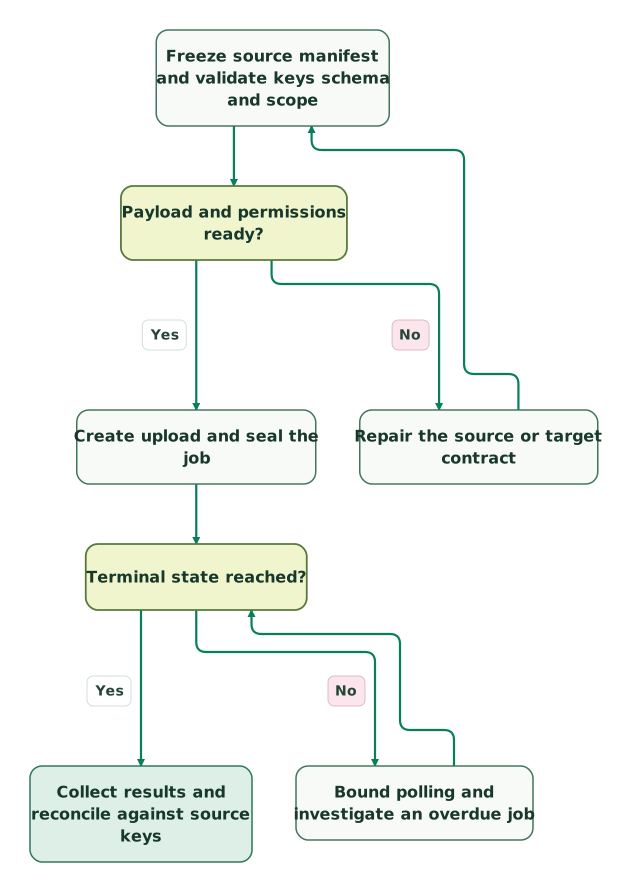
Prepare and process the job
The terminal-state Yes branch continues to result reconciliation in the next view. These are the same nodes and connections as the full workflow.
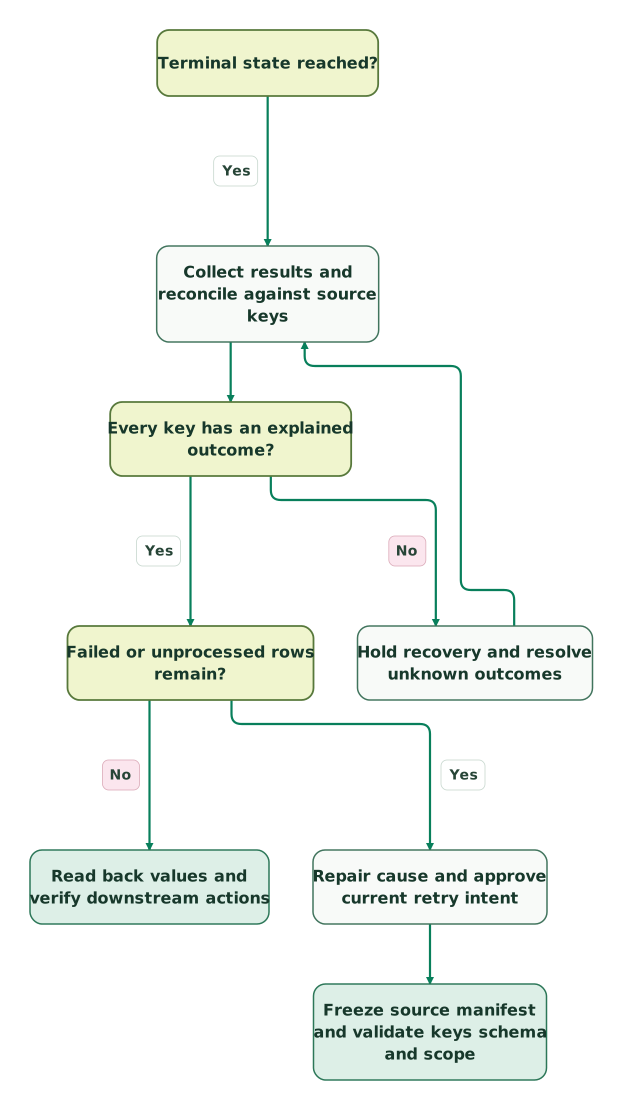
Reconcile outcomes and approve exceptions
A retry returns to the manifest in the preparation view. The no-exceptions branch continues to the release checks below; previous successes remain recorded.
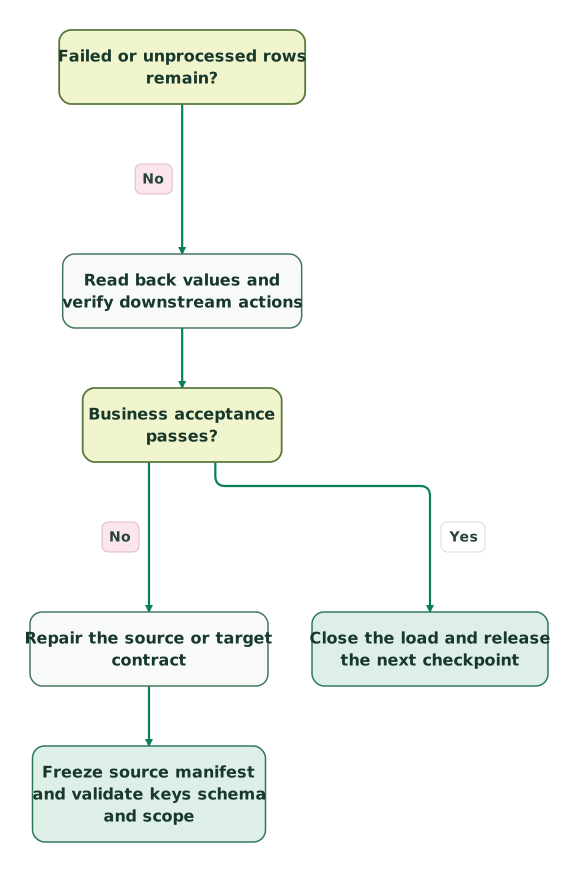
Verify business state before release
This is the release portion of the same workflow. Contract repair returns to the preparation view, rather than authorizing a blind full-file replay.
Read diagram as text
- Freeze source manifest and validate keys schema and scope to Payload and permissions ready?.
- Payload and permissions ready? to Repair the source or target contract: No.
- Repair the source or target contract to Freeze source manifest and validate keys schema and scope.
- Payload and permissions ready? to Create upload and seal the job: Yes.
- Create upload and seal the job to Terminal state reached?.
- Terminal state reached? to Bound polling and investigate an overdue job: No.
- Bound polling and investigate an overdue job to Terminal state reached?.
- Terminal state reached? to Collect results and reconcile against source keys: Yes.
- Collect results and reconcile against source keys to Every key has an explained outcome?.
- Every key has an explained outcome? to Hold recovery and resolve unknown outcomes: No.
- Hold recovery and resolve unknown outcomes to Collect results and reconcile against source keys.
- Every key has an explained outcome? to Failed or unprocessed rows remain?: Yes.
- Failed or unprocessed rows remain? to Repair cause and approve current retry intent: Yes.
- Repair cause and approve current retry intent to Freeze source manifest and validate keys schema and scope.
- Failed or unprocessed rows remain? to Read back values and verify downstream actions: No.
- Read back values and verify downstream actions to Business acceptance passes?.
- Business acceptance passes? to Repair the source or target contract: No.
- Business acceptance passes? to Close the load and release the next checkpoint: Yes
Retain the original successful outcomes when preparing a smaller retry manifest. Attempts are not distinct source records. A stopped or failed load can leave partial committed state, and a later successful request does not erase its earlier side effects.
What should pass before the load is released?
Release the backfill or nightly checkpoint only after record outcomes, current source intent and downstream behavior pass together.
Checklist
- The object grain, external key and Unique setting match the business entity.
- The integration identity can write the intended fields and records.
- Parent mappings, required fields, null handling and CSV bytes pass the pilot.
- Input files and their manifests are retained before upload.
- Job ID, state transitions, errors and all applicable result files are archived.
- Every attempted key has a current, explained outcome; unknowns block recovery.
- Successful rows are excluded from exception retries.
- Replayed values are still current and do not repeat unintended business actions.
- Readback verifies the relevant values, relationships and financial units.
- A named owner controls quota reserve, pause, retry and release of the next checkpoint.
For a controlled build, request a detailed Salesforce implementation scope around the target objects, representative payloads and failure cases. The useful deliverable is a recoverable load with evidence for each row.
Keep reading
Browse all CRM & Lifecycle guides
 CRM & Lifecycle
Salesforce API Limits: Find the Consumer and Recover Failed Syncs
Diagnose Salesforce API limits, identify consuming integrations, reserve capacity for critical work and recover failed syncs with a tested batch planner.
Jafrin Akter AloLast updated 12 min read
 CRM & Lifecycle
Salesforce Stripe Integration: Reconcile Customers, Subscriptions and Payments
Connect Stripe to Salesforce with clear account mappings, subscription states and payment records. Test refunds, retries and failed CRM writes before launch.
Jafrin Akter AloLast updated 14 min read
 Data Warehouse
Reverse ETL to Salesforce: Match Accounts, Control Writes and Verify Results
Sync warehouse signals into Salesforce with unique external IDs, controlled writes and field access. Reconcile row results, retries, readback and automation.
Jafrin Akter AloLast updated 14 min read
Salesforce consulting
See the implementation scope, deliverables and acceptance checks.
Questions people ask
What if the job must never create a new Salesforce record?
Use an update operation with verified Salesforce IDs when creation is forbidden. Upsert has a creation branch when its external key has no match, so it does not enforce an update-only business policy by itself. Treat a missing account or invoice mapping as an exception before submission, and keep creation permission tied to an explicitly approved workflow. Upsert behavior.
Can one CSV load Accounts and invoices together?
No. An ordinary Bulk API 2.0 ingest job specifies one object, and its CSV rows must belong to that object. Run the Account load first, reconcile its results and resolve the accepted Account IDs before preparing the invoice lookup fields. Two jobs finishing successfully still need a relationship check to prove that each invoice belongs to the intended customer. Job object scope.
What if the connection drops after UploadComplete?
Keep the known job ID and inspect that job before creating a replacement. The request may have reached Salesforce even when your client did not receive the response. Continue from its observed state, collect the available results and reconcile the original keys. A network failure alone does not prove that no records were written or authorize another full-file replay. Job inspection.
Should a failed nightly row be retried after a newer sync succeeds?
Only after checking which source version represents the current intended value. Replaying an older health status or invoice state can undo the newer result while still returning a successful write. Preserve the failed attempt for audit, then retire it as superseded or generate a new approved payload. Record-level identity and current-state ordering solve different problems.
Can the Salesforce job remain our only audit record?
No. Archive the input manifest, job information and result files in your controlled storage. Salesforce's documented ingest-result window is seven days after completion, and deletion can shorten it. Your archive should also explain repaired, superseded and unresolved rows, because a successful latest job cannot reconstruct the complete history of decisions and retries. Result retention.
Sources
- Salesforce: Bulk API and Bulk API 2.0 limits
- Salesforce: API security
- Salesforce: sObject Describe
- Salesforce: Bulk upsert walkthrough
- Salesforce: External ID and Unique settings
- Salesforce: Prepare Bulk API 2.0 CSV files
- Stripe: Invoice object
- Salesforce: Create an ingest job
- Salesforce: Upload job data
- Salesforce: Mark upload complete
- Salesforce: Get ingest job information
- Salesforce: Job states
- Salesforce: Organize data to minimize locks
- Salesforce: Platform API request allocations
- Salesforce: How Bulk API 2.0 ingest is processed
- Salesforce: Successful row results
- Salesforce: Failed row results
- Salesforce: Unprocessed row results
- Stripe: List invoices
- Salesforce: Troubleshoot ingest timeouts

Written by
Jafrin Akter AloData Engineer and Co-founder at Martechdevs and Growth and Analytics Partners
Jafrin writes practical guides to marketing technology, customer data, analytics and AI workflows. Martechdevs is a Growth and Analytics Partners company.