
Salesforce API Limits: Find the Consumer and Recover Failed Syncs
When Salesforce integrations hit an API limit, identify the exact limit before retrying. Read the org's current allocation, inspect the error and find which application increased consumption. Then protect essential work, control the backlog and verify recovery. A new integration user does not create another org-wide allowance, and waiting until midnight does not reset a rolling 24-hour window.
On this page
This guide covers Salesforce Platform API consumption for CRM integrations. Marketing Cloud Engagement, Data 360, event delivery and individual products can have separate limits. Confirm the API family and endpoint before applying a Platform rule to another Salesforce service.
The business priority is to keep the important handoffs working: a qualified lead reaching sales, a confirmed order reaching operations, or a support case receiving its account context. Treat a reporting backfill and a live order update differently when capacity is scarce.
Which Salesforce API limit has actually been reached?
Separate total request allocation, concurrency and transaction-level failures. The error code alone may not identify the exhausted resource.
| Evidence | Resource to inspect | First operational response |
|---|---|---|
| Org-wide usage near its allocation; several integrations fail | Rolling API request consumption | Identify large consumers and pause approved nonessential work |
| Long-running requests accumulate while daily capacity remains | Concurrent request limit | Reduce concurrency and inspect slow operations |
| One Apex operation fails on query, CPU or DML limits | That transaction's execution limits | Repair or partition the operation |
| Only one product-specific endpoint is throttled | That API's own quota and error contract | Follow its documented retry and allocation rules |
| Authentication or access error without limit evidence | Token, user and permissions | Repair authentication or access instead of waiting for capacity |
Salesforce's Platform limit reference distinguishes concurrent requests, timeouts and total allocations. For requests lasting at least 20 seconds, it lists five concurrent requests for Developer/Trial orgs and 25 for production orgs and sandboxes. A concurrency breach can also produce REQUEST_LIMIT_EXCEEDED. Platform API limit categories.
For standard REST responses, HTTP 401 indicates an invalid or expired session/token. HTTP 403 can indicate permissions; when its error code is REQUEST_LIMIT_EXCEEDED, inspect request limits. Save both the HTTP status and response body. Do not assume every Salesforce limit appears as HTTP 429. REST error responses.
A call can reach Salesforce successfully and then fail within custom Apex. The Platform API overview notes that Apex REST calls consume API requests while Apex governor limits also apply. Buying more daily calls does not fix an inefficient transaction.
Why does the daily API allowance not reset at midnight?
Salesforce measures Platform API use over a rolling 24-hour window. Older calls fall out as time advances; the whole allowance does not reappear at a fixed midnight boundary. Rolling-limit behavior.
For example, imagine a large backfill ran between 14:00 and 16:00 yesterday. Its calls leave the rolling window progressively during the corresponding period today, while today's ordinary integrations continue adding calls. A midnight restart can therefore begin with much of the same pressure still present.
Paid active orgs can receive limited tolerance above the normal daily allocation, subject to platform protection. Do not plan on that tolerance; the reference excludes trials, Developer Edition and sandboxes from this behavior. Allocation enforcement.
Salesforce describes protective blocking with HTTP 403 and REQUEST_LIMIT_EXCEEDED when request growth reaches its protection limit. Its separate monthly entitlement is a commercial usage measure, not a second daily refill. Limit and entitlement guidance.
Use your actual org's maximum and remaining allocation. Edition tables explain how allowances can be derived, but an integration should not hardcode a generic edition allowance and assume it matches the provisioned contract. Use Salesforce pricing and API entitlement checks when reviewing the commercial requirement.
How do you check the current maximum and remaining calls?
Use a current org-level reading, record when it was taken and preserve its API family. Salesforce's REST Limits resource returns maximum and remaining allocations, including DailyApiRequests. It requires an API user with View Setup and Configuration and is available from REST API 29.0. Values are accurate within five minutes of consumption; rapid or concurrent checks can be inconsistent. Limits resource.
The request shape is:
GET /services/data/vXX.X/limits/
Authorization: Bearer <access_token>
Use your authenticated org host and replace vXX.X with a supported API version approved for the integration. Keep the real token in your credential system, not in a ticket or shared screenshot.
An illustrative response fragment might be:
{
  "DailyApiRequests": {
    "Max": 150000,
    "Remaining": 50000
  }
}
Those example values imply 100,000 calls consumed and 50,000 nominally remaining. They are not a recommended quota or a reading from a customer account. The measurement has a timestamp and can change while you inspect it.
Existing REST responses also supply Sforce-Limit-Info with an api-usage used/limit pair. Capture it in your integration's operational telemetry where available rather than creating unnecessary requests solely to observe consumption. Salesforce Functions can use a different allocation. Limit Info header.
An administrator can check System Overview → API Usage for the preceding 24 hours. The allowance is aggregated across the org, not allocated independently to each user. System Overview API usage.
How do you identify the integration consuming the calls?
Combine Salesforce's request evidence with the calling application's job history. A high total names the problem; it does not identify the process causing it.
API Total Usage logs cover Platform SOAP, REST and Bulk requests. Salesforce identifies CONNECTED_APP_ID, optional CLIENT_NAME, USER_ID and CLIENT_IP as attribution fields. A shared user or IP can represent several clients. Use REQUEST_ID to correlate event types so one request appearing in multiple logs is not counted repeatedly. API usage attribution.
For the available log period:
- Confirm the org, time zone, covered interval and event types.
- Separate request counts from records processed. One request can handle several records.
- Group the relevant request evidence by application, user, operation and time.
- Compare the unusual interval with a representative normal interval.
- Match the increase to a deployment, backfill, schedule change, retry loop or repeated metadata lookup.
- Confirm the hypothesis in the application's own execution logs before changing its schedule.
Daily Event Log Files are retrospective and can be delayed; hourly files also have processing latency. Retention and access depend on the org and subscription. They are not a complete real-time control feed or a durable audit archive. Event-log availability and limitations.
If current logs are unavailable, use the most recent counter, request headers and client-side call metrics to contain the incident, then review the detailed files when they arrive. Do not label an application responsible simply because it owns the busiest user account.
Maintain an application register with an owner, authentication identity, purpose, normal request pattern, pause control and replay procedure. Distinct identities improve attribution and access management; they do not multiply the org's total quota.
How much of the remaining allowance can a backfill use?
Reserve capacity for essential work and other expected consumers before allocating any headroom to the backfill. Define a short planning horizon and use a conservative request estimate from the actual integration path.
For the load itself, use the Salesforce Bulk API 2.0 workflow to track job requests, results and recovery separately from the shared quota.
Consider this illustrative plan for the next controlled batch:
| Input | Calls or records | Meaning |
|---|---|---|
| Observed remaining allocation | 50,000 calls | Latest org reading, before this planned work |
| Protected reserve | 20,000 calls | Capacity the team deliberately keeps unused by this batch |
| Other expected consumers | 12,000 calls | Planned consumption during the same operating horizon |
| Budget available to this batch | 18,000 calls | 50,000 − 20,000 − 12,000 |
| Conservative request cost | 3 calls/record | Includes this job's expected reads, writes and checks |
| Maximum planned batch | 6,000 records | 18,000 ÷ 3 |
If the requested backfill contains 8,000 records, its estimated 24,000 calls exceed the 18,000-call budget. Split or defer it. This calculation deliberately assumes no replenishment from expiring calls and does not promise that 6,000 records can run at once.
The following local helper makes that planning arithmetic explicit. It sends no requests and is not a runtime rate limiter.
def plan_api_batch(remaining, reserve, other_calls,
                   calls_per_record, requested_records):
    values = {
        "remaining": remaining,
        "reserve": reserve,
        "other_calls": other_calls,
        "calls_per_record": calls_per_record,
        "requested_records": requested_records,
    }
    for name, value in values.items():
        if isinstance(value, bool) or not isinstance(value, int) or value < 0:
            raise ValueError(f"{name} must be a nonnegative integer")
    if calls_per_record == 0:
        raise ValueError("calls_per_record must be positive")

    available = max(0, remaining - reserve - other_calls)
    planned_records = min(requested_records, available // calls_per_record)
    planned_calls = planned_records * calls_per_record
    return {
        "available_calls": available,
        "planned_records": planned_records,
        "planned_calls": planned_calls,
        "deferred_records": requested_records - planned_records,
        "unallocated_calls": available - planned_calls,
    }


plan = plan_api_batch(50000, 20000, 12000, 3, 8000)
assert plan["planned_records"] == 6000
assert plan["deferred_records"] == 2000
Treat calls_per_record as an intentionally conservative whole-number estimate for this simple model. For batched APIs, build a job-level model that includes batch creation, polling, result retrieval and retries instead of pretending every record costs an independent call.
Refresh the operating decision as counters, traffic and backlog change. This helper does not model counter latency, expiring usage, concurrent requests, transaction limits or another application consuming more than expected. Keep the reserve and pause decision with an accountable operator.
Which changes reduce API consumption without losing data?
Reduce repeated work first, then select the API that fits the volume and consistency requirement. Confirm the change with request counts and record reconciliation, not just a faster runtime.
Evaluate a scheduled Stripe billing sync against the required freshness before adding more polling.
| Consumption pattern | Change to evaluate | Acceptance evidence |
|---|---|---|
| Full extracts repeated for small changes | Incremental extraction with a durable checkpoint | Updates, late changes and deletions remain covered |
| Same record or schema fetched repeatedly | Scoped caching with an explicit refresh rule | Required freshness and schema changes still work |
| Individual writes for a large backfill | Suitable composite, collection or Bulk operation | Correct partial-failure handling and lower counted requests |
| Frequent polling of an unfinished job | Bounded polling with an appropriate interval | Completion still detected within the operating requirement |
| Failed rows retried as the entire original file | Retry the eligible failed subset with stable keys | Successful rows are not recreated or repeatedly rewritten |
| Several systems enrich the same field | One authoritative writer and shared result | Conflicting writes and unnecessary reads disappear |
Salesforce recommends evaluating incremental changes and Bulk APIs when repeated cumulative updates or individual REST uploads consume excessive requests. Consumption troubleshooting.
Do not assume that every request containing a batch reduces counted calls. Salesforce's API comparison says Composite Batch counts each subrequest, while other listed composite resources count the outer request. Their dependency, transaction and partial-failure behavior also differs. Composite resource comparison.
Bulk work still needs its own allocations and operational checks. The current Platform reference includes Bulk and Bulk 2.0 in total API consumption, with additional product-specific limits. A switch to Bulk is an efficiency decision, not an unlimited-call exemption. Counted API families.
Use the martech data-integration guide when redesigning checkpoints, backfills and recovery. If the pressure comes from a particular connector, inspect its own controls, such as the HubSpot–Salesforce sync settings, rather than applying one global polling rule to every application.
How should an integration recover after REQUEST_LIMIT_EXCEEDED?
Recover by reducing the cause, preserving pending work and restarting within an agreed budget. Repeatedly resending a blocked request is not a recovery strategy.
- Capture the endpoint, status, error message, observed allocation and job state. Establish whether the failure is daily consumption, concurrency or another limit.
- Pause or throttle the identified nonessential workload through its own control. Preserve its checkpoint and queue; avoid disabling a shared identity that also runs critical processes.
- Prioritize the remaining work with its business owners. Record which delays affect leads, customer updates, orders or reporting.
- Observe recovery using an appropriate cadence. Do not assume midnight or a guessed fixed wait will restore capacity.
- Restart with a bounded batch or lower concurrency, using stable business keys and a known replay boundary.
- Reconcile completed, pending, failed and duplicate records before declaring recovery complete.
For a request with an unknown outcome, establish whether the operation was applied before replaying a write. A client-side timeout can leave that question unresolved. Use the integration's supported record identity or idempotent design to avoid creating another customer, deal or order during recovery.
Backoff with jitter can reduce synchronized retry pressure for transient failures, but it does not repair invalid credentials, malformed data or missing permissions. Classify the failure first. Route permanent row errors to an exception queue instead of feeding them back into an unlimited retry loop.
The recovery sequence should remain observable:
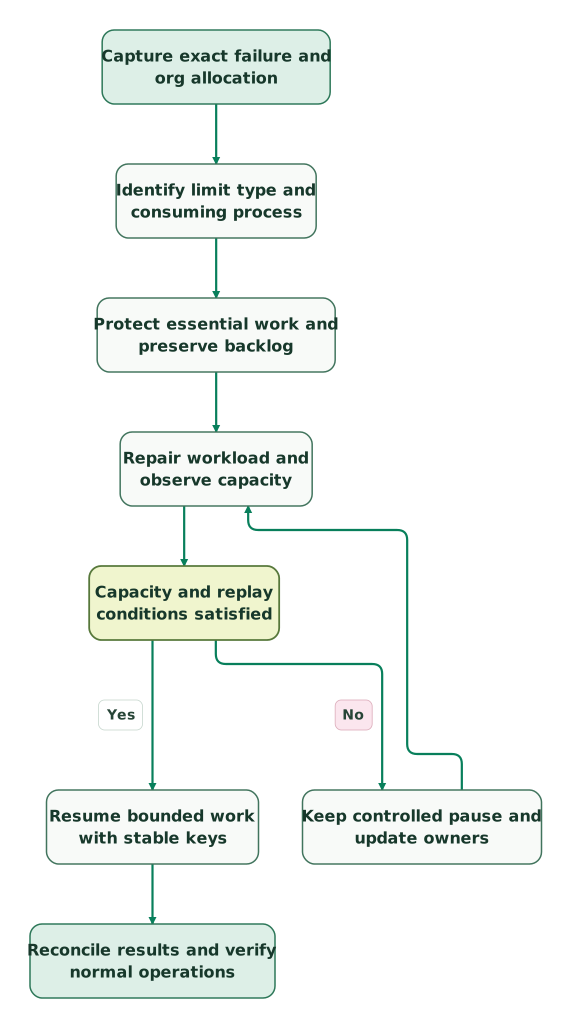
Read diagram as text
- Capture exact failure and org allocation to Identify limit type and consuming process.
- Identify limit type and consuming process to Protect essential work and preserve backlog.
- Protect essential work and preserve backlog to Repair workload and observe capacity.
- Repair workload and observe capacity to Capacity and replay conditions satisfied.
- Capacity and replay conditions satisfied to Keep controlled pause and update owners: No.
- Keep controlled pause and update owners to Repair workload and observe capacity.
- Capacity and replay conditions satisfied to Resume bounded work with stable keys: Yes.
- Resume bounded work with stable keys to Reconcile results and verify normal operations
What alerts should your team maintain?
Alert on approaching exhaustion, unexpected consumption and delayed business work. A quota percentage alone cannot show whether an important customer process has stopped.
Salesforce's API Usage Notifications lets an administrator configure a recipient, percentage threshold and measurement interval. The notification interval determines which span of requests is evaluated; it is not simply a label for how often someone wants an email. Configuration requires Modify All Data; have the responsible administrator manage it rather than broadening an integration user's access for alert setup. Notification configuration.
Define the response beside each alert:
- A declining reserve triggers review of scheduled backfills and optional polling.
- An unusual increase in one application's calls triggers comparison with its recent changes and successful business outcomes.
- A growing age of the oldest pending lead or order triggers the process owner even if quota remains.
- Repeated permanent row errors trigger repair of the input or mapping, not another unrestricted retry.
Set thresholds from measured workload and the time your team needs to act. A universal 80% rule is less useful than a reserve that covers the expected critical workload while the team intervenes.
Before handing over the integration:
Checklist
- The API family, endpoint and quota type are recorded.
- The actual org allocation is monitored with observation time.
- Applications have owners, attributable identities and normal usage patterns.
- Backfills preserve an explicit reserve for other work.
- Retry behavior distinguishes transient, permanent and uncertain-outcome failures.
- Pause, resume and replay controls have been exercised in the intended environment.
- Recovery reconciles records and backlog, not just successful HTTP responses.
- The ongoing contract entitlement is reviewed alongside operational consumption.
Our martech integration service can help establish those controls across CRM, lifecycle and reporting tools. Bring the failing job, its expected throughput and a recent consumption sample. The useful deliverable is a sustainable operating budget and a tested recovery procedure, not another dashboard with an unexplained red line.
Keep reading
Browse all CRM & Lifecycle guides
 CRM & Lifecycle
Salesforce Implementation Mistakes That Break Revenue Operations
Avoid Salesforce failures in identity, migration, automation and permissions. Use a worked won-deal handover and an evidence-based release checklist.
Jafrin Akter AloLast updated 10 min read
 CRM & Lifecycle
Salesforce Implementation Checklist: From Scope to a Working Release
Plan a Salesforce rollout with owners, migration rehearsals, permissions, integration tests, UAT, cutover and recovery gates before approving the release.
Jafrin Akter AloLast updated 14 min read
 CRM & Lifecycle
Salesforce to HubSpot migration: plan, field mapping and cutover checklist
Plan a Salesforce to HubSpot migration: phases, a field mapping template, load order, Smart Transfer limits, reconciliation checks and a safe cutover.
Jafrin Akter AloLast updated 21 min read
Martech integration
See the implementation scope, deliverables and acceptance checks.
Questions people ask
Will creating another Salesforce integration user increase the daily allowance?
A separate identity does not create an independent org-wide request allowance. Use separate users to control access, identify callers and manage each integration responsibly. Capacity depends on the org's actual provisioned entitlement and applicable limits. If a commercial change adds eligible licence capacity, verify the resulting allocation separately rather than assuming every new identity adds calls automatically.
Should a sales campaign launch wait until every historical CRM backfill finishes?
Decide from the campaign's data dependencies and the capacity needed for live work. Some historical enrichment may be optional, while suppression, account ownership or active-customer exclusions can be essential. Define the minimum reliable launch population and protect the live handoff. Defer optional history in bounded batches with a clear completion owner instead of treating all queued records as equally urgent.
Can an AI assistant consume Salesforce API capacity while answering questions?
It can, depending on the tools and API path the assistant uses. Inspect the actual connector requests and applicable accounting rather than assigning a fixed cost to each chat message. One answer may trigger several reads, searches or retries. Include the assistant in the application register and verify how its identity, scope, caching and usage limits fit the shared operating budget.
How should you compare two connectors' API efficiency?
Give both connectors the same controlled workload and count the relevant requests, successful records, retries and time to completion. Include initial load, incremental changes, deletions and a recoverable failure. Normalize for the API family and batching behavior. A lower call count is useful only if the connector preserves the required freshness, relationships and recovery guarantees without hiding skipped work.
What evidence should accompany a request for additional API capacity?
Provide the current allocation, measured normal and peak consumption, attributable applications, planned new workload and the efficiency changes already evaluated. Include the business impact of delayed work and a reserve calculation. Ask for the applicable commercial terms and effective allocation rather than an assumed temporary exception. Keep the optimization and recovery work moving while the account team reviews the request.
Sources
- Salesforce Platform API limits and allocations
- Salesforce REST error responses
- Salesforce Platform API and composite resource comparison
- Salesforce rolling-limit behavior
- Salesforce API limits, entitlement and usage attribution
- Salesforce REST Limits resource
- Salesforce REST Limit Info header
- Salesforce System Overview API usage
- Salesforce Event Log File availability
- Salesforce request-limit troubleshooting
- Salesforce API Usage Notification configuration

Written by
Jafrin Akter AloData Engineer and Co-founder at Martechdevs and Growth and Analytics Partners
Jafrin writes practical guides to marketing technology, customer data, analytics and AI workflows. Martechdevs is a Growth and Analytics Partners company.