
Salesforce Implementation Mistakes That Break Revenue Operations
Data Engineer and Co-founder, martechdevs
Last updated 9 min read
Salesforce implementations fail when records lack stable identity, commercial stages lack evidence, automation has competing writers, and permissions are tested only as an administrator. Prevent those failures by defining the operating contract first, rehearsing representative migrations, testing whole transactions and making exceptions visible before the team relies on the system.
Last updated: 2 October 2026.
A CRM implementation is not finished when the fields exist and the import completes. It is finished when a seller, manager, finance owner and integration can perform their jobs using the same business meaning.
That is a demanding standard because one saved record can affect several processes. A stage update might create delivery work, change a forecast, notify a manager and update another system.
This guide focuses on failure mechanisms a founder or revenue operations lead should ask an implementation team to prove. For work spanning several platforms, martech integration design should include ownership and reconciliation, not only connectivity.
1. Designing stages without evidence
A stage is a business assertion. “Proposal sent” should identify a real proposal and its recipient. “Closed won” should mean the commercial event your organisation has agreed to recognise.
If those definitions are loose, dashboards become opinions presented as numbers.
For each stage, document:
- Evidence required to enter.
- Person authorised to make the change.
- Expected next action and owner.
- Conditions for leaving or reversing the stage.
- Downstream actions triggered by the transition.
- Fields that become mandatory for a specific reason.
Avoid making every field mandatory at record creation. The seller may not know contract details when the first conversation starts. Require information at the point when it becomes necessary for a decision.
Separate commercial success from accounting and payment state. A signed agreement, issued invoice and settled payment are different facts. Putting all three behind one “won” label creates confusion when finance tries to reconcile revenue.
Our CRM property ownership guide explains how to keep those facts under the correct authority.
2. Treating names or emails as permanent identity
An import needs a stable way to find the same entity again.
Store the source system and source ID, define what that ID represents, and preserve a mapping to Salesforce. An account ID should not sometimes mean a legal customer and sometimes a product workspace.
Salesforce REST upsert by external ID creates a record when no match exists, updates one match, and rejects multiple matches. The External ID and Unique settings are distinct; the documented updateOnly option prevents creation when the operation is intended only to update. External ID upsert
The practical implication is important: an unexpected new record may be a matching failure, not a successful new customer import.
For a migration, define whether the job is permitted to create. A nightly billing update should not invent a second account because a mapping value went missing.
Reject records that lack required identity instead of substituting a name. Keep those exceptions in a queue that someone can resolve.
Test a changed email, two similarly named companies, a parent and subsidiary, a duplicate source ID and a source record already present in Salesforce. Document which cases should create, update or stop for review.
3. Celebrating a completed job without reconciling rows
A batch being finished does not establish that every intended record is correct.
Salesforce's bulk tooling exposes successful, failed and, where applicable, unprocessed results. Use those outcomes and their record identifiers to reconcile the load, rather than treating submission or completion status as sufficient evidence. Salesforce bulk data results
Consider an illustrative migration file containing 2,000 accounts:
- 1,920 succeed.
- 50 fail validation.
- 30 remain unprocessed after an interrupted job.
The total reconciles, but 80 accounts still need action. If the team imports contacts immediately and assumes every parent exists, it can create missing relationships or attach contacts incorrectly.
A useful import ledger contains a source row ID, intended operation, result, Salesforce ID, error category and retry decision. Retrying only the unresolved subset avoids blindly replaying successful work.
Reconcile relationships as well as counts. Two thousand records can exist while hundreds of contacts point to the wrong company.
For financial or pipeline data, compare totals by a meaningful partition such as currency, owner and period. A grand total can hide two offsetting errors.
4. Adding automation without inspecting existing writers
Before creating a flow, identify every mechanism that already writes the fields or related records involved.
Salesforce's architecture guidance distinguishes before-save changes to the triggering record from after-save work on related records, and recommends selecting Flow, Apex or a deliberate combination based on complexity and volume. A single giant flow is not the goal; controlled entry conditions and understandable dependencies are. Record-triggered automation guidance
The business question is simple: what should happen once, and what may happen again?
Suppose a deal becoming won should create an onboarding project. A flow that checks only “stage equals won” may run again when someone edits the close date or another integration updates the record.
Specify the event as a transition and define an idempotency rule. For example, the intended onboarding project might be uniquely associated with the opportunity and a handover version. A second attempt should find the existing work or create a visible exception, not silently duplicate it.
Also define legitimate repeat behaviour. Reopening an opportunity and winning it again might require a revised handover, not another initial project. That is a business decision, not an implementation detail to leave to the builder.
5. Assuming visible flow order guarantees every dependency
Flow Trigger Explorer helps inspect and order record-triggered flows. Salesforce's training explicitly notes that asynchronous flows cannot be guaranteed to run in the displayed order. Flow Trigger Explorer
If action B requires action A to finish, encode that dependency in the process. Do not depend on two independent asynchronous actions merely appearing in a preferred sequence.
A useful pattern is to represent progress explicitly:
- Handover requested.
- Required commercial data validated.
- Delivery record created.
- Destination acknowledged.
- Handover complete.
- Exception requiring action.
The precise implementation depends on your architecture. The important point is that completion has evidence.
If the external delivery tool is unavailable, the opportunity can remain won while its handover is incomplete. Collapsing those states into one success flag hides the operational risk.
Set a recovery policy. Identify which errors can retry, which require corrected data, and who is notified when a pending handover exceeds the expected time. A failed action should not require a salesperson to discover it accidentally.
6. Testing access only through an administrator account
An administrator can make an implementation appear functional while ordinary users cannot complete essential work.
Salesforce distinguishes object and field permissions from record-level sharing. A user can have permission to read an object or field while still lacking access to a particular record. Broad permissions can also override the intended record restrictions. Salesforce data access
Test a seller, manager, finance user and integration identity separately. For each role, verify both allowed and prohibited actions.
A useful seller test might confirm that the person can edit their opportunity's next action, cannot change the billing status owned by finance, and cannot view a restricted account belonging to another business unit.
Custom code needs a version-aware review. Current Salesforce documentation distinguishes Apex API67.0-and-later access defaults from earlier versions and recommends explicit access modes for maintainability. Record sharing keywords and field/object permissions are separate concerns. Secure Apex classes
Do not rely on an old blanket statement about Apex always running in a particular mode. Review the actual class versions and operations in your org.
Avoid solving every permission failure by assigning administrator-level access. Diagnose whether the missing permission is required for the job, then grant the minimum relevant capability.
A worked release test: won deal to delivery
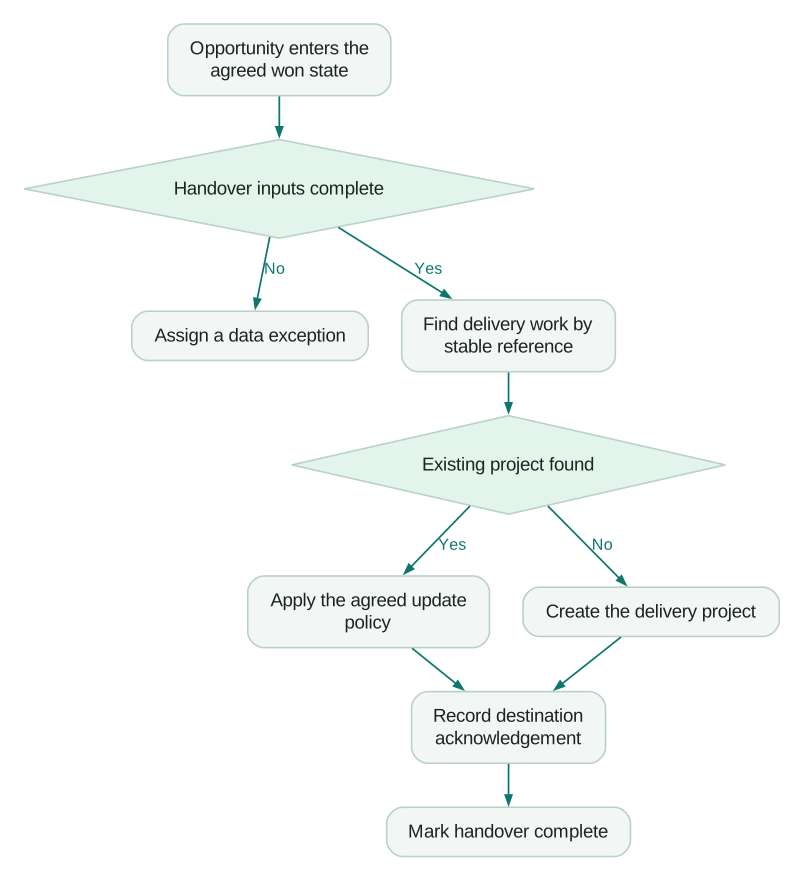
Consider an illustrative services business. A won opportunity must create one delivery project containing the signed scope, start date and delivery owner.
Define the acceptance contract before building:
- A qualifying transition into won requests the handover.
- Required scope and ownership fields must be present.
- The destination project retains the opportunity reference.
- A retry does not create a duplicate.
- A later date correction updates the intended project or enters a controlled change process.
- An external failure is visible without reversing the commercial fact.
- A reopened deal follows an explicit business rule.
Then test these cases in an appropriate non-production environment:
- A complete opportunity moves to won.
- An opportunity lacks the delivery owner.
- The same qualifying update is replayed.
- An unrelated field changes after the deal is won.
- The destination times out.
- The destination succeeds but the acknowledgement is lost.
- The opportunity is reopened and won again.
- Many qualifying records are processed together.
Case six is easy to miss. The source may think the action failed while the destination has already created the project. A stable external reference allows the retry to find the existing result.
Do not treat bulk testing as optional because sellers normally edit one record at a time. Imports, integrations and administrative corrections can exercise the same logic at a different scale.
What should your implementation team hand over?
A useful handover explains the system well enough for someone else to operate it.
Require a compact operating pack:
- Definitions of critical objects, stages and fields.
- Source identity and integration mapping rules.
- Automation purpose, entry conditions and dependencies.
- Access tests for representative roles.
- Migration reconciliation and unresolved exceptions.
- Monitoring, retry and escalation procedures.
- A release record with a rollback or repair approach.
- Named business and technical owners.
Do not accept screenshots alone as documentation. Screenshots can show where a setting was, but they rarely explain why it exists or what depends on it.
A change also needs a retirement plan. If a new flow replaces old behaviour, identify when the old mechanism is disabled and how duplicate execution is prevented during transition.
If Salesforce exchanges lifecycle data with HubSpot, the HubSpot and Salesforce sync guide is relevant to ownership and conflict decisions. If the implementation burden exceeds the business need, evaluate Salesforce alternatives before building more custom behaviour.
The release acceptance checklist
Use this as evidence collection, not a ceremonial sign-off:
Checklist
- Stage definitions identify the evidence and downstream consequences.
- Source IDs are stable, scoped and mapped to the correct entity.
- Import successes, failures and unprocessed rows reconcile to the source.
- Relationship and financial totals reconcile independently of row count.
- Repeated qualifying actions do not create unintended duplicates.
- Bulk changes exercise the same automation safely.
- Asynchronous dependencies have explicit state and recovery.
- Role tests cover both successful actions and denied access.
- Code access behaviour has been reviewed against actual API versions.
- A named owner can find and resolve a failed business handover.
Approve the release when these results are visible and unresolved issues have explicit owners. A usable revenue system is one whose behaviour can be explained when the happy path breaks.
Questions people ask
What is the biggest Salesforce implementation mistake?
Treating configuration as a substitute for business definitions. Ambiguous identity, stages and ownership spread into every integration and report. Define those concepts before automating them.
Should we use Flow or Apex?
Choose based on the process's complexity, transaction volume and maintenance needs. Straightforward changes may suit Flow, while complex operations may need Apex or a deliberate combination. Review the whole object transaction rather than judging one small automation in isolation.
Is a successful import enough to approve migration?
No. Reconcile row outcomes, relationships and important totals, then inspect representative records. A completed job can still leave failures or incorrect associations that only appear when teams begin using the data.
Why does an automation work for an admin but fail for a seller?
The roles may have different object, field, record or execution-context access. Test using the intended role and inspect the exact failing operation. Granting broad permissions without understanding the failure can conceal a flawed design.
How do we stop duplicate onboarding records?
Define a stable business reference and make repeat attempts recognise an existing result. Test retries, lost acknowledgements and later edits to a won deal. Also define whether reopening and rewinning represents a revision or a genuinely new delivery engagement.
Sources
- Salesforce: Upsert by external ID. Accessed 2 October 2026.
- Salesforce: Work with large datasets. Accessed 2 October 2026.
- Salesforce Architects: Record-triggered automation. Accessed 2 October 2026.
- Salesforce Trailhead: Flow Trigger Explorer. Accessed 2 October 2026.
- Salesforce: Data access. Accessed 2 October 2026.
- Salesforce: Secure Apex classes. Accessed 2 October 2026.
Written by
Jafrin Akter AloData Engineer and Co-founder, martechdevs
Jafrin Akter Alo is a data engineer and co-founder of martechdevs, where the team has delivered 74+ martech, data and growth stack implementations.