
Stape vs Elevar for Shopify: Choose by Implementation Responsibility
Data Engineer and Co-founder, martechdevs
Last updated 10 min read
Choose Stape-hosted server-side GTM when your team wants configurable event processing and can own the container, mappings and QA. Evaluate Elevar when you want a Shopify-focused managed event pipeline with packaged destinations and support. Compare the exact events, checkout paths, consent behavior and operating work you need. Their subscription prices describe different responsibilities and billing units.
Last updated: 2 October 2026.
The useful comparison starts with who fixes a missing purchase on a Friday afternoon. A lower hosting subscription helps if someone can inspect the sender, client, event data and destination tag. A managed pipeline helps if its supported configuration covers your store and the support arrangement addresses the problem you need solved.
At Martechdevs, we implement analytics and tracking systems. This comparison focuses on the configuration and evidence a merchant needs to own after implementation. It draws on current vendor documentation, not a controlled performance test of the two products.
What are you actually comparing?
Compare a complete Stape-based implementation with the relevant Elevar package. Stape offers several products, so “Stape” alone does not specify an architecture.
Stape’s Shopify app documentation describes a free app that installs the web GTM snippet and supplies data-layer events and webhook support for a server container. The container’s clients and tags still determine how that data becomes requests to destinations. Some Stape-specific capabilities require a Stape account or paid plan.
Elevar describes its own managed server-side model through sources and destinations. Its server-side overview explains that the managed offering takes on server operation and associated integration work. Confirm the current package and supported destinations rather than relying on historical plan names in older documentation.
This creates different ownership questions. With the Stape route, identify who maintains your web container, server container and destination templates. With Elevar, identify which requirements fit the managed configuration, which need custom work and who handles exceptions. Both routes need an owner for business definitions and acceptance tests.
Avoid describing every browser event as server-originated simply because its next hop is a server. Record where the event originates and what can prevent it being created. A purchase received from a platform-side source and a browser page-view sent through a server have different failure modes.
When is Stape the better fit?
Stape is a reasonable candidate when you have a capable GTM operator and need to control how events are interpreted, transformed and routed. The choice becomes stronger when the required logic extends beyond the supported settings of a packaged destination.
Examples of requirements to evaluate include:
- Different approved field policies for different destinations.
- Custom business events whose definitions are owned by your application team.
- A mixture of storefront, backend and non-Shopify sources.
- A need to inspect and maintain the server-container configuration directly.
- Existing GTM skills and an agreed release and monitoring process.
These are reasons to investigate the architecture, not a claim that every feature is included in every hosting tier. Confirm template support, permissions, logs, quotas and relevant plan requirements for the actual implementation.
The operating cost belongs in the decision. Someone must respond when the application changes an event, a credential expires or a template needs an update. A hosting provider can operate infrastructure while your team still owns conversion correctness.
Use the Stape diagnostics guide to assess the skills the team will need. If nobody can follow a request from browser to destination, include an implementation and maintenance owner in the budget before choosing the plan.
When is Elevar the better fit?
Elevar is worth evaluating when your store’s requirements align with its Shopify source and supported destinations, and the team values a managed operating model. Its sources documentation describes a unified Shopify source, automatic version updates and compatibility with Shopify’s Pixel API, Checkout Extensibility and Theme App Extensions.
The important question is whether that supported path covers your actual store. List the destinations, subscription system, payment flows, markets, custom storefront features and required events. Ask the vendor to demonstrate how each unusual case is handled.
Packaged coverage can reduce the amount of custom container work you operate. It can also make a requirement dependent on a vendor-supported setting or change request. Establish the boundary before buying so an unsupported custom event does not become an unexpected migration project later.
Ask for the support scope in practical terms. Who investigates a missing event, who can change the mapping, which evidence can you export and when does paid implementation work begin? “Support included” does not specify all of those responsibilities.
Automatic updates also need an acceptance process on your side. You still want to notice if a change affects revenue definitions or the behavior of a custom checkout flow. Keep a small set of repeatable journeys even when the platform maintains the integration code.
How do the current prices compare?
The public prices below were checked on 2 October 2026. Keep the units and billing terms visible when you use them in a budget.
Stape’s published hosting offer lists Pro at USD20 per month with monthly billing and 500,000 requests. Its annual offer lists USD200 billed yearly for that allowance. This is hosting; implementation work and the exact feature requirements need their own scope. Confirm the current checkout and account currency before purchasing.
Elevar’s Shopify App Store listing lists Core at USD225 per month for up to 2,000 orders and two ad or analytics destinations, with USD0.50 per additional order. Advanced lists USD650 for up to 10,000 orders and four destinations. The listing states that recurring and usage charges are billed every 30 days.
A request and an order measure different activity. A store with relatively few purchases can still generate many browsing events. A high-conversion store may have a different request-to-order relationship. Forecast both from the journeys and delivery routes you intend to run.
For an illustrative merchant requiring two qualifying destinations and 2,600 billable orders in a period, the published Core formula gives USD225 + 600 × USD0.50 = USD525 before other applicable charges. If the merchant needs a third destination, the lower-tier arithmetic alone no longer establishes plan fit. Reconfirm the eligible package.
For a Stape forecast, suppose measured billable requests are 420,000 in the comparable planning period. That is 84% of a 500,000 allowance, leaving 80,000 requests. A 25% increase would bring usage to 525,000. Price the appropriate higher allowance and quota behavior before a campaign creates that load.
These examples are calculations under stated assumptions. They do not show that one product is universally cheaper. The server-side hosting comparison covers hosting and maintenance budgeting in more detail.
What must work on Shopify before either choice is acceptable?
The store’s event model and privacy configuration matter for both implementations. Shopify runs app and custom pixels in a sandbox with access to the data that environment exposes. Its pixel overview documents limitations on DOM scraping, automatic form inspection and other browser behavior. A storefront script cannot be assumed to see everything in checkout.
Ask each implementation to show how it collects:
- Product, cart and checkout progression.
- Completed purchases with stable order references.
- The required currencies and revenue components.
- Subscription renewals and relevant offline activity, if in scope.
- Returns or refunds, if the destination and agreed reporting model support them.
- Consent state for the relevant destination and journey.
Then ask which events originate in the browser and which use a supported server-side source. Document the mechanism and the permissions it needs. A claim that events are “server-side” is insufficient to establish that checkout, renewals and refunds all behave the same way.
Shopify’s app-pixel documentation explains that server pixels remain subject to the store’s privacy settings and that third-party consent tools must synchronize state appropriately. Request a demonstration for your actual consent provider, including a later change of choice.
Elevar separately documents consent configuration for its sources, client-side tags and server-side destinations. Treat consent configuration as part of the implementation scope. A delivery-rate claim does not authorize sending every order to every marketing platform.
How do you run a pilot that gives a useful answer?
Write the acceptance criteria before installing another sender. Select representative journeys and compare business outcomes with the events each route should receive.
For example, a fictional store could test these six cases:
- A normal single-item purchase with consent granted.
- An accelerated checkout using a supported payment method.
- A multi-item purchase with a discount and shipping charge.
- A visitor who declines the relevant tracking permission.
- A purchase followed by a thank-you-page reload.
- A subscription renewal or refund supported by the agreed scope.
For each case, define expected count, order reference, currency, value and destination behavior. If a refund is outside a vendor’s supported path, record the gap and price the additional work rather than marking the test as passed.
Use separate test destinations or the platforms’ documented testing facilities where practical. Running two live purchase senders without a deduplication and cutover plan can contaminate the comparison. The Shopify purchase-reconciliation guide explains how to compare eligible orders, duplicates and values.
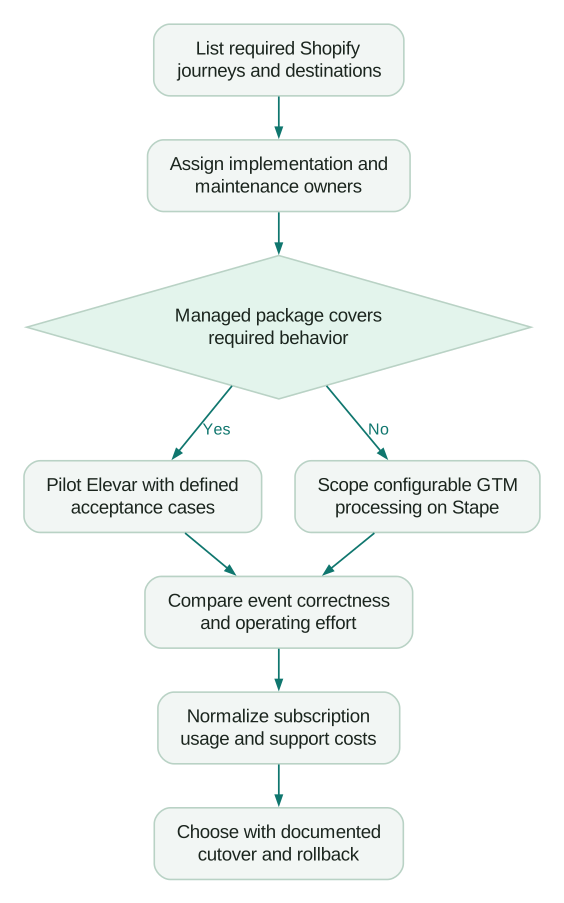
Record operating effort during the pilot. Count time spent configuring mappings, finding a failed event, retrieving evidence and making a controlled correction. Treat those measurements as observations from your test, with its scope and limitations. A short pilot cannot establish annual reliability or future vendor response times.
How should you compare the work behind the subscription?
Estimate the annual cost of the actual responsibilities you retain. Use internal or supplier estimates for implementation, routine QA, monitoring and incident handling. Keep those assumptions separate from published plan prices.
Suppose one option requires four additional maintenance hours per month compared with the other. At an illustrative internal cost of USD90 per hour, that difference is USD360 per month or USD4,320 per year. The result is a planning sensitivity, not a measured difference between Stape and Elevar.
Now ask whether those extra hours are credible for your team. An experienced analyst with an existing event specification may need little custom work. A merchant with several custom apps and no measurement owner may require much more. The subscription gap alone cannot answer that question.
Include exit work. Identify what can be exported, which identifiers and event definitions will carry over, who owns the GTM account and domains, and how historic reporting will be compared after a migration. A destination account remaining the same does not guarantee the incoming event semantics remain unchanged.
What should determine the final choice?
For a Shopify team with standard requirements and limited capacity to maintain a server container, start by testing Elevar’s managed coverage and support scope. For a team with a named GTM operator and material custom routing or event-processing requirements, start by scoping the Stape route. Those are starting recommendations; the pilot should decide whether the fit holds.
Before committing, make sure:
Checklist
- Every required journey has a supported collection mechanism.
- The right consent behavior is demonstrated for the store’s configuration.
- Purchase references, counts and values reconcile in the pilot.
- The chosen tier supports the destinations and forecast usage.
- Responsibility for mappings, releases, monitoring and incidents is written down.
- Cutover removes or coordinates old senders and has a rollback owner.
Use the attribution and incrementality guide when evaluating the result afterward. More recorded purchases can improve measurement coverage. Business lift needs a separate evaluation of the decisions and campaigns using that measurement.
Questions people ask
Is Stape a direct replacement for Elevar?
A Stape-hosted GTM implementation can cover overlapping tracking requirements, but the configuration and operating responsibilities differ. Map the current sources, destinations, event definitions and support needs before treating it as a replacement. Custom work may be required in either direction.
Is the free Stape Shopify app enough for server-side tracking?
The app provides collection and integration components. Your server-container architecture, destination configuration and any required hosting features still need to be set up and operated. Verify the complete event route rather than using the app price as the project budget.
Does Elevar remove the need for measurement QA?
A managed pipeline can reduce infrastructure and integration work your team performs. You still own the business definitions and need to confirm behavior for your store’s journeys. Keep tests for unusual checkout paths, values, consent and repeated delivery.
Which option gives more accurate attribution?
Accuracy depends on the event source, identity, destination rules and configuration. Vendor delivery claims and dashboard ROAS changes are insufficient to establish causal attribution quality. Compare event completeness and correctness first, then evaluate the business decisions the data supports.
Can I run Stape and Elevar at the same time?
A controlled evaluation can use both when their roles and destinations are deliberately separated. Inventory every sender and define deduplication or suppression before sending overlapping production conversions. Use a documented cutover to avoid leaving duplicate paths behind.
Sources
- Stape, Shopify app overview, updated 25 September 2026, accessed 2 October 2026.
- Elevar, What is server-side tracking?, accessed 2 October 2026.
- Elevar, Sources, accessed 2 October 2026.
- Stape, Server-side tracking hosting offer, accessed 2 October 2026.
- Elevar, Conversion Tracking app and pricing, Shopify App Store, accessed 2 October 2026.
- Shopify, Pixels overview, accessed 2 October 2026.
- Shopify, App pixels, accessed 2 October 2026.
- Elevar, Consent overview, accessed 2 October 2026.
Written by
Jafrin Akter AloData Engineer and Co-founder, martechdevs
Jafrin Akter Alo is a data engineer and co-founder of martechdevs, where the team has delivered 74+ martech, data and growth stack implementations.