
Stape Implementation Mistakes: Domains, Clients and Event Delivery
Data Engineer and Co-founder, martechdevs
Last updated 10 min read
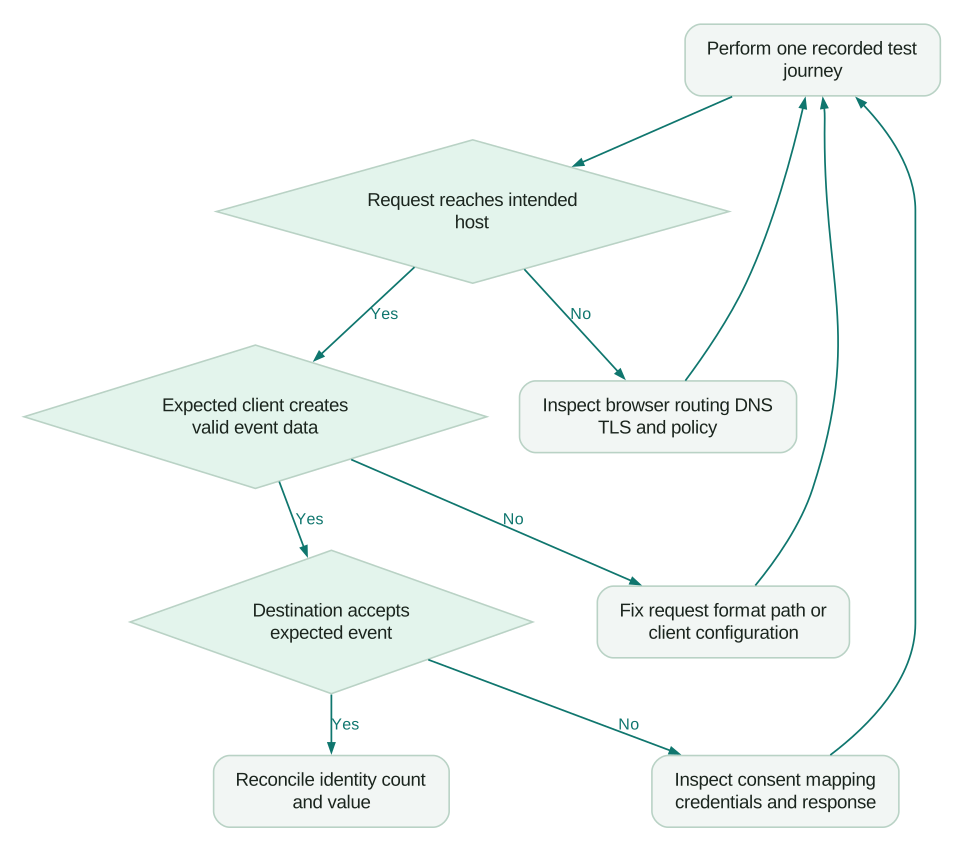
Stape can host a healthy server container while important events still fail between the browser and their destination. The most useful checks follow one event through its actual route: browser request, custom domain, claiming client, event data, destination tag and destination receipt. Fix the first point where the evidence diverges, then reconcile counts and values against the business system.
Last updated: 7 September 2026.
A green hosting status answers whether infrastructure is available. Your reporting also depends on what the website sends, which server client interprets it and what the destination accepts. Those are separate checks, often owned by different people.
This guide covers Stape-hosted server-side Google Tag Manager. Stape also offers gateway and platform-specific products with different setup steps. Confirm the product in use before applying a setting from another tutorial. An analytics and tracking implementation should leave a route map and acceptance tests so the next person can diagnose the event without rebuilding the project.
What should you capture before changing anything?
Choose one test journey and preserve the evidence from the current published configuration. Record its time, browser, consent choice, expected event, test transaction reference and destination. Avoid collecting unnecessary personal data in screenshots or logs.
Open the web and server container previews for the same test. Stape’s preview guide separates the browser event, request received by the server, client processing and outgoing destination request. Add a final check in the destination’s own diagnostic view where available.
A tag marked as fired shows that the tag ran. Inspect the browser’s network request and the destination response before concluding that the event arrived correctly. A valid HTTP response alone also cannot prove that the destination attributed or counted the event as you intended.
Use this evidence sequence for each failing example:
- The application completed the expected business action.
- The browser created the expected measurement event with the agreed values.
- The request used the intended hostname and path.
- The server received it and the expected client claimed it.
- The resulting event data contained the required fields and consent context.
- The intended destination tag sent its expected request.
- Destination diagnostics and later reporting show the expected outcome.
A failure at one step narrows the next investigation. It does not justify changing all seven layers at once.
Why does a verified domain still receive no events?
A verified domain and a browser configured to use it are separate pieces of the setup. Compare the actual request hostname with the domain you verified, the server-container URL and the configuration used by the sending tag.
Stape documents a default hosting address, a custom subdomain and a same-origin approach. Its custom-domain guide also makes DNS records dependent on the selected region and CDN option. Copy the records generated for the actual container rather than reusing a value from another environment.
For a subdomain configuration, inspect these items:
- DNS resolves to the intended service using the records shown for that configuration.
- The TLS certificate covers the requested hostname.
- The browser request uses HTTPS and the expected route.
- A proxy, CDN or security rule is not rewriting or blocking that route.
- The published tag uses the production URL, not an old preview or staging URL.
For a same-origin path, also check whether the website framework or CDN catches the path first. A successful response containing your website’s HTML is evidence that the request reached the wrong handler. Inspect the response content and routing configuration before changing a GTM trigger.
Google’s server-side send-data guide documents the content-security-policy directives relevant to supported transport methods. A restrictive policy can block a request even when the domain works in a separate browser tab. Update the narrow required policy through the site’s normal security review, then repeat the journey.
Do not use a domain change as a reason to bypass a visitor’s consent choice. Route reliability and permission to process data remain separate implementation requirements.
Why does the server receive a request but create no useful event?
The server client must understand the incoming protocol. In server-side GTM, a client is the component that claims a request and translates it into event data for tags and triggers.
Google explains that clients evaluate requests in priority order. Once a client claims a request, later clients do not process it. See the server-side tagging introduction. A request arriving at the right hostname can therefore still reach the wrong client or use an unsupported format.
Inspect the incoming path, request body, content type and the name of the client that claimed it. Then inspect the generated event data. If the event name or fields are absent, fix the interpretation step before changing destination variables.
Stape’s troubleshooting guide gives an example where a request is sent to a path handled by the GA4 client even though the payload uses a different format. That illustrates why a familiar URL is insufficient evidence. The sender and client need an agreed protocol.
A useful test contract contains the expected input and output for one event. For an illustrative purchase, you might expect a numeric value of 79.00, currency USD, a stable order reference and one purchase event. If the incoming body contains the string "$79.00" while the destination requires a number, identify where formatting should occur and test that conversion deliberately.
Keep the browser value, server event value and outgoing value together in your diagnostic note. It becomes clear whether a transformation repaired a value, removed it or accidentally changed its meaning.
Why do tags fire in preview but fail after publication?
Preview can expose a workspace that has not become the live version. A successful test of an unpublished configuration does not establish that production traffic uses it.
Before publishing, record the intended versions of both the web and server containers and the dependency between them. A new server tag may depend on a parameter the web release has not started sending. Releasing only one side can create a period of missing or malformed events.
Use a coordinated release plan:
- Make the receiving configuration tolerant of the currently published sender where practical.
- Test the proposed sender and receiver together in the approved environment.
- Publish in the order required by their dependency.
- Run a new journey outside the preview session.
- Confirm the published route and the actual destination receipt.
- Revert the relevant version if the acceptance criteria fail.
The release should state who can change DNS, hosting, the web container and the server container. A person with GTM publish access may have no ability to reverse the CDN route. Test the rollback at the layer you are changing.
For an initial build, the server-side GTM setup guide provides the wider implementation sequence. Keep a production diagnostic checklist beside it so future releases use the same evidence.
Why can browser and server delivery double-count a conversion?
Two delivery paths need to represent the same business action consistently. Decide which paths are intentional and how the destination recognizes duplicates before enabling another connector or plugin.
Inventory every sender for the conversion: browser pixel, web GTM tag, server tag, native ecommerce integration, backend job and gateway. A second system may already send the event even if nobody added it to the current container.
For destinations that use an event identifier, generate and propagate the value according to that destination’s specification. Stape provides a Unique Event ID variable, but installing the variable alone does not prove every relevant sender shares the same identifier. Inspect the outgoing payloads for the exact business action.
Avoid generating separate random identifiers independently in browser and server for an event you expect the destination to deduplicate. Also distinguish an event identifier from a customer identifier: multiple legitimate purchases by one customer require separate event identities.
Use the Meta Conversions API guide for Meta-specific mapping and deduplication checks. Apply the receiving platform’s own rules to other destinations rather than assuming one deduplication mechanism works everywhere.
A practical acceptance test includes a reload, a retry and two separate legitimate purchases. The first two should follow your documented repeat-delivery policy; the last two should remain separate business events. Record observed behavior before declaring duplicate handling complete.
How does consent get lost between browser and server?
Consent can fail when the browser does not send the intended state, when the request reaches the server without that context, or when a destination tag ignores the state relevant to it.
Google’s server-side consent guide describes the Google tag transmitting consent parameters and Google product tags adjusting their behavior. That documentation does not establish identical behavior for every community or third-party server template.
Test your approved consent design for a fresh visitor, a returning visitor, acceptance, rejection and a later change of choice. For each case, record the expected storage behavior and destination requests. Basic and advanced implementations have different expected network behavior, so an empty network panel is not a universal acceptance rule.
Inspect the state at the time of the conversion. A banner displayed correctly on arrival can still leave a later event with stale state. Likewise, consent initialization that occurs after the first tag runs may produce an unintended first request.
The Consent Mode v2 guide explains the Google signals and implementation decisions. Where the business has regional requirements, have the responsible owner define the allowed behavior first, then test the technical setup against that specification.
What does a useful reconciliation example look like?
Reconcile events against an explicit eligible set of business outcomes. Total orders and permitted analytics events can differ for documented reasons. Preserve that distinction in the calculation.
Consider this illustrative QA batch. The test plan contains 20 completed test orders. Four are deliberately exercised under a consent state where the chosen implementation should not send the destination purchase event. The expected destination set therefore contains 16 orders.
The server receives 16 purchase requests. Fifteen contain the expected order references and values, while one contains a blank reference. The destination shows 18 requests because two extra browser sends occurred for one of the orders.
A total-only check can hide both problems. Compare the expected set of 16 references with the observed set, then inspect counts per reference and values. The empty reference needs a mapping fix. The repeated reference needs delivery-path and deduplication investigation. Neither finding implies that Stape hosting itself dropped the requests.
After the fix, rerun the same cases with new test references and document the expected outcomes. Do not fabricate live sales or inject test purchases into production revenue reports merely to produce a successful screenshot. Use the destination’s documented test facilities and an agreed cleanup process where available.
For Shopify-specific business definitions and value checks, use the purchase reconciliation guide. It helps keep payment, order and analytics totals distinct.
What should be handed over after the fix?
Keep a short diagnostic record that another operator can use:
Checklist
- The affected journey, event and first failing layer.
- The published versions and relevant routing configuration.
- One redacted before-and-after example with expected count and value.
- The consent cases and duplicate scenarios tested.
- The named owner for each configuration and destination credential.
- The monitoring signal that will reveal recurrence.
- The rollback steps and the person authorized to execute them.
Monitor more than total incoming requests. An abrupt change in accepted conversions, missing identifiers or value distributions can matter even when hosting traffic looks stable. Pick thresholds from your own normal operating range and campaign pattern; a universal percentage would hide the differences between a small B2B site and a busy store.
Questions people ask
Does a ready Stape container mean tracking works?
It establishes only part of the implementation. Trace a business event through the browser, server client, destination tag and receiving platform. Then check whether its identity, count and value match the intended measurement.
Why does my server preview show no request?
Check the actual browser request URL, network result and preview-session configuration. DNS, TLS, routing, content security policy or a different published sender can explain the gap. For backend traffic, follow the documented preview method for that sender before concluding that no request arrived.
Should I change client priority when an event is missing?
First identify which client claimed the request and whether the input matches its supported protocol. Change priority only when the intended request-handling design requires it. A priority change can affect other requests, so retest every relevant sender afterward.
Can Stape hosting handle consent automatically for every tag?
Consent behavior depends on the browser implementation and the destination template. Google documents consent-aware behavior for its own supported tags. Test third-party tags against the approved consent specification rather than assuming the hosting layer supplies it.
What is the fastest way to narrow down a tracking failure?
Use one recorded journey and identify the first layer where expected and observed data differ. Preserve the request, processed event and destination response needed to explain that difference. Make one controlled correction, then rerun the journey and its regression cases.
Sources
- Stape, How to debug sGTM configuration using Preview Mode, updated 10 March 2026, accessed 7 September 2026.
- Stape, Add a custom domain, updated 21 July 2026, accessed 7 September 2026.
- Google, Send data to server-side Tag Manager, accessed 7 September 2026.
- Google, An introduction to server-side tagging, accessed 7 September 2026.
- Stape, Unique Event ID, updated 30 May 2025, accessed 7 September 2026.
- Google, Implement consent mode with server-side Tag Manager, accessed 7 September 2026.
Written by
Jafrin Akter AloData Engineer and Co-founder, martechdevs
Jafrin Akter Alo is a data engineer and co-founder of martechdevs, where the team has delivered 74+ martech, data and growth stack implementations.