
Server-side GTM hosting cost: Stape, Cloud Run, Usercentrics and Google tag gateway
Data Engineer and Co-founder, martechdevs
Last updated 11 min read
Server-side GTM costs include hosting, implementation, monitoring and the work needed to keep events correct. Managed request-based hosting can be inexpensive for a small site; running your own cloud configuration gives you different operating responsibilities. Google tag gateway serves a narrower purpose and may be enough when you only need a first-party route for Google measurement. Choose the required capability first, then compare complete costs at the same traffic volume.
Last updated: 7 September 2026.
Decide whether you need a server container
Google tag gateway and server-side GTM are related options, but they do different jobs.
Google tag gateway uses your website's infrastructure to serve Google tags and route measurement in a first-party context. A server-side GTM container adds clients, event processing, transformations and destination tags. Google's server-side overview describes that processing model.
If your requirement is a first-party Google measurement route, assess gateway support on your current infrastructure. If you need to decide which event fields go to Google, Meta, LinkedIn or another destination, evaluate a server container and the supported templates for those destinations.
Both can be part of the same architecture. Do not buy hosting solely because a comparison calls every first-party setup “server-side tracking.” Write the capability you need in a sentence a developer can test.
Examples include removing an unapproved field before a specific destination receives it, adding a permitted backend attribute, or maintaining one defined conversion event across browser and server delivery. Improving an undefined “tracking score” is not enough to establish a hosting requirement.
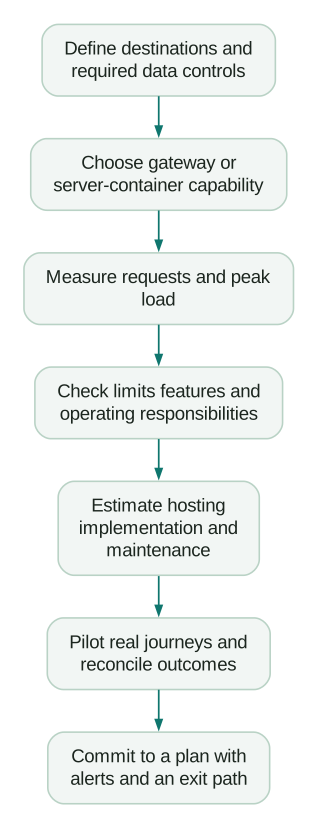
Count the thing the provider bills
A session, page view, analytics event and HTTP request are different units. A visitor can create several events, and the implementation can generate additional requests for scripts or other operations.
Stape counts incoming requests to the container, including relevant script loads and Data Store requests. Its request definition explicitly says this does not equal the GA4 event total. Its rough estimation guidance is useful for an initial budget, but measure the actual deployed route before choosing a plan close to its limit.
For a fictional site, suppose the planned route receives 300,000 event requests, 120,000 script requests and 30,000 other counted requests in a month. The total is 450,000. A 500,000-request allowance leaves 50,000 requests of spare capacity, or 10% of the plan allowance. If traffic and those request categories all rise 20%, usage reaches 540,000.
The budgeting mistake would be selecting the tier from the 300,000 analytics events and ignoring the other 150,000 requests. The correct multiplier depends on your route, caching, clients and product configuration. Do not assume one request multiplier fits every provider.
Measure peak load separately from monthly volume. Ten million requests spread evenly through a 30-day month average about 3.86 requests per second. A campaign launch can concentrate a meaningful share of them into a short period. Monthly allowance tells you little about how that burst behaves.
Include staging, preview activity, bots, retries and additional domains in the inventory where the provider counts them. Confirm whether limits apply per container, per workspace or across an account.
What the four options mean operationally
Stape: managed server-container hosting with request tiers
Stape is worth evaluating when you want a managed hosting layer with server-side GTM features and a defined request allowance. Its pricing page exposes monthly and annual billing as well as additional Pro+ and Business+ tiers. Check those controls; the default cards do not show every useful intermediate allowance.
An annual price expressed “per month” is a billing comparison, not permission to cancel a yearly commitment after one month. Confirm the actual charge, renewal terms and included features before comparing it with a monthly plan.
Quota handling matters as much as the headline price. Stape's detailed pause policy says paid plans can pause at 110% of allowance, with plan-specific grace rules. Auto-upgrade can keep traffic running by moving to a higher paid tier. Do not budget on the assumption that over-limit traffic is always processed for free.
Decide who receives quota alerts and whether that person can approve the next tier promptly. If uninterrupted measurement matters, make the cost-versus-pause decision before a high-traffic campaign begins.
Managed hosting still leaves event definitions, consent behaviour, destination credentials, tag mappings and release QA with your implementation team. Buying a plan does not validate a purchase event.
Google Cloud Run: control of the cloud configuration
Cloud Run is worth evaluating when your team already operates Google Cloud and needs control over project access, infrastructure, routing and monitoring. You take responsibility for configuring and maintaining that environment alongside the GTM container.
Google's dedicated Cloud Run tagging guide illustrates approximately $45 per instance per month for its stated configuration and recommends at least two instances to reduce outage risk. Two at that illustrative rate gives roughly $90 before other applicable costs. It is not a fixed-price hosting package or a quote for your site.
The Cloud Run pricing reference makes region, billing configuration, resource use and network transfer relevant to the calculation. Free-tier usage is shared across the billing account. Include the services your complete architecture requires, such as preview, routing and logging, rather than treating the tagging-instance estimate as the entire invoice.
For a smaller site, baseline capacity and operating time may dominate cost. At larger volumes, tag execution, scaling, traffic shape and network usage matter more. A monthly request count alone cannot produce a defensible cloud bill.
Set budget alerts and a deliberate scaling configuration. A hard capacity limit can restrict spending while also limiting delivery. Know which consequence is acceptable and how the on-call owner will detect it.
Usercentrics: managed sGTM alongside its consent products
Usercentrics offers managed server-side GTM with a request-based allowance and integration with its Web CMP. Its server-side product overview distinguishes sGTM from its separate Meta Signals Gateway offering.
That distinction is important when reading the pricing page. A lower starting price for another gateway product is not automatically the price for multi-destination sGTM hosting. Compare the specific product, request unit, domain allowance and support you need.
This option deserves consideration when its consent integration fits your existing stack. Verify the actual consent state reaching each destination, including third-party templates. A common vendor can simplify configuration; it does not remove the need to test the resulting data flow.
Confirm what happens when you exceed a request allowance and what operational support is included. Do not import Stape's pause or auto-upgrade rules into another provider's budget without checking its terms.
Google tag gateway: a narrower, potentially low-cost route
Cloudflare's Google tag gateway documentation says the feature is free and gateway-routed requests do not count towards usage or billing for its other listed products. That statement applies to the documented Cloudflare integration. It does not establish that every custom CDN or web-server deployment has zero infrastructure or implementation cost.
Cloudflare also documents zone-level configuration: enabling it affects the zone's hostnames and subdomains, with tag behaviour controlled through GTM triggers where needed. Inventory those hosts before enabling a shared zone configuration.
Consider the gateway when Google measurement is the requirement and your infrastructure supports the route. Choose a server container when you need its additional processing and destination controls. The cheaper product is only useful if it performs the job you actually have.
Compare 100,000, one million and ten million requests
The following advertised monthly prices were checked on 7 September 2026. Stape's USD monthly billing and plus-tier controls were inspected directly; Usercentrics figures come from the sGTM section of its pricing page. These are allowance comparisons, not like-for-like feature rankings or tax-inclusive checkout quotes.
- 100,000 requests: Stape Pro lists $20/month for up to 500,000 requests. Usercentrics Growth lists €16/month for up to 500,000.
- One million requests: Stape Pro+ lists $50/month for up to two million. Usercentrics Scale lists €49/month for up to three million.
- Ten million requests: Stape Business+ lists $150/month for up to ten million. Usercentrics Performance lists €99/month for up to ten million.
These Stape figures are from the current plan selector. Annual billing can change the displayed rate. Keep USD and EUR separate until you apply the exchange rate and payment terms relevant to your business.
At exactly ten million expected requests, a ten-million allowance offers no planned growth margin. Recalculate after adding script delivery, another domain or a traffic campaign. A plan that fits the rounded forecast may not fit the implementation.
For Cloud Run, calculate the chosen instance configuration and its ancillary services at each traffic level. The earlier two-instance estimate is a starting assumption, not a promise that the same bill or performance holds at every volume. For the documented Cloudflare gateway integration, the feature price remains free, but its narrower capability remains the same too.
Do not select a production plan purely because a free tier appears to cover a short test. The test may omit destinations, scripts or traffic paths that will be enabled at launch.
Put implementation and maintenance into the comparison
Use the same planning period and currency for each option. A useful cost worksheet contains:
- Hosting or subscription charges for every required environment.
- Routing, network, logging, storage and related infrastructure charges.
- Implementation hours for events, identity, consent, destinations and QA.
- Routine maintenance hours for updates, releases and diagnostic review.
- Incident handling and the agreed response arrangement.
- Paid support or additional product features required by the implementation.
Here is a fictional first-year planning example in USD. It is not a vendor quote or a benchmark for how many hours your setup should take.
Option A uses $50/month of hosting, one maintenance hour per month at an internal cost of $90/hour, and 12 implementation hours. Its first-year total is $600 hosting + $1,080 maintenance + $1,080 implementation = $2,760. Spread over 12 months for comparison, that is $230/month.
Option B uses $110/month of total infrastructure, three maintenance hours per month at the same internal cost, and 20 implementation hours. Its first-year total is $1,320 + $3,240 + $1,800 = $6,360, or $530/month on the same planning basis.
The $300 monthly-equivalent difference comes from the stated assumptions. It is not evidence that managed hosting always saves that amount. An experienced cloud team may need fewer hours, while a complex managed-container implementation may need more. Replace every input with a credible estimate for your team.
You can reuse this local calculation without entering business data into a vendor calculator:
from math import isfinite

def first_year_cost(hosting_monthly, other_monthly,
                    maintenance_hours_monthly, setup_hours, hourly_cost):
    inputs = (hosting_monthly, other_monthly,
              maintenance_hours_monthly, setup_hours, hourly_cost)
    if any(not isfinite(value) or value < 0 for value in inputs):
        raise ValueError("Use finite, non-negative cost and hour assumptions")
    recurring = hosting_monthly + other_monthly
    recurring += maintenance_hours_monthly * hourly_cost
    annual = 12 * recurring + setup_hours * hourly_cost
    return {"first_year": annual, "monthly_equivalent": annual / 12}

managed_example = first_year_cost(50, 0, 1, 12, 90)
cloud_example = first_year_cost(110, 0, 3, 20, 90)
Use the result for planning, and keep cash timing visible. A yearly subscription payment and a one-time implementation invoice do not arrive as twelve equal monthly bills simply because the worksheet spreads their cost.
Evaluate controls that the price cannot describe
Before selecting a host, ask for evidence about the requirements that affect your operation:
- Where the relevant data is processed, where logs are stored and who can access them.
- Which domains, regions, environments and credentials the plan supports.
- How requests, additional services and overages are counted.
- What fails when an upstream service or a destination is unavailable.
- Which monitoring and log export capabilities the selected tier includes.
- Who updates the runtime and who maintains templates or application mappings.
- How to move domains, container configuration and operational ownership later.
Inspect the relevant agreement and architecture rather than treating “managed” as a complete service definition. Hosting support, tag implementation support and commercial measurement analysis are different deliverables.
An exit plan matters even when the initial price is low. Retain the container configuration, documented event contracts, domain ownership and an inventory of provider-specific features. A migration becomes harder when no one knows which behaviour comes from the host and which comes from your own tags.
Test the customer journey before claiming better measurement
A deployment can increase reported conversions by recovering missed events, but it can also change attribution or accidentally send duplicates. Higher reported ROAS alone does not identify which happened.
Select a set of real journey types before rollout: ordinary checkout, returning customer, supported accelerated checkout, an upsell flow if present, failed payment and each approved consent state. Record the expected purchase identity, count, value and destination for each.
Reconcile eligible business outcomes against received events using stable identifiers. If purchase reporting falls after a routing change, inspect the actual route, script behaviour, consent timing and event ownership. Do not assume a general platform incident or reverse every change based solely on a dashboard total.
For Shopify, use the GA4 purchase-reconciliation guide to separate order definitions, duplicates, missing events, value and currency. For the implementation sequence, follow the server-side GTM setup guide.
Keep recovered measurement separate from newly created sales. If a project is justified by better budget allocation, define how that decision will be evaluated after the data becomes reliable. The attribution versus incrementality guide explains why a measurement increase is not automatically a business lift.
Make the choice reviewable
- The required capability distinguishes gateway routing from server-container processing.
- The forecast uses the provider's billable unit and includes growth margin.
- Monthly and annual prices are compared on the same basis.
- Plan limits, pause behaviour and cost alerts have an owner.
- Infrastructure, implementation and operating time are included.
- Required controls and support are verified for the actual tier.
- Purchase or lead outcomes reconcile before and after rollout.
- The team retains a documented migration and rollback path.
If the difficult part is identifying the correct events, permissions and destination behaviour, resolve that scope before debating a small monthly hosting difference. An analytics and tracking implementation should produce a costed architecture and verifiable measurement, with the responsibilities clear enough to operate afterwards.
Questions people ask
Is server-side Google Tag Manager free?
The hosting and operation of the server environment can incur costs. Free or low-volume allowances can support evaluation, but production budgeting should include the selected infrastructure, implementation and maintenance requirements.
Is Google tag gateway a replacement for server-side GTM?
It can meet a narrower requirement for a first-party Google measurement route. A server container supports additional event processing and destination configuration. Choose based on those requirements; the two can also be used together.
Should I estimate hosting from GA4 event counts?
Use them only as an initial input. Determine what your chosen provider counts, then measure the requests the deployed configuration actually generates. Scripts, additional operations and traffic changes can make the totals differ.
Is Stape or Cloud Run cheaper?
Compare the plan or cloud configuration that meets your requirements, then add implementation and operating time. Request-based subscription prices and cloud-resource estimates are not interchangeable units. The cheaper choice depends on the actual workload and team.
Will server-side hosting increase revenue?
Hosting can support a more controlled measurement implementation. It does not itself prove that advertising generated additional sales. Validate event correctness first, then evaluate whether decisions made with the improved information create business value.
Sources
- Google: Tag gateway for advertisers
- Google: Server-side tagging overview
- Stape: What counts as a request
- Stape: Pricing and interactive plan selector
- Stape: Request limits and pause rules
- Google: Cloud Run tagging setup and cost estimate
- Google Cloud: Cloud Run pricing
- Usercentrics: Server-side tracking products
- Cloudflare: Google tag gateway configuration and pricing
- Usercentrics: sGTM pricing
Written by
Jafrin Akter AloData Engineer and Co-founder, martechdevs
Jafrin Akter Alo is a data engineer and co-founder of martechdevs, where the team has delivered 74+ martech, data and growth stack implementations.
