
HubSpot Duplicate Contacts: Merge and Prevent Recurrence
HubSpot duplicate contacts need an identity decision before a merge. Confirm that the records represent the same person, choose the values and relationships to retain, and check the resulting Record ID, workflows and connected systems afterward. Then repair the form, import or integration that produced the duplicate. An empty suggestions queue is useful, but it does not prove that the underlying identity problem is fixed.
On this page

Why can one person have several HubSpot contacts?
One person can have several contact records when their creation paths do not share a reliable identity key. Different work and personal emails, an import without a matching identifier, or an integration that repeatedly creates records can split their history.
HubSpot's automatic contact matching uses email. A manual attempt to create an existing email is blocked; matching form submissions and imports can update an existing contact. An import without Email or another unique identifier can create new contacts. These rules do not establish that two different email addresses belong to the same person. HubSpot's deduplication rules distinguish the creation paths.
Start with the record's origin and identifier history. Check which form, import or integration created each contact and which system owns the person key. Keep shared mailboxes, reassigned addresses and two employees with similar names separate until there is reliable evidence linking them.
The CRM data hygiene guide covers the recurring cross-system review. This guide handles the HubSpot contact decision and its consequences. Product analytics identity has its own linking rules; a CRM merge should not silently become a Mixpanel, Amplitude or PostHog identity merge.
What does HubSpot's duplicate manager detect?
HubSpot's duplicate manager suggests candidate records by comparing properties; its similarity result is a review signal, not a verified person match. Contact comparisons include names, email, IP country, phone, postal code and company name. Results recalculate as records are created, with a daily check when none are created. HubSpot's duplicate-manager guide explains the matching and access limits.
| Task | Subscription requirement | Review boundary |
|---|---|---|
| Merge a known pair individually | Available across plans | Confirm Merge access for the records |
| Review suggested pairs | Professional or Enterprise; up to 10,000 pairs | Suggestions still require an identity decision |
| Bulk duplicate management | Data Hub Professional: up to 30,000 pairs; Enterprise: up to 100,000 | Use reviewed groups and a deliberate survivor rule |
| Custom detection rules | Data Hub Professional or Enterprise | Up to two rules per object and nine comparison properties |
The manager requires Data quality tools access and Edit access to all relevant contacts, or Super Admin. Direct merging has its own scoped Merge permission. HubSpot also documents an Edit-permission beta; check the account's effective permissions rather than granting broad administrator access. See the user permissions guide and the individual merge procedure.
Open CRM → Contacts → Manage duplicates from the page's actions menu and review a pair. Add the properties that can settle the identity question, including your source person key and external CRM ID. A rule matching only a broad attribute such as region is too weak for this decision. More matches are not necessarily better coverage.
How do you decide which contact should be primary?
Choose the primary contact according to the intended business record and integration relationships, then review important property conflicts separately. The most recently edited contact is not automatically the most authoritative one; a routine sync can make an incomplete record look newer.
For a fictional example, contact 101 uses mira@example.invalid, while contact 202 uses an older address. Both carry the verified person key product:person:007. Contact 101 has the correct owner and company relationship; contact 202 contains a meeting that must remain visible. That evidence can support a merge. Matching names alone cannot.
| Decision | Evidence to collect | Reason to hold the pair |
|---|---|---|
| Same person | Verified source key, address history and business context | Different authoritative person keys or a shared mailbox |
| Primary selection | Intended email, current owner and connected-system pairing | Two conflicting Salesforce or product identities |
| Property values | Selected value and responsible source for each conflict | A newer value has no trusted origin |
| Retained context | Required deals, tickets, company labels and activities | An unexplained relationship or incomplete export |
| Automation | Current enrollment, suppression and pending actions | The merge could send or repeat an unintended message |
Save the decision with both Record IDs and an evidence reference. Export the relevant before-state using the access and retention rules for your customer data. Keep identity evidence and the repair instruction together, without copying unnecessary personal details into a general task log.
For a known pair, open the intended primary, choose Actions → Merge, select the secondary and review the property choices before confirming. This is an irreversible CRM change, so unresolved identity conflicts should remain in a review queue. A dedupe-review command can organize the evidence and proposed choices; it should not turn a similarity score into permission to merge.
What survives a contact merge?
A contact merge combines context but does not apply one universal “primary wins” rule. Review the specific exceptions before deciding what the resulting record should contain.
| Data | Default treatment | Read-back check |
|---|---|---|
| Ordinary properties | Primary values usually win; a blank can use the secondary | Compare your selected owner and important fields |
| Primary remains primary; secondary becomes additional | Verify the intended sending address | |
| Lifecycle stage | Furthest downstream stage wins | Check stage-driven qualification and reporting |
| Marketing contact status | Marketing wins over non-marketing | Review status separately from subscription permission |
| Associations | Combined; primary contact's Primary company label takes priority | Inspect company labels, deals and tickets |
| Activities and property history | Combined; activity sync can take up to 30 minutes | Verify important items after processing |
| Create date and changed-value timestamps | Oldest creation date; changed values receive merge-time timestamps | Preserve source timing where it matters |
| Original Traffic Source and legal basis | Oldest source unless manually updated; most recent legal-basis values | Inspect those fields rather than assuming primary selection decides them |
These are HubSpot's merge rules and contact exceptions. Also check static segments, active segments and reporting totals in the account: the business question is whether the resulting contact remains in the right operational populations. Do not remove meaningful associations merely to make a failed merge fit an association limit.
HubSpot can match a contact through its additional email addresses. Adding an email address does not make it the address used everywhere. Marketing emails use the primary email, and Email filters in segments, workflows and reports reference that primary value. Email bounces and unsubscribes are associated with addresses. Review actual subscription evidence before using a newly consolidated contact for messaging. HubSpot's multiple-email guidance explains these distinctions.
Will the primary Record ID and workflow enrollment stay the same?
Do not assume the chosen primary Record ID survives: HubSpot documents a new resulting ID by default, while the Primary ID Preservation for Merged Records public beta retains the primary ID. The beta applies to UI merges and all API versions. For an API merge, the response's id identifies the result. Record that actual value and verify it before updating downstream mappings. HubSpot's Contacts API guide describes both paths.
Workflow behavior has the same beta boundary: outside it, both records leave active workflows; inside it, the primary keeps its enrollment and the secondary leaves. Check the account setting and pending actions before merging. HubSpot's workflow merge behavior makes this distinction explicit.
New enrollment is a separate setting. By default, satisfying a workflow's criteria through a merge does not automatically enroll the resulting contact. Review Automatically enroll merged records and re-enrollment settings for each relevant workflow. A later qualifying change can enroll the contact again, starting at the beginning. Workflow enrollment settings explain that behavior.
Create a crosswalk from each old ID to the observed resulting ID, including the old primary when it changes. Update an integration's retained mappings through its controlled repair process. A missing lookup must not automatically trigger “create contact,” or the first post-merge sync can recreate the problem.
How can you reconcile a merge without writing to the CRM?
Compare a reviewed plan with a fresh, complete read-back before marking a merge resolved. The following local exercise checks that contract; it does not find duplicates, execute a merge or simulate HubSpot's internal merge rules.
The inputs are normalized JSON files for one HubSpot account, not raw API responses. Keep export timestamps with the surrounding review record; the checker rejects different portal IDs. In real work, an operator must gather the selected properties, full relevant association pages, activity evidence and workflow state, then record the collection's completeness. The review flags are declarations about work already done. Setting a flag to true does not perform or prove that work.
Save this fictional decision as plan.json. It deliberately expects the default new-ID path and no active workflows after the reviewed operation:
{
  "portal_id": "999001",
  "primary_id": "101",
  "secondary_id": "202",
  "person_key_primary": "product:person:007",
  "person_key_secondary": "product:person:007",
  "identity_confirmed": true,
  "evidence_ref": "review-demo-001",
  "id_mode": "new_id",
  "expected_properties": {
    "email": "mira@example.invalid",
    "lifecyclestage": "customer",
    "hubspot_owner_id": "7001"
  },
  "required_emails": [
    "mira@example.invalid",
    "mira.old@example.invalid"
  ],
  "required_associations": [
    [
      "companies",
      "9001"
    ],
    [
      "deals",
      "9002"
    ]
  ],
  "expected_primary_company_id": "9001",
  "required_activities": [
    "note:501",
    "meeting:502"
  ],
  "expected_active_workflows": [],
  "automation_reviewed": true,
  "upstream_fixed": true
}
Save this synthetic read-back as observed.json. The invented resulting ID is 303; the primary-company label is checked separately from the presence of a company association:
{
  "portal_id": "999001",
  "id": "303",
  "merged_ids": [
    "101",
    "202"
  ],
  "properties": {
    "email": "mira@example.invalid",
    "lifecyclestage": "customer",
    "hubspot_owner_id": "7001"
  },
  "emails": [
    "mira@example.invalid",
    "mira.old@example.invalid"
  ],
  "associations": [
    [
      "companies",
      "9001"
    ],
    [
      "deals",
      "9002"
    ]
  ],
  "primary_company_id": "9001",
  "activities": [
    "note:501",
    "meeting:502"
  ],
  "active_workflows": [],
  "complete": true
}
Save the complete checker as reconcile.py:
import json
import re
import sys


def require(condition, message):
    if not condition:
        raise ValueError(message)


def text(value):
    require(type(value) is str and bool(value) and value == value.strip(),
            'Expected nonblank, unpadded text')
    return value


def record_id(value):
    require(re.fullmatch(r'[1-9][0-9]*', text(value)) is not None,
            'Record IDs must be positive decimal strings')
    return value


def string_set(value):
    require(type(value) is list, 'Expected a list, not a scalar')
    result = {text(item) for item in value}
    require(len(result) == len(value), 'Repeated entry in snapshot')
    return result


def associations(value):
    require(type(value) is list, 'Expected association list')
    result = set()
    for pair in value:
        require(type(pair) is list and len(pair) == 2, 'Invalid association pair')
        kind, identifier = pair
        require(kind in ('companies', 'deals', 'tickets'), 'Unsupported object type')
        item = (kind, record_id(identifier))
        require(item not in result, 'Repeated association')
        result.add(item)
    return result


def properties(value):
    require(type(value) is dict and bool(value), 'Expected nonempty properties')
    for key, item in value.items():
        text(key)
        require(type(item) is str, 'Property values must be explicit strings')
    return value


def reconcile(plan, observed):
    plan_keys = ('portal_id primary_id secondary_id person_key_primary person_key_secondary '
                 'identity_confirmed evidence_ref id_mode expected_properties '
                 'required_emails required_associations expected_primary_company_id '
                 'required_activities expected_active_workflows automation_reviewed upstream_fixed').split()
    observed_keys = ('portal_id id merged_ids properties emails associations primary_company_id '
                     'activities active_workflows complete').split()
    require(type(plan) is dict and set(plan) == set(plan_keys), 'Invalid plan schema')
    require(type(observed) is dict and set(observed) == set(observed_keys), 'Invalid snapshot schema')
    portal = record_id(plan['portal_id'])
    require(portal == record_id(observed['portal_id']), 'HubSpot accounts differ')
    primary, secondary = record_id(plan['primary_id']), record_id(plan['secondary_id'])
    require(primary != secondary, 'A contact cannot merge with itself')
    for key in ('identity_confirmed', 'automation_reviewed', 'upstream_fixed'):
        require(plan[key] is True, 'Unresolved review: ' + key)
    text(plan['evidence_ref'])
    require(text(plan['person_key_primary']) == text(plan['person_key_secondary']),
            'Authoritative person keys conflict')
    require(observed['complete'] is True, 'Read-back collection is incomplete')
    resulting = record_id(observed['id'])
    mode = plan['id_mode']
    require(mode in ('new_id', 'preserve_primary'), 'Unreviewed ID behavior')
    if mode == 'preserve_primary':
        require(resulting == primary, 'Primary ID was not preserved as expected')
    else:
        require(resulting not in (primary, secondary), 'Expected a new resulting ID')
    merged = string_set(observed['merged_ids'])
    for identifier in merged:
        record_id(identifier)
    require({primary, secondary} <= merged | {resulting}, 'Missing merge lineage')
    expected, actual = properties(plan['expected_properties']), properties(observed['properties'])
    require('email' in expected, 'Select the expected primary email explicitly')
    require(all(key in actual and actual[key] == value for key, value in expected.items()),
            'Selected property value differs')
    emails = string_set(observed['emails'])
    require(string_set(plan['required_emails']) <= emails, 'Required email missing')
    require(text(expected['email']) in emails, 'Primary email missing from email inventory')
    wanted, found = associations(plan['required_associations']), associations(observed['associations'])
    require(wanted <= found, 'Required association missing')
    company = record_id(plan['expected_primary_company_id'])
    require(record_id(observed['primary_company_id']) == company and ('companies', company) in found,
            'Primary company label or association differs')
    require(string_set(plan['required_activities']) <= string_set(observed['activities']),
            'Required activity missing')
    require(string_set(plan['expected_active_workflows']) == string_set(observed['active_workflows']),
            'Active workflow state differs')
    return {'status': 'reconciled_local_snapshot', 'portal_id': portal,
            'id_crosswalk': {primary: resulting, secondary: resulting},
            'checked_properties': sorted(expected)}


def read_json(filename):
    def unique_object(pairs):
        result = {}
        for key, value in pairs:
            require(key not in result, 'Duplicate JSON key: ' + key)
            result[key] = value
        return result
    with open(filename, encoding='utf-8') as handle:
        return json.load(handle, object_pairs_hook=unique_object)


if __name__ == '__main__':
    require(len(sys.argv) == 3, 'Usage: python3 reconcile.py plan.json observed.json')
    print(json.dumps(reconcile(read_json(sys.argv[1]), read_json(sys.argv[2])), indent=2))
Run the local files with:
python3 reconcile.py plan.json observed.jsonThe result maps 101 and 202 to 303 and reports reconciled_local_snapshot. Change the observed owner, remove the meeting or add an unexpected active workflow, and the check stops with an error. For the reviewed beta path, select preserve_primary and require the observed ID and workflow state that the plan actually expects.
This small contract intentionally compares exact strings. It does not lowercase emails, remove plus tags, infer aliases or compare fuzzy names. It checks only the selected properties and required context; extra valid historical associations or activities can remain. The primary company is required by this example's B2B policy. Adapt that contract explicitly for people who should have no company, rather than inserting a fake company ID to make it pass.
How do you prevent form submissions from splitting or overwriting people?
Configure the form's identity behavior and test both repeat visitors and shared-device visitors. A known email can update an existing contact; a secondary-email submission can also change which email is primary. That is different from creating a second contact. HubSpot's form deduplication rules explain the distinction.
The form setting Automatically create new contacts from unknown email addresses creates a new contact for a new email and updates a matching email. With the option off, HubSpot can fall back to browser cookies when the submitted address does not match, which can overwrite a contact when several people share a device. With it on, that cookie-based association is not used. See HubSpot's form settings.
Test a repeat submission with the same email, an existing secondary email, a new address for a known person and two different people on one device. Check the actual contact and primary email after each case. Preserve separate form submissions as separate enquiries where that is their business meaning; a repeat request is not automatically a duplicate person to delete.
If your website submits through a custom backend, the HubSpot Forms API guide covers payloads, consent, attribution and delivery checks. Do not add a separate create-contact call beside a working form submission without establishing why both operations are necessary.
Which import and API choices stop duplicates at the source?
Choose the matching identifier before importing or syncing, and separate updates to known contacts from creation of genuinely new contacts. For an update file, export the current Record IDs and reconcile every row to the intended contact. Keep IDs as strings rather than allowing spreadsheet formatting to change them.
HubSpot's import mapping gives Record ID precedence when used as the identifier. Blank IDs in a create-and-update file can create records. Importing a secondary email alongside Record ID can replace the primary email; using that secondary email as the identifier without Record ID avoids that particular overwrite. Inspect the mapped identifier and Email column together. HubSpot's import instructions explain these cases.
An import updates selected existing records; it is not a merge of their timelines. Do not map two independently populated contacts to one ID and assume their history will combine. Use the native merge decision for established duplicates, then repair the next import file to use the observed resulting IDs.
For API syncs, maintain a namespaced source-person-to-HubSpot-ID mapping and use supported update or upsert behavior. The Contacts API supports upsert by email or a custom unique property, but partial upserts by email are not supported; use a custom unique identifier for that case. Do not treat every failed update as evidence that a new person should be created. The Contacts API guide documents the distinction.
Test the same source record twice, an email change under the same source key, a delayed update and a missing-ID lookup after a merge. Each case should have a defined outcome and an error path. A source key identifies the person according to your contract; it must not be a shared billing account or a company ID used for all its employees.
What changes when Salesforce is connected?
Review the Salesforce pairing before choosing the HubSpot primary. HubSpot recommends keeping the contact already syncing to the intended Salesforce record when several HubSpot contacts with different emails correspond to that one record. Different email addresses are not automatically treated as the same Salesforce person. HubSpot's Salesforce duplicate guidance describes the matching behavior.
When cleaning Salesforce duplicates too, inspect the current Lead or Contact ID and deletion-sync settings. A Salesforce merge can delete a corresponding HubSpot contact when deletion sync is enabled for the losing record; choosing another primary can also require repairing the sync. Resolve the linked records deliberately rather than running unrelated bulk cleanups in both systems.
Read back a controlled subsequent update in each permitted direction and confirm that the pairing stays correct. Use the HubSpot–Salesforce sync guide for that investigation. If the cleanup also includes Salesforce company accounts, follow the separate Salesforce account-merge procedure; account and contact merges have different relationship rules.
Can you undo a bad HubSpot contact merge?
HubSpot does not support unmerging records. Recreating a contact from an additional email is a new record, not restoration of its original history and relationships. HubSpot's unmerge explanation states the boundary.
For an incorrect merge, first contain the affected syncs and outbound actions under the incident owner's control. Preserve the current record, the reviewed before-state, merge evidence and any transactions that arrived afterward. Identify which person owns each activity and association before planning corrections.
Do not replay an old full export over newer customer activity. Repair may require selected property changes, new records, reassociation and changes in external systems. Have the responsible administrator establish the supported recovery path and then reconcile both people independently. If the original identity evidence was insufficient, that is also a defect in the review process.
How do you clean up a large duplicate backlog safely?
Work in small, disjoint, reviewed groups and stop when the observed results differ from the plan. Resolve the source of recurrence first, or make its controlled pause part of the repair plan. Do not select a bulk survivor criterion merely because it processes the queue quickly.
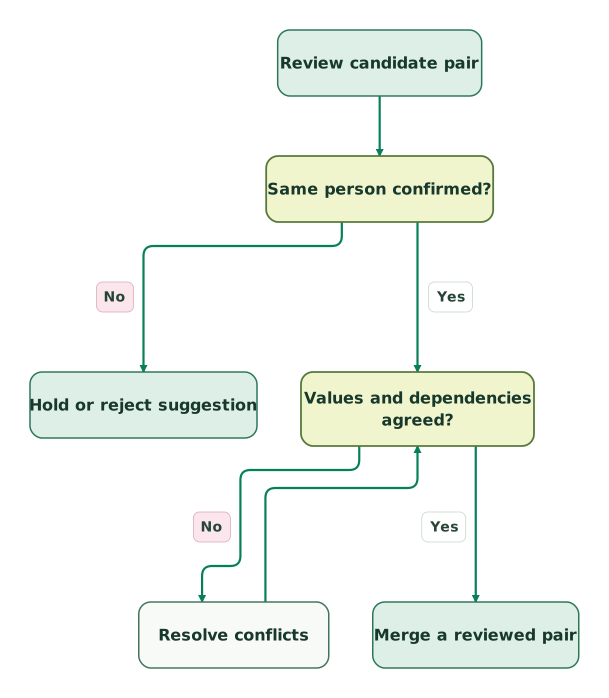
Review identity and dependencies
The merge step is shared with the verification view; a matching name or score alone cannot satisfy the identity decision.
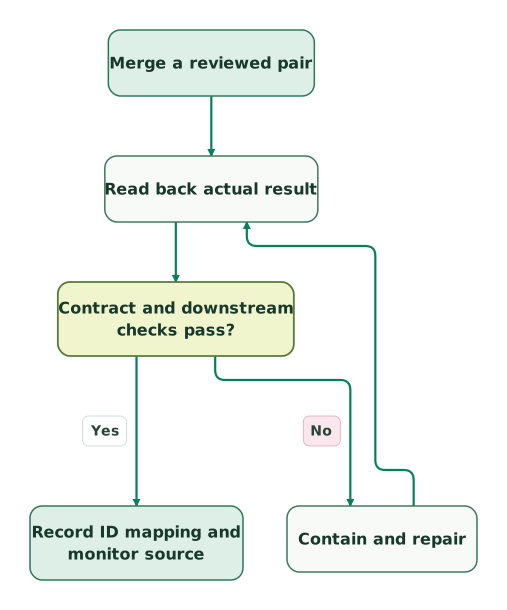
Verify the result and repair mismatches
This view begins at the same merge step after identity and dependency review. It does not add an automatic merge or unmerge action.
Read diagram as text
- Review candidate pair to Same person confirmed?.
- Same person confirmed? to Hold or reject suggestion: No.
- Same person confirmed? to Values and dependencies agreed?: Yes.
- Values and dependencies agreed? to Resolve conflicts: No.
- Resolve conflicts to Values and dependencies agreed?.
- Values and dependencies agreed? to Merge a reviewed pair: Yes.
- Merge a reviewed pair to Read back actual result.
- Read back actual result to Contract and downstream checks pass?.
- Contract and downstream checks pass? to Contain and repair: No.
- Contain and repair to Read back actual result.
- Contract and downstream checks pass? to Record ID mapping and monitor source: Yes
Run one representative pair for each creation route and merge behavior before expanding the cohort. Keep each Record ID in only one planned group at a time. Once a merge changes IDs or values, invalidate stale instructions that refer to the old state.
Reconcile identities and retained context as well as counts. In a simple hypothetical batch of ten disjoint pairs, ten fewer active contacts is an expected count change only if no unrelated creation or deletion occurred. That arithmetic cannot prove which people were combined. Use the per-pair evidence and read-back, then verify that the next normal form, import or sync does not recreate the duplicate.
Checklist
- Identify the source producing each candidate and preserve a scoped before-state.
- Confirm same-person evidence and reject conflicting authoritative keys.
- Select the primary, important property values and required associations.
- Check merge access, duplicate-tool eligibility and applicable beta behavior.
- Review workflows, subscriptions, marketing status and Salesforce pairing.
- Keep planned groups disjoint and invalidate instructions after their inputs change.
- Read back the actual result ID, lineage, selected fields and required context.
- Update downstream ID mappings and verify the next permitted sync.
- Stop the batch on mismatches and reconcile any recovery separately.
- Monitor the repaired source for recurrence before closing the issue.
For help implementing the matching rules, merge review and downstream reconciliation, request a detailed HubSpot implementation scope. Bring one representative pair, its creation path and the systems that still reference its IDs.
Keep reading
Browse all CRM & Lifecycle guides
 CRM & Lifecycle
CRM data hygiene: a monthly checklist and a reusable review command
Review duplicates, owners, lifecycle stages, email restrictions and CRM sync issues. Includes a reusable Claude Code command and a careful repair process.
Jafrin Akter AloLast updated 12 min read
 Tracking & Attribution
HubSpot Forms API: Fix Missing Submissions, Consent and Attribution
Build and troubleshoot HubSpot form submissions with correct fields, cookie context, consent mapping, response handling, retries and a CRM delivery checklist.
Jafrin Akter AloLast updated 12 min read
 CRM & Lifecycle
CRM Property Ownership: Stop Integrations Overwriting Good Data
Stop CRM integrations overwriting useful data with property-level ownership, explicit blank rules and stable matching. Includes a renewal-field contract and tests.
Jafrin Akter AloLast updated 10 min read
HubSpot implementation
See the implementation scope, deliverables and acceptance checks.
Questions people ask
Does rejecting a suggested duplicate delete either contact?
No. Rejecting a pair dismisses that suggestion rather than merging or deleting its records. Treat it as a recorded identity decision and keep the reason where your team can find it. HubSpot allows rejection rollback for up to 14 days, with restrictions when records change, so that option is distinct from an impossible merge undo. See the duplicate-manager guidance.
Should a new employer make one person a new HubSpot contact?
An employer change does not by itself establish a new person. Review your contact model, email history and company associations before creating or merging records. A stable person key may continue while their work email and commercial relationships change. Preserve the business history you need, and check whether an old employer's address is still an appropriate primary address for future communication.
Can an old contact ID remain in warehouse history after a merge?
Yes, retain the original ID in historical source rows when it is needed to explain what was recorded then. Maintain a separate verified mapping to the current HubSpot ID for present-state joins. Keep the account or portal namespace with that mapping, and define when it became valid. Rewriting every old row can obscure the original evidence and change earlier counts unexpectedly.
Is a generic mailbox a safe person-matching key?
A generic mailbox is weak evidence for a unique person because several people may use it or inherit it over time. HubSpot's email matching can connect activity to one contact, but that does not settle your identity model. Decide whether the address represents a shared business endpoint, then preserve individual person identifiers where they exist. Do not manufacture separate consent or ownership from the mailbox alone.
Can a reviewer approve the whole backlog from a sample?
A sample can test whether your process and integration behave as expected, but it cannot prove the identity of every unreviewed pair. Apply the agreed evidence standard to the full proposed merge population. Use sampling to discover additional failure cases, not to waive conflicting IDs or missing context. Keep unresolved candidates separate and report the reviewed population explicitly when measuring cleanup progress.
Sources
- HubSpot: Deduplicate records
- HubSpot: Review and manage duplicate records
- HubSpot: User permissions guide
- HubSpot: Merge records
- HubSpot: Add multiple email addresses to a contact
- HubSpot: Contacts API
- HubSpot: Manage workflow enrollment settings
- HubSpot: Create and customize forms
- HubSpot: Import records for multiple objects
- HubSpot: Resolve duplicate Salesforce records syncing with HubSpot

Written by
Jafrin Akter AloData Engineer and Co-founder at Martechdevs and Growth and Analytics Partners
Jafrin writes practical guides to marketing technology, customer data, analytics and AI workflows. Martechdevs is a Growth and Analytics Partners company.