
HubSpot Lifecycle Stages: Set Them, Correct Them and Keep Salesforce in Step
HubSpot's Lifecycle stage describes where a contact or company sits in your marketing and sales process. Default automatic updates move forward, but manual edits can move backwards. Imports, forms, workflow updates and the Contacts API need the existing value cleared before setting an earlier stage. When a record looks wrong, find the first incorrect property change, identify its writer and check the stage dates before changing more automation.
On this page
A form submission can arrive successfully while the contact lands in the wrong sales queue. Start with the HubSpot Forms API delivery checks if acceptance itself is uncertain. This guide takes over when the record exists and the question is why its lifecycle state is wrong.
The job is to make one property mean the same thing across forms, qualification, deals and integrations. Our CRM and lifecycle work and HubSpot implementation service connect that definition to the writers and reports that depend on it.
What should each default lifecycle stage mean?
Use the default stages as shared business milestones, then document the evidence your team requires for each transition.
HubSpot's default order is Subscriber, Lead, Marketing Qualified Lead, Sales Qualified Lead, Opportunity, Customer, Evangelist and Other. The table pairs those labels with practical decisions to define for your team. HubSpot lifecycle-stage reference.
| Stage | Working interpretation | Evidence to define |
|---|---|---|
| Subscriber | Asked to hear more | Which subscription or signup establishes interest |
| Lead | An interaction beyond subscribing | Which enquiry or conversion qualifies |
| Marketing Qualified Lead, or MQL | Marketing judges the record ready for sales | Approved fit and intent criteria |
| Sales Qualified Lead, or SQL | Sales accepts the potential customer | A recorded sales acceptance decision |
| Opportunity | Associated with a real potential deal | Correct deal and contact/company relationships |
| Customer | An established customer relationship | The closed-won or other approved commercial evidence |
| Evangelist | A customer advocating for the business | An explicit advocacy criterion |
| Other | Outside the other categories | A specific reason, not an unexplained catch-all |
These are not eight required steps that every person must visit. A direct sales opportunity can skip marketing qualification. Nor is the order a ranking of customer value: Other is the final default option, but it does not mean more qualified than Customer.
Keep nearby concepts separate. A deal's pipeline stage describes that deal. Lead Status describes sales follow-up detail. Product qualification describes a signal or assessment. Lifecycle stage should not become the field where all three compete. Use the lead-scoring guide to define qualification evidence before a score is allowed to set MQL.
Why does a stage move forward through one tool but not backwards through another?
HubSpot applies different update behavior to manual edits and automated or imported changes.
Use this mechanism check before diagnosing an unchanged value as a failed sync:
| Change mechanism | Moving to a later stage | Moving to an earlier stage |
|---|---|---|
| Manual property edit | Select the intended value | Can set an earlier value directly |
| Import | Imports can advance the value | Clear the existing value before importing the earlier stage |
| Form submission | Can advance a new or existing record | A later existing stage is not moved backwards by the form |
| Workflow property action | Set the later value | Clear first, then set the earlier value in another action |
| Contacts v3 API update | Can set a later stage | Clear the existing value before setting an earlier stage |
The bulk-update guide documents import restrictions and the workflow sequence. The Contacts API guide confirms the API boundary, while form settings preserve an existing later stage. The lifecycle guide distinguishes direct manual reversal.
For a workflow correction, HubSpot documents two Edit record actions: first select Lifecycle Stage and Clear existing property value, then add another Edit record action setting the intended stage. This workflow capability requires Professional or Enterprise. It is a correction procedure, not a reason to clear lifecycle stages on every form submission.
Agree on the correct value before clearing anything. Capture the previous state and reason, narrow competing writers, and verify the final value after the next normal automation or sync. Treat clear and set as separate steps; do not assume another writer cannot act while the property is empty.
An absent incoming value and an intentional clear also need different treatment in an integration. Do not turn every blank export cell into a lifecycle reset. Use the CRM property ownership contract to define who can propose, clear and correct this property.
Where does the first lifecycle value come from?
The creation path and its settings can establish the first value before your qualification workflow runs.
For a new record created through a form, HubSpot documents this order:
- A lifecycle stage selected in the form settings supplies the initial value.
- Otherwise, the enabled default for newly created contacts or companies supplies it.
- If neither applies, the record uses the first lifecycle stage in the account's display order.
That is why changing the global default may not fix a form with its own stage setting. Test both a new contact and an existing contact with a later stage. Form lifecycle defaults.
Associations add more writers. HubSpot can set stages when a first associated deal is created or a deal is won, and can sync a primary company's stage to its associated contacts. The company-to-contact setting does not make a contact's stage update its company. These native automation settings do not move records backwards. Lifecycle automation and association settings.
Record the current toggles, selected destination stages and relevant associations. A contact linked to the wrong primary company can receive a technically valid but commercially wrong update. A correct contact property does not prove that the company or deal model is correct.
Which forms, deals and product signals should set a stage?
Permit a signal to set lifecycle stage only when it establishes the milestone's agreed meaning.
Here is an illustrative operating policy for a small B2B software company. It is a proposed policy, not HubSpot's default automation or a report of client results.
| Signal | Proposed treatment | Required check | Owner |
|---|---|---|---|
| Newsletter signup | Subscriber | Actual signup and intended communication preference | Marketing operations |
| Guide download | Lead | Valid request; not a test or spam record | Marketing operations |
| Demo request from a qualifying account | MQL | Fit and intent reviewed under the agreed criteria | Marketing |
| Sales accepts the handoff | SQL | Acceptance is recorded, not inferred from an email open | Sales |
| Real opportunity created | Opportunity | Correct deal, person and company associations | Sales operations |
| Verified closed-won deal | Customer | The commercial condition and associated records are correct | Revenue operations |
| Product activation or expansion interest | Update a separate product signal first | Account mapping, freshness and current sales/customer context | Product data owner |
The product-data writer should usually own fields such as qualification status, reason and observation time, while the agreed lifecycle process decides whether those facts justify a transition. A paying customer can show expansion intent without becoming a new lead. The product data in HubSpot guide covers that account-level signal and re-entry design.
Do not use the lifecycle label alone as permission to send a message. Communication preferences, customer status, open opportunities and existing tasks need their own checks. Keep those facts visible instead of forcing every change into a new lifecycle stage.
Write the rules down before building the workflow. The HubSpot implementation planning skill can organize the decisions, field owners and acceptance cases without making a stage label stand in for the whole sales process.
How do you find the first wrong state?
Follow one record's lifecycle property history back to the earliest value that disagrees with the approved rule.
HubSpot's property history shows the changed value, time and source. Review that alongside the actual form, workflow or integration activity. A record's creation source is not necessarily the writer of its later lifecycle value, and property history alone is not a log of every attempted update. Property-history inspection.
For an integration already using the documented Contacts v3 API, these are read-only request shapes. Replace the placeholder with the intended contact ID and use the account's approved authentication; no credential belongs in a diagnostic note.
GET /crm/v3/objects/contacts/{contactId}?properties=lifecyclestage&propertiesWithHistory=lifecyclestage
GET /crm/v3/properties/0-1/lifecyclestage
The first requests the current value and history. The second retrieves the property's available options, including custom stages. Use internal option values in API writes rather than guessing from a renamed display label. These examples are contact-specific; choose the corresponding object API when investigating a company. Contacts API properties and history.
Consider this fictional timeline for demo-contact-001. The approved policy says a guide download creates a Lead, but a copied form has its lifecycle setting left at Customer.
| Time in the example | Writer or investigation | Lifecycle result | What it tells you |
|---|---|---|---|
| 09:00 | Guide form creates the contact | Customer | First value already contradicts the policy |
| 09:05 | Qualification workflow requests MQL | Remains Customer under the forward-only tool rule | Repeating that earlier-stage write is not the repair |
| 09:10 | Sales finds no genuine customer or closed-won evidence | Customer is still displayed | The commercial fact must be reconciled |
| 10:00 | Owner reviews form settings and property history | Incorrect form setting identified | Fix the producer before correcting its records |
| 11:00 | Approved manual correction sets Lead after the form rule is fixed | Lead | Recheck subsequent submissions and automation |
The workflow was not necessarily broken. It was trying to write an earlier value after the wrong first stage. Repairing only the score or launching a Salesforce resync would leave the faulty form able to create more false customers.
After correcting the producer, identify the affected cohort from its actual form and change window. Keep one known-good record and one deliberately excluded record in the test. Review any tasks, emails or reports that already reacted to the erroneous value; correcting the dropdown does not undo those effects.
How should lifecycle stage stay in step with Salesforce?
Treat HubSpot's automatic Salesforce lifecycle transitions as a specific one-way behavior, separate from ordinary two-way field mappings.
In the integration's contact sync rules, the Adjusting Lifecycle Stage setting can update the HubSpot contact when the corresponding Salesforce opportunity changes. It does not move HubSpot lifecycle backwards. Setting HubSpot lifecycle to Customer also does not convert a Salesforce Lead into a Contact. Salesforce integration settings.
A Salesforce Contact must be associated with the opportunity through a contact role for this automatic transition path. An account association or custom relationship field alone is insufficient. For HubSpot's documented closed-won-to-Customer flow, inspect account sync, Automatic lifecycle stage transitions and company Lifecycle stage sync. Company propagation can affect other associated contacts, so test that scope explicitly. Opportunity lifecycle prerequisites.
Use a compact ownership record:
| Fact or decision | Authoritative owner in this example | Lifecycle consequence |
|---|---|---|
| Marketing qualification | Approved HubSpot qualification process | May promote an eligible prospect to MQL |
| Sales acceptance | Sales process | Sets SQL when accepted |
| Opportunity and won status | Salesforce opportunity process | Native transition only through the configured association path |
| Current subscription or churn state | Billing or customer-success source | Separate property; no automatic acquisition reset |
| An incorrect historical stage | Revenue operations owner | Scoped correction with evidence and reporting review |
A custom mapping or middleware job writing lifecyclestage is another writer, even when the native integration is also enabled. Identify it by property history and its own logs. Do not assume the native forward-only safeguard describes every custom integration's clear-and-set behavior.
If the record itself is missing, suspended or paired incorrectly, use the HubSpot–Salesforce sync guide. Here the acceptance question is narrower: did the intended commercial event produce the correct lifecycle value on the correct contact and related company population?
What do lifecycle dates and time-in-stage properties measure?
Lifecycle dates record stage transitions, while latest and cumulative durations describe visits to a stage. They are not interchangeable with contact creation date or a live follow-up clock.
HubSpot automatically maintains the stage properties, including for custom lifecycle stages. Latest and cumulative time require Professional or Enterprise. Lifecycle calculated-property behavior, default contact properties.
| Property | Meaning | Reporting check |
|---|---|---|
| Date entered [stage] | When the record entered that stage | Use with history when records return to a stage |
| Date exited [stage] | When the record left that stage | A current visit may still be open |
| Latest time in [stage] | Duration of the latest completed visit, in seconds | While currently in stage, it can be blank or refer to an earlier visit |
| Cumulative time in [stage] | Completed time across visits, in seconds | Does not keep adding the current open visit until exit |
For example, a contact spent two hours in MQL, left it, and later returned three hours ago. While it remains in MQL, the completed-visit values can still show the earlier two hours. They are not a five-hour running timer. For a current-stage follow-up, combine the current stage with its relevant entry or update-age condition, rather than expecting Latest time or Cumulative time to trigger while the contact is still there.
Moving backwards also affects old and new date properties differently. HubSpot says a direct manual reversal clears the legacy Became a [later stage] date and populates the earlier stage's legacy date. Clearing the stage alone leaves the most recent legacy date. The newer calculated properties are not cleared by moving backwards. Stage correction and date effects.
Preserve the original history before repair and ask the report owner how erroneous transitions should be handled. A contact corrected from Customer to Lead may still have historical evidence of the mistaken Customer entry. Do not declare the conversion report repaired just because today's dropdown is correct.
How should you report lifecycle conversion?
Define a cohort and required path before interpreting the funnel's percentage.
A current count of SQL contacts is a snapshot. A conversion rate needs an entry population, observation period and rule for skipped or repeated stages. Use the same contact or company unit throughout; do not divide qualified companies by individual leads without a defined relationship.
This fictional acceptance cohort has six contacts with a complete observation window. Each started at Lead during the selected cohort period:
| Example contacts | Path reached by the cutoff | Count |
|---|---|---|
| A, B and C | Lead, MQL, SQL | 3 |
| D | Lead, MQL | 1 |
| E | Lead, SQL; skipped MQL | 1 |
| F | Lead only | 1 |
If the rule requires all three stages, 3 ÷ 6 = 50% reached the full path. If the question is whether a Lead reached SQL regardless of MQL, 4 ÷ 6 = 66.7%. Both calculations are valid for their stated questions. Neither should be relabelled as the other's conversion rate.
HubSpot's legacy funnel builder distinguishes All from Any stage membership. The newer custom funnel builder is documented as beta and supports optional intermediate stages; its date range filters activity dates, not simply record creation dates. Record the builder, filters and stage requirements used before comparing reports. Legacy funnel rules, new funnel configuration.
Standard funnel steps use the built-in Lifecycle stage or Deal stage properties and their automatically maintained stage-entry timestamps. Adding a custom option to Lifecycle stage is different from creating a separate custom property called “Lifecycle.” The latter does not automatically gain the timestamps required by that standard funnel path.
When should you add custom lifecycle stages?
Add a custom stage when it represents a distinct shared milestone with an owner, entry evidence and a reporting purpose.
HubSpot makes custom lifecycle stages available across products and plans, with Super Admin permission required to create or edit them. Customization does not automatically include every workflow or reporting capability. Create and customize stages.
| Capability | Published availability or requirement | What to confirm |
|---|---|---|
| Custom lifecycle stages | All products and plans; Super Admin to configure | The stage's meaning and display order |
| Workflow clear/set correction | Professional or Enterprise | The eligible workflow actions and operator permissions |
| Latest/cumulative lifecycle time | Professional or Enterprise | The exact properties available for the record object |
| New custom funnel builder | Beta; listed Marketing, Sales, Service, Data or Content Hub Professional/Enterprise | Account eligibility and Super Admin beta access |
Before adding Product Qualified Lead, ask whether product qualification can overlap existing customer or opportunity states. If it can, a separate qualification property may be more useful than forcing it into one linear lifecycle. Link its owner and expiry to the stage rule instead of maintaining two competing definitions.
Review forms, integrations, reports and automatic defaults before reordering or deleting stages. HubSpot's Used In view helps identify references, and a stage used by records or tools needs those dependencies addressed before deletion. Internal option values and display labels also serve different purposes for integrations.
A custom replacement for Customer needs extra care. HubSpot's contact-property reference says automatic Close date updates from won deals require the default Customer stage, not a custom stage. Confirm Close date and Days to close behavior before changing the milestone that reporting relies on. Contact close-date rules.
What should pass before you change a cohort of records?
Prove the intended transition and its side effects on a small approved test set before expanding the repair.
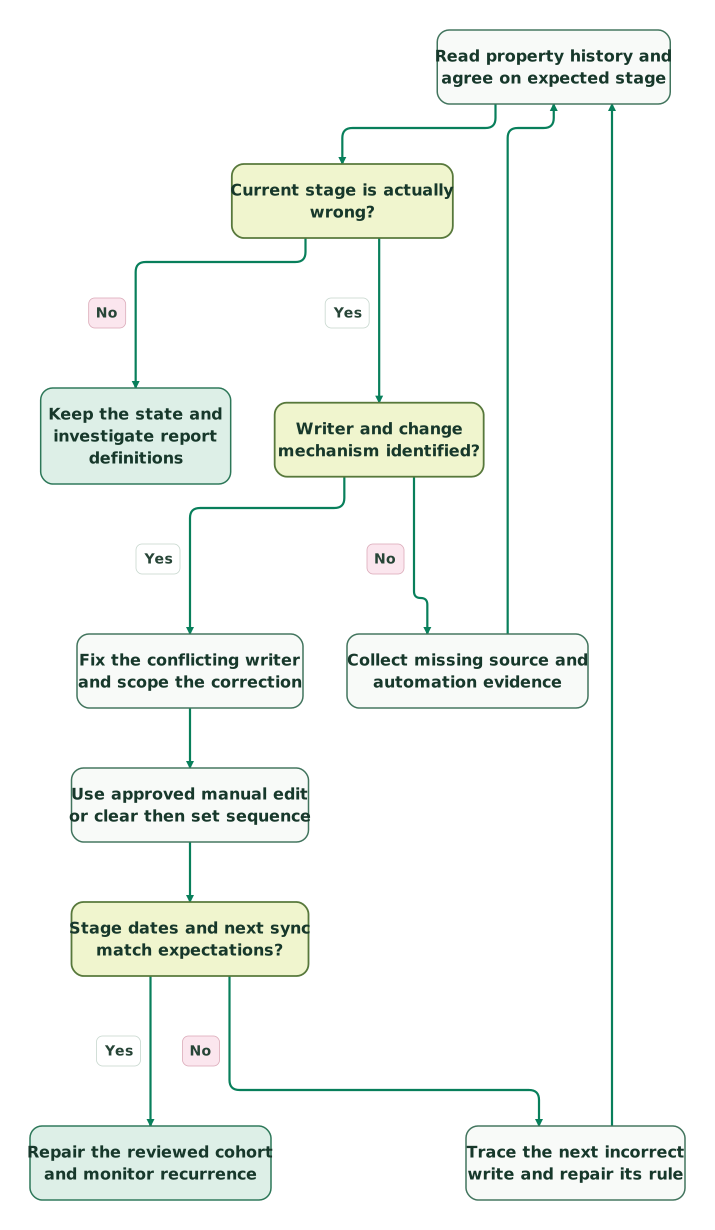
Read diagram as text
- Read property history and agree on expected stage to Current stage is actually wrong?.
- Current stage is actually wrong? to Keep the state and investigate report definitions: No.
- Current stage is actually wrong? to Writer and change mechanism identified?: Yes.
- Writer and change mechanism identified? to Collect missing source and automation evidence: No.
- Collect missing source and automation evidence to Read property history and agree on expected stage.
- Writer and change mechanism identified? to Fix the conflicting writer and scope the correction: Yes.
- Fix the conflicting writer and scope the correction to Use approved manual edit or clear then set sequence.
- Use approved manual edit or clear then set sequence to Stage dates and next sync match expectations?.
- Stage dates and next sync match expectations? to Trace the next incorrect write and repair its rule: No.
- Trace the next incorrect write and repair its rule to Read property history and agree on expected stage.
- Stage dates and next sync match expectations? to Repair the reviewed cohort and monitor recurrence: Yes
Checklist
- One owner has approved what each stage means and which writers may set it.
- A new form-created record gets the intended first stage.
- An existing later-stage contact is not unintentionally treated as a fresh lead.
- Manual reversal and workflow/API/import correction are tested as different mechanisms.
- Clear-and-set corrections finish at the intended value without a competing writer restoring the error.
- Stage dates, historical reporting and downstream tasks are reviewed after correction.
- Primary-company association and propagation scope match the commercial account model.
- Salesforce tests include a valid contact role and a deliberately missing contact role.
- An open opportunity does not cause an existing customer to regress under the native transition setting.
- Skipped stages and re-entry have known expected report results.
- Custom-stage internal values, defaults and edition requirements are confirmed.
- The repaired value survives the next normal form, workflow and sync cycle.
Keep the record IDs, prior value, approved replacement, reason, responsible writer and verification result with the repair. For help defining that scope, request a HubSpot implementation plan around one failing transition and the reports or handoffs it affects.
Keep reading
Browse all CRM & Lifecycle guides
 CRM & Lifecycle
HubSpot Salesforce integration: how the sync works and how to fix errors and suspensions
Fix HubSpot Salesforce integration issues: what each suspension error means and how to clear it, plus sync rules, field ownership and a safe resync process.
Jafrin Akter AloLast updated 21 min read
 CRM & Lifecycle
CRM Property Ownership: Stop Integrations Overwriting Good Data
Stop CRM integrations overwriting useful data with property-level ownership, explicit blank rules and stable matching. Includes a renewal-field contract and tests.
Jafrin Akter AloLast updated 10 min read
 CRM & Lifecycle
Lead scoring model for SaaS: fit, engagement and product signals
Build a SaaS lead-scoring model with separate fit and engagement signals. Use clear weights, account examples and capacity-based validation before rollout.
Jafrin Akter AloLast updated 15 min read
HubSpot implementation plan
Turn stage rules and ownership decisions into a reviewable setup plan.
Questions people ask
Is lifecycle stage the same as Lead Status?
No. Lifecycle stage describes the broader contact or company relationship, while Lead Status captures sales follow-up detail such as New, In Progress or Bad Timing. HubSpot describes those statuses within the SQL part of the process. Keep the fields separate so a salesperson's attempt to contact someone does not redefine the person's marketing qualification or customer history.
Should a churned customer become a Lead again?
Usually keep churn or current subscription state in a separate property instead of automatically resetting acquisition history. A former customer may need a win-back workflow without becoming a person who never bought. Agree the policy with revenue operations and reporting owners. HubSpot permits a manual backwards correction, but the ability to change a value does not establish that the change represents your business correctly.
Why does a form leave an existing Customer unchanged?
A form cannot set an existing record to an earlier lifecycle stage. A customer submitting a guide or demo form can therefore remain Customer even when the form's stage is Lead. Verify that the submission and requested follow-up still arrived. Do not use a lifecycle reset to stand in for capturing a new request from someone the business already knows.
Can I create custom lifecycle stages without a paid plan?
HubSpot lists custom lifecycle stages across all products and plans, with Super Admin permission required to create or edit them. Paid functionality is a separate question: workflow stage updates and latest/cumulative time properties require Professional or Enterprise, and custom reporting has its own entitlement. Confirm the complete workflow you need before assuming that an available dropdown option includes every automation and report.
Does moving a record backwards erase all stage history?
No. HubSpot distinguishes legacy Became a stage dates from newer calculated stage properties. A manual backwards change affects the relevant legacy dates, while newer calculated properties are not cleared. An explicit clear has different legacy-date behavior again. Preserve the original history, document the correction and inspect the report's actual fields before claiming that a mistaken conversion has disappeared from historical reporting.
Sources
- HubSpot: Use contact and company lifecycle stages.
- HubSpot: Update lifecycle stages in bulk.
- HubSpot: Contacts v3 API guide.
- HubSpot: Create and customize forms.
- HubSpot: Forms FAQ and lifecycle defaults.
- HubSpot: Automatic lifecycle stage settings.
- HubSpot: View property history.
- HubSpot: Salesforce integration settings.
- HubSpot: Salesforce opportunity lifecycle prerequisites.
- HubSpot: Default contact properties.
- HubSpot: Legacy custom funnel reports.
- HubSpot: New custom funnel reports.
- HubSpot: Create and customize lifecycle stages.

Written by
Jafrin Akter AloData Engineer and Co-founder at Martechdevs and Growth and Analytics Partners
Jafrin writes practical guides to marketing technology, customer data, analytics and AI workflows. Martechdevs is a Growth and Analytics Partners company.