
HubSpot Tracking Code Not Working? Check Requests, Consent and Identity
When HubSpot tracking appears broken, follow one known visit from the page to the network request, then to the report or contact record you expected. Each stage answers a different question. A script can load successfully while the visitor remains unidentified. A form can create a contact while the earlier browsing history is unavailable.
On this page
Start with a page, a browser session and an expected outcome that you can repeat. “The pricing page should appear on this test contact after an allowed visit and a form submission” is an actionable test. “HubSpot doesn't match GA4” sends the investigation into several systems at once.
This guide covers HubSpot's website tracking code, browser identity and page views. Use the GA4 and HubSpot reporting guide when both systems collect activity and the problem is connecting acquisition, contacts and revenue.
What should you check first when HubSpot tracking stops working?
Check whether the failure affects collection, report inclusion or contact association before changing the installation.
Use a dedicated test contact with an address your team controls. Record the exact page, final hostname, consent choice, device, browser and test time in a private ticket. Keep the same session open while checking its result.
| What you can observe | What it establishes | Next check |
|---|---|---|
| The intended HubSpot code is present | The page contains an installation | Did its scripts load and send a request? |
| A tracking request completes | The browser reached the collection endpoint | Is the correct domain included in reporting? |
| The page appears in traffic reporting | Collection and report inclusion worked for that visit | Was this browser identified as the intended contact? |
| A form submission appears on a contact | HubSpot received a submission | Was the browser context available at submission? |
| A contact has one page view but misses later screens | At least one visit reached the record | Does the application send subsequent route views? |
Keep the distinction between an absent signal and a signal you have not yet located. A contact timeline filter, a different report period or the wrong HubSpot account can hide evidence without explaining what happened in the browser.
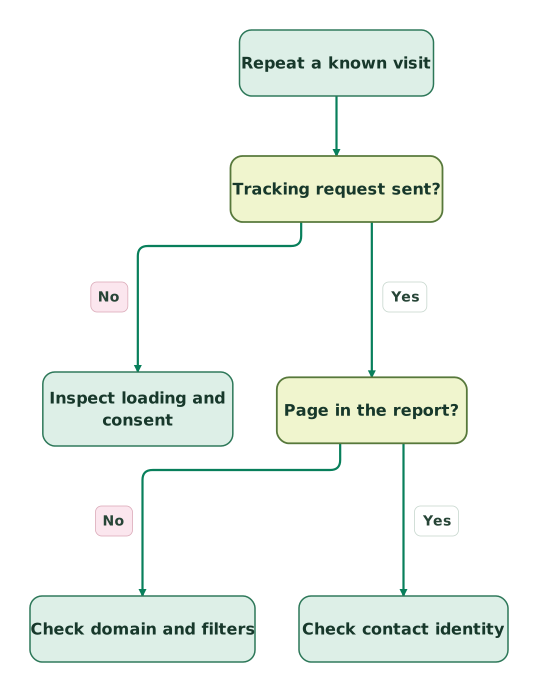
Read diagram as text
- Repeat a known visit to Tracking request sent?.
- Tracking request sent? to Inspect loading and consent: No.
- Tracking request sent? to Page in the report?: Yes.
- Page in the report? to Check domain and filters: No.
- Page in the report? to Check contact identity: Yes
The diagnostic branches at collection and reporting. Investigate identity after establishing that the page visit itself reaches the intended account.
How do you confirm the HubSpot code is installed in the right place?
Use the account's own embed code and give one installation method responsibility for each page.
HubSpot-hosted website pages, landing pages and blogs already include tracking. External pages need an installation; HubSpot's WordPress plugin supplies one when used. A manual external installation goes before the closing body tag. Multiple HubSpot installations on one page are unsupported, and the first code to load can prevent another account's code from loading. HubSpot installation instructions.
Make a small inventory before adding code:
| Page family | Installation owner | Evidence to collect |
|---|---|---|
| Main marketing website | CMS layout or tag manager | Published template and account ID |
| Campaign landing pages | Landing-page platform | A live page from each template |
| Product application | Application code | Initial load and route-change behavior |
| Help center | Help-center theme | A real article page |
| Embedded form | Form integration | Submission request and its page context |
A homepage check cannot establish coverage of every layout. Test at least one page from each publishing system and one page using a different template. A microsite often has a separate footer even when the navigation looks identical.
If the code is managed through GTM, inspect the published container and its firing conditions. “Saved” in a workspace does not establish what the public website loads. Preserve the current version before editing so you can restore it if the change affects forms, chat or consent behavior.
Compare the account in the embed with the account where you are checking the contact. Keep that account identity in the ticket. Removing a second installation without identifying its owner can break another team's configuration.
Which browser requests prove that HubSpot tracking is firing?
Inspect the script requests and the analytics request separately, because loading JavaScript and sending a page view are different stages.
Open developer tools before reloading. In Network, find the account-specific JavaScript and inspect its status. HubSpot's expected script statuses are 200 or 304; its manual firing check looks for a successful __ptq.gif request. The loader and analytics script can both appear normally. A missing match in the original page source is inconclusive when GTM inserts the code dynamically. HubSpot's request checks.
For the test visit, save these observations:
- The final page URL after redirects.
- The account-specific script URL and status.
- Whether a collection request appears after the permitted page view.
- Any browser console error or blocked-request reason.
- The request initiator, which helps locate the code that caused it.
Avoid treating every HubSpot filename as another installation. Trace the initiator and account instead. Likewise, a “tag fired” message in a tag manager proves execution reached that tag; the network result establishes whether the browser actually made the downstream request.
If a security policy blocks a request, give the developer the exact blocked destination and browser error. Review the narrow policy change required for the intended integration. Disabling the entire policy hides the cause and changes the site's security behavior.
Run an unextended test browser alongside the affected browser when extensions are suspected. Preserve the failing case. Otherwise, the team can report a pass that depends on a browser configuration customers do not share.
How can consent allow a form submission while page history is missing?
Form submission and permission to associate browsing activity are separate parts of the journey.
HubSpot explains that a visitor can become a contact without accepted tracking cookies while page-view activity remains absent from that contact. A server-side or proxied form that omits the tracking cookie can also lose the browser-to-contact association. How HubSpot associates visits with contacts.
Test the actual consent states your site offers:
| Test state | Check in the browser | Check after submission |
|---|---|---|
| Before any choice | Which scripts, requests and cookies are permitted by your configured policy | Whether submission remains usable |
| Accepted tracking category | Whether the expected tracker is allowed | Whether the known visit joins to the contact |
| Rejected tracking category | Whether the configured restriction is respected | Whether the business submission still arrives as intended |
| Consent withdrawn | Whether subsequent tracking follows the withdrawal | Whether later activity is handled according to the new state |
A visible banner alone does not show that its choices control every installed tag. Test the resulting behavior. If the banner provider and the tag manager both control HubSpot, document which system releases or blocks the tracker.
HubSpot's doNotTrack method sets a browser cookie that prevents its tracker from collecting analytics, including page views and identification. That state persists across sessions. Include it in the investigation when one tester consistently sees no activity. HubSpot do-not-track behavior.
Use a fresh, purpose-built test session to compare behavior. Never clear or override visitors' preferences merely to increase recorded traffic. If a legitimate refusal explains the missing history, record the measurement boundary and keep the form working.
The HubSpot consent listener applies to HubSpot's consent banner. A third-party consent manager needs its own supported integration and category mapping. Do not assume that adding a listener reads another vendor's consent state.
Why can HubSpot receive requests but show no traffic for the website?
HubSpot's domain configuration and reporting filters determine which collected visits you see in the selected report.
For an external website, add the relevant domain in Tracking Code settings under Advanced Tracking and Additional site domains. Adding a specific subdomain covers that subdomain; adding the root domain covers its subdomains. Review cross-domain linking separately when visitors move between different root domains. HubSpot site-tracking configuration.
Create a hostname checklist from the real journey. For example, a visitor may arrive on www.example.com, read a page on learn.example.com, then submit on events.example.net. Those addresses belong to different deployment surfaces and may need different checks.
Before reinstalling anything:
- Confirm the selected HubSpot account and report domain.
- Compare the test time with the report's date and time-zone scope.
- Inspect internal-traffic exclusions and other active report filters.
- Check whether the journey redirected to another hostname.
- Locate the same known page in a narrower report view.
An internal-traffic exclusion is easy to overlook during QA. Test from an allowed environment rather than disabling a useful exclusion for everyone. HubSpot provides account-level controls for excluding traffic from site analytics. Traffic exclusion settings.
When the symptom is referral fragmentation between owned sites, trace the cross-domain transition and its parameters. A new tracking snippet on the destination does not, by itself, establish continuity between the two visits.
How do you connect a tracked browser to the correct HubSpot contact?
Identify the actual visitor through an appropriate form or supported identity call, then verify the resulting contact association.
For a custom form, follow the checks to pass the tracking cookie with a Forms API submission only when that browser context is available and permitted.
An imported contact record does not tell HubSpot which browser belongs to that person. Cookie resets and shared devices also complicate identity. HubSpot uses form email and browser context when making associations, so repeated tests from a single browser can produce confusing contact histories. HubSpot visitor identity rules.
Use a fresh browser session for a new-person test and a retained session for a returning-person test. Keep those two tests separate. For a shared-device flow, check the identity options available in that form editor. Legacy forms provide an “Always create contact for new email address” setting, which also affects prepopulation and tracking when the address changes. Legacy form identity options.
Applications that already know the signed-in user's email can use the tracking API's identify method. The method sets identity in the tracker; an ensuing page-view or supported custom-event call sends it to HubSpot. Only supply the actual known viewer's identity. A shared placeholder email links unrelated visitors to the same contact. HubSpot tracking API identity behavior.
Do not add a fictitious page view solely to flush identity. Plan identification before the next real view, or use an appropriate supported event that genuinely occurred. Decide what happens on sign-out and account switching before enabling identification throughout an application.
After submission, compare the contact's email, page history and relevant property history. A contact count alone cannot reveal whether the right browser was associated with the right person.
How should a single-page application send HubSpot page views?
A single-page application should load the tracker once and send a page view for each later route transition that your measurement design counts as a new page.
HubSpot records an initial page view when its tracking code loads. Subsequent virtual views use setPath followed by trackPageView. Avoid queuing an extra initial page-view call before loading the tracker. HubSpot page-view method, setting the tracked path.
This small adapter shows the route-level deduplication rule. It expects a canonical, approved path from your router. Initialize it only after the initial view has been handled, and call it from the router's completed-navigation event while tracking is permitted.
function createHubSpotRouteTracker(queue, initialPath) {
  function validatePath(path) {
    if (
      typeof path !== "string" ||
      !path.startsWith("/") ||
      path.startsWith("//") ||
      /[?#\s]/.test(path)
    ) {
      throw new Error("Use an approved path without query or fragment");
    }
  }

  validatePath(initialPath);
  let previousPath = initialPath;

  return function trackRoute(path) {
    validatePath(path);
    if (path === previousPath) return false;

    queue.push(["setPath", path]);
    queue.push(["trackPageView"]);
    previousPath = path;
    return true;
  };
}
The path policy here deliberately excludes query strings and fragments. It also requires the application to supply a path that contains no personal information. The validator cannot recognize a person's name or email embedded in a path segment.
Use a named route such as /account/settings instead of copying an unrestricted URL. A hash-based router needs an explicit mapping from its route to the approved path; passing the raw hash will be rejected.
Expected sequence: initializing at /pricing sends nothing, repeating /pricing sends nothing, moving to /demo sends one path update and one view, and returning to /pricing sends another view. A later visit to the same page is meaningful. Only consecutive duplicate route notifications are suppressed.
This helper does not manage tracker readiness or consent transitions. Wire those controls in the application and test them separately. If consent becomes available after navigation, establish which initial view the tracker actually sent before setting the adapter's starting path.
What evidence is enough to close a HubSpot tracking issue?
Close the issue when a repeated, permitted journey produces the intended request, report entry and contact association across the affected page types.
Use this release checklist:
Checklist
- One named installation owner and the intended HubSpot account on each page family.
- Script and collection evidence from the public version.
- Consent acceptance, rejection and withdrawal behavior checked.
- External domains and test-traffic exclusions reviewed.
- A fresh-contact test and a returning-contact test separated.
- Initial load, route transition and browser back navigation checked where applicable.
- Form submission checked independently from page-history association.
- A rollback version and a person responsible for post-release checks recorded.
Keep a short before-and-after trace in the issue. The useful evidence is a controlled journey and its corresponding records, with personal values removed from shared screenshots or logs.
A successful repair restores collection going forward. HubSpot cannot recover page tracking that never ran during the gap. HubSpot troubleshooting guidance. Mark the affected interval in your internal reporting notes rather than filling it with invented activity.
If the installation spans several websites, a product application and custom forms, assign one owner to the full acceptance test. Our analytics and tracking implementation work can cover that handoff, including consent behavior, browser identity and the CRM evidence the marketing team needs.
Keep reading
Browse all CRM & Lifecycle guides
 CRM & Lifecycle
Salesforce to HubSpot migration: plan, field mapping and cutover checklist
Plan a Salesforce to HubSpot migration: phases, a field mapping template, load order, Smart Transfer limits, reconciliation checks and a safe cutover.
Jafrin Akter AloLast updated 21 min read
 CRM & Lifecycle
HubSpot implementation: a phased plan, template and launch checklist
Implement HubSpot in five phases: scope, data model, migration, integrations and launch. Includes a plan template, a worked example and a go-live checklist.
Jafrin Akter AloLast updated 22 min read
 Tracking & Attribution
HubSpot Google Ads Integration: 7 Checks for Missing Leads and Conversions
Fix HubSpot Google Ads integration problems across account access, tracking templates, native lead forms, lifecycle events, conversion values and campaign goals.
Jafrin Akter AloLast updated 12 min read
Analytics & tracking
See the implementation scope, deliverables and acceptance checks.
Questions people ask
Does a failed HubSpot automatic validation mean the installation must be replaced?
A failed automatic validation is a reason to inspect the page manually. HubSpot warns that its checker can return a false failure for some websites. Preserve the existing installation while checking the actual browser requests and intended account. Replace or change code only when that evidence identifies a concrete problem. HubSpot validation guidance.
Should a HubSpot form and the website tracker use the same account?
Use the intended account consistently for the website and its lead-capture flow. During troubleshooting, compare the tracker account, form destination and contact record before changing consent or reporting settings. If separate accounts are intentional, document the boundary and test what each account receives; a submission visible in one account does not establish page-history availability in another.
Is a PDF download a HubSpot page view?
Opening a file from HubSpot's files tool does not count as a page view or provide the same page-visit activity used for workflow enrollment. Track the meaningful interaction on the containing webpage if you need download intent, then distinguish that click from proof that someone read the document. HubSpot file-tracking limitations.
Can a website redesign break HubSpot tracking without changing the account?
A redesign can change the templates, redirects, consent integration or navigation events that tracking depends on. Include measurement acceptance criteria in the redesign release. Check several page families and a real form journey on the published site. Preserve the previous implementation until its replacement has an owner, a rollback path and evidence from the affected journeys.
Should every modal or tab change create a HubSpot page view?
Count a modal or tab as a page view only when it represents a distinct page in your measurement design. Otherwise, use an appropriate interaction event. Write the rule before implementing the router hook so rerenders, validation messages and cosmetic tabs cannot inflate page counts. Keep the same rule across application releases and explain it to report users.
Sources
- Install the HubSpot tracking code
- Troubleshoot the HubSpot tracking code
- Set up site tracking in HubSpot
- Track visitors in HubSpot
- HubSpot tracking code API
- Track a page view
- Set the current page path
- Enable do not track
- Add a privacy consent listener
- Exclude traffic from site analytics
- Legacy form identity options

Written by
Jafrin Akter AloData Engineer and Co-founder at Martechdevs and Growth and Analytics Partners
Jafrin writes practical guides to marketing technology, customer data, analytics and AI workflows. Martechdevs is a Growth and Analytics Partners company.