
6 Braze Implementation Mistakes and How to Fix Them
The six Braze implementation mistakes to check first are split user profiles, API calls that hide failed records, duplicate trigger events, unplanned Canvas re-entry, stale eligibility after a delay and suppression gaps. These faults can send the wrong message, repeat it or leave an eligible customer without one. Prove the expected sends and suppressions on a small journey before importing the full audience.
On this page
- Split profiles: one person's events and preferences land on different profiles.
- Hidden API failures: the job reports success while a profile update or event is missing.
- Duplicate triggers: one business action starts the journey more than once.
- Unplanned re-entry: a customer begins another Canvas run before the first one finishes.
- Stale eligibility: the customer completes or cancels during a delay but still receives a reminder.
- Suppression gaps: a message goes out despite the current permission or exclusion rule.
Use a custom attribute for current state, such as a plan being Pro, and a custom event for something that happened, such as a trial starting. Keep the event's time and business-object reference with it. Braze's custom attributes and custom events serve these different jobs.
The release evidence should explain why a person entered, what they received, why another message was withheld and which system supplied the deciding information. A visual preview cannot establish those behaviours.
What should you define before building a Canvas?
Define one customer outcome, its authoritative event and its stop conditions before drawing the Canvas. For example, completing setup should mean the product successfully processed the first import, rather than someone clicking a setup button.
If you are still evaluating Braze against Customer.io, use this specification as a trial script for both. Once Braze is selected, match the release scope to the channels, data usage and support in your Braze pricing agreement.
Then write the entry rule, recipient identity, required permissions, relevant object ID and stop conditions. If the journey concerns an order, include that order's identity. A person may have several open orders with different states.
Lifecycle messaging implementation is most valuable here when product, marketing and engineering currently use different definitions. Agreeing on “activated” or “paid” before launch prevents the messaging platform from becoming the place those contradictions surface.
Use a compact specification that the release owner can sign off:
| Decision | Example for first-import onboarding | Evidence to retain |
|---|---|---|
| Entry | Eligible workspace created; one permitted administrator selected | Workspace ID, recipient ID, source timestamp |
| Success | Backend confirms the first successful import | Import ID and completion time |
| Stop | Success, cancellation or lost eligibility | Current state and reason |
| Re-entry | One reminder episode per workspace setup | Episode ID and repetition rule |
| Ownership | Named journey owner and integration owner | Rollback path and monitoring contact |
This is a hypothetical specification. Adapt the rules to the product before configuring the platform. If you want help building or repairing these rules in your workspace, see our Braze implementation services.
What happens when identity differs across sources?
Different identifiers can split one customer across profiles and leave triggers or suppression attached to the wrong record. Use a consistent person identifier across the SDK, backend and imports, and document its relationship to account, subscription and order IDs.
Braze's SDK documentation uses changeUser to identify the active person. It warns against assigning everyone the same default ID at logout. It also documents platform- and version-specific logout and push-unregistration methods. Check those instructions against the exact SDK versions in your application. Setting Braze user IDs.
Do not assume the web, iOS and Android teams have implemented the same lifecycle.
Build an identity specimen covering anonymous use, first signup, an existing customer's second device, logout, shared-device account switching and reinstall. For each transition, specify the expected profile and allowed communication.
Inspect important history rather than assuming every anonymous field or event merges into an existing profile. Merge behaviour is a specific technical contract, not a general promise that all past activity will appear everywhere.
The single customer view guide helps distinguish person identity from account relationships. This matters when a user belongs to several workspaces and an onboarding message concerns only one.
Does an API success prove every record succeeded?
An API success does not prove every object succeeded. Braze's /users/track can return success with non-fatal errors, and accepted data is queued for asynchronous processing. Inspect the response body and reconcile the intended profile after processing. Create and update users.
The standard request limit is 75 objects combined across attributes, events and purchases. Legacy accounts can have separate limits of 75 for each type. A hypothetical request with 50 attribute objects and 30 events totals 80, so it exceeds the standard limit even though each array is below 75. Split the request before sending.
For customers with data points in their pricing, Braze applies a burst limit of 3,000 requests per three seconds. Other contracts can have different limits. Confirm the account's limits in Settings → APIs and Identifiers → API Usage Dashboard before sizing a migration or a retry queue. Request and rate limits
The dangerous implementation logs “batch sent” and discards the individual errors. Marketing then sees a missing audience member while engineering sees a green job.
Record the source record ID, destination identity, payload version, attempt time and returned error for failed objects. Keep sensitive values out of general logs. Make the failure actionable without exposing unnecessary personal data.
If one object fails in a partially successful request, do not blindly replay the entire batch. Determine what was accepted and what needs correction. For event delivery, establish duplicate protection in the source or integration and verify the destination's supported behaviour rather than assuming retries are harmless.
A migration reconciliation should compare expected records with accepted, rejected and deliberately excluded records. “No exception thrown” is not a reconciliation.
Can two systems trigger the same customer action?
Yes. The browser, order service and warehouse sync can each report purchase_completed for a single purchase, producing repeated journey triggers unless the integration controls duplicates.
Choose the authoritative producer for each event used to trigger a journey. If browser activity is useful for analytics, give it a different semantic name from the server-confirmed business outcome.
For example, “checkout submitted” is an intention. “Order confirmed” is a state accepted by the order service. A payment webhook and a thank-you-page view should not both become independent confirmations.
Define a stable business key such as the order ID and event type. Preserve it in your own delivery ledger. An automatically generated identifier for each retry does not help recognise a repeated business event.
This is especially important when replaying historical data. Keep backfills from accidentally activating live journeys unless the replay is intentionally designed to do so. Use a tested import route or an explicit audience exclusion, and record which mechanism provides the separation.
For historical purchases, write the event-time boundary and present business-state rule before importing. Test an old purchase whose customer has since completed or cancelled the relevant action. Preserve useful history without making that old event eligible for a new reminder by accident.
Does Canvas entry mean a message was received?
Canvas entry does not prove that a message was received. Braze distinguishes Canvas re-entry from message receipt. A user can enter, receive nothing, and still require re-eligibility to enter again. A short re-eligibility interval can also permit overlapping journeys before the first one ends. Canvas re-eligibility.
That matters for repeated events. A customer who opens checkout three times may deserve one reminder for the latest relevant checkout, not three concurrent sequences.
Choose the unit of the journey: person, account or business object. Then state which repetition is allowed. “Once ever,” “once per order” and “again after a cooling period” are different policies.
Do not use a profile-level flag as a substitute for order-level state if a customer can have several orders. A flag such as “reminder sent” can suppress the wrong order or permit a repeat when overwritten.
The right design may require preparing eligibility outside Braze and triggering a controlled journey. A visual flow is not a reason to force every state-management problem into profile attributes.
Why must eligibility be checked after a delay?
Eligibility must be checked again because a customer can complete, cancel or lose eligibility during the wait. A reminder selected at entry can be wrong by send time.
Braze documents entry controls and Canvas exit criteria, including events and audience conditions that stop further messages. Configure explicit stop conditions and validate their timing in the chosen journey. Creating a Canvas.
For an activation journey, possible stop reasons include completed setup, cancelled account, changed product eligibility or a manually managed exception. Keep those reasons visible rather than representing every exit as “not engaged.”
Avoid checking a stale “has not activated” field without knowing its update delay. If the product event arrives quickly but a warehouse-derived profile field refreshes overnight, the two can disagree for hours.
Document the freshness requirement next to the rule. Where a delayed field cannot support the customer promise, change the data path or the message timing.
When eligibility comes from warehouse models, define audience exit rules from the warehouse with a maximum acceptable delay. Keep a fast product-state path for a stop condition that cannot safely wait for the next scheduled sync.
Do caps, quiet hours and unsubscribe do the same job?
No. Permission, current relevance, timing and message pressure need separate controls. A person can pass one and fail another.
Braze's frequency-capping documentation says a globally capped Canvas Message step can advance without sending. It does not automatically remove the person from the Canvas. In-app messages and Content Cards also have different treatment from capped channel sends. Frequency-capping behaviour.
Therefore, the next step must make sense even if the previous message never arrived. A message saying “as we explained yesterday” is fragile when yesterday's send could be skipped.
Use the lifecycle frequency caps guide to define a cross-journey pressure policy. Separately decide how critical operational messages are classified and reviewed.
For email, global subscription status and category-level groups serve different purposes. Braze also provides targeting configurations capable of including unsubscribed users, so review the actual campaign settings rather than assuming the default always protects the audience. Email subscription controls.
Keep promotional journeys within the intended permission rules. A platform's ability to send is not proof that your chosen message should be sent.
During a rollback, preserve the latest customer permissions. Restoring a previous journey or integration version must not restore an old audience snapshot that predates an unsubscribe. Reconcile permission updates received during the incident, test a changed-preference case and resume only when the active send path reflects current permissions.
How would an onboarding journey respond to changing state?
Check the latest product state before each consequential reminder, and route completed, failed and cancelled accounts differently. Consider an illustrative analytics product where a new account must connect a data source and process its first import.
Define activation as a successful import confirmed by the backend. A click on “connect” is insufficient because credentials can fail after the click.
The proposed sequence is:
- A new eligible account identifies a permitted onboarding recipient.
- The initial connection guidance is offered.
- After a chosen delay, the system checks current account state.
- Completed imports end the reminder path.
- Failed imports route to troubleshooting.
- Accounts with no attempt receive a relevant connection reminder.
- Cancelled or otherwise ineligible accounts leave the journey.
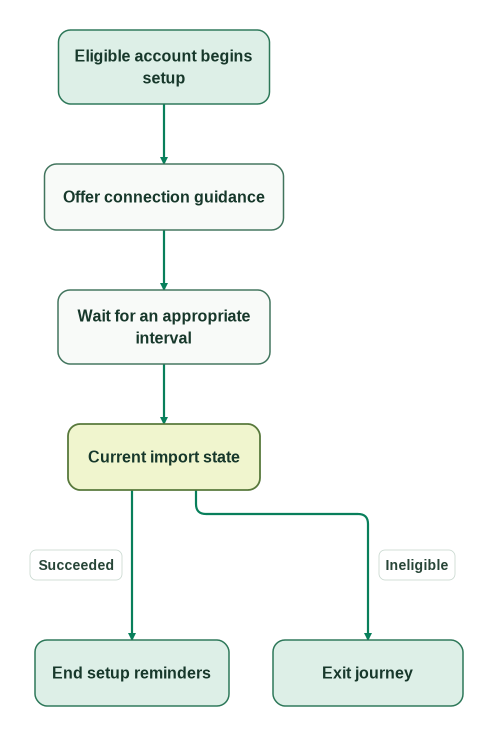
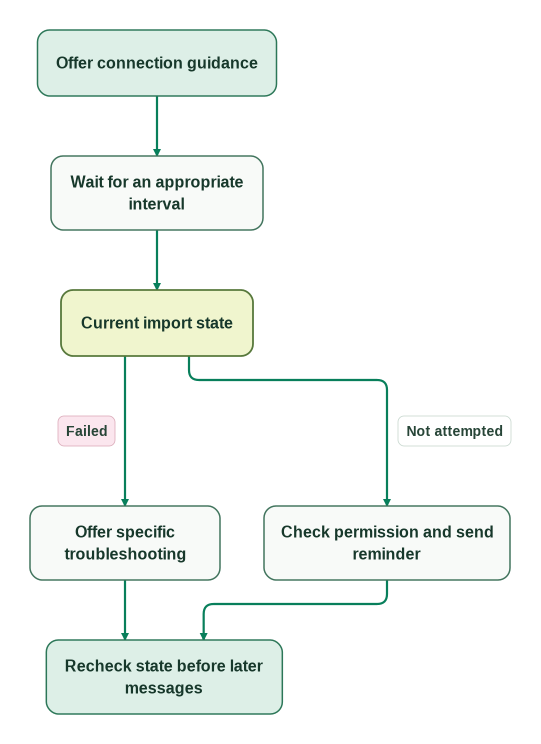
Read the current-state decision in two focused views: completed or ineligible accounts stop, while failed or unattempted imports follow the relevant help path. The repeated guidance, delay and state check refer to the same original journey, not extra sends.
When setup reminders stop
This view shows the Succeeded and Ineligible branches of the same current-state check. Failed and Not attempted continue in the help view.
When setup needs help
Guidance, delay and current state are the same steps shown in the stop view. This view shows Failed and Not attempted; recheck state before any later message.
Read diagram as text
- Eligible account begins setup to Offer connection guidance.
- Offer connection guidance to Wait for an appropriate interval.
- Wait for an appropriate interval to Current import state.
- Current import state to End setup reminders: Succeeded.
- Current import state to Offer specific troubleshooting: Failed.
- Current import state to Check permission and send reminder: Not attempted.
- Current import state to Exit journey: Ineligible.
- Offer specific troubleshooting to Recheck state before later messages.
- Check permission and send reminder to Recheck state before later messages
The delay is a product decision informed by how long setup normally takes. Do not copy a universal “24-hour reminder” without considering whether the customer needs administrator access or external approval.
Use one synthetic account to complete activation during the delay, another to fail connection, and another to cancel. Verify the resulting message or suppression in each case. Retain the evidence for every branch before expanding the journey.
How do you diagnose a missing message?
Follow the decision chain in order: source event, correct profile, Canvas entry, current eligibility, permission, channel reachability, delivery controls and final delivery outcome.
Do not start by disabling every filter. That can make the test message arrive while hiding the reason production customers were protected from it.
Keep the expected behaviour, relevant timestamps and observed result together:
| Symptom | Possible cause to check | Corrective action | Proof of the fix |
|---|---|---|---|
| Business action has no matching profile update | Rejected object or mismatched identity | Correct the failed payload and replay only what needs it | Intended profile and source record reconcile |
| Updated profile does not enter Canvas | Entry, schedule or re-entry rule excludes it | Correct the rule only if it conflicts with the specification | Eligible fixture enters; excluded fixture stays out |
| Canvas entry produces no message | Current eligibility, permission or delivery control blocks it | Identify the exact gate before changing configuration | Intended send and intended suppression both pass |
| Send count exists but receipt is unproven | Provider rejection, bounce or device delivery problem | Investigate channel evidence and repair the specific cause | Provider/device outcome is recorded separately from send |
You can inspect Canvas configuration with the Braze MCP server when the account supports it. Scope that inspection to configuration, then use the authorised delivery logs for recipient-level evidence. A prompt asking for read-only work is not a substitute for restricting the available tools and permissions.
What evidence should approve launch?
Approve launch when synthetic cases prove both the intended sends and the intended suppressions, and someone owns the failure response. Use this Braze onboarding checklist and record the result beside each check:
Checklist
- SDK, API and import paths use the intended person identity.
- Shared-device and logout scenarios follow the installed SDK's supported behaviour.
- Partial API failures are visible and replayed deliberately.
- One authoritative source emits each journey-triggering business outcome.
- Historical imports cannot accidentally enter production journeys.
- Re-entry rules prevent unintended concurrent reminders.
- Completion, cancellation and changed eligibility stop stale messaging.
- Later steps remain coherent if an earlier message is skipped.
- Permission changes reach every relevant send path.
- A release owner can stop the journey and investigate affected recipients.
Launch a small, observable journey before expanding the canvas. Use the Braze implementation QA skill to organise identity, entry and suppression evidence for that release.
Hand over the event and identity contracts, field ownership, journey specification, acceptance evidence and rollback instructions. Include where an operator checks failed imports, suppressed messages and stale data. A new owner should be able to explain one customer's path without asking the original implementer to reconstruct the design.
For help isolating the failure, the $99 martech audit includes a written assessment and a one-hour specialist call. For a defined implementation or repair, request a detailed Braze implementation scope with the journey specification, sample failures and required channels.
How long does a Braze implementation take?
The Braze implementation timeline depends on channel integration, data migration and the journeys you must prove before launch. Braze's current onboarding guide describes four phases: discovery and planning, integration, quality assurance, and maintenance. Braze says discovery and planning takes about six weeks on average and that customers typically integrate in one to six weeks, depending on scope and how much time the team dedicates. Use those phases to identify dependencies, and treat Braze's typical durations as a reference rather than a commitment for your project. Braze integration overview.
The following release gates are a proposed planning method, not vendor service-level promises:
| Phase | Work that drives the schedule | Gate before expanding |
|---|---|---|
| Discovery and planning | Agree customer outcomes, identity, events, consent and initial journeys | Owners approve the data and journey specification |
| Integration | SDK/app work, channels, imports and ongoing source updates | A representative record reaches the intended profile |
| Quality assurance | Test identity transitions, triggers, suppression and channel behaviour | The launch checklist passes with retained evidence |
| Maintenance | Assign monitoring, SDK updates, incident response and journey changes | Operators can investigate and roll back the pilot |
Push and in-app work depend on the application integration, so plan engineering capacity and app release dates alongside marketing work. When you migrate to Braze from another platform, the imports need identity mapping and reconciliation before the migrated audience can become eligible. Braze's guide covers SDK/API setup, historical imports and testing these connections; a working email preview does not complete those dependencies.
Email introduces domain configuration, authentication and an appropriate IP-warming plan. Confirm the sending setup and ramp with the delivery owner rather than treating the full migrated audience as day-one send volume. Braze email prerequisites.
Journey count matters because each rebuilt journey has its own entry, exit, content, permission and reporting tests. Retire unused paths before estimating the migration. When moving from Responsys into Braze, include preference mapping and the old platform's shutdown conditions. If you are moving from Braze to Customer.io, preserve the same acceptance tests for the destination. Agree the first useful release before assigning a calendar date to the whole programme.
Keep reading
Browse all CRM & Lifecycle guides
 CRM & Lifecycle
Braze Pricing: What Braze Costs, How MAU and Credits Are Billed, and a Quote Checklist
How much does Braze cost? Braze prices by quote, from MAU, profiles and Action Credits. See what drives the bill and build a quote you can compare.
Jafrin Akter AloLast updated 9 min read
 Martech AI
Braze Remote MCP Server: Claude, ChatGPT and Cursor Setup
Braze's local MCP server is deprecated. Connect the remote one to Claude, ChatGPT or Cursor via OAuth, see which tools write, plus 8 prompts.
Jafrin Akter AloLast updated 13 min read
 CRM & Lifecycle
Braze to Customer.io migration: preserve preferences, journeys and delivery
Migrate from Braze to Customer.io with verified exports, an identity crosswalk, preference mapping, push re-registration, a safe cutover and tool checks.
Jafrin Akter AloLast updated 17 min read
Braze implementation QA
Download the skill for a scoped review of the configured workflow.
Questions people ask
Should you use a custom attribute or a custom event in Braze?
Use a custom attribute for current state, such as the customer's plan, and a custom event for an occurrence, such as trial_started. An attribute value alone does not preserve the history of when each change happened. Give the event a timestamp and relevant business-object reference, then decide which state must still be true when the message sends. Attributes, events
What is Braze's rate limit for tracking user data?
For /users/track, customers with data points in their pricing have a burst limit of 3,000 requests per three seconds. Other accounts use contract-specific limits. The standard request limit is 75 objects combined across attributes, events and purchases; legacy accounts can have separate limits. Confirm yours in Settings → APIs and Identifiers → API Usage Dashboard before sizing batches. Braze limits
Can you implement Braze without a partner?
Yes, if your team can own identity, SDK and API integration, channel setup, journey rules, testing and ongoing support. Assign those responsibilities before deciding whether outside help is needed. Braze's onboarding phases provide a useful work breakdown; your contract determines which vendor services are included. Bring in specialist help for a defined gap and require the same acceptance evidence from every implementer. Onboarding responsibilities
Who should approve the first Braze journey?
The journey owner should approve the intended customer experience, and the integration owner should approve the data and delivery evidence. Include the person responsible for consent and channel operations where those decisions apply. Keep one named release owner who can pause the journey if an acceptance test fails after launch.
How should a Braze test workspace differ from production?
Use a separate testing workspace and its own application API key, as Braze's integration guide recommends. Populate it with synthetic cases whose expected identities and messages are known. Keep production audience credentials and outbound destinations out of the test path, then repeat the critical checks when validating the controlled production release.
Sources

Written by
Jafrin Akter AloData Engineer and Co-founder at Martechdevs and Growth and Analytics Partners
Jafrin writes practical guides to marketing technology, customer data, analytics and AI workflows. Martechdevs is a Growth and Analytics Partners company.