
Braze to Customer.io migration: preserve preferences, journeys and delivery
Data Engineer and Co-founder, martechdevs
Last updated 12 min read
A Braze to Customer.io migration is complete when the right people receive the right messages from the new system, with their preferences and journey state preserved. Importing a profile file is one step. The harder work is moving active journeys, coordinating mobile app adoption and changing send ownership without duplicate or missing messages.
Last updated: 2 September 2026.
Establish why you are moving and what must survive
Write down the specific reason for migration: a simpler operating model, a better fit for product data, a contract change or capabilities your current setup cannot deliver economically. Then identify what a successful move must preserve.
Inventory active campaigns and Canvases, transactional sends, channels, templates, reusable content, audience rules, preferences, custom attributes, source events and reporting dependencies. Assign an owner to each journey and classify it as rebuild, retire or keep temporarily in Braze.
Do not carry an unused journey into the new platform just because it exists. Conversely, a low-volume password or billing message may be more important than a high-volume newsletter.
Before committing to a move, check the destination's data model, feature tier and ongoing cost. The Customer.io and lifecycle platform comparison gives you a way to price the actual workload and test the difficult journeys.
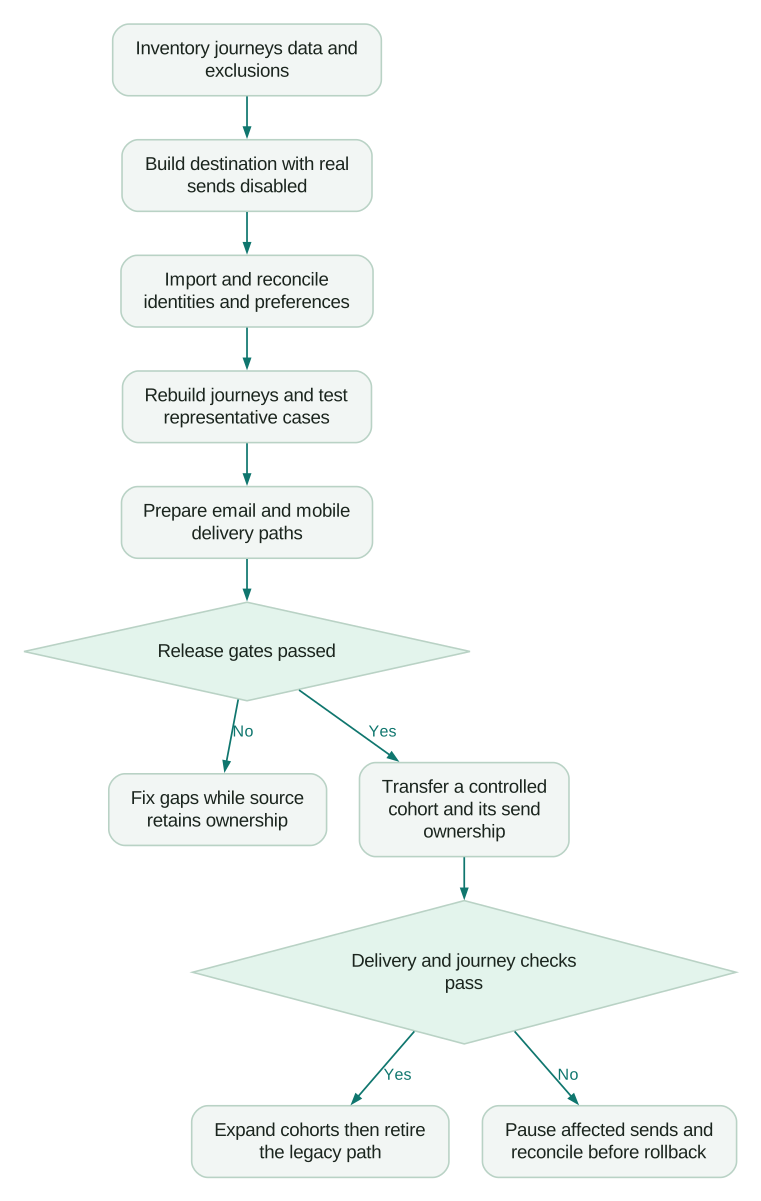
Define release gates before setting the final cutover date:
- Identity and account relationships reconcile.
- Preferences and delivery exclusions have a verified destination.
- Rebuilt journeys pass their acceptance cases.
- Email sending is ready for the intended volume.
- Mobile users have a supported delivery path during app-version overlap.
- One system owns each live send decision.
- Rollback preserves new preferences and completed actions.
Export the data with its actual boundaries
CSV segment exports are useful, but not a complete migration package
Braze lets authorized users export segment data. A segment without filters can include all profiles. Its current documentation says a CSV export may fail when the segment's estimated size exceeds 500,000 users; it offers partitioning and API routes for large exports. That is more precise than a universal “Braze only exports 500,000 users” rule. Braze segment CSV exports.
Create non-overlapping partitions when needed, retain their definitions and verify the combined set of IDs. Do not assume a roughly even random split produces equal file sizes or complete coverage.
Record each export's start time, source segment, selected fields, row count, unique identifier count and file checksum. Store the files in an access-controlled location with an agreed retention period. These records let you distinguish an incomplete export from a later import problem.
Use the API when its export shape fits the job
Braze's /users/export/segment endpoint requires fields_to_export and produces newline-separated user JSON records in compressed output. It supports exporting profiles updated at or after a specified time. Selected history fields, including custom events, purchases and received campaigns or Canvases, cover the last 90 days. The first and count values within custom events and purchases retain all-time information; those summaries do not provide the missing event-level history. Braze segment export API.
Treat that export as documented profile data, not a complete historical event archive. Preserve longer-term reporting from the systems that actually hold it. Do not convert a campaign-received summary into invented individual send events.
For an initial snapshot followed by changes, choose an overlap window and reconcile repeated records by authoritative identity and update rules. A changed-profile export alone does not account for someone who was deleted or moved out of the exported segment. Handle deletions, membership changes and preferences through explicit additional reconciliation.
Build an identity crosswalk before importing
Keep the Braze identifier, your canonical product person ID and the destination identifier together. Preserve email as a contact method rather than making it the only join key by default.
Test alias-only users, missing external IDs, duplicate emails, changed emails and people who belong to several accounts. Decide which records need resolution before they can enter live messaging. An unresolved record can remain in a controlled migration exception queue; it does not need to be guessed into an account.
Rename attributes deliberately. A case change is easy, but a semantic change is not. A timestamp called “Created At” might describe profile creation in Braze rather than the person's original signup in your product. Keep those meanings separate.
Customer.io CSV imports let you map headers, choose identifiers and preview the resulting import. Reserved fields such as id, email, phone, created_at and unsubscribed have platform-defined meanings. Verify their types and purpose before using them as convenient destinations for similarly named source columns. Customer.io CSV imports.
Create a small fixture containing the awkward records first. Inspect the destination profile, account relationships and preferences, then repeat the import to check that the same person is updated rather than duplicated.
If the source identity model is already unreliable, the identity merge guide helps separate legitimate joins from records that merely share a contact field.
Migrate preferences as a separate workstream
A CSV with email addresses is not a list of people you may message. Capture the source's channel state, topic or subscription-group state, applicable consent evidence and delivery exclusions.
Braze distinguishes global subscription states from subscription-group states. In particular, its email subscribed state means the person has neither unsubscribed nor explicitly opted in; it is not equivalent to the opted-in state. A global email unsubscribe can override an otherwise subscribed group. Braze subscription status.
The subscription-group status endpoint returns the group's saved state independently of the global state. A globally unsubscribed person can therefore still return Subscribed for a group. Reconcile both layers before determining destination eligibility. Braze subscription-group status API.
Braze's segment CSV documentation also notes that subscription-group data is not included in that export. Use an appropriate group-status export or documented membership-based approach in addition to the profile snapshot. Do not infer every group's state from one global unsubscribe column. Braze segment CSV exports.
Map to topics and channels without broadening permission
Customer.io's cio_subscription_preferences supports boolean topic and channel preferences. Topics use their destination IDs, and the relevant topic and channel both affect message eligibility. Create the destination configuration and apply it to the journeys before importing preferences. Customer.io preference migration.
An illustrative mapping policy could look like this. It is a planning document, not an API request or a complete consent engine:
journey: product_news
destination_topic_id: topic_2
cases:
  - case: globally_unsubscribed_email
    source_email_state: unsubscribed
    source_news_group: subscribed
    destination_email_channel: false
    destination_news_topic: true
    marketing_send_allowed: false
  - case: confirmed_topic_permission
    source_email_state: opted_in
    source_news_group: subscribed
    destination_email_channel: true
    destination_news_topic: true
    marketing_send_allowed: true
  - case: insufficient_permission_evidence
    source_email_state: subscribed
    source_news_group: unknown
    destination_email_channel: false
    destination_news_topic: false
    marketing_send_allowed: false
The first case retains a saved topic preference while the channel remains blocked. The second assumes the permission evidence is valid for this message and there are no other exclusions. The third is a deliberately conservative policy for unresolved migration records, not a claim that Braze's subscribed state always prohibits every message.
Do not map Braze's email-only global unsubscribe mechanically to a destination-wide setting that also blocks other channels. Decide the cross-channel behaviour explicitly, then test it with the actual sending configuration.
Keep email suppression separate from identifier deletion
Preserve bounces, complaints and existing delivery exclusions before sending through the new provider. Confirm the scope of the destination operation you choose.
Customer.io distinguishes ESP email suppression from deleting and suppressing a person's identifiers. ESP suppression blocks email while allowing other activity; identifier suppression deletes the person and prevents reuse of the identifiers. Its current documentation also distinguishes domain-specific delivery suppressions from workspace-wide ESP API suppressions. Choose the operation that matches the record's actual purpose. Customer.io suppression management.
A migration must also keep preferences current after the initial export. If someone opts out while both systems are running, the new state needs to reach whichever system could send next. Never restore an older snapshot over a more recent opt-out during rollback.
Rebuild journeys from their behaviour
Export configuration and save representative messages, but write down what each journey does in plain language: trigger, eligible recipient, delay, branch conditions, frequency rules, exit conditions and outcome.
Braze's Canvas details endpoint exposes metadata and configuration information that can help this inventory. It is not a portable Customer.io automation package or a record of every user's current execution position. Braze Canvas details.
Rebuild the journey around the intended behaviour, then compare it using the same fixtures. Check timezone handling, missing attributes, relationship changes, event replay and a conversion that happens during a delay.
For example, a setup reminder should stop when the relevant account reaches activation. It should not continue because the imported person is waiting in a new sequence that knows nothing about the completed account. The SaaS onboarding sequence guide provides examples of useful send and stop conditions.
Decide what happens to people already in a journey
Choose a policy per journey:
- Drain the old journey: Braze completes existing entrants while Customer.io accepts new entrants after a defined boundary.
- Resume from explicit business state: reconstruct a safe next step from source facts, message history and eligibility, rather than assuming a delay-node export is portable.
- Restart a deliberately redesigned journey: use this only when the repeated content and timing make sense, with exclusions for actions already completed.
Record the policy and the data required to enforce it. Draining is not automatically safe if both systems can still accept the same new event. Resuming is not safe if the only evidence is “this person once received a Canvas message.”
Use an episode identifier where one person can repeat the journey, such as a trial, booking or renewal. A person-level flag alone cannot distinguish this renewal from the previous one.
Plan mobile push around app adoption
Customer.io's documented SDK migration route starts with integrating and testing its SDK, releasing the new app version, importing the audience and encouraging users to update. It recommends registering devices through the new SDK rather than importing old provider tokens as the migration shortcut. This creates an overlap period while people remain on older app versions. Customer.io push migration.
Start this work early. A completed data import cannot make every customer install a new version of your app.
If you intend to use an alternative token-registration architecture, validate that supported design separately with the provider and your mobile engineers. The migration plan should establish delivery, identity, permission and metrics for that route, not assume that possessing a token proves all four.
Customer.io's push_enabled is a recorded device-permission indicator, updated when the app reports it. It can lag an operating-system preference change and does not include all subscription-center rules. Missing or true values alone do not establish whether a particular person should receive a push message. Customer.io device tokens and permissions.
Track app version and registration state by device. One person can use an updated phone and an older tablet. A person-level “migrated” flag can otherwise strand the old device or let both providers target the same interaction.
Verify login, logout, account switching, reinstall, token refresh, deep links and delivery reporting on the app versions you support. Decide how long the legacy path stays available and what product policy applies to users who never update.
Prepare email sending before transferring full volume
Verify domain authentication, tracking links, unsubscribe links, sender identity, template rendering and reply handling. Use your actual sending setup and provider instructions; do not copy DNS records from an unrelated account.
Customer.io recommends controlled warming for a new sending setup, including when the root domain already has history. Its guidance emphasizes real recipients, gradual volume changes and reviewing negative delivery signals before increasing sends. Customer.io domain warming.
Build the ramp around expected, permissioned messages to suitable recipients. Do not use an imported stale audience as a convenient volume target. Observe delivery failures, deferrals, complaints and provider feedback before moving another cohort.
A mailbox accepting a message does not prove it reached the inbox or produced the intended action. Keep delivery health separate from the journey's product or revenue outcome.
Run both data paths with one sending owner
During validation, both platforms can receive a controlled data stream while the destination's sends remain disabled or restricted to test recipients. Compare eligibility, rendered content and proposed actions before moving real send ownership.
Define ownership by the unit your journey needs: person, account, device or journey episode. A general cutover rule is:
Send only when:
  this platform owns the journey episode and channel
  the recipient still qualifies
  the current preferences permit the message
  this logical message has not already been completed
This is an implementation requirement, not a native deduplication guarantee in either product. Specify where ownership is stored and how both systems enforce it. For important API-triggered sends, that may require a shared application-side decision rather than two independently updated segments.
Include messages already queued before ownership changes. Pausing new entry does not, by itself, prove that old scheduled sends are canceled. Choose whether those messages drain, cancel or move, and confirm the actual platform behaviour before releasing the destination equivalent.
Reconcile outcomes and make rollback explicit
Check counts at several levels: exported records, unique people, imported profiles, resolved accounts, preferences, eligible recipients and actual sends. Explain differences rather than forcing all totals to match.
For an original illustrative reconciliation, suppose 20,000 unique source people are in scope. The destination has 19,600 correctly mapped profiles and 400 unresolved identity exceptions. Coverage is 98%, but those 400 people are still unresolved. Do not declare 100% success by calculating only over the records that imported.
Rollout may proceed for a verified cohort if the exception handling is explicit. It should not silently drop those exceptions from the migration scope.
If a cohort fails, pause the affected destination sends. Determine what already sent, which preferences changed and whether source ownership can resume safely. A rollback can change future routing; it cannot retract an email or push notification already delivered.
Keep a shared log of completed logical messages where needed for recovery. Restore current preference and business state, not merely the original import file. After fixing the fault, test the exact failed case before resuming the cohort.
Migration acceptance checklist
- Every active journey has an owner and a rebuild, retire or temporary-retention decision.
- Export partitions reconcile by unique identity, and historical-data limits are documented.
- Global, topic and channel preferences retain their distinct meanings.
- Bounces, complaints, deletions and unresolved permission records cannot become eligible by default.
- Imports update the intended people without duplicate identities or incorrect accounts.
- Historical imports and replayed events cannot trigger unintended welcome journeys.
- People already in journeys have an explicit drain, resume or restart policy.
- The supported app versions have verified push delivery and reporting paths.
- Email setup and sending volume have passed the agreed delivery checks.
- Each live logical message has one sending owner, including queued work.
- Rollback preserves completed sends and the latest preferences.
- Reporting, source retirement and data retention have named owners and evidence.
The schedule follows these dependencies. Estimate work for data, journeys, email, mobile and review separately; identify which can run concurrently and which block release. A universal “two-week migration” promise ignores app adoption, sender preparation and the complexity of active journeys.
Our CRM and lifecycle implementation service can help turn this inventory into a scoped migration, including the data mapping, journey rebuild and controlled cutover. The useful input is your active journey list, channel mix, current data model and renewal deadline, so the plan reflects what must actually keep working.
Questions people ask
How do I export all users from Braze?
Use a suitable segment export or the documented API route with the required permissions and selected fields. Large CSV exports may require partitions. Reconcile unique identifiers and collect subscription-group state separately where the chosen export omits it. A successful file download does not establish complete migration coverage.
Can I just copy Braze push tokens into Customer.io?
That is not the SDK migration route described here. Plan the destination SDK release, device registration and old-version overlap. If you need a different token-registration design, verify its support and test delivery, permissions and reporting explicitly before relying on it.
Do Braze Canvases transfer automatically?
Treat them as journeys to rebuild and verify. Configuration exports help document the source behaviour, but do not assume they recreate destination triggers, delays, templates or the execution state of current participants. Decide how existing entrants continue before opening the new journey.
Can both platforms send during migration?
Yes, for intentionally separated cohorts or journeys with clear ownership. They should not independently send the same logical message to the same recipient. Keep preference changes synchronized and account for messages already queued in the source platform.
How long does a Braze to Customer.io migration take?
Estimate from the number and complexity of live journeys, identity quality, preference mapping, email preparation and mobile release adoption. Set dates after identifying the critical path and release gates. Importing profiles can finish long before the messaging migration is ready to close.
Sources
- Braze: segment CSV exports
- Braze: export user profiles by segment
- Customer.io: import people and events
- Braze: subscription status across channels
- Braze: retrieve subscription-group status
- Customer.io: migrate subscription preferences
- Customer.io: manage email and identifier suppressions
- Braze: export Canvas details
- Customer.io: migrate push from another provider
- Customer.io: device tokens and push permissions
- Customer.io: domain warming
Written by
Jafrin Akter AloData Engineer and Co-founder, martechdevs
Jafrin Akter Alo is a data engineer and co-founder of martechdevs, where the team has delivered 74+ martech, data and growth stack implementations.