
Braze MCP Server: Connect, Check Access and Review Campaigns Safely
Data Engineer and Co-founder, martechdevs
Last updated 9 min read
The Braze MCP server lets an AI assistant read campaign and Canvas information and, where your permissions allow, change supported Braze objects. The current remote server uses OAuth and differs materially from the deprecated local beta. Start with one campaign review, confirm the workspace and available tools, and check the assistant's conclusions against the underlying Braze report.
Last updated: 3 September 2026.
A lifecycle manager rarely needs another broad summary of message performance. They need to understand why a particular journey produced fewer qualified outcomes, whether the comparison is fair, and what can safely change next. Braze MCP can shorten that investigation when the question and evidence are explicit.
This guide is for a CRM or marketing operations owner connecting an external assistant to Braze. It follows Braze's current documentation, rather than claiming an account-level test. If the workflow spans warehouse definitions, Braze and CRM outcomes, our custom martech AI agent work connects those steps around a defined business decision.
Which Braze MCP server should you use?
Use the remote server for a new connection. Braze has deprecated its locally hosted beta. The current server authenticates with your Braze dashboard account and includes read and write capabilities. Its dedicated documentation says it excludes tools that return user-profile data or user-level PII. Canvas-specific tools are currently read only. See Braze's server overview.
An old tutorial asking you to install a local package and create a Braze API key describes a different setup. An existing local integration needs a migration check before removal: list its workflows, compare the available remote tools, verify permissions and run the same known query through both paths.
There is also a documentation connection. Braze's LLM development guide uses Context7 to retrieve SDK documentation for coding assistance. Access to reference material does not establish access to your campaigns. Choose the connection according to the job: implementation guidance needs documentation; investigation of a particular workspace needs the workspace server.
The development guide currently contains a read-only description of workspace MCP that conflicts with the dedicated server and function references. Use the dedicated references to assess current operational permissions, then inspect the tools actually exposed to your account. Treat a connector's familiar name as insufficient evidence of its capabilities.
What must an administrator enable?
The administrator must allow MCP OAuth at company level, and the user needs the separate Use MCP Server permission for each required workspace. Existing dashboard permissions still govern available access. Company OAuth controls apply across workspaces, so a workspace administrator cannot override a company-wide block. Braze's OAuth administration reference explains these layers.
Choose a named operator with the access required for the pilot. A campaign investigation does not need the same operating scope as a workflow that creates content or updates catalog items. Inspect both the Braze role and the AI client's approval controls before connecting.
Write a short access record before the first analysis:
- The business owner and the person whose Braze account is connected.
- The company and exact production workspace.
- The AI client and company workspace receiving the results.
- The approved data categories and intended operations.
- The person who can remove access if the pilot behaves unexpectedly.
This record gives the team somewhere to resolve uncertainty. “Marketing connected Claude” leaves the administrator unable to tell which account or customer environment is involved.
Keep returned content within the AI environment your organisation has approved. Excluding profile-level PII does not make campaign strategy, audience definitions or commercial results public information. Apply the same sharing judgement you would use before forwarding an internal report.
How do you connect and verify the workspace?
Add Braze as a remote MCP connector in a supported client and complete OAuth with your usual Braze account. Braze documents a US endpoint, https://mcp.braze.com/mcp, and an EU endpoint, https://mcp.braze.eu/mcp. It recommends the EU endpoint for EU customers. The remote flow does not require an API key, client ID or client secret. Customers using Braze IP allowlisting currently cannot use this server. Check the setup documentation before rollout.
After authentication, ask for workspace discovery first. Select the workspace explicitly, and retain the returned identifier in the working note so similarly named environments cannot be confused. Then use a campaign you can also open in the dashboard.
An initial prompt can be:
Show the Braze workspaces available to this connection and wait for me to choose one. After selection, list the tools available for campaign analysis. Do not create, modify, launch or stop anything. Identify any operation your account cannot perform.
That wording defines the task. It does not remove permissions from the connected identity. The technical controls still need to match the intended scope.
Braze recommends confirming the workspace, specifying dates and metrics, asking which tools were used, and comparing consequential recommendations with the dashboard. Its usage guide describes the request flow. Preserve those details when an investigation becomes a recurring process.
Which operations deserve separate approval?
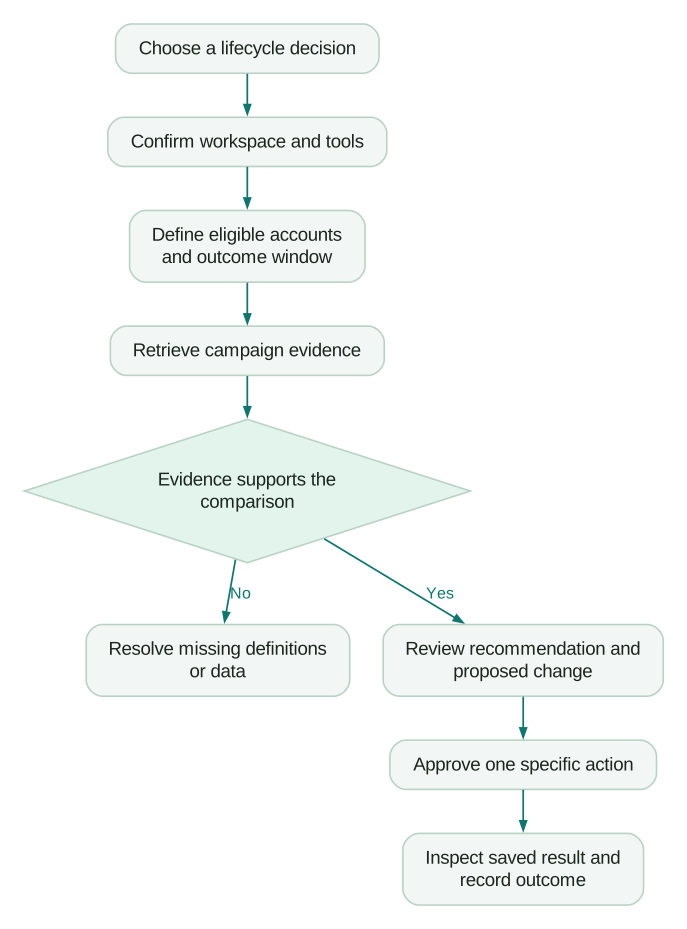
Treat creation, updates, deletion and sending-related actions as distinct operations. A request to analyse performance should finish with an evidence-backed recommendation. A later approved request can authorise a specific change.
The current function list includes campaign and Canvas analytics, catalog operations, templates, content blocks and Cloud Data Ingestion sync triggers. Some campaign, segment and Operator tools require participation in beta programmes. A listed function is therefore not a promise that your workspace can use it.
For example, updating a shared content block can affect several uses of that block. Ask for the proposed content, the object's identifier and the known dependent messages before approval. If dependencies cannot be established, review the change manually in Braze rather than guessing its reach.
A useful approval note records:
- The exact object and workspace.
- The current value or content and the proposed replacement.
- Why the change follows from the evidence.
- Which existing campaigns, templates or processes may depend on it.
- The validation steps and recovery method.
- The named approver and the result returned by the operation.
Use a draft or test object when the supported workflow allows it. Check the saved result afterwards. A successful tool response confirms that a request completed; the reviewer still needs to check whether the resulting object matches the approved intent.
For a broader design, the AI approval workflow guide separates analysis, a proposed action and a controlled execution step.
What makes a campaign comparison defensible?
Define the population and outcome before asking the assistant for a winner. A campaign sent to established buyers and a campaign sent to new trial users answer different questions, even if both contain the same offer.
Use a reusable analysis specification. This is an illustrative working document, not an API payload:
decision: decide whether to change the trial onboarding reminder
workspace: selected production workspace
journey: trial onboarding
comparison: two fully observed weekly entry cohorts
population: eligible new trial accounts
outcome: first successful product integration within 14 days
exclusions: internal accounts and agreed test records
reporting_timezone: UTC
required_output:
  - eligible account count
  - contacted account count
  - successful account count
  - rate and denominator definition
  - campaign or Canvas references
  - missing evidence and alternative explanations
permitted_actions: read and prepare a recommendation
Ask where each value can be obtained. Braze campaign metrics may establish message activity, while the agreed success event or account identity may need a separate maintained dataset. An assistant must report that boundary rather than silently substituting clicks for integration success.
Account for observation time. A customer who started a trial yesterday has had less time to complete a 14-day outcome than one who started three weeks ago. Compare cohorts with complete windows, or choose the same partial observation period for both and label it clearly.
Also separate a descriptive association from a causal claim. More conversions after a send can be useful evidence for investigation. It does not by itself identify how many conversions the message caused. The lifecycle journey guide helps define the customer state and success event before automation begins.
A worked example: a lower conversion rate with the same performance
Consider an illustrative onboarding programme with two acquisition routes. These numbers are fictional and demonstrate a review method.
In the first week, 300 assisted trials produce 120 activations and 700 self-serve trials produce 140. The combined activation rate is 260 divided by 1,000, or 26%.
In the second week, 100 assisted trials produce 40 activations and 900 self-serve trials produce 180. The combined rate is 220 divided by 1,000, or 22%.
Assisted activation is 40% in both weeks. Self-serve activation is 20% in both. The overall decline comes from a change in acquisition mix. Nothing in these counts establishes that the reminder became less effective.
The useful next question is whether the business intentionally accepted more self-serve trials, whether their cost and eventual revenue justify that change, and whether their onboarding needs differ. Rewriting the reminder immediately would target a cause the evidence has not demonstrated.
Have the assistant return the counts behind each rate and reconcile the segment totals to the overall population. Recalculate the percentages independently. If a route is unknown, show it separately and establish how missing values affect the comparison.
This small arithmetic check is a practical acceptance test for the pilot. The assistant should identify a composition effect, preserve uncertainty about message impact and recommend a focused follow-up. If it instead invents a cause, correct the workflow before expanding its access.
How should you handle failures and revoke access?
Separate authentication, workspace access, feature availability and analysis problems. Each has a different owner.
- If sign-in fails, the administrator checks company OAuth access, the user's MCP permission and client approval.
- If the connection works but the expected data is absent, confirm the workspace and inspect the user's dashboard access.
- If one operation fails, check whether it belongs to an enabled beta and preserve the returned error for support.
- If numbers disagree, compare definitions, filters, date boundaries and denominators before retrying a broader prompt.
For access removal, Braze distinguishes user permission changes, client redirect-URI controls and company token revocation. Blocking a redirect URI prevents new authorisations but does not end existing sessions. Company token revocation disconnects all current MCP connections; removing a user's MCP permission targets that user's access. Record which control the incident requires in the OAuth administration process.
Keep the original tool result and the assistant's interpretation separately during the pilot. This makes it easier to establish whether an error came from the returned data, the chosen request or the explanation. The MCP security checklist covers the wider client and tool boundary.
What should be true before the pilot expands?
Use a completion checklist tied to actual work:
Checklist
- The team can identify the connected user, company and workspace.
- A known campaign report reconciles with the retrieved evidence.
- The analysis preserves metric definitions, observation windows and unknown groups.
- Account-specific limitations are documented.
- Mutations have an explicit approval path and post-change check.
- The administrator can remove access at the intended scope.
- A lifecycle owner can use the output to make a specific decision.
Measure the reviewer time needed to reach that decision alongside the time saved retrieving information. A fast answer that requires rebuilding the entire analysis has not yet improved the operating workflow. Expand to a second journey only after the first produces a repeatable, inspectable result.
Questions people ask
Is the Braze MCP server read only?
The current remote server includes read and write tools, subject to permissions and feature availability. Canvas-specific tools are currently read only. Inspect the current function reference and the tools exposed to your own account before selecting approval controls.
Do I need to create a Braze API key?
The remote MCP flow uses OAuth through your Braze dashboard account. Older local-beta instructions use a different setup. Existing REST API integrations remain a separate matter.
Can it retrieve individual customer profiles?
Braze's dedicated server documentation says profile-level data and tools exposing user-level PII are unavailable. Plan campaign and aggregate investigations around that boundary. Review any additional connected system separately before combining its data with the result.
Why can I sign in but still fail to use a tool?
Authentication does not establish that every workspace feature or beta is available to you. Confirm the workspace, dashboard role and feature entitlement, then inspect the operation's error. Keep that evidence when asking your administrator or Braze support to investigate.
Should I let the assistant launch campaigns automatically?
Begin with analysis and a separately reviewed action proposal. Any sending-related workflow needs explicit business scope, audience and content checks, an accountable approver and a record of the actual outcome. Test those controls before considering more autonomy.
Sources
- Braze, About the Braze MCP server, accessed 3 September 2026.
- Braze, Setting up the Braze MCP server, accessed 3 September 2026.
- Braze, Manage OAuth settings, accessed 3 September 2026.
- Braze, MCP server functions, accessed 3 September 2026.
- Braze, Using the Braze MCP server, accessed 3 September 2026.
- Braze, Building with an LLM, accessed 3 September 2026.
Written by
Jafrin Akter AloData Engineer and Co-founder, martechdevs
Jafrin Akter Alo is a data engineer and co-founder of martechdevs, where the team has delivered 74+ martech, data and growth stack implementations.