
ActiveCampaign vs Mailchimp: Automation, Team Access and Full Cost
Pick ActiveCampaign if your programme needs branching automation, coordinated follow-up and sales actions that pass a trial in the selected package. Pick Mailchimp if its campaign workflow and automation scope handle the job with less ongoing work. ActiveCampaign vs Mailchimp is a comparison of complete configurations: the entry prices, contact definitions, included users and required add-ons differ.
On this page
ActiveCampaign and Mailchimp compared
USD list prices below exclude promotions; ActiveCampaign entry rates use annual billing, while Mailchimp rates use monthly billing.
| Decision | ActiveCampaign | Mailchimp |
|---|---|---|
| Entry paid configuration | Starter $15/month equivalent at 1,000 contacts | Essentials $13/month at 500 contacts |
| Longer automation configuration | Plus $49/month equivalent at 1,000 contacts | Standard $20/month at 500 contacts; $45 at 1,500 |
| Entry automation boundary | Starter has five actions per automation | Essentials has four steps per flow |
| Higher automation allowance | Plus has unlimited actions; individual feature gates still apply | Standard supports up to 200 steps per flow |
| Included account users | Starter/Plus one; Pro three | Essentials three; Standard five |
| Sales and other channels | Enhanced CRM, SMS and transactional email have add-on arrangements | CRM handoff and Transactional Email need their own configured scope |
Sources: ActiveCampaign entry prices, ActiveCampaign feature matrix, Mailchimp USD tiers, Mailchimp flows, and ActiveCampaign add-ons.
We would choose the lowest complete configuration that handles the required customer journey and that the team can maintain. A platform with more options still needs reliable triggers, stopping rules and ownership. Our lifecycle messaging implementation service connects those requirements to the appropriate purchase and the work needed to launch it.
Automation depth and the actual customer decision
Begin with the journey's business states. For a B2B consultation funnel, the useful states might be enquiry received, qualified, meeting booked, sales owner assigned and opportunity created. Each state needs a source and a rule for what may happen next.
ActiveCampaign Starter's five-action limit and Mailchimp Essentials' four-step limit make both entry plans a poor default assumption for an involved journey. ActiveCampaign Plus removes its action-count limit; Mailchimp Standard allows much longer flows. The remaining question is whether the selected plan supports each required trigger, condition and action. ActiveCampaign automation scope, Mailchimp flow structure.
Counting steps alone cannot settle the comparison. A flow with 200 steps may still depend on a missing booking event, while a short flow can be sufficient if the upstream system owns the relevant decision. Build the trial from the hardest necessary exception, not just the welcome email.
| Business state | Required input | Desired action | Stop or exception |
|---|---|---|---|
| Qualified enquiry | Accepted qualification result | Useful follow-up | Existing customer or suppression |
| Waiting for a booking | Current booking status | Reminder within agreed cadence | Booking completed before send |
| Meeting booked | Booking identity and owner | Sales handoff | Duplicate booking event |
| Opportunity created | CRM association and lifecycle state | Exit acquisition nurture | Missing owner or conflicting state |
This is an illustrative journey specification. Use your actual states, and identify which system is allowed to change each one. The lifecycle journey guide helps translate a campaign idea into that contract.
Platform fit and maintenance
ActiveCampaign for connected automation
- Best for: A team that needs coordinated nurture and follow-up with an owner for its automation logic.
- Pros: Higher plans support longer workflows and additional capabilities; eligible CRM and channel add-ons extend the configuration. Plan overview.
- Cons: Add-on, user and feature requirements can make the complete setup cost more than the advertised entry rate.
- Free plan and startup offer: A trial is available. Use the actual paid entitlements and normal renewal amount when assessing production fit.
- Choose it if: Its tested workflow removes a meaningful operating limitation or manual handoff.
- Skip it if: The programme is straightforward and nobody will maintain the extra configuration.
The plan guide says existing customers do not qualify for Starter. An existing account should review its available downgrade options rather than use the new-customer entry price as a guaranteed saving. The ActiveCampaign pricing guide separates those conditions from the other billing inputs.
Mailchimp for the campaign operating process
- Best for: A marketing team that can run its content, segmentation and required flows within the selected Mailchimp package.
- Pros: Essentials and Standard include more than one account user, and Standard supports longer flows. Mailchimp plans.
- Cons: Contact-tier charges include some records that cannot receive marketing; automation availability still needs plan-level checks.
- Free plan and startup offer: Free supports 250 contacts and 500 emails per month, with a daily limit. Trial and introductory terms should be separated from the recurring comparison.
- Choose it if: Ordinary marketers can safely edit and operate the accepted programme without an unnecessary rebuild.
- Skip it if: A required sales action or data relationship cannot be delivered reliably with the proposed connections.
Ask the actual operator to change an email, audience condition and waiting period during the trial. Confirm that a reviewer can inspect the change and that the team understands its effect on people already in the journey. Ease of maintenance is a recurring cost.
Prices at a matched audience
The following worked comparisons use one required marketing user, the stated contact population, no optional add-ons and no promotions. Mailchimp's nearest sufficient tier is selected where the audience sits between its published contact limits.
| Requirement | ActiveCampaign configuration | Mailchimp configuration | Annual base comparison |
|---|---|---|---|
| 500 contacts with longer automation | Plus at 1,000: $49/month equivalent, annually billed | Standard at 500: $20/month | $588 versus $240 at twelve unchanged monthly payments |
| 1,000 contacts with longer automation | Plus at 1,000: $49/month equivalent | Standard at 1,500: $45/month | $588 versus $540 |
| 1,000 contacts, three operators and a Pro feature requirement | Pro at 1,000: $79/month equivalent | Standard at 1,500: $45/month, only if its features pass | $948 versus $540 before any feature gap |
ActiveCampaign's published own-product rates and Mailchimp's USD tier data support these amounts. The last row compares candidate budgets; it does not establish that a Mailchimp feature replaces the named Pro requirement.
For 1,000 contacts, the Plus and Standard examples differ by only $48 annually before extras. An important workflow benefit can outweigh that difference. At 500 contacts, the $348 annual base difference is larger, but a lower bill still needs the correct journey behaviour.
Include the users the team needs. ActiveCampaign Plus includes one, while Mailchimp Standard includes five. Additional ActiveCampaign users need the actual purchase price; do not assume every extra person costs the same as a new full subscription. ActiveCampaign seats, Mailchimp seats.
For larger audiences, obtain the relevant ActiveCampaign tier alongside the Mailchimp tier. Mailchimp Standard lists $100 monthly for 5,000 contacts and $135 for 10,000. Avoid extrapolating ActiveCampaign's 1,000-contact rate linearly. Use the software pricing directory to include connected tools in the same decision.
Billable contacts and sending limits
For ActiveCampaign accounts created on or after 3 November 2025, all contacts count regardless of list status. Older accounts can count active contacts or all contacts depending on the plan. Mailchimp counts subscribed, unsubscribed and non-subscribed contacts; cleaned and archived records follow different treatment. Inspect both populations before comparing a price for the same number of recipients. ActiveCampaign counting, Mailchimp contact types.
Consider an illustrative database with 850 subscribed, 100 unsubscribed and 50 non-subscribed contacts, plus 100 bounced records. A new ActiveCampaign account can count all 1,100 stored contacts. If those bounced records are Cleaned in Mailchimp, the counted population there is 1,000. Confirm actual statuses before selecting tiers; transferring labels without preserving their meaning can change both billing and permissions.
ActiveCampaign Plus includes ten times the contact allowance in monthly marketing sends. Mailchimp Standard includes twelve times its contact tier. The 1,000-contact Plus example therefore includes 10,000 sends; Mailchimp's 1,500-contact Standard tier includes 18,000. This headroom can matter during launches or when automations run alongside campaigns. ActiveCampaign send limits, Mailchimp allowances.
Overage and interruption rules differ. Mailchimp paid-plan excess can create add-on blocks, and its contact billing uses the period's peak population. ActiveCampaign's contact-limit behaviour is separate from its send allowance: excess contacts can block campaigns and cause automation email steps to be skipped. Monitor both units. Mailchimp additional charges, ActiveCampaign contact-limit behaviour.
Sales handoffs and integration boundaries
A sales handoff needs more than an email trigger. Define the CRM record, owner, qualification result and response the sales team should see. The transition should happen once, with enough evidence to diagnose a missing or duplicate handoff.
ActiveCampaign's enhanced CRM packages cover deal and sales-engagement functions under their own entitlement. Price the exact action, such as creating an assigned deal or task, rather than treating the base email plan as a complete sales system. CRM add-on scope.
For Mailchimp, confirm the connected CRM's field mapping, update direction and expected latency. A product being listed as an integration does not prove that every lifecycle field or action is included. The HubSpot and Mailchimp integration guide provides a focused example of the data contract to inspect.
| Handoff check | Accepted behaviour | Evidence |
|---|---|---|
| Repeated qualification event | One intended sales record or task | Stable identifier and duplicate handling |
| Existing customer | Correct account association and suppression | CRM match and current lifecycle state |
| Owner reassignment | New owner receives the next required action | Assignment rule and task history |
| Opt-out | Marketing stops across connected tools | Permission propagation and send log |
| Failed CRM request | Visible exception with safe replay | Error record and recovery result |
Test these cases with synthetic or designated records before broad activation. If the destination holds a newer trusted value, the integration needs an explicit overwrite rule. Otherwise, one platform can repeatedly undo the other's correction.
Migration and the cost of a working change
Keep audience permissions, custom fields, tags and journey state in the transition scope. A person waiting for a reminder, someone who already converted and someone who opted out require different destination treatment. A contact import cannot establish that all three will behave correctly.
Choose a transition rule per journey: finish in the original system, enter the new system at an agreed point, or retire the flow. Retain exactly one active sender for each live message during overlap, and define how late events are assigned at cutover.
A hypothetical move that saves $29 per month but requires $1,200 of transition work has a simple payback of about 41.4 months. A different move can be justified by better qualification or less manual work, but measure those benefits separately. Do not turn a projected revenue gain into a promised outcome.
For other candidates, compare the ActiveCampaign alternatives and Mailchimp alternatives. For a sending-volume-based option, see Brevo versus Mailchimp.
Best fit by programme
| Programme | First candidate | Runner-up | Deciding evidence |
|---|---|---|---|
| Small team running campaigns and a supported journey | Mailchimp | ActiveCampaign | Editing process and actual feature acceptance |
| Coordinated nurture and sales actions | ActiveCampaign with required add-on scope | Mailchimp with tested CRM connection | Complete handoff and recurring operating cost |
| Existing platform already meets the requirement | Current configuration | Bounded replacement trial | Specific measurable improvement after transition |
| Three marketers with a small list | Matched user and feature quotes | Current-plan repair | Included access and permissions |
| Large lightly emailed database | Broader volume-based shortlist | Current configuration | Full counted population and actual cadence |
Journey and purchasing checklist
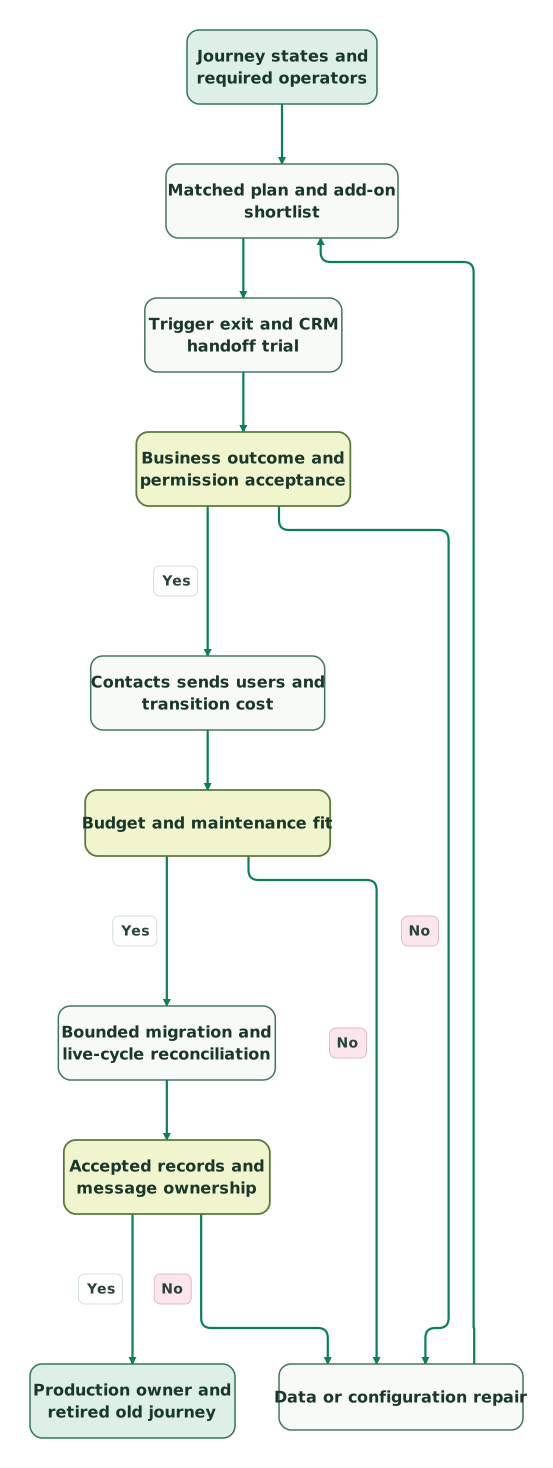
Read diagram as text
- Journey states and required operators to Matched plan and add-on shortlist.
- Matched plan and add-on shortlist to Trigger exit and CRM handoff trial.
- Trigger exit and CRM handoff trial to Business outcome and permission acceptance.
- Business outcome and permission acceptance to Data or configuration repair: No.
- Data or configuration repair to Matched plan and add-on shortlist.
- Business outcome and permission acceptance to Contacts sends users and transition cost: Yes.
- Contacts sends users and transition cost to Budget and maintenance fit.
- Budget and maintenance fit to Data or configuration repair: No.
- Budget and maintenance fit to Bounded migration and live-cycle reconciliation: Yes.
- Bounded migration and live-cycle reconciliation to Accepted records and message ownership.
- Accepted records and message ownership to Data or configuration repair: No.
- Accepted records and message ownership to Production owner and retired old journey: Yes
Checklist
- The journey uses defined business states and accountable source systems.
- Every required action is included in the selected plan or quoted add-on.
- Actual counted contacts and eligible recipients have separate totals.
- Campaigns and automated messages fit the complete sending forecast.
- Staff access and permissions appear in both quotes.
- Duplicate events, purchases, opt-outs and failed handoffs pass the trial.
- People already in journeys have explicit transition rules.
- The recurring benefit justifies migration, overlap and ongoing maintenance.
Use the lifecycle marketing audit skill to capture the current programme. At Martechdevs, we build the events, CRM connections and stopping rules that make a lifecycle platform dependable. Discuss the implementation scope with the journey and data the system must preserve.
Keep reading
Browse all CRM & Lifecycle guides
 CRM & Lifecycle
Brevo vs Mailchimp: Contact Costs, Sending Volume and Automation
Compare Brevo and Mailchimp at matched contact and send volumes. See when prices reverse, staff-seat costs, transactional email and migration checks.
Jafrin Akter AloLast updated 10 min read
 CRM & Lifecycle
ActiveCampaign Pricing: Contacts, Plans, Sends and Total Cost
ActiveCampaign starts at $15 monthly with annual billing. Calculate contacts, sends, users and add-ons, with worked budgets and current subscription rules.
Jafrin Akter AloLast updated 11 min read
 CRM & Lifecycle
Mailchimp Pricing: Plans, Contact Costs and the Bill After Discounts
Mailchimp costs from $13 a month. Compare real contact-tier bills, send and seat limits, overages, SMS costs and the renewal price after discounts.
Jafrin Akter AloLast updated 12 min read
Lifecycle marketing
See the implementation scope, deliverables and acceptance checks.
Questions people ask
Is ActiveCampaign Starter equivalent to Mailchimp Standard?
They have different limits and included access. ActiveCampaign Starter has five actions per automation and one included user; Mailchimp Standard supports much longer flows and five included users. Compare the exact triggers, actions and audience tiers required by the programme. Matching entry prices or plan names cannot establish that the configurations do the same work.
Does ActiveCampaign Plus always cost much more at 1,000 contacts?
The stated Plus entry is $49 monthly equivalent with annual billing. Mailchimp Standard needs its 1,500-contact tier for a 1,000-contact audience, at $45 monthly. That base difference is $48 over twelve months, before additional users, features, sends or add-ons. Use the complete configuration and payment commitment to make the decision.
Can bounced records change the contact-cost comparison?
Yes. A new ActiveCampaign account counts stored contacts regardless of list status, while Mailchimp's Cleaned contacts do not count toward its contact limit. Verify the actual status and record population on both sides. Preserve suppression and retention evidence during cleanup, and avoid treating every failed email or inactive contact as the same billing category.
Does a longer automation allowance guarantee a better sales handoff?
No. The handoff also depends on the qualification event, CRM matching, owner assignment and the selected integration's rights. Test a complete example with a duplicate event and a failed destination request. A longer flow can add useful decisions, but it can also conceal a missing input or repeat work if the underlying contract is unclear.
Should both platforms send during a migration overlap?
They can remain available during transition, but each live message needs one designated sender. Assign journey entry, in-flight contacts and late events deliberately. Test rollback before enabling the replacement, and reconcile a representative cycle before retiring the original flow. That preserves recovery options while preventing two platforms from sending the same follow-up to one person.
Sources
- ActiveCampaign published entry rates
- ActiveCampaign feature and user matrix
- ActiveCampaign plans and add-ons
- ActiveCampaign contact-counting rules
- ActiveCampaign email-send limits
- ActiveCampaign contact-limit consequences
- Mailchimp USD tier data
- Mailchimp marketing plan features
- Mailchimp automation flows
- Mailchimp contact statuses
- Mailchimp additional charges

Written by
Jafrin Akter AloData Engineer and Co-founder at Martechdevs and Growth and Analytics Partners
Jafrin writes practical guides to marketing technology, customer data, analytics and AI workflows. Martechdevs is a Growth and Analytics Partners company.