
ActiveCampaign Pricing: Contacts, Plans, Sends and Total Cost
ActiveCampaign pricing starts at $15 per month for 1,000 contacts with annual billing. The complete bill depends on your plan, counted contacts, email allowance, users and add-ons. A small programme can fit the entry package; a team needing more automation, additional users or sales actions should price those requirements together before committing to the annual subscription.
On this page
ActiveCampaign billing units and entry prices
These are US list prices in USD for 1,000 contacts, expressed monthly with annual billing and no optional add-ons.
| Email plan | Monthly equivalent | Annual base | Included users | Monthly marketing emails |
|---|---|---|---|---|
| Starter | $15 | $180 | 1 | 10,000 |
| Plus | $49 | $588 | 1 | 10,000 |
| Pro | $79 | $948 | 3 | 12,000 |
| Enterprise | $145 | $1,740 | 5 | 15,000 |
ActiveCampaign publishes these 1,000-contact entry rates; its plan comparison supplies the annual billing basis, seats and send allowances. Its own Starter pricing example also states $15 per month billed annually. The annual totals above are twelve times the monthly equivalents.
The base purchase is an email plan at a selected contact allowance. A contact is a stored person record identified through an email address, phone number or both. Contact definition. Your account's billing rules determine the counted population. Users are the staff accessing the platform, and marketing email sends are a separate monthly allowance.
Price the package in this order: required workflow, counted audience, expected sends, staff access, then extra channels and sales functions. Our lifecycle messaging implementation service can turn those inputs into a scoped configuration with explicit acceptance tests.
ActiveCampaign cost by company type
Company headcount is a planning context; the examples below deliberately use modest contact populations to show the effect of workflow, staff access and sending frequency. These are worked examples at annual list rates, excluding tax, optional add-ons and implementation.
| Example company | Assumed workload | Candidate plan | Monthly equivalent | Annual base |
|---|---|---|---|---|
| Five-person startup | One marketing user, 750 counted contacts, 4,000 sends, automations within five actions | Starter at 1,000 contacts | $15 | $180 |
| Twenty-person SaaS with a small early audience | One marketing user, 1,000 counted contacts, 9,000 sends, required automations beyond five actions | Plus at 1,000 contacts | $49 | $588 |
| Small team with three marketing operators | Three users, 1,000 counted contacts, 11,000 sends and Pro-level content requirements | Pro at 1,000 contacts | $79 | $948 |
| Business requiring SSO for a narrow programme | Five platform users, 1,000 counted contacts, 14,000 sends and an accepted Enterprise configuration | Enterprise at 1,000 contacts | $145 | $1,740 |
The examples use the published entry prices and edition capabilities. They do not estimate a typical bill for every company of that size. Replace the audience and requirements with your own values.
A five-person company can have 100,000 contacts. A much larger business may use ActiveCampaign for a narrow 1,000-contact programme. The first business needs a different contact quote, even if fewer employees log in.
For a 25,000-contact team, request the exact plan rate at that allowance rather than multiplying the 1,000-contact price by 25. The rate curve and available features come from the selected package. Preserve the quoted contact tier, billing term and add-ons beside the number so finance can reproduce the budget.
Contact rules and the billable audience
For accounts created on or after 3 November 2025, all contacts count regardless of list status. Earlier accounts can use active-only or all-contact counting depending on the plan. Check Profile, Billing & Upgrade, Your Plan for the rule that applies. Current contact-status rules.
Suppose a new account holds 900 active contacts, 150 unsubscribed contacts, 50 bounced contacts and 100 unconfirmed contacts. Its population is 1,200, so a 1,000-contact allowance is insufficient. An unsubscribe protects a recipient's preference; it does not remove their stored record from this account's billing population.
Separate three counts in the budget: records stored, records counted under the subscription and people eligible for the proposed message. They answer different operational questions. A billing exercise must preserve suppression evidence and respect retention requirements when considering record deletion.
Starter supports a maximum of 25,000 contacts. Increasing an allowance also needs a spending decision: without auto-upgrade enabled, the allowance does not increase automatically. The billing owner should know which behaviour is configured before a major import or acquisition campaign. Contact-limit behaviour.
Bill drivers and operating consequences
Contact-tier growth
A growing audience can move the base subscription even if the number of employees remains flat. Model the contacts imported by forms, integrations, sales systems and historical data separately. Before a backfill, count the destination population after identity matching and decide which records the messaging system needs.
An integration can keep adding contacts after the account exceeds its allowance. ActiveCampaign says campaigns then stop sending and contacts can pass through automations while skipping the Send an email action. A later budget increase therefore needs reconciliation of missed messages, as well as a changed limit. Contact-limit consequences.
Sending frequency and extra email volume
For current email plans, Starter and Plus include ten times the contact allowance in monthly marketing sends; Pro includes twelve times and Enterprise fifteen times. Direct and automated campaigns use that allowance. One-to-one and transactional emails have separate treatment. Email-send rules.
A 1,000-contact Plus account has 10,000 included marketing sends. If 1,000 eligible people receive eight campaigns, that uses 8,000 sends and leaves 2,000 for automations. A campaign calendar that ignores automated messages understates the total.
ActiveCampaign's overage guide lists $0.005 per additional email and describes a further limit that can stop sending. Its terms also permit usage restrictions. Confirm the purchased account's permitted volume and overage behaviour before relying on extra capacity. In an example where that published overage rate applies, 3,000 extra sends cost $0.005 × 3,000 = $15. Overage guide, usage terms.
Workflow and add-on requirements
Starter's five-action automation limit can make Plus the first suitable plan. Enhanced CRM deals and sales engagement, SMS, transactional email and custom reporting have their own availability and charges. Ask for a complete line-item quote with the base plan and each required add-on. Plan and add-on scope.
Test the exact action that matters. Capturing a lead's address and creating an assigned deal with a follow-up task are different requirements. A successful contact import does not prove that the quoted configuration supports the sales handoff.
Users and AI credits
The included user counts are one on Starter and Plus, three on Pro and five on Enterprise. Additional access and advanced controls can influence the plan choice even if contact volume is unchanged. The public pricing comparison also lists 500 Active Intelligence credits per plan; additional usage is a separate budget decision. ActiveCampaign plan comparison.
Assign access by responsibility. Include the marketer, operational owner and any necessary reviewer in the quote. For AI usage, identify the tasks the team intends to run and review their actual credit consumption before buying extra capacity. The subscription label alone cannot predict that workload.
People versus usage in the budget
The number of counted contacts and the selected features establish the base configuration. Sending frequency can then add volume cost, while staff access and add-ons introduce further charges. Track these inputs independently.
| Change | Cost mechanism | Required budget check |
|---|---|---|
| More employees, same platform users | Company headcount itself is outside the quoted unit | Any new access or approval requirement |
| Same employees, larger stored audience | Higher counted population | Next contact-tier quote and counting rule |
| Same audience, more campaigns | Higher monthly sends | Campaigns plus automation volume |
| Same volume, more complex journey | Higher plan or add-on requirement | Required action and entitlement |
| AI and another messaging channel | Separate credits or channel package | Consumption, recipient geography and applicable fees |
Use a monthly forecast with a base month, an expected growth month and a seasonal peak. A peak should include retries and resends only where they are actually part of the planned workflow. Keep a reasonable approved buffer without creating duplicate messages to consume it.
Plan fit and upgrade decisions
Starter fits a new-customer programme with limited automation, a small operating team and an audience within its ceiling. Existing customers should inspect the downgrade options actually offered: ActiveCampaign's plan guide says they do not qualify for Starter. Plus is the practical next candidate for longer workflows. Pro needs a specific case for its extra capability or included access. Enterprise should answer a real governance, integration or operating requirement. Plan eligibility and capabilities.
Compare the full quote for the lower plan with add-ons against the higher plan. For example, Plus at $588 annually and Pro at $948 have a $360 annual base difference at 1,000 contacts. Whether that difference is worthwhile depends on required features and the price of access in the lower configuration. A quote for the lower plan's extra users completes that comparison.
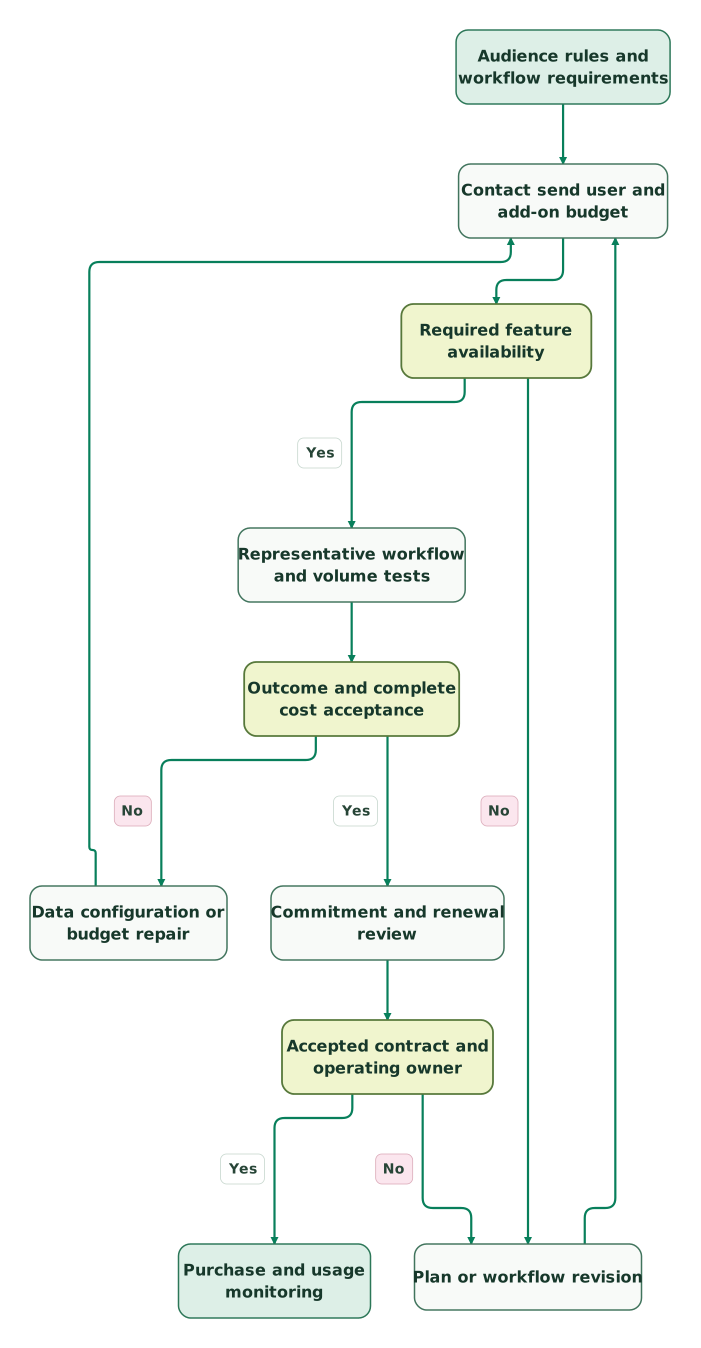
Read diagram as text
- Audience rules and workflow requirements to Contact send user and add-on budget.
- Contact send user and add-on budget to Required feature availability.
- Required feature availability to Plan or workflow revision: No.
- Plan or workflow revision to Contact send user and add-on budget.
- Required feature availability to Representative workflow and volume tests: Yes.
- Representative workflow and volume tests to Outcome and complete cost acceptance.
- Outcome and complete cost acceptance to Data configuration or budget repair: No.
- Data configuration or budget repair to Contact send user and add-on budget.
- Outcome and complete cost acceptance to Commitment and renewal review: Yes.
- Commitment and renewal review to Accepted contract and operating owner.
- Accepted contract and operating owner to Plan or workflow revision: No.
- Accepted contract and operating owner to Purchase and usage monitoring: Yes
For a different operating model, compare the ActiveCampaign alternatives and Brevo alternatives. Choose a replacement only after the same journey and complete budget pass the comparison.
Cost control and account settings
Start with the usage screen, then inspect the sources creating that usage. Removing useful sends to fit a budget is less valuable than stopping duplicate entry or a broken repeat rule.
- Record the account's counted-contact rule and current allowance.
- Compare stored records with expected populations from each integration.
- Forecast campaigns and automated sends together for the billing month.
- Test duplicate events, purchase exits and re-entry conditions.
- Inspect auto-upgrade settings and assign one owner for spend approvals.
- Price planned extra volume before a seasonal campaign begins.
- Request an appropriate downgrade after sustained demand changes.
ActiveCampaign permits upgrades to contact allowance, seats and sends from Billing & Upgrade. Lowering a tier, contact limit or removing an add-on requires its Customer Experience team. Confirm the effective date and resulting features before changing a workflow that relies on the current package. Upgrade and downgrade process.
The lifecycle frequency-cap guide helps address overlapping journeys. Apply a business rule for message pressure and eligibility; a random volume cut can suppress the message the customer actually needs.
Billing terms, trial and renewal cost
A monthly equivalent on an annually billed plan represents a yearly commitment and payment basis. ActiveCampaign also offers some commit-annually-pay-monthly arrangements. Under those arrangements, cancellation takes effect at the end of the annual subscription period. Ordinary monthly payment and an annual commitment paid in instalments have different exit costs. Cancellation guidance.
The 14-day trial supports up to 100 contacts and 100 emails, with Professional-tier features. Use it to test decisions and edge cases, then verify the chosen paid plan still includes everything used in the trial. The trial does not charge unless manually upgraded. Trial FAQ.
Keep implementation separate from the licence. ActiveCampaign's FAQ lists training and varying onboarding or migration assistance with plans. Confirm the exact included deliverables; consent mapping, custom integrations, historical reconciliation and your acceptance report still need owners.
Budget year two at the accepted recurring rate, with any offer expiry shown separately. Do not assume a startup discount. If a discount is approved, record its eligible products, term and renewal price. The site advertises a money-back guarantee subject to detailed conditions; review those conditions before treating a cancellation as refundable. Advertised guarantee and conditions.
The subscription continues until canceled, and inactivity alone does not cancel it. Preserve the confirmation and the effective date. The contract and your accepted order determine the fees that remain due. Subscription terms.
The rate card in a working budget
Keep the quote in a form another operator can recalculate. Record the plan, contact allowance, contact-counting rule, included sends, extra volume, staff users, add-ons, credits, commitment, tax treatment and renewal date. Attach the source or accepted quote to each priced component.
For a hypothetical implementation budget, assume a $588 annual Plus subscription, $1,200 of one-time setup work and $40 per month for an external integration. Year-one cost is $588 + $1,200 + 12 × $40 = $2,268. Year two is $1,068 if the same licence and integration rates remain and no new setup work is needed. The setup and integration amounts are hypothetical planning inputs that need replacing with scoped quotes.
Use the software pricing directory to compare connected products. The useful output is a complete budget attached to an accepted workflow, with each cost change explained by a specific input.
ActiveCampaign pricing checklist
- The selected plan supports every required automation action and integration.
- The account's real contact-counting rule appears in the budget.
- Stored records and eligible recipients are counted separately.
- Campaign and automation sends fit the purchased volume or an agreed overage arrangement.
- Staff users, CRM functions, channels and AI credits have explicit allowances.
- Auto-upgrade and spending ownership are agreed before large imports.
- Trial features are checked against the selected paid plan.
- Annual commitment, payment timing, downgrade process and renewal terms are recorded.
- Implementation and ongoing integration costs sit beside the licence amount.
Use the lifecycle marketing audit skill to connect the budget to actual journeys and senders. At Martechdevs, we implement the events, permissions and workflow checks that make a messaging subscription useful. Request a scoped lifecycle implementation with the required outcomes and the account limits the project must respect.
Keep reading
Browse all CRM & Lifecycle guides
 CRM & Lifecycle
ActiveCampaign Alternatives: Five Competitors by Workflow and Cost
Choose an ActiveCampaign alternative by workflow and full cost. Compare five tools, current billing rules and migration checks for permissions and journey state.
Jafrin Akter AloLast updated 11 min read
 CRM & Lifecycle
Brevo Alternatives: Five Competitors by Email Job and Cost
Compare five Brevo alternatives for newsletters, automation, ecommerce and application email. See billing units, worked costs and a controlled migration plan.
Jafrin Akter AloLast updated 11 min read
 CRM & Lifecycle
Customer.io Pricing: Count Profiles, Objects and Messages Correctly
Estimate Customer.io costs using people, objects, billing-cycle history and message volume. Includes worked pricing examples and a practical budget checklist.
Jafrin Akter AloLast updated 11 min read
Lifecycle marketing
See the implementation scope, deliverables and acceptance checks.
Questions people ask
Is ActiveCampaign's $15 price the complete annual cost?
The $15 entry price is a monthly equivalent for an annually billed Starter configuration at 1,000 contacts, making its base annual amount $180. Additional volume, users, eligible add-ons, taxes and implementation can change the total. Select the required workflow and audience first, then request the complete configuration price. Published entry price.
Can unsubscribing contacts reduce every ActiveCampaign bill?
No. Newer accounts count all contacts regardless of list status; earlier accounts can use different rules depending on their plan. Inspect the billing configuration before estimating savings from unsubscribes or cleanup. Preserve suppression history and the necessary retention evidence when deciding which records the system should continue storing. Contact-counting rules.
Does exceeding the contact allowance behave like email-send overage?
The two limits have different consequences. Exceeding the contact allowance can prevent campaigns and cause automation email actions to be skipped. The send-overage guide describes extra email charges under its applicable limits. Confirm both behaviours in the selected account, and reconcile any skipped messages after correcting a contact-limit problem. Contact-limit behaviour.
Does paying monthly always allow cancellation after one month?
No. A commit-annually-pay-monthly subscription has an annual commitment even though payment is collected monthly. ActiveCampaign says cancellation requests for that arrangement take effect at the annual term's end. Check the commitment on the accepted order, record the effective cancellation date and complete the cancellation process rather than simply stopping account activity. Cancellation guidance.
Can a free trial prove that the cheaper paid plan fits?
The trial can demonstrate a workflow, but its Professional-tier features may exceed the cheaper plan's entitlements. After the test, map every action, integration and user requirement to the intended subscription. Repeat any affected acceptance case under that configuration before committing. The trial's contact and send allowances also differ from a production workload. Trial details.
Sources
- ActiveCampaign published entry prices
- ActiveCampaign plan comparison
- ActiveCampaign annual Starter pricing example
- ActiveCampaign plan and add-on scope
- ActiveCampaign contact-status and billing rules
- ActiveCampaign contact definition
- ActiveCampaign contact-limit behaviour
- ActiveCampaign email-send allowances and overage fees
- ActiveCampaign upgrade and downgrade process
- ActiveCampaign cancellation guidance
- ActiveCampaign trial and billing FAQ
- ActiveCampaign advertised guarantee
- ActiveCampaign subscription terms

Written by
Jafrin Akter AloData Engineer and Co-founder at Martechdevs and Growth and Analytics Partners
Jafrin writes practical guides to marketing technology, customer data, analytics and AI workflows. Martechdevs is a Growth and Analytics Partners company.