
ActiveCampaign Alternatives: Five Competitors by Workflow and Cost
Pick Brevo for volume-led email budgets, MailerLite for a simpler newsletter operation, Kit for a creator business, Omnisend for store-driven messaging, and Customer.io for product-event journeys. An ActiveCampaign alternative earns its place by preserving the decisions your automations make while improving a specific cost or operating problem. Start with those decisions, then compare the complete replacement.
On this page
ActiveCampaign competitors compared
These are US list prices in USD, with the billing basis and entry allowances stated for each product.
| Tool | Starting price and billing basis | Best fit | Main tradeoff |
|---|---|---|---|
| Brevo | Starter from $9/month; Standard from $18/month; both entry tiers have 5,000 emails and 500 stored contacts | Campaigns and journeys with a volume-led budget | Stored-contact, automation and seat limits need separate checks |
| MailerLite | Comfort from $12/month, with subscriber and send tiers | Newsletters and a smaller automation inventory | Complex sales workflows may need a separate system |
| Kit | Free up to 10,000 subscribers; Creator $390/year for 1,000 subscribers | Creators selling content and running sequences | Automated journeys require a paid plan |
| Omnisend | Standard from $16/month, scaling with billable contacts | Ecommerce campaigns and store-event flows | SMS requires Pro plus separate credits for new setups |
| Customer.io | Essentials from $100/month, billed monthly, for 5,000 people-and-object profiles | Product-led journeys with owned event data | Data preparation and ongoing engineering ownership |
Price sources: Brevo plans, MailerLite pricing, Kit pricing, Omnisend plans, and Customer.io pricing.
These are starting configurations. Price the actual contact population, sends, users, CRM actions and channels before ranking them. We would retain a working ActiveCampaign setup if the proposed saving depends on losing a required behaviour or adding an unowned integration. Our lifecycle messaging implementation service helps define the workflow and migration boundary before the replacement is selected.
The current ActiveCampaign baseline
Identify the limit or cost that triggered the search. A five-action automation limit, contact-tier increase and separate sales add-on are different purchasing decisions.
ActiveCampaign Starter limits each automation to five actions. Plus supports unlimited automation actions. Pro includes three users; Starter and Plus include one. A move between plans can change both the available workflow and its administration cost. ActiveCampaign feature comparison.
The current plan guide says existing customers do not qualify for Starter. Treat that entry plan as a new-customer option and confirm any downgrade against your account's actual choices. The same guide separates enhanced CRM, SMS, transactional email and custom reporting into add-ons with plan requirements. Plans and add-ons.
Contact counting also deserves an explicit check. Accounts created on or after 3 November 2025 count all contacts regardless of list status. Earlier accounts can count active contacts or all contacts depending on the plan. Read the account's Billing & Upgrade screen rather than assuming unsubscribing will reduce its billed population. Contact-status and billing rules.
Build a small inventory before requesting alternative quotes:
- Live journeys: Trigger, branch conditions, waits, stopping event and repeat-entry rule.
- Sales work: Deal creation, owner assignment, tasks, scoring and handoff reporting.
- Message types: Campaigns, one-to-one sales messages, transactional email and other channels.
- Audience: All stored records, eligible recipients, suppression states and expected growth.
- Operating work: Changes the marketer can make and changes that need technical support.
This inventory becomes the trial script. The replacement should demonstrate the important business behaviour with your records and conditions. Matching the count of automation boxes has little value if a customer receives a promotion after purchasing.
Alternatives by operating need
Brevo for a volume-led email programme
- Best for: A sizeable audience with a manageable sending cadence and clear channel requirements.
- Pros: The 20,000-email Starter or Standard tier allows up to 500,000 stored contacts. Standard removes the 2,000-contact automation limit of Free and Starter. Brevo plan limits.
- Cons: Low entry prices cover smaller storage tiers, and extra marketing seats or sales functionality can change the budget.
- Free plan and startup offer: Free permits 300 sends daily, with no carryover. Use the regular paid rate for a sustainable sending plan.
- Choose it if: The required journeys pass and email-volume pricing improves the complete budget.
- Skip it if: A required data relationship, sales action or approval cannot be demonstrated in the chosen configuration.
Start with a campaign and one revenue-relevant automation. Compare both their cost and the work needed to update them. The Brevo alternatives guide explains the platform's repair options and separate application-email decisions.
MailerLite for a smaller automation inventory
- Best for: Marketers whose valuable work is newsletters, signup forms and a few dependable follow-ups.
- Pros: Comfort provides three user seats and 50 active automations. Power has unlimited seats and sends, with fair-use conditions. MailerLite plan comparison.
- Cons: A larger contact list can outweigh an attractive entry price. The subscriber count includes addresses active at any point in the billing cycle.
- Free plan and startup offer: Free covers 250 subscribers and 2,500 emails per month; budget normal paid rates beyond that scope.
- Choose it if: Your team can retire unnecessary complexity and maintain the remaining flows in the selected plan.
- Skip it if: The move depends on reproducing every existing sales-process customization without a separate CRM design.
Identify redundant automations before migration. Several old campaigns may serve the same audience with slightly different entry rules. Consolidate them only after agreeing the intended behaviour and preserving exclusions; a smaller diagram alone does not prove a simpler operation.
Kit for creator businesses
- Best for: Newsletter, course and digital-product businesses with a creator-led audience.
- Pros: Creator includes unlimited visual automations and email sequences. The 1,000-subscriber annual plan costs $390, equivalent to $32.50 per month.
- Cons: The free plan is useful for broadcasts, while automated sequences need the paid tier. Budget the subscriber count you will actually retain.
- Free plan and startup offer: Free supports up to 10,000 subscribers and unlimited broadcasts. Paid-plan trials and promotions should be separated from ongoing cost.
- Choose it if: The programme centres on content, product launches and subscriber journeys the creator controls.
- Skip it if: An account-based sales pipeline is the main system being replaced.
The prices and included features come from Kit's plan comparison. In a course launch, test existing-customer exclusions and purchase exits first. A subscriber already enrolled should not restart the same promotion because a newly imported tag looks like a new entry event.
Omnisend for store-led lifecycle messaging
- Best for: Store teams making decisions from carts, products, orders and customer purchase history.
- Pros: Standard provides monthly email credits equal to 12 times the contact count. Its ecommerce orientation makes the store's actual events the right trial material.
- Cons: Billable contacts include some non-subscribers receiving automated messages. New SMS purchases require Pro and separate credits.
- Free plan and startup offer: Free provides 500 monthly emails to at most 250 unique contacts. Separate first-term discounts from the regular subscription.
- Choose it if: Store data and consent remain correct through cart recovery, purchase and repeat-customer journeys.
- Skip it if: The indispensable workflow depends on an external sales model that the proposed configuration cannot reproduce.
Use Omnisend's billing definitions for the quote. Compare an order event with its refund and cancellation paths, then inspect duplicate events. For a wider commerce comparison, see Klaviyo versus Mailchimp.
Customer.io for event and relationship data
- Best for: Product-led SaaS and apps with accountable owners for event collection and identity.
- Pros: Essentials combines the visual workflow builder with 5,000 profiles, including people and objects, and 1 million monthly emails. Customer.io plans.
- Cons: An account object consumes profile capacity too. Moving data and relationships requires more work than importing a subscriber list.
- Free plan and startup offer: A startup programme offers up to 12 months free to eligible companies: under $10 million raised, legitimately obtained lists and no previous Customer.io subscription. Eligibility.
- Choose it if: The decision needs product events or linked records and the team can maintain those inputs.
- Skip it if: The main objective is a cheaper newsletter with minimal technical ownership.
For example, a failed payment belongs to an account, while the billing contact is a person. Define the recipient relationship and current account state before building the journey. The Customer.io implementation guide to common mistakes covers the failures to look for.
Comparable budgets and switching economics
Compare required configurations over a full year, including implementation and the overlap between subscriptions. Exclude introductory discounts from the steady-state comparison until their eligibility and renewal terms are agreed.
These worked examples are hypothetical operating profiles. They use the quoted public allowances, one required marketing user unless stated, and no SMS or optional add-ons.
| Example | Candidate configuration | Recurring baseline | Additional decision |
|---|---|---|---|
| 5,000 contacts and 20,000 monthly emails with journeys | Brevo Standard, 20,000-email tier | $69/month, billed monthly | Trial the required branches and stopping rules |
| 1,000 creator subscribers with automated launch sequences | Kit Creator | $390/year | Confirm the complete subscriber tier and commerce workflow |
| 5,000 people, no objects, with product-event journeys | Customer.io Essentials | $100/month | Add any required objects to the profile budget |
| 200 newsletter subscribers and 2,000 monthly emails | MailerLite Free | $0 within its allowance | Confirm the required automation depth and future growth |
The Brevo total is $18 base + $51 recurring-email tier = $69. Brevo USD rate card. Other figures use the Kit, Customer.io and MailerLite allowances above. These rows represent different jobs and cannot be treated as a price ranking for the same business.
For a reproducible switching calculation, suppose your accepted ActiveCampaign configuration costs $180 per month, the replacement costs $95, and a required integration adds $25. Net recurring savings are $180 - $95 - $25 = $60 per month. If migration costs $1,800, simple payback is 30 months. These amounts are hypothetical planning inputs; use accepted supplier quotes in your decision.
Add the annual commitment still payable on the old account to the transition budget. Include the time needed to validate and operate the replacement. Use the software pricing directory for connected tools, and the ActiveCampaign pricing guide for the current plan and usage mechanics.
Best fit by scenario
| Business model | First candidate | Runner-up | Deciding evidence |
|---|---|---|---|
| Small team publishing newsletters | MailerLite | Brevo | Owner can maintain the accepted forms and follow-ups |
| Creator selling courses or subscriptions | Kit | MailerLite | Existing-customer exclusions and purchase exits |
| Store with cart and purchase journeys | Omnisend | Retained ActiveCampaign configuration | Store-event completeness and channel permission |
| Product-led SaaS with account relationships | Customer.io | Retained ActiveCampaign configuration | Correct identity, event timing and recipients |
| Large list with modest send frequency | Brevo | Retained ActiveCampaign configuration | Full audience cost and accepted automation behaviour |
Migration beyond the contact CSV
The contact export is one part of the transition. ActiveCampaign's list export defaults to Active contacts and offers an Any status option. Export the required statuses deliberately and retain list-specific subscription history. Download links expire after seven days. List export guidance.
The standard contact CSV omits contact notes. ActiveCampaign documents a separate API route for contact and deal notes. Inventory that history before canceling access; the current CSV alone cannot establish that the migration is complete. Notes export.
Build a record map that covers contacts, list permissions, tags, custom fields, accounts, deals, notes and business identifiers that the selected scope needs. Then document live automation state. A person waiting between message two and message three needs an explicit destination rule. Restarting everyone at the beginning can repeat offers or ignore a completed outcome.
Choose one of three deliberate transition policies for each journey: complete the old flow, restart only eligible people at a defined point, or retire it. Write the policy per journey before importing trigger tags. Pause new entry into a retired flow and account for any events arriving during the cutover window.
| Acceptance case | Required outcome | Check |
|---|---|---|
| Opt-out during a waiting period | Future promotional sends suppressed | Destination state and scheduled message |
| Purchase before a follow-up | Promotion stops | Purchase event, identity match and exit record |
| Duplicate source event | One intended action | Duplicate handling and send history |
| Existing person with changed email | Intended record updated without conflicting consent | Stable identifier and permission mapping |
| Sales-qualified lead | One assigned owner and traceable handoff | CRM association, task and reporting evidence |
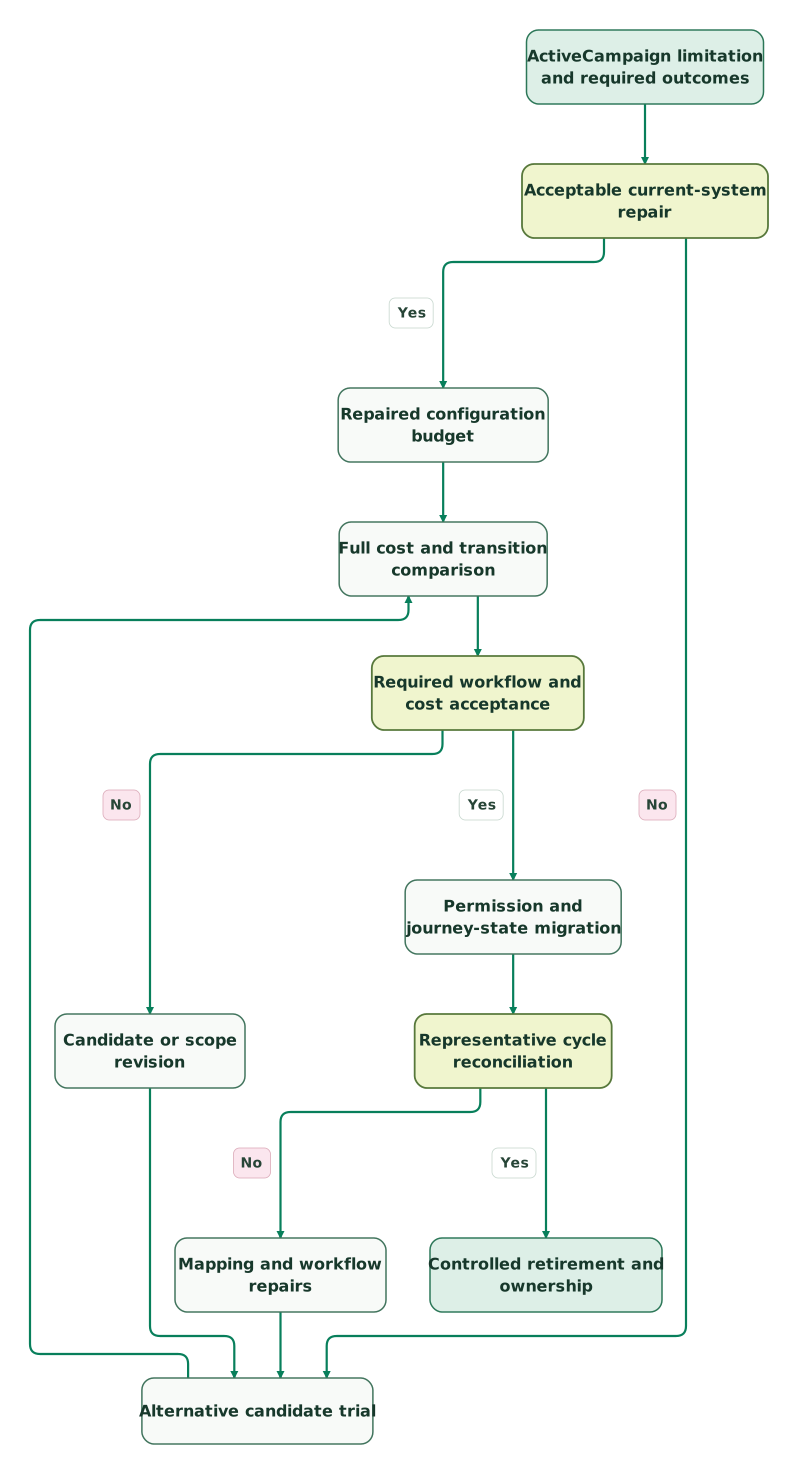
Read diagram as text
- ActiveCampaign limitation and required outcomes to Acceptable current-system repair.
- Acceptable current-system repair to Repaired configuration budget: Yes.
- Acceptable current-system repair to Alternative candidate trial: No.
- Repaired configuration budget to Full cost and transition comparison.
- Alternative candidate trial to Full cost and transition comparison.
- Full cost and transition comparison to Required workflow and cost acceptance.
- Required workflow and cost acceptance to Candidate or scope revision: No.
- Candidate or scope revision to Alternative candidate trial.
- Required workflow and cost acceptance to Permission and journey-state migration: Yes.
- Permission and journey-state migration to Representative cycle reconciliation.
- Representative cycle reconciliation to Mapping and workflow repairs: No.
- Mapping and workflow repairs to Alternative candidate trial.
- Representative cycle reconciliation to Controlled retirement and ownership: Yes
ActiveCampaign replacement checklist
- The current account's billable contact definition and available downgrade options are recorded.
- Required CRM, messaging and reporting add-ons appear in both budgets.
- The same representative workflow has been tested in each candidate.
- Exported contacts include the necessary statuses and list-level permission history.
- Notes, deals, associations and source identifiers have an agreed destination.
- Every live journey has a transition rule for people already in progress.
- Duplicate events, opt-outs and purchase exits pass before activation.
- Old and new systems reconcile through an agreed representative sending cycle.
- Cancellation confirmation and remaining subscription commitments are recorded.
Use the lifecycle marketing audit skill to prepare the evidence. At Martechdevs, we build the event connections, permissions and journey logic that make a replacement useful in daily operation. Discuss the implementation scope after identifying the workflows your team must preserve.
Keep reading
Browse all CRM & Lifecycle guides
 CRM & Lifecycle
Brevo Alternatives: Five Competitors by Email Job and Cost
Compare five Brevo alternatives for newsletters, automation, ecommerce and application email. See billing units, worked costs and a controlled migration plan.
Jafrin Akter AloLast updated 11 min read
 CRM & Lifecycle
ActiveCampaign Pricing: Contacts, Plans, Sends and Total Cost
ActiveCampaign starts at $15 monthly with annual billing. Calculate contacts, sends, users and add-ons, with worked budgets and current subscription rules.
Jafrin Akter AloLast updated 11 min read
 CRM & Lifecycle
Customer.io Implementation Mistakes: Events, Segments and Re-Entry
Prevent duplicate journeys, unsafe backfills and irrelevant reminders in Customer.io, with an event contract and an activation test to run before launch.
Jafrin Akter AloLast updated 13 min read
Lifecycle marketing
See the implementation scope, deliverables and acceptance checks.
Questions people ask
Can an existing ActiveCampaign customer downgrade to Starter?
ActiveCampaign's current plan guide says existing customers do not qualify for Starter. Check the downgrade options available to your account before using its entry price in a cost-saving plan. A supported downgrade, a revised contact allowance and a platform replacement have different implications for features, subscription commitments and migration work. Plan eligibility.
Does an ActiveCampaign CSV include contact and deal notes?
The ordinary contact or list CSV does not include contact notes. ActiveCampaign provides a separate API method for exporting contact and deal notes. If that history matters to sales or support, add it to the migration inventory and reconcile it against the intended records before terminating the old account. Notes export.
Can Kit Free replace paid ActiveCampaign automations?
Kit Free is a broadcast option, while its paid Creator plan includes visual automations and email sequences. Price the plan that supports the actual journey, including your subscriber count. A useful trial must cover purchase exits, existing-customer exclusions and repeat entry; the size of the free subscriber allowance cannot answer those workflow questions. Kit plans.
Should contacts already in an automation restart after migration?
They should restart only under an explicit journey rule. Record their current stage, completed actions and stopping conditions before transition. Some flows can finish in the old system; others need a defined entry point in the replacement. Test the policy with representative records so the move does not repeat messages or revive completed promotions.
Can replacing ActiveCampaign reduce the bill without removing the CRM?
Yes, if the CRM remains the system of record and the new messaging platform can exchange the required data reliably. Include the integration, monitoring and ownership cost in the comparison. Test lead assignment and consent updates in both directions. Splitting the systems is useful only if the complete operation remains maintainable and the savings survive those extra costs.
Sources
- Brevo plans and allowances
- Brevo USD pricing rate card
- MailerLite pricing and billing rules
- Kit plans and annual prices
- Omnisend pricing and contact definitions
- Customer.io pricing
- Customer.io startup eligibility
- ActiveCampaign feature comparison
- ActiveCampaign plans and add-ons
- ActiveCampaign contact-status rules
- ActiveCampaign list export
- ActiveCampaign notes export

Written by
Jafrin Akter AloData Engineer and Co-founder at Martechdevs and Growth and Analytics Partners
Jafrin writes practical guides to marketing technology, customer data, analytics and AI workflows. Martechdevs is a Growth and Analytics Partners company.