
Brevo vs Mailchimp: Contact Costs, Sending Volume and Automation
Pick Brevo if its sending-volume tiers fit your audience and you need marketing and transactional email within the same operating setup. Pick Mailchimp if its campaign workflow, integrations and included team access fit your programme better. Brevo vs Mailchimp becomes a useful comparison only after you count stored contacts, actual sends, required automation and people using the account.
On this page
Brevo and Mailchimp compared
Prices are US list amounts in USD with monthly billing, excluding promotions and optional add-ons.
| Decision | Brevo | Mailchimp |
|---|---|---|
| Paid entry | Starter $9/month for 5,000 emails and 500 stored contacts | Essentials $13/month for 500 contacts and 5,000 emails |
| Standard entry | $18/month for 5,000 emails and 500 stored contacts | $20/month for 500 contacts and 6,000 emails |
| Free allowance | 300 sends daily and up to 100,000 stored contacts | 250 contacts, 500 sends monthly and 250 daily |
| Automation boundary | Free/Starter up to 2,000 automation contacts; Standard unlimited automation contacts | Essentials up to four flow steps; Standard up to 200 |
| Team access | Standard supports up to three marketing seats through add-ons | Essentials includes three seats; Standard five |
| Application email | Monthly email credits can cover marketing and transactional email | Transactional Email is a separate product to price and configure |
Sources: Brevo plans, Mailchimp US plan data, Mailchimp pricing features, Mailchimp automation flows, and Brevo email-credit scope.
We would first price the actual month and test one important journey. A low entry price can disappear after choosing the correct contact tier, adding team access or including all automated sends. Our lifecycle messaging implementation service connects that purchasing decision to the events, permissions and customer outcomes the programme needs.
Contact storage and the real billing population
Brevo's chosen email tier also sets a stored-contact limit. At 5,000 monthly emails, Starter and Standard support 500 contacts; the 20,000-email tier supports up to 500,000 stored contacts. The model therefore has both sending and storage boundaries. A large audience with occasional communication can fit differently from a small audience receiving frequent messages. Brevo tier limits.
Mailchimp counts subscribed, unsubscribed and non-subscribed contacts toward its monthly contact limit. Cleaned, pending and archived contacts are treated differently. Its contact-status guide also separates email and SMS subscriptions. A person present in the account is not automatically eligible for every channel. Mailchimp contact types.
Write down the population before quoting a migration. For example, 4,000 subscribed contacts plus 1,000 unsubscribed contacts can fill a 5,000-contact Mailchimp allowance even if campaigns go only to the subscribed group. A quote based on the 4,000 recipients would miss the rest of the counted records.
Mailchimp's paid-plan additional charges use the peak contact total during the billing period. Reducing the population later in that period does not retroactively remove the peak. Contacts or sends beyond the selected allowance can trigger add-on blocks, whose size and price depend on the package. Additional-charge rules.
Manage retention and suppression deliberately. Archiving may be appropriate for an inactive record, but preserve the evidence and exclusions the business needs. A cleanup exercise should not remove the only record of an objection and allow the next import to reactivate that person.
Worked costs at the same audience and cadence
These examples compare Standard plans for one marketing user, with no SMS, optional add-ons or introductory discounts. Mailchimp's included sends are an allowance, so a lower actual sending volume does not reduce the listed contact-tier price.
| Monthly requirement | Brevo Standard | Mailchimp Standard | Base-price result |
|---|---|---|---|
| 500 stored/billable contacts and 5,000 emails | $18 | $20 | Brevo lower by $2 |
| 5,000 contacts and 20,000 emails | $69 | $100 | Brevo lower by $31 |
| 5,000 contacts and 60,000 emails | $104 | $100 | Mailchimp lower by $4 |
| 20,000 contacts and 20,000 emails | $69 | $285 | Brevo lower by $216 |
Brevo's totals use its USD base plus recurring-email tier: $18 + $51 = $69 at 20,000 sends and $18 + $86 = $104 at 60,000. Mailchimp's 5,000-contact Standard tier includes 60,000 sends; its 20,000-contact tier includes 240,000. Brevo rate card, Mailchimp tier data.
The third row explains why sending frequency matters. A small audience receiving many legitimate messages can use more of Mailchimp's included allowance. The last row shows the opposite case: the audience is large but sends are infrequent. Neither row establishes feature equivalence or the complete delivery cost.
Team access can narrow the gap. Brevo's published Standard rate card includes one marketing seat and prices each additional seat at $12 monthly, within the plan's supported seat limit. For three marketers on the 20,000-send configuration, the total becomes $69 + 2 × $12 = $93. Mailchimp Standard includes five seats at the stated $100 tier. Confirm the users' required permissions as well as their access count. Brevo seat charges, Mailchimp seats.
An illustrative $1,500 migration funded solely by a $31 monthly subscription saving takes about 48.4 months to recover. At $216 monthly savings, it takes about 6.9 months. Those simple paybacks exclude overlap, maintenance and the value of any changed capability. Use the Mailchimp pricing guide to build the complete contact-based side of the calculation.
Campaign and automation fit
Brevo for a volume-led messaging programme
- Best for: A team with a well-defined sending cadence and a need to coordinate campaigns with application messages.
- Pros: Marketing and transactional sends can use the plan's email credits. Standard removes the lower plans' automation-contact ceiling.
- Cons: Stored-contact tiers, seats and optional channel costs still matter. A low send count alone does not guarantee the smallest paid tier fits.
- Free plan and startup offer: Free is useful for bounded evaluation, with a daily cap. Use the normal paid configuration for the ongoing budget.
- Choose it if: The editor, required journey and permission handling pass your tests at the expected monthly volume.
- Skip it if: The proposed setup needs extra systems or manual work that outweigh its subscription advantage.
Brevo's monthly emails expire at the billing-period boundary. Its help guide distinguishes the timing of adding emails from removing them, with reductions applying at the next billing date. Forecast the busy month before activating a new campaign. Email allowance management.
Mailchimp for the campaign team's workflow
- Best for: A team whose campaign creation, connected store and marketing operations work well within Mailchimp's selected plan.
- Pros: Standard includes five seats and longer automation flows; the contact tier brings a defined monthly send allowance.
- Cons: Unsubscribed and non-subscribed records can remain billable. Peak-period population and add-on blocks can change the bill.
- Free plan and startup offer: The small permanent free allowance has contact, monthly and daily sending caps. Paid trials and promotions have separate terms.
- Choose it if: The team can build, review and maintain the campaign and journey without extra operating friction.
- Skip it if: A large lightly emailed database makes the complete contact-tier bill difficult to justify.
Mailchimp Essentials supports up to four flow steps, while Standard supports up to 200. Price the plan that handles the actual flow, including branching and the required trigger. Buying Essentials for a complex journey and planning to add the missing steps later understates the starting requirement. Automation scope.
Test a real content-editing task: update a product section, change the segment and replace a personalization field. Include the person who will maintain the programme after implementation. Their ability to make a safe routine change matters more than a feature count.
A complete journey test
Use a defined customer outcome as the comparison unit. For a consultation business, the journey might begin with a qualified enquiry, send a useful follow-up and stop when the person books. For a store, a purchase should stop the relevant recovery promotion. The lifecycle journey guide helps define those states.
| Test | Expected outcome | Evidence |
|---|---|---|
| Duplicate signup event | One intended entry | Event identity and entry history |
| Booking or purchase during a wait | Promotional follow-up stops | Accepted event and exit decision |
| Unsubscribe before the next step | Further marketing suppressed | Permission state and scheduled send |
| Missing name or product field | Approved fallback or review | Actual generated message |
| Broken event connection | Visible, recoverable failure | Error record and replay plan |
Compare the target outcome under the same conditions. An automation can look complete while relying on an event that never arrives, or interpreting a stale field as the current customer state. That failure belongs in the implementation plan before it becomes a reason to blame the platform.
Transactional messages and channel permissions
Inventory password resets, receipts and account notifications separately from marketing campaigns. Brevo allows the shared email credits to cover both, so include both in the forecast. A volume budget that counts newsletters alone can leave application messages competing for the remaining allowance. Brevo email scope.
Mailchimp's Transactional Email product has its own purchasing and integration scope. Its pricing page links to that separate product; obtain the required package and volume before treating a marketing subscription as the entire application-email bill. Mailchimp transactional pricing.
For a worked example, assume 5,000 contacts, 20,000 marketing emails and 10,000 transactional emails per month. Brevo Standard needs the 30,000-send tier: $18 + $61 = $79. Mailchimp Standard at 5,000 contacts is $100, and one $20 transactional block covers up to 25,000 transactional emails, producing a $120 subtotal. This comparison excludes extra users, channels and implementation. Brevo rate card, Mailchimp transactional blocks.
Permissions should survive any shared infrastructure. Brevo's blocklists vary by channel, and transactional-email restrictions can be sender-specific. Map those distinctions to the destination rather than collapsing every record into one subscribed flag. Brevo blocklist behaviour.
For Mailchimp, keep email and SMS permission separate and preserve the contact status during imports and updates. Data from a purchase or integration can create a non-subscribed contact; its presence does not establish marketing permission. Mailchimp contact status.
Migration cost and acceptance
Export the necessary audience, fields and permission evidence, then reconcile the destination population. Count imported, excluded, rejected and merged records separately. Retain the reason for each exclusion so the team can explain why an address did not move.
Translate live journeys as well as templates. Someone already halfway through a sequence needs an explicit rule: finish in the old system, enter the replacement at a defined point, or leave the retired journey. A blanket restart can repeat offers or ignore completed purchases.
Keep only one active owner for each live message during overlap. If a destination fails, the rollback should identify which queue, trigger and sender resume. Two platforms both believing they own the same follow-up can double the message pressure without improving the customer experience.
The Brevo alternatives and Mailchimp alternatives provide wider shortlists if neither configuration fits. For more involved automation and sales handoffs, continue with ActiveCampaign versus Mailchimp.
Best fit by scenario
| Programme | First candidate | Runner-up | Deciding evidence |
|---|---|---|---|
| Large audience with occasional campaigns | Brevo | Mailchimp | Actual stored population and send cadence |
| Small audience with frequent campaigns | Matched Standard quotes | Current platform repair | Included sends and total staff access |
| Existing Mailchimp team with reliable workflows | Retained Mailchimp setup | Brevo trial | Migration recovery and concrete operating gain |
| Marketing plus application email | Brevo configuration | Mailchimp plus transactional scope | Combined volume, ownership and suppression |
| Complex branching and sales handoff | Exact workflow trial | A broader lifecycle shortlist | Trigger, exit, CRM action and complete cost |
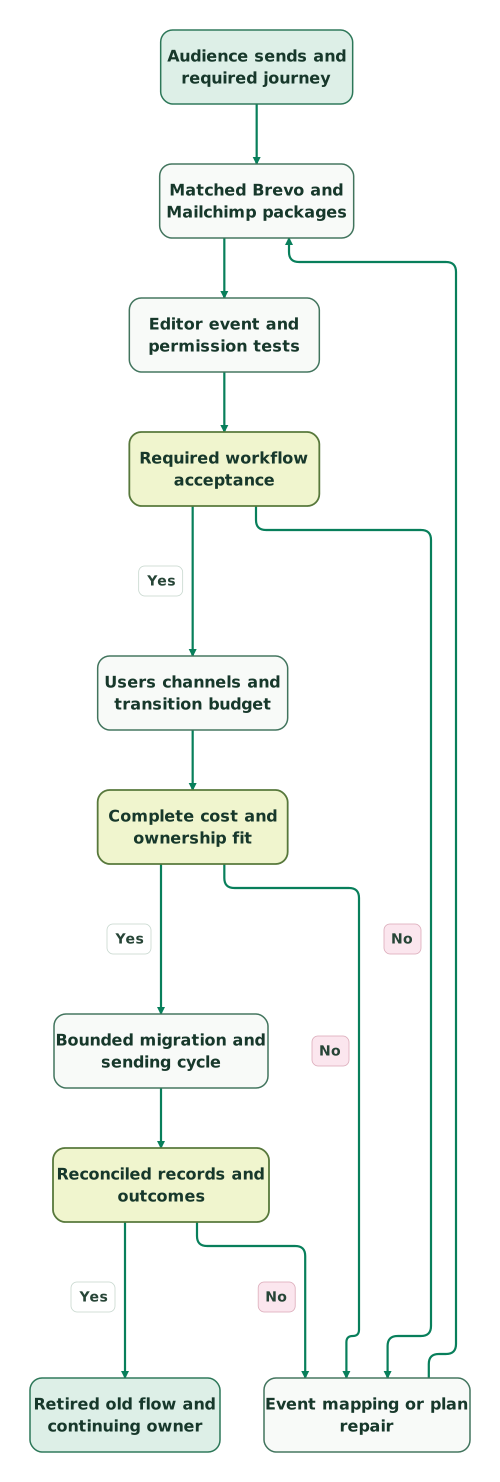
Platform selection checklist
Read diagram as text
- Audience sends and required journey to Matched Brevo and Mailchimp packages.
- Matched Brevo and Mailchimp packages to Editor event and permission tests.
- Editor event and permission tests to Required workflow acceptance.
- Required workflow acceptance to Event mapping or plan repair: No.
- Event mapping or plan repair to Matched Brevo and Mailchimp packages.
- Required workflow acceptance to Users channels and transition budget: Yes.
- Users channels and transition budget to Complete cost and ownership fit.
- Complete cost and ownership fit to Event mapping or plan repair: No.
- Complete cost and ownership fit to Bounded migration and sending cycle: Yes.
- Bounded migration and sending cycle to Reconciled records and outcomes.
- Reconciled records and outcomes to Event mapping or plan repair: No.
- Reconciled records and outcomes to Retired old flow and continuing owner: Yes
Checklist
- Stored contacts, billable contacts and eligible recipients are counted separately.
- Campaign, automation and transactional sends appear in the monthly forecast.
- Staff seats and permissions fit the chosen packages.
- The complete journey passes entry, exit, repeat and failure tests.
- Contact-status and channel restrictions have a destination mapping.
- Introductory discounts are separated from normal recurring cost.
- Migration, overlap and maintenance are included in the comparison.
- One reconciled sending cycle passes before the replaced flows are retired.
Use the lifecycle marketing audit skill to prepare the baseline. At Martechdevs, we implement the events, data connections and message controls that make the selected platform useful. Discuss the lifecycle implementation scope with the audience and journeys the system must serve.
Keep reading
Browse all CRM & Lifecycle guides
 CRM & Lifecycle
ActiveCampaign vs Mailchimp: Automation, Team Access and Full Cost
Compare ActiveCampaign and Mailchimp by automation, users, contact rules and sales handoffs. Includes matched entry budgets and a complete journey test.
Jafrin Akter AloLast updated 10 min read
 CRM & Lifecycle
Mailchimp Pricing: Plans, Contact Costs and the Bill After Discounts
Mailchimp costs from $13 a month. Compare real contact-tier bills, send and seat limits, overages, SMS costs and the renewal price after discounts.
Jafrin Akter AloLast updated 12 min read
 CRM & Lifecycle
Brevo Alternatives: Five Competitors by Email Job and Cost
Compare five Brevo alternatives for newsletters, automation, ecommerce and application email. See billing units, worked costs and a controlled migration plan.
Jafrin Akter AloLast updated 11 min read
Lifecycle marketing
See the implementation scope, deliverables and acceptance checks.
Questions people ask
Is Brevo always cheaper than Mailchimp for the same contact count?
No. Sending frequency and required features change the result. At 5,000 contacts and 20,000 monthly emails, the stated Standard configurations favour Brevo; at 60,000 emails, Mailchimp's included allowance can reverse that small price difference. Add users, other channels and implementation before deciding which complete configuration costs less for the business.
Do unsubscribed Mailchimp contacts still affect the contact tier?
Yes. Mailchimp counts unsubscribed and non-subscribed contacts toward the monthly contact limit, alongside subscribed contacts. Archived and cleaned records follow different rules. Review the population and retention policy before planning a tier change, and keep suppression evidence intact so a cost-saving cleanup does not permit later accidental resubscription. Contact types.
Can Brevo's email allowance cover receipts and newsletters together?
Yes, Brevo says email credits can cover marketing and transactional messages. Count both workloads when selecting the volume tier, including automated sends outside the campaign calendar. Keep message ownership and permission rules separate even when they share an allowance, and test what happens when the account approaches its purchased sending capacity. Email-credit scope.
Does archiving Mailchimp contacts erase a peak-period charge?
Mailchimp bases paid-plan billing on the peak contact total during the billing period, so reducing the count later does not retroactively remove that peak. Use cleanup to control the appropriate future population, and review the effective tier change. Preserve the status and history the business needs before archiving or deleting records. Peak billing.
Should a working Mailchimp journey move solely for a small price difference?
A small subscription saving should be compared with the full migration and operating cost. Test the replacement's events, stopping rules, permissions and editing workflow, then calculate how long the saving takes to recover the transition. A move is more useful when it also resolves a specific business limitation the current setup cannot handle economically.
Sources

Written by
Jafrin Akter AloData Engineer and Co-founder at Martechdevs and Growth and Analytics Partners
Jafrin writes practical guides to marketing technology, customer data, analytics and AI workflows. Martechdevs is a Growth and Analytics Partners company.