
Mailchimp Alternatives and Competitors: Prices and Best Fit Compared
Choose Klaviyo or Omnisend for online-store journeys, Brevo for a large list with modest sends, Kit for creators, MailerLite for newsletters, ActiveCampaign or HubSpot for a B2B handoff, and Customer.io for product-triggered SaaS messages. At 5,000 contacts and four emails each a month, Mailchimp Standard costs $100, Brevo Starter $32 and HubSpot Marketing Hub Starter $210.
On this page
Mailchimp alternatives compared by price
US list prices in USD per month, with each price's list size and billing period in the cell.
| Tool | Starting price and list size | Best fit | Main tradeoff |
|---|---|---|---|
| Mailchimp, the baseline | Essentials $13 for 500 contacts, billed monthly | Newsletters and short flows | Unsubscribed contacts count toward the tier |
| Klaviyo | Email plan $20 for 500 active profiles, billed monthly | Shopify and ecommerce stores | $100 at 5,000 profiles, the same as Mailchimp Standard |
| Brevo | Starter $9 for 5,000 emails and 500 contacts, billed monthly | Big lists that get a few emails a month | Price rises with emails sent, one marketing seat on Starter |
| Kit | Free up to 10,000 subscribers, Creator $39 for 1,000, billed monthly | Creators and newsletter writers | The free plan has no automations or sequences |
| MailerLite | Free for 250 subscribers, Comfort $12 for 500, billed monthly | Small business newsletters | Comfort caps sends at 10 times the subscriber tier |
| ActiveCampaign | Starter $15 for 1,000 contacts, billed yearly | Small B2B and service businesses | Starter has one seat and 5 actions per automation |
| HubSpot Marketing Hub | Starter $20 per seat with 1,000 marketing contacts | B2B teams whose sales reps use HubSpot | $210 a month at 5,000 marketing contacts |
| Omnisend | Standard $16 for 500 contacts, billed monthly | Online stores on a smaller budget | New SMS subscriptions need Pro at $59 plus separate credits |
| Customer.io | Essentials $100 for 5,000 profiles, billed monthly | SaaS emails triggered by product events | Needs event data from your product |
| Shopify Messaging | Free for 10,000 emails a month, then $1 per 1,000 | Small Shopify stores | Shopify subscription required; SMS billed separately |
| Constant Contact | Lite from $12/month; contact tier determines final price | Small businesses needing standard campaigns and live support | Historical contact-tier rules and sending allowances |
Each tool name links to the page its price comes from. Our Mailchimp pricing guide covers every Mailchimp tier if you'd rather stay and cut the bill.
If your Mailchimp bill grows with contacts you don't email, clean the list before you compare. If the flows need data that never reaches Mailchimp, our lifecycle messaging implementation work fixes the store or product feed before you switch, so the new tool doesn't inherit the same gap.
Mailchimp competitors priced at 5,000 contacts
Worked example: 5,000 email contacts, four emails each monthly (20,000 sends) and one marketer, at US monthly list prices before tax; Customer.io has 5,000 people and no additional object profiles, and Shopify’s store subscription is excluded.
| Tool and plan | Monthly price | Billing basis at this size |
|---|---|---|
| Shopify Messaging | $10 | First 10,000 emails free, then 10,000 at $1 per 1,000 |
| Brevo Starter | $32 | $9 base plus $23 for 15,001 to 20,000 emails |
| Brevo Standard | $69 | $18 base plus $51 for 15,001 to 20,000 emails |
| Mailchimp Essentials | $75 | 5,000-contact tier with 50,000 sends |
| Mailchimp Standard | $100 | 5,000-contact tier with 60,000 sends |
| Klaviyo Email | $100 | 5,000 active profiles with 50,000 emails |
| Customer.io Essentials | $100 | Up to 5,000 profiles and 1 million emails |
| HubSpot Marketing Hub Starter | $210 | $20 seat plus $190 for 4,000 extra marketing contacts |
Shopify Messaging and Brevo have the lowest email-service totals in this example. Shopify requires an existing store subscription, so its $10 is incremental email usage rather than a complete business-platform budget. Brevo also limits stored contacts by tier. Mailchimp, Klaviyo and Customer.io sit between $75 and $100. HubSpot costs most because Starter charges $50 for each 1,000 marketing contacts up to 3,000 and $45 for each 1,000 up to 5,000.
The rows compare this sending workload, not a full equivalent automation setup. Starter-level flow limits can change the appropriate plan. Kit, MailerLite, ActiveCampaign, Omnisend and Constant Contact price each contact tier on their own pricing pages. Set those to your own count before you compare, and check the Mailchimp cost calculator and the Klaviyo cost calculator for the tiers either side of yours.
Best Mailchimp alternative by business type
| Business | Best fit | Runner-up | Reason |
|---|---|---|---|
| Small Shopify store | Shopify Messaging | Omnisend | The first 10,000 emails a month are free, and Omnisend adds store flows from $16 |
| Store where flows drive revenue | Klaviyo | Omnisend | Klaviyo bills reachable profiles and runs flows on store data; Omnisend starts at $16 against $20 |
| Creator or paid newsletter | Kit | MailerLite | Kit is free up to 10,000 subscribers, and MailerLite's free plan stops at 250 |
| Small business newsletter | MailerLite | Mailchimp Essentials | Comfort starts at $12 a month and Essentials at $13 |
| Big list, few sends | Brevo | Mailchimp Pay As You Go | Brevo bills emails sent; Mailchimp credits last 12 months |
| B2B team with sales in HubSpot | HubSpot Marketing Hub | ActiveCampaign | One CRM record for marketing and sales; ActiveCampaign Starter is $15 at 1,000 contacts |
| SaaS onboarding on product events | Customer.io | HubSpot Marketing Hub | Customer.io prices 5,000 profiles at $100 with 1 million emails; HubSpot is a weaker fit unless sales already lives there |
Mailchimp itself is a weaker fit for SaaS onboarding with many branches, because Essentials flows stop at four steps and branching needs Standard (Mailchimp flow rules). For a newsletter under 5,000 contacts with simple flows, staying on Essentials at $75 or less saves the cost and risk of a migration.
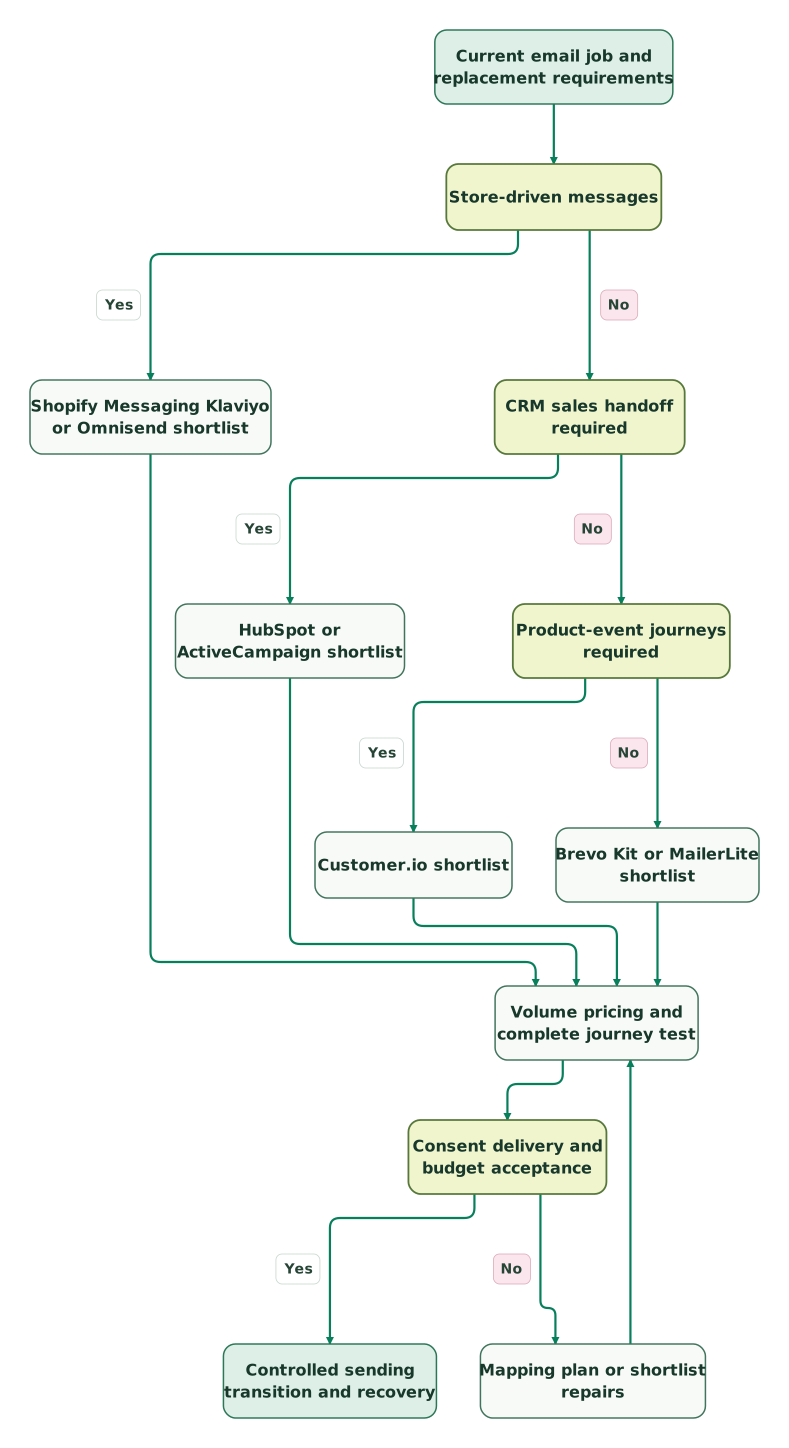
Use the business job to choose a shortlist, then test its cost, consent handling and delivery before moving the workload:
Read diagram as text
- Current email job and replacement requirements to Store-driven messages.
- Store-driven messages to Shopify Messaging Klaviyo or Omnisend shortlist: Yes.
- Store-driven messages to CRM sales handoff required: No.
- CRM sales handoff required to HubSpot or ActiveCampaign shortlist: Yes.
- CRM sales handoff required to Product-event journeys required: No.
- Product-event journeys required to Customer.io shortlist: Yes.
- Product-event journeys required to Brevo Kit or MailerLite shortlist: No.
- Shopify Messaging Klaviyo or Omnisend shortlist to Volume pricing and complete journey test.
- HubSpot or ActiveCampaign shortlist to Volume pricing and complete journey test.
- Customer.io shortlist to Volume pricing and complete journey test.
- Brevo Kit or MailerLite shortlist to Volume pricing and complete journey test.
- Volume pricing and complete journey test to Consent delivery and budget acceptance.
- Consent delivery and budget acceptance to Mapping plan or shortlist repairs: No.
- Mapping plan or shortlist repairs to Volume pricing and complete journey test.
- Consent delivery and budget acceptance to Controlled sending transition and recovery: Yes
Mailchimp alternatives tool by tool
Klaviyo
- Best for: Shopify and ecommerce stores whose revenue comes from abandoned cart, browse and post-purchase flows.
- Pros: the Email plan starts at $20 a month for 500 active profiles with 5,000 emails, and only contacts you can market to count as active profiles (Klaviyo pricing).
- Cons: 5,000 profiles cost $100 and 50,000 cost $720, against $450 on Mailchimp Standard. SMS and MMS are add-ons, and over 150,000 active profiles is a custom quote.
- Free plan and startup offer: free for 250 active profiles and 500 monthly emails. Treat the displayed Marketing-plan introduction separately from the recurring Email-plan rates used here. Klaviyo plan terms.
- Choose it if: store data should decide who gets which email, and you want SMS in the same tool.
- Skip it if: you send a monthly newsletter to a B2B list, where Mailchimp Essentials or MailerLite costs less.
Our Klaviyo pricing guide shows every profile tier, and Klaviyo vs Mailchimp compares the two on the same list.
Brevo
- Best for: large lists that get a few emails a month.
- Pros: Brevo bills by monthly email volume. Starter costs $9 a month, or $97 a year, for 5,000 emails, and from 20,000 emails a month Starter and Standard store up to 500,000 contacts (Brevo pricing data).
- Cons: the 5,000-email entry tier stores only 500 contacts. Starter has one marketing seat, removing its logo costs $12 a month, and Standard supports up to three marketing seats through add-ons. Starter’s automation inherits the 2,000-contact allowance; Standard supports unlimited automation contacts. Brevo plan limits.
- Free plan and startup offer: a free plan with one marketing seat, and yearly billing about 10% below twelve monthly payments.
- Choose it if: you store tens of thousands of contacts but email them once or twice a month.
- Skip it if: more than three people need to build campaigns, since Professional starts at $499 a month with ten seats.
Kit
- Best for: creators and newsletter writers growing an audience.
- Pros: free up to 10,000 subscribers with unlimited forms, landing pages and broadcasts (Kit free plan). Creator costs $39 a month for 1,000 subscribers, and an annual plan costs the same as 10 monthly payments (Kit plans, Kit billing).
- Cons: automations and sequences need a paid plan, Creator allows two team members, and Pro costs $79 a month at 1,000 subscribers.
- Free plan and startup offer: the free plan above and a 14-day paid-plan trial. Compare the normal renewal rate separately from any promotional offer shown at checkout. Kit plans.
- Choose it if: email is the product or the main channel to your audience.
- Skip it if: your list is mostly store customers whose flows depend on order data.
MailerLite
- Best for: small businesses that want newsletters, landing pages and simple automations at a low price.
- Pros: free for 250 subscribers and 2,500 emails a month. Comfort costs $12 a month for 500 subscribers and 5,000 emails, and Power starts at $25 with unlimited emails under a fair use policy and unlimited seats (MailerLite pricing).
- Cons: Comfort caps sends at 10 times the subscriber tier, and lists over 200,000 subscribers go to a custom Enterprise plan.
- Free plan and startup offer: the free plan and 14-day trial; the pricing page lists 10% savings with annual billing. Check any nonprofit offer directly before using it in the budget. MailerLite plans.
- Choose it if: you want a simple newsletter tool now and the option of unlimited sends on Power later.
- Skip it if: you send more than 10 times your subscriber tier a month and won't pay for Power.
ActiveCampaign
- Best for: small B2B and service businesses that want multi-step automation.
- Pros: Starter is $15 a month for 1,000 contacts, Plus $49 and Pro $79, billed yearly for that contact count, with sends of 10 times the contacts on Starter and Plus and 12 times on Pro (ActiveCampaign’s published entry rates, billing basis).
- Cons: Starter and Plus have one seat and Pro three. Starter allows 5 actions per automation and has no landing pages or SMS.
- Free plan and startup offer: a 14-day free trial with no credit card.
- Choose it if: you want automations with unlimited actions, which start on Plus, and one seat is enough.
- Skip it if: several marketers need their own login and you won't pay for Pro.
HubSpot Marketing Hub
- Best for: B2B teams whose sales reps already work in HubSpot.
- Pros: marketing and sales share one CRM record, and non-marketing contacts are free (HubSpot product catalog).
- Cons: Starter is $20 per seat a month with 1,000 marketing contacts, and more contacts cost $50 per 1,000 up to 3,000, $45 up to 5,000 and $40 after that. Professional starts at $800 a month on annual billing with three seats, plus a $3,000 one-time onboarding fee (Marketing Hub pricing).
- Free plan and startup offer: free tools for up to two users, and a limited-time Starter offer for new customers.
- Choose it if: the handoff from email to sales matters more than the email bill.
- Skip it if: you mainly send newsletters to a big list. Contact-based pricing makes HubSpot a weaker fit there.
HubSpot vs Mailchimp covers the sales handoff in detail.
Omnisend
- Best for: online stores that want store flows at a lower entry price than Klaviyo.
- Pros: Standard starts at $16 a month for 500 contacts with emails of 12 times the list, and unsubscribed contacts aren't billed (Omnisend pricing).
- Cons: new SMS subscriptions require Pro, starting at $59 monthly, plus a separate SMS credit subscription. Country and spend determine the message rate. Standard accounts retaining a qualifying pre-May 4, 2026 SMS subscription have a legacy exception. Billable contacts also change the tier each cycle. Omnisend SMS and billing rules.
- Free plan and startup offer: 500 emails a month to up to 250 contacts, and 30% off the first three months when you prepay your first upgrade.
- Choose it if: you want store flows and email at a lower starting price than Klaviyo.
- Skip it if: SMS is your main channel and you'd rather not pay Pro plus credits.
Customer.io
- Best for: SaaS and app teams that send emails from product events.
- Pros: Essentials costs $100 a month for 5,000 total profiles, including people and objects, and 1 million emails. A company or account object can therefore consume capacity alongside its people. Customer.io pricing.
- Cons: it needs product event data from your app, and Premium starts at $1,000 a month billed annually.
- Free plan and startup offer: a 14-day trial, plus up to 12 months and 30,000 profiles through the startup program for eligible applicants. The business must have raised under $10M, use legitimately obtained contact lists and never have been a Customer.io customer. Approval and the actual benefit term still apply. Startup eligibility.
- Choose it if: onboarding and retention emails depend on what users do in the product.
- Skip it if: you mostly send newsletters, where a newsletter tool costs less.
The Customer.io pricing guide explains how profiles and objects are counted.
Shopify Messaging
- Best for: small Shopify stores sending simple campaigns and automations.
- Pros: the first 10,000 emails a month are free, then $1 per 1,000, with lower rates after 300,000 a month and no monthly commitment (Shopify Messaging).
- Cons: it only works for Shopify stores, and SMS is billed separately in select countries.
- Free plan and startup offer: free up to 10,000 emails a month on every Shopify plan.
- Choose it if: you're on Shopify and the list is small.
- Skip it if: you sell outside Shopify.
Constant Contact
- Best for: small businesses that want plan-and-contact-tier pricing like Mailchimp's.
- Pros: Lite starts at $12, Standard at $35 and Premium at $80 monthly before contact-tier changes. Constant Contact prices. Sends go up to 24 times the contact tier, depending on the plan, and the overage rate is published at $0.002 per extra send, or $2 per 1,000 (Constant Contact send allowance).
- Cons: the billing guide distinguishes the current period’s peak billable contacts from the purchased contact tier, which deletion does not automatically lower. Confirm the downgrade process and next quoted charge before treating a cleanup as subscription savings. Ordinary prepayments are described as non-refundable, and the monthly fee applies even in a month you send nothing (Constant Contact billing).
- Free plan and startup offer: the pricing page offers a free trial and a 30-day money-back guarantee for eligible new plans. Check those guarantee terms alongside the ordinary prepayment rules before paying for a longer term. Trial and guarantee.
- Choose it if: you want Lite, Standard or Premium plans with a published overage rate.
- Skip it if: your list changes sharply and the proposed contract does not establish a workable downgrade route. Deleting records alone should not be budgeted as an automatic tier reduction.
Migration acceptance checks
Test a small synthetic cohort before moving the full list. Include an opted-in subscriber, an unsubscribed contact, a cleaned address, a duplicate identity and a customer already inside an active flow. Keep the expected result beside each test record so a successful import cannot conceal an incorrect send.
| Test case | Expected outcome | Evidence |
|---|---|---|
| Unsubscribed or cleaned contact | No new promotional enrolment | Destination suppression and a blocked campaign or flow entry |
| Duplicate source record | One intended contact and action | Stable identity mapping and deduplicated enrolment |
| Existing flow participant | Controlled continuation or explicit restart | Recorded handoff point and one active sending owner |
| Late order or product event | Correct eligibility from current state | Replay test with the expected flow branch |
| Failed integration | Visible exception with a safe replay path | Owned queue and reconciled destination result |
Define the cutover from those results and the journeys’ actual timing. A week-long welcome series and a renewal reminder need different observation periods. Preserve suppression evidence and a recovery export even after the old subscription ends.
Mailchimp migration checklist
At Martechdevs, we move lists, suppressions and flows off Mailchimp and rebuild the store or product data feeds the new tool needs. This is the list we work through:
Checklist
- Export every audience with each contact's status, including unsubscribed and cleaned contacts.
- Import unsubscribed and cleaned contacts into the new tool as suppressed.
- Map Mailchimp tags, groups and fields to the new tool's fields before the first import.
- Rebuild each flow from its goal and test it with internal addresses.
- Complete the provider’s domain authentication and confirm DMARC alignment before the first campaign.
- Give each message one sending tool while both tools run.
- Price the new tool at your real contact count and your busiest month's sends.
- Cancel Mailchimp only after the required journeys, suppression rules and reconciliation checks pass, with renewal timing recorded.
Use the lifecycle marketing audit skill to document the journey, channel permissions and acceptance checks.
Next steps after choosing a Mailchimp alternative
Price your current plan first in the Mailchimp cost calculator, then the same list in the Klaviyo cost calculator if you run a store. For stores already weighing Klaviyo, our Klaviyo alternatives page compares Omnisend, Brevo and the store-focused options at the same profile count.
Keep reading
Browse all CRM & Lifecycle guides
 CRM & Lifecycle
Mailchimp Pricing: Plans, Contact Costs and the Bill After Discounts
Mailchimp costs from $13 a month. Compare real contact-tier bills, send and seat limits, overages, SMS costs and the renewal price after discounts.
Jafrin Akter AloLast updated 12 min read
 CRM & Lifecycle
Klaviyo Alternatives: Omnisend, Brevo and Attentive Compared
Compare Klaviyo alternatives with starting prices, SMS and contact limits, WooCommerce fit, migration costs and tests for orders, consent and delayed flows.
Jafrin Akter AloLast updated 12 min read
 CRM & Lifecycle
Klaviyo vs Mailchimp: choose by your store data, your flows and the bill at your list size
At 5,000 contacts Klaviyo and Mailchimp Standard both cost $100 a month; at 25,000, Klaviyo is $400 and Mailchimp $310. Compare flows, data and fit.
Jafrin Akter AloLast updated 23 min read
Lifecycle marketing
See the implementation scope, deliverables and acceptance checks.
Questions people ask
What is the best free Mailchimp alternative?
Kit offers a free plan covering up to 10,000 subscribers with unlimited forms, landing pages and broadcasts, though automations need a paid plan (Kit free plan). MailerLite's free plan covers 250 subscribers and 2,500 emails a month, and Shopify Messaging sends 10,000 emails a month free for Shopify stores. Mailchimp's own free plan stops at 250 contacts.
Is Brevo cheaper than Mailchimp?
Brevo is cheaper than Mailchimp at the sizes we priced, because it bills emails sent. At 5,000 contacts and 20,000 sends a month, Brevo Starter costs $32 against $75 for Mailchimp Essentials. At 50,000 sends a month, Starter costs $56 ($9 plus $47) and Standard $97 ($18 plus $79), so frequent senders should price their busiest month first (Brevo pricing data).
Which Mailchimp competitor suits a Shopify store?
Klaviyo suits a Shopify store whose revenue comes from flows built on orders and browsing, at $100 a month for 5,000 active profiles. Omnisend starts lower, at $16 for 500 contacts, with SMS on its Pro plan. A small store with simple campaigns can start on Shopify Messaging, which sends 10,000 emails a month free.
Does any Mailchimp alternative charge by emails sent instead of contacts?
Yes, Brevo and Shopify Messaging both charge by emails sent. Brevo's Starter plan costs $9 a month for 5,000 emails and rises by email tier, while Shopify Messaging is free for 10,000 emails a month and then $1 per 1,000. Customer.io charges by profiles and includes 1 million emails a month on Essentials.
Is Mailchimp still worth it for a small business?
Mailchimp is still worth it for a small business with a newsletter and short flows, because Essentials costs $13 to $75 a month up to 5,000 contacts. It gets expensive when unsubscribed and non-subscribed contacts push you up a tier, or when flows need branches that require Standard. Clean the list first, then compare alternatives at your real count (Mailchimp pricing).
Sources
- Mailchimp: US marketing plan prices by contact tier
- Mailchimp: Marketing automation flows
- Klaviyo: Pricing
- Brevo: Machine-readable pricing data
- Kit: The Kit Free plan
- Kit: Creator vs Pro plans
- Kit: Billing at Kit
- Kit: Pricing
- MailerLite: Pricing
- ActiveCampaign: Plans and features
- HubSpot: Marketing Hub pricing
- HubSpot: Product and Services Catalog
- Omnisend: Pricing
- Omnisend: Pricing plans and SMS rules
- Customer.io: Pricing
- Shopify: Shopify Messaging pricing
- Constant Contact: Email send allowance and overage fee
- Constant Contact: How you're billed
- Brevo: Plan limits and contact capacity
- ActiveCampaign: Published entry rates
- ActiveCampaign: Starter annual billing and plan limits
- Constant Contact: Plan prices, trial and guarantee
- Customer.io: Startup eligibility and benefit limits

Written by
Jafrin Akter AloData Engineer and Co-founder at Martechdevs and Growth and Analytics Partners
Jafrin writes practical guides to marketing technology, customer data, analytics and AI workflows. Martechdevs is a Growth and Analytics Partners company.