
Schema Drift in Marketing Pipelines: 7 Changes to Detect
Schema drift happens when incoming data changes beyond the contract its consumers expect. A removed column can stop a model; a new lifecycle value can quietly change a funnel while every job succeeds. Detect structure, allowed values and business meaning separately. Then decide which changes may enter raw storage, which require review and which must block reports or activation.
On this page
A connector can successfully deliver a column that your report interprets incorrectly. A dashboard can also fail because it assumes a field exists in every export variant. Treat the boundary between source and consumer as an operating contract, rather than relying on a green connector status.
The marketing data quality guide covers the wider monitoring routine. This article focuses on recognizing a source change, containing its effect and proving the repaired contract. Freshness and historical corrections remain separate checks.
Which seven changes should a schema drift monitor distinguish?
Distinguish added fields, removed fields, renames, type changes, new values, changed relationships and changed meaning. The first four change structure. The remaining three can leave column names and types untouched, so a column-diff monitor alone cannot establish compatibility.
These examples are illustrative. The consumer and consequence determine the response.
| Change | Marketing example | What detects it | First decision |
|---|---|---|---|
| 1. Added field | Connector adds a customer attribute | Schema comparison | Is collection permitted, and should a consumer use it? |
| 2. Removed field | Ad API removes a reporting metric | Schema or query contract | Hold the dependent output until an equivalent is established |
| 3. Renamed field | A source key arrives under a new name | Removed-plus-added difference | Confirm identity and meaning before mapping the replacement |
| 4. Changed type | Purchase amount changes from number to text | Type check and invalid-value count | Reject, quarantine or explicitly parse under a reviewed rule |
| 5. New category | CRM adds a product-qualified stage | Accepted-value or mapping-coverage test | Assign meaning and update the affected funnel |
| 6. Changed relationship | One account begins exporting several subscriptions | Grain, uniqueness and join tests | Redesign the relationship before aggregating |
| 7. Changed meaning | Revenue changes from gross to net in the same field | Reconciliation and contract review | Version the definition and decide whether to restate history |
An extra optional field may be harmless to a report that selects explicit columns. It can still be consequential if it contains restricted information or automatically reaches an external destination. “Additive” describes the shape of the change, not permission to collect or distribute it.
Planned schema evolution means the producer and consumers coordinate the change, compatibility period and acceptance. Drift describes the mismatch you discover when that coordination is absent or incomplete. The same column addition can be managed evolution in one pipeline and unexpected drift in another.
Where does drift enter a marketing stack?
Drift enters through the source API, connector, CRM configuration, application event or export format. Record those separately so the first responder knows which owner can change the failing boundary.
Ad platform API versions
Google Ads publishes version-specific sunset dates and upgrade differences. Its policy aims to keep at most five major versions available, with major versions lasting around twelve months and at most two upgrades needed per year. The actual version timetable controls the deadline. Google Ads API sunset policy.
Keep the requested API version, connector version and last accepted field set in the connection record. Rehearse the exact reports before an upgrade: a request that still succeeds may return different fields, enum values or segmentation combinations.
Meta's Marketing API has its own versioning policy: the previous version receives at least a ninety-day transition period, and releases occur approximately every four months. Some unaffected endpoints can be automatically upgraded when a version becomes unavailable. Marketing API versioning. The broader Graph API's minimum two-year version support is a separate policy; do not apply it to a Marketing API integration. Graph API versioning.
A managed connector can handle the API upgrade while still changing the destination schema. Keep source and connector notices in the same review queue, with the consumer tests attached.
CRM properties and application payloads
A CRM administrator can add a stage without changing a column. A developer can send amount as "49.00" instead of a number. A new account model can change a formerly one-to-one join into a one-to-many join. Each can preserve successful extraction while changing the result.
Name who may change CRM properties, including the internal property identifier, displayed label and normalized meaning. Keep a small representative payload fixture for critical application events. A screenshot of a field label is weaker evidence than the value and identifier actually sent to the integration.
GA4 export variants
Daily and intraday Google Analytics 4 (GA4) tables have different availability rules. For example, is_active_user is populated in daily tables, and older mobile SDKs can produce the old export schema. Google's current-schema guidance specifies Android SDK 17.2.5 or iOS SDK 16.20.0 or later. GA4 export schema.
Record which variant the model accepts before declaring an absent field an incident. Compare a daily table with its expected daily contract, then handle intraday data through its own documented transformation. The GA4 BigQuery export guide covers the surrounding delivery and reporting limits.
At Martechdevs, we put staging models and contracts between source volatility and the reports or syncs people depend on. That layer should make an intentional change visible without exposing every new raw field automatically.
Which changes should Fivetran allow into the warehouse?
Choose a schema-change policy per connection, then review what the connector actually supports. Fivetran provides three policies for newly detected objects. Schema-change handling.
| Policy | New schemas and configurable tables | New columns on existing tables |
|---|---|---|
| Allow all | Sync | Sync |
| Allow columns | Block | Sync |
| Block all | Block | Block |
Some application-connector tables are not configurable and cannot be completely blocked; under Block all, their primary keys still sync. Optional new-data notification emails also depend on the connection's notification configuration. Confirm the effective result before calling the policy a complete data boundary.
Use a restrictive policy when new objects require an explicit data-use decision. Use automatic intake when the raw landing area is controlled and a separate consumer boundary prevents accidental use. Neither is universally correct. Consider discovery needs, sensitive fields, maintenance capacity and the consequence of waiting for approval.
Select and rename columns explicitly in staging. Avoid pushing select * from a changing raw table through every downstream model. The Fivetran implementation guide explains the surrounding checks for sync state, history and downstream completeness.
Blocking a new field is not a repair for a removed field or a changed definition. Those need a consumer decision and a versioned transformation.
How can you detect a schema change before a report breaks?
Compare an approved structural snapshot with the currently observed schema, then test the values and relationships the structure cannot describe. Store both snapshots with the environment, connection and capture time so the comparison can be reproduced.
The following original Python example compares flattened field paths and normalized type strings. Obtain those inputs from your warehouse or connector metadata; use one normalization rule for both snapshots. It intentionally does not infer that a removed field and a new field are a safe rename.
def schema_changes(expected, observed):
    expected_keys = set(expected)
    observed_keys = set(observed)
    shared = expected_keys & observed_keys
    return {
        "added": sorted(observed_keys - expected_keys),
        "removed": sorted(expected_keys - observed_keys),
        "type_changed": {
            key: {"before": expected[key], "after": observed[key]}
            for key in sorted(shared)
            if expected[key] != observed[key]
        },
    }


approved = {
    "invoice_id": "string",
    "amount_minor": "integer",
    "currency": "string",
}
received = {
    "invoice_id": "string",
    "amount_minor": "string",
    "currency": "string",
    "customer_region": "string",
}
print(schema_changes(approved, received))
The result reports customer_region as added and amount_minor as a type change. No field was removed. This is a structural detector: it cannot discover that an integer changed from cents to whole currency units, or that an identifier now represents a subscription rather than an account.
For nested payloads, flatten a path such as items[].price consistently and preserve array/cardinality requirements in the contract. Do not erase those distinctions while normalizing. Treat a change in nullability, decimal scale or timestamp timezone as a separate contract attribute if the consumer relies on it.
Which existing tools can perform the structural check?
Elementary's schema_changes test monitors deleted tables, added or deleted columns and type changes, normalizing supported type synonyms. Databricks requires Unity Catalog; Athena and Trino are unsupported. Elementary schema tests.
Snowflake's SCHEMA_CHANGE_COUNT data metric function counts column additions, drops, renames and type changes between evaluations. Snowflake Data Quality Monitoring requires Enterprise Edition. System data metric functions. Choose an expectation and response owner for the resulting measurement; the existence of a function does not establish an effective release gate.
A first observation establishes a baseline. Decide who approves it and test a later controlled change. Automatically blessing every newly observed schema would turn the detector into an inventory with no rejection condition.
What can a dbt model contract actually block?
A dbt model contract checks the output column names and types against the declared model contract before building it. It protects the consumer-facing model boundary; it does not prevent the source from changing. dbt model contracts.
For SQL models, table and view materializations support names and types. Views do not support contract constraints. Incremental models require on_schema_change: append_new_columns or fail; ephemeral and materialized-view models are unsupported. Constraint enforcement also varies by adapter.
This example is for a Snowflake SQL model with exactly the three output columns shown. Add every actual output column and use the data types your adapter accepts:
version: 2
models:
  - name: mart_activation__account_status
    config:
      materialized: table
      contract:
        enforced: true
    columns:
      - name: account_id
        data_type: varchar
      - name: lifecycle_stage
        data_type: varchar
      - name: paid_invoice_count
        data_type: number
Keep value and relationship tests alongside this contract. Both lead and an unexpected product_qualified value are strings, so a type contract does not decide how they belong in a funnel. Likewise, two records with the same account ID can satisfy the declared column types.
Build the candidate in an isolated environment, compare its keys and business totals, and release its consumers only after acceptance. A failed new build may leave an older table available, so an independent sync must also check the expected successful version and cutoff.
How do you catch a new lifecycle value without losing the record?
Return unexpected values for review while retaining their original records and provenance. Use accepted-value tests and business-key checks to distinguish a new category from a missing or duplicated customer.
The example below uses an illustrative normalized stage vocabulary. Save it as a singular dbt test after mapping the source values. It returns both unexpected values and nulls:
select
    lifecycle_stage,
    count(*) as affected_rows
from {{ ref('stg_crm__contacts') }}
where lifecycle_stage is null
   or lifecycle_stage not in ('lead', 'qualified', 'customer', 'inactive')
group by lifecycle_stage
Suppose a fictional CRM export contains 1,000 contacts: 600 leads, 200 qualified contacts and 200 customers. RevOps then moves 80 leads into a new product_qualified stage. A reporting CASE expression that recognizes only the original four values sends those 80 records to other.
The new distribution is 520 leads, 200 qualified, 200 customers and 80 unrecognized contacts. The total remains 1,000; the unmapped share is 80 ÷ 1,000 = 8%. A total-row-count check passes while the lifecycle report loses meaning.
Keep the 80 records visible. Ask the process owner whether product qualification is an additional signal, a replacement stage or an overlapping classification. If it is an additional signal, a separate field may preserve the lifecycle model better than changing the funnel. The correct mapping is a business decision, not a convenient way to silence a warning.
Version the accepted mapping, determine its effective boundary and rebuild only the affected output. Compare record identities and stage totals before reopening activation. If a wrong audience already reached a destination, handle the breaking change as an incident and verify that the downstream state was repaired too.
How do you catch event payload drift before release?
Validate the event name, required properties, type and value constraints against representative browser, app and backend payloads before shipping. Include accepted and rejected consent states, retries and optional properties where they affect the contract.
Amplitude Protected Schema is available on Growth and Enterprise. It can mark unexpected data or reject it. Rejecting an unplanned event drops the event; rejecting an unplanned property keeps the event but omits the property. Those different outcomes matter when counting losses. Amplitude schema controls.
Avo Inspector distinguishes unexpected events, missing properties and inconsistent types, with release and source context. Its Issues view covers production observations; use its Debugger for immediate implementation checks. Avo Inspector issues. Twilio Segment Protocols compares incoming events with a tracking plan and provides controls to review, forward or block non-conforming data. It is an add-on to paid plans, so verify the entitlement. Twilio Protocols. Confirm the plan and enforcement configuration before treating monitoring as automatic rejection.
Use an allowed test destination to compare the producer payload, validation result and received event. A contract that blocks every newly introduced property without notifying the release owner can replace a visible schema problem with silent measurement loss.
Keep a small acceptance set: correct payload, missing required field, wrong type, new category and repeated delivery. Test the handler's response to each one, including which data is quarantined or rejected and where the owner sees the failure. Reuse the tracking plan as the contract rather than maintaining an unrelated second definition inside the test tool.
What should an API deprecation and schema-change calendar contain?
Record the exact connection, current version, supported replacement, affected outputs, migration owner and the last safe rehearsal point. Subscribe to vendor and connector release notes, but convert relevant notices into owned work rather than an unread notification folder.
Include an owned step to plan the backfill after a schema change when the replacement changes historical outputs.
| Calendar item | Evidence to attach | Completion condition |
|---|---|---|
| API sunset | Vendor deadline and affected version | Candidate reports reconcile before the old version expires |
| Connector upgrade | Release notes and before/after schema | New raw shape and staging contract accepted |
| CRM process change | Property identifiers and proposed meaning | Historical and future classifications agreed |
| App event change | Payload fixture and expected validation | Producer and consumer tests pass together |
Set review timing from the migration lead time. A small report upgrade may need less preparation than a multi-account export with backfill. Keep an internal warning before the vendor deadline, and name who acts if the replacement is not ready.
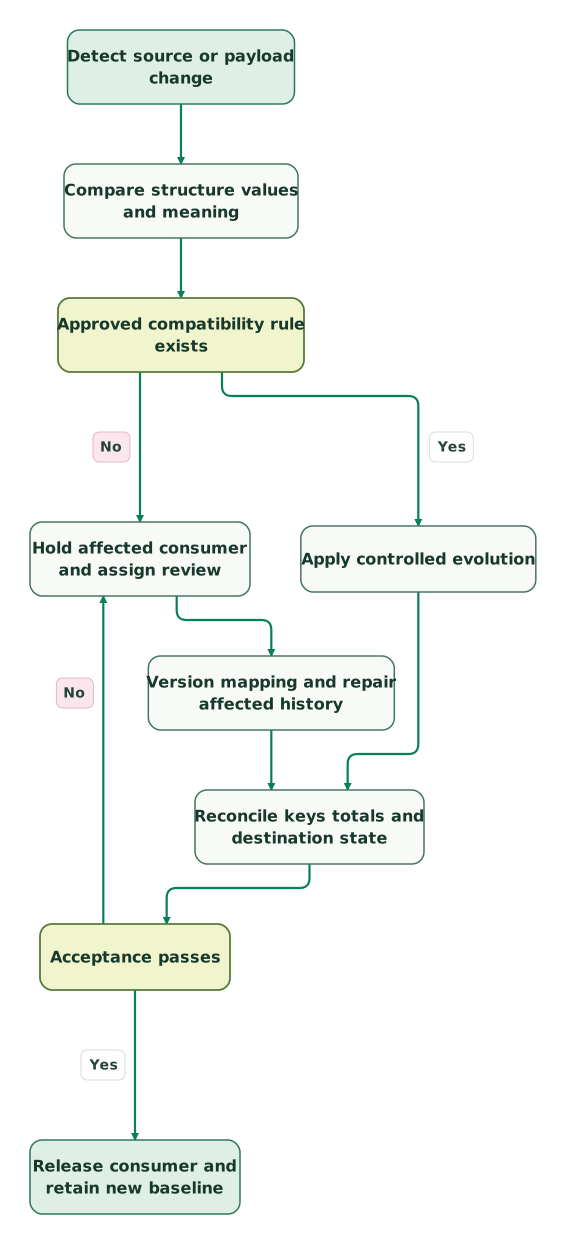
Read diagram as text
- Detect source or payload change to Compare structure values and meaning.
- Compare structure values and meaning to Approved compatibility rule exists.
- Approved compatibility rule exists to Hold affected consumer and assign review: No.
- Hold affected consumer and assign review to Version mapping and repair affected history.
- Approved compatibility rule exists to Apply controlled evolution: Yes.
- Version mapping and repair affected history to Reconcile keys totals and destination state.
- Apply controlled evolution to Reconcile keys totals and destination state.
- Reconcile keys totals and destination state to Acceptance passes.
- Acceptance passes to Hold affected consumer and assign review: No.
- Acceptance passes to Release consumer and retain new baseline: Yes
What should pass before accepting a schema change?
Accept the change when the required consumers still produce the intended result and the evidence explains every consequential difference.
Checklist
- The source, connector, environment and observed version are recorded.
- The difference identifies additions, removals, types, values and relationship changes.
- Collection and onward use of new fields are approved separately.
- Staging models select and map fields explicitly.
- Contract checks and value/grain tests cover the affected output.
- The business owner accepts changed meaning and historical treatment.
- A scoped backfill reconciles keys, amounts and destination state.
- The new baseline has an owner and future change alerts are exercised.
Get the $99 martech audit to identify unstable data boundaries, or scope a warehouse implementation that includes contracts, fixtures and an operating handover.
Keep reading
Browse all Data Warehouse guides
 Data Warehouse
Data Quality Metrics for Marketing: Formulas and a Monthly Scorecard
Build a marketing data quality scorecard with clear formulas, record coverage, incident metrics and tested examples. Set targets around real decisions.
Jafrin Akter AloLast updated 13 min read
 Data Warehouse
Data Observability Tools Compared: dbt Tests, Elementary, Soda, Great Expectations, Monte Carlo, Metaplane and Sifflet
Compare dbt tests, Elementary, Soda, Great Expectations, Monte Carlo, Metaplane and Sifflet on setup, pricing units, alerts and fit for small data teams.
Jafrin Akter AloLast updated 16 min read
 Data Warehouse
Data Incident Runbook: 8 Steps to Recover Marketing and Product Data
Resolve marketing data incidents with eight practical steps, severity rules, replay limits, reconciliation checks and copyable stakeholder messages.
Jafrin Akter AloLast updated 14 min read
Data warehouse & CDP
See the implementation scope, deliverables and acceptance checks.
Questions people ask
How should drift alerts behave during a planned connector upgrade?
Keep the detector running and attach the approved change to the alert. A planned upgrade may explain one expected difference while introducing another unexpected change. Compare both with the accepted contract, record the result and close only the explained items. Temporarily suppressing notifications needs an owner and an expiry; it should not automatically approve every difference observed during the maintenance window.
Can development and production have different approved schemas?
Yes, when the difference is intentional and versioned. Identify which consumer contract each environment serves and keep deployment promotion tied to that version. A development-only column should not make production appear broken, while a missing production field must not be dismissed merely because a newer sandbox has it. Compare each environment with its own approved baseline before comparing environments with one another.
Should a renamed CRM label count as a schema rename?
Inspect the internal property identifier and the payload before classifying the change. A display-label edit may leave the integration field unchanged, while a replacement property can introduce a new identifier despite a familiar label. Record the business meaning in either case. The repair decision should follow what the consumer receives and how the report uses it, rather than the wording visible in one CRM screen.
How should a removed column appear in an archived export?
Keep the archive's original schema and a description of the version it represents. If a reader needs a consistent historical view, build a separately versioned transformation with explicit handling for the missing field. Do not rewrite an old extract to imply the source once supplied a value it never contained. Preserve the raw evidence needed to explain later restatements.
Who should approve a wider numeric type for a billing field?
Have the data owner and the person accountable for billing interpretation review it together. Confirm scale, rounding, valid range and downstream export limits, then test boundary values and reconciliation totals. A wider type can accept more values without proving that those values are meaningful. Keep the source amount and transformation rule available so the change does not silently alter financial interpretation.
Sources
- Google: Google Ads API deprecation and sunset policy
- Meta: Marketing API versioning
- Meta: Graph API versioning
- Fivetran: Schema-change handling and data blocking
- Elementary: Schema-change tests
- Snowflake: System data metric functions
- dbt Labs: Model contracts
- Amplitude: Protected Schema
- Google Analytics: BigQuery export schema
- Avo: Inspector issues
- Twilio: Protocols

Written by
Jafrin Akter AloData Engineer and Co-founder at Martechdevs and Growth and Analytics Partners
Jafrin writes practical guides to marketing technology, customer data, analytics and AI workflows. Martechdevs is a Growth and Analytics Partners company.