
dbt Incremental Backfills: Repair History Without Breaking Today's Reports
Data Engineer and Co-founder, martechdevs
Last updated 10 min read
A reliable dbt backfill identifies the affected business records or time periods, recomputes their complete results, and replaces the appropriate target state. It also checks downstream models and activation jobs. Simply widening a date filter can miss old corrections, overwrite a daily total with a partial total, or leave duplicate rows behind.
Last updated: 14 October 2026.
Marketing data rarely becomes final the moment it arrives. Ad spend can change, refunds arrive after purchases, and a corrected campaign mapping can alter months of reporting. Incremental processing saves work, but only if the model knows which earlier results those changes invalidate.
This guide is for the data engineer or analytics owner who needs a repeatable repair procedure. The examples are illustrative and use small fixtures so the expected result is visible. Apply the pattern to your adapter, model grain and retention policy before using it in production.
If historical reporting repeatedly disagrees with source systems, our warehouse implementation service can help separate ingestion completeness, transformation logic and business definitions. A faster incremental job will not resolve a disagreement about what revenue means.
What are you actually trying to repair?
Classify the incident before choosing a command:
- Late arrival: a previously unseen event belongs to an older business date.
- Correction: an existing record has changed, perhaps through a refund or revised cost.
- Logic change: the same source rows now produce a different result.
- Missing history: the warehouse never retained the source records needed for reconstruction.
- Deletion: a record must be removed or its contribution reversed.
The first three can often be repaired from retained data. The fourth requires recovery from an upstream source or a clear statement that the historical result cannot be reconstructed. A full refresh cannot recreate information that no longer exists.
Write the repair objective in business terms. For example: “Recalculate campaign-day net revenue for 1–7 October using the corrected refund mapping, while leaving all other periods unchanged.” That is much easier to validate than “rerun the revenue model.”
The late-arriving marketing data guide explains how to separate event time from arrival time. Keep both when possible: one assigns the business period and the other helps identify new information.
Why can a recent-date filter miss an old correction?
An incremental model processes the source rows selected by its SQL. dbt does not infer every historical dependency from a business rule. The model must remain valid on both its initial-build and incremental paths. Configure incremental models
Imagine an order dated 3 October receives a correction on 14 October. Filtering only for orders dated after 13 October excludes it. Filtering by a reliable change timestamp could find the correction, but you still need to know which output rows it affects.
For an order-grain model, that may be one order. For a campaign-day aggregate, it may be the entire 3 October campaign group. For a cumulative lifetime-value model, it may affect later snapshots too.
A rolling lookback is an operational compromise. It covers changes inside its window, not every possible correction. Measure the distribution of actual delays and maintain a separate process for older repairs. Do not label a seven-day lookback “complete” unless the upstream contract genuinely guarantees that boundary.
Use a successful-run watermark rather than advancing a cursor merely because a job started. If a job fails after reading the input but before publishing the output, the next attempt must still include the unfinished work.
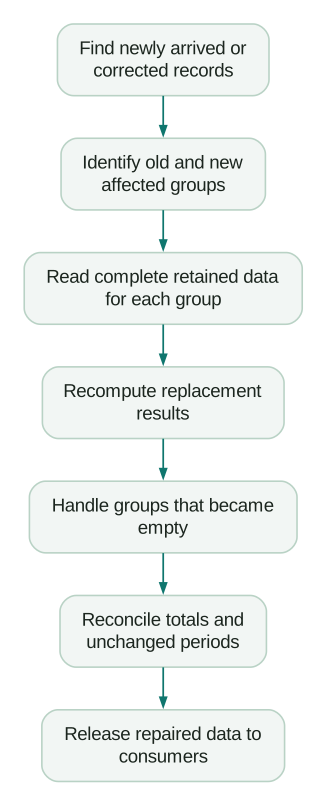
Recompute the whole affected group, not just the arriving rows
Here is an illustrative daily revenue example. On the first run, 3 October contains two orders: USD100 and USD50. The stored daily total is USD150. A third order worth USD40 arrives later, but its business date is still 3 October.
If the incremental query aggregates only newly arrived rows and merges by date, it can replace USD150 with USD40. The query ran successfully, but the correct total is USD190.
The repair has two stages: identify affected dates from arrivals, then read all retained orders for those dates. This simplified SQL assumes one current row per order, a reliable ingestion timestamp and an append-only fixture:
with affected_days as (
  select distinct order_date
  from orders
  where ingested_at >= '2026-10-14 00:00:00'
),
recomputed as (
  select
    o.order_date,
    count(*) as order_count,
    sum(o.net_amount) as net_revenue
  from orders o
  join affected_days d
    on o.order_date = d.order_date
  group by o.order_date
)
select * from recomputed;
The expected output is three orders and USD190 for the affected date. A different unaffected date should not be included. This query discovers and recomputes the repair set; the adapter-specific materialization must then replace or update the appropriate target rows.
For a campaign-day model, discover and recompute both parts of the key. For mutable records, use a trustworthy change indicator and retain enough previous state to identify the old group as well as the new one. If an order moves from one campaign to another, repairing only its new campaign leaves its old contribution behind.
A group that becomes empty needs explicit handling too. An aggregate query returns no row for a group with no remaining members. A merge cannot update a target row it never receives. Your repair design must deliberately remove that old group or write an agreed zero result.
How should you choose the incremental strategy?
Adapter support and write semantics matter. Append adds the selected rows without deduplicating existing target records. Merge uses its match condition to decide between updates and inserts. Partition-oriented strategies replace a different unit of data. Inspect the compiled SQL for your actual adapter rather than assuming the strategy names behave identically everywhere. Incremental strategies
For row-level repairs, define the stable business key and decide how source duplicates are resolved. For partition replacement, make sure the replacement query contains the complete intended partition. Replacing a day with only its late arrivals destroys the rest of that day's result.
Do not confuse unique_key configuration with a data-quality test. The configuration supplies matching information; your source and target still need checks for nulls and duplicate keys. Unique key reference
Check target pruning before an old backfill
Some performance configurations add a time restriction to the destination side of a merge. If an incoming correction is older than that restriction, its existing target row may be invisible to the match. Depending on constraints and adapter behavior, the operation can attempt an insert instead of updating the old row. This follows from the merge condition shown in dbt's strategy documentation; it is not a separate deduplication guarantee.
Review both the source filter and the target match predicate. A repair that widens only the source side can still be wrong. Test with an old existing key, not only a new key whose insertion would succeed under either configuration.
When is a full refresh appropriate?
A full rebuild is a sensible option when the retained source is complete, the model is affordable to reconstruct and the change affects most historical results. For a narrow correction in a large model, a bounded repair may be more practical.
Before rebuilding, record the expected output grain, historical coverage, source cutoff, code version and downstream consumers. Avoid rebuilding against a moving or partially loaded source without a defined consistency boundary.
The resource's full_refresh setting overrides the command-line flag. A model configured with false will not become a full refresh merely because the command includes --full-refresh. Snapshots have separate behavior and are not recreated by that flag. Full refresh configuration
For a conventional incremental model that permits rebuilding, a targeted command might be:
dbt build --full-refresh --select fct_campaign_dayThis example names one model. Review the lineage and select affected downstream models deliberately. Adding a broad descendant selector without reviewing what it contains can enlarge the operation substantially.
A schema change is not a historical calculation repair. dbt documents that on_schema_change options do not backfill old rows for a newly added column. If the column must be populated historically, schedule that work explicitly and validate coverage. Schema change behavior
Keep a recoverable prior result or rebuild into an isolated relation where your platform supports that workflow. The exact promotion and rollback mechanism depends on the warehouse. The acceptance decision should happen before the revised data starts driving customer-facing actions.
When does microbatch help?
Microbatch is designed for time-series workloads and is available from dbt v1.9, subject to adapter support. It divides work by event_time and batch size; upstream references need appropriate event_time configuration to be automatically filtered. An unfiltered parent can be scanned for every batch. The documented time inputs use UTC. Microbatch documentation
For a model already configured correctly for microbatch, a bounded example is:
dbt build --select fct_activation_events \
  --event-time-start '2026-10-01' \
  --event-time-end '2026-10-08'
Both boundaries are required. This represents the interval starting 1 October and ending before 8 October. Inspect the generated batches and adapter requirements before execution. A configured lookback handles a limited recent range; older repairs still need an explicit range.
Do not automatically filter every dimension by the event's date. A current account classification and a historical event may need to join across different time meanings. Conversely, if the report requires the classification as it was at the event time, a current-state dimension is insufficient.
Microbatch improves how bounded work is organized. It does not decide whether your campaign attribution rule, historical dimension join or revenue definition is correct. That remains part of the model contract.
What must the validation prove?
Start with structural tests, then add business reconciliation. dbt supplies generic tests for uniqueness, non-null values, accepted values and relationships, while custom tests can return rows that violate your own assertions. Data tests
For the daily revenue repair, useful acceptance checks include:
- The affected date contains three orders and USD190 in the fixture.
- Unaffected periods are unchanged.
- The output key remains unique and non-null.
- The old and new totals differ by the independently calculated correction.
- Running the same repair twice with identical input produces the same final result.
- A source deletion or group reassignment has the intended old-group effect.
Compare at several levels. A matching overall total can hide amounts assigned to the wrong campaigns. Reconcile totals, group counts and selected record identities. For money, use a documented currency and rounding policy instead of comparing mixed currencies as if they were one measure.
Test the incremental path as well as the initial build. dbt's CI guidance explains why a clean schema can exercise only the initial-build path and miss a failure that occurs when a production table already exists. Cloning an appropriate existing model is one documented approach where supported. Testing existing incremental state in CI
How do you keep a backfill from triggering unwanted campaigns?
A corrected warehouse attribute can flow into a CRM or lifecycle tool as soon as activation resumes. Historical event replay can also look like new activity to a downstream system.
List the consumers before repair: dashboards, exports, audiences, event feeds and automated decisions. Decide whether each should see the correction immediately, after validation, or through a special historical-repair path.
The Hightouch implementation guide explains why repeating a sync is not a universal recovery action. Preserve that distinction when a dbt backfill supplies its source data.
Checklist
- The repair has a named owner, reason and bounded scope.
- Required historical source data is present and complete enough to rebuild.
- Source selection and target matching cover the same affected records.
- Complete groups or partitions are recomputed, including empty-group handling.
- Old and new group identities are covered when records move.
- Adapter, runtime and effective model configurations are recorded.
- Expected numerical differences are calculated independently.
- Initial-build, incremental and repeat-run behavior have been exercised.
- Downstream reporting and activation consumers have a release plan.
- The accepted result and recovery evidence are retained.
Finally, document whether the repair changes the definition of the metric or merely corrects its implementation. The marketing metric contracts guide helps make that distinction visible to people reading the reports. A number that changes without an explanation can undermine trust even when the new number is correct.
Questions people ask
Does a lookback window eliminate the need for backfills?
No. It handles the changes covered by its chosen range and logic. Older corrections, reclassified records and changed business definitions can still require explicit historical work. Measure the gaps rather than assuming the window is sufficient.
Can I merge only the late rows into a daily aggregate?
Only if the design intentionally maintains valid deltas and handles every correction type. A replacement-style aggregate normally needs the complete affected group. In the example above, replacing a daily total with the late USD40 row loses the earlier USD150.
Will a full refresh restore deleted source history?
No. Rebuilding can only use the data available to the query. If retention or source overwrites removed required history, recover it from an appropriate retained source or explain the limitation in the report.
How do I know that a repair is safe to rerun?
Run it twice against the same controlled input and compare the final rows, keys and totals. Also inspect downstream effects separately: an unchanged warehouse table does not prove that a repeated event delivery would be harmless.
Should a backfill always include every downstream model?
Include the consumers whose stored results depend on the repaired data or logic. Review the lineage and materialization behavior before selecting them. A view, a stored aggregate and an external activation destination can require different release steps.
Sources
- Configure incremental models, accessed 14 October 2026.
- Incremental strategies, accessed 14 October 2026.
- Unique key configuration, accessed 14 October 2026.
- Full refresh configuration, accessed 14 October 2026.
- Microbatch incremental models, accessed 14 October 2026.
- Data tests, accessed 14 October 2026.
- Clone incremental models in CI, accessed 14 October 2026.
Written by
Jafrin Akter AloData Engineer and Co-founder, martechdevs
Jafrin Akter Alo is a data engineer and co-founder of martechdevs, where the team has delivered 74+ martech, data and growth stack implementations.