
Fivetran Implementation Mistakes: Syncs, History and Downstream Checks
Data Engineer and Co-founder, martechdevs
Last updated 10 min read
Fivetran implementation problems often appear after data reaches the warehouse: deleted records remain in reports, historical versions inflate counts, or a successful sync feeds a stale business model. Diagnose the complete path from source record to business output. Confirm each connector's capabilities, document its sync mode and keys, and test updates, deletes, recovery and downstream freshness before declaring the pipeline ready.
Last updated: 2 October 2026.
A green connection status answers a narrow question. Your growth team still needs to know whether yesterday's qualified leads are present, whether the latest subscription change is reflected, and whether the audience going back to the CRM is safe to use.
Fivetran handles data movement, but the implementation includes decisions about scope, history, reporting models and operations. This guide focuses on the mistakes that can survive a successful connection test. Our data warehouse implementation work carries the checks through to the report or activation that depends on the data.
Why can a successful sync still produce the wrong report?
A connection can successfully load the data it is configured and permitted to read while missing the business requirement. The wrong source account, excluded table, restricted API permission or misunderstood reporting grain can all produce a technically functioning pipeline.
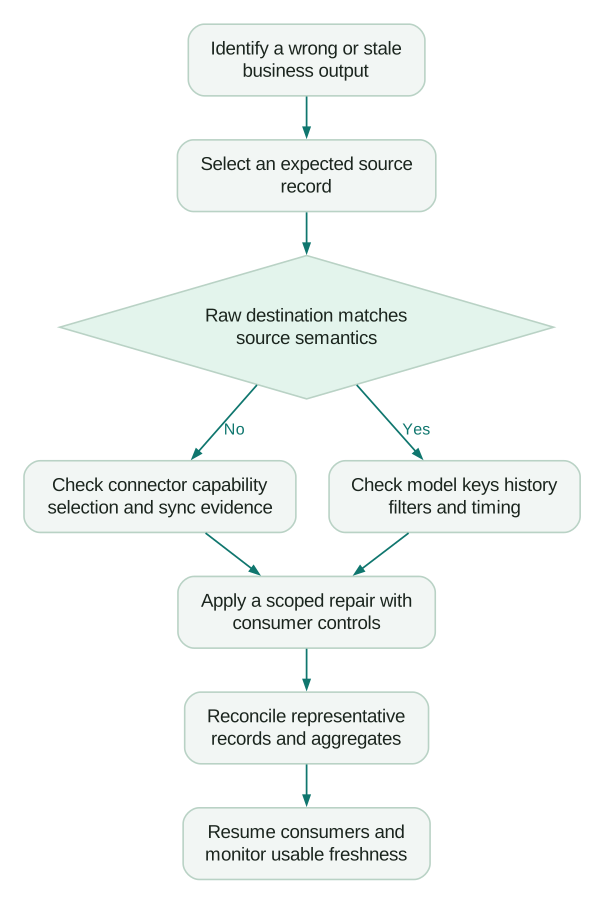
Start an investigation with one expected business record. Identify its source account, source key, last relevant change and expected destination representation. Follow it through the raw table, transformation and final consumer.
Write down which layer first differs from expectation:
- Missing in the source response: investigate source permissions, filters, object support and the source's own behaviour.
- Present in the response but absent in raw storage: inspect the connection, sync logs and selected schema.
- Correct in raw storage but wrong in the model: investigate keys, joins, history filters and incremental logic.
- Correct in the model but wrong in the dashboard: inspect refresh, filters and metric definitions.
- Correct in reporting but wrong in a destination audience: inspect identity mapping, eligibility and outbound sync rules.
This sequence gives the incident a specific owner. Re-running the connector repeatedly is unlikely to repair a join that duplicates every deal after the load completes.
Mistake 1: assuming every connector handles changes the same way
Check the documentation for the exact connector and important tables. A feature available for one database or SaaS source may have a different implementation or be unavailable for another.
Deletion is a particularly consequential example. Fivetran's soft-delete documentation says a connector can use soft-delete mode without supporting detection of source deletions. The connector's Captures Deletes feature indicates whether it can detect and flag those removals. A familiar system-column name alone does not prove the capability.
For each required object, record:
- Its business meaning and source of truth.
- The source key and the expected destination key.
- Whether inserts, updates and deletes are captured.
- Whether deletion detection is direct or inferred periodically.
- The history available at setup and the changes retained afterwards.
- Any source permission or account-level dependency.
Test with controlled records when the source offers a suitable test environment. Create, update and remove one record, then verify what appears after the relevant sync completes. Do not infer deletion timing from insertion timing.
When a source cannot provide the required history, choose a documented alternative such as an appropriate source export or a forward-looking snapshot design. State the historical gap explicitly. An ingestion tool cannot recover a business state that the source no longer exposes.
Mistake 2: counting every replicated row as a current business record
Keep raw replication tables distinct from the models business users query. The latter need an explicit rule for current, deleted and historical records.
In supported soft-delete tables, Fivetran uses _fivetran_deleted to mark removed records. Its documentation identifies a Salesforce exception using is_deleted, so avoid applying one filter blindly to every connector. Use the actual schema and documented behaviour for the source.
Illustrative example: a replicated opportunity table contains two current opportunities worth $1,000 and $400, plus a removed test opportunity worth $600. Summing all three rows produces $2,000 instead of the intended $1,400 current pipeline. This is a demonstration of filtering semantics, not a revenue-recognition calculation.
The following self-contained SQL fixture shows the difference. It uses PostgreSQL-compatible VALUES syntax and a generic table shaped like a supported soft-delete destination, not a claim about the schema of a particular CRM connector:
WITH replicated_opportunities
  (opportunity_key, amount, _fivetran_deleted) AS (
  VALUES
    ('demo-a', 1000, FALSE),
    ('demo-b', 600, TRUE),
    ('demo-c', 400, FALSE)
)
SELECT
  SUM(amount) AS unfiltered_amount,
  SUM(CASE WHEN _fivetran_deleted = FALSE THEN amount ELSE 0 END)
    AS current_amount
FROM replicated_opportunities;
The expected outputs are 2000 and 1400. A production model also needs the business eligibility rules, currency handling and a policy for unexpectedly null flags. Make those rules visible in the model instead of relying on every dashboard author to remember them.
Soft deletion describes replication state. It should not be substituted for commercial concepts such as cancellation, refund or churn unless the source definition supports that interpretation.
Mistake 3: treating history mode as an ordinary current-state table
History mode preserves versions of records, so counting rows can count changes rather than customers or opportunities. Fivetran documents _fivetran_active, _fivetran_start and _fivetran_end for identifying the current version and validity periods. Availability and selection differ by connector and table. History mode reference.
Decide whether the question needs the current state, the state at a past point or the sequence of transitions. These produce different queries.
For example, “current deal owner” needs a current version. “Owner when the deal became qualified” needs the relevant historical relationship at that time. Joining every version of the owner record to every version of the deal can multiply rows without adding useful information.
Create separate, clearly named models for the business uses you actually need. Test that the current-state model has no more than one eligible record per business key. For historical reporting, test the interval boundaries and document what timestamps represent.
Also include history in the cost decision. Fivetran notes that changes recorded as new history rows can increase paid monthly active rows. Enable history where it answers an important question, then model the expected change volume. The Fivetran pricing guide explains the broader usage model.
Mistake 4: using an ingestion timestamp as the business event time
Keep the time a business action happened separate from the time the pipeline observed or loaded it. Otherwise, a delayed load can shift yesterday's activity into today's report.
Fivetran's system-column reference documents _fivetran_synced as a replication timestamp. Inspect its documented meaning for your use; it is not a replacement for a source purchase, qualification or cancellation timestamp.
An illustrative timeline makes the distinction clear:
Source deal becomes qualified: Monday 16:10 UTC
Source API exposes the change: Monday 16:12 UTC
Connection writes the record: Monday 16:20 UTC
Warehouse model completes: Monday 16:25 UTC
Dashboard refresh completes: Monday 16:30 UTC
The qualification belongs to the business time defined by the reporting model. The later timestamps help diagnose freshness and delivery. They should not quietly change the reporting day.
Document the time zone and treatment of late changes. If yesterday's deal stage is corrected today, decide whether the report restates the earlier period or records a separate adjustment. The late-arriving data guide covers that model decision.
Mistake 5: choosing a sync interval without measuring usable freshness
A configured interval describes scheduling, while the business cares about when a usable output becomes available. Source delay, extraction, warehouse loading, transformations and the consuming tool all contribute.
For a campaign audience, define the maximum acceptable age of the underlying eligibility information at dispatch. For a finance review, define the source-complete cutoff and when the report must be ready. Those requirements can differ even when they use the same raw tables.
Measure the complete delay using a controlled change with a known source timestamp. Record when the change appears in raw storage, the accepted model and the final consumer. Repeat during the peak condition relevant to the workflow.
Fivetran's sync overview documents failed retries and rescheduling, including automatic pausing after fourteen days of unsuccessful retries. Your team's intervention threshold should follow the business requirement, long before a prolonged failure becomes that old.
The marketing data freshness guide explains how to make the source, pipeline and consumer responsibilities explicit. Alert on a stale business output as well as a failed connection.
Mistake 6: triggering a re-sync without protecting downstream consumers
A re-sync is an operating change with downstream consequences. Before starting one, identify the affected tables, expected duration, source load, usage treatment and consumers that might act on an intermediate state.
Fivetran's soft-delete documentation warns that a multi-batch re-sync can expose transient row states and recommends pausing downstream readers until it completes. That matters especially when a reader produces an audience or updates a customer property.
Use a short re-sync runbook:
- Record the reason, scope and current source position or available evidence.
- Identify every affected transformation, report and destination write.
- Preserve a known-good business output where the workflow requires continuity.
- Pause or isolate consumers that must not act on intermediate data.
- Run the smallest supported re-sync that addresses the issue.
- Wait for completion, then reconcile keys, current-state counts and important values.
- Rebuild dependent models and inspect the resulting output before resuming consumers.
Do not describe every re-sync as free or fully billable. Fivetran's usage rules distinguish types of activity and free usage. Check the applicable connector and agreement before using a large re-sync as a diagnostic shortcut.
If recovery changes customer eligibility, review the resulting audience before dispatch. A technical replay should not accidentally restart an onboarding campaign for every historical customer.
Mistake 7: letting schema changes reach reports without a review boundary
Automated replication still needs a controlled boundary between raw source changes and business-facing models. Fivetran's feature documentation includes schema migrations such as new or renamed columns, type changes and key changes.
A new field may be harmless in raw storage but inappropriate for broad access. A renamed field may break a transformation. A key change can alter uniqueness and join behaviour while the row count still looks plausible.
Define a staging model that selects and names the fields the business output requires. Add checks for key uniqueness, required values and allowed categories where those assumptions matter. Avoid passing every new source field automatically into an audience or a broadly accessible report.
When a source owner proposes a change, have them identify affected models and consumers before release. If the change arrives unexpectedly, preserve the evidence and stop the affected output from claiming freshness or completeness it no longer has.
What should an incident record contain?
Capture the minimum evidence needed for someone else to reproduce the problem. Fivetran's logging reference documents sync start/end, extraction and schema-change events, with status and reason fields for failures and rescheduling.
An actionable incident record contains the connection and destination, affected business output, first observed failure, last known-good output, a representative source record, relevant job times, error text and recent configuration changes. Include the expected behaviour and the first layer that differs.
Keep credentials and unnecessary customer payloads out of the incident note. Use restricted logs or a minimal redacted sample when a record is needed. The support question should make the discrepancy understandable without copying the entire source dataset.
Escalate with that record after checking the documented connector behaviour. “The numbers are wrong” gives support little to investigate. “This source record changed at this time, the completed sync did not reflect the field, and the raw table differs before transformation” is a concrete case.
What should pass before the pipeline is accepted?
- The source account, objects, keys and required permissions are recorded.
- Connector-specific insert, update, delete and history behaviour is understood.
- A controlled record reaches the accepted business output with the right values.
- Current-state models exclude inappropriate deleted or historical versions.
- Business event time and ingestion time are used for their intended purposes.
- Freshness is measured through the final consumer under representative load.
- A re-sync procedure protects consumers and includes reconciliation before resuming.
- Schema and key changes have a review owner and meaningful checks.
- Alerts reach an owner who can act within the business's required window.
- The handover includes recovery evidence, known limitations and ongoing ownership.
If these checks reveal missing definitions or unowned transformations, fix those before adding more connectors. The marketing warehouse guide helps organise that wider scope. A useful implementation leaves the team able to explain where a number came from and what happens when its pipeline fails.
Questions people ask
Does a successful Fivetran sync prove the dashboard is correct?
It establishes that a configured data movement operation completed, not that every downstream business rule is correct. Check source scope, model semantics, refresh and consumer filters separately. Trace a representative record through the complete path when the result is disputed.
Why do deleted source records remain in the warehouse?
The connector and sync mode determine how removals are represented. Some supported tables retain a deletion flag, while other connectors cannot detect deletes. Read the exact connector documentation and make the current-state filter part of a maintained model.
Should every table use history mode?
Enable it where historical states support an actual analytical requirement and the connector supports the needed behaviour. Historical versions change both query semantics and potentially usage. Test the current-state and historical models separately so analysts cannot accidentally count versions as customers.
Should we re-sync whenever data looks wrong?
First locate the discrepancy in the source, raw table, transformation or consumer. A re-sync will not fix a downstream join or metric definition. When it is appropriate, scope it carefully, protect readers and destination writers, and reconcile the completed result.
Who owns a managed ingestion pipeline after launch?
Name an internal owner for the business output and an operating owner for the pipeline. Fivetran's managed connector does not remove your responsibility for source permissions, model definitions, consumer behaviour and escalation. The handover should make those boundaries clear enough that an incident can be routed promptly.
Sources
- Fivetran, Soft delete mode, documentation accessed 2 October 2026.
- Fivetran, History mode, documentation accessed 2 October 2026.
- Fivetran, System columns and tables, documentation accessed 2 October 2026.
- Fivetran, Sync overview, documentation accessed 2 October 2026.
- Fivetran, Usage-based pricing, documentation accessed 2 October 2026.
- Fivetran, Features and schema migration, documentation accessed 2 October 2026.
- Fivetran, Logs, documentation accessed 2 October 2026.
Written by
Jafrin Akter AloData Engineer and Co-founder, martechdevs
Jafrin Akter Alo is a data engineer and co-founder of martechdevs, where the team has delivered 74+ martech, data and growth stack implementations.