
HubSpot vs Zoho CRM: Compare the Process, Three-Year Cost and Migration Work
Choose HubSpot when shared marketing, sales and service records are central to how the business operates. Choose Zoho CRM when a configurable sales process, lower seat costs and the surrounding Zoho applications fit the work your team can maintain. Decide on the required edition, user roles and three-year operating cost before a startup discount or attractive demo makes the decision for you.
On this page
Both products can hold contacts and deals. The meaningful difference appears when a salesperson tries to move a deal without the required evidence, a marketer withdraws a recipient from a campaign, or finance asks why the pipeline report differs from the source records.
Martechdevs charges for CRM implementation and lifecycle work. Our recommendation is to establish the required process and test its failure cases before buying the platform or commissioning a migration.
Which CRM should a small team pilot first?
Pilot the platform that matches the company's main coordination problem, then test the runner-up using the same records and users. A cheaper seat is useful only if the necessary work fits the edition.
| Team situation | First pilot | Runner-up | What should determine the choice |
|---|---|---|---|
| Two founders need a shared contact list and next actions | HubSpot Free | Zoho CRM Free | Daily follow-up and the next paid step |
| Three people need a free sales record | Zoho CRM Free | Paid HubSpot Starter | Capacity, required fields and ongoing cost |
| Small sales team needs a repeatable, enforced process | Zoho CRM Professional | HubSpot with the required sales controls | Invalid transitions fail and exceptions have an owner |
| Inbound marketing and sales need the same customer context | HubSpot | Zoho CRM plus the needed marketing apps | Capture, permission, ownership and reporting work together |
| Business already uses several relevant Zoho products | Zoho CRM or a priced bundle | HubSpot plus retained systems | Whole-business licence population and integration upkeep |
If neither fits the operating job, use the broader CRM selection guide. Do not force a head-to-head decision when the shortlist itself is wrong.
HubSpot
- Best for: Teams whose recurring problem is coordinating marketing, sales and service around shared customer records.
- Pros: Contact, company and deal context can stay together; free tools support a small pilot; paid hubs extend the same platform around specific operating jobs.
- Cons: Advanced actions depend on product and edition; seats, marketing capacity and usage can add separate costs; a shared database still needs disciplined ownership and associations.
- Free tier and startup offer: Free supports up to two users. Eligible startups can receive discounts on qualifying net-new Professional or Enterprise products, with later-year price increases.
- Choose it if: The shared customer workflow passes on a package the team can afford after incentives end.
- Skip it if: A basic pipeline is the entire requirement and the proposed paid package mainly adds unused capabilities.
Zoho CRM
- Best for: A team that wants configurable sales records and process controls, and has an owner for the configuration.
- Pros: Standard supports custom modules and sales automation; Professional adds Blueprint process enforcement; the surrounding Zoho catalogue can cover related business jobs.
- Cons: A single CRM edition governs the organization; bundles and alternative user types need their own scope checks; additional marketing or service requirements can extend the implementation beyond CRM alone.
- Free tier and startup offer: Free supports three users. Startup wallet credits are a separate eligibility-based programme with an expiry and excluded purchases.
- Choose it if: The required record model and process can be operated and maintained by the future administrator.
- Skip it if: The low licence price hides an unowned collection of custom modules, functions and app-to-app handoffs.
Sources: HubSpot CRM overview, Zoho edition and role guide. The recommendations above describe fit, not a universal ranking of product quality.
What can each free plan prove?
The free plans can establish whether the basic sales record and daily follow-up suit the team. They cannot prove that a larger organization will fit the same limits or operating model.
| Free-plan boundary | HubSpot | Zoho CRM | Pilot implication |
|---|---|---|---|
| Users | Up to 2 | Up to 3 | Include the actual operator and reviewer |
| Core storage measure | 1,000 contacts | 5,000 records across modules | A record and a contact are different units |
| Email evaluation | 2,000 marketing sends/calendar month, branded | No CRM mass-email allowance | Test the actual intended communication route |
| Custom model | Check paid entitlement for custom objects | Custom modules start above Free | A flat contact import does not prove a multi-entity model |
Sources: HubSpot free tools, Zoho's current feature matrix.
Zoho Free includes basic tasks, standard reports and limited workflows, but the specific action matters. Its API allowance is 5,000 credits in a rolling 24-hour window; some operations cost more than one credit. Zoho API limits.
For a hypothetical three-person company, Zoho's user allowance fits while HubSpot's free allowance does not. That is a real initial advantage. It does not settle the later question of required automation, record capacity, marketing tools or the cost of switching once the company grows.
During either pilot, have the future operator add a lead, find the next action, update a deal and inspect a failed or incomplete record. Keep those tasks realistic enough to expose the work that would otherwise remain in spreadsheets.
Which edition supports the process you actually need?
Select the lowest edition that passes the required controls, rather than matching products by the words Standard, Starter or Professional.
Zoho Standard is a candidate for multiple pipelines, custom modules and assignment rules. Professional adds Blueprint and operational features such as inventory and quoting; Enterprise adds controls including territories and sandbox access. Confirm the exact limits in the quoted edition. Zoho edition guidance.
Blueprint can require evidence during a transition, including fields, notes, attachments and checklist items. A useful pilot is a deal that cannot advance until the required commercial details are complete. Also test who can perform the transition and how an approved exception is recorded. Blueprint transition design.
Do not assume the equivalent HubSpot control belongs to Starter merely because a pipeline is available there. Confirm the required rule, workflow action, object and user entitlement in the proposed package. The HubSpot implementation checklist helps turn those requirements into acceptance cases.
Custom records deserve a separate decision. Under HubSpot's standard product model, custom objects require an eligible Enterprise subscription. Its flexible seats-and-credits model has different Professional and Enterprise entitlements. Standard custom objects, flexible-pricing supplement.
If a SaaS team needs people, workspaces and commercial accounts separately, test the relationships before counting custom fields. If one company-level summary answers the operational question, a simpler model may be sufficient. Use the product-data-in-HubSpot guide for that distinction.
What do three, ten and twenty-five users cost over three years?
Zoho's listed CRM seat costs are lower in these scenarios, but the packages have different capabilities and billing bases. Use the table as a subscription baseline after identifying the required edition.
All figures are USD before tax. Zoho rows use annual-prepayment rates for regular users. HubSpot rows use its undiscounted catalog monthly rates: Starter monthly commitment, Sales Professional monthly payment with an annual commitment. Every person in this baseline needs the listed editing or sales entitlement. Do not use these totals for a mixed reader/editor team without repricing the roles.
The model holds the user count and list price constant for 36 months. It excludes marketing subscriptions, usage charges, implementation, migration, optional support and add-ons. Sales Professional includes its USD 1,500 required onboarding once; no startup discount is applied.
| Edition and billing basis | USD/user/month used | Three users, 3 years | Ten users, 3 years | Twenty-five users, 3 years |
|---|---|---|---|---|
| Zoho Standard, annual prepayment | 14 | 1,512 | 5,040 | 12,600 |
| Zoho Professional, annual prepayment | 23 | 2,484 | 8,280 | 20,700 |
| Zoho Enterprise, annual prepayment | 40 | 4,320 | 14,400 | 36,000 |
| HubSpot Starter, monthly payment | 20 | 2,160 | 7,200 | 18,000 |
| HubSpot Sales Professional, monthly payment | 100 | 12,300 | 37,500 | 91,500 |
Sources: Zoho Standard and Professional USD rates, Zoho Enterprise price, HubSpot Sales pricing, HubSpot onboarding catalog.
The fixed ten-user Zoho Professional calculation is 10 × 23 × 36 = 8,280. HubSpot Sales Professional is 10 × 100 × 36 + 1,500 = 37,500. These are reproducible subscription calculations, not estimates of implementation difficulty or business results.
HubSpot's annual-prepayment Sales Professional rate is USD 90 per seat per month. At ten seats, that alternative produces 10 × 90 × 36 + 1,500 = 33,900 under unchanged pricing. It also changes cash timing. Compare the payment schedule the company can actually support rather than treating a prepayment reduction as free flexibility.
For Zoho Enterprise, monthly billing is USD 50 per user, compared with USD 40 on annual billing. At ten users over 36 unchanged months, monthly billing is USD 18,000 rather than USD 14,400. Obtain the relevant billing-country quote before purchase. Enterprise billing options.
How does a growing team change the calculation?
A hypothetical team with three users in year one, ten in year two and twenty-five in year three consumes 12 × (3 + 10 + 25) = 456 user-months. Zoho Professional at the stated annual rate totals USD 10,488. HubSpot Sales Professional at the stated monthly-paid rate totals USD 47,100 including onboarding.
This model assumes the team reaches each user count at the start of that year and keeps it for twelve months. Midyear additions, minimum commitments and prorations require the actual contract schedule. A flat ten-user comparison conceals the larger year-three exposure.
What belongs in the budget beyond sales seats?
Budget the users, capacity and adjacent products needed for the full customer journey. A sales-seat subtotal is not the total cost of a marketing and service platform.
| Cost or scope | HubSpot decision | Zoho decision | Evidence to request |
|---|---|---|---|
| Sales users versus other staff | Sales entitlement, Core access or View-Only role | Regular versus permitted Team-user duties | Required actions under each user's login |
| Marketing email | Appropriate Marketing Hub model and contact/send capacity | Required Campaigns or marketing component | A priced campaign with suppression and reporting |
| Service work | Needed service features and seats | CRM cases versus a support product or bundle | The actual ticket and escalation flow |
| Custom data and integrations | Object access, API allowance, usage and mappings | Modules, functions, API credits and connected products | A changed source record reaching the right destination |
| Operation after launch | Administration, training and change ownership | Administration, training and change ownership | Named owner and a tested recovery procedure |
Zoho's CRM mass-email allowance is for sales activities; its feature matrix directs campaign use to Zoho Campaigns. Do not assume that a CRM seat includes the whole newsletter operation. Zoho communication scope.
For HubSpot, Marketing Hub Professional lists a USD 890 monthly-paid starting package with 2,000 marketing contacts and required onboarding. That is a separate product decision from Sales Professional. Confirm overlapping seat rights and the actual bundle quote instead of mechanically adding every standalone price. Marketing Hub pricing. The HubSpot cost guide develops the contact, seat and credit calculation.
Does Zoho One always reduce the bill?
Zoho One can be attractive when the business will use several included applications, but its All Employee model requires licences for all employees on payroll. Flexible-user licensing is a different option. Zoho One pricing rules.
A company with twenty-five employees and ten CRM users must compare the applicable whole-company licence count with the separate ten-user CRM purchase. Also test the edition and capacity included in the bundle. An unused app has no operating value merely because its standalone price makes the bundle look discounted.
CRM Plus is another customer-facing bundle; Zoho One has a broader business scope. Keep the actual product list and included limits in the decision record, including who maintains the connections between them.
How should startup discounts enter the decision?
Apply a startup offer only after eligibility, product scope, term and later-year pricing are confirmed. The incentive should reduce the cost of a suitable system, rather than justify buying a system the team cannot afford to keep.
HubSpot's qualifying funded or partner route advertises 90% off year one, 50% year two and 25% year three. The entrepreneurial-organization route advertises 30% then 15%. The programme applies to net-new Professional or Enterprise products. HubSpot startup eligibility.
For a hypothetical approved ten-seat subscription with USD 12,000 annual list value, the first schedule produces USD 1,200, USD 6,000 and USD 9,000 in licence cost. Add the assumed undiscounted USD 1,500 onboarding separately: USD 17,700 across three years. If the signed offer does not grant the year-three discount, the same model becomes USD 20,700. Confirm the written offer instead of assuming the promotional schedule overrides the contract.
Zoho provides wallet credits rather than the same stepped subscription discount. Its FAQ lists limited programme access in multiple countries, including the UK, Australia, India and the UAE. Prior payment history, the application route and local availability matter. Zoho startup FAQ.
The credits expire 360 days after the first tranche, and excluded purchases include onboarding, training and premium support. The legal terms broadly exclude existing or former users, while the FAQ explicitly allows free-trial users and excludes current or former paying customers. If your company has used Zoho before, obtain written eligibility confirmation before deducting credits from the budget. Zoho startup terms.
Keep an undiscounted renewal column for both vendors. A credit balance is not cash and does not pay for excluded implementation work. Do not create a new account to conceal previous paid usage; the programme FAQ says that does not reset eligibility.
Which five workflows should you run in both trials?
Run five complete operating tasks with the same controlled records, permissions and expected results. A product demo should show how the team will handle an exception as well as the normal path.
| Trial task | Controlled case | Passing result | Failure that should block purchase |
|---|---|---|---|
| Capture and route a lead | New enquiry followed by the same person's second submission | One intended person, correct owner and visible follow-up | Duplicate creation or an unowned lead |
| Enforce deal progression | Rep attempts the next stage with missing commercial evidence | Transition is blocked or handled through the approved exception | The rule exists visually but can be bypassed through an ordinary route |
| Send eligible marketing | A test recipient withdraws permission while waiting | The relevant future marketing send is suppressed | A CRM update silently restores permission |
| Display product or billing context | Two workspaces belong to one commercial account | Correct account summary and source trace | Values attach to a similarly named but wrong customer |
| Rebuild a pipeline report | Known open, won and lost deals across owners | Counts and amounts reconcile to the selected source cohort | Duplicate associations inflate totals or access hides unexplained records |
For the stage-control case, test the actual entry routes the team uses: manual changes, imports and integrations. Do not infer that a control enforced on one form applies automatically to every API update. Record the intended enforcement point and the operator responsible for exceptions.
For the report, agree whether the date means creation, expected close, actual close or payment. A CRM forecast and recognised revenue have different definitions. A sale recorded twice through contacts should not become twice the commercial value.
Ask the second operator to find and explain one failed case. Count missing required fields, unowned enquiries and manual reconciliation steps after the pilot, alongside whether the team can complete its work. Login counts alone do not prove adoption.
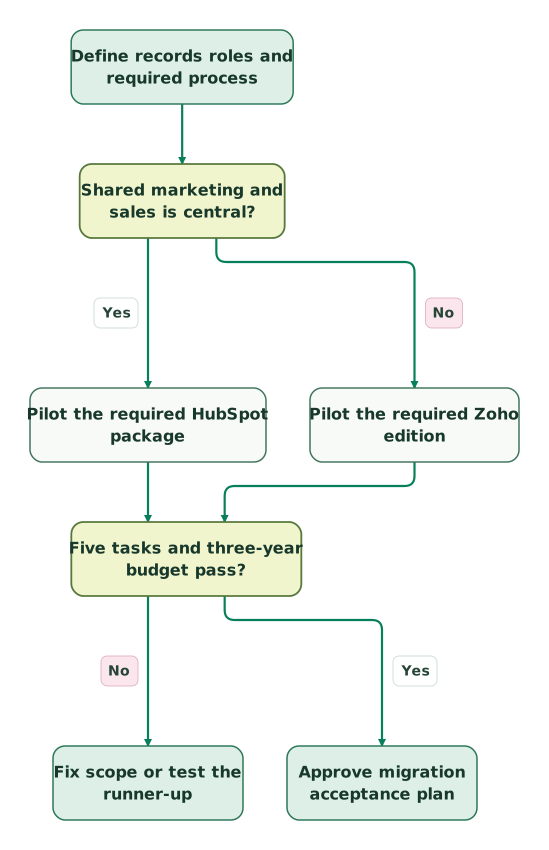
Read diagram as text
- Define records roles and required process to Shared marketing and sales is central?.
- Shared marketing and sales is central? to Pilot the required HubSpot package: Yes.
- Shared marketing and sales is central? to Pilot the required Zoho edition: No.
- Pilot the required HubSpot package to Five tasks and three-year budget pass?.
- Pilot the required Zoho edition to Five tasks and three-year budget pass?.
- Five tasks and three-year budget pass? to Fix scope or test the runner-up: No.
- Five tasks and three-year budget pass? to Approve migration acceptance plan: Yes
How should API limits, AI and MCP be evaluated?
Evaluate the exact operation, edition and user permission required by the integration or AI task. An API or AI feature appearing on the price page does not prove capacity for your workload.
Zoho Standard allows 50,000 API credits plus 250 per user licence in a rolling 24-hour window, subject to its maximum. Ten regular licences therefore provide 52,500 credits before add-ons. Lead conversion costs five credits per call; 1,000 such conversions consume 5,000 credits before reads, retries or other jobs. Concurrency limits apply separately. Zoho API credit and concurrency rules.
Model the calls generated by the business action, rather than comparing daily quotas as if every request cost the same. A lookup, update and retry can consume more capacity than the single visible action suggests. Preserve headroom for backfills and recovery.
Zoho's current feature matrix lists AI capabilities individually. For example, field prediction appears from Professional while churn prediction appears from Enterprise. Do not treat “Zia included” as an entitlement to every prediction or agent. Current Zia feature matrix.
Zoho CRM's prebuilt Model Context Protocol servers separate read-oriented insights, record operations, customization and workflow management. Actions follow the authenticated user's permissions and consume ordinary API credits. Zoho CRM MCP. Zoho lists no separate MCP subscription charge; underlying service limits still apply. Zoho MCP pricing.
HubSpot's remote MCP supports authorized CRM read and write access, while its developer MCP serves development work. HubSpot MCP. Use the HubSpot MCP implementation guide for that setup.
Test a useful question with a known correct answer, then inspect which records and permissions support it. Keep proposed mutations reviewable. A more fluent answer is not a reason to grant an assistant broader customer-data access or let it update a whole pipeline without validation.
What migration work remains after contacts and deals move?
The hard part of migration is preserving relationships and operating behaviour: ownership, permissions, activities, process gates, subscriptions and report definitions. A successful record import is only one acceptance result.
Moving Zoho CRM to HubSpot
Map Leads, Contacts, Accounts, Deals and any custom modules to the intended HubSpot structure before choosing the transfer route. Define what happens when a Zoho lead converts into a contact and account. Preserve source IDs so related records can be reconciled without relying on names.
HubSpot offers a Zoho Data Sync connection and requires the Modified By field on the Zoho CRM objects being synced. HubSpot's Zoho connection requirements. Confirm the actual supported objects and mappings in the proposed connector; a contact sync is not proof that a Blueprint, custom module or activity history transfers.
Rebuild required process rules in HubSpot and test the five cases above before retiring the old route. Inventory every automation that interprets a create event so a historical import does not start fresh outreach.
Moving HubSpot to Zoho CRM
Zoho's migration tool supports a HubSpot API-transfer route and file/module mapping. Use the current connection instructions and the intended migration scope rather than assuming a general CSV import will preserve every relationship. Zoho migration overview.
Preserve source identifiers for associations. Zoho's migration guidance distinguishes vendor IDs used to associate records, and notes need their parent record relationship. Zoho import and association guidance.
Recreate required workflows, templates, process transitions and permissions. Map HubSpot subscription categories and suppression evidence to the intended sending product. The presence of an email address does not imply permission for its new sender.
How should cutover be controlled?
Choose a source-of-truth boundary and one active writer per responsibility during overlap. Reconcile changed records after the baseline export, then switch forms, inbox connections, billing/product feeds and reporting readers deliberately.
| Migration evidence | What to compare | Approval condition |
|---|---|---|
| Record identity | Source IDs and destination IDs | Every required record has one explained outcome |
| Relationships | Contacts, companies, deals and custom entities | Correct parents and associations survive |
| Activity and permission | Notes, history and communication choices | Required context is readable and restrictions remain enforced |
| Operational behaviour | Routing, stages, reminders and integrations | Normal and negative cases pass |
| Reporting | Same cohort, currency and dates | Differences are explained before the old report is retired |
Keep new opt-outs and valid source changes during any rollback. If the migration needs specialist help, request a detailed CRM migration scope with this inventory rather than a record count alone.
What do reviewers suggest you should test?
Review comments suggest testing operator learning, feature gates and integration ownership in both products. They do not establish a universal ease-of-use winner.
| G2 product | Rating out of 5 | Review count | Reported themes to investigate |
|---|---|---|---|
| HubSpot Sales Hub | 4.4 | 14,365 | Shared activity context; advanced-feature cost and learning effort |
| Zoho CRM | 4.1 | 2,953 | Configurability and Zoho app connections; setup and integration complexity |
The HubSpot comments include users valuing a common sales record and others describing the effort of finding or configuring the right functions. The Zoho comments include praise for extensibility alongside specific onboarding and integration difficulties. Review counts change, and reviewer roles, business sizes and invitation or incentive labels matter.
Turn those themes into an acceptance task for the future administrator. Ask them to diagnose a missing record or change one process rule in the proposed edition. A seller's polished walkthrough is not the same as an operator maintaining the setup after handover.
What should be agreed before the CRM decision is final?
Approve the CRM when the chosen edition passes the required tasks, the future owner can maintain it and the recurring budget survives the end of incentives.
Checklist
- Required records, relationships and sales transitions are written down.
- Each user's actual duties match the purchased licence.
- The free pilot's limits are separated from the production requirement.
- Marketing, service, API and add-on costs are included where needed.
- Three-year seat growth and payment timing are budgeted.
- Startup eligibility and later-year terms are confirmed in writing.
- All five workflow tests include negative cases and pass.
- Migration preserves identity, permission and the required history.
- An administrator owns future changes and failed integrations.
Use the broader HubSpot alternatives guide if the required edition still does not fit. A smaller, well-maintained process is a better investment than a larger configuration nobody can explain.
Keep reading
Browse all CRM & Lifecycle guides
 CRM & Lifecycle
HubSpot implementation cost: onboarding fees, partner prices and your team's time
HubSpot implementation cost by layer: onboarding fees from $1,500, published partner prices, migration, integrations, internal time and a worked budget.
Jafrin Akter AloLast updated 14 min read
 CRM & Lifecycle
HubSpot Pricing: Seat Prices, Marketing Contacts, Credits and Onboarding
HubSpot is free for 2 users. Starter seats list at $20, Professional seats at $50 to $100, plus $250 per 5,000 marketing contacts and $1,500 to $3,000 onboarding.
Jafrin Akter AloLast updated 19 min read
 CRM & Lifecycle
Salesforce to HubSpot migration: plan, field mapping and cutover checklist
Plan a Salesforce to HubSpot migration: phases, a field mapping template, load order, Smart Transfer limits, reconciliation checks and a safe cutover.
Jafrin Akter AloLast updated 21 min read
CRM & marketing automation
See the implementation scope, deliverables and acceptance checks.
Questions people ask
Can three founders share a two-user HubSpot free account?
Give each person the access and identity required for their work rather than sharing credentials to fit a free limit. A third working user changes the HubSpot plan decision. Compare that paid step with Zoho's three-user Free allowance and the actual feature requirements. Individual access also makes ownership, offboarding and the history of record changes easier to manage.
Can a company mix Zoho Standard and Professional seats in one CRM organization?
Zoho's edition guide says a CRM organization uses one edition, although supported user types can differ. Do not price regular Standard and Professional users together as if each person can select a separate edition. Map regular sales duties and eligible Team-user work first, then quote that role mix under the organization's chosen edition. Zoho licensing scope.
Is Bigin worth considering before either paid CRM?
Bigin is worth a separate pilot when the requirement is a straightforward pipeline and follow-up process. Zoho positions it for teams moving from spreadsheets. Keep the same required tasks and reporting checks, rather than assuming a smaller product is automatically sufficient. If the pilot needs a richer customer model or formal process controls, return to the appropriate CRM edition. Zoho's Bigin positioning.
Should a startup select a CRM before its sales stages are settled?
A startup can start with a simple CRM while its process evolves, but it should define enough ownership and next-action rules for daily work. Avoid encoding an uncertain process into many mandatory fields and automations. Begin with the smallest useful pipeline, observe where decisions fail, and make deliberate changes with the people who use the records.
How should CRM adoption be measured after migration?
Measure whether the team completes the intended sales work and whether the records support it. Track unowned enquiries, overdue next actions, missing required evidence and time spent reconciling reports, with clear denominators. Review representative records and ask operators where work still escapes into spreadsheets. More logins can accompany more friction, so activity alone should not define success.
Sources
- HubSpot: CRM overview.
- HubSpot: free tools.
- HubSpot: Sales Hub pricing.
- HubSpot: product and onboarding catalog.
- HubSpot: Marketing Hub pricing.
- HubSpot: startup programme.
- HubSpot: custom objects.
- HubSpot: flexible pricing supplement.
- HubSpot: Zoho connection.
- HubSpot: MCP scope.
- Zoho: edition and role guide.
- Zoho: current feature matrix.
- Zoho: Standard and Professional USD rates.
- Zoho: Enterprise pricing.
- Zoho: US pricing and Bigin positioning.
- Zoho: One licensing.
- Zoho: Blueprint transitions.
- Zoho: startup FAQ.
- Zoho: startup terms.
- Zoho: API credits and concurrency.
- Zoho: CRM MCP.
- Zoho: MCP pricing.
- Zoho: migration overview.
- Zoho: import and association guidance.
- G2: HubSpot Sales Hub reviews.
- G2: Zoho CRM reviews.

Written by
Jafrin Akter AloData Engineer and Co-founder at Martechdevs and Growth and Analytics Partners
Jafrin writes practical guides to marketing technology, customer data, analytics and AI workflows. Martechdevs is a Growth and Analytics Partners company.