
Intercom Salesforce Integration: Fix Lead, Contact and Account Handoffs
Configure the Intercom Salesforce integration around identity first, then field direction and the handoff your team needs. A live Salesforce card, a synchronized Intercom attribute and a created Salesforce Case are separate outcomes. Test each one. Most confusing failures come from expecting a field sync to create missing records, connect company memberships or close a case automatically.
On this page
A customer appears in Intercom, their Salesforce account exists, and the integration says connected. Yet the support teammate sees no account tier, the conversation routes to the wrong owner and a closed chat leaves an open Salesforce Case. Reinstalling the app will not explain those differences.
Trace one person from Intercom to the intended Salesforce Lead or Contact, then trace their company and the resulting support automation work. The Intercom implementation guide covers Messenger identity and queue design. This guide focuses on the native Salesforce connector and the evidence that its handoffs work.
What does the native Salesforce app actually synchronize?
The native app combines attribute mapping, a Salesforce view inside the Inbox and actions that create sales or support records. Choose the outcome explicitly before configuring its fields.
| Surface | What to inspect | What completion means |
|---|---|---|
| Salesforce Inbox app | Live CRM context beside a conversation | The correct record is visible to the teammate |
| Mapped person or company attributes | Stored values on matched objects | The intended field changed in its configured direction |
| Lead creation | Resulting Salesforce Lead and owner | The sales team receives a usable, correctly owned lead |
| Tasks and Cases | Activity or support record produced by the selected action | The next team can find and act on the conversation |
The Inbox app reads Salesforce context separately from mapped native Intercom attributes. A correct value in that card therefore does not prove that an Intercom segment or workflow sees the same value. The app supports Salesforce Lead creation; Contact creation and conversion remain Salesforce operations. Using Intercom's Salesforce app.
Attribute synchronization is configurable in either direction, but each individual mapped attribute has one direction. A two-way integration is not permission for both platforms to overwrite the same field indiscriminately. People-sync behaviour.
Fin for Salesforce is another product path: Fin handles service interactions while the team works in Salesforce Service Cloud. Evaluate its deployment separately from the native data-sync app in an Intercom workspace. Fin for platforms.
Which plans and permissions are required?
The native Salesforce app requires Intercom Advanced or Expert, an authorized Intercom administrator and a Salesforce edition with API access. The Salesforce sandbox installation option requires Intercom Expert. If these plan requirements reopen the helpdesk decision, compare Intercom and Zendesk on the plans you would buy.
Intercom specifies a regular Salesforce user rather than an API-only user, with API Enabled, View All Data and read/write access to the synced Leads, Contacts, Accounts and Tasks. A non-System Administrator also needs the Intercom connected app installed through Salesforce's Connected Apps OAuth Usage. Native integration prerequisites.
Treat those permissions as a concrete access decision. Have the Salesforce administrator review the requested account, object access and data visibility before connecting production. A broad administrator demonstration should not become an undocumented permanent operating identity.
Record the owner responsible for the connection, the Salesforce organization, the Intercom workspace and the recovery contact. Keep test and production destinations distinct. Check Salesforce object and field permissions when an authorized request still cannot read or update the necessary field.
Use this setup sequence:
- Define the first supported handoff and its expected destination record.
- Confirm subscriptions, API access and the installation identity.
- Prepare representative people and company records in the permitted test environment.
- Record the proposed matching keys and field directions.
- Connect the app and inspect the actual mapping configuration.
- Test the complete handoff before enabling wider automation.
For a planned change of connected Salesforce user, Intercom instructs you to disconnect and reconnect under the new user. Uninstalling clears mappings, so preserve the configuration and use the appropriate reconnection procedure. Changing the connected user.
How should Leads, Contacts and companies be matched?
Use a stable shared identifier for each entity and examine duplicate candidates before enabling writes. A person and their company need separate mappings.
Intercom Leads use email for matching. Where duplicate candidates exist, the native app prioritizes Intercom Users over Leads and Salesforce Contacts over Leads; among matching records of the same type, the most recently updated candidate wins. Those rules choose a record, but do not establish that your underlying identity data is correct. Matching priorities.
An email can belong to a shared mailbox, and the same person can appear under several application IDs. Intercom identifies users by user_id when it is supplied; changing that identity can create another profile despite a matching email. Keep the application identifier consistent across Messenger, backend updates and imports. Intercom duplicate-user guidance.
Test Salesforce lead conversion explicitly. The connector removes the Lead mapping, creates the Contact mapping and applies the Contact's mapped attributes. The person-to-company or Contact-to-Account relationship is not synchronized by that mapping process. Salesforce integration troubleshooting.
Keep a small cross-reference containing the Intercom contact, Salesforce record, record type, application identity and intended account. After conversion, confirm that support still sees the right commercial owner and that automations consume Contact fields rather than a stale Lead value.
For a multi-account customer, the conversation must also identify the affected account. A matching person is insufficient evidence that they may access every company attached to that person. The support-context guide explains that authorization boundary.
Why can account sync stay empty even when Salesforce has the account?
Account sync matches existing Salesforce business accounts with existing Intercom companies. It does not create either company's record, and it does not support Salesforce Person Accounts or automatically created Intercom qualification companies.
Enable Intercom's company features and create the intended companies with a defined Company ID. Use a shared account identifier such as Account Number whose value matches that Company ID. Salesforce's native record ID is not supported as the matching field. Company and account sync.
Distinguish identity failure from attribute failure. If every account field is absent, inspect the company record and shared identifier first. If the match exists but individual fields fail, inspect their mapping and errors. A blank or mismatched identifier prevents the account sync from being attempted. Account-sync diagnosis.
Do not repair a blank account tier by copying it manually onto the wrong company. Establish the relationship first, then compare values. Preserve leading zeros and the agreed text format when the shared identifier is an account number rather than a quantity.
The following Python preflight audits a proposed one-to-one crosswalk before configuration. Its inputs are normalized exports from one selected Salesforce organization and one Intercom workspace. record_id identifies a row for this audit; match_key is the approved shared business key, not the native Salesforce record-ID field. The helper deliberately refuses ambiguous matches instead of reproducing the app's newest-record selection rule.
def company_crosswalk(companies, accounts):
    def index(rows, label):
        if not isinstance(rows, list):
            raise ValueError(label + ": expected a list of records")
        result = {}
        seen_records = set()
        for row in rows:
            if not isinstance(row, dict):
                raise ValueError(label + ": expected record objects")
            record = row.get("record_id")
            key = row.get("match_key")
            if any(not isinstance(v, str) or not v or v != v.strip()
                   for v in (record, key)):
                raise ValueError(label + ": require exact nonblank text IDs")
            if record in seen_records:
                raise ValueError(label + ": duplicate record ID in export")
            seen_records.add(record)
            result.setdefault(key, []).append(record)
        return result

    left = index(companies, "Intercom")
    right = index(accounts, "Salesforce")
    findings = []
    for key in sorted(set(left) | set(right)):
        company_ids = left.get(key, [])
        account_ids = right.get(key, [])
        if len(company_ids) > 1 or len(account_ids) > 1:
            status = "review_duplicates"
        elif not company_ids:
            status = "missing_intercom_company"
        elif not account_ids:
            status = "missing_salesforce_account"
        else:
            status = "ready_for_mapping_test"
        findings.append({"match_key": key, "status": status,
                         "company_ids": company_ids,
                         "account_ids": account_ids})
return findings| Synthetic input | Expected finding | What the owner should do |
|---|---|---|
One company and one account share acct-041 | ready_for_mapping_test | Test the mapping and selected field update |
Two Salesforce accounts share acct-042 | review_duplicates | Resolve the collision before relying on a selected account |
Salesforce has acct-043, Intercom has no corresponding company | missing_intercom_company | Create the intended company through the supported process |
Intercom uses 00044, Salesforce uses 44 | Two unmatched keys | Repair the shared-key contract without guessing that they are equivalent |
Supply only eligible business-account and company records. Keep organization/workspace namespaces outside the function or include them in a deliberately shared key; do not mix exports from unrelated tenants. The helper uses exact, case-sensitive string equality as a local preflight rule. It does not test native API permissions, field types, company eligibility or the connector's actual identity mapping.
How should field direction and empty values be controlled?
Give each field a source of authority, a permitted destination and a deliberate empty-value rule. The integration should move meaning that both teams have agreed to use.
| Business field | Example authority | Acceptance case |
|---|---|---|
| Commercial account owner | Salesforce sales operations | Owner change reaches the intended customer without changing the support assignee unexpectedly |
| Product workspace reference | Application identity service | One workspace remains distinct from another belonging to the same person |
| Support issue classification | Support workflow | A classification update does not overwrite sales qualification |
| Marketing subscription choice | Approved preference system | A channel opt-out remains effective throughout the handoff |
Company mappings can skip an empty source or a destination that already contains a value. Removing a mapping stops future updates and leaves previously copied data in place. Choose those controls field by field. Account mapping controls.
For example, “do not overwrite an existing value” protects a manually entered account tier during a pilot, but can also preserve an obsolete tier indefinitely. Test both the first fill and a legitimate later change. Decide whether empty means unknown, intentionally cleared or not supplied.
Do not collapse marketing permission into a broad customer-status field. The native app supports the general email-unsubscribed attribute, but not granular subscription-list choices. A detailed preference handoff needs an explicit integration path. Subscription-sync limitation. Use the preference-centre design to preserve channel and purpose decisions.
How do you verify Case creation and conversation handoff?
Verify the resulting Case and its owner after the conversation action. Closing the Intercom conversation does not prove that Salesforce support work is complete.
Auto Case Creation requires a mapped Salesforce Contact and Case-create permission for the integration owner. It sends data from Intercom to Salesforce; the generated Case ID does not automatically populate an Intercom conversation attribute. Closing a conversation updates its transcript but does not close the Salesforce Case. Case behaviour.
Choose an acceptance conversation with a known Contact, a required Case field and an actual next owner. Create the Case, inspect the Salesforce record and compare its required attributes. Then close and reopen the conversation and inspect what changes. Define who closes the Case when the customer obligation is resolved.
Required Case fields must be available to the Intercom case-creation setup. Missing required fields can cause FIELD_FILTER_VALIDATION_EXCEPTION; add the necessary fields and check their permissions and values. Case-creation troubleshooting.
If you log conversations as Tasks, also test a shared email with several matching Leads and a conversation with multiple participants. Confirm the actual activity recipients and ownership before using task counts as a measure of completed handoffs. Review transcript visibility with ordinary Salesforce users, including notes that should remain internal.
Why do historical values remain stale or a bulk sync stop?
Check the object, mapping and trigger before starting a bulk operation. People-sync recovery and account-sync recovery have different boundaries.
Manual bulk sync updates mapped Leads and Users/Contacts across the configured directions. It does not create missing people, sync Accounts or Cases, or let you select an individual people cohort. Stopping the run cannot be resumed from its old position; a new run starts again, and saving settings during a run stops it. Manual people-sync limits.
Account sync is change-driven and does not automatically backfill all historical account data. A controlled update to an existing matched record can trigger the relevant account sync. Avoid mass-changing business fields just to create a trigger; choose an approved test and inspect the result first. Account history behaviour.
Intercom also applies its own Salesforce API budget, with reduced activity before the configured maximum is exhausted. Check the current app warning, consumption and which functions are paused before changing a mapping to fix an apparent delay. Its published guidance gives inconsistent background-pause thresholds, so use the observed control state and confirm the applicable threshold with support rather than planning around a single percentage. Intercom Salesforce API controls.
Reserve headroom for other Salesforce integrations. Raising Intercom's allocation does not increase the organization's underlying allowance. The Salesforce API limits guide separates request budgets, endpoint behaviour and operational monitoring.
Use a diagnostic record containing the source value, destination value, mapping direction, source update time, observed sync time and error state. The native Sync Errors view covers Intercom-to-Salesforce failures; a clean list does not establish that the reverse direction is current. Sync error coverage.
What must pass before the integration goes live?
Require the correct identity, correct field result and an owned next action before releasing the wider population. A successful connection is only one prerequisite.
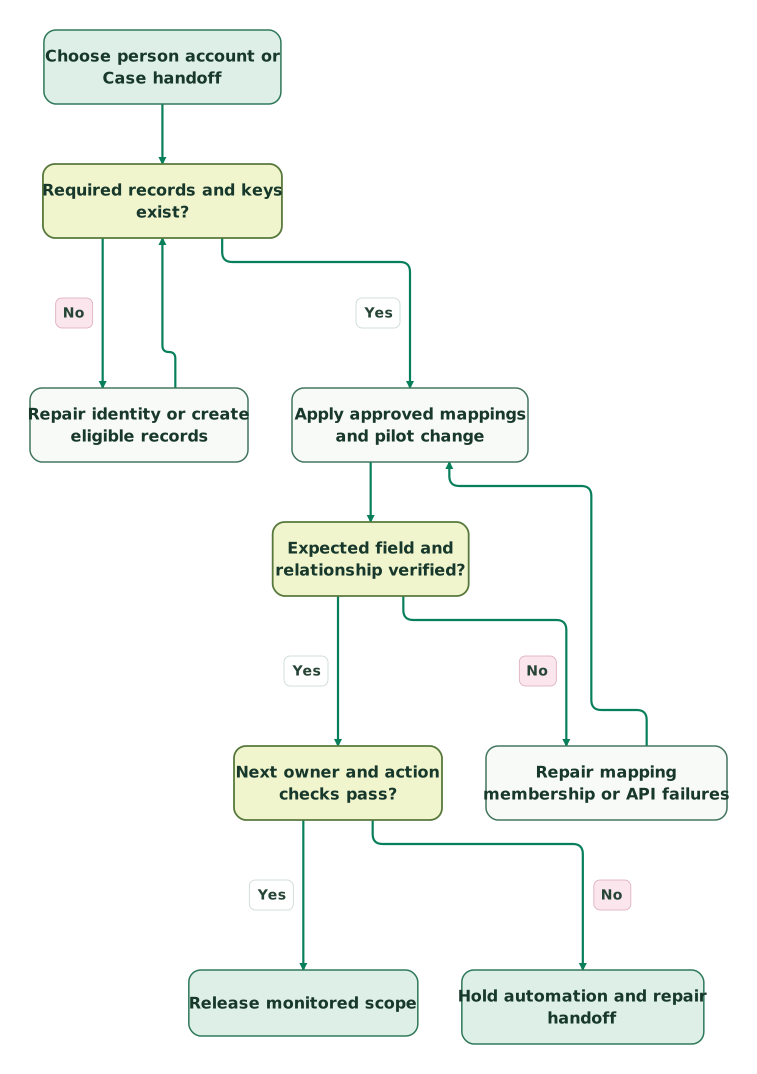
Read diagram as text
- Choose person account or Case handoff to Required records and keys exist?.
- Required records and keys exist? to Repair identity or create eligible records: No.
- Repair identity or create eligible records to Required records and keys exist?.
- Required records and keys exist? to Apply approved mappings and pilot change: Yes.
- Apply approved mappings and pilot change to Expected field and relationship verified?.
- Expected field and relationship verified? to Repair mapping membership or API failures: No.
- Repair mapping membership or API failures to Apply approved mappings and pilot change.
- Expected field and relationship verified? to Next owner and action checks pass?: Yes.
- Next owner and action checks pass? to Hold automation and repair handoff: No.
- Next owner and action checks pass? to Release monitored scope: Yes
Checklist
- A new Lead is created only through the intended creation route.
- Lead conversion preserves the correct person mapping and commercial context.
- Business accounts and Intercom companies exist with unique shared keys.
- Person-to-company membership is verified independently of attribute sync.
- First-fill, subsequent-change and empty-value cases behave as approved.
- A workflow reads the intended stored attribute, not an assumed Inbox-card value.
- Case creation, required fields, ownership and closure responsibilities pass.
- Transcript and note visibility is appropriate for ordinary destination users.
- Paused sync, credential recovery and stale context have accountable owners.
- Bulk recovery cannot unexpectedly overwrite the wider mapped population.
Keep a record of the approved mappings and repeat the pilot after changing identifiers, permissions or Salesforce validation rules. Fix one reproduced failure at a time; a broad reinstall can remove the configuration evidence needed to explain it.
Martechdevs' CRM and lifecycle integration work connects the data contract to the sales or support handoff. Bring a failing customer example to the $99 martech audit, including the intended Salesforce record and the action your team cannot currently complete.
Keep reading
Browse all CRM & Lifecycle guides
 CRM & Lifecycle
Intercom Implementation Mistakes: Identity, Inbox and Automation
Fix Intercom identity, account context, inbox ownership and Fin handovers with a practical launch scenario and release acceptance checklist.
Jafrin Akter AloLast updated 12 min read
 CRM & Lifecycle
Salesforce Implementation Mistakes That Break Revenue Operations
Avoid Salesforce failures in identity, migration, automation and permissions. Use a worked won-deal handover and an evidence-based release checklist.
Jafrin Akter AloLast updated 10 min read
 CRM & Lifecycle
Salesforce Implementation Checklist: From Scope to a Working Release
Plan a Salesforce rollout with owners, migration rehearsals, permissions, integration tests, UAT, cutover and recovery gates before approving the release.
Jafrin Akter AloLast updated 14 min read
Customer support automation
See the implementation scope, deliverables and acceptance checks.
Questions people ask
Can a Salesforce field shown in the Inbox card drive an Intercom workflow immediately?
Check the mapped Intercom attribute that the workflow actually reads. The Inbox card and stored attributes are different surfaces, so a current card value does not establish that the workflow's field exists or has updated. Test one source change, inspect the destination attribute and run the intended branch. Give missing or stale context a defined fallback instead of treating it as a confirmed negative value.
Should we use the newest duplicate Salesforce record as the correct customer automatically?
Use the newest-record rule as a description of connector selection, not as your identity policy. Review the application identifier, account relationship and retained history before accepting a match. A recent duplicate can be less accurate than an older established record. Resolve ambiguous keys before writes or customer-facing automation, and keep the chosen cross-reference so the decision is explainable later.
Can we deploy Fin in Salesforce without moving the human support team into Intercom?
Yes. Fin for Salesforce is designed to work with the team in Salesforce Service Cloud. It is separate from installing the native Salesforce data-sync app inside an Intercom helpdesk workspace. Define the intended service channels, knowledge access and human handoff for that deployment, then test those outcomes. Access and onboarding for Fin for Salesforce are handled through the vendor's sales team.
What should we do before changing the shared company identifier?
Export the current cross-reference, identify every producer and consumer of the old key, and test the replacement against existing records. Include leading zeros, duplicates, renamed companies and people belonging to multiple accounts. Plan how old mappings will be reconciled and pause dependent automation where identity is uncertain. A cleaner identifier format is useful only if it preserves the intended customer relationship.
Is an empty sync-error screen enough to close the incident?
No. Compare the actual source and destination values for the failed direction and object. The error view does not establish every reverse update, historical backfill or business handoff. Confirm that the affected workflow now consumes the right field and reaches its intended owner, then retain the reproduced case as a regression check. A connection can be healthy while one customer record remains incorrectly mapped.
Sources
- Intercom: Use the Salesforce app.
- Intercom: Manual people-data sync.
- Intercom: Fin for platforms.
- Intercom: Install Salesforce integration.
- Intercom: Duplicate users.
- Intercom: Salesforce troubleshooting.
- Intercom: Companies and Salesforce accounts.
- Intercom: Account-sync diagnosis.
- Intercom: Manage Salesforce API usage.

Written by
Jafrin Akter AloData Engineer and Co-founder at Martechdevs and Growth and Analytics Partners
Jafrin writes practical guides to marketing technology, customer data, analytics and AI workflows. Martechdevs is a Growth and Analytics Partners company.