
Intercom Fin: Pricing, Resolution Rules and Setup
Intercom Fin is a customer-facing AI agent that answers questions from your knowledge, retrieves connected data and follows configured procedures. It can run with Intercom or an existing helpdesk such as Zendesk. Evaluate Fin on the work it completes correctly, the handoff it leaves when it cannot finish, and the full cost of operating that workflow.
On this page
Intercom Fin capabilities and practical boundaries
Start with the customer request and the evidence needed to complete it.
| Customer request | Fin capability to configure | Required evidence | Boundary to test |
|---|---|---|---|
| Product or policy question | Approved knowledge and guidance | Correct source for that plan and region | Missing or conflicting policy |
| Order or account-status question | Data connector | Authorized identity and current response | Wrong account or unavailable API |
| Cancellation or another operational request | Procedure with permitted tools | Eligibility, approval and confirmed action | Duplicate request or failed write |
| Exception needing judgment | Escalation or configured handoff | Context, destination and accountable owner | Unstaffed queue or lost handoff |
Fin answers customers; Intercom Copilot assists teammates in the inbox. They serve different jobs. Fin can use configured knowledge and connected data, but a source being available does not establish that it is current, suitable for every audience or sufficient to authorize an account change. Fin capabilities and Copilot distinction.
Procedures combine instructions, conditions and tools for more involved work. A connector can retrieve information; the surrounding process still needs to decide whether the customer is eligible and what happens if that retrieval fails. Fin Procedures, data connectors in Procedures.
Our CRM and lifecycle implementation work connects customer identity, support context and the systems behind those actions. For a Fin rollout, the useful first scope is one maintained policy, one clear customer group and one observable outcome. Expanding that scope comes after the failure cases work.
Intercom Fin pricing and billable outcomes
Fin's standard chat and email schedule on Intercom distinguishes several outcome types. USD per billed conversation outcome is shown below; voice and special commercial arrangements need their own quote.
| Outcome | Price, USD | Billing meaning |
|---|---|---|
| Resolution | 0.99 | Answer followed by confirmation or no further help request |
| Successful configured Procedure handoff | 0.99 | Procedure completes its planned transfer to a person or workflow |
| Disqualification | 0.99 | Prospect fails the configured qualification criteria |
| Qualification | 9.99 | Qualified prospect is routed under the configured criteria |
| Self-serve routing | 0.99 | Routing outcome explicitly marked Self-serve |
Intercom charges at most one outcome per conversation. An ordinary escalation, a request for a person or a failed Procedure differs from a successfully completed, deliberately configured Procedure handoff. The latter can be billable while human work remains. Fin outcome prices and definitions.
Keep sales qualifications out of a support-resolution forecast. Twenty full-rate qualifications cost $199.80; twenty $0.99 support outcomes cost $19.80. That $180 difference comes from the billing category, with no change in conversation count.
Intercom helpdesk seats, optional products and channel usage are additional budget lines. For those plan and commitment details, use the Intercom pricing guide. For comparisons against credit, session and resolution billing elsewhere, use support AI pricing.
Resolution rules and reopened conversations
A confirmed resolution follows positive customer feedback after an answer; an assumed resolution follows an answer without a further help request. Reported resolution states. A greeting or unanswered clarifying question does not qualify. If the customer returns to the same conversation for more help, the resolution is deducted, including across billing periods. Resolution billing rules.
Treat the billing classification as one measure of the interaction. Independently inspect whether the advice matched policy, the customer could complete the task and any promised system change actually happened. A conversation can look finished because the customer stopped replying; that deserves a different quality review from a confirmed successful account update.
Fin on an existing helpdesk
Fin for Zendesk lets the team keep Zendesk as its ticket system and hand unresolved work to its existing agents. A Fin pilot therefore does not require a helpdesk migration. Compare the Intercom versus Zendesk decision separately from the choice of AI agent. Fin for Zendesk.
The standalone offer needs a careful order check. Fin's help page describes a $49 monthly base with 50 included resolutions and $0.99 per additional outcome. Its public pricing page instead describes $0.99 per outcome with a 50-outcome minimum. These produce slightly different totals. Confirm which model applies to your order. Standalone billing guide, Fin pricing.
For an illustrative month containing only resolution outcomes:
| Monthly resolutions | $49 bundle including 50 | 50-outcome minimum at $0.99 |
|---|---|---|
| 0 | $49.00 | $49.50 |
| 50 | $49.00 | $49.50 |
| 200 | $197.50 | $198.00 |
Unused included resolutions do not roll over under the bundle. The standalone help guide also says Fin for Sales qualifications and disqualifications are unavailable outside Intercom. Do not transfer the Intercom sales schedule into that order. Standalone scope and allowance.
Keep the existing helpdesk bill in the total. No additional Intercom helpdesk seat charge does not mean the current Zendesk subscription disappears. Voice needs its own quote, and an optional product should be included only when the pilot requires it. Deployment pricing, Intercom existing-helpdesk pricing.
A worked Fin support budget
This hypothetical month has 1,000 support conversations, with Fin involved in 800. The counts below are mutually exclusive conversation outcomes under the standard Intercom support schedule, before any later billing adjustment.
| Conversation result | Count | Fin usage calculation | Usage cost, USD |
|---|---|---|---|
| Confirmed resolutions | 400 | 400 × $0.99 | 396.00 |
| Assumed resolutions | 200 | 200 × $0.99 | 198.00 |
| Successful configured Procedure handoffs | 100 | 100 × $0.99 | 99.00 |
| Ordinary escalations | 100 | No billable outcome in this example | 0.00 |
| Conversations outside Fin | 200 | No Fin usage | 0.00 |
| Total | 1,000 | 700 billed outcomes | 693.00 |
The $693 is AI usage, before helpdesk seats, channels, optional products and operations. It represents 700 billable outcomes but only 600 Fin resolutions. The 100 Procedure handoffs still need their planned human or workflow follow-through.
Intercom's reporting separates resolution rate over Fin-involved conversations from outcome rates over all conversations in the selected period. In this example, the resolution rate is 600 ÷ 800 = 75%, while the support outcome rate is 700 ÷ 1,000 = 70%. Both numbers can be correct. They answer different questions. Fin reporting denominators.
Now suppose an independent quality review accepts 550 of those resolutions as satisfactorily completed. With an illustrative $600 monthly budget for knowledge maintenance and review, incremental usage plus that operating budget is $1,293, or about $2.35 per accepted resolution. Existing platform and other incremental costs are still excluded. This is a planning example, not a Fin performance benchmark.
Use the same denominator when comparing vendors. A lower price per billed outcome can coexist with a higher cost per satisfactorily resolved issue if more work reopens, escalates or needs correction. Review human handling time after handoff as well as the work Fin completes alone.
Fin setup for a controlled first release
Choose the deployment route before configuring knowledge or automation. Intercom chat, Intercom email and Fin on another helpdesk have different channel setup steps.
Knowledge and audience boundaries
Inventory the questions Fin should answer, identify the current approved sources and assign a content owner. Resolve contradictions between old help articles, pricing pages and internal instructions before importing them. A retrieval system cannot reliably infer which conflicting policy your business intended.
In Fin, untargeted content defaults to Everyone. Audience rules can target content, guidance, connectors and Procedures, but they are evaluated when a conversation begins. Changing a rule or customer attribute later does not automatically change the content audience of that existing conversation. Test a fresh conversation after an audience change. Fin audience rules.
Use separate test cases for a public visitor, an authenticated standard customer and a restricted customer group. The answer should use only the policy and data allowed for that identity. Treat audience targeting as one configured control; the external system must still authorize its own data retrieval and account changes.
Chat and email deployment
For Intercom web chat, install and verify Messenger first. The chat deployment guide requires at least ten live public Help Center articles. Configure Fin AI Agent > Deploy > Chat with a limited audience, a handoff destination and the intended closing behaviour. Simple deploy takes precedence over the inbound workflows identified in Intercom's guide, so inspect which route actually owns the conversation. Chat deployment.
For email, forwarding and domain authentication are prerequisites, but they do not activate Fin by themselves. Explicitly configure Fin AI Agent > Deploy > Email or add the Let Fin handle step to the relevant workflow. Email deployment. Keep sender identity, reply routing and the human team's monitored inbox in the same test.
For an existing Zendesk deployment, follow the channel-specific connection and configuration flow, import the intended knowledge and test the transfer back to the Zendesk team. A correct answer in Fin's test interface does not establish that the ticket and human handoff are correct. Zendesk deployment flow.
Procedures, connectors and escalation
Give each Procedure a narrow trigger, explicit exclusions, approved tools and a defined ending. Add error and empty-response handling after connector calls. A connector can execute even when its returned data is not used in the final answer, so every permitted call needs its own safe scope. Procedure construction and failure handling.
For a subscription-cancellation pilot, use a test account and state the rules before connecting a write operation. Confirm the account identity, eligibility, effective date, expected confirmation and destination record. A retry must not repeat a payment or create a second cancellation task. An ambiguous response from the external service needs reconciliation before another write.
Escalation rules should name the destination and the reason a person is needed. Intercom distinguishes workspace-level escalation rules from Procedure-specific handoffs; they also have different billing treatment. Escalation configuration, Procedure behaviour.
Check the receiving queue as part of the outcome. The customer should know who owns the next step, what information was transferred and what happens outside staffed hours. A transfer that leaves the request unowned is a failed operating process even when its billing classification is expected.
Fin testing and failure cases
Evals for new workspaces
Use Fin AI Agent > Test > Evals for a new workspace. Evals run multi-turn simulated conversations against the configuration and score them against your checks. Existing Batch test users can still use that older single-turn tool; new workspaces no longer see it in the navigation. Evals availability.
- Create a themed Eval, such as account cancellations, and add a Simulation with an opening message and intended customer behaviour. Eval management.
- Select the customer or lead whose access you want to test. The default Test customer belongs to all audiences, so it cannot establish that a restricted customer sees only permitted content.
- Set the starting data, connector test responses and explicit answer, action and handoff checks. In particular, name an expected handoff so a legitimate escalation is not scored against an unintended no-handoff default. Simulation setup.
- Run the cases and inspect the transcript, event log and individual checks. A failed check and a simulation error need different investigations. Change the relevant configuration, then rerun the affected cases and the regression set. Eval results.
A model-generated Pass supports the defined test criteria; the release owner still needs to review important answers and actions. Use the following example cases as acceptance criteria for the chosen support topic:
| Test case | Expected behaviour | Evidence to retain |
|---|---|---|
| Straightforward policy question | Correct answer with the applicable source | Answer, source and audience |
| Two conflicting policies | Approved current policy or escalation | Selected source and rule owner |
| Ambiguous account request | Necessary clarification before action | Conversation and action log |
| Restricted customer information | No unauthorized disclosure | Identity and connector authorization result |
| Connector timeout or empty result | Safe fallback without invented account facts | Error, fallback and handoff |
| Repeated operational request | One intended effect | Stable action reference and destination state |
| Explicit request for a person | Correct escalation | Receiving queue and conversation context |
| Unsupported language or topic | Configured fallback | Customer response and owner |
| Customer returning after apparent resolution | Continued support and reviewed outcome classification | Conversation history and usage adjustment |
Simulation limits and live acceptance
Evals use saved connector test responses rather than live data. They can test Procedure behaviour and handoff expectations, but they do not simulate what a workflow does after receiving a handoff. Confirm the actual account action and receiving queue separately. Connector simulation data, workflow boundary.
Each Eval supports up to 50 Simulations, with a separate monthly workspace allowance based on conversation volume. Stopped runs also consume that allowance. Check capacity before repeatedly running a full suite. Eval usage limits.
For an existing workspace retaining Batch test, the older tool checks single-turn questions and uses sample connector responses; it does not execute Procedures or Workflows. Its manual answer ratings do not retrain Fin. Apply content or configuration fixes and test again. Do not transfer those older execution limits to Evals, which can exercise Procedure behaviour in a simulation. Batch test scope.
Follow simulated checks with a controlled live-channel test using safe records and the real handoff path. Intercom's chat preview is free, while outcomes in a live test can be billed. Inspect the destination system and the teammate's experience as well as the customer answer. Preview and live testing.
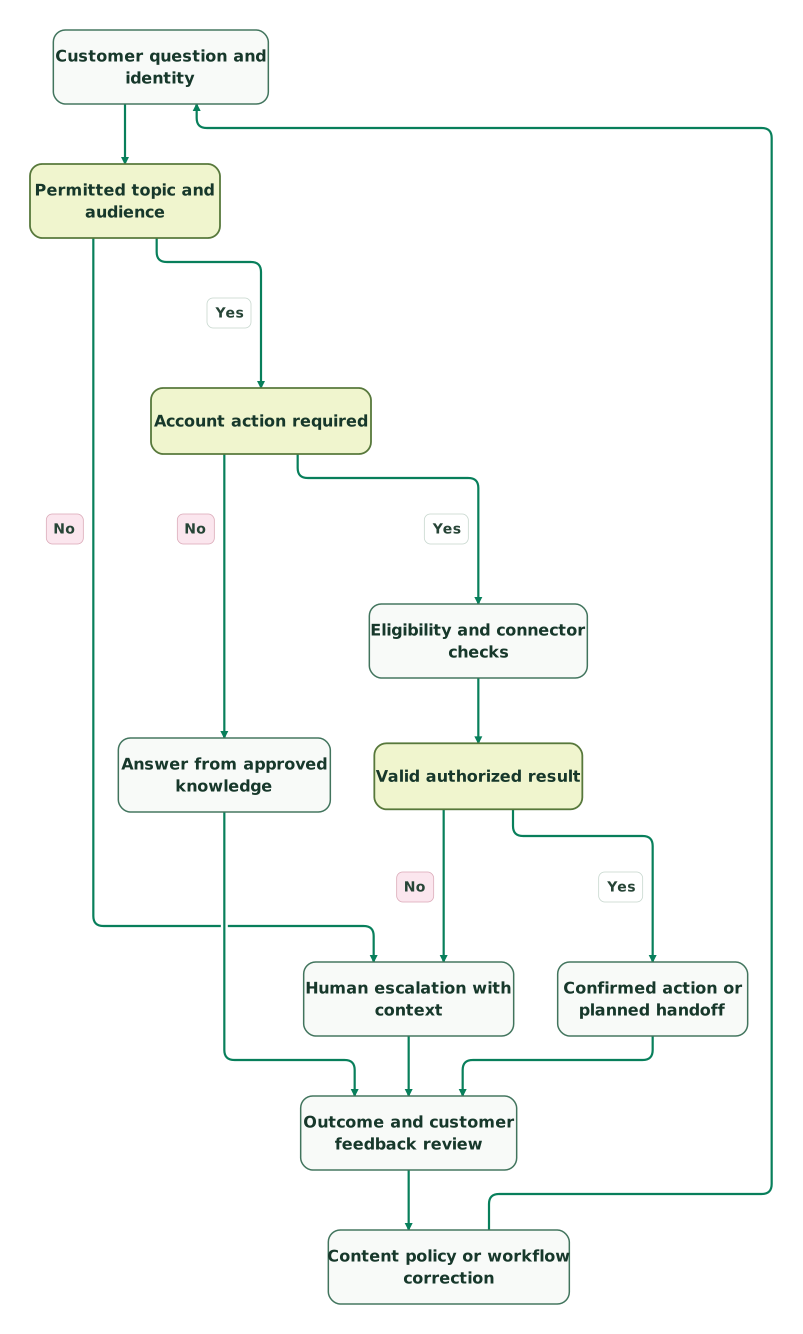
Read diagram as text
- Customer question and identity to Permitted topic and audience.
- Permitted topic and audience to Human escalation with context: No.
- Permitted topic and audience to Account action required: Yes.
- Account action required to Answer from approved knowledge: No.
- Account action required to Eligibility and connector checks: Yes.
- Eligibility and connector checks to Valid authorized result.
- Valid authorized result to Human escalation with context: No.
- Valid authorized result to Confirmed action or planned handoff: Yes.
- Answer from approved knowledge to Outcome and customer feedback review.
- Confirmed action or planned handoff to Outcome and customer feedback review.
- Human escalation with context to Outcome and customer feedback review.
- Outcome and customer feedback review to Content policy or workflow correction.
- Content policy or workflow correction to Customer question and identity
The correction loop represents operational review, not automatic model training. Expand the audience only after the owner accepts the tested answers, the handoff queue works and the expected costs fit the budget.
Fin versus Zendesk AI and other starting choices
Pilot the AI agent inside the support operation you already maintain before combining that decision with a helpdesk migration.
Zendesk's current AI agent experience supports knowledge answers, generative procedures, authorized actions and API integrations. Its older Essential/Advanced split no longer describes the full current packaging. Evaluate the actual experience enabled on the account. Zendesk AI agents.
On Zendesk's resolution-tier model, verified resolutions consume the allowance; contained resolutions and assisted escalations do not. That differs from Fin's assumed-resolution and configured-handoff rules. Compare the same transcripts and accepted business outcomes, then apply the account's pricing model. Zendesk resolution tiers, Zendesk AI pricing.
HubSpot Customer Agent is another candidate for a team already operating support in HubSpot. It requires a qualifying Professional or Enterprise subscription and HubSpot credits, with deployment to supported channels. Its fit depends on the existing CRM and support workflow, rather than simply being another chatbot. HubSpot deployment requirements.
| Team situation | First option to test | Runner-up | Decision evidence |
|---|---|---|---|
| Existing Intercom team with maintained knowledge | Fin within Intercom | A narrower human-led workflow | Correct answers, safe actions and useful handoffs |
| Existing Zendesk operation evaluating automation | Zendesk AI | Fin connected to Zendesk | Same case set, account billing and operational ownership |
| Zendesk team with demonstrated gaps in its AI pilot | Fin on Zendesk | Revised Zendesk implementation | A measured improvement without unnecessary migration |
| HubSpot team with eligible support setup | HubSpot Customer Agent | Fin connected to the required helpdesk route | Channel fit, context and total operating cost |
| Sparse knowledge or inconsistent policies | Knowledge and routing repair | Limited AI pilot on a stable topic | Maintained answers and a staffed exception path |
There is no useful universal resolution-rate target for all five situations. Compare your topic mix, customer segments and risk. Fin handling public setup questions and Fin changing a billing account have different acceptance requirements, even when their conversations appear in the same report.
Fin rollout checklist
- The first topic, audience, channel and expected business outcome are explicit.
- Knowledge has an owner and no unresolved policy conflict.
- Restricted content is targeted and tested with a fresh conversation.
- External data access checks the customer's identity and permissions.
- Procedures include eligibility, failure handling and a defined ending.
- Repeated requests cannot repeat an unintended business action.
- Evals use the intended customer and explicit success and handoff checks.
- Simulated connector results and live-channel acceptance have separate evidence.
- The receiving team owns escalations during and outside staffed hours.
- Usage separates resolutions, configured handoffs and sales outcomes.
- Quality review includes reopened issues, incorrect answers and unfinished actions.
The integration engineering skill helps document connector contracts and failure handling. For help configuring the rollout, use our Intercom and Fin implementation service with a scoped question set, the required account actions and the support team's acceptance criteria.
Keep reading
Browse all CRM & Lifecycle guides
 CRM & Lifecycle
Zendesk and Intercom Migration: Move Conversations and Attachments Safely
Move Zendesk tickets or Intercom conversations with their attachments, authors and private notes. Compare import limits and use a cutover acceptance checklist.
Jafrin Akter AloLast updated 12 min read
 CRM & Lifecycle
Intercom Implementation Mistakes: Identity, Inbox and Automation
Fix Intercom identity, account context, inbox ownership and Fin handovers with a practical launch scenario and release acceptance checklist.
Jafrin Akter AloLast updated 12 min read
 CRM & Lifecycle
Intercom Salesforce Integration: Fix Lead, Contact and Account Handoffs
Connect Intercom and Salesforce with correct Lead, Contact and Account identity. Check field direction, Case creation, missing companies and bulk-sync limits.
Jafrin Akter AloLast updated 12 min read
CRM & marketing automation
See the implementation scope, deliverables and acceptance checks.
Questions people ask
Is Intercom Fin the same product as Intercom Copilot?
Fin responds to customers and follows the configured knowledge, action and escalation routes. Copilot assists human teammates inside the inbox. Choose Fin when the customer interaction itself should be automated, and evaluate Copilot when a teammate should remain responsible for the reply. Include their separate commercial terms only when both roles are needed. Product distinction.
Can a Fin pilot keep Zendesk as the main support system?
Yes. Fin for Zendesk connects to the existing support operation and transfers unresolved work to the Zendesk team. Test ticket context, identity, channel routing and handoff ownership before expanding. Keeping the helpdesk also keeps its subscription and operating responsibilities, so compare the incremental AI cost separately from a full platform migration. Fin for Zendesk.
Does a passing Fin Eval prove that an external account action will work?
No. Evals use saved connector test responses, so a pass does not prove a live external service accepted the action. A workflow's behaviour after handoff also sits outside the simulation. Follow the Eval with a controlled live-channel test using safe records, checking the destination state, duplicate handling and receiving team. Simulation boundaries.
Should a higher Fin outcome rate always justify a wider rollout?
Only when the outcome mix and independent quality checks support that decision. A higher outcome rate can include more configured handoffs that still require human work. Compare completed customer tasks, repeat contact, handoff handling and total cost on the same population. Keep a topic restricted when its failure cases remain unresolved, even if the aggregate dashboard improves.
Can we fix a sensitive-content audience rule during an active conversation?
Update the rule promptly, but do not assume it changes the audience state of an existing conversation. Fin evaluates audience targeting when the conversation starts. Treat the active conversation as a separate access and response issue, involve its owner, and test a fresh conversation to confirm the corrected content boundary. Audience evaluation timing.
Sources
- Intercom: Fin AI Agent FAQs.
- Intercom: Building Fin Procedures.
- Intercom: Data connectors in Fin Procedures.
- Intercom: Fin AI Agent outcomes.
- Fin: Zendesk integration.
- Fin: Standalone outcome pricing.
- Fin: Pricing.
- Intercom: Pricing.
- Intercom: Fin reporting.
- Intercom: Fin audiences.
- Intercom: Chat deployment.
- Intercom: Email deployment.
- Intercom: Escalation guidance and rules.
- Intercom: Fin Batch testing.
- Zendesk: AI agents.
- Zendesk: Automated resolution tiers.
- HubSpot: Customer Agent deployment.
- Intercom: Fin Evals explained.
- Intercom: Simulation setup for Evals.
- Intercom: Running Evals and interpreting results.
- Intercom: Eval management.

Written by
Jafrin Akter AloData Engineer and Co-founder at Martechdevs and Growth and Analytics Partners
Jafrin writes practical guides to marketing technology, customer data, analytics and AI workflows. Martechdevs is a Growth and Analytics Partners company.