
HubSpot Shopify Integration: Sync Orders Without Breaking Customer Journeys
The HubSpot Shopify integration should give your team a dependable view of customers, purchases and unfinished checkouts. Start with the native Shopify Data Sync app, map each object to its actual business meaning, and reconcile a controlled order cohort before enabling messages. An order appearing in HubSpot does not prove its customer, financial value or marketing eligibility is correct.
On this page
A store can have the right number of orders in its CRM and still miss a purchase. One duplicate can conceal one missing order. A customer can also appear correctly while an old checkout triggers an inappropriate reminder. These are separate acceptance failures, so they need separate checks.
Our implementation priority is to make one customer journey reliable from source record to operational action. Expand the sync after that journey passes, rather than treating an installed app as the release milestone.
What does the native HubSpot Shopify integration sync?
Shopify Data Sync connects customers, companies, products, orders and abandoned checkouts to corresponding HubSpot objects. The supported directions differ by object. Official Shopify app listing.
| Shopify object | HubSpot object | Supported direction | Implementation decision |
|---|---|---|---|
| Customer | Contact | Two-way | Choose which fields each system may change |
| Company | Company | Two-way, Shopify Plus | Confirm the wholesale account relationship |
| Product | Product | Two-way | Decide who maintains the commercial catalogue |
| Order | Order | Shopify to HubSpot | Keep the purchase separate from a sales opportunity |
| Abandoned checkout | Cart | Shopify to HubSpot | Define the recovery episode before sending |
If an existing process expects a Deal for every purchase, inventory that dependency before migration. A sales opportunity and a paid store order answer different questions. Decide whether a separate deal is justified for a negotiated wholesale sale, then link it to the order without counting both as revenue.
Subscriptions and recurring-revenue calculations have a different scope. Use the Stripe-to-HubSpot billing model when the requirement is subscription state, monthly recurring revenue or payment recovery across an account.
Which limitations should you check before installing the app?
Check identity, field availability and the intended customer action before committing to the native route. HubSpot's Shopify-specific rules include these boundaries:
- Contacts match by email; companies and products match by normalized name.
- Product variants and Shopify metafields are unsupported.
- Orders and carts do not automatically deduplicate against existing imports.
- An order can arrive without a contact when its customer has no email.
- Contact deletion does not propagate between the two systems.
- The cart mapping no longer includes its former buyer-accepts-marketing field.
Installation needs HubSpot Super Admin or App Marketplace permission and automatically adds HubSpot tracking code to the store. Shopify Data Sync requirements and object rules.
Turn each relevant limitation into a release decision. If segmentation needs size and colour variants, a successfully synced parent product is insufficient. If a loyalty tier exists only in a metafield, record the additional supported route that will deliver it. Do not buy a mapping upgrade expecting it to expose an unsupported source field.
Custom mappings require Data Hub Starter or above. Field types also constrain the mapping: a dropdown may support one-way text mapping rather than a full two-way relationship. Data Sync field mapping rules.
Price the complete workflow, including the email, automation and reporting features it consumes, using the HubSpot seats and contacts guide. A connector entitlement is only one part of that purchase.
What should each system own?
Shopify should remain the authority for the commerce facts it creates; HubSpot should own the approved CRM decisions derived from those facts. Write field-level ownership before switching on a two-way route.
| Information | Recommended authority | HubSpot use | Validation |
|---|---|---|---|
| Source order identity and store | Shopify | Find the exact purchase | Open the source order from the reconciliation record |
| Purchase amount, payment and fulfilment state | Shopify's relevant source fields | Service context and qualified segments | Compare the same measure and observation time |
| Sales owner and qualification | CRM operations | Route account follow-up | A store update must not reassign the owner |
| Marketing permission and suppression | Named consent process | Decide whether a message may send | Test a withdrawal and a stale customer update |
| Customer-level spending summary | Approved calculation | Identify meaningful customer groups | Reconcile the eligible orders and currency policy |
These are design recommendations, not a claim that every listed field is a native mapping. Record the actual available mapping and the receiving property beside each requirement. Leave unnecessary writes disabled.
For example, a service agent correcting a phone number is a profile update. It should not also reclassify the person as a marketing subscriber or change the historical billing address of a fulfilled order. The CRM property ownership method helps separate those responsibilities.
How do you configure the first sync safely?
Configure a small, identifiable cohort with downstream communication held until its records and associations reconcile.
- Inventory existing writers. Find previous Shopify apps, imports, automation platforms and custom jobs that create contacts, orders or deals. Record which one will stop at cutover.
- Save a baseline. Export the pilot's source IDs, destination IDs, statuses, amounts and associations. Include existing records so you test matching rather than only creation.
- Connect the intended store. In HubSpot Marketplace, install Shopify using its store URL. In Connected Apps, open Shopify, then CRM syncs and configure the required object. Native connection steps.
- Choose direction and conflict authority. Test a controlled field change from each permitted writer. A successful update from Shopify alone cannot validate two-way ownership.
- Define the pilot filter and mapping. Include at least one old record, a new purchase, a customer without email and a refund case. Keep the separate messaging hold active.
- Save and observe the initial sync. Record completion, failures and exclusions. Compare source IDs before enabling the first downstream action.
HubSpot indexes existing records during initial sync, and saving configuration restarts that phase. After initial completion, its stated change-sync window is within ten minutes. Filters control initial admission; records already paired continue syncing under their mappings. A filter is therefore not an ongoing marketing suppression mechanism. How Data Sync operates.
Do not repeatedly save settings while investigating a missing order. Preserve the failing record, its source update time and its current sync state first. Otherwise, a restarted backfill can obscure the original evidence.
How should customer and product identities be validated?
Validate the connector's actual matching rule against ambiguous records before enabling broad creation or two-way updates. A name that looks unique to a person may not remain unique after normalization.
For a hypothetical catalogue, compare Gift-Set, Gift Set and GIFT SET. Determine whether they represent the same product or different commercial items before allowing a match. The answer must come from the catalogue owner, not punctuation.
General Data Sync supports different matching options across apps, but those options are not available for every connector or object. Matching is separate from field mapping, and paired records subsequently rely on their record IDs. Disabling an identifier's field mapping does not necessarily change matching. Record matching behaviour.
Keep a reconciliation crosswalk containing the store, source object ID, HubSpot object ID and match decision. If two source customers share an email, resolve the intended relationship instead of allowing whichever record arrives first to define it silently. If one customer changes email, check that the existing relationship survives without a second person being created.
An order with no contact should enter an exception view. Do not fabricate an email address or attach the order to a similarly named person to make the dashboard look complete. Customer visibility and order completeness are separate measures.
How do you prevent historical orders from creating duplicates or new journeys?
Treat the historical load as reconciliation work, with a defined source population and a separate permission to trigger customer actions. Do not assume an earlier CSV import and a new connector will recognise the same transaction.
Choose a cutover boundary and preserve original purchase times. Record whether each destination order came from the old route or the new route. If both representations must temporarily remain, define one report population and one automation owner until the duplicate representation is retired.
For a custom Shopify API extraction, ordinary order access covers the most recent sixty days. Older history requires read_all_orders alongside read_orders or write_orders: Partner-organization apps need Shopify approval, while merchant-organization apps used on their own stores do not. This is an API permission boundary, not evidence that the native HubSpot app has a sixty-day backfill limit. Verify the oldest required source order in the actual connector result. Shopify order access scopes.
A historical first purchase should not automatically start a fresh welcome discount. Add an explicit migration or eligibility condition to the downstream journey, then test an old paid order and an old abandoned checkout. Removing the hold is a business decision after reconciliation, not a side effect of finishing the import.
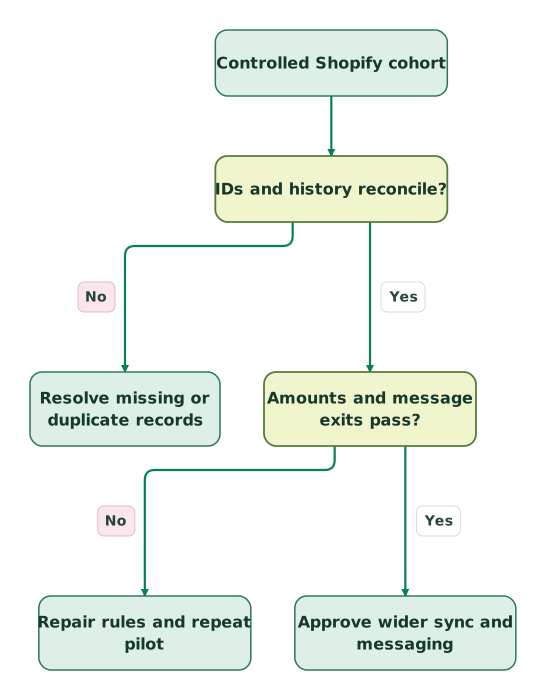
Read diagram as text
- Controlled Shopify cohort to IDs and history reconcile?.
- IDs and history reconcile? to Resolve missing or duplicate records: No.
- IDs and history reconcile? to Amounts and message exits pass?: Yes.
- Amounts and message exits pass? to Repair rules and repeat pilot: No.
- Amounts and message exits pass? to Approve wider sync and messaging: Yes
What should you reconcile besides the order count?
Reconcile unique identities, multiplicity, financial meaning and associations for the same source cohort. Equal row counts are only a preliminary check.
Consider this hypothetical pilot. The letters are local fixture IDs, not Shopify's real ID format. Compare (store, source order ID) pairs, including currency beside each amount.
| Check | Source population | HubSpot population | Result |
|---|---|---|---|
| Rows | A, B, C, D, E | A, A, B, C, D | Both contain five rows |
| Unique orders | Five | Four | Destination is incomplete |
| Missing source key | None | E absent | Investigate its sync state |
| Duplicate destination key | None | A appears twice | Identify the competing writer |
A report that joins one order to several contacts can multiply its amount again even when the underlying order records are correct. Aggregate commerce values at the order grain before joining recipient or company relationships. Inspect the detail behind any total that changes after an association is added.
Shopify distinguishes order totals from net payments, and represents money in shop and presentment currencies. Its netPaymentSet is received payments minus refunds. The display order name is not unique across stores. Shopify Order fields.
For this hypothetical USD example, a customer has paid USD 120 and later received a USD 30 refund. Net cash received is USD 90. A separate USD 80 order that has not been paid contributes USD 80 to the selected order-value measure and zero to cash received. Neither measure should be labelled recognised revenue without the relevant accounting policy.
| Synthetic purchase | Selected order value, USD | Received less refunded, USD | Why the values differ |
|---|---|---|---|
| Paid order with a later refund | 120 | 120 − 30 = 90 | Original order value and net cash have different meanings |
| Unpaid order | 80 | 0 − 0 = 0 | The order exists before collection |
| Combined selected cohort | 200 | 90 | A single revenue label would hide the distinction |
Specify whether the CRM field stores an original total, a current post-adjustment amount or a payment measure. Do not subtract refunds twice from a value that already reflects them. Keep an EUR order outside the USD sum unless the reporting model supplies an explicit conversion rule.
For a customer-spend segment, define which cancelled, test and unpaid orders qualify. Store the source observation time separately from the CRM delivery time so a recent write cannot disguise stale commerce data. The customer identity guide helps define the person and account relationships behind that summary.
How should abandoned checkout and post-purchase messages behave?
Choose one owner for each customer message and recheck the current commerce state before dispatch. A Cart record is an input to a journey; it does not establish permission or prove the checkout is still unfinished.
Shopify's current abandoned checkout automation applies to customers who started checkout without completing a purchase. Its default recipient setting targets marketing subscribers, and a completed purchase before dispatch prevents the recovery email. That behaviour belongs to Shopify's automation; a separate HubSpot workflow must implement and verify its own exits. Shopify abandoned checkout automation.
Define the episode around the checkout and customer relationship. If another checkout supersedes it, or a purchase completes while a reminder waits, decide which queued item is cancelled. Coordinate Shopify, HubSpot and any other email tool so the same episode does not produce competing recovery offers.
Keep these three decisions separate: whether the contact exists, whether the person is eligible for a particular message, and whether HubSpot classifies the contact as marketing for tool access and billing. HubSpot's marketing-contact defaults depend on the creation route and account settings. Inspect the resulting status on the pilot contact rather than assuming that a store sync makes it marketable. Marketing-contact creation defaults.
HubSpot requires verifiable permission for marketing email; the absence of an opt-out is insufficient. Applicable local requirements can be stricter than the platform rule. Record the purpose and evidence of the permission, then test the suppression path. HubSpot opt-in requirements.
For a post-purchase journey, explicitly choose the event that matters: order placed, payment received or fulfilment completed. A shipment-help message and a repeat-purchase offer have different conditions. Use the lifecycle journey design method to define entry, exit and re-entry without restarting onboarding after every order update.
Why can a synced customer still have incomplete attribution?
A synced customer establishes a CRM record; acquisition attribution needs evidence of the customer's interactions. Inspect those two layers separately before rewriting source fields.
HubSpot's Record Source describes how a record was created. Original and Latest Traffic Source describe known web interactions. Changing a traffic-source value clears its drill-down properties, so manually replacing an inconvenient category can discard useful detail. HubSpot traffic and record sources.
Trace a controlled visit with a known campaign parameter through the storefront, consent choice, checkout and resulting contact. Inspect the actual tracking request, contact association, source properties and relevant order. Repeat with tracking declined to establish what should legitimately remain unknown.
Do not assign paid-search attribution merely because the purchase came from a store that runs ads. Preserve the unknown population and explain the reporting coverage. For a broader web-to-CRM comparison, use the GA4 and HubSpot reconciliation guide.
How do you investigate a missing or incorrect record?
Start with a known source record and classify the failure before changing the sync. Keep record creation, associations, field updates and downstream eligibility as separate checks.
| Symptom | Evidence to inspect | Next action |
|---|---|---|
| Purchase absent from an expected view | Actual destination object, filter and source key | Confirm the view reads Orders and the intended cohort |
| Order exists but customer context is empty | Source email and destination associations | Resolve the identity exception without guessing a person |
| Expected catalogue detail is absent | Source field type and supported mapping | Choose a supported enrichment route or revise the segment |
| Customer receives duplicate reminders | Sender logs, checkout key and workflow entries | Stop the competing journey and reconcile queued episodes |
| Count matches but spending is wrong | Duplicate keys, joins, currencies and amount definition | Rebuild the comparison at the order grain |
| Old purchase appears as new business | Purchase time, record creation time and import marker | Repair the event-time rule before resuming messages |
For excluded or failed records, preserve the exact reason from the sync's record view. Repair the narrow cause and verify that record before expanding the change. The martech integration design guide covers ownership, failed deliveries and reconciliation across the wider stack.
What must pass before the wider rollout?
Approve the rollout when the chosen customer journey has correct data and correct stopping conditions, including negative cases.
Checklist
- Each source object has one intended destination and operational owner.
- Existing writers and imported records have a cutover plan.
- Oldest required history, missing-email customers and ambiguous names are tested.
- Unique source IDs reconcile, including duplicate and missing-record checks.
- Amounts have a defined basis, currency and refund treatment.
- An old order does not trigger an unintended new-customer journey.
- A purchase or permission withdrawal stops the relevant queued reminder.
- Tracking and attribution are tested separately from record sync.
- An operator owns failed records and the messaging hold.
If the customer view needs commerce data, CRM ownership and lifecycle rules working together, Martechdevs' CRM and lifecycle implementation can scope those dependencies around a concrete pilot. Use the HubSpot implementation checklist to fit the integration into the wider rollout.
Keep reading
Browse all CRM & Lifecycle guides
 CRM & Lifecycle
Salesforce to HubSpot migration: plan, field mapping and cutover checklist
Plan a Salesforce to HubSpot migration: phases, a field mapping template, load order, Smart Transfer limits, reconciliation checks and a safe cutover.
Jafrin Akter AloLast updated 21 min read
 CRM & Lifecycle
HubSpot implementation: a phased plan, template and launch checklist
Implement HubSpot in five phases: scope, data model, migration, integrations and launch. Includes a plan template, a worked example and a go-live checklist.
Jafrin Akter AloLast updated 22 min read
 CRM & Lifecycle
HubSpot Email Tracking: 8 Reasons Opens, Clicks and Logs Disagree
Fix confusing HubSpot email tracking with eight checks for logging, seats, link formats, inferred opens, privacy filters and report definitions.
Jafrin Akter AloLast updated 14 min read
CRM & marketing automation
See the implementation scope, deliverables and acceptance checks.
Questions people ask
Can one HubSpot account serve several Shopify storefronts?
Yes, HubSpot supports connecting additional Shopify stores from the app's account-management settings. Retain the source store beside each order and test one person buying in two stores. Decide whether purchases share a CRM contact while keeping currencies, permissions and brand-specific messages distinct. A combined customer view must not combine separate sender permissions. Multi-store connection steps.
Should an anonymous add-to-cart event produce a HubSpot Cart record?
Do not treat an anonymous add-to-cart event as equivalent to a synced abandoned checkout. The behavioural event describes an earlier action, while the integration's Cart object represents the supported checkout data. Define the audience from the stage you actually observe. Test product browsing, adding an item and starting checkout separately so missing identity is not mistaken for a connector failure.
Does deleting a customer from HubSpot complete a store-wide erasure request?
Treat customer erasure as a coordinated process across the store, CRM, connected senders and retained data, rather than a single-record action. Inventory the systems and applicable retention requirements, then record completion or justified retention for each. Also prevent an active integration from recreating a removed record. Keep the operational suppression needed to avoid renewed messaging without retaining unnecessary customer details.
Should a returned purchase automatically remove the Customer lifecycle stage?
A returned purchase should change the customer facts and eligible journeys under your policy, not automatically erase the entire commercial relationship. Check whether other valid purchases remain and whether the return is partial, full or unresolved. Keep historical purchase evidence separate from current value and service status. A lifecycle stage is too coarse to represent every payment or fulfilment transition.
When should a custom Shopify-to-CRM route replace native sync?
Choose a custom route when a required field, identity rule or operational latency cannot be satisfied by the supported native mapping. Name that unmet requirement before building. Prove duplicate protection, historical coverage, retries, permission handling and reconciliation in the replacement. If the missing requirement is only one customer summary, a narrowly scoped supplementary writer may be easier to operate than replacing every synced object.
Sources
- HubSpot: Shopify Data Sync app listing.
- HubSpot: connect Shopify through Data Sync.
- HubSpot: Data Sync field mappings.
- HubSpot: Data Sync operation.
- HubSpot: record matching.
- Shopify: API access scopes.
- Shopify: Order object.
- Shopify: current abandoned checkout automation.
- HubSpot: marketing-contact defaults.
- HubSpot: opt-in consent.
- HubSpot: traffic source properties.

Written by
Jafrin Akter AloData Engineer and Co-founder at Martechdevs and Growth and Analytics Partners
Jafrin writes practical guides to marketing technology, customer data, analytics and AI workflows. Martechdevs is a Growth and Analytics Partners company.