
Hotjar vs Microsoft Clarity: Compare Replay, Consent and Real Limits
Choose Microsoft Clarity for a focused, free website replay and heatmap workflow when its data controls and access periods fit. Evaluate Contentsquare, where new Hotjar customers now sign up, when feedback, deeper investigation or paid workflow features justify the cost. Compare recording coverage, consent behavior and usable history separately. Neither a free price nor a large session allowance guarantees that the recording you need will exist.
On this page
Martechdevs provides implementation services. Our starting recommendation for a small website is to test the least costly setup that answers one real question safely. Paying becomes useful when a specific limit prevents that work, not simply because the paid product has more features.
The important question is practical: can your team locate a permitted recording of a failed checkout, understand the failure and measure how often it happens? If the answer is no, another dashboard is unlikely to help.
Which tool should you choose first?
Start with the investigation your team repeats, then check the retained plan and collection controls. Clarity is a strong initial candidate for website behavior investigation. Contentsquare deserves a trial when replay needs to connect with feedback or a broader experience-analysis workflow.
| Your need | First evaluation | Runner-up | What must pass |
|---|---|---|---|
| Free website replay and heatmaps | Microsoft Clarity | Contentsquare Free | Consent, masking and the needed recording are available |
| Replay plus visitor feedback | Contentsquare Free | Clarity alongside your existing feedback tool | Response volume, targeting and investigation fit |
| An existing Contentsquare team needs more projects or history | The relevant paid tier | Clarity if its access windows fit | Exact analytics and replay periods meet the need |
| Replay tied to established product events | Your current product analytics tool | A separate replay tool | Identity and event-to-replay investigation work without redundant collection |
| Native mobile app | A dedicated mobile SDK comparison | Your existing product analytics SDK | Framework, masking, consent and device tests pass |
For a product team already using PostHog, compare replay and product analytics capabilities before adding another collector. A free standalone replay tool can still create extra consent, access and maintenance work.
Microsoft Clarity
- Best for: Small website teams investigating a specific usability failure.
- Pros: Free visual investigation with no account-wide site-count limit. Clarity scope
- Cons: Ordinary replay expires after 30 days, individual recordings cannot be downloaded, and no-cookie sessions have different reporting meaning. Retention, recording limits, no-cookie reporting
- Free tier and startup offer: The ongoing free service is the starting route; a startup award is unnecessary. Capture and retention limits still apply.
- Choose it if: An owner can turn a permitted recording into a reproducible problem and measure the affected population.
- Skip it if: Your site or app targets under-18s, which Microsoft excludes, or the required recording-access workflow does not fit. Usage restrictions
Contentsquare for new Hotjar customers
- Best for: Teams connecting replay with visitor feedback or an existing Contentsquare workflow.
- Pros: Replay, feedback and broader investigation capabilities can sit within the same platform. Select the required product scope. Contentsquare plans
- Cons: Recording coverage and access periods vary by plan; migrating Hotjar accounts also need configuration and integration checks.
- Free tier and startup offer: Start with the regular Free plan or the cardless 15-day Growth trial, then retain only the plan that fits. The trial does not require a startup award. New-account offer
- Choose it if: A specific retained feature improves the investigation enough to justify its operating cost.
- Skip it if: The relevant visitor population is poorly covered or a required workflow fails in the retained package.
Use product analytics and replay setup to connect the chosen tool to a useful workflow. The implementation should protect restricted content while preserving enough context to diagnose the actual failure.
What is Hotjar now, and what can a new account buy?
New customers sign up with Contentsquare; new Hotjar accounts are no longer available. The Hotjar landing page offers a cardless Growth trial followed by a Free plan. An existing Hotjar account’s notified migration is a separate process, so do not assume that a new-account offer describes your legacy contract. Current Hotjar signup route
The Contentsquare price list separates Experience Analytics, Voice of Customer and other product scopes. Select the product that performs your required job, then confirm its included usage and retained features. A headline platform description is not an entitlement list for every plan.
The website comparison below concentrates on Experience Analytics and replay. Feedback has its own allowance, and native-app requirements need a separate evaluation.
How do free capture and usable history compare?
Distinguish analytics sessions, available replay and the period during which you can access each data type. A month of analytics history does not imply a recording exists for every session in that month.
| Measure | Microsoft Clarity | Contentsquare Experience Analytics Free |
|---|---|---|
| Service price | Free | Free |
| Analytics volume | No traffic-based paid upgrade | Up to 200,000 monthly sessions |
| Recording coverage | Up to 100,000 recorded sessions per project per day; not every session is guaranteed a recording | 5% of sessions, capped at 10,000 monthly replays |
| Ordinary replay access | 30 days | One month |
| Longer history | Labeled/favorited sessions and heatmaps: nine months | One month of analytics access |
| Project scope | No limit on sites per account | One project |
Sources: Microsoft FAQ, Clarity data retention, Contentsquare plans, Contentsquare session and replay allocation.
Clarity also retains a randomly selected sample of recordings for up to nine months, but do not plan an investigation around your desired recording being randomly retained. Clarity recording retention
Contentsquare’s Free and Growth session limits can stop new analytics collection and replay capture while previously collected data remains accessible. Monitor the actual account allowance and reset shown for your subscription; a usage gap cannot be repaired by watching more of the recordings already stored. Collection behavior at the limit
For a simple planning example, 40,000 eligible tracked sessions at a 5% replay rate corresponds to 2,000 selected sessions before other capture conditions. That does not guarantee 2,000 useful recordings, nor that a rare error appears in them. If the problem happens on a particular device or checkout step, validate coverage of that population rather than multiplying a headline allowance.
When is paying for Contentsquare worth it?
Pay when a required investigation, retention period or operating workflow fails on the free setup and the paid package demonstrably fixes it. Keep analytics access and replay access separate in the purchase.
Experience Analytics Growth includes 13 months of analytics access, two months of replay access and three projects. Its entry tier covers 7,000 monthly sessions: USD 49/month with monthly payment, or approximately USD 39/month in the yearly-billing view. Select the session tier for your traffic before upgrading. Contentsquare commercial scope
Voice of Customer Growth is separate, listed from USD 79/month in the yearly-billing view. Its Free option already includes 100 monthly responses and three surveys/widgets. Confirm the selected allowance, billing currency and checkout total; European Growth accounts are billed in euros. Feedback plans and billing
Do not describe Growth as a year of ordinary replays because another row says 13 months of data. Likewise, needing a single basic survey does not by itself establish a paid requirement. Test the targeting, response volume, access window and connection to the investigation you actually need.
Use a short purchase brief:
| Requirement | Evidence from the trial | Commercial confirmation |
|---|---|---|
| Investigate an issue reported several weeks later | The relevant data type remains accessible | Exact replay and analytics access periods |
| Support several sites or teams | Owners can isolate the correct project | Shared usage and project allocation |
| Ask visitors why they stopped | Relevant survey reaches the intended audience | Response cap, targeting and feedback product |
| Pass a finding into the team’s workflow | The intended integration completes the task | Exact supported action in the retained plan |
| Handle a busy month | Coverage remains adequate through the peak | Session allocation, reset and charge behavior |
Ask the team to estimate review time as well. If a paid filter saves two hours per week at an assumed internal cost of USD 60/hour, that represents roughly USD 520 of monthly capacity using 52 weeks divided by 12. It is not USD 520 of cash savings unless spending actually falls. Measure whether the filter saves that time before using it to justify the licence.
PostHog is another route when replay should sit beside established product events. Use its replay pricing and usage guide for that specific workload rather than comparing only the free allowance.
How does consent change Clarity’s data?
Clarity’s web consent controls affect both collection behavior and the meaning of the resulting sessions. In the EEA, UK and Switzerland, a valid signal is required for full functionality. In its no-consent mode, Clarity can still collect limited cookieless data; denied consent is not a universal “send no data” switch. Clarity consent management
Without cookie consent in those regions, each pageview becomes a separate session. Recordings can become single-page fragments, and a multi-page funnel can show complete drop-off even though a person continued browsing. Reporting without cookie consent
Here is an intentionally simplified denominator example. Assume 1,000 actual three-page journeys, with 400 using consented cross-page sessions and 600 represented as separate pageviews. Ignoring all other session and capture differences:
| Population | Journeys | Count per journey | Resulting session count |
|---|---|---|---|
| Consented cross-page group | 400 | 1 | 400 |
| No-cookie group | 600 | 3 | 1,800 |
| Combined | 1,000 | Mixed definitions | 2,200 |
The apparent increase to 2,200 sessions does not mean traffic grew by 120%. It illustrates a change in counting units. Real comparisons also depend on time windows, regions, inactivity rules, blocked scripts and filtering. Segment those conditions before comparing Clarity with GA4 or Contentsquare.
If your organization’s approved policy requires no collection before permission, enforce that policy at the appropriate tag-loading boundary. Do not assume a vendor’s cookieless mode satisfies a stricter requirement. Keep CMP selection and implementation separate from the choice of replay interface.
How should the consent signal be connected?
Use one deliberate consent integration path, verify its initial state, and test later changes. A banner visible on the page is not evidence that the replay tag received the correct signal.
Microsoft documents integrated support for Google Consent Mode: Clarity recognizes its ad_storage and analytics_storage signals. If that is your chosen route, test it end to end rather than adding a second custom bridge that can contradict it. Clarity’s Google Consent Mode support
For a custom integration, the recommended Clarity API is consentv2. Its property names are case-sensitive: ad_Storage and analytics_Storage, with granted or denied values. The capital S is part of Clarity’s contract; it differs from the Google signal names. Clarity ConsentV2
This original mapper accepts an already verified CMP choice. It deliberately rejects missing values instead of guessing consent. It does not determine legal permission, load the tag or manage a CMP’s asynchronous startup.
function clarityConsentPayload(choice) {
  if (!choice || typeof choice !== "object" || Array.isArray(choice)) {
    throw new TypeError("Expected a verified CMP choice object");
  }
  const own = Object.prototype.hasOwnProperty;
  const current = Object.create(null);
  for (const key of ["analytics", "advertising"]) {
    const value = own.call(choice, key) ? choice[key] : undefined;
    if (typeof value !== "boolean") {
      throw new TypeError("Both consent choices must be explicit booleans");
    }
    current[key] = value;
  }
  return {
    ad_Storage: current.advertising ? "granted" : "denied",
    analytics_Storage: current.analytics ? "granted" : "denied"
  };
}

const payload = clarityConsentPayload({
  analytics: true,
  advertising: false
});
console.log(payload);
In the selected custom CMP callback, pass the resulting payload to window.clarity("consentv2", payload) after the Clarity command queue is available. Replace the example booleans with the verified current choices, apply the initial choice, and update on withdrawal as well as acceptance. Do not use this sample’s true value as a default for visitors.
Withdrawal through ConsentV2 ends the cookie-based session and continues in no-consent mode. Microsoft also distinguishes advertising permission: denied ad storage prevents sharing with Microsoft Ads. Preserve the two choices rather than treating analytics acceptance as advertising acceptance. ConsentV2 behavior, consent-state effects
Our tracking and consent implementation work tests the signal path, cookies and outgoing requests together. Google Consent Mode v2 is part of that stack when applicable, not a replacement for verifying every recipient’s behavior.
How should you test masking before collecting real sessions?
Use obviously fictional sensitive markers on each relevant page state, then verify that the permitted recording remains useful without revealing restricted content. Do this before reducing default masking.
Clarity’s web default is Balanced, which classifies numbers and email addresses as sensitive. Strict masks all content. Inputs and dropdowns remain masked across modes. Changes apply to new recordings, may take up to an hour and cannot repair earlier exposure. CSS content is not covered by those masking controls. Clarity masking rules
Contentsquare’s web masking controls are available across its plan tiers. Full masking is the default, and automatic redaction remains active even when the selected mode reveals more content. Page and element rules need review; changes affect future collection. Contentsquare data masking
Run these tests with synthetic accounts and dummy text only.
| Surface | Test marker or action | Expected evidence |
|---|---|---|
| Form input and submitted confirmation | Fake email and a unique dummy account reference | Restricted values remain hidden after the UI changes |
| Error toast or validation message | Dummy sensitive value echoed by the page | The error mechanism is visible without the value |
| Account menu and populated table | Fictional name, balance or customer identifier | Masking covers dynamic content as well as the initial page |
| URL, referrer and custom payload | Clearly fake query-string or event marker | No restricted value reaches an unintended field |
| Single-page navigation and mobile layout | Open a modal, change route and resize | Rules still apply after rendering and selector changes |
Masking a form field does not prove that the same value is absent from the URL or a custom event. Test outgoing data as well as the replay. Keep one named owner for masking changes and permission reviews.
Contentsquare describes the customer organization as responsible for the purposes and lawful scope of collection. Treat vendor controls as implementation tools, not automatic approval of your particular pages or payloads. Contentsquare collection responsibilities
What should an existing Hotjar customer check before moving?
Read the notice for the actual account and preserve its deadline, price and owner decision. The documented automatic-migration process applies to notified accounts, not an invented universal cutover date.
For that process, the owner has a 30-day decision window. Without an opt-out, Growth activates and the new price applies at the next scheduled renewal; a previously canceled auto-renewal remains canceled. Historical Observe data stays in Hotjar, read-only for 12 months before deletion. Surveys and feedback transfer. Keep the Hotjar account: deleting it can stop Contentsquare tracking. Notified-account migration terms
Check the technical boundaries separately.
| Item | Documented migration behavior | Required action |
|---|---|---|
| Existing tag | Can collect for both during transition | Confirm actual recipients and content-security rules |
| Masking | Existing suppression settings carry over | Recheck synthetic markers in the new project |
| Targeting | URL rules transfer; event-based rules do not | Rebuild or replace the required selection logic |
| Consent | New cookies do not inherit the old CMP configuration | Add the appropriate new recipients/cookies and retest choices |
| Integrations and exclusions | IP blocking does not transfer; some integration actions are unavailable | Rebuild exclusions and test the exact action; the FAQ lists replay-link sharing to Slack/Teams and replay-to-Jira issue creation as unsupported |
Sources: migration behavior, transferred settings.
Keep a written map of old investigations, saved evidence and their new location. Export what is both supported and necessary before an access window closes. A familiar logo and a working login do not prove that historical analyses, integrations or permission choices have moved correctly.
What do users report about the two tools?
User reviews are useful for designing trial tasks, especially around filtering and review effort. They do not override the vendor’s current plan, consent or retention rules.
G2 lists Microsoft Clarity at 4.5/5 from 55 reviews and Hotjar by Contentsquare at 4.3/5 from 345 reviews. The populations and product histories differ, so those scores are not a controlled comparison of the current Contentsquare offer. Clarity reviews, Hotjar reviews
Clarity reviewers describe useful visual evidence and straightforward setup, while some ask for better filtering or integration with other reporting. Several visible reviews are marked incentivized. Treat those observations as prompts to test the specific filter and investigation you need. G2 Clarity user accounts
Hotjar reviewers describe the value of combining recordings, heatmaps and feedback. Some also report time spent reviewing large recording volumes and limitations in filtering or tier coverage. These are individual experiences with Hotjar-branded workflows; validate the current package rather than transferring every claim to Contentsquare. G2 Hotjar user accounts
How do you prove the tool helps explain one drop-off?
Start with a measured failure population, use replay to identify a possible mechanism, then measure that mechanism in the appropriate event data. Watching five frustrating sessions does not establish that half your customers are affected.
For example, suppose a fictional checkout has 8,000 eligible attempts and 6,000 completed orders: 2,000 attempts did not finish. You inspect 25 recordings selected for a particular mobile browser and observe a blocked address field in eight. That is eight of the selected 25 recordings, not 32% of all checkouts.
Add or verify a privacy-safe failure event tied to the actual attempt. If that event occurs in 160 of the 8,000 eligible attempts, the observed rate is 2%. Even then, establish whether the event definition and population are complete before deciding it explains 160 lost orders. Some attempts recover, and some would fail for another reason.
Turn the finding into an action: reproduce the form behavior, fix the specific defect, verify the event and then assess the outcome. Use product analytics tools for the recurring population and metric work. Use replay to inspect what happened, not to invent a revenue estimate from a few memorable sessions.
What should happen before rollout or a switch?
Roll out when the chosen retained plan supports the required investigation and the collection controls pass. If an existing collector is already adequate, improve its configuration before adding another.
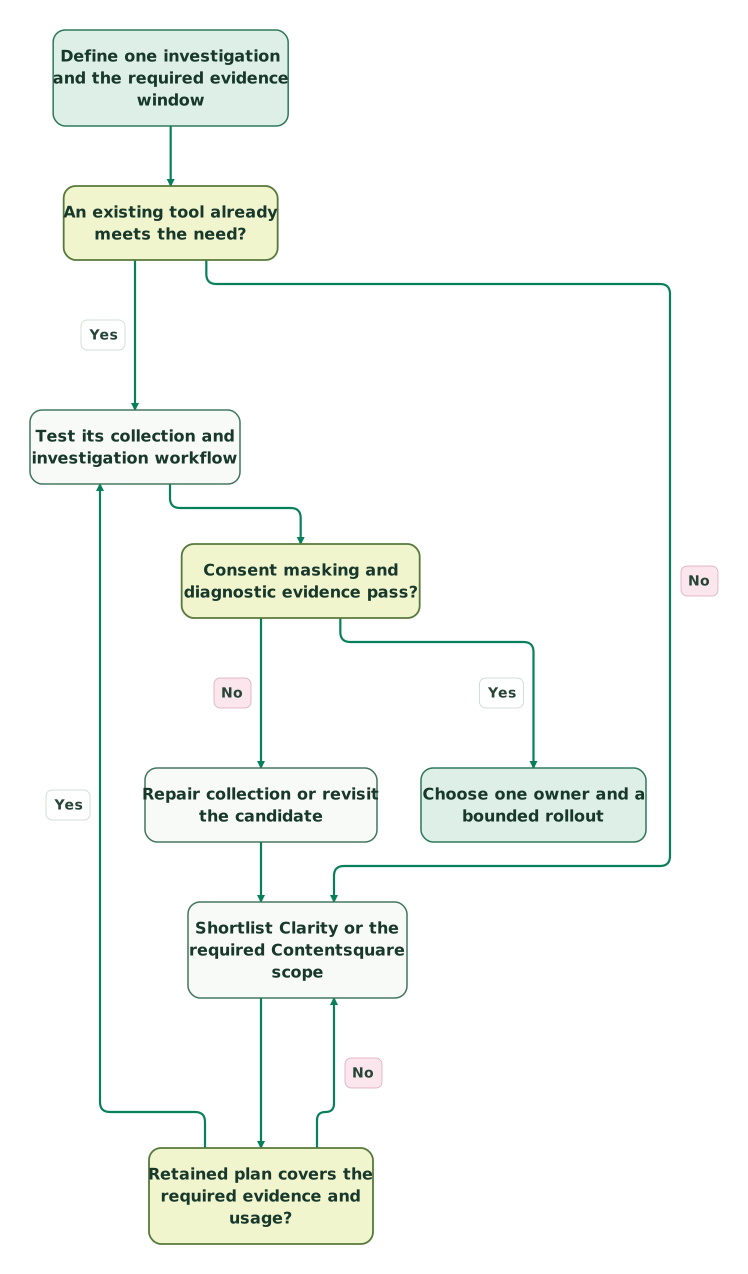
Read diagram as text
- Define one investigation and the required evidence window to An existing tool already meets the need?.
- An existing tool already meets the need? to Test its collection and investigation workflow: Yes.
- An existing tool already meets the need? to Shortlist Clarity or the required Contentsquare scope: No.
- Shortlist Clarity or the required Contentsquare scope to Retained plan covers the required evidence and usage?.
- Retained plan covers the required evidence and usage? to Shortlist Clarity or the required Contentsquare scope: No.
- Retained plan covers the required evidence and usage? to Test its collection and investigation workflow: Yes.
- Test its collection and investigation workflow to Consent masking and diagnostic evidence pass?.
- Consent masking and diagnostic evidence pass? to Repair collection or revisit the candidate: No.
- Repair collection or revisit the candidate to Shortlist Clarity or the required Contentsquare scope.
- Consent masking and diagnostic evidence pass? to Choose one owner and a bounded rollout: Yes
Running both temporarily can help compare a defined workflow, but test page performance and collection behavior on representative devices. Set an end condition and remove the redundant collector through the approved migration path. Two tags collecting indefinitely create two configurations to maintain without necessarily producing a better decision.
What belongs in the release checklist?
Keep the evidence close to the decision and assign the follow-up work before collection expands.
Checklist
- The exact investigation and required evidence window are recorded.
- Analytics sessions and available replay are measured separately.
- Free, trial and retained paid features have been distinguished.
- Initial consent, denial, partial consent and withdrawal are tested.
- The GCM, supported CMP or custom API route is explicit and consistent.
- Synthetic sensitive markers remain protected across dynamic page states.
- URL and custom-payload checks pass as well as replay masking.
- The owner understands quota stops, reset timing and access expiry.
- Existing Hotjar notices, historical evidence and integration dependencies are resolved.
- A real finding can move from replay to a measured fix with a named owner.
Use the martech comparison method to document the decision. If the tool choice is clear but the collection boundary is not, request a detailed tracking and consent scope. The deliverable should be useful, permitted evidence and a repeatable investigation workflow.
Keep reading
Browse all Product Analytics guides
 Product Analytics
Experimentation Platforms: 8 Options Compared by Metrics, Limits and Test Readiness
Compare eight experimentation platforms by metrics, free limits and result access. Includes a sample-size calculator, cost examples and setup checks.
Jafrin Akter AloLast updated 19 min read
 Product Analytics
Sample Ratio Mismatch: Diagnose an A/B Test Before Reading Lift
Diagnose sample ratio mismatch across assignment, exposures and analysis filters, with a checked Python example, missing-user scenario and recovery criteria.
Jafrin Akter AloLast updated 9 min read
 Product Analytics
GA4 Alternatives: Choose by the Questions You Need to Answer
Compare Plausible, Matomo, Mixpanel, PostHog and a warehouse by the decisions they support. Use a controlled pilot and preserve critical GA4 dependencies.
Jafrin Akter AloLast updated 13 min read
Product analytics
See the implementation scope, deliverables and acceptance checks.
Questions people ask
Does Clarity replace GA4?
Not automatically. Clarity is useful for investigating interface behavior; GA4 may still serve your acquisition and conversion reporting. Decide which tool owns each recurring question and reconcile their populations before comparing counts. A recording of a clicked payment button does not prove payment succeeded, and a different session total does not by itself prove either implementation is broken.
Should denied consent mean there are no recordings?
Not necessarily under Clarity’s no-consent mode. Clarity uses pageview-level sessions and fragmented recordings without persistent cookie identity. If your approved policy requires no collection, implement that separate loading restriction. Judge the test against the actual permitted behavior, not the assumption that deleting cookies and preventing every network request are the same operation. Clarity no-cookie reporting
Can these tools analyze a native mobile app?
Clarity has separate mobile SDKs with framework-specific support. Contentsquare’s wider platform also has mobile capabilities, but the free web comparison does not establish native-app entitlement. Evaluate the actual SDK, device behavior, masking and consent requirements independently. A mobile browser test cannot validate a native screen or a different framework’s capture behavior. Clarity mobile overview, Contentsquare mobile capabilities
How many replays should we watch before changing a page?
Watch enough relevant examples to form a testable explanation, then establish how common that mechanism is using the appropriate event population. A targeted replay sample is useful for diagnosis but is not a random survey of all users. Reproduce a clear defect and repair it; use a planned experiment when the decision concerns competing designs rather than an obvious failure.
Can masking changes remove sensitive data from old recordings?
Do not rely on that. Both tools describe masking changes as applying to future collection, so preventing the initial exposure matters. If restricted data was collected, stop the faulty path and follow the applicable access, deletion and incident process. Recheck the actual affected fields and recipients rather than assuming that changing a selector retroactively fixes the evidence. Clarity masking, Contentsquare masking
Sources
- Current Hotjar signup route.
- Contentsquare pricing.
- Clarity FAQ.
- Clarity data retention.
- Contentsquare session and replay allocation.
- Clarity consent management.
- Clarity reporting without cookie consent.
- Clarity Google Consent Mode support.
- Clarity ConsentV2.
- Clarity masking.
- Contentsquare masking.
- Contentsquare collection responsibilities.
- Hotjar migration FAQ.
- Transferred Hotjar settings.
- G2 Clarity reviews.
- G2 Hotjar reviews.
- Clarity mobile overview.
- Contentsquare mobile capabilities.

Written by
Jafrin Akter AloData Engineer and Co-founder at Martechdevs and Growth and Analytics Partners
Jafrin writes practical guides to marketing technology, customer data, analytics and AI workflows. Martechdevs is a Growth and Analytics Partners company.