
Copper CRM vs Pipedrive for Google Workspace and Sales Pipelines
Pick Copper if the team manages customer relationships through Gmail and Google Workspace; pick Pipedrive if a shared deal pipeline and the next sales activity organize the working day. Copper CRM vs Pipedrive comes down to that operating preference, the required edition and the handoff after a sale. Compare representative customer records and the complete cost before committing.
On this page
Copper CRM vs Pipedrive comparison
These are published US prices in USD, with the stated billing basis and taxes excluded.
| Decision criterion | Copper | Pipedrive | Buying implication |
|---|---|---|---|
| Annual entry subscription | Basic $23/seat/month, paid annually | Lite $14/seat/month, billed annually | Entry prices need a feature check |
| Automation comparison | Professional $59/seat/month annually | Growth $39/seat/month annually | Use the required production tier |
| Daily working context | Gmail and Google Workspace | Deals and linked sales activities | Test the seller's ordinary routine |
| Relationship and delivery work | Contacts, opportunities and projects | People, organizations, deals and projects | Preserve the distinction between sale and delivery |
| Evaluation | 14 days, no credit card | 14 days, no credit card | A trial is not a permanent free production plan |
Sources: Copper pricing, Copper trial, Pipedrive pricing and Pipedrive data organization. The Pipedrive budget below uses the displayed $39 annual Growth offer. Applicable offers can differ, so record the price and included scope shown for your order.
Both products can support a relationship-led sales process. The useful distinction is the screen and sequence of actions that the team will maintain. A tool can have a suitable pipeline while still requiring too much switching between correspondence, commercial context and delivery work.
At Martechdevs, CRM and lifecycle implementation starts with those handoffs. We define the customer record, the next action and the receiving owner before configuring fields and automation. The CRM examples guide gives concrete patterns for deciding which work belongs in each record.
Tool decisions
Copper
- Best for: A Google Workspace team that wants customer context close to its correspondence and needs continuity into project work.
- Pros: The current Basic plan includes pipelines, project management and task automation. Professional adds workflow automation and reporting, giving a clear upgrade question for a more involved process.
- Cons: Copper's signup route specifies Gmail and Google Workspace. A team standardized on a different email environment should resolve that fit before investing in configuration.
- Free plan and startup offer: The public trial lasts 14 days without a credit card. The quoted plans are paid subscriptions; no permanent free allocation or universal startup discount is included in this comparison.
- Choose it if: An ordinary user can maintain the customer relationship, opportunity and delivery handoff from the working environment the team already uses.
- Skip it if: Email-platform fit fails, or the required reporting and automation depend on an edition the approved budget does not cover.
Pipedrive
- Best for: A sales team that wants deals, ownership and the next activity to organize its pipeline review.
- Pros: Activities can connect calls, meetings and tasks to customer and commercial records. Growth adds email synchronization, automations and subscription forecasting to the entry plan.
- Cons: A lower entry subscription does not establish that the complete post-sale or reporting process fits. Required customization and additional products belong in the proposal and trial.
- Free plan and startup offer: The pricing page advertises a 14-day trial without a card. No permanent free production allowance or universal startup concession is assumed in the budget.
- Choose it if: Sellers can maintain an accurate deal and next activity, while the manager can explain the pipeline from the same records.
- Skip it if: The team cannot preserve its important relationship and delivery work without an unsupported parallel process.
For a broader replacement shortlist, use Copper alternatives. If the difficult part is modeling several kinds of relationships rather than choosing between two sales routines, the Attio review addresses that different requirement.
Gmail context and field ownership
Copper's Google Workspace emphasis is useful when the team already works in Gmail, Calendar and Drive. Its product comparison describes those connections, including the desktop extension and linked Drive documents. Evaluate the specific action the employee needs instead of scoring the integration from the vendor name alone.
For example, start with an existing customer's email. The operator should find the correct company, understand the open opportunity and record the next commitment. Then another colleague should be able to continue the conversation without creating a second customer record or searching a personal inbox for the missing decision.
Contact synchronization needs separate attention. Copper documents a one-way connection from Copper to Google Contacts; changes in Google Contacts do not flow back through that integration. A manager who expects Google Contacts to be the authoritative editing screen will otherwise create a process mismatch.
Write down which system owns each value. An email address, sales owner, billing status and marketing preference can have different authoritative sources. The CRM property ownership guide provides a deeper framework for preventing an integration from replacing a correct value with an older one.
Pipedrive's Growth offer includes synchronization with Gmail, Outlook or a company email account. That makes the email-provider question different, but it does not remove the need to test association and visibility. Send a controlled message involving a known contact and confirm which record receives the conversation.
Pipeline stages and next activities
A pipeline stage should describe evidence about the sale. A scheduled call should describe work still to perform. Mixing them creates stages such as Call scheduled that become stale as soon as the meeting changes, even though the opportunity's commercial position has not changed.
Pipedrive distinguishes deals from activities. Its activity guide also notes that a user needs visibility into the linked items to see an activity. Include that permission boundary when a sales assistant, account owner and manager share work.
Use a small hypothetical opportunity with two contacts and one pending proposal. Give both products the same inputs. The test is whether a seller can identify the decision-maker, record the proposal state, schedule a follow-up and assign responsibility without using a free-text note as the only source of truth.
| Trial case | Expected record behavior | Acceptance evidence |
|---|---|---|
| Second contact at an existing company | Existing company retained, new person linked | One company with both contacts |
| Meeting postponed | Activity date changes, deal evidence remains accurate | No false stage progression |
| Ownership change | New owner receives the next action | Task and customer record agree |
| Opportunity lost | Reason retained, unnecessary follow-ups stopped | Closed outcome and reviewed activity queue |
| Deal won with unfinished delivery | Sale recorded separately from delivery work | Named receiving owner and project reference |
The most useful trial includes a correction. Change an email address, reopen an incorrectly closed deal or move the next activity. Confirm that the manager's view changes accordingly. A system that works only with perfect new records has not demonstrated the routine the team will actually use.
Sales-to-delivery continuity
A won deal records a commercial event. Service delivery, invoice collection and customer renewal remain separate outcomes. Decide which of those jobs the CRM should coordinate and which belong in another application.
Copper's plan cards include project management in Basic. Pipedrive also has project records within its data model. The presence of a project concept does not establish identical production entitlements, permissions or automation. Qualify the exact configuration before comparing it with a separate delivery tool.
For a hypothetical consultancy, the accepted handoff might contain the signed scope, commercial owner, delivery owner, promised start date and link to the customer. Ask the delivery owner to retrieve those items without interviewing the salesperson. Missing context is a handoff failure even if the deal appears correctly in a revenue chart.
Keep renewal work separate from the original sales opportunity when it represents a new commercial decision. Otherwise, changing the old opportunity's value can rewrite the meaning of historical pipeline and revenue reports. The design should make both the original agreement and the current renewal understandable.
Eight-user subscription budget
Assume eight paid users need the selected automation configuration for twelve months. The illustration uses Copper Professional at $59 per seat per month and the displayed Pipedrive Growth annual offer at $39. Both are annual billing bases in USD, before tax, optional products, implementation and retained subscriptions.
| Subscription component | Calculation | Annual amount, USD | Scope |
|---|---|---|---|
| Copper Professional | 8 × $59 × 12 | $5,664 | Eight seats |
| Pipedrive Growth | 8 × $39 × 12 | $3,744 | Eight seats |
| Subscription difference | $5,664 − $3,744 | $1,920 | Qualified plans only |
| Monthly equivalent difference | $1,920 ÷ 12 | $160 | Budget comparison |
Sources: Copper rates and Pipedrive rates. These are selected configurations, not a claim that every included feature is equivalent. Copper Basic has a 2,500-contact limit; Professional lists 15,000. Check record volume as well as the number of employees who need access.
Now assume a hypothetical transition costs $2,400 and that the full $160 monthly difference survives after all required products are included. Simple payback is $2,400 ÷ $160, or fifteen months after savings begin. If another required subscription costs $100/month, the remaining saving becomes $60 and payback becomes forty months.
Those additional amounts are planning assumptions, not vendor or Martechdevs prices. They demonstrate why a subscription difference can be real without justifying an immediate migration. Use the software pricing tool to keep seats, annual commitments and ongoing extras visible in one decision.
Export and migration evidence
Export the important records before designing the destination import. Copper's export guide separates people, companies, opportunities, projects, tasks and leads. Activity export requires contacting Copper Support for a one-time export, so do not assume a contact spreadsheet contains the complete relationship history.
Define the minimum history needed for current work. An active proposal may require correspondence, the last agreed scope and a next action. An old lost opportunity may only require its outcome and reason. Preserve the information the receiving team needs without importing every obsolete field into the new design.
- Inventory record types, relationships, active opportunities and required history.
- Confirm export permissions and obtain the separate activity export if it is required.
- Map source identifiers, company links, owners, stages and dates to the destination.
- Import a bounded sample containing ordinary records and exceptions.
- Reconcile counts and inspect a customer with several contacts and opportunities.
- Repeat the affected tests after correcting mapping or permissions.
- Move the remaining population only after the team accepts the sample and rollback plan.
Reconcile at more than one level. A matching contact count can conceal two companies merged incorrectly or a task linked to the wrong deal. Check the original record identifier, linked company, owner and next activity for the selected sample. Keep the source export until the agreed historical-access requirement has been met.
Best fit by operating model
| Company size or operating model | Best fit | Runner-up | Decision reason |
|---|---|---|---|
| Small consultancy centered on Google Workspace | Copper pilot | Pipedrive | Correspondence and delivery context lead the test |
| Sales team reviewing deals and next actions daily | Pipedrive pilot | Copper | Pipeline and activity maintenance lead the test |
| Team using Outlook as its required email environment | Pipedrive evaluation | Broader CRM shortlist | Copper's stated email environment is a constraint |
| Existing Copper team with one incorrect sync direction | Copper process repair | Pipedrive | Ownership correction may resolve the problem |
| Eight-user team considering a move for price alone | Complete-cost comparison | Retention with scope adjustment | Migration and retained tools can absorb the difference |
Selection and repair workflow
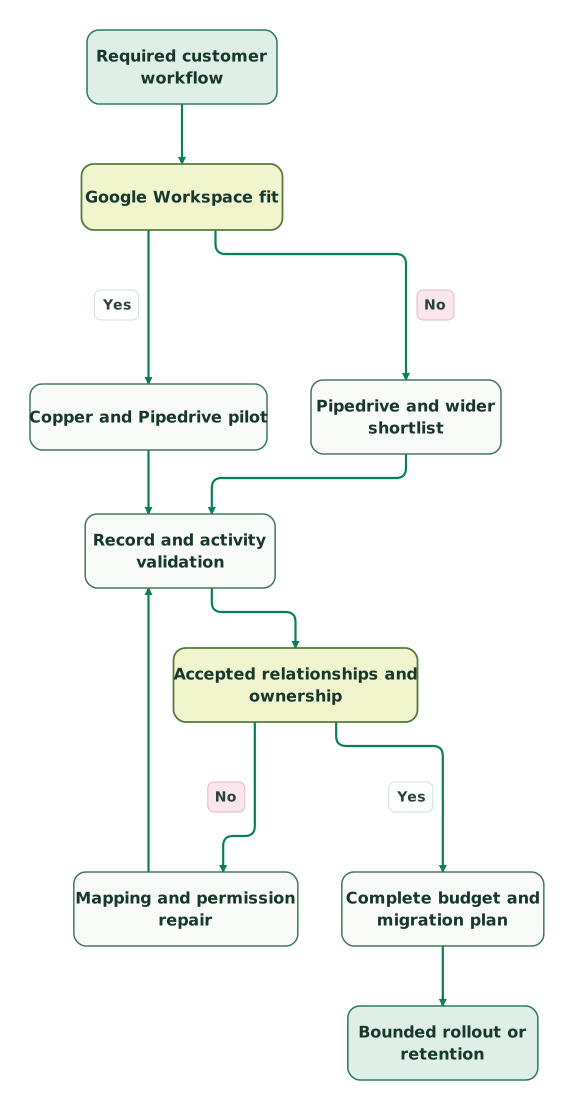
Read diagram as text
- Required customer workflow to Google Workspace fit.
- Google Workspace fit to Copper and Pipedrive pilot: Yes.
- Google Workspace fit to Pipedrive and wider shortlist: No.
- Copper and Pipedrive pilot to Record and activity validation.
- Pipedrive and wider shortlist to Record and activity validation.
- Record and activity validation to Accepted relationships and ownership.
- Accepted relationships and ownership to Mapping and permission repair: No.
- Mapping and permission repair to Record and activity validation.
- Accepted relationships and ownership to Complete budget and migration plan: Yes.
- Complete budget and migration plan to Bounded rollout or retention
A mapping or permission repair returns to the same record and activity checks. Changing the owner mapping can change who sees the follow-up, while changing the company match can change the manager's account view. Treat those as linked outcomes rather than approving a spreadsheet import in isolation.
Copper and Pipedrive selection checklist
- Confirm the required email environment before configuring a trial.
- Define stages from commercial evidence and activities from next actions.
- Test an existing company with multiple contacts and opportunities.
- Record field ownership and the direction of each synchronization.
- Validate seller, manager and delivery-user access separately.
- Confirm required production features, contact limits and applicable offers.
- Include retained tools, implementation and overlap in the budget.
- Obtain the activity history required for migration.
- Repeat affected checks after every mapping or permission repair.
- Assign a continuing administrator and an owner for each handoff.
The CRM data hygiene audit skill helps prepare the record and relationship sample. Use the same sample during the trial and after migration so the acceptance evidence remains comparable.
Keep reading
Browse all CRM & Lifecycle guides
 CRM & Lifecycle
Copper CRM Alternatives: Five Options by Workflow, Cost and Migration
Compare Streak, Pipedrive, Zoho, HubSpot and Attio as Copper CRM alternatives. Review Google sync, activity exports, user pricing and the full switching cost.
Jafrin Akter AloLast updated 12 min read
 CRM & Lifecycle
Attio vs Pipedrive for sales teams and relationship models
Pick Attio for custom relationships or Pipedrive for a deal-driven sales routine. Compare current billing, ten-user budgets, credits and migration checks.
Jafrin Akter AloLast updated 11 min read
 CRM & Lifecycle
Best CRM for startups: seven options ranked on price, integrations, reporting and fit
Compare HubSpot, Attio, Pipedrive, Zoho, monday CRM, Freshsales and Close for startups, ranked on price at 5, 10 and 20 seats, integrations and reporting.
Jafrin Akter AloLast updated 30 min read
CRM & marketing automation
See the implementation scope, deliverables and acceptance checks.
Questions people ask
Is Copper Basic only a contact manager without a pipeline?
Copper Basic includes pipelines in the current published offer, together with task automation and project management. A comparison should therefore evaluate the actual working process instead of assuming that every pipeline requires Professional. The upgrade question concerns the additional workflow, reporting and integration requirements, as well as the contact limit and the selected commercial terms.
Can a team use Google Contacts as a two-way editing screen for Copper?
A team should not treat Copper's Google Contacts integration as a two-way editing screen. The documented connection applies changes from Copper to Google Contacts, while edits made in Google Contacts do not return through that connection. Choose the authoritative contact-editing process and test a known update before asking employees to maintain both systems.
Does the lower Pipedrive subscription guarantee a cheaper migration?
A lower Pipedrive subscription does not guarantee a cheaper migration or lower first-year cost. The decision also includes required products, data preparation, history transfer, training and overlap. Calculate recurring savings only after the replacement scope is qualified, then compare that saving with the transition investment and the disruption the team can reasonably accept.
Can Copper activity history be assumed to appear in a contact export?
Copper activity history should not be assumed to appear in a standard contact export. Copper documents record exports separately and directs customers to Support for a one-time activity export. Identify the history needed for active work, obtain the relevant export and inspect its relationships before retiring access to the old system or approving the destination migration.
Should a won deal become the only record for delivery and renewal?
A won deal should not automatically become the only record for delivery and renewal. Those processes can have different owners, dates and completion criteria. Preserve the original commercial agreement, then connect the delivery work and any new renewal decision through appropriate records. This keeps historical sales reporting understandable while allowing the customer team to manage current commitments.
Sources

Written by
Jafrin Akter AloData Engineer and Co-founder at Martechdevs and Growth and Analytics Partners
Jafrin writes practical guides to marketing technology, customer data, analytics and AI workflows. Martechdevs is a Growth and Analytics Partners company.