
BigQuery Alternatives: Choose for the Workload You Need to Change
Choose a BigQuery alternative around a specific constraint: query performance, cloud alignment, structured query language (SQL) workflows, operating cost or data delivery. Snowflake, Redshift, Databricks SQL, Microsoft Fabric and ClickHouse are candidates for different requirements. First diagnose the current workload, then test the complete replacement path, including exports, data types, permissions and the reports or customer actions that depend on it.
On this page
A slow dashboard does not tell you which database to buy. It could reflect an expensive query, repeated work in the reporting layer, competing jobs or a serving requirement that needs a different architecture.
Changing platforms before identifying that cause turns a diagnostic problem into a migration project. You still need to resolve the original issue, and now you also need to prove that every transferred metric means the same thing.
This guide is for a growth or data leader deciding whether to replace BigQuery, move one workload or improve the current setup. Our warehouse implementation work connects that decision to the reporting, audience activation and operational requirements the business actually has.
What evidence would justify evaluating a replacement?
Write a short problem statement with a measurable consequence. Useful examples include a customer-facing report missing its response-time target, a business-critical refresh failing during peak demand, or a new operating model that would otherwise require maintaining two cloud environments.
Inspect a representative set of jobs before comparing alternatives. Google's performance overview identifies input volume, shuffle, computation, output, capacity and concurrency as distinct contributors to query performance. Those mechanisms call for different remedies.
Ask the engineer responsible for the workload to establish:
- Whether time is spent waiting for capacity, reading data, joining it or writing the result.
- Whether the same transformation runs repeatedly for different dashboard tiles.
- Whether the query reads the intended date range and columns.
- Whether a small dimension join unexpectedly multiplies the rows.
- Whether the report genuinely needs fresh raw events on every request.
- Whether the reported cost includes storage, ingestion and services beyond the query itself.
Keep the evidence with the decision. A screenshot of one unusually slow run is insufficient when the next run is fast. Record a normal operating period and the peak condition that matters to users.
The BigQuery implementation mistakes guide is a useful first pass. If the diagnosis points to a broken model or unnecessarily broad query, estimate that repair before authorising a migration.
Which alternatives fit which reasons for moving?
Each BigQuery competitor in this section suits a different reason for moving: Snowflake for separately owned compute, Redshift for an AWS-centred operation, Databricks SQL for an existing lakehouse team, Microsoft Fabric for Power BI-led reporting and ClickHouse for a latency-sensitive serving workload. We shortlist platforms around the workload, the people operating it and the integrations that must survive the move. Use those requirements to select a small pilot, then compare its observed performance and complete cost.
Snowflake for separately owned warehouse workloads
- Best for: a team that wants explicit compute ownership for reporting and transformation. A warehouse here means the compute resource running queries, separate from stored data.
- Pros: warehouses can start, stop and resize, with automatic suspension and resumption. Assign workloads deliberately and test queueing with your real business intelligence (BI) tool. Warehouse behaviour.
- Cons: more compute choices require an owner. Frequent dashboard polling and the first query after suspension belong in the pilot, rather than assuming every query has the same operating cost.
- Free tier and startup offer: the platform trial offers USD 400 for 30 days. The selective Startup Accelerator targets customer-facing applications built on Snowflake; do not assume an internal reporting migration qualifies. Trial, Accelerator scope.
- Choose it if: workload isolation and named compute ownership solve the measured constraint. Use Snowflake list prices by edition and region with the pilot’s actual consumption.
- Skip it if: a bounded BigQuery repair already meets the requirement. The Snowflake vs BigQuery guide helps separate platform differences from a poorly written model.
Redshift for an AWS-centred operation
- Best for: a team whose operational systems, access controls and data lake are already concentrated in Amazon Web Services (AWS).
- Pros: Redshift Serverless manages capacity and accesses Redshift managed storage and S3 data. That can simplify ownership when those are already your source systems. Serverless overview.
- Cons: important Google-origin feeds still need movement, credentials and reconciliation. Include failed refreshes and replay behaviour in the comparison, not just the warehouse query.
- Free tier and startup offer: accounts new to Redshift Serverless can receive USD 300 usable within 90 days. AWS Activate is a separate eligibility-based credit programme; an application is not a guaranteed warehouse subsidy. Redshift trial, Activate.
- Choose it if: AWS alignment removes real administration or data-delivery work while the report and recovery tests pass.
- Skip it if: moving the warehouse creates another cloud boundary for most sources and consumers without a measured benefit.
Databricks SQL for an existing lakehouse team
- Best for: a team already running substantial engineering or machine-learning work in Databricks and seeking a shared reporting environment.
- Pros: SQL warehouses serve queries and external connections; Unity Catalog governs most asset access. Test the actual identities used by scheduled jobs and BI connections. SQL warehouse documentation.
- Cons: translated models, permissions and consumer connections still need proof. Consolidating a stable, low-cost report can add more work than it removes.
- Free tier and startup offer: the commercial trial lasts 14 days; Free Edition is non-commercial and has no service-level guarantee. The startup programme offers qualification-dependent credits, not an automatic award. Trial, Free Edition limits, Startup programme.
- Choose it if: the same engineering team will maintain the tables, governance and reporting path, and the pilot shows that shared ownership helps.
- Skip it if: you would create a new lakehouse operating practice solely to replace a small reporting workload that already works.
Microsoft Fabric for a Microsoft reporting environment
- Best for: a business whose reporting and administration already centre on Power BI and Microsoft identities.
- Pros: Fabric Warehouse combines a data-lake foundation, Transact-SQL (T-SQL) and Power BI integration. Specify which Fabric item owns storage and transformation. Warehouse overview.
- Cons: the Lakehouse SQL analytics endpoint is read-only over its Delta tables; it is not an interchangeable write path for Warehouse transformations. Test the selected item, identities and shared capacity. Endpoint boundary.
- Free tier and startup offer: the standard Fabric trial lasts 60 days and can use F4 or F64 capacity. Microsoft startup Azure credits have separate activation terms; confirm the intended Fabric purchase is eligible before offsetting its cost. Trial capacity, Startup credit activation.
- Choose it if: the Microsoft workflow simplifies reporting ownership and the capacity test meets the agreed demand.
- Skip it if: the main justification is a temporary credit or a vague plan to move every report into Power BI later.
ClickHouse for a specific analytical serving workload
- Best for: interactive event exploration or a customer-facing analytical workload with a measured latency and concurrency requirement.
- Pros: ClickHouse is a column-oriented analytical SQL database available as open-source software and a cloud service. Evaluate the actual query mix rather than treating a demonstration as a benchmark for your application. Product architecture.
- Cons: updates, deletes, deduplication and late events still need a correct model. A second serving path creates a pipeline and operational boundary that someone must own.
- Free tier and startup offer: Cloud offers USD 300 for 30 days; self-hosted software does not remove infrastructure work. The published Y Combinator offer requires programme verification, pre-Series-D status and a new Cloud customer. Confirm eligibility and approval. Cloud pricing, YC offer.
- Choose it if: the serving pilot meets the required response time and correctness at realistic concurrency, including corrections.
- Skip it if: the workload is an ordinary scheduled report and the existing warehouse can meet its service target without another system.
A starting shortlist by situation
These are architectural starting points, not performance rankings. Use the same acceptance pack on the first choice and runner-up.
| Situation | First candidate to test | Runner-up | Why the order matters |
|---|---|---|---|
| Small team with a slow daily report | Repair BigQuery | Snowflake | Avoid migration until the current model and compute constraint are understood |
| Existing AWS lake and operating team | Redshift | Snowflake | Test whether cloud alignment reduces real movement and administration |
| Established Databricks engineering team | Databricks SQL | Keep BigQuery reporting | Reuse governance only if consumer migration also pays off |
| Power BI-led reporting organisation | Fabric Warehouse | Snowflake | Include capacity and report-access requirements in both designs |
| Customer-facing event exploration | ClickHouse serving path | Tuned BigQuery workload | Compare user-visible latency and full pipeline cost before replacing shared reporting |
If you are evaluating the reverse move, away from Snowflake, use the same workload boundaries. A platform can be a good destination for one team and an unnecessary move for another.
Should you replace BigQuery or move one workload?
Separate the business requirements that share a source dataset but have different delivery needs. A daily finance report, a product-facing live chart and a weekly customer relationship management (CRM) audience can require different freshness, latency and availability.
Start with the smallest change that can resolve the demonstrated constraint. There are three practical options:
- Improve the existing workload. Appropriate when the problem comes from query design, data shape, repeated work or an unowned operating process.
- Add a purpose-specific serving path. Worth testing when one workload has materially different requirements and the team can own the additional pipeline.
- Replace the shared warehouse. Worth testing when several important workloads benefit and the migration has a credible cost and ownership case.
The marketing warehouse architecture guide helps separate shared business models from the outputs that use them. Define the boundary in business terms. For example, “customer-facing usage charts move, while finance models and lifecycle audiences remain” tells the team which dependencies need to be separated. “We will try ClickHouse” leaves that work undefined.
When two systems coexist, decide where each metric is defined and where changes are reviewed. A second copy of the data should not become a second unexplained definition of active customer. Our metric contracts guide describes the definition and ownership record that makes this manageable.
What can break when BigQuery data moves elsewhere?
Data export is only one part of a migration. You must preserve business meaning across storage formats, types and downstream queries.
Google's export documentation says nested and repeated data cannot be exported as CSV, while Avro, JSON and Parquet support those structures. It also notes that JSON exports represent INT64 values as strings to preserve precision. A receiving tool that automatically guesses types can therefore produce an unexpected schema.
Use a migration fixture containing representative edge cases:
Checklist
- An order with multiple line items, an empty item list and a missing item field.
- A customer identifier with leading zeros and a large numeric-looking identifier.
- A timestamp near a reporting-day boundary and a local datetime with no time zone.
- A fractional monetary amount, a refund and a currency code.
- A corrected historical record, a deleted record and a duplicated incoming event.
- A null value and an empty string where they mean different things.
Write the expected representation in the destination for each case. A string identifier should remain an identifier even when every current value looks numeric. A missing value should not silently become zero if zero means a real measured quantity.
Inspect SQL behaviour as well as column types. Date boundaries, JSON extraction, array expansion, rounding, distinct counting and null handling can change the result when models are translated. Review the specific operations your reports use instead of assuming a compatible SQL interface guarantees identical semantics.
Recreate access deliberately. A successful import does not establish that a restricted marketing role sees only the permitted customer fields. Test both allowed and denied queries using the intended production identity.
How do you prove the migrated report is correct?
Reconcile at several levels: record identity, dimensions, amounts and timing. Row count and grand total are useful checks, but neither can prove that the correct customers or campaigns received the correct values.
In this hypothetical migration fixture, a join assigns both transaction amounts to campaign A. The two transaction rows and USD 1,000 total remain unchanged, so those checks alone miss the defect.
Hypothetical values in USD for one reporting period. Each campaign spends USD 200. Ratios use collected revenue divided by spend, not incremental return.
| Campaign | Correct revenue, USD | Badly mapped revenue, USD | Correct revenue/spend | Bad revenue/spend |
|---|---|---|---|---|
| A | 400 | 1,000 | 2.0 | 5.0 |
| B | 600 | 0 | 3.0 | 0.0 |
A marketer could move budget toward the wrong campaign even though the grand total reconciles. Check the transaction-to-campaign mapping before aggregating.
Use this acceptance specification as a starting point:
Dataset: Collected revenue by campaign
Business key: Transaction ID, with explicit refund relationships
Reporting cutoff: Same source-complete timestamp in both systems
Identity test: Every expected transaction maps to the same customer
Dimension test: Campaign and currency assignments match
Amount test: Signed amounts reconcile in their original currencies
Time test: Reporting dates use the same agreed time zone
Exception test: Unknown campaign remains visible and separately counted
Aggregate test: Totals reconcile by day, campaign and currency
Consumer test: Dashboard filters reproduce the accepted results
Access test: Restricted role cannot read excluded payment fields
Choose tolerances by field. Currency rounding might justify a documented small amount difference after conversion; it does not justify losing transactions. An approximate distinct-count metric needs a different agreement from an exact invoice balance.
Keep exceptions visible in the release decision. “Only 0.2% of records differ” is insufficient if those records are the largest customers. Inspect their business significance before accepting the migration.
How should the pilot and cutover work?
Give the pilot an owner, an acceptance pack and a stopping rule. It should answer whether the proposed change resolves the original problem without creating an unacceptable correctness, access or operating burden.
First, select a representative reporting period and freeze a consistent source cutoff for the comparison. Next, move the required data and transformations. Run the correctness checks before timing the output. Then test the expected concurrent workload and a recovery scenario.
Keep platform charges and operating effort separate in the cost record. Include the temporary overlap, data movement and work needed to rebuild consumers. The BigQuery pricing guide helps establish the existing baseline, while the warehouse ROI guide connects the proposal to business value.
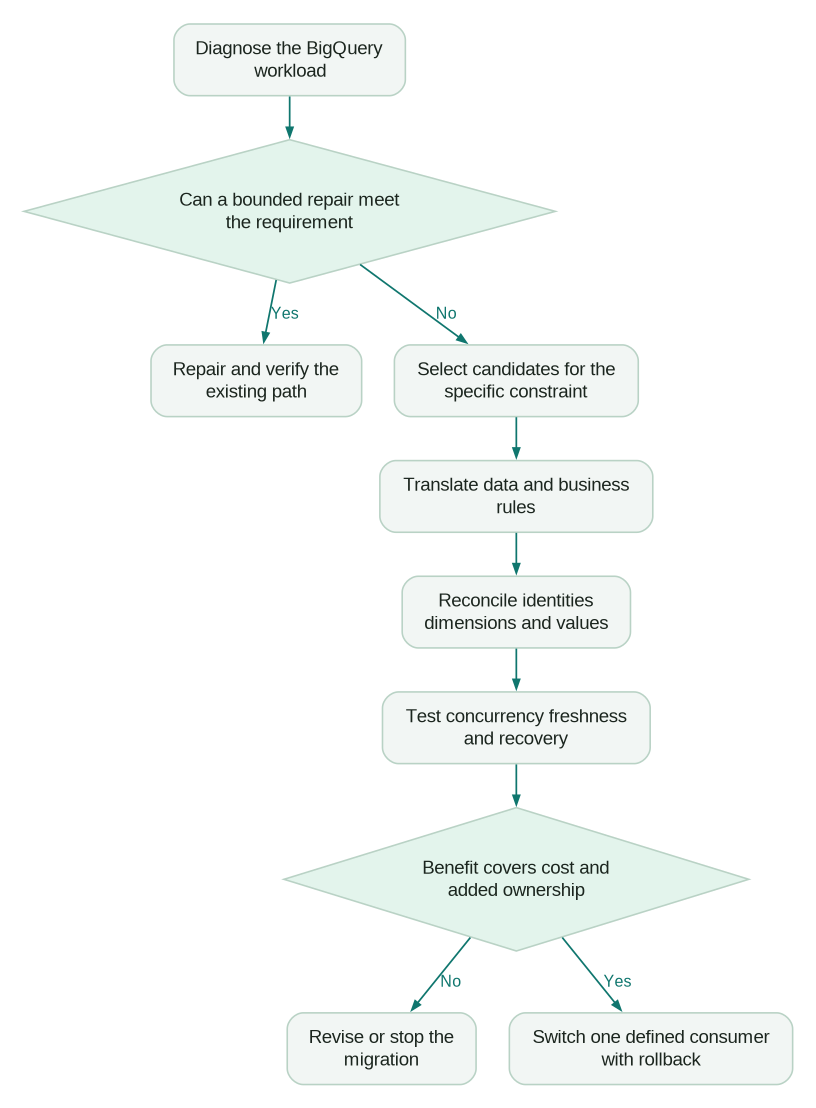
Read diagram as text
- Diagnose the BigQuery workload to Can a bounded repair meet the requirement.
- Can a bounded repair meet the requirement to Repair and verify the existing path: Yes.
- Can a bounded repair meet the requirement to Select candidates for the specific constraint: No.
- Select candidates for the specific constraint to Translate data and business rules.
- Translate data and business rules to Reconcile identities dimensions and values.
- Reconcile identities dimensions and values to Test concurrency freshness and recovery.
- Test concurrency freshness and recovery to Benefit covers cost and added ownership.
- Benefit covers cost and added ownership to Revise or stop the migration: No.
- Benefit covers cost and added ownership to Switch one defined consumer with rollback: Yes
At cutover, identify the authoritative output for each consumer. A reporting dashboard may be easy to redirect; an audience sync that changes CRM fields needs more care. Ensure the old and new paths cannot both update the same destination unintentionally.
Keep a clear record of the last accepted source position and any changes arriving during the switch. Plan how the new path catches up and how rollback handles those changes. A rollback that restores yesterday's report but loses today's destination updates is incomplete.
The final acceptance should include someone who uses the business output. Ask them to reproduce the decision they normally make, including filters and exceptions. If the migration team can run SQL but the growth manager cannot reproduce the weekly acquisition review, the work is not finished.
If the pilot needs independent acceptance criteria, bring the failing workload and proposed output to the $99 martech audit. For a defined migration, request a detailed warehouse scope that includes reconciliation, consumer cutover and handover.
Keep reading
Browse all Data Warehouse guides
 Data Warehouse
BigQuery Pricing 2026: Query Cost per TB, Storage, Editions and GA4 Export Bills
A 100 GB BigQuery query costs about $0.57 once the free TiB is used. See query, storage and slot prices, three GA4 export bills and when editions pay off.
Jafrin Akter AloLast updated 20 min read
 Data Warehouse
BigQuery Implementation Mistakes: Fix Missing Data, Cost Surprises and Unreliable Reports
Fix missing GA4 exports, location mistakes, sandbox limits and costly raw scans with BigQuery diagnostics, reconciliation checks and recovery steps.
Jafrin Akter AloLast updated 14 min read
 Martech AI
BigQuery AI: Gemini, Data Agents and AI Functions for Marketing Data
Choose BigQuery AI tools for marketing data. Understand Gemini costs, data-agent setup, AI functions, permissions and how to verify useful outputs.
Jafrin Akter AloLast updated 14 min read
Data warehouse & CDP
See the implementation scope, deliverables and acceptance checks.
Questions people ask
How should we prevent cached results from flattering a warehouse pilot?
Record whether each timed query used a cached result and test the conditions users will actually encounter. Include a fresh-data run, repeated dashboard use and the first request after an idle period where applicable. Keep correctness checks outside the timing contest. A candidate should not win because one system returned an old result while the other processed new records.
What should happen to the old warehouse after cutover?
Give retirement its own acceptance conditions. Check that consumers, recovery jobs and audits no longer depend on it before removing access or storage. Retain only the approved evidence and rollback material for the agreed period. Assign an owner to the final shutdown, because an unused warehouse or abandoned pipeline can keep generating cost long after the migration is declared finished.
Can GA4 remain in BigQuery while finance reporting moves elsewhere?
Yes, a coexistence design can retain BigQuery as the acquisition-data source and deliver selected outputs elsewhere. Give the transfer an owner, a freshness target and a reconciliation rule. Preserve the source cutoff and correction history so finance can explain which data version it used. Count the extra movement and maintenance when comparing this design with keeping the report in BigQuery.
Who should approve a currency difference in the migrated report?
The owner of the financial measure should approve the conversion and rounding policy before the comparison. Reconcile original-currency amounts first, then the converted result using the same rate date and precision. A small net difference can hide offsetting errors across currencies or customers. Treat missing transactions and misassigned customers separately from permitted rounding, with explicit acceptance evidence for each.
How can we keep a free trial from becoming an unplanned production dependency?
Define the trial’s exit date, export plan and paid cost before connecting an operational consumer. Use a representative workload, but keep its authority and access limited to the approved pilot. Record what happens when credits expire or capacity changes. A successful test justifies a purchase decision; it should not force one because an unowned live report now depends on the trial.
Sources
- Google Cloud, Introduction to optimising query performance.
- Snowflake, Overview of warehouses.
- AWS, What is Amazon Redshift Serverless?.
- Databricks, Connect to a SQL warehouse.
- Microsoft, What is Fabric Data Warehouse?.
- ClickHouse, What is ClickHouse?.
- Google Cloud, Export table data to Cloud Storage.
- Snowflake: Platform trial
- Snowflake: Startup Accelerator
- AWS: Redshift free trial
- AWS: Activate credits
- Databricks: Commercial trial
- Databricks: Free Edition limitations
- Databricks: Startup programme
- Microsoft: Fabric trial capacity
- Microsoft: Startup credit activation
- ClickHouse: Cloud pricing
- ClickHouse: Y Combinator offer
- Microsoft: Lakehouse SQL analytics endpoint

Written by
Jafrin Akter AloData Engineer and Co-founder at Martechdevs and Growth and Analytics Partners
Jafrin writes practical guides to marketing technology, customer data, analytics and AI workflows. Martechdevs is a Growth and Analytics Partners company.