
Snowflake Pricing: Estimate Your Marketing Workload and Control the Bill
Data Engineer and Co-founder, martechdevs
Last updated 12 min read
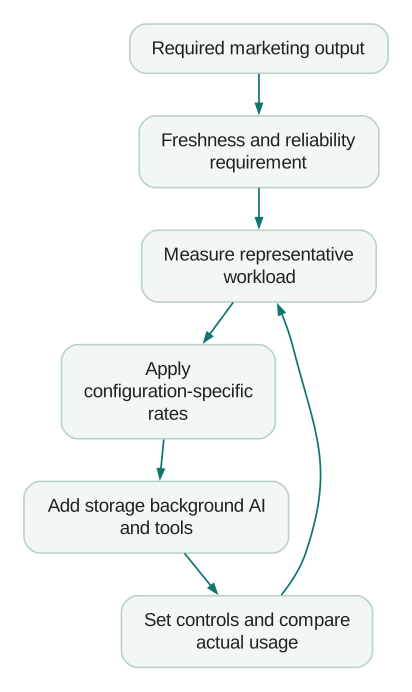
Snowflake pricing becomes easier to estimate when you separate warehouse runtime, storage, background services and AI usage. Start with the reports and customer workflows you need to run, then price their actual consumption. Company headcount is a poor substitute for that workload.
Last updated: 12 October 2026.
A ten-person SaaS business refreshing large event models every few minutes can spend more than a larger company running one daily report. The useful question is what it costs to deliver reliable data at the freshness your team needs.
This guide gives you a practical estimate, shows where that estimate can fail and explains the controls to set before dashboards, connectors and AI tools begin generating work.
Read the rate card in the right units
Snowflake's Service Consumption Table, effective 12 October 2026, distinguishes Platform Credits from AI Credits. They are separate pricing units.
Selected on-demand Platform Credit prices for AWS are $2 in Northern Virginia, $2.25 in Canada Central, $2.60 in Dublin, $2.70 in London and $2.75 in Sydney, for Standard edition. Enterprise is $3 in Northern Virginia and $3.50 in Canada Central: do not assume a universal 50% premium.
The same table lists Gen1 X-Small at one Platform Credit per hour. Gen2 X-Small is 1.35 on AWS and GCP, and 1.25 on Azure. Standard storage in AWS Northern Virginia is $23 per TB-month. On-demand AI Credits are $2 for Global and $2.20 for Regional pricing.
Use the applicable feature, cloud, region, edition and contract when choosing rates. A Platform Credit discount does not automatically apply to AI Credits. Copy the rate-card date into your estimate so a later change is visible.
Build the estimate from five cost buckets
For a marketing warehouse, track these separately:
- Warehouse compute: ingestion jobs that use your warehouse, transformations, reports, analyst queries and SQL generated by AI tools.
- Storage: retained source data, reporting models, staging files and historical versions.
- Background services: separately metered ingestion, maintenance, acceleration or other enabled services.
- AI: the selected model or feature's metered consumption, plus the warehouse work it triggers.
- Surrounding costs: connectors, orchestration, BI, destination syncs, transfers, implementation and maintenance.
The last bucket includes costs that may sit outside your Snowflake invoice. Keep it visible when comparing vendors. A low database bill can coexist with expensive connectors or a fragile pipeline requiring weekly repair.
Start with one row per workload. Record its owner, purpose, required freshness, compute configuration, observed running time and acceptable failure behaviour. Use the marketing data warehouse guide to define the outputs before assigning infrastructure costs.
Query duration is not warehouse running time
A standard warehouse consumes compute while running, including idle time. Snowflake documents a 60-second minimum whenever it starts or resumes, followed by per-second billing. Increasing warehouse size also introduces a minimum charge for the added resources. These mechanics are described in its compute-cost guide.
For a fixed-size, single-cluster standard warehouse, estimate each uninterrupted running period as:
billable_seconds = max(actual_running_seconds, 60)
period_credits = billable_seconds / 3600 * credits_per_hour
warehouse_cost = sum(period_credits) * price_per_platform_credit
This simplified calculation excludes resizing, overlapping clusters and other services. Use metered usage for configurations with those behaviours.
Suppose an original planning scenario has 120 separate running periods each day, each lasting 20 seconds before a full suspension. At one credit per hour, the minimum produces two credits per day, or 60 credits over 30 days. Counting only the 40 minutes of daily running time would predict 20 monthly credits. That estimate misses two-thirds of the billable consumption.
The practical fix depends on the work. You might combine refreshes that share a deadline, stop a connector polling unnecessarily or allow closely spaced queries to share a running period. You might also accept the cost because the freshness is valuable. Do not slow a live customer workflow merely to make a cost chart smaller.
Three worked bills with explicit assumptions
These are hypothetical workloads, not observed customer bills or promises about what a company your size will pay. Each uses a 30-day month, Standard edition in AWS Northern Virginia, fixed Gen1 single-cluster warehouses and the rates above. Running hours already include idle time and minimum billing periods. Storage is average billable storage for the month.
All three show warehouse compute plus standard storage only. Background services, AI, additional cloud-services charges, transfers, taxes and external tools must be added where applicable.
Daily reporting: $64.60 before other costs
Assume an X-Small warehouse runs for one hour daily to load, transform and serve a modest reporting workload. It consumes 30 credits, costing $60. Average billable storage of 0.2 TB adds $4.60.
The subtotal is $64.60. This is useful if daily freshness meets the business requirement and the measured workload fits that running hour. It says nothing about whether your event history, joins or dashboards will actually fit.
Before adopting this estimate, run a representative refresh and the reports people will use. Include a busy reporting day. If transformation alone requires the hour, dashboard activity needs its own allowance.
Several daily refreshes: $407 before other costs
Assume an X-Small transformation warehouse runs two hours daily: 60 credits. A separate Small reporting warehouse runs three hours on each of 22 working days: 132 credits.
Total warehouse consumption is 192 credits, costing $384; one TB of storage adds $23, giving $407. If an X-Small reporting warehouse can deliver the same workload within the same running hours, that component falls to 66 credits and the subtotal becomes $275.
The difference is a sizing decision that must be earned by testing response time and concurrency. Do not put an attractive midpoint into the budget without specifying which configuration will deliver it.
A warehouse left running: $1,463 before other costs
One X-Small warehouse running continuously for 30 days consumes 720 credits, costing $1,440. One TB of storage adds $23, producing $1,463.
That could be intentional for a sustained workload. It could also be an idle warehouse kept awake by polling or a missing suspension setting. Look at what the running time accomplished before deciding whether to resize or redesign it.
The most useful comparison is therefore between measured configurations delivering the same outputs. Comparing a daily batch estimate with an always-available serving workload tells you little about platform efficiency.
Choose edition and region from requirements
Standard can be sufficient for straightforward reporting, but check the features your implementation actually requires. Snowflake's edition matrix places extended Time Travel, masking policies and row access policies in Enterprise or above, while private connectivity to the service is a Business Critical or higher feature.
Write the requirement first. For example: separate customer visibility through row access policies, retain recoverable changes beyond one day, or connect through the required private network path. Identify the matching edition before estimating compute.
Avoid choosing Enterprise simply because the company is growing. Equally, avoid choosing Standard and then discovering that the access design depends on a higher edition. The cheapest valid configuration is more useful than the cheapest advertised rate.
Region selection also affects the surrounding system. Consider data-location obligations, where sources already run, transfer paths, latency and recovery design. A lower credit price can be a poor bargain if it adds recurring transfers or makes the operating model harder.
Gen2 and Interactive warehouses need their own calculation
A higher hourly rate can still produce lower cost for a completed job. In a purely hypothetical test, a configuration costing twice as much per running hour but finishing in one-third of the time uses two-thirds of the compute budget. Real results depend on your query, cache, concurrency and billing minimums.
Snowflake's warehouse considerations recommend experimenting with workload and size rather than assuming smaller always costs less. Compare total credits, elapsed time and output correctness across repeated representative runs. State whether you tested a warm or cold workload.
Interactive warehouses have different operating economics: their documented minimum billable period is one hour, with per-second billing afterward. Their minimum automatic suspension interval is 24 hours, though manual or scheduled suspension can occur sooner. Resuming creates a new minimum charge. See the interactive analytics documentation.
A low hourly rate alone therefore does not make an Interactive warehouse appropriate for occasional reporting. Price its actual operating pattern. Conversely, a busy serving workload may benefit from keeping resources warm. Test the latency requirement that justified that architecture.
Storage includes more than your current reporting tables
Snowflake's storage-cost documentation includes staged files, table data, Time Travel history and Fail-safe storage. Table storage uses compressed size. A clone can retain references to data that would otherwise become removable.
Treat the following as separate questions: how much current data exists, how much historical data is retained, and which copies or stages still have an owner. A dashboard showing active table size alone does not answer all three.
Transient tables have no Fail-safe period and support only limited Time Travel. Use them for data you can reliably recreate within the required recovery window. First test that reconstruction path, including source retention and permissions. A table described as staging may still contain the only surviving copy of an important extract.
Reducing storage can be sensible. Deleting the evidence needed to repair revenue reporting can be expensive. Put a retention purpose and recovery owner beside each large dataset before changing its lifecycle.
The cloud-services adjustment is daily
Snowflake calculates the cloud-services adjustment by UTC day, using 10% of warehouse consumption, limited to actual cloud-services usage. Serverless consumption does not increase that allowance. The compute billing rules explain this distinction.
Consider two hypothetical days. On day one, warehouse usage is 100 credits and cloud-services usage is five: the adjustment removes those five. On day two, warehouse usage is zero and cloud-services usage is five: those five remain billable.
Across both days, the total is five billable cloud-services credits. Subtracting 10% of monthly warehouse usage from monthly cloud-services usage would incorrectly return zero in this example.
Use the actual daily adjustments when reconciling a bill. Do not treat cloud services as an automatic 10% surcharge or manufacture warehouse activity to absorb the allowance.
Cortex costs need a feature-level model
An AI assistant can generate several kinds of work: model calls, search over an index, SQL execution and repeated attempts when the first answer is insufficient. Price the actual path, including follow-up questions and failed or rejected outputs.
For each enabled feature, record its current metering unit, applicable rate, expected monthly units and related warehouse activity. Do not multiply all usage called credits by your warehouse credit price. The consumption table's AI sections specify feature-dependent billing, including token and other usage measures.
Set a small evaluation workload before allowing broad access. For a campaign analyst, that might contain a fixed set of questions, repeated under documented data conditions. Record cost per accepted answer, acceptance rate and total investigation time. A cheap answer that requires manual reconstruction has weak business value.
If an AI workflow creates a new daily SQL workload, add that workload to the warehouse estimate even when the AI feature has its own allowance. The warehouse AI analyst comparison covers the access and operating choices behind these tools.
Set controls before connecting more tools
Use a warehouse resource monitor with an intentional action, assignment and notification recipient. Snowflake documents that monitors cover warehouse consumption, not serverless and AI services. They can overshoot a threshold while suspension takes effect, and their cloud-services totals do not apply the billing adjustment. See resource monitor behaviour.
An unassigned monitor provides no protection. A notification nobody receives provides little operational value. Check the actual assignment and delivery settings, then document who can respond and which business workflows would stop if suspension occurred.
For broader credit usage, configure a budget. The default budget spending limit is for alerting; Snowflake also supports separately configured custom actions through stored procedures. Neither the existence of a budget nor a chosen number proves that every service stops at that amount. Check the budget documentation and the behaviour of your configured actions.
Separate exploratory work from critical refreshes when their interruption policies differ. This does not require creating a warehouse for every tiny job. Group workloads deliberately so one analyst's experiment cannot consume the allowance needed for tomorrow's revenue report.
Reconcile the first month before buying a commitment
Review costs by day and service, then compare them with the workload assumptions. Snowflake's cost-exploration guide describes Snowsight and usage views; cost data can lag by up to 72 hours. A recent empty chart is not evidence that the workload was free.
Where available to your organization, the USAGE_IN_CURRENCY_DAILY view exposes charged currency amounts and billing classifications. Data can change before month close; reseller customers cannot access this view. Keep currencies separate, preserve adjustments and reconcile the final statement rather than treating a mid-month extract as the invoice.
For a new implementation, measured usage is a better basis for a capacity purchase than a sales estimate alone. Obtain written terms for discount scope, commitment period, unused balance, overage and renewal. Compare the cash commitment with plausible low, expected and high consumption, including changes already planned.
If the estimate and actuals differ, identify the cause: more work, longer runtime, idle periods, a different rate, retained storage or an omitted service. Fix the model before buying more capacity.
A practical approval checklist
- Each workload has an owner, required output and freshness target.
- Cloud, region, edition, warehouse generation and rate-card date are explicit.
- Running time includes idle periods, minimums and additional clusters where applicable.
- Storage, background services, AI, transfers and external tools have separate lines.
- Critical and exploratory workloads have appropriate interruption policies.
- Monitors are assigned, notifications are enabled and budget actions are understood.
- A representative workload has produced correct outputs within the required time.
- Actual usage will be reconciled after reporting delays and month-close adjustments.
If you are choosing the platform as well as the configuration, compare the same workload using Snowflake versus BigQuery. If Databricks already supports your engineering or model workloads, the Snowflake-versus-Databricks guide explains how to test reusing that environment for marketing. Bring the output requirements and source inventory to a data warehouse and CDP implementation discussion; those determine a useful scope.
Questions people ask
How much does Snowflake cost per month for a small company?
There is no reliable price based only on company size. In the explicit daily-reporting example above, compute and storage total $64.60 before other costs. Your estimate should replace its runtime, storage and configuration assumptions with measured workloads, then add every applicable service and external tool.
What does a Snowflake credit cost?
The price depends on the billing unit and applicable configuration or contract. Distinguish Platform Credits from AI Credits, then select the correct rate. A warehouse credit rate is not a universal conversion factor for every Snowflake feature.
Is X-Small always the cheapest warehouse?
No. Compare credits consumed to finish the same correct workload within its deadline. A larger warehouse may complete work sufficiently faster to justify its hourly rate, or it may add cost without enough benefit. Measure before choosing.
Does suspending a warehouse stop the entire bill?
No. It stops that warehouse's running compute consumption, subject to applicable billing minimums. Storage and separately enabled services can continue to incur costs. Your estimate and controls need to cover those separately.
Should a small team buy prepaid capacity immediately?
Base the decision on measured demand and the written commercial terms. A discount is valuable only within an acceptable commitment and operating plan. Include uncertain adoption, planned workloads and the consequence of consuming less or more than expected.
Sources
- Snowflake Service Consumption Table
- Snowflake: Understanding compute cost
- Snowflake editions
- Snowflake warehouse considerations
- Snowflake interactive analytics
- Snowflake: Understanding storage cost
- Snowflake: Working with resource monitors
- Snowflake: Monitor credit usage with budgets
- Snowflake: Exploring overall cost
- Snowflake: USAGE_IN_CURRENCY_DAILY
Written by
Jafrin Akter AloData Engineer and Co-founder, martechdevs
Jafrin Akter Alo is a data engineer and co-founder of martechdevs, where the team has delivered 74+ martech, data and growth stack implementations.