
Snowflake vs BigQuery for startups: choose by workload, cost and ownership
Data Engineer and Co-founder, martechdevs
Last updated 9 min read
For a small team centred on GA4, Google Ads and Google Cloud, BigQuery is often the first platform worth testing. Snowflake deserves a closer look when its sharing ecosystem, existing team expertise or broader data and AI capabilities match a specific requirement. Compare a representative workload and the full operating cost before committing. Neither platform removes the need to model your data correctly.
Last updated: 7 October 2026.
The wrong comparison begins with two storage prices and ends with a winner. Your actual bill depends on how often data moves, how queries run, which services stay active and how much work the team spends maintaining the result.
The right comparison begins with a question the business needs answered, such as which acquisition cohorts produce retained revenue. Build the smallest version of that answer in the candidate platform and measure the work it takes.
The core difference in how you operate them
BigQuery offers on-demand query pricing based on processed data and capacity pricing based on slots. A small team can begin with on-demand analysis without choosing a virtual warehouse size. BigQuery pricing models.
Snowflake commonly uses virtual warehouses whose credit consumption depends on size and runtime. You control when that compute runs, while storage remains separate. Snowflake also has serverless services with their own consumption models. Snowflake compute costs.
These mechanics create different questions. In BigQuery, ask how much data each recurring query processes. In Snowflake, ask how much compute remains running to serve the workload. For both, ask what the ingestion and supporting services cost.
Martechdevs' warehouse implementation work evaluates those costs alongside identity, metric definitions and the operational use of the data.
When BigQuery is a strong first evaluation
Your first source is GA4
GA4 has a native BigQuery export for event data. This gives a Google-heavy marketing team a direct path into warehouse analysis. The export still has configuration, retention and quota considerations. GA4 export setup.
If you choose Snowflake, account for the path that delivers the required GA4 data there. That may involve BigQuery as an intermediate source or another ingestion approach, each with costs and operational dependencies.
Read the GA4 BigQuery export guide before treating the connection as a finished reporting model.
You have intermittent analytical work
A team that runs a few scheduled models and occasional investigations may find on-demand pricing easy to reason about. It still needs partition filters, sensible column selection and controls on expensive queries.
The workload matters more than the number of employees. Three analysts repeatedly scanning large event histories can process more data than a larger team using well-designed aggregate tables.
Your existing skills and administration are in Google Cloud
Using the platform your team already understands can reduce identity, billing and operational setup work. Google Ads also has a documented BigQuery Data Transfer Service integration. Review its schema, refresh behaviour and current pricing for the data you need. Google Ads transfer documentation.
Native availability is an implementation advantage, but it does not mean every field, history requirement or business definition arrives ready to use.
When Snowflake is a strong first evaluation
Your partners or customers already exchange data through Snowflake
Secure Data Sharing can expose selected read-only objects to other Snowflake accounts. The standard same-region model avoids another stored copy for the consumer, while queries still use compute. Distribution across regions or clouds can involve additional replication and costs. Snowflake data sharing.
If a required partner dataset already comes through this route, it can be a meaningful advantage. If sharing is only a possible future idea, give it less weight than your current workload.
BigQuery also has data sharing capabilities. Avoid the false comparison that only one platform can share data. Evaluate the actual providers, consumers and regional requirements. BigQuery sharing.
You already have Snowflake skills or infrastructure
A maintained Snowflake account, tested ingestion patterns and a capable owner can outweigh a small theoretical difference in query cost. Rebuilding familiar operational processes elsewhere has a cost too.
For a new team, make sure the proposal identifies who will configure warehouses, roles and monitoring. Managed cloud infrastructure still needs operational choices.
A specific Snowflake capability is central to the project
Snowflake supports a broad range of analytical and AI workloads. Evaluate the feature you need with your data and access model, rather than buying a platform because its feature list is longer. The Snowflake AI guide explains the relevant products and their dependencies.
An assistant that can answer questions is useful only when those questions map to correct, governed data. This requirement applies to AI features on either platform.
Compare costs with explicit units
At the time of research, BigQuery's live US-central1 page lists on-demand analysis at $6.25 per TiB above the first monthly 1 TiB allowance. Active logical storage is approximately $0.023 per GiB-month, with the applicable free allowance. Rates depend on location and billing choices. Current BigQuery pricing.
Snowflake's credit price depends on edition, region, cloud and your agreement. Table storage is billed using compressed size, with other retained storage contributing separately. Snowflake pricing options and storage documentation.
Do not compare BigQuery logical bytes directly with Snowflake compressed bytes and call the difference a saving. Measure the relevant storage in each system. Similarly, a TiB processed and a credit consumed are different units of work.
A small BigQuery example
Assume an isolated billing account has its full relevant allowances available. A fictional workload processes 6 TiB in a month and holds an average of 100 GiB of active logical data in US-central1.
The simplified analysis charge is (6 - 1) × $6.25 = $31.25.
The simplified storage charge is (100 - 10) × $0.023 = $2.07.
That produces $33.32 for those two categories. It excludes ingestion services, transformations that add query usage, transfers, BI tools, taxes and other services. Actual storage billing is prorated, so this is a planning calculation rather than an invoice prediction.
A small Snowflake example
Assume a fictional workload consumes 30 warehouse credits in a month. At an illustrative contract rate of $3 per credit, compute is $90. Add an assumed $8 in storage and other platform usage, and the subtotal is $98.
The $3 and $8 values are assumptions, not a universal Snowflake price. Replace them with your selected configuration, agreement and measured usage.
These two examples demonstrate billing mechanics. They are not a performance benchmark of equivalent workloads. To compare them fairly, run the same transformations and reports against representative data, then use the observed bytes and credits.
Add the costs that can dominate both examples
Suppose connectors cost $200 per month and maintenance requires five hours at an internal rate of $80 per hour. That adds $600 to either platform before reporting subscriptions and implementation.
A $65 platform difference matters less than a recurring process that needs several extra hours of repair. Conversely, at large scale, query design and capacity commitments can become material. Reassess when the workload changes.
Test these workload shapes
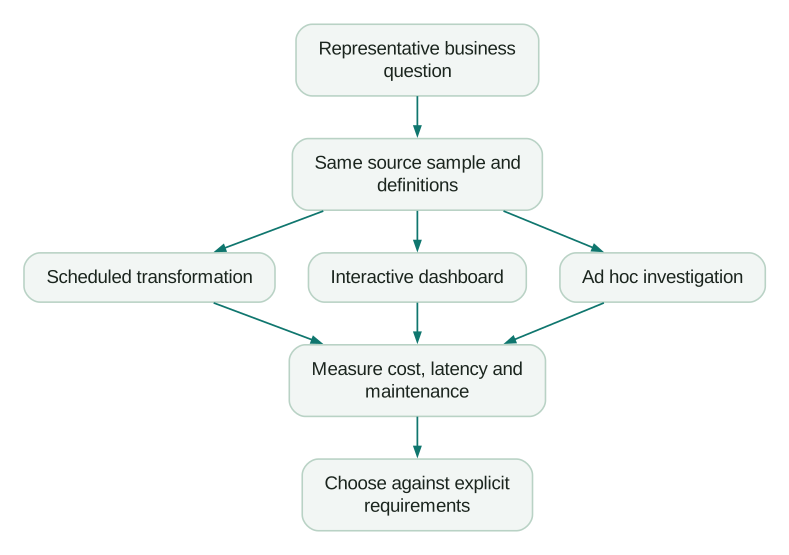
Scheduled batch. Load and transform yesterday's data. Measure completion time, retries, late data handling and the cost of reprocessing a recent window.
Dashboard use. Simulate realistic refreshes and concurrent users. A single cached query tells you little about a morning when several people open different filters.
Ad hoc investigation. Let an analyst ask an unplanned question over a larger period. Check how easy it is to estimate cost, constrain execution and inspect the result.
Backfill. Rebuild a meaningful historical period. Initial loads and occasional corrections can cost more than a normal day's activity.
Keep the logic equivalent. One platform querying a pre-aggregated table while the other scans raw events is a test of modelling choices, not a fair platform comparison.
Cost controls differ, but both need an owner
In BigQuery, use query estimates, maximum bytes billed where supported, project or user quotas and partition-aware models. A LIMIT on returned rows is not a reliable way to reduce scanned data. BigQuery cost controls.
In Snowflake, manage warehouse size, auto-suspension, query timeouts and resource monitors. Warehouse controls do not cover every serverless or cloud service charge, so monitoring must match the services you enable. Snowflake cost controls.
For either platform, decide what happens when a limit stops a workload. The report should show stale data, and someone should receive an actionable failure signal. Quietly displaying yesterday's successful output can create a more expensive business mistake than the avoided query charge.
What about Databricks?
Include Databricks when the wider workload makes it relevant: substantial data engineering, machine learning, lakehouse operations or an existing team already using the platform.
For a small marketing team that mainly needs reliable joins between CRM, billing and advertising data, adding another candidate can consume evaluation time without changing the requirements. Expand the shortlist when there is a concrete capability or operating reason.
Databricks Free Edition is a learning option with documented non-commercial restrictions, not a production pricing benchmark. Free Edition limitations.
Our starting recommendation for a ten-person SaaS team
For a hypothetical ten-person SaaS company using GA4, Google Ads, HubSpot and Stripe, with modest analytical usage and no existing warehouse expertise, start by evaluating BigQuery on demand.
The reason is the direct GA4 path and a relatively simple entry into intermittent SQL analysis. This is an editorial recommendation for that stated scenario, not a claim that BigQuery always costs less.
Change the recommendation if the team already has a strong Snowflake owner, a required Snowflake data share, contractual requirements or a workload that performs materially better there.
If the business cannot name the first useful decision or an owner, pause the platform comparison and read whether you need a warehouse.
Evaluation checklist
- The same business questions and metric definitions are used.
- Required source fields and history are available.
- Region and access requirements are satisfied.
- Batch, interactive, ad hoc and backfill workloads are tested.
- Storage measurements use each platform's actual billing basis.
- Connector, reporting and maintenance costs are included.
- Cost controls cover the services in the proposed design.
- A named person can troubleshoot the implementation.
- Migration and exit costs are understood.
At Martechdevs, we connect source systems to tested customer and revenue models, with documentation your team can maintain. Start with the free martech AI audit, or explore an AI assistant built around your approved workflows.
Questions people ask
Which is cheaper for a small company?
There is no universal answer. BigQuery on demand can be inexpensive for modest, intermittent scans. Snowflake can also support small workloads with appropriate compute scheduling. Compare measured usage and total operating cost, including the work required to maintain each design.
Which is easier without a data engineer?
BigQuery removes some explicit compute-sizing choices in on-demand mode. Both still require reliable ingestion, SQL models, access design and monitoring. The easier platform is often the one your responsible operator can support well.
Can we move later?
Yes, but migration is work. SQL dialects, permissions, scheduled jobs, connectors and operational features differ. Keeping definitions documented and transformations versioned helps. It does not make every platform feature portable.
What do Reddit users recommend?
You will find different recommendations because workloads and contracts differ. Use community discussions to discover failure modes and questions to test. Treat claimed bills or benchmark results as anecdotes unless their configuration, data and workload match yours.
Should AI features decide the choice?
Only when a specific AI workflow is part of the requirements and has been evaluated. A demonstration on sample data is weaker evidence than a test on your definitions, permissions and difficult cases. Your warehouse design remains the foundation for either platform.
Sources
- BigQuery pricing. Accessed 7 October 2026.
- Snowflake compute costs. Accessed 7 October 2026.
- GA4 BigQuery setup. Accessed 7 October 2026.
- Google Ads transfer. Accessed 7 October 2026.
- Snowflake data sharing. Accessed 7 October 2026.
- BigQuery sharing. Accessed 7 October 2026.
- Snowflake pricing. Accessed 7 October 2026.
- Snowflake storage costs. Accessed 7 October 2026.
- BigQuery cost controls. Accessed 7 October 2026.
- Snowflake cost controls. Accessed 7 October 2026.
- Databricks Free Edition limitations. Accessed 7 October 2026.
Written by
Jafrin Akter AloData Engineer and Co-founder, martechdevs
Jafrin Akter Alo is a data engineer and co-founder of martechdevs, where the team has delivered 74+ martech, data and growth stack implementations.