
How to Merge Salesforce Accounts Without Breaking Relationships
To merge accounts in Salesforce Lightning, open a duplicate account, select View Duplicates, choose up to three records, then select the principal account and retained field values before confirming. First verify that the records represent the same customer. After merging, reconcile related records and update integrations that still reference a losing account ID.
On this page
When should two Salesforce accounts actually be merged?
Merge accounts when they represent the same business entity under your agreed customer model. A matching name or website is a candidate signal, not enough evidence by itself.
Two subsidiaries can share a domain while holding separate contracts. A distributor and its customer can appear in the same billing workflow without being one account. A product workspace can belong to a commercial customer but still need a separate identifier. Merging these distinctions can damage reporting and ownership even when the operation succeeds technically.
Before changing records, compare the source-system identifiers, legal or commercial entity, contracts, account hierarchy and responsible owner. If those disagree, resolve the identity decision first. Our identity merge guide explains that boundary; the CRM hygiene process helps find and prioritize candidates without automatically merging them.
| Candidate pattern | Decision to establish | Evidence before merging |
|---|---|---|
| Same customer imported twice | One entity with duplicate CRM records | Shared authoritative source ID and reviewed relationships |
| Similar names, different subsidiaries | Separate commercial entities or one shared account? | Contract, billing and hierarchy ownership |
| Same domain, different customer workspaces | Account versus workspace model | Product-to-commercial identity map |
| Old and new company names | Rename, acquisition or new legal entity? | Authoritative business record and operating decision |
| Matching contacts on different accounts | Valid multi-account relationship or duplicate account? | Contact role and customer context |
For CRM and lifecycle data work, the useful result is a consistent customer identity across systems. A smaller account count alone is not a quality measure.
How do you merge accounts in Lightning Experience?
Use the native duplicate workflow on a confirmed candidate group, with the intended survivor and field choices already reviewed. Salesforce's standard Lightning help lists Delete permission on the account type and requires an administrator, account owner or a user above the owner in the role hierarchy. Additional conditions can apply to special account relationships. Lightning account merge
- Open one of the candidate account records and select View Duplicates.
- Select up to three accounts, including the account that will survive, then choose Next.
- Select the principal account and the field values to retain.
- Review the confirmation and merge the approved group.
Do the first representative merge in a suitable test environment when the records have important automation or integrations. Record the selected IDs and expected relationships so the result can be checked against the original decision.
If View Duplicates does not appear, inspect matching rules, duplicate rules, the record page and the user's access. Absence of an alert does not establish that the records are different customers.
Where Salesforce Classic is available, its Accounts tab provides Merge Accounts in the Tools section. Search by an account-name string, select the records, choose the principal and retained values, then merge. Use the supported route available in the org; do not rename unrelated records merely to force a match. Classic account merge
Which account and field values should survive?
Choose the survivor using both business ownership and technical dependencies. Preserve the account ID that should remain authoritative, then select current field values deliberately rather than assuming the most recently edited record is correct.
Hidden and read-only values, including sharing settings, generally come from the principal account and are not all presented in the merge screen. Review them before selecting the survivor. Lightning merge field handling
There is an important audit-field exception: Salesforce retains Created By and Created Date from the oldest record in the group, regardless of the selected principal. Its merge considerations also distinguish Chatter from files: only the principal's Chatter feed is retained, while Salesforce Files are retained on the merged account. Losing accounts move to the Recycle Bin. Account merge considerations
Use a field decision sheet for consequential differences:
| Field or relationship | Selection principle | Verification after merge |
|---|---|---|
| Customer identifier | Preserve the authoritative entity mapping | Source systems resolve to the survivor |
| Account owner and access | Follow the agreed operating responsibility | Intended users retain appropriate access |
| Billing or contract status | Use the responsible system's current fact | Finance and CRM values reconcile |
| Address or company classification | Resolve conflicting evidence | Correct value survives without silent reversal |
| Account hierarchy | Preserve the actual parent/customer structure | No unintended hierarchy or reporting change |
| Communication restrictions | Preserve applicable evidence and purpose | Downstream eligibility is not widened |
An account merge is not permission to reset a contact's subscription state or combine separate consent histories. Review the actual contact and messaging relationships under the CRM property-ownership rules.
Keep an export of the original fields, IDs and relevant relationships, with the approved selection and operator. The export is evidence for verification and recovery planning; it is not a guarantee that every native or external effect can be undone automatically.
What happens to contacts, opportunities and other related records?
Salesforce normally reparents related records from the losing accounts to the survivor, but the supported behavior has exceptions. Reconcile the relationships your workflow depends on rather than assuming every associated object behaves identically.
The SOAP merge() operation describes deletion of losing records and reparenting their children. An account-hierarchy merge that would create a cycle returns an error. It also identifies redundant account-contact relationships as a merge constraint. Salesforce merge API
Special cases deserve a separate preflight. Person Accounts, partner accounts, Experience Cloud users, account teams and relationship groups can impose additional restrictions or survivor requirements. The standard considerations warn, for example, that Person Account relationships to contact-point objects are lost after a merge. Check the rules for the actual record types before applying a generic account procedure. Special account considerations
For an API merge, inspect success, errors, the surviving id and mergedRecordIds. The updatedRelatedIds list contains reparented records visible to the caller. It is not unconditional proof that you have inspected every related record in the org. MergeResult fields
Why might downstream automation miss the relationship change?
Apex merge behavior uses delete events for losing records and update events for the survivor, rather than a separate merge trigger event. Salesforce's Apex guide says that child records reparented by the merge do not fire their own triggers. MasterRecordId becomes available on losing records in the after-delete trigger context. Apex merge trigger behavior
That matters when an integration expects a child-record trigger to announce a changed Account ID. The relationship can be correct inside Salesforce while the external system still holds the old parent. Do not infer how every Flow, connector or event subscriber behaves from the Apex rule; test the actual route and add an explicit reconciliation or merge-handling path where needed.
If the same customer also has duplicate HubSpot contacts, coordinate that separate cleanup and its returned IDs; a Salesforce Account merge does not establish that those contacts were merged.
How do you preserve losing account IDs for integrations?
Keep a durable old-ID-to-survivor mapping and update each dependent system through its approved process. Do not respond to a missing old account by creating another customer automatically.
Salesforce populates MasterRecordId on a deleted losing Account with the winning record's ID. The field is available through the API rather than the usual object field list. Export All in Data Loader can include the deleted record and that mapping. MasterRecordId meaning
The SOAP queryAll() operation includes deleted or archived records, unlike a normal active-record-only query. Retain the complete result and pagination for the approved review population. Salesforce queryAll
Record the source org, losing ID, survivor ID, merge evidence and verification state. Include downstream identifiers such as a billing customer, support organization or warehouse account key. A Salesforce ID alone does not explain whether two source records were legitimately the same commercial entity.
Use Salesforce ID-format checks before joining exports. Do not lowercase the meaningful portion of an ID or assume a case-insensitive spreadsheet join preserves identity.
Resolve verified aliases without guessing new accounts
This original Python helper resolves a local mapping of previously verified merges. It does not identify duplicates, call Salesforce, validate Salesforce ID checksums or approve a merge. The caller supplies the active-account set from a reconciled snapshot.
def resolve_account_id(record_id, aliases, active_ids):
    def valid_id(value):
        return (isinstance(value, str) and bool(value)
                and value == value.strip())

    if not valid_id(record_id):
        raise ValueError("record_id must be a nonempty unpadded string")
    if type(aliases) is not dict or type(active_ids) not in (set, frozenset):
        raise ValueError("Use a dictionary of aliases and a set of active IDs")
    if not all(valid_id(k) and valid_id(v) for k, v in aliases.items()):
        raise ValueError("Alias IDs must be nonempty unpadded strings")
    if not all(valid_id(value) for value in active_ids):
        raise ValueError("Active IDs must be nonempty unpadded strings")
    if set(aliases) & active_ids:
        raise ValueError("An alias cannot also be an active account")

    current, seen = record_id, set()
    while current in aliases:
        if current in seen:
            raise ValueError("Merge alias cycle requires review")
        seen.add(current)
        current = aliases[current]
    if current not in active_ids:
        raise ValueError("No verified active survivor")
    return current
For a synthetic historical map acct-a → acct-b → acct-c, with only acct-c active, the resolver returns acct-c for either losing identifier. These labels are local fixture IDs, not Salesforce API payloads. A cycle, missing survivor or contradictory active set stops resolution instead of choosing an arbitrary record.
The function checks the requested path for cycles. Validate all relevant source IDs when assessing an entire mapping, and retain unresolved IDs in an exception queue. Updating the mapping does not by itself repair every downstream foreign key or complete an in-flight transaction.
What should you verify immediately after a merge?
Verify the survivor, relationships and dependent workflows against the approved pre-merge inventory. Compare exact IDs, not only totals or account names.
Before the next Lead is converted, review the conversion matching and duplicate checks so the sales process selects the intended existing Account.
| Check | Evidence | Hold expansion when |
|---|---|---|
| Survivor and retained fields | Approved ID and selected values | Wrong principal or important field conflict remains |
| Contacts and opportunities | Expected child IDs and current Account IDs | Missing or wrongly reparented relationships |
| Access and ownership | Role-specific allowed and denied checks | The merge changes access beyond the intended boundary |
| Downstream mapping | Old IDs resolve to the verified survivor | A connected system still writes against a losing ID |
| Automation | Actual transaction and retry outcome | A merge creates duplicate work or misses a required update |
| Reporting | Totals by meaningful business partition | A changed hierarchy distorts a forecast or account measure |
For a hypothetical group, suppose the principal has eight opportunities and the losing account has five different opportunities. The expected inventory contains thirteen distinct opportunity IDs under the intended survivor. A count of thirteen alone is insufficient: the wrong set of thirteen can still conceal a missing deal and an unrelated addition.
Re-run one representative downstream update after repairing the mapping. Confirm that it reaches the survivor without recreating the duplicate. If HubSpot and Salesforce synchronization is involved, review the connector's account matching and association behavior explicitly. A successful Salesforce merge does not imply that another CRM performed an equivalent merge.
Keep the affected group small until those results are visible. If a test fails, stop expanding the cleanup and investigate the specific lost or unexpected behavior.
Can you undo a Salesforce account merge?
Do not treat restoring a losing record as a complete reversal of the merge. Salesforce's Recycle Bin guidance says that some associations are restored, but lookup relationships are restored only when they have not been replaced. Relationships already redirected to a survivor need their own assessment. Record restoration considerations
If a merge was wrong, first stop the affected downstream writes and preserve the current evidence. Identify which fields changed, which children moved, what external work completed and which new transactions arrived afterward. Then have the responsible administrator plan the supported restoration and relationship repair.
Do not replay an old full export over newer business activity. Recovery may require selective repair rather than replacing every value. A backup product's restoration feature also needs verification for the specific objects and relationships; the word “undo” does not establish complete coverage of external systems.
The prevention rule is practical: resolve the identity decision and recovery requirements before the merge. If the two records might be separate customers, leave them separate while the business owner investigates.
What should block the merge before it happens?
Block a merge when identity, survivor selection, special-case requirements or downstream handling are unresolved. Then verify the result before adding more candidate groups.
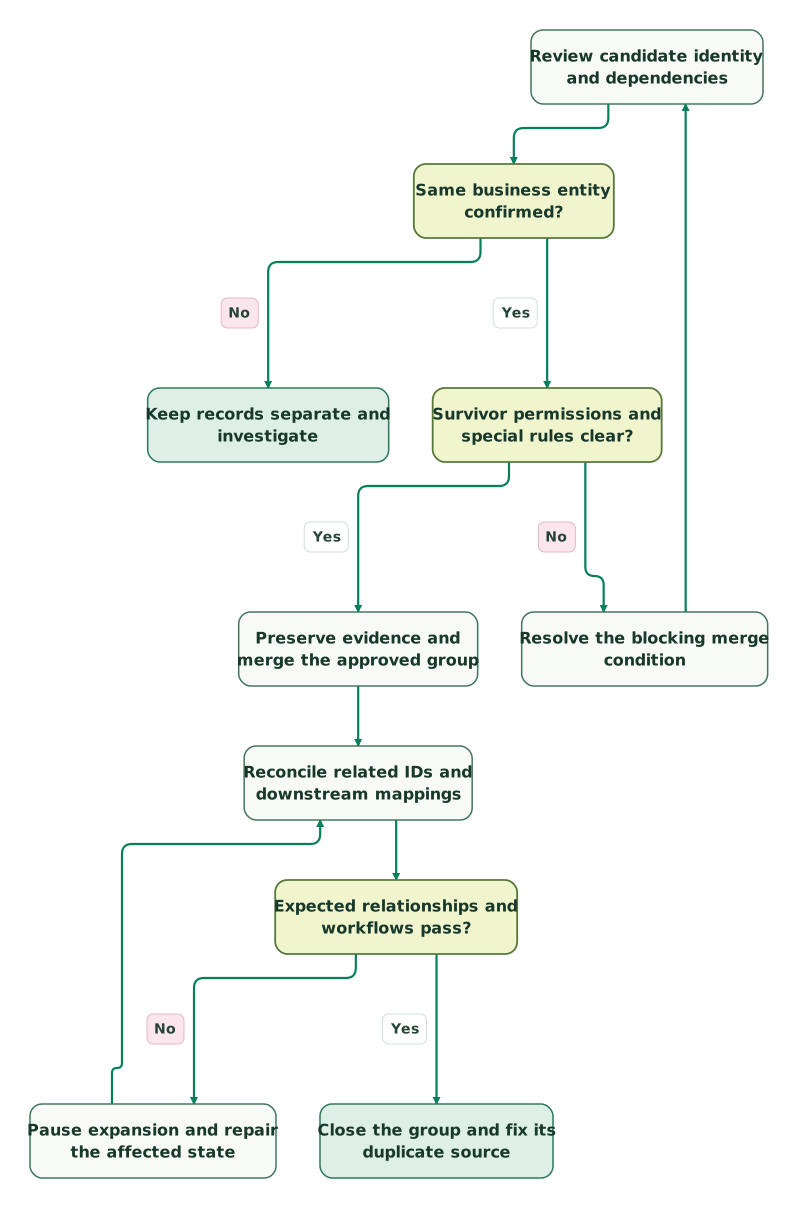
Read diagram as text
- Review candidate identity and dependencies to Same business entity confirmed?.
- Same business entity confirmed? to Keep records separate and investigate: No.
- Same business entity confirmed? to Survivor permissions and special rules clear?: Yes.
- Survivor permissions and special rules clear? to Resolve the blocking merge condition: No.
- Resolve the blocking merge condition to Review candidate identity and dependencies.
- Survivor permissions and special rules clear? to Preserve evidence and merge the approved group: Yes.
- Preserve evidence and merge the approved group to Reconcile related IDs and downstream mappings.
- Reconcile related IDs and downstream mappings to Expected relationships and workflows pass?.
- Expected relationships and workflows pass? to Pause expansion and repair the affected state: No.
- Pause expansion and repair the affected state to Reconcile related IDs and downstream mappings.
- Expected relationships and workflows pass? to Close the group and fix its duplicate source: Yes
Checklist
- A business owner confirms that the records represent the same entity.
- The survivor ID and important field values are approved.
- Permissions and any Person Account, site or partner restrictions are checked.
- Original fields, relevant relationships and source identifiers are preserved.
- Connected systems have an explicit losing-ID resolution plan.
- Merge results and caller visibility are understood.
- Related-record IDs and role access pass verification.
- Downstream retries do not recreate the duplicate or repeat completed work.
- Unresolved recovery or integration issues stop further merges.
- The import, matching rule or integration that created the duplicate is corrected.
Get the $99 martech audit to identify the source of recurring duplicates. For a larger repair, request a detailed CRM integration scope with the account model, affected relationships and connected systems. The durable improvement is a better identity and update process, not a one-time reduction in record count.
Keep reading
Browse all CRM & Lifecycle guides
 CRM & Lifecycle
Salesforce Implementation Checklist: From Scope to a Working Release
Plan a Salesforce rollout with owners, migration rehearsals, permissions, integration tests, UAT, cutover and recovery gates before approving the release.
Jafrin Akter AloLast updated 14 min read
 CRM & Lifecycle
Salesforce to HubSpot migration: plan, field mapping and cutover checklist
Plan a Salesforce to HubSpot migration: phases, a field mapping template, load order, Smart Transfer limits, reconciliation checks and a safe cutover.
Jafrin Akter AloLast updated 21 min read
 CRM & Lifecycle
Salesforce Implementation Mistakes That Break Revenue Operations
Avoid Salesforce failures in identity, migration, automation and permissions. Use a worked won-deal handover and an evidence-based release checklist.
Jafrin Akter AloLast updated 10 min read
CRM & marketing automation
See the implementation scope, deliverables and acceptance checks.
Questions people ask
Can Salesforce merge a Person Account with a business account?
No. The standard account merge workflow keeps those types separate. First establish whether the record model is correct rather than trying to use merging as a conversion shortcut. Person Accounts also have additional relationship and site-user considerations, so review the applicable rules for the specific records. A shared name or email does not remove that product boundary. Lightning merge rules
How do you merge more than three duplicate accounts?
The standard UI and SOAP merge request support up to three records, including the survivor. Larger confirmed groups require successive merges with an explicit survivor policy. Verify each result and update the identity map before continuing, especially where integrations retain earlier losing IDs. Do not confuse this standard operation with specialized industry packages that expose different account-merge tools. Merge request limits
Can the merge API use our external customer ID directly?
The standard SOAP merge operation requires Salesforce record IDs; its documentation excludes External ID fields for identifying the merge records. Resolve your authoritative customer identifiers to the intended Salesforce Accounts first and review ambiguous matches. Keep that crosswalk afterward so future source updates reach the survivor. The resolution step should not guess from a company name or create another account when a mapping is missing. Merge API
Why does our billing integration still reference the losing account?
An external foreign key does not necessarily change when Salesforce reparents its own records. The connector may need an explicit merge event, lookup repair or reconciliation job. Inspect its actual behavior and resolve the losing ID to a verified active survivor before retrying. Also check whether any action already completed, so repairing identity does not create a duplicate invoice, project or customer.
Should we grant administrator access to make a failed merge work?
Diagnose the exact failure first. The operator may lack the required object or record authority, or the accounts may violate a relationship constraint that extra access cannot resolve. Have an authorized administrator review the case and use the permitted operation. Broad temporary access should not substitute for deciding whether the records belong together or verifying the effects on other systems.
Sources

Written by
Jafrin Akter AloData Engineer and Co-founder at Martechdevs and Growth and Analytics Partners
Jafrin writes practical guides to marketing technology, customer data, analytics and AI workflows. Martechdevs is a Growth and Analytics Partners company.