
Salesforce Stripe Integration: Reconcile Customers, Subscriptions and Payments
A Salesforce Stripe integration should connect the correct sales account to its billing records, preserve payment and subscription states, and make failures recoverable. Start with the Stripe app for Salesforce Platform when you need billing visibility and Salesforce automation. Decide separately whether Salesforce should create subscriptions or collect payments. Copying a paid invoice into the CRM does not, by itself, authorize a new charge or prove how much cash Stripe collected.
On this page
Which Salesforce Stripe integration do you actually need?
Choose the integration according to who owns billing and which actions Salesforce must perform. Stripe's Platform app provides an integration builder, billing objects, synchronization and Flow or Apex actions. Its extensions serve different jobs, so confirm the package and workflow instead of asking only whether a product “connects Stripe.” Stripe Platform app overview For the Salesforce side of the build, see our Salesforce consulting.
| Required job | Starting route | Decision that remains yours |
|---|---|---|
| Show Stripe billing records in Salesforce | Platform app and Stripe Billing Sync | Which records, relationships and financial definitions users need |
| Create or change Stripe subscriptions from sales operations | Platform app with Billing Flows Extension or a designed Flow/Apex process | Approved trigger, commercial terms and prevention of repeated creation |
| Process Stripe payments for Salesforce Billing | Salesforce Billing Extension on the Platform app | Payment ownership, customer experience and supported methods |
| Combine billing with product usage and other sources | A controlled integration service or warehouse-to-CRM route | Metric calculation, refresh frequency and operational support |
The Billing Flows Extension is an unmanaged package with templates for subscription-schedule creation from Salesforce Order activation. Its flows and mappings can be adapted for Sales Cloud or Revenue Cloud, with or without CPQ. The Salesforce Billing Extension is a different unmanaged package that uses Stripe through the Salesforce Payment Gateway, including card and ACH payments.
An opportunity becoming Closed Won is a commercial milestone. Your design must decide whether that milestone merely updates visibility, prepares an order for approval or triggers a supported billing workflow. If the product application already creates subscriptions, do not give a second uncoordinated process the same responsibility.
For a team that only needs a trusted customer account page, start with visibility and reconciliation. Add subscription creation or payment actions after the billing owner has approved the inputs and stopping conditions. Include the required Salesforce edition, package entitlements and operating work in the Salesforce cost review.
What should you configure before syncing live billing data?
Configure the app in the intended test environment with a separate Stripe connection, then verify permissions, mappings and outcomes before production activation. Stripe's installation guide distinguishes test and production installations, calls for Lightning Web Security and recommends installing for administrators first. The wizard uses a publishable key and restricted access key and installs its documented API extension. Platform app installation
For a separate history load into custom objects your integration owns, follow the Bulk API 2.0 billing-history guide. Keep managed-package objects under their supported synchronization path.
- Record the Salesforce organization, Stripe account and test or live environment for this connection.
- Install the Platform app and the extensions required by the chosen workflow.
- Complete the setup wizard with the appropriate restricted key and review who can access billing data or execute actions.
- Configure the required billing objects, account associations and synchronization mode.
- Reconcile a small set of representative source and destination records.
- Enable downstream actions only after duplicate, failure and recovery tests pass.
Stripe says OAuth-based authentication is no longer offered from Platform app version 1.17; an existing OAuth connection uses the reauthorization path to API keys. The installation guide currently selects the 2025-04-30 API extension. Treat that as the app's supported extension choice, rather than assuming it is interchangeable with whichever Stripe API version another service uses.
When upgrading the API extension, update Flow actions and Apex nodes that reference the older version. Installing the newer extension does not update those references automatically. API extension upgrade behavior
For Salesforce sandbox clones, Stripe instructs teams to exclude stripeGC objects and configure the app independently in each organization. Preserve that separation in the sandbox template. A cloned production connection is a billing risk that a test-only report filter cannot solve. Environment and configuration rules
Should you use real-time or scheduled Billing Sync?
Use real-time Billing Sync for an operational workflow that needs prompt billing changes; use scheduled synchronization where the agreed reporting delay is acceptable. Measure the end-to-end delay to the Salesforce field or task that matters, including failures and backlog.
Stripe permits one Billing Sync mode per account. Real Time uses webhooks and allows object selection. Scheduled Recurring uses a global schedule across linked Stripe accounts and syncs all objects or none; configure it in the app wizard rather than Salesforce Scheduled Jobs. Billing Sync settings
| Mode | Useful fit | Acceptance evidence |
|---|---|---|
| Real-time Billing Sync | Account teams need a recent payment or subscription change | The required record updates within your agreed window, including after recovery |
| Scheduled Recurring Sync | A periodic billing overview supports the workflow | The schedule, next run and all required accounts have been checked |
| Custom event processing | A business decision requires additional data or controlled side effects | Delivery, current-state calculation and the resulting action reconcile separately |
Avoid describing a real-time configuration as a guaranteed latency. Define what happens if the customer view is stale, which queue holds failed work and who restores service. Record source observation time separately from successful Salesforce delivery time so an old snapshot cannot appear current merely because it was copied again.
How should customers, accounts and subscriptions be matched?
Keep a durable mapping between the commercial account, the Stripe billing relationship and each subscription. A billing email can belong to an accountant, a shared mailbox or an external payer; it is insufficient evidence that two Salesforce accounts should be combined.
Inspect the Account and Contact chosen during Lead conversion before treating that CRM relationship as the billing customer mapping.
Stripe's default Platform mapping includes Salesforce Account to Stripe Customer, while its billing model also represents subscriptions, invoices, charges and related objects in Salesforce. Validate the installed mapping against your business structure. If you use customer-configured Accounts v2 in Stripe, confirm compatibility with the app and mapping instead of treating that model as interchangeable with the Customer-based flow. Platform object model
| Relationship | Keep as distinct evidence | Mistake the check prevents |
|---|---|---|
| Commercial customer | Salesforce Account and approved internal customer key | Joining unrelated companies through a shared email |
| Stripe billing relationship | Stripe account, environment and customer identifier | Mixing legal entities or test and live records |
| Subscription | Its own source identifier and customer association | Replacing several subscriptions with the last event received |
| Invoice | Invoice identity, currency, state and customer relationship | Treating every invoice as a new sale or every sale as paid |
| Payment and refund | Separate transaction identifiers and relationships | Counting a replay twice or hiding a partial refund |
For a custom Salesforce writer, use an explicitly designed external key. A conceptual key includes the source Stripe account, environment, object type and object ID. This is your integration convention, not a pre-existing managed-package field. Store its components as well, so operators can investigate a record without decoding an opaque string.
Salesforce external-ID upsert creates on no match, updates one match and rejects multiple matches. updateOnly prevents creation when a workflow is only permitted to update; the Unique attribute is separate from the External ID attribute. Salesforce external-ID behavior
Choose create permission by operation. A newly approved billing customer may be allowed to create a record. A nightly refresh of known customers should stop for investigation if its account mapping disappears. The CRM property ownership guide helps prevent a billing writer from overwriting sales-owned fields while it updates financial facts.
Which billing states should the Salesforce account page preserve?
Preserve invoice settlement, subscription status and payment movement as separate facts. A single “paid customer” checkbox loses the reason a sales or customer-success team needs to act.
Use a subscription MRR model when recurring value is needed alongside invoice and payment state.
Stripe's invoice.paid event can mean that an invoice payment succeeded or that the invoice was marked paid outside Stripe. A subscription marked active also does not necessarily mean every outstanding invoice has been paid; the configured invoice-resolution policy matters. Invoice event meaning, subscription status rules
| Account question | Evidence to use | Keep separate |
|---|---|---|
| What does the customer owe? | Current invoices, currency and remaining amounts | Subscription status and opportunity stage |
| Did Stripe process this collection? | The relevant payment records and settlement method | An invoice marked paid outside Stripe |
| Which subscriptions remain in force? | Current subscription records and the agreed access policy | Cancellation intent and unresolved invoice history |
| Has money been refunded? | Refund identity, amount, currency and current status | A refund request that is still pending or has failed |
| What recurring value does the account have? | A defined recurring-revenue calculation | One-time charges, tax and raw invoice totals |
The Invoice object distinguishes total, amount due, paid and remaining amounts. Do not map whichever amount field is easiest to find into a generic revenue field. The Refund object has its own lifecycle, including pending, succeeded and failed states; the CRM should retain that distinction.
If an account has two subscriptions and one has a collection problem, preserve the affected subscription and invoice. The account owner needs a specific case to resolve. Replacing the whole account's state with the most recent event can hide the healthy subscription or erase the unresolved one.
For MRR, churn and finance reconciliation, use a defined metric model. The Stripe-to-CRM revenue reconciliation guide covers the broader accounting comparison. An integration should deliver that agreed result with its supporting records rather than inventing a new metric inside a Salesforce Flow.
How do you reconcile amounts without doubling or shrinking them?
Reconcile unique source transactions by currency and state before aggregating a Salesforce summary. Keep source minor units intact until the display conversion is explicit. Stripe uses currency-specific minor units: USD amounts normally use cents, while JPY uses whole yen. Stripe currency units
This hypothetical snapshot contains one captured payment and one successful partial refund per currency. It calculates captured payments less successful refunds only. It excludes fees, disputes, currency conversion and other balance adjustments, and it is not recognized revenue or a bank-payout reconciliation.
| Currency | Captured amount in source minor units | Successful refund in source minor units | Remaining collected amount for this example |
|---|---|---|---|
| USD | 120,000 | 30,000 | USD 900 |
| JPY | 5,000 | 500 | JPY 4,500 |
For USD, (120000 - 30000) / 100 = 900. For JPY, 5000 - 500 = 4500. Dividing both rows by 100 would turn the JPY amount into an incorrect 45 yen. Adding the two displayed values would also be meaningless without an agreed exchange-rate policy.
A repeated webhook for the USD payment must leave the captured amount at 120,000 minor units. A second delivery of the same refund must leave the successful refund at 30,000. A different refund ID is a different transaction that needs its own current state and relationship check.
Add a pending USD 100 refund to the test. The completed-payment-minus-successful-refund figure stays USD 900 while the pending refund is shown separately. If it succeeds, the figure becomes USD 800; if it fails, USD 900 remains. This is a deliberately narrow operational measure. Finance should determine how pending refunds, disputes and other adjustments appear in its own reports.
If analytics purchases also feed this view, the purchase reconciliation skill can compare those purchases with billing records without treating the CRM total as the source of truth.
How should webhooks and Salesforce actions survive retries?
Treat incoming delivery, Salesforce record updates and billing actions as separate operations with separate evidence. Stripe can repeat webhook deliveries and does not guarantee event order. Event IDs identify repeated receipts, while a snapshot event's seconds-level creation time cannot establish a complete ordering. A custom endpoint should verify the raw-body signature and process accepted work through a queue. Stripe webhook handling, Event timestamp definition
Budget retries against the shared Salesforce API limits instead of treating every integration as a separate allowance.
With the Platform app, configured Stripe events are stored as Salesforce Stripe Event records. Stripe documents record-triggered flows using that object and event-name conditions. Test the resulting Flow behavior rather than equating an event record's presence with a completed customer update. Configure Platform events
For a custom route or additional business logic, use this processing contract:
- Retain the source account, environment and event identity with the accepted delivery.
- Resolve the event to its verified commercial account and source object.
- Refresh the relevant current source state before writing current-state CRM fields.
- Serialize or otherwise control competing updates for the same account or subscription.
- Store the Salesforce write result separately from the incoming delivery receipt.
- Before a task, reminder or billing action, check its business-level eligibility and prior outcome.
Suppose a failure event arrives after the invoice has already been paid. Refreshing the invoice lets the processor close or suppress the recovery task instead of reopening it from the old snapshot. Retain the historical failure as history while keeping the current customer view accurate.
For Stripe API actions, reuse the correct idempotency key when retrying the same intended operation. Stripe's API v1 saves the response once execution begins, including errors, and a key can be pruned after at least 24 hours. Reusing a pruned key can create a new request. Maintain a durable business-action receipt alongside API idempotency so a late replay does not become a second subscription or charge. Stripe idempotency
Include the idempotency key when creating new Platform app flows or activating packaged flows. The app's Transaction Tracking uses it to prevent reprocessing Salesforce-initiated Stripe transactions. Inspect the associated records in Stripe API Transactions when diagnosing a duplicate or an unexpectedly ignored event. Platform transaction tracking
Give a subscription-creation action a stable business identity, such as an approved order and revision. A changed commercial order may require an amendment, while a network retry of the same order should remain the same action. Preserve the destination subscription or schedule ID and investigate an unknown outcome before issuing a fresh create request.
What should your failure and replay tests prove?
Test the adverse cases against the customer record and the downstream action, including successful recovery. A connected app or a webhook response only proves one stage of the handoff.
| Synthetic case | Expected Salesforce outcome | Evidence to retain |
|---|---|---|
| Same payment event delivered twice | One payment contribution and no duplicate task | Event receipt and unique payment identity |
| Old payment-failure event delivered after settlement | Current paid state; no reopened recovery reminder | Refreshed invoice and task eligibility result |
| Subscription updated while another invoice remains unpaid | Both subscription state and open invoice remain visible | Source subscription and invoice records |
| Refund moves from pending to succeeded | Pending amount moves to the completed-refund measure once | Refund ID, status and amount comparison |
| Stripe accepts a create request but the response is lost | Existing outcome is resolved before any new creation | Request key, business-action receipt and destination lookup |
| Salesforce rejects a required field or relationship | Repairable exception; source processing is not labelled fully complete | Exact write error and corrected readback |
| A historical import contains old failures | History loads without unintentionally restarting reminders | Import origin and action-suppression decision |
| Test and live data share a customer label | Records remain in their separate intended environments | Full source scope and Salesforce organization |
Do not clear a failure just because a retry was submitted. Re-read the destination record, compare its source association and relevant fields, then close the exception. For a customer-facing action, confirm that the owner, recipient and exit condition remain valid at execution time.
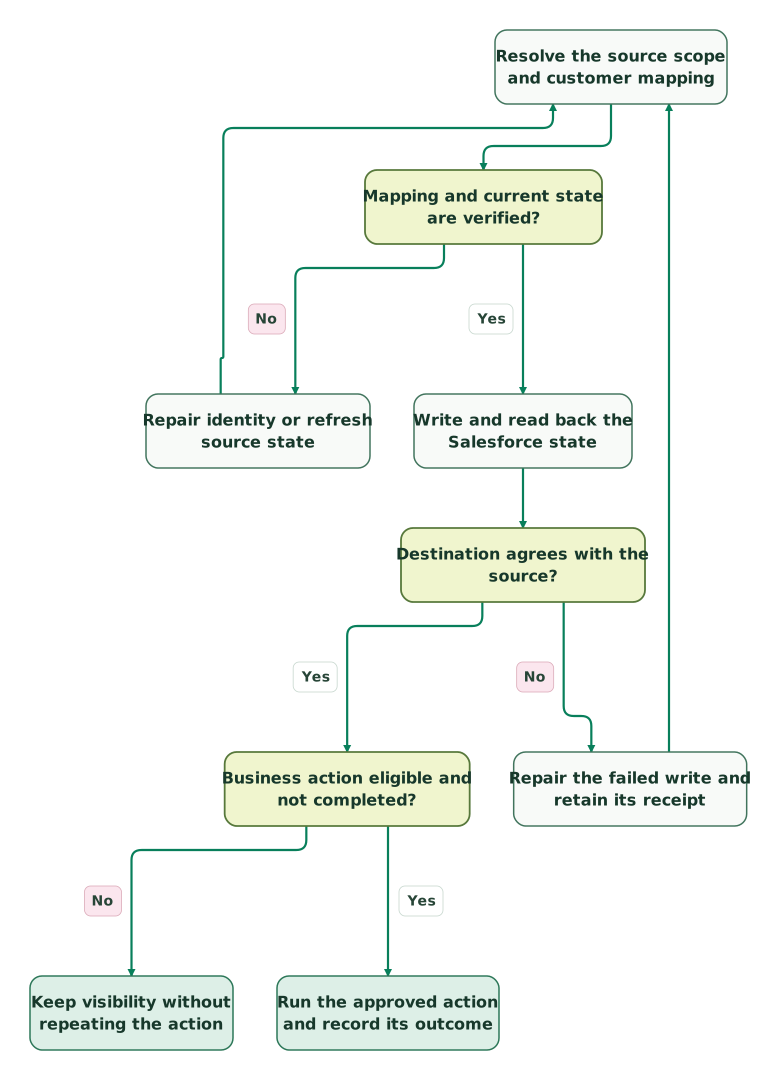
Read diagram as text
- Resolve the source scope and customer mapping to Mapping and current state are verified?.
- Mapping and current state are verified? to Repair identity or refresh source state: No.
- Repair identity or refresh source state to Resolve the source scope and customer mapping.
- Mapping and current state are verified? to Write and read back the Salesforce state: Yes.
- Write and read back the Salesforce state to Destination agrees with the source?.
- Destination agrees with the source? to Repair the failed write and retain its receipt: No.
- Repair the failed write and retain its receipt to Resolve the source scope and customer mapping.
- Destination agrees with the source? to Business action eligible and not completed?: Yes.
- Business action eligible and not completed? to Keep visibility without repeating the action: No.
- Business action eligible and not completed? to Run the approved action and record its outcome: Yes
The diagram begins after the connection or event has passed its authentication checks. The last step records an action's actual result; a failed or unknown action remains in its own recovery queue. A successful CRM readback must not be treated as proof that a later payment operation succeeded.
What belongs in the production handover?
The production handover should let another operator explain a customer balance, identify a failed record and recover the approved workflow without guessing. Include the installed app and extension versions, object mappings, connection owners, operational queues and representative reconciliation results.
Checklist
- Billing visibility, subscription creation and payment collection have explicit owners.
- Salesforce organization, Stripe account and environment are mapped correctly.
- Multiple subscriptions and billing customers can be explained from the account view.
- Invoice settlement, subscription status, collections and refunds remain distinct.
- Repeated and out-of-order events preserve the correct current state.
- USD and zero-decimal currency examples reconcile in their own units.
- Unknown create outcomes cannot trigger an unreviewed fresh operation.
- Salesforce write failures and customer-facing action failures are tracked separately.
- Historical imports cannot unintentionally restart operational messages.
- The intended users can read the billing context and perform only their approved actions.
Our CRM and lifecycle implementation work connects those account facts to sales and recovery workflows. Bring one representative customer, its subscriptions and invoices, and the action the team needs to take. That gives the implementation a concrete acceptance case before additional automation is designed.
Keep reading
Browse all CRM & Lifecycle guides
 CRM & Lifecycle
Salesforce API Limits: Find the Consumer and Recover Failed Syncs
Diagnose Salesforce API limits, identify consuming integrations, reserve capacity for critical work and recover failed syncs with a tested batch planner.
Jafrin Akter AloLast updated 12 min read
 CRM & Lifecycle
Stripe and HubSpot for SaaS: subscriptions, MRR and churn in the CRM
Connect Stripe and HubSpot without confusing payments, subscriptions and revenue. Pick a sync route and handle duplicates, cancellations and billing changes.
Jafrin Akter AloLast updated 14 min read
 Data Warehouse
How to Model SaaS MRR Without Double Counting Revenue
Model SaaS MRR at subscription-item grain with effective dates, explicit policies and a checked SQL fixture. Stop invoice and CRM joins inflating totals.
Jafrin Akter AloLast updated 8 min read
Salesforce consulting
See the implementation scope, deliverables and acceptance checks.
Questions people ask
Can one Salesforce account represent several Stripe customers?
Yes, your commercial model can associate several billing relationships with one sales account, but preserve each source customer and its Stripe account and environment. Decide how the summary handles separate currencies, subscriptions and contacts. Do not merge Stripe customers simply to fit a single Salesforce text field; retain the detailed mapping and aggregate only the facts the account team needs.
Does the Platform app require Salesforce CPQ for every workflow?
The Platform app is an integration builder for Salesforce, and Stripe's Billing Flows Extension can be adapted for setups with or without CPQ. Choose the package and flow according to the actual order and billing model. An older CPQ-specific integration's requirements should not be assumed to describe every Platform app workflow or every Salesforce quote object.
Does an invoice.paid event prove that Stripe collected money?
No. Stripe also emits invoice.paid when an invoice is marked paid outside Stripe. Keep invoice settlement separate from payment-processing evidence, and reconcile the actual payment method and records before describing an amount as collected through Stripe. This distinction matters when finance records an external bank transfer or another settlement outside the processor.
Should recurring renewal payments create new Salesforce opportunities?
Create a renewal opportunity when it represents a commercial decision the sales team owns. A recurring payment can simply settle an existing contract. Define the opportunity's identity around the relevant contract and renewal term, then keep its creation separate from payment receipt. Repeated collections or webhook deliveries should not generate extra pipeline for the same renewal decision.
Can a record update succeed while the intended Flow still fails?
Yes. A billing record arriving in Salesforce and a later Flow action completing are different outcomes. Inspect the relevant Flow execution, entry conditions, permissions and action response, then reconcile the resulting task or billing object. Keep the incoming sync receipt and the action result separately so a successful delivery cannot close an unresolved workflow exception.
Sources
- Stripe app for Salesforce Platform overview
- Stripe Billing Flows Extension
- Salesforce Billing Extension
- Stripe Platform app installation
- Stripe Platform app configuration
- Salesforce external-ID upsert
- Stripe invoice event meanings
- Stripe subscription events and status
- Stripe Invoice object
- Stripe Refund object
- Stripe currency units
- Stripe webhook delivery and verification
- Stripe events in Salesforce
- Stripe API idempotency
- Stripe Event object and timestamp

Written by
Jafrin Akter AloData Engineer and Co-founder at Martechdevs and Growth and Analytics Partners
Jafrin writes practical guides to marketing technology, customer data, analytics and AI workflows. Martechdevs is a Growth and Analytics Partners company.