
HubSpot Power BI Integration: Build Pipeline Reports That Reconcile
A reliable HubSpot Power BI integration needs a supported extraction route, a model that preserves deal identity and history, and a refresh process tested in the Power BI service. Start with one reconciled pipeline report. Separate current deals from associations and historical states, define currency and date rules, then test the result as an ordinary restricted reader before expanding the dashboard.
On this page

Which connection route should you use for HubSpot and Power BI?
Use a managed connector for a bounded reporting requirement, a warehouse when several reports need shared history and cross-source models, or an owned API pipeline when your team can maintain it. A file export is useful for a controlled one-off analysis, with its manual refresh limitations made explicit.
Compare what Tableau would cost instead only after counting equivalent users and reporting requirements.
| Route | Good starting situation | Responsibility that remains |
|---|---|---|
| Managed HubSpot reporting connector | One team wants supported extraction into Power BI | Required objects, history, model and service refresh acceptance |
| HubSpot to a maintained warehouse, then Power BI | CRM must join billing, advertising or product data | Ingestion, transformations, history, access and operating cost |
| Owned API extraction | Specific objects or logic justify custom work | Authentication, pagination, retries, changes and recovery |
| Exported file | A temporary analysis has an accepted cutoff | Export scope, file handling and repeatable refresh procedure |
A marketplace listing does not establish first-party ownership or complete source coverage. For example, Microsoft's marketplace identifies its HubSpot-to-Power-BI listing as a Dataddo product. Verify the provider and the exact service you will operate. Microsoft Marketplace listing.
For a warehouse route, the CRM-to-data-warehouse guide compares native and managed extraction options. This guide starts at the report contract: which records, states and amounts Power BI must represent correctly.
Do not choose the route from connector subscription cost alone. Include Power BI reader licences, any required gateway or data infrastructure, implementation and ongoing support. The BI licence comparison keeps those commercial questions separate from the source-to-report checks below. Our warehouse and reporting service scopes both together.
What must the first pipeline report define?
Define the report's population, business date, amount measure and audience before extracting data. “Pipeline by source” is incomplete until the team agrees what counts as a deal, which stage population belongs in the result and how source attribution is assigned.
| Decision | Definition to record | Example of an unexplained mismatch |
|---|---|---|
| Population | Accounts, pipelines, deal types and archived-record policy | Renewals included in one report but excluded in another |
| Time | Created, expected close, actual close or snapshot date; timezone | A close-date chart compared with a created-date chart |
| Value | Deal amount, weighted amount, bookings or collected revenue | Open opportunities called revenue |
| Currency | Original currencies or an approved conversion basis | USD and EUR summed as if equivalent |
| Attribution | Agreed source or allocation rule | Deal-contact relationships treated as automatic revenue attribution |
| Audience | Which people may see which records and fields | A sales representative sees another team's opportunities |
HubSpot distinguishes deal amount, amount in company currency and weighted amount. Its ARR and MRR properties are based on recurring line items and terms, rather than simply copying the deal Amount property. Select the exact measure instead of renaming one field “Revenue” and leaving its meaning implicit. HubSpot deal property definitions.
Keep the metric contract beside the report specification. For a known test cohort, save the expected IDs and totals under the same permissions and cutoff. A screenshot of a different filtered HubSpot view is not a useful reconciliation reference.
Which HubSpot data should the extraction include?
Extract the smallest complete set of objects, relationships and history needed by the report. A deals table supplies the current transaction records; it does not automatically supply owner labels, association meaning or every previous stage.
For a pipeline report, establish these datasets:
| Dataset | Required grain | Why it matters |
|---|---|---|
| Current deals | One row per account and deal ID | Counts and amounts should remain stable when dimensions change |
| Pipeline and stage definitions | Account, pipeline and stage identifier | Translate internal IDs into maintained business meaning |
| Owners and approved team mappings | One current owner key, with history if required | Keep missing or reassigned ownership visible |
| Deal-contact or deal-company associations | One defined relationship per pair and type | Avoid multiplying deal amounts through many-to-many joins |
| Selected property history or snapshots | One documented change or accepted snapshot | Answer previous-state and movement questions |
HubSpot returns internal pipeline and stage IDs through the Deals API. The API supports requested properties, selected property history and associated IDs; its deal batch-read endpoint does not return associations. Treat a missing requested field differently from a defined field whose value is null. HubSpot Deals API.
Retrieve the relevant pipeline and stage definitions and preserve their IDs. HubSpot's Pipelines API exposes stage labels and order, and provides audit routes for definition changes. Do not hard-code “the third stage is qualified” or rely on the display label remaining unchanged. HubSpot Pipelines API.
Test pagination and scope for every selected object, including associations. A connector can load all deals while omitting a required relationship or historical property. Custom objects and subscription-specific fields need their own acceptance cases; use the HubSpot custom-object guide when the business model depends on them.
For an owned integration, use a supported authentication method and narrow scopes. HubSpot is replacing creation of legacy private apps with Service Keys for applicable system integrations; existing apps continue working. That change does not prove every third-party connector accepts the same credential. Confirm its supported configuration. HubSpot authentication guidance.
How do you model deals without multiplying pipeline value?
Keep the deal fact at one row per scoped deal and model associations separately. Filters can select eligible deals through a relationship without copying the amount once for every associated contact.
Microsoft's star-schema guidance distinguishes facts from dimensions and emphasizes consistent grain. It also recommends a warehouse when complex transformations or historical modeling become difficult to maintain directly in Power Query. Power BI modeling guidance.
In Power BI, import the accepted deal and dimension tables, assign deliberate types and inspect relationship cardinality. A dimension's key must be unique for the relationship you intend. Review filter direction and ambiguous paths before adding measures. Hide technical source fields from casual report use when they could encourage a second, incompatible calculation.
Use this hypothetical fixture to test a deal-to-contact filter. The report should include open, nonarchived deals associated with at least one Enterprise contact. All amounts in the table are minor currency units; USD and EUR each use cents in this fixture.
| Deal | Amount and currency | Enterprise contact matches | Reporting treatment |
|---|---|---|---|
| A | 100,000 USD cents | 2 | Count the deal once |
| B | 100,000 USD cents | 1 | Count the deal once |
| C | 150,000 EUR cents | 1 | Keep EUR separate |
| D | 50,000 USD cents | 1 | Exclude because it is closed |
| E | 70,000 USD cents | 0 | Exclude from this contact-filtered report only |
The expected result is two USD deals totaling USD 2,000 and one EUR deal totaling EUR 1,500. A raw qualifying-contact join reports three USD rows and USD 3,000 because deal A repeats. Summing distinct amounts returns USD 1,000 and incorrectly collapses A and B.
The following SQL expresses the business filter without expanding the deal rows. It assumes maintained relational tables named deal_current and deal_contact, not raw HubSpot API responses. amount_minor is an integer in the currency's minor unit; is_archived and is_closed are validated 0/1 fields. Both tables carry portal_id and deal_id.
SELECT
    d.portal_id,
    d.pipeline_id,
    d.currency_code,
    COUNT(*) AS deal_count,
    SUM(d.amount_minor) AS pipeline_amount_minor
FROM deal_current AS d
WHERE d.is_archived = 0
  AND d.is_closed = 0
  AND EXISTS (
      SELECT 1
      FROM deal_contact AS c
      WHERE c.portal_id = d.portal_id
        AND c.deal_id = d.deal_id
        AND c.contact_segment = 'Enterprise'
  )
GROUP BY d.portal_id, d.pipeline_id, d.currency_code;
Reject duplicate deal keys, missing amounts and missing currency codes before aggregating. SUM can silently ignore null amounts, leaving an apparently plausible total. Map each currency's minor-unit exponent when formatting the result; do not assume every currency uses cents.
For an unfiltered company pipeline report, deal E should remain in the population. The contact filter above is a declared business choice, not a convenient way to discard unmatched records. Apply the same expected-result fixture to the Power BI measures and slicers after loading the tables.
How should historical pipeline and stage duration work?
Historical reporting needs the values that applied at the reporting cutoff, not today's values assigned to an earlier date. Preserve the historical fields required by the question, including amount, owner or expected close date where those can change.
HubSpot's selected property history can support reconstruction when the required changes are available. A scheduled snapshot can preserve accepted states going forward. Neither approach should claim complete earlier history without checking coverage. Document the earliest trustworthy period and any missing changes.
Separate three questions: current open pipeline, pipeline as it stood at a prior cutoff, and movements between two cutoffs. For a movement report, classify new deals, won/lost exits, amount changes, reopened deals and movement across the selected period boundary. Reconcile the opening balance plus classified movements to the closing balance.
Stage duration also needs an explicit re-entry policy. In a hypothetical sequence measured in elapsed hours, a deal enters Demo at hour 2, leaves at hour 4, returns at hour 7 and leaves at hour 10. Its cumulative Demo duration is five hours. The last completed visit is three hours; first entry to final exit spans eight hours and includes time outside Demo.
HubSpot requires a Professional or Enterprise subscription for its calculated stage properties, including latest, cumulative and current-stage duration. Their update behavior differs. For example, completed-stage duration fields need not behave like a live clock while the deal remains in that stage. Choose the field or interval calculation that matches the question. HubSpot stage properties.
If the report attributes value to owners historically, avoid joining old deal states to today's owner-team mapping without an explicit policy. Keep late-arriving corrections visible so an amended source record repairs the relevant reporting period.
How do you make refresh work after publishing?
Test the entire refresh path in the Power BI service, using the credentials, gateway and workspace configuration that will operate after handover. A successful Desktop refresh verifies a different execution environment.
For an Import model, Power BI copies source data into the semantic model and must refresh that copy to obtain later changes. Source ingestion and model refresh therefore need coordinated completion. Refreshing visuals alone cannot repair an old imported dataset. Power BI refresh behavior.
Use a run record with three boundaries: HubSpot extraction complete, reporting tables accepted and semantic model refresh complete. Display the accepted source cutoff or reporting-data completion in the report. A “refreshed now” label can be misleading when the source extract is yesterday's data.
Microsoft lists up to eight scheduled daily refreshes on shared capacity and up to 48 through the schedule settings on Premium, PPU or Fabric capacity. These are scheduling capabilities, not an end-to-end freshness guarantee. Include extraction duration, retries and resource availability in the deadline. Refresh schedules and capacity.
If a custom connector uses an on-premises data gateway, validate its gateway support. Microsoft's guidance notes that the gateway requires the connector's TestConnection implementation, although Desktop does not. A custom connector can therefore work locally and fail through the service gateway. Custom connectors and gateway requirements.
Treat Power BI incremental refresh separately from source change capture. Its date-range filtering and partition processing must align with the source query. Microsoft recommends verifying that the intended filter reaches the source; a full source read can defeat the performance objective. Incremental refresh configuration.
An old deal can change today. Test that correction against the selected partition and source-watermark design. Do not assume that refreshing recently created deals will update every changed old deal or remove every archived record. Keep periodic reconciliation and a bounded repair path for records outside the routine refresh scope.
How do you preserve the right access after data leaves HubSpot?
Design Power BI and data-layer access explicitly; HubSpot permissions do not automatically become Power BI row filters. Extract only needed fields and test each intended reader role against known allowed and denied records.
Power BI row-level security restricts Viewer access, but it does not restrict workspace Admin, Member or Contributor roles. Define roles, assign the intended consumers and validate the effective access. A test run as the report author cannot establish what a salesperson will see. Microsoft row-level security rules.
Use an access fixture with two teams, one cross-team manager and one person who should see no records. Test report pages, drill-through, available exports and any alternate access route included in the deployment. Keep the deny case: proving that one authorized user can open the report covers only half of the requirement.
Avoid using a display filter as security. A hidden slicer, default page or preselected owner does not establish a restriction on the underlying data. Review the model, workspace and sharing configuration together, then repeat the tests after a role or relationship change.
What should you test before accepting the report?
Accept the integration only after the numbers, historical interpretation, service refresh and reader restrictions pass together. Keep a failure visible rather than publishing an attractive dashboard with an unexplained discrepancy.
| Test case | Expected evidence | Repair boundary |
|---|---|---|
| One deal with several contacts | Deal amount counted once under the agreed filter | Association model and measure |
| Two different deals with the same amount | Both values remain included | Incorrect distinct-amount workaround |
| Multiple currencies | Separate totals or approved conversion | Currency definition and formatting |
| Re-entered stage | Agreed latest/cumulative/current duration | Historical intervals or source property |
| Old deal amended or archived | Correct result after the required refresh | Source capture and model partition policy |
| Ordinary restricted reader | Allowed records visible; denied records absent | Workspace role and model security |
| Failed source or gateway | Visible stale/incomplete state and owned recovery | Extraction, gateway or refresh chain |
The acceptance path below returns scope failures to the source contract and operational failures to configuration and retesting. It does not treat a successful connection as a completed implementation.
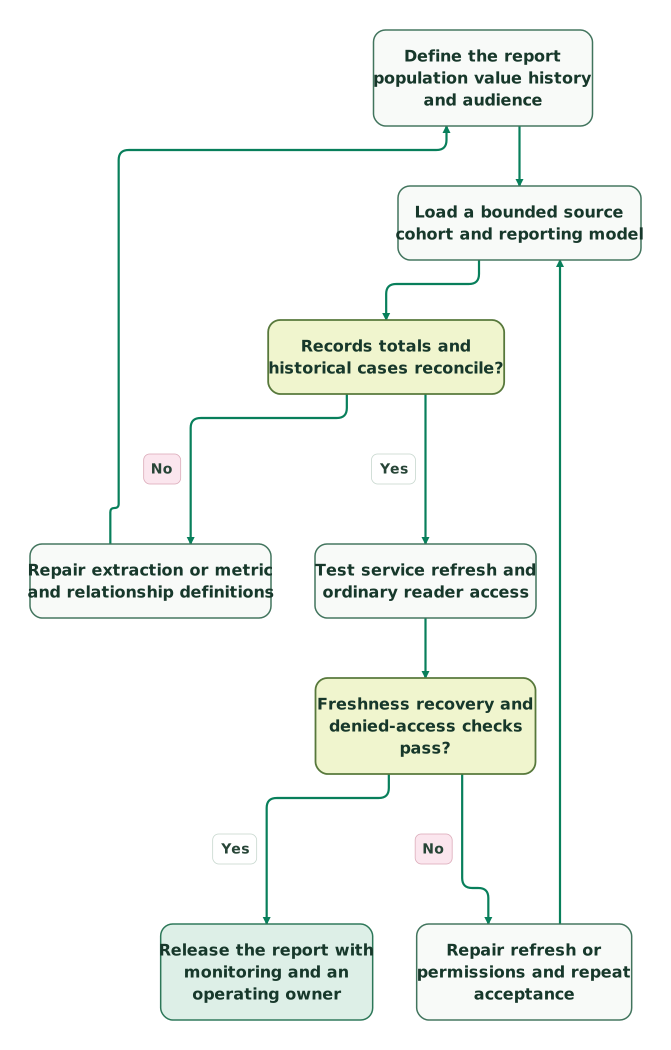
Read diagram as text
- Define the report population value history and audience to Load a bounded source cohort and reporting model.
- Load a bounded source cohort and reporting model to Records totals and historical cases reconcile?.
- Records totals and historical cases reconcile? to Repair extraction or metric and relationship definitions: No.
- Repair extraction or metric and relationship definitions to Define the report population value history and audience.
- Records totals and historical cases reconcile? to Test service refresh and ordinary reader access: Yes.
- Test service refresh and ordinary reader access to Freshness recovery and denied-access checks pass?.
- Freshness recovery and denied-access checks pass? to Repair refresh or permissions and repeat acceptance: No.
- Repair refresh or permissions and repeat acceptance to Load a bounded source cohort and reporting model.
- Freshness recovery and denied-access checks pass? to Release the report with monitoring and an operating owner: Yes
Before launch:
Checklist
- Each metric names its population, date, currency and attribution policy.
- Extraction includes required definitions, relationships and historical fields.
- Deal keys are unique and amounts survive association filtering correctly.
- Missing, archived and late-corrected records have tested treatment.
- The service refresh succeeds with the actual operating identity and gateway.
- The report exposes its accepted data cutoff and incomplete-source state.
- Allowed and denied reader fixtures pass under effective permissions.
- Source changes, failed refreshes and reconciliation gaps have owners.
Use the marketing data quality framework to maintain those controls after handover. If a current dashboard disagrees with the CRM, get the $99 martech audit with one disputed metric and its expected records. For a defined integration, request a detailed reporting implementation scope.
Keep reading
Browse all Data Warehouse guides
 CRM & Lifecycle
Salesforce to HubSpot migration: plan, field mapping and cutover checklist
Plan a Salesforce to HubSpot migration: phases, a field mapping template, load order, Smart Transfer limits, reconciliation checks and a safe cutover.
Jafrin Akter AloLast updated 21 min read
 CRM & Lifecycle
HubSpot implementation: a phased plan, template and launch checklist
Implement HubSpot in five phases: scope, data model, migration, integrations and launch. Includes a plan template, a worked example and a go-live checklist.
Jafrin Akter AloLast updated 22 min read
 CRM & Lifecycle
HubSpot Email Tracking: 8 Reasons Opens, Clicks and Logs Disagree
Fix confusing HubSpot email tracking with eight checks for logging, seats, link formats, inferred opens, privacy filters and report definitions.
Jafrin Akter AloLast updated 14 min read
Data warehouse & CDP
See the implementation scope, deliverables and acceptance checks.
Questions people ask
Can I use a HubSpot owner ID as a Power BI login?
No, a HubSpot owner ID identifies a source owner, while Power BI evaluates the consuming identity in its own environment. Maintain an approved mapping between report users and the source entities they may access. Include inactive owners, reassigned records and managers in the test data, and verify the mapping under the actual reader's permissions before using it for security.
Why does the deal count match while pipeline value differs?
Matching counts do not establish matching amounts, currency rules or record identity. Compare the exact deal IDs and selected values under the same filters and cutoff. Two incorrect records can offset each other in the count, and a correct deal population can still use a different amount measure. Preserve missing, unexpected and value-mismatch categories rather than reconciling only the grand total.
Can a pipeline-stage label change break historical charts?
It can if the model uses labels as keys or assigns current labels to history without an agreed interpretation. Preserve stable scoped stage identifiers and version relevant definitions. Decide whether historical charts should show the label used at the time or a current reporting label, then keep that choice consistent. A cosmetic rename should not silently split or merge a business measure.
Should closed-won deal value reconcile directly to cash collected?
Only if the business has explicitly defined an equivalent population and timing rule. A closed-won deal can precede invoicing, payments, refunds or revenue recognition, so the two totals often answer different questions. Build a relationship from deals to the relevant billing records, preserve partial payments and adjustments, and reconcile the selected financial measure rather than treating a sales-stage change as a payment.
Can a connector's history feature replace reporting snapshots?
Sometimes, when the extracted history covers every changing property needed to reconstruct the required state and its timing. Verify amount, stage, owner and date coverage rather than accepting the word “history” alone. Snapshots remain useful for preserving an accepted reporting state. If neither history nor snapshots cover an earlier period, label the limitation and avoid reconstructing missing values from today's record.
Sources
- Dataddo HubSpot connector in Microsoft Marketplace
- HubSpot deal property definitions
- HubSpot Deals API
- HubSpot Pipelines API
- HubSpot authentication change
- Power BI star-schema modeling
- Power BI data refresh
- Power BI custom connectors and gateway requirements
- Power BI incremental refresh
- Power BI row-level security

Written by
Jafrin Akter AloData Engineer and Co-founder at Martechdevs and Growth and Analytics Partners
Jafrin writes practical guides to marketing technology, customer data, analytics and AI workflows. Martechdevs is a Growth and Analytics Partners company.