CRM to Data Warehouse Sync: Get HubSpot and Salesforce Data Into Snowflake or BigQuery
Data Engineer and Co-founder at Martechdevs and Growth and Analytics Partners
Last updated 16 min read
To sync CRM data into a warehouse, first choose the objects, history and freshness your reporting needs. Then compare a native share or transfer with a managed connector such as Fivetran or Airbyte. HubSpot and Salesforce each have routes into Snowflake and BigQuery, but schedules, credentials, deletion handling and costs differ. A successful sync must also pass a record-level completeness check.
For detailed plan economics, start with Fivetran pricing for a CRM connection; for operating-model tradeoffs, use Fivetran versus Airbyte.
What does real-time mean for CRM data?
For the scheduled routes in this guide, a one-minute or 15-minute setting is a scheduling capability, not a guarantee that a new CRM update appears in a finished dashboard within that time. Extraction, loading, retries, transformations and report refreshes add delay. Native shares also depend on the provider's publishing behaviour.
Use the decision deadline to set the requirement. A daily pipeline meeting may work with an hourly refresh that completes before the meeting. A lead requiring a response in two minutes usually belongs in an operational CRM workflow or event-driven integration, with warehouse reporting used to measure that process.
The current advertised schedule limits, checked on 17 October 2026, are:
| Route | Fastest documented schedule here | Important qualification |
|---|---|---|
| Fivetran Standard | 15 minutes | Connector duration and API quotas still matter |
| Fivetran Enterprise | 1 minute | Faster plan setting is not an end-to-end SLA |
| Airbyte Standard | 1 hour | Volume-based cloud plan |
| Airbyte Plus | 15 minutes | Higher plan cost can be driven by freshness |
| Airbyte Pro | 5 minutes | Capacity-based plan |
| BigQuery Salesforce transfer | 15 minutes | Default is 24 hours; overlapping runs can be skipped |
Sources: Fivetran pricing, Airbyte pricing and Google's Salesforce transfer limits.
Write a measurable deadline using the marketing data freshness SLA guide: for example, “The 09:00 pipeline report includes all eligible CRM changes through 08:00, with completeness checked.” Our data warehouse and CDP implementation service connects that requirement to extraction, modelling and alerting.
Which route fits your CRM and warehouse?
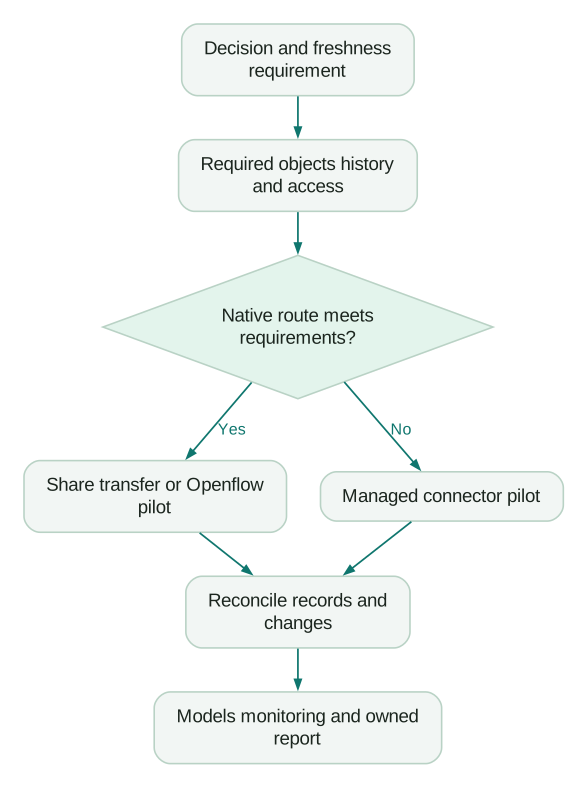
Our starting recommendation is to test the simplest native route that satisfies your actual objects, history and operating requirements. When several sources need the same monitoring and deployment process, a managed ELT platform can justify its additional fee.
| CRM and destination | First route to evaluate | Alternative when the first route does not fit |
|---|---|---|
| HubSpot → Snowflake, already on Data Hub Enterprise | HubSpot Snowflake Data Share | Fivetran, Airbyte or Openflow for a required copy or unsupported scope |
| HubSpot → BigQuery | Native transfer pilot if Preview and credentials are acceptable | Managed connector for operational requirements or broader sources |
| Salesforce → BigQuery | Native transfer if its object and deletion limitations fit | Managed connector when those limits block the reporting contract |
| Salesforce → Snowflake | Openflow or a managed connector, based on the team's operating model | Compare supported objects, history and total runtime cost |
| CRM plus billing, ads and product data | One managed ELT platform for the supported sources | Native routes where their benefits outweigh fragmented operations |
A native route is not automatically cheaper. Upgrading a CRM solely to obtain a data share can cost more than the pipeline it replaces. Equally, adding a vendor for one well-supported native export can create unnecessary administration.
Which native routes avoid a separate pipeline provider?
HubSpot's Snowflake share, Google's Data Transfer Service and Snowflake Openflow can move or expose CRM data without a separate ELT subscription. Each has different prerequisites, and Openflow still has runtime costs and operational responsibilities.
HubSpot Data Share for Snowflake
HubSpot requires Data Hub Enterprise for its Snowflake Data Share. The integration supports Snowflake regions across supported clouds, and the customer pays the Snowflake costs of using the data. HubSpot accounts with HIPAA enabled require Snowflake Business Critical for this integration. HubSpot Data Share setup.
The share exposes provider-managed data for SQL access. It does not require your team to schedule an API extraction and maintain its own raw replica. If you materialize shared data into your own tables for snapshots or modelling, that additional copy and its storage become your responsibility. Review Snowflake sharing and cost behaviour alongside the actual reporting requirement.
Do not confuse the share with the legacy Snowflake-to-HubSpot Data Sync integration. HubSpot says the latter ends on 30 October 2026; HubSpot-to-Snowflake sharing is unaffected. Legacy Data Sync notice.
HubSpot to BigQuery through Data Transfer Service
Google's HubSpot connector is in Preview and documents private-app-token authentication. Every run transfers all available selected data, and Google states that transfers incur no charge during Preview. That does not remove warehouse storage, downstream query or other processing costs. HubSpot transfer documentation.
Two checks matter before choosing it. First, HubSpot is retiring creation of legacy private apps, so the documented authentication route needs testing in the actual account. Second, a full source read does not by itself tell you whether destination rows are replaced, merged or appended. Inspect the configuration and two consecutive runs, including a changed and deleted record, before forecasting destination storage or calling the output a current-state copy.
Salesforce to BigQuery through Data Transfer Service
Google's Salesforce connector supports Sales Cloud through Bulk API v1, with documented object and field restrictions. It supports full and incremental modes; incremental transfers require a valid increasing timestamp watermark and do not sync source deletions. The minimum schedule is 15 minutes and the default is 24 hours. Salesforce transfer documentation.
Google recommends no more than ten assets per configuration and ten simultaneous transfer runs across configurations. A configuration cannot run two transfers at once; an overlapping scheduled run is skipped. If extraction takes 22 minutes, a 15-minute schedule does not create a 15-minute-fresh copy.
Salesforce is a paid GA connector on the current BigQuery pricing page. Transfer orchestration is measured in slot-hours, with data loading and processing as a separate component. The public Iowa example lists a $0.06 default slot-hour rate and a planning guideline of up to 20 slot-hours per transfer-runtime hour, equivalent to $1.20. This is Google's planning estimate for that region, not a guaranteed per-hour invoice. BigQuery Data Transfer Service pricing.
Openflow for Snowflake
Snowflake documents a Preview HubSpot connector with initial and incremental loading, and a Salesforce Bulk API connector with incremental change detection. The HubSpot connector still documents a private-app API token. Check the specific connector's objects, deletion behaviour and credentials rather than applying the general Openflow feature list to every source. HubSpot connector and Openflow connector catalogue.
Openflow is not a zero-cost pipeline because it comes from the warehouse vendor. Snowflake deployments incur management and runtime compute costs; the management compute pool can keep running when no runtime is active. Telemetry and warehouse ingestion can add costs. BYOC uses a different cost model that also includes your infrastructure. Estimate the selected deployment and runtime from the documented rate card and a measured pilot. Snowflake deployment costs and BYOC usage accounting.
When should you choose Fivetran or Airbyte?
Choose a managed ELT route when its connector coverage, change handling and shared operations are worth more than the work it replaces. Test the relevant CRM objects; the number of connectors in a vendor catalogue is not an acceptance criterion.
Fivetran
Fivetran bills connections using monthly active rows: distinct primary keys affected by inserts, updates or deletes during the billing month, under the applicable consumption terms. Repeatedly syncing the same key does not automatically create another MAR, but history tables can create new rows for changes. Service Consumption Table.
For HubSpot, current-state tables and property-history tables are separate. History can increase MAR because changes are represented as new rows. Select the history needed for questions such as “What stage was this deal in last month?” rather than turning everything off to lower a bill and losing the answer. Fivetran's HubSpot behaviour.
For Salesforce, Fivetran detects and excludes formula fields because incremental synchronization cannot reliably preserve their correctness. It recommends a transformation-based approach. At 90% of the rolling Bulk API job quota it can fall back to REST; at 90% of the REST quota it postpones sync for an hour. Those controls protect source capacity but can delay data. Fivetran Salesforce documentation.
Airbyte
Airbyte's Standard and Plus plans bill API sources by rows processed, at six credits per million API rows. Standard starts at $20 monthly with five credits and $5 per additional credit; Plus starts at $189 for 40 credits. Pro and Enterprise Flex use capacity-based Data Workers. Airbyte billing units and current plans.
The HubSpot source supports OAuth and token-based routes. Its documentation explicitly accepts a Service Key in the access-token field for accounts that cannot create a legacy private app. Follow the connector's supported authentication path and grant scopes for the selected streams. A token with broader scopes cannot overcome a HubSpot product-tier entitlement. Airbyte HubSpot setup.
For a cost estimate that includes resyncs and operating work, use our Airbyte pricing guide. A full refresh that processes the same rows repeatedly is not equivalent to Fivetran's distinct monthly-key accounting.
Two-way sync solves a different problem
CRM-to-CRM synchronization keeps operational records aligned; warehouse ingestion creates data for analysis. HubSpot and Salesforce sync needs field ownership, conflict handling and business rules that a raw warehouse loader does not supply.
Pushing calculated warehouse values back into the CRM is reverse ETL. Design that destination write separately so a reporting repair does not unexpectedly overwrite a salesperson's field or trigger a customer message.
Where is the data processed before it reaches the warehouse?
In managed ELT, the connector reads the CRM API, performs extraction and transport work in its processing environment, then loads data for transformation in the warehouse. ETL performs more transformation before loading. A native share exposes provider-managed data; it is a different access model from your own persisted raw copy.
Fivetran lists processing locations in the US, Canada, EU, UK, Australia, India and Singapore. Connections use the location selected for their destination; finer cloud and region choices depend on plan. Hybrid Deployment keeps processing inside your network. Fivetran region guidance and Hybrid Deployment.
Airbyte Enterprise Flex offers in-boundary and hybrid deployment options. That does not mean the self-service Standard connection automatically runs inside your network. Record the source, processing and destination locations separately, including logs, credentials and support access. Airbyte deployment plans.
A live query driver is different again. CData's documented Alteryx/HubSpot ODBC route queries source data and pushes supported filters to HubSpot. It can suit a bounded investigation, but repeated runs still depend on source API access and limits. It is not a warehouse snapshot or a historical ledger. CData's vendor guide.
Which credentials should you prepare before the first sync?
Prepare a supported integration identity and a tested rotation path before committing to a route. In October 2026, both CRM vendors have changes that make older setup instructions incomplete.
HubSpot disables legacy private-app creation for accounts created from 28 September 2026 and for older accounts from 26 October 2026. Existing apps and tokens continue to work. Airbyte documents Service Keys as a replacement, currently labelled public beta in its guide. Google's and Snowflake's HubSpot connector instructions still name private-app tokens; we have not tested Service Keys with those two connectors and do not claim compatibility. Validate the token and required streams before choosing either route. HubSpot's sunset notice.
Google's Salesforce transfer instructions require a Connected App. Salesforce's current guidance says creation is restricted by default, with Salesforce Support involvement required for an exception, while existing Connected Apps continue working. External Client Apps are the replacement framework, but that does not prove that a specific connector's Connected App instructions work unchanged with an ECA. Obtain the supported setup for your org and connector. Salesforce's Connected App notice.
On the warehouse side, use a dedicated service identity and least-necessary access to the intended landing area. Where supported, follow our Snowflake key-pair authentication guide. Keep token values out of documents, SQL examples and prompts; record the owner and rotation procedure instead.
What would one HubSpot portal cost through these routes?
The example below separates vendor billing units rather than pretending they are interchangeable. Assume a pilot measures 250,000 paid Fivetran MAR or 1.5 million Airbyte API rows during a month. These are illustrative measurements of the same business workload through different connectors, not a conversion formula between MAR and rows. The table shows monthly pipeline costs in USD using prices checked on 17 October 2026.
| Route | Illustrative monthly pipeline amount, USD | What the figure excludes |
|---|---|---|
| Fivetran Standard, 250,000 paid MAR | About $128.75 | Warehouse, models, other connections and operating work |
| Fivetran Free, if the entire account qualifies | $0 | Free-plan limits and warehouse costs still apply |
| Airbyte Standard, 1.5 million API rows | $40 | Warehouse and operating work; one-hour schedule limit |
| Airbyte Plus, same nine-credit usage | $189 starting package | Faster 15-minute schedule costs more despite low volume |
| BigQuery HubSpot transfer during Preview | $0 transfer charge | Storage, downstream queries and other processing |
| HubSpot Snowflake Data Share | No separate pipeline provider | Data Hub Enterprise entitlement and Snowflake usage |
The Fivetran low-volume Standard band is a $5 base plus approximately 0.25 × $495 per million MAR, giving $128.75 after rounding. Free permits up to 500,000 connection MAR at the account level, subject to its other terms; it is not a free allowance deducted from every paid connection. Fivetran rate table and Free plan limits.
Airbyte's 1.5 million API rows use 1.5 × 6 = nine credits. Five are included in Standard, leaving four at $5: $20 + $20 = $40. If the decision needs 15-minute scheduling, the starting Plus package is $189 even though this workload uses fewer than its 40 credits. Airbyte credit rules.
The HubSpot Data Hub pricing page currently lists Enterprise starting at $2,000 a month. If you already own it, the share can remove a separate extraction bill. If not, do not justify an upgrade solely by comparing “no pipeline fee” with $40 or $128.75. Confirm the actual commitment, seats and package with HubSpot. Data Hub pricing.
For BigQuery, measure two full transfers and inspect write behaviour before projecting monthly storage. Add BigQuery storage and query costs to the model. For every route, price the busiest expected month, backfills and the people who will investigate failures.
How do you set up the sync?
Set up a small complete reporting path before loading every object. These six steps apply across routes, with the connector's own documentation controlling exact settings.
- List the required data. Name objects, fields, associations, custom objects and history. Include IDs, owners, stage definitions, currencies and timestamps needed for reconciliation.
- Choose the route against acceptance criteria. Check freshness, plan, region, credentials, supported objects and deletion behaviour together.
- Create and test the integration identities. Verify authorized and unauthorized access, token rotation and the destination landing permissions.
- Land a traceable raw copy or document the share. Preserve source IDs, source update times, extraction metadata and deletion markers where available. Do not silently drop an unreadable object.
- Schedule backwards from the decision deadline. Leave room for extraction, models, validation and a retry. Avoid overlapping full transfers that cannot finish within the interval.
- Build staging models and the first report. Normalize owners, stages, currency and associations at an explicit grain. Use dbt for marketing to keep definitions versioned and testable.
How do you prove the warehouse copy is complete?
Compare the copy with the CRM at the same scope and cutoff, then test changes that a count alone cannot reveal. A green connector run says the process completed; it does not prove every required object, association and historical state is represented correctly.
For each object, compare source and destination IDs, total counts, counts by update-time window and selected field values. Use the same permissions and exclusions on both sides. Counts can match while one missing record is offset by one duplicate.
Test a deletion, a merged contact, an association change, a custom-object update and a formula field whose inputs change. Document the expected representation before the test: deletion marker, removed row, retained history or a deliberately unsupported operation. For BigQuery's incremental Salesforce route, a deletion needs a separate reconciliation strategy because the connector does not sync it.
Check pipeline health separately from source activity
A quiet CRM can have an old maximum updated_at even when extraction is healthy. Conversely, one recent record can hide many stale rows. Monitor completed runs, extraction watermarks, object coverage and end-to-end availability alongside source update times.
This illustrative BigQuery query assumes an audit table your team creates with one row per successful object sync. It has not been run against a live warehouse; replace the table and field names with your own audit contract.
SELECT
  object_name,
  last_success_completed_at,
  source_high_watermark_at,
  TIMESTAMP_DIFF(
    CURRENT_TIMESTAMP(), last_success_completed_at, MINUTE
  ) AS minutes_since_success,
  TIMESTAMP_DIFF(
    last_success_completed_at, source_high_watermark_at, MINUTE
  ) AS watermark_age_at_completion_minutes,
  rows_written
FROM `your_project.ops.crm_sync_audit`
QUALIFY ROW_NUMBER() OVER (
  PARTITION BY object_name
  ORDER BY last_success_completed_at DESC
) = 1;
The second age metric is diagnostic, not proof of failure: an unchanged source may have an old watermark. Use a controlled change or source-side comparison to test delivery delay, and alert on missing object runs as well as failed ones. For connector-specific checks, use Fivetran implementation mistakes and Airbyte cursor and deletion checks.
What usually breaks after launch?
Investigate the symptom against a specific control instead of resyncing the entire CRM by default.
| Symptom | Likely mechanism to check | First useful action |
|---|---|---|
| Data falls behind during a campaign | API quotas or longer extraction | Inspect source usage, job duration and postponed/skipped runs |
| Salesforce field is absent or stale | Formula cannot be maintained incrementally | Check connector support and transformation of formula inputs |
| Deleted opportunities remain active | Route does not propagate deletes | Reconcile deleted IDs and implement the agreed deletion policy |
| HubSpot cost increases unexpectedly | History rows or re-imported objects | Inspect billable tables and newly enabled history |
| New account cannot create a token | Legacy private-app creation restriction | Use a documented supported alternative and test scopes |
| Custom objects are missing | Not selected, inaccessible or unsupported | Check the object list, subscription and credential scopes |
| Counts match but account reporting differs | Association or merge handling | Compare ID relationships and surviving-record mappings |
Review HubSpot custom objects before assuming standard contact/deal extraction covers your business model. Preserve a method for late-arriving CRM updates so a delayed correction can repair a historical report without duplicating records.
Before handing the pipeline to its operating owner, confirm:
Checklist
- Decision deadline, required objects and historical questions are explicit.
- The route's plan, region, credentials and deletion limits are accepted.
- A complete pilot reconciles IDs, fields, associations and changes.
- Source timestamps and ingestion audit records are available.
- Alerts distinguish a failed sync from an unchanged source.
- Billable volume and API use have been observed through a representative week.
- Backfills, schema changes and credential rotation have an owner.
- The report uses reviewed staging models rather than unexplained raw joins.
If the pilot exposes gaps your team cannot maintain, request a warehouse implementation quote. Martechdevs implementation starts at USD 3,000, with the quote determined by sources, modelling, history and activation scope. For an existing unreliable copy, bring one disputed report to a data pipeline audit.
Questions people ask
Can HubSpot send data to BigQuery without a third-party tool?
Yes. Google's HubSpot Data Transfer Service connector provides a native route, currently in Preview, with full transfers and documented private-app-token authentication. Existing private apps continue working, but creation restrictions are changing in October 2026. Test the supported authentication and destination write behaviour in your account; Service Key compatibility with this connector is not established here.
Does CRM-to-warehouse sync consume CRM API limits?
API-based extraction does. The exact limits depend on the CRM, API and subscription, and other integrations share some capacity. Fivetran documents Salesforce Bulk-to-REST fallback and postponement at quota thresholds. Measure usage during the pilot and busiest period. Native data sharing uses a different access path and should not be described as the same polling workload.
Will deleted CRM records disappear from the warehouse?
That depends on the route and its deletion model. Some retain a marked or historical row, while BigQuery's incremental Salesforce transfer does not synchronize source deletions. Define whether reports should exclude, retain or anonymize a deleted record, then test a controlled deletion. A successful incremental job alone does not prove that the destination reflects removals.
Can the same platform push warehouse data back to the CRM?
Some platforms offer reverse ETL or activation alongside ingestion, but it is a separate workflow and may have separate billing. Fivetran prices Activations on a different MAR curve. Define field ownership, approval and automation effects before sending results back. Our reverse ETL guide explains that operational handoff and its checks.
Do we still need transformations after CRM data lands?
Usually yes. Raw CRM tables need clear models for owners, stages, currency, merged identities and associations before they support consistent reporting. A source copy can be technically correct while a many-to-many join duplicates revenue. Define the report's grain, test relationships and preserve the history it needs. Start with staging models for marketing data.
Sources
- HubSpot: Snowflake Data Share
- HubSpot: Legacy Snowflake Data Sync notice
- Google: HubSpot transfers
- Google: Salesforce transfers
- Google: BigQuery transfer pricing
- Snowflake: Openflow HubSpot connector
- Snowflake: Openflow connectors
- Snowflake: Openflow Snowflake deployment costs
- Snowflake: BYOC Openflow usage accounting
- Fivetran: Pricing and processing regions
- Fivetran: Service Consumption Table
- Fivetran: Salesforce connector behaviour
- Fivetran: HubSpot connector behaviour
- Fivetran: Hybrid Deployment
- Airbyte: Plans and schedules
- Airbyte: Credit billing units
- Airbyte: HubSpot credentials and streams
- HubSpot: Legacy private-app creation sunset
- Salesforce: Connected App creation restrictions
- HubSpot: Data Hub pricing
- CData: HubSpot ODBC with Alteryx

Written by
Jafrin Akter AloData Engineer and Co-founder at Martechdevs and Growth and Analytics Partners
Jafrin writes practical guides to marketing technology, customer data, analytics and AI workflows. Martechdevs is a Growth and Analytics Partners company.