
BigQuery vs Redshift: Warehouse Costs, Workloads and Cloud Fit
Pick BigQuery when a Google-centered warehouse and managed query resources fit your data work; pick Redshift when AWS ownership, existing warehouse assets and the proposed workload design make it the easier system to operate. BigQuery vs Redshift needs a comparison of real queries and complete running costs. Their billing units describe different resources, so headline rates alone cannot identify the cheaper platform.
On this page
BigQuery vs Redshift comparison
USD examples use BigQuery on-demand pricing in Iowa and the Redshift Serverless Northern Virginia rate in AWS's pricing example.
| Decision | BigQuery | Amazon Redshift |
|---|---|---|
| Example query-compute rate | $6.25/TiB after the monthly free allowance | $0.375/RPU-hour for the stated Serverless regional example |
| Other compute choices | Capacity billed in slot-hours | Provisioned clusters and Serverless capacity arrangements |
| Storage | Separately billed; logical and physical options | Separately billed managed storage and applicable backup costs |
| Free evaluation | 1 TiB query processing and 10 GiB storage monthly within free-tier terms | Eligible first-time Serverless customers: $300 credit expiring after 90 days |
| Main operating focus | Query scope, model design and capacity choice | Workload behavior, table design and capacity controls |
See BigQuery pricing, Redshift pricing and Redshift Serverless billing. Regions, discounts and selected services change the rate. The comparison uses Serverless for the Redshift worked examples, rather than applying those rates to a provisioned cluster.
We would first inspect the data's existing home, the team's access controls and the reporting estate. Moving a functioning warehouse to save a small compute amount can create a larger integration and maintenance bill. For a new warehouse, the cloud environment is useful context, while the query and recovery requirements remain the acceptance criteria.
At Martechdevs, we design those models and ownership boundaries through our data warehouse implementation service. A short workload inventory often prevents a long evaluation of features the team will never need.
BigQuery and Redshift decision blocks
BigQuery
- Best for: A Google-centered analytics team with varied transformation and reporting workloads and a clear model for query-cost control.
- Pros: The service supports on-demand processed-byte billing and capacity options. Partitioning and clustering can reduce unnecessary work when query filters fit the design. See pricing models and query optimization.
- Cons: A broad query repeated frequently can consume much more than its report's displayed row count suggests. Managed resources do not remove model or cost ownership.
- Free plan and startup offer: The free usage tier includes 1 TiB of query processing and 10 GiB storage monthly. Startup credits have separate eligibility and are excluded from the regular budget. See BigQuery allowances.
- Choose it if: The accepted query workload, source location and team responsibilities fit the proposed on-demand or capacity setup.
- Skip it if: The move depends on an assumed scan-cost saving without measuring the actual transformed tables, query frequency and transfer work.
Amazon Redshift
- Best for: An AWS-oriented team with warehouse workloads, existing AWS operations and a reason to retain or build that reporting environment.
- Pros: Automatic table optimization can choose sort and distribution keys, and automatic workload management handles varying query workloads. Serverless workgroups always use automatic workload management. See table optimization and workload management.
- Cons: Capacity settings and workload behavior still require review. A low capacity ceiling can constrain spending while delaying the work users need.
- Free plan and startup offer: Eligible customers who have never used Serverless receive $300 credit with a 90-day expiration. Other AWS credits depend on eligibility; no additional startup offer is assumed. See Redshift trial terms.
- Choose it if: The workload and operating team fit AWS, and a representative concurrency test meets the agreed cost and reporting deadlines.
- Skip it if: The proposal assumes that Serverless removes the need to inspect resource usage, query design and source ingestion failures.
Cloud fit and migration scope
The first comparison should list the systems around the warehouse. Include source extracts, orchestration, transformations, identity and access, secrets, BI tools, monitoring and recovery. A platform with a lower query subtotal can still require more work if most of these dependencies need rebuilding.
Separate a new warehouse decision from an existing warehouse migration. For a new platform, compare the simplest qualified design on each side. For a migration, add the cost of translating SQL, reconciling output, running both systems and retraining the people who investigate failures.
Redshift vs BigQuery is also a choice about ownership boundaries. Identify who can grant source access, who can approve a model change and who receives the first alert when a load fails. A cloud team may already have a well-understood process in one environment. That existing capability is part of the decision, provided it supports the reporting requirements.
Avoid making cloud preference a substitute for a workload test. The test should contain the transformation job, the reporting queries and the peak overlap between them. A warehouse that performs well with one analyst can behave differently while several dashboards refresh during the daily model build.
Our data warehouse design guide helps define the layers before selecting a product. The CRM-to-warehouse guide makes the source ownership and correction process explicit for operational customer records.
Query scope and workload overlap
BigQuery's on-demand bill follows processed bytes, with selected columns and relevant partitions affecting the work. A result LIMIT does not by itself reduce the billed bytes. Use the query estimate and actual job records to inspect the consequence of a report change. See BigQuery billing details.
For example, a report might need current-month campaign totals while its source query scans all historical events. Correcting the date boundary and selected columns may matter more than changing warehouse products. The model should make the intended query easy for the BI tool to express.
Redshift's automatic table optimization evaluates workload behavior and can adjust sort and distribution choices. That reduces some manual layout work, but the business query still needs sensible joins and an appropriate result grain. Automatic tuning cannot decide that a report should exclude an unrelated historical period. See Redshift table optimization.
Redshift automatic workload management can prioritize and queue queries as resource demand changes. Its Serverless workgroups use that automatic model. During a pilot, record both execution time and the wait before execution so a successful query is not mistaken for an acceptable user experience. See Redshift workload management.
Define the busiest realistic period rather than multiplying a single isolated query time by the number of users. Include model refreshes, scheduled exports and analyst exploration. The shared workload determines whether the chosen arrangement meets the business deadline.
BigQuery and Redshift cost examples
These are hypothetical billing illustrations in USD, not equal-performance benchmarks. BigQuery examples assume the 1 TiB monthly free query allowance is fully available. Redshift examples use $0.375/RPU-hour in Northern Virginia, as published in AWS's pricing example. All rows exclude storage, transfer, ingestion, taxes, support and implementation.
| Hypothetical monthly usage | Calculation | Query-compute amount | Interpretation |
|---|---|---|---|
| BigQuery, 25 TiB processed | (25 minus 1) × $6.25 | $150.00 | On-demand scan billing |
| BigQuery, 80 TiB processed | (80 minus 1) × $6.25 | $493.75 | Higher scan demand |
| Redshift Serverless, 400 billed RPU-hours | 400 × $0.375 | $150.00 | Aggregate billed capacity usage |
| Redshift Serverless, 1,200 billed RPU-hours | 1,200 × $0.375 | $450.00 | Higher capacity-time usage |
The sources are BigQuery pricing and Redshift pricing. Equal dollar totals in the first and third rows do not mean that the workloads are equivalent. A processed TiB cannot be converted to an RPU-hour without measuring the actual workload on the proposed setup.
Suppose a hypothetical BigQuery report runs 1,000 times per month and each uncached run processes 0.025 TiB. The monthly demand is 25 TiB, producing the $150 query subtotal above. If a valid model change halves processed bytes per run, demand becomes 12.5 TiB and the subtotal becomes (12.5 minus 1) × $6.25 = $71.875, or $71.88. The result must remain identical before calling that change an improvement.
For Redshift, use billed capacity usage rather than assuming that every elapsed hour equals the same resource size. Serverless charges per second with a 60-second minimum, and its billing documentation distinguishes actual compute seconds from charged seconds that include minimums. The aggregate billed usage is the appropriate input for a cost reconciliation. See on-demand billing.
A first-year migration budget should add one-time work and overlap to recurring costs. Assume, solely for planning, $18,000 of migration effort and three months of $600/month additional overlap. Transition cost is $19,800. At an assumed qualified steady-state saving of $900/month, simple payback after transition is $19,800 ÷ $900 = 22 months. Replace these assumptions with observed effort and approved quotes.
The BigQuery pricing guide and Redshift pricing guide expand the billing categories. Use the software pricing tool to keep subscriptions and other recurring platform commitments visible beside usage charges.
Capacity controls and business deadlines
BigQuery offers maximum-bytes-billed and other cost controls for on-demand queries. These are useful boundaries for an unexpected query, but the allowed limit must fit the work the business needs. A rejected month-end query is a failure if nobody knows how to rerun it safely. See BigQuery cost controls.
Redshift Serverless provides a maximum-capacity setting. AWS notes that setting it too low can delay workload processing. The capacity cap limits a resource dimension; it does not replace monitoring of duration, storage and the rest of the bill. See Serverless capacity controls.
Define an escalation path alongside each control. A report owner should know whether a delayed result is caused by a source failure, rejected query, queue or expensive transformation. A clear owner can reduce the time spent increasing capacity to compensate for an unrelated data problem.
Use a practical freshness agreement. State the source period, the expected completion time and the behavior if the data is late. A report that clearly shows its last successful load can be safer to use than one that silently presents stale numbers as current.
Data correctness and cutover evidence
For either platform, compare the same business population and source snapshot. Reconcile row counts, distinct business keys and monetary totals by period and segment. A matching grand total alone can conceal offsetting errors. Include cancelled records, refunds, late updates and records with missing relationships.
Test the time boundary carefully. A daily report may use a local business day while source timestamps are stored in UTC. Define the conversion and daylight-saving behavior where relevant, then use records near the boundary. Do not accept a migration that changes which day receives an order without an explicit business decision.
Access belongs in the same acceptance package. Use a restricted account to query an allowed segment and a forbidden segment, then test the BI tool and any scheduled export. A correct warehouse permission does not prove that an earlier exported copy has the intended distribution.
Keep the old system available for a bounded comparison period during migration. Decide in advance which evidence permits retirement: reconciled outputs, successful scheduled jobs, working access, recovery evidence and a second person able to operate the new setup. The data incident runbook helps make that operational handover concrete.
Best fit by warehouse scenario
| Company or operating model | Best fit | Runner-up | Decision reason |
|---|---|---|---|
| Google-centered marketing warehouse with varied reporting | BigQuery | Redshift | Source and operating environment fit the warehouse plan |
| AWS organization with existing warehouse operations | Redshift | BigQuery | Existing access and support processes have value |
| New small team with occasional analytical demand | BigQuery on-demand pilot | Redshift Serverless | Measured frequency and full scope determine cost |
| Established Redshift estate with a modest query-cost concern | Redshift optimization | BigQuery migration | Migration cost requires a wider justification |
| Product needing a repeated analytical serving interface | A serving-focused pilot | Either warehouse | Response-time requirements may change the shortlist |
For the last scenario, ClickHouse vs BigQuery and ClickHouse vs Redshift examine the serving-oriented choice. A warehouse and a bounded serving copy can coexist if the extra pipeline has a clear owner and measurable value.
Warehouse evaluation workflow
The diagram starts with the existing operating environment, then requires both candidates to pass the same result and workload tests. Repairs repeat validation before the full-cost and recovery review.
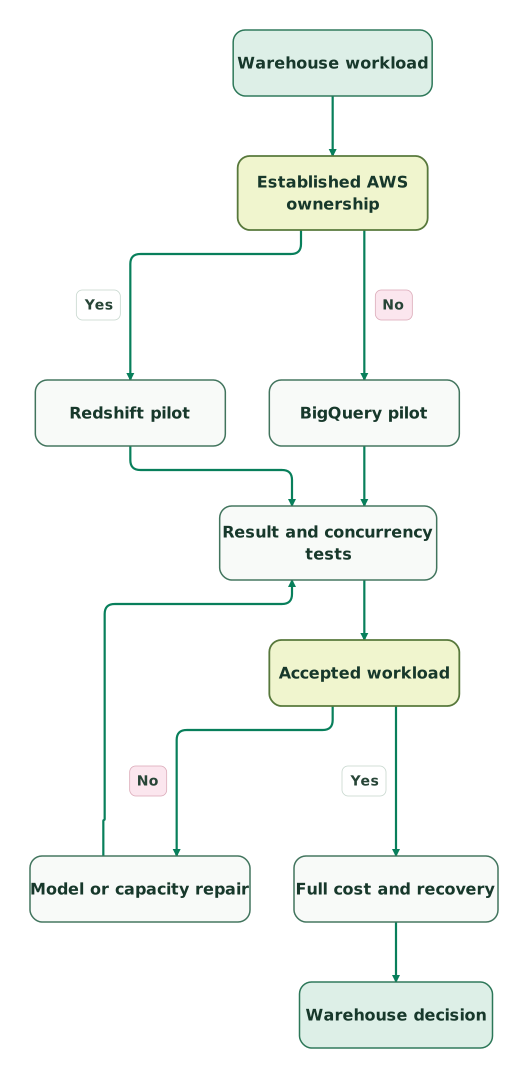
Read diagram as text
- Warehouse workload to Established AWS ownership.
- Established AWS ownership to Redshift pilot: Yes.
- Established AWS ownership to BigQuery pilot: No.
- Redshift pilot to Result and concurrency tests.
- BigQuery pilot to Result and concurrency tests.
- Result and concurrency tests to Accepted workload.
- Accepted workload to Model or capacity repair: No.
- Model or capacity repair to Result and concurrency tests.
- Accepted workload to Full cost and recovery: Yes.
- Full cost and recovery to Warehouse decision
BigQuery and Redshift purchase checklist
- A complete inventory of sources, transformations, reports and owners.
- Representative queries and a realistic period of overlapping work.
- Reconciled outputs by business key, period and segment.
- Explicit regional prices and the selected compute billing model.
- Observed usage units rather than a conversion between unrelated resources.
- Separate storage, transfer, backup and ingestion estimates.
- Tested cost controls with an escalation path for legitimate work.
- Restricted-access and recovery evidence.
- A migration budget including overlap, training and retirement criteria.
The marketing data audit skill can organize the source and reconciliation evidence. Keep the accepted queries and results with the purchase record so the team can assess future tuning against the same workload.
Keep reading
Browse all Data Warehouse guides
 Data Warehouse
ClickHouse vs BigQuery: Query Workloads, Costs and Data Design
Choose ClickHouse or BigQuery by query workload and ownership. Compare current billing units, correction behavior, serving needs and a practical pilot.
Jafrin Akter AloLast updated 10 min read
 Data Warehouse
ClickHouse vs Redshift: Analytical Serving, Warehousing and Cost
Compare ClickHouse and Redshift for analytical serving and warehouse workloads, with current compute units, replay correctness, cost examples and a pilot checklist.
Jafrin Akter AloLast updated 11 min read
 Data Warehouse
Marketing Data Warehouse: Sources, Models and Setup
Plan a marketing data warehouse finance trusts: sources to load, models to build, BigQuery or Snowflake choice, setup steps and a launch checklist.
Jafrin Akter AloLast updated 21 min read
Data warehouse & CDP
See the implementation scope, deliverables and acceptance checks.
Questions people ask
Is Redshift Serverless billed like BigQuery on-demand scans?
Redshift Serverless and BigQuery on-demand scans use different billing units. Redshift Serverless charges for capacity-time usage in RPU-hours, while BigQuery on-demand query charges depend on processed bytes. Measure the same accepted workload in each configuration before comparing totals. The relevant references are Redshift billing and BigQuery pricing.
Does choosing a warehouse in the existing cloud always produce the lowest cost?
Choosing a warehouse in the existing cloud does not guarantee the lowest total cost. It can preserve useful integrations, skills and access processes, but query behavior and resource use still matter. Include migration, data movement, recurring operations and the required reporting service level. Compare a qualified design in each environment instead of assuming that location decides everything.
Can Redshift automatic table optimization repair an incorrect business join?
Redshift automatic table optimization does not define the business meaning of a join. It can adjust sort and distribution design based on workload, while the team remains responsible for relationship grain and duplicate handling. Reconcile the output before evaluating performance. AWS describes the physical optimization scope in its automatic table optimization guide.
Should BigQuery migration estimates use stored terabytes as query usage?
BigQuery migration estimates should keep stored data separate from processed query bytes. A small table queried repeatedly can produce substantial processing, while partitioned access can read only part of a larger table. Estimate the actual query shapes and frequency, then compare the observed usage with the BigQuery pricing model.
Is a Serverless maximum-capacity setting a complete monthly budget cap?
A Serverless maximum-capacity setting limits the compute capacity available to a workgroup, rather than every component of monthly spend. Runtime and other charges still matter, and an overly low setting can delay work. Pair the setting with usage monitoring and a business escalation path. See AWS capacity-control guidance.
Sources

Written by
Jafrin Akter AloData Engineer and Co-founder at Martechdevs and Growth and Analytics Partners
Jafrin writes practical guides to marketing technology, customer data, analytics and AI workflows. Martechdevs is a Growth and Analytics Partners company.