
ClickHouse vs BigQuery: Query Workloads, Costs and Data Design
Pick ClickHouse for a repeated analytical query workload that justifies deliberate table design and a measured response-time target; pick BigQuery for a broader warehouse workload with managed query capacity and a strong Google data connection. ClickHouse vs BigQuery depends on the queries, freshness and ownership you need. A vendor benchmark or a storage-volume estimate cannot settle the decision alone.
On this page
ClickHouse vs BigQuery at a glance
USD example rates below use ClickHouse Cloud Scale on AWS Northern Virginia and BigQuery on-demand queries in Iowa; the billing units differ.
| Decision | ClickHouse Cloud | BigQuery |
|---|---|---|
| Compute price basis | Scale: $0.2985 per compute-unit-hour in the selected region | $6.25 per TiB processed after the monthly free allowance in the selected region |
| Compute unit | One unit is 8 GiB RAM and two vCPUs | On-demand bytes processed; capacity options use slot-hours |
| Storage basis | Compressed storage billed separately; selected rate $25.30/TB/month | Separate storage, with logical and physical billing options |
| Free evaluation | $300 Cloud credit for up to 30 days; open-source distribution available | First 1 TiB of queries and 10 GiB storage free monthly within applicable terms |
| Main design decision | Ordering keys aligned with recurring query filters | Partitioning, clustering and query scope aligned with access patterns |
The current rate and allowance sources are ClickHouse pricing and BigQuery pricing. ClickHouse rates vary by plan, cloud and region. BigQuery also offers capacity pricing, so a per-TiB example does not describe every BigQuery deployment.
We would start a ClickHouse pilot when a product or operational interface repeatedly asks a recognizable family of analytical questions. We would start a BigQuery pilot when the team needs a general warehouse for transformations, ad hoc analysis and reporting, especially with Google-based data. These are shortlist recommendations; the acceptance evidence must come from the actual workload.
At Martechdevs, we turn that workload into source models, reporting contracts and validation through our data warehouse implementation service. The purchase decision becomes clearer after the team defines the rows, query patterns and recovery requirements it will own.
ClickHouse and BigQuery decision blocks
ClickHouse
- Best for: A defined analytical serving workload with repeated filters, aggregations and a response-time requirement that the team can measure.
- Pros: Ordering keys and sparse primary indexes can reduce the data read for aligned filters. That creates a direct design opportunity for a known access pattern. See primary-key guidance.
- Cons: Table design and update semantics need deliberate ownership. Copying a transactional schema without reconsidering the analytical workload can miss the intended benefit.
- Free plan and startup offer: Cloud provides $300 credit for 30 days or until the credit is exhausted. The open-source distribution has no software purchase price, but infrastructure remains yours. No startup credit beyond an approved offer is assumed. See ClickHouse pricing.
- Choose it if: A representative test meets the latency, freshness and concurrency requirements with a design your team can explain and maintain.
- Skip it if: The recommendation rests only on a generic speed claim, with no measured workload or owner for data layout and corrections.
BigQuery
- Best for: A general analytical warehouse where the team wants managed query resources and can control the scope of scans and transformations.
- Pros: On-demand pricing ties query compute to processed bytes, while capacity pricing provides a different resource model. Partitioning and clustering can reduce relevant reads. See pricing models and partitioned tables.
- Cons: Repeated broad scans can create a different bill from the one implied by stored data size. Unbounded dashboard queries need attention even in a managed service.
- Free plan and startup offer: The free usage tier includes 1 TiB of query processing and 10 GiB storage monthly. Startup credits have separate eligibility and are excluded from steady-state examples. See BigQuery free usage.
- Choose it if: The warehouse workload spans several teams and the proposed query and modeling controls keep cost and performance within the accepted range.
- Skip it if: An application-facing response requirement is assumed to work without testing representative interactions, concurrent requests and the chosen capacity arrangement.
Query patterns and the serving boundary
An internal analyst querying last quarter's revenue has a different job from a customer opening an interactive usage page. The analyst may accept a longer query and occasionally change the question completely. The customer-facing page may run the same aggregate many times with different account and time filters.
Write down that difference before comparing databases. For each query family, record the selected columns, filtered dates, tenant or account filter, aggregation and expected audience. Then record the acceptable response time and the busiest expected arrival pattern. These are business requirements, not performance claims about either vendor.
A narrow workload gives ClickHouse's ordering design something concrete to target. ClickHouse recommends prioritizing columns frequently used in selective filters, and explains how data order affects compression and scanning. A tenant-and-date access pattern deserves a design built around that behavior rather than an arbitrary key chosen during ingestion. See ordering-key design.
BigQuery partitioning divides a table into segments, allowing relevant filters to limit the data considered. Its query optimization guidance also recommends reducing unnecessary projection and work. A team can therefore change cost and performance by changing model and query design, before changing database products. See partitioning and query computation guidance.
If both jobs exist, a combined architecture may be worth evaluating. Keep the broad warehouse as the durable analytical source and publish a bounded serving dataset for a specific interface. That adds another pipeline and reconciliation responsibility. The serving copy needs an explicit freshness target and a clear answer for which system owns a corrected metric.
Corrected records and event identity
Event data rarely stays perfectly immutable. A payment can be refunded, a device event can arrive twice and an account can move between segments. The storage engine's behavior matters because a fast query over duplicate or obsolete rows can produce a convincing wrong result.
ClickHouse's ReplacingMergeTree supports versioned rows, with deduplication occurring during merges. Its documentation warns that background replacement provides eventual correctness and that queries may need explicit correctness logic such as FINAL. Choose the engine and query contract around the required result, then measure the actual implementation. See ReplacingMergeTree guidance.
That is particularly relevant to revenue and current-account-state tables. Define whether the reader needs the latest accepted record or the full history of changes. Give repeated events a stable identity and give updates a deterministic ordering. Include a replayed batch and an older update arriving after a newer update in the test data.
BigQuery also needs an explicit correction process. Decide whether a load appends raw history, rebuilds a partition or updates a modeled result. Document the identity and period rules in the pipeline. The point is to make the business result repeatable, rather than assuming the warehouse will infer which duplicate or late record should win.
The late-arriving marketing data guide helps define that boundary. Our data warehouse design guide separates raw history from the models readers should query.
BigQuery vs ClickHouse cost examples
These hypothetical examples demonstrate billing units, not equal-performance configurations. They use the regional rates in the lead table, exclude taxes, ingestion, backups, transfer, support and implementation, and do not apply trial credits. BigQuery examples assume the full monthly 1 TiB free query allowance is available.
| Hypothetical usage | Calculation | Amount | Scope |
|---|---|---|---|
| BigQuery, 11 TiB processed in a month | (11 minus 1) × $6.25 | $62.50 | Query compute only |
| BigQuery, 100 TiB processed in a month | (100 minus 1) × $6.25 | $618.75 | Query compute only |
| ClickHouse Scale, 600 compute-unit-hours | 600 × $0.2985 | $179.10 | Compute only |
| ClickHouse, 0.25 TB compressed data retained for a full month | 0.25 × $25.30 | $6.33 | Storage rounded to cents |
| ClickHouse illustrative compute plus data storage | $179.10 + $6.325 | $185.43 | Excluded charges still additional |
Inputs come from the ClickHouse regional pricing page and BigQuery pricing. Compute-unit-hours are aggregate measured usage across the service's resources. They are not a proposed replica configuration. Likewise, processed TiB describes query work, not the amount of data retained.
A simple query-frequency sensitivity makes the BigQuery unit clearer. Assume each uncached execution processes 0.02 TiB and the report runs 500 times per month. That is 10 TiB, or (10 minus 1) × $6.25 = $56.25 under the stated allowance. At 5,000 executions, the same query shape processes 100 TiB, producing the $618.75 example. Actual cache behavior and query changes alter the bill.
BigQuery does not reduce processed-byte billing merely because a query adds a result LIMIT. Select the required columns and use appropriate filtering instead. Its pricing guide also documents maximum-bytes-billed controls. See query billing details.
For ClickHouse, keep compressed data, retained backups, ingestion and data transfer as separate worksheet rows. The vendor's compression illustration is not a guarantee for your data. Use a representative loaded sample and the actual retained footprint before extrapolating storage cost.
The BigQuery pricing guide helps expand the warehouse budget. If AWS is a major constraint, BigQuery vs Redshift covers that decision, while ClickHouse vs Redshift compares analytical serving with an AWS warehouse shortlist. The software pricing tool can keep recurring platform costs separate from one-time work.
Availability, idling and operational ownership
ClickHouse Cloud Basic and Scale are different operating propositions. The current tier documentation describes Basic as a smaller single-zone option, while Scale supports multiple zones and scaling capabilities. A trial on a small Basic service should not silently become the production availability design. See Cloud tiers.
ClickHouse also describes scaling idle compute to zero, with retained storage continuing to be billed. Include a first request after inactivity in a pilot if that behavior is enabled and the response time matters. The existence of an idle-saving feature does not establish the first-request experience for your workload. See ClickHouse billing behavior.
For both products, separate the database's availability from the freshness of the data it serves. A reachable database can still contain yesterday's failed import. Define the point at which readers should see a stale-data indicator and the person responsible for replaying or repairing the pipeline.
Recovery needs an observed result. Select a representative dataset, identify the recovery mechanism and restore it into an isolated destination. Reconcile a known total and verify the reader's access. The business acceptance condition should describe the recoverable data window and the time available to restore service.
Best fit by workload
| Company or operating model | Best fit | Runner-up | Decision reason |
|---|---|---|---|
| Product with repeated account-and-time analytical queries | ClickHouse pilot | BigQuery | A known serving pattern can guide physical design |
| Marketing team building a broad Google-centered warehouse | BigQuery | ClickHouse | General warehouse and reporting work dominates |
| Organization with a trusted warehouse and one demanding serving feature | Warehouse plus a bounded ClickHouse copy | Warehouse-only design | Added pipeline cost must earn its place |
| Team with frequent source corrections and unclear record identity | Identity and correction design first | Either qualified database | Incorrect row versions undermine both candidates |
| Small team with occasional analytical queries | BigQuery on-demand pilot | ClickHouse Cloud | Query frequency and maintenance scope deserve the first test |
Warehouse and serving pilot
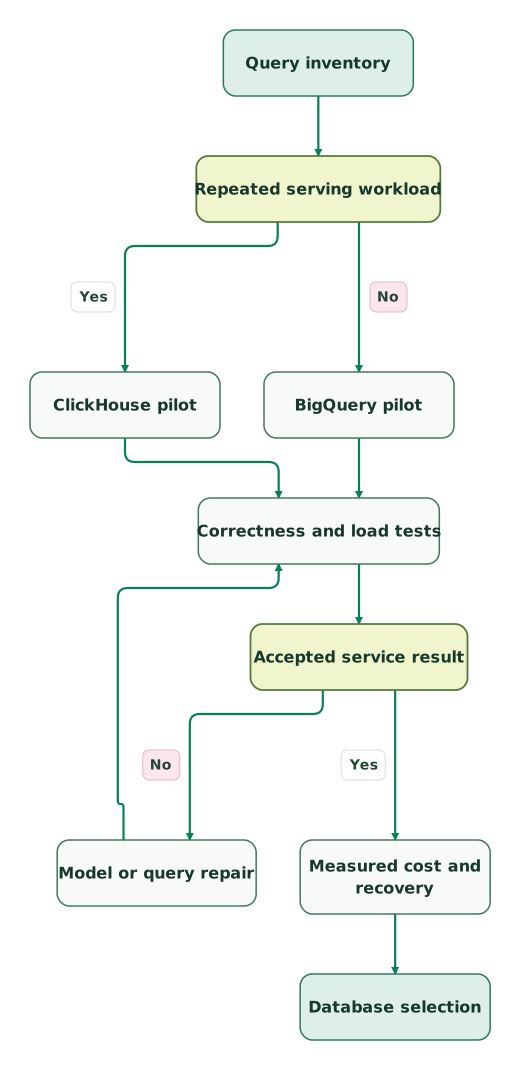
The diagram uses the recurring workload to form a shortlist. Both candidates must pass result and load validation. A failed test returns to the model or query design and repeats validation before cost and operations review.
Read diagram as text
- Query inventory to Repeated serving workload.
- Repeated serving workload to ClickHouse pilot: Yes.
- Repeated serving workload to BigQuery pilot: No.
- ClickHouse pilot to Correctness and load tests.
- BigQuery pilot to Correctness and load tests.
- Correctness and load tests to Accepted service result.
- Accepted service result to Model or query repair: No.
- Model or query repair to Correctness and load tests.
- Accepted service result to Measured cost and recovery: Yes.
- Measured cost and recovery to Database selection
ClickHouse and BigQuery evaluation checklist
- A query inventory with realistic filters, dates and selected columns.
- Explicit response-time, freshness and concurrency requirements.
- A reconciled source sample with duplicates and late corrections.
- Table design aligned with the proposed access pattern.
- Separate warm, uncached and post-idle observations where relevant.
- A budget built from measured billing units and the chosen region.
- Ingestion, storage, backup and transfer costs outside the compute subtotal.
- A restricted-reader test and an observed recovery exercise.
- A named owner for pipeline failures and versioned-record behavior.
Use the marketing data audit skill to organize the identity, metric and ownership evidence. Preserve the pilot inputs and query definitions so later tuning can be compared with the same accepted business result.
Keep reading
Browse all Data Warehouse guides
 Data Warehouse
BigQuery vs Redshift: Warehouse Costs, Workloads and Cloud Fit
Compare BigQuery and Redshift by cloud ownership, query workload and complete cost. Review current billing units, migration examples and acceptance checks.
Jafrin Akter AloLast updated 11 min read
 Data Warehouse
ClickHouse vs Redshift: Analytical Serving, Warehousing and Cost
Compare ClickHouse and Redshift for analytical serving and warehouse workloads, with current compute units, replay correctness, cost examples and a pilot checklist.
Jafrin Akter AloLast updated 11 min read
 Data Warehouse
Marketing Data Warehouse: Sources, Models and Setup
Plan a marketing data warehouse finance trusts: sources to load, models to build, BigQuery or Snowflake choice, setup steps and a launch checklist.
Jafrin Akter AloLast updated 21 min read
Data warehouse & CDP
See the implementation scope, deliverables and acceptance checks.
Questions people ask
Is ClickHouse automatically faster than BigQuery for every dashboard?
ClickHouse is not automatically faster for every dashboard. The useful comparison depends on query shape, data layout, concurrency, freshness and the chosen service configuration. Test the actual dashboard interactions against an agreed response-time target. Keep result correctness and cost alongside elapsed time, and avoid turning a vendor's different benchmark workload into a guarantee for your application.
Can a BigQuery LIMIT clause control the scan bill?
A BigQuery LIMIT clause does not by itself reduce the bytes charged for the selected columns. Use appropriate column selection, partition and cluster filtering, and query cost controls. The expected bill should come from the query's processed-byte estimate or observed usage, rather than the number of displayed rows. See BigQuery billing details.
Does ReplacingMergeTree immediately remove every older ClickHouse row version?
ReplacingMergeTree does not guarantee that every older row version disappears immediately. Background merges provide eventual replacement, so the query design must account for the required correctness before merges finish. Test out-of-order updates and replayed batches, and measure any query-time correction approach. The ReplacingMergeTree guide explains the behavior and relevant tradeoffs.
Can BigQuery remain the source while ClickHouse serves an application feature?
BigQuery can remain the analytical source while a bounded ClickHouse dataset serves a specific feature, provided the team owns the extra pipeline and reconciliation. Define which data is copied, its freshness target and the correction process. The combined design is justified only if the measured serving benefit exceeds the extra cost and operational responsibility.
Are ClickHouse compute units directly comparable with BigQuery slots?
ClickHouse compute units and BigQuery slots are different billing and execution units, so a one-for-one comparison is misleading. Measure the accepted workload in each proposed configuration and apply that product's rate. Include retained data, ingestion and transfer separately. Equal spending or equal nominal resource counts do not establish equal throughput, latency or reliability.
Sources

Written by
Jafrin Akter AloData Engineer and Co-founder at Martechdevs and Growth and Analytics Partners
Jafrin writes practical guides to marketing technology, customer data, analytics and AI workflows. Martechdevs is a Growth and Analytics Partners company.