
Amplitude vs Google Analytics for acquisition and product decisions
Pick Google Analytics for acquisition measurement and workflows connected to Google advertising; pick Amplitude when product behaviour, activation and retention drive the recurring decisions. Amplitude vs Google Analytics also allows a shared setup when the two tools have distinct responsibilities. Define the business events and identity once, then compare the required analysis, export, retention and operating cost before replacing a working implementation.
On this page
Amplitude vs Google Analytics comparison
The comparison concerns current Amplitude offers and Google Analytics 4, with usage and export units kept separate.
| Decision | Amplitude | Google Analytics |
|---|---|---|
| Free entry | 2 million events/month; unlimited seats | Standard analytics without a licence charge |
| Paid scope | Plus starts at $0 with first 2 million events free; higher usage and plans change cost | Analytics 360 and other services have separate commercial terms |
| Primary shortlist job | Product behaviour, activation and retention | Acquisition, campaign measurement and Google Ads workflows |
| Native adjacent scope | Replay, experiments and guides, with plan limits | Google advertising links and BigQuery export |
| Key budget boundary | Monthly event volume and required entitlements | Implementation, warehouse use and required service limits |
Sources: Amplitude pricing, Google Analytics product overview, Google key events and conversions and BigQuery export.
At Martechdevs, we connect acquisition and in-product behaviour through product analytics implementation. We would use Google Analytics to support the marketing team's acquisition questions and advertising workflow. We would put Amplitude on the shortlist when product managers need a maintained behavioural model that helps them decide what to improve after acquisition.
Those are priorities rather than exclusive capabilities. Google Analytics can analyse product events, and Amplitude includes marketing analytics. The useful evaluation compares the actual questions, required destinations and the team maintaining the definitions.
Tool decisions
Amplitude
- Best for: Product teams making regular decisions about activation, feature adoption, retention and behavioural differences between groups.
- Pros: The platform combines analytics with replay, experimentation and guides. Guides can use properties or cohorts to connect an analytical audience with an in-product message. Plans, guide targeting.
- Cons: Events and identities need a maintained contract. More capture can change both the bill and the meaning of a report if event definitions drift.
- Free plan and startup offer: Free includes 2 million monthly events and 10,000 replays. The startup offer advertises one Growth year for eligible companies below $10 million funding and fewer than 20 employees, subject to acceptance. Current pricing.
- Choose it if: A product or analytics owner can name recurring behavioural decisions and maintain the events and identities needed to support them.
- Skip it if: The organization mainly needs campaign reporting and has no owner for a separate product-analysis workflow.
A useful Amplitude pilot begins with an outcome beyond account creation. Define the event representing a useful completed task and the eligible users who had an opportunity to perform it. Then examine the steps, delays and segments associated with that outcome. The result should lead to a decision, rather than another dashboard whose audience is unclear.
Avoid copying every Google Analytics event automatically into a new product model. Some events describe technical collection, some describe acquisition, and some describe meaningful product work. Keep the distinctions explicit and retain only the data needed for the accepted questions and downstream uses.
Google Analytics
- Best for: Marketing teams measuring acquisition and campaign outcomes, especially when Google advertising is part of the operating workflow.
- Pros: Google Analytics connects with Google's advertising tools, and key events can support Google Ads conversion measurement. BigQuery export provides a route for warehouse analysis. Product integrations, conversion definitions.
- Cons: Reporting scope, identity, attribution and export settings require agreement. A free reporting licence does not include all implementation and warehouse costs.
- Free plan and startup offer: Standard Google Analytics is available without a licence charge. Analytics 360 is a separate paid scope; no startup credit is assumed to replace the implementation or warehouse budget. Google Analytics overview, standard and 360 export scope.
- Choose it if: Acquisition reporting and the advertising workflow define the core requirement, with an owner for event and conversion configuration.
- Skip it if: The purchase decision assumes the default reports will answer a complex product-retention question without additional modelling and validation.
A Google Analytics pilot should include the complete marketing path. Follow a campaign visit through the important business action and verify the intended reporting and advertising configuration. A key event appearing in Analytics does not by itself establish that the correct Google Ads conversion action is configured for the intended bidding use.
Google distinguishes key events from conversions: key events mark important business actions in Analytics, while conversions support advertising performance and bidding workflows. Google's definitions. Keep the team's naming and documentation aligned with the action each system is actually using.
Acquisition and activation responsibilities
Separate the customer journey into decisions, rather than assigning an entire journey to whichever tool was installed first.
| Decision | Required population | Metric or evidence | Likely owner |
|---|---|---|---|
| Campaign allocation | Eligible campaign traffic | Agreed acquisition outcome and cost | Marketing |
| Signup friction | Users entering the signup flow | Attempts, successful creation and failure context | Growth and product |
| Activation | New users eligible for the useful task | Confirmed completion within a defined window | Product |
| Retention | A defined starting cohort | A meaningful return action in the later period | Product analytics |
| Revenue contribution | Accepted customers or transactions | Reconciled billing value and attribution definition | Finance and marketing |
The same event can contribute to several decisions, but the metric may use a different denominator. A campaign report might divide conversions by sessions. A product report might divide activated users by newly eligible accounts. Matching the numerator alone does not make the rates comparable.
Create an event contract with the action, triggering condition, identifier, timestamp, properties and owner. The tracking-plan guide provides that structure. Use the event-naming guide to keep attempts, successes and failures distinguishable.
A dual-tool setup can work if each official metric has an agreed definition. Name the system used for the marketing report and the system used for the product decision. Where the same measure appears in both, document the expected differences and reconcile a common sample. Avoid making every discrepancy an open-ended debate about which tool is right.
Identity and measurement reconciliation
Amplitude associates activity using device IDs, supplied user IDs and Amplitude IDs. Its guidance recommends a stable user ID after authentication and avoiding assigned user IDs for anonymous visitors. Amplitude identity rules.
Use an implementation sample that covers anonymous browsing, first sign-in, repeat sign-in, another device and account switching. Write the expected person and account for each event before checking the resulting reports. Stable identifiers are especially important when acquisition and activation occur in different systems or on different domains.
A metric comparison also needs aligned time windows and populations. In a hypothetical example, suppose Google Analytics reports 1,000 eligible sessions and 80 successful signup events. That session-based rate is 8%. Suppose the product analysis identifies 600 distinct eligible users and the same 80 successful users. That user-based rate is approximately 13.33%.
| Hypothetical metric | Numerator | Denominator | Result |
|---|---|---|---|
| Session-based signup rate | 80 signup events | 1,000 sessions | 8% |
| User-based signup rate | 80 successful users | 600 users | 13.33% |
The rates answer different questions even before considering repeated events, attribution or identity differences. For a fair comparison, select the same successful action, the same distinctness rule, the same time window and the same eligible population. Then inspect mismatched records rather than forcing the final percentages to agree.
The identity-resolution guide helps clarify the person-versus-account boundary. If the actual need is simpler website reporting, Google Analytics vs Plausible evaluates that narrower alternative.
Retention and warehouse export
Google Analytics' retention settings govern user-level and event-level data used in explorations and funnel reports. Standard properties provide 2-month and 14-month settings, with additional qualifications for large properties and particular data types. The setting does not remove the same history from standard aggregated reports. Google retention scope.
That distinction matters for a product analysis. A team might still see an older aggregate while lacking the event-level data required for a new historical exploration. Decide the necessary analysis window early and validate it in the chosen configuration. A retention setting is a data-planning decision, not merely an administrator preference.
Standard Google Analytics daily batch export to BigQuery has a one-million-event-per-day limit. Streaming export has a different scope, and BigQuery storage and query processing can create separate costs. The daily export limit is not a general one-million-event collection allowance. BigQuery export limits and billing.
Use daily peaks in the export plan. A hypothetical month with 10 million events could average around 333,333 events over 30 days, while a campaign day produces 1.2 million. That day exceeds the standard daily batch-export threshold even though the monthly average looks comfortable. Monitor the relevant daily quantity and the actual export result.
Amplitude's current entry offer measures monthly events. A workload of 100,000 events per day for an illustrative 30-day month is 3 million monthly events, above the 2-million-event Free allowance. The comparison with Google's daily export threshold concerns different limits. Amplitude pricing. Record each limit with its product, unit and time period.
Cost and operating scope
A zero licence price can coexist with material work. Budget implementation, schema changes, identity validation, report ownership and warehouse usage separately from the analytics subscription.
| Budget line | Amplitude scope | Google Analytics scope |
|---|---|---|
| Core subscription | Event volume and required plan | Standard or separately scoped 360 |
| Adjacent features | Required replay, guides and experiment entitlements | Required advertising and export configuration |
| Data preparation | Shared event and identity contract | Shared event and identity contract |
| Warehouse | Chosen export or integration design | BigQuery storage and query processing |
| Ongoing work | Product analysis and release validation | Acquisition reporting and conversion validation |
For an illustrative maintenance comparison, assume a team spends four hours each month reconciling duplicated definitions at an internal planning value of $75 per hour. That is $300 per month and $3,600 per year. These are hypothetical values, not a forecast of savings from either product. A shared definition may reduce that work without replacing either tool.
Use the software pricing tool to keep subscription and operating assumptions visible. If a startup offer applies to Amplitude, obtain the ordinary renewal scope and price before approving a long-term dependency. The Amplitude vs Pendo guide helps if guide operations become part of the required paid plan.
Best fit by organization
| Company size or operating model | Best fit | Runner-up | Decision reason |
|---|---|---|---|
| Marketing team focused on Google advertising | Google Analytics | Amplitude | Acquisition and conversion configuration drive work |
| SaaS product team investigating activation and retention | Amplitude | Google Analytics with a defined product model | Behavioural analysis has an accountable owner |
| Company with distinct marketing and product teams | A bounded shared setup | A single qualified platform | Separate decisions can justify separate working surfaces |
| Small content site needing only clear traffic trends | A simple website-analytics shortlist | Google Analytics | Product analysis may exceed the actual requirement |
| Team with conflicting event definitions | Event-contract repair | Either platform after validation | A tool change cannot reconcile different meanings |
Analytics decision workflow
The diagram uses the main operating decision to form the pilot, then requires identity and metric validation before cost and retention approval.
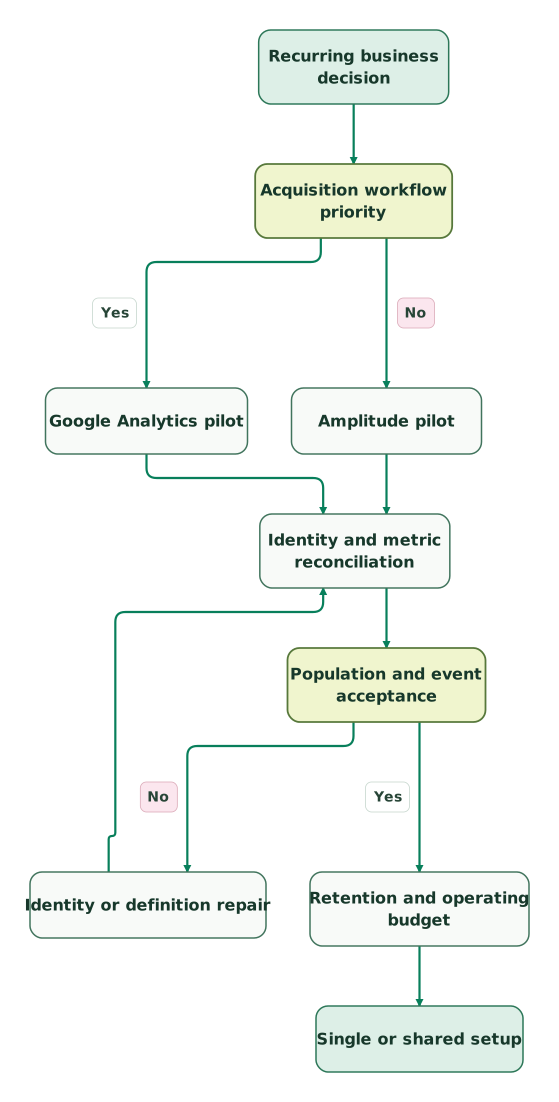
Read diagram as text
- Recurring business decision to Acquisition workflow priority.
- Acquisition workflow priority to Google Analytics pilot: Yes.
- Acquisition workflow priority to Amplitude pilot: No.
- Google Analytics pilot to Identity and metric reconciliation.
- Amplitude pilot to Identity and metric reconciliation.
- Identity and metric reconciliation to Population and event acceptance.
- Population and event acceptance to Identity or definition repair: No.
- Identity or definition repair to Identity and metric reconciliation.
- Population and event acceptance to Retention and operating budget: Yes.
- Retention and operating budget to Single or shared setup
A repaired event definition returns to the same reconciliation sample. Validate both the success condition and the denominator, then check the relevant downstream destination. A corrected product metric does not automatically correct an advertising conversion action that was configured separately.
Evaluation checklist
- Name the acquisition or product decision and its owner.
- Define successful actions separately from attempts and failures.
- Agree user, account, session and event counting rules.
- Test anonymous, authenticated and cross-device journeys.
- Reconcile the same time window and eligible population.
- Confirm retention and export limits with their exact units.
- Repeat downstream validation after event or identity repairs.
- Approve the subscription, warehouse and maintenance budget.
Use the tracking-plan audit skill to organize the definitions and sample evidence. Keep that accepted sample with the implementation so future releases can repeat the comparison.
Keep reading
Browse all Product Analytics guides
 Product Analytics
Google Analytics vs Plausible for website reporting
Choose Plausible or Google Analytics by website reporting needs, visitor identity and advertising dependencies, with usage costs and migration checks.
Jafrin Akter AloLast updated 11 min read
 Product Analytics
Best Product Analytics Tools for Startups: 7 Options Compared by the Job They Do
Compare GA4, Mixpanel, Amplitude, PostHog, Heap, Pendo and Statsig on free tiers, experiments, server-side events, raw data export and warehouse options.
Jafrin Akter AloLast updated 27 min read
 Tracking & Attribution
GA4 pricing: what standard GA4 costs and how Analytics 360 is priced
Standard GA4 has no licence fee and Analytics 360 has no public price. See how 360 is quoted and billed, which limits change and what the exports cost.
Jafrin Akter AloLast updated 12 min read
Product analytics
See the implementation scope, deliverables and acceptance checks.
Questions people ask
Can Google Analytics and Amplitude remain installed together?
Google Analytics and Amplitude can remain together when each has a clear operating role and the shared definitions are maintained. A marketing team may use Google Analytics for acquisition and advertising, while product uses Amplitude for activation and retention. Avoid duplicated event logic where possible and document which system supplies each official metric and downstream action.
Is Google Analytics' one-million-event limit a monthly collection cap?
The one-million-event limit discussed here is the standard property's daily batch export limit to BigQuery, rather than a monthly collection cap. Streaming export has different terms, and warehouse charges remain separate. Plan around daily peaks and verify the export result, especially during campaigns or product launches. Google export limits.
Does Google Analytics erase all reports after fourteen months?
Google Analytics does not erase all standard reports after fourteen months under the event-retention setting. That setting affects user-level and event-level data used in explorations and funnel reports, while standard aggregated reports have a different scope. Confirm the required historical analysis and the applicable property qualifications before relying on an older reporting window. Retention guidance.
Are Google Analytics key events already Google Ads conversion actions?
A Google Analytics key event and a Google Ads conversion action serve distinct configured roles. Key events identify important business actions in Analytics; conversions support advertising performance and bidding workflows. Verify that the intended action is created and configured correctly for the linked advertising use, rather than assuming the key-event label completes that setup. Google definitions.
Can matching signup totals prove the two analytics implementations agree?
Matching signup totals cannot prove that two analytics implementations agree. They may count different users, sessions, timestamps or repeated attempts, and offsetting errors can produce the same total. Compare a shared record sample, align the success condition and denominator, then reconcile by date and segment. Keep expected differences explicit instead of adjusting definitions solely to force agreement.
Sources

Written by
Jafrin Akter AloData Engineer and Co-founder at Martechdevs and Growth and Analytics Partners
Jafrin writes practical guides to marketing technology, customer data, analytics and AI workflows. Martechdevs is a Growth and Analytics Partners company.