
Termly Alternatives for Policies, Consent and Website Tag Control
Choose iubenda when legal documents and consent controls need a combined replacement, Cookiebot when website scanning and tag control lead the decision, or CookieYes for a domain-based setup with explicit traffic tiers. Termly alternatives should replace every job the current subscription performs. Compare policy coverage, consent behavior and usage costs before moving the banner or cancelling hosted documents.
On this page
Termly competitors compared
These are public USD monthly starting configurations before taxes and introductory offers; usage allowances and document scope differ.
| Alternative | Starting price and billing unit | Best fit | Main tradeoff |
|---|---|---|---|
| iubenda | Essentials $6.99/site/month; $5.99/month equivalent billed yearly | Policies and consent controls in one selected package | Clauses, languages, documents and traffic need qualification |
| Cookiebot | Premium Lite $10/domain/month for one domain with fewer than 50 subpages under its FAQ rules | A focused website consent and scanning requirement | Additional domains and page counts change eligibility |
| CookieYes | Basic $10/domain/month with 600 pages per scan and 100,000 monthly pageviews | A bounded domain and traffic workload | Scanned pages and pageviews are separate limits |
iubenda pricing, Cookiebot US pricing and CookieYes pricing provide those starting configurations.
Termly itself combines policy and consent work. Its monthly Starter offer is $14 per website with two policies and 50,000 banner views; Pro+ is $20 with unlimited policies, edits and banner views. A replacement that handles consent alone may leave a document-maintenance job behind. Termly pricing
At Martechdevs, we would inventory the policy links, consent state and tags controlled by the existing setup before choosing a replacement. Our analytics and tracking implementation service covers the technical mapping and acceptance checks that make the change reviewable.
The Termly replacement inventory
Separate the work into policy documents, visitor choices, technical enforcement and retained evidence. The person responsible for privacy requirements should approve the document and regional scope. The implementation owner should show how those requirements become banner settings and tag behavior.
| Current responsibility | Replacement decision | Evidence to retain |
|---|---|---|
| Hosted privacy and cookie documents | New documents, approved retained documents or another maintained source | Current links, contents, versions and responsible owner |
| Terms and other policies | Equivalent document coverage in the chosen package | Required languages, clauses and review process |
| Visitor preferences | Deliberate treatment of existing choices and new interactions | Category mapping, settings and withdrawal route |
| Tag control | An implementation that applies the approved choices | Before-choice, acceptance and rejection observations |
| Consent records | Required historical and future evidence in an accessible location | Available export fields, retention arrangements and access owner |
Do not assume that moving the visible banner transfers the policies it links to. Check footer links, forms, checkout pages and embedded documents separately. A policy URL can remain visible in a template while its underlying document has lost its maintained source.
The same principle applies to the old consent record. A visitor's existing choice should have an explicit treatment during cutover. Confirm the supported migration route and category meanings before attempting to reuse stored choices. A fresh banner display is a product and privacy decision with consequences for returning visitors.
For wider privacy operations, the OneTrust alternatives guide covers requirements beyond a website consent replacement. Keep this Termly assessment focused on the policies, banner and enforcement jobs actually in use.
Alternative decision blocks
iubenda for documents and consent together
- Best for: A business replacing both Termly's document tools and website consent controls in one maintained package.
- Pros: Essentials includes a privacy and cookie policy plus consent controls; higher packages add broader document and language scope.
- Cons: Essentials has a 25,000-pageview starting allowance and one language. Terms and Conditions require Advanced or Ultimate, so the entry rate may not cover the current policy set.
- Free plan and startup offer: Free includes limited policy clauses, one language and up to 5,000 monthly pageviews. Its banner is disabled for the month when that threshold is reached. Paid plans have a 14-day refund window, rather than an assumed no-payment trial. No startup concession is included here. Free limitations and billing FAQ
- Choose it if: The required documents, clauses, languages and consent behavior are covered by the selected package and its ongoing usage cost.
- Skip it if: The apparent saving depends on leaving a required document or language outside the subscription.
iubenda distinguishes its policy generator from the Privacy Controls and Cookie Solution. A published document explains processing; the technical solution handles the banner and configured script controls. Treat these as related implementation tasks with separate acceptance evidence. iubenda policy and consent products
Ongoing document access also matters. Its billing FAQ says a paid privacy policy cannot continue to be used when the paid plan is not renewed. Record that condition in the operating handover and budget rather than treating generated documents as a one-time purchase.
Cookiebot for scanning and tag control
- Best for: A website team with a clear policy source that mainly needs consent collection, scanning and controlled tag behavior.
- Pros: Pricing follows subpages rather than traffic volume, which can suit a site with a bounded URL inventory and high visitor activity.
- Cons: Premium Lite is limited to one domain. Adding another domain changes the applicable arrangement, and each domain has its own tier.
- Free plan and startup offer: The FAQ offers Free for one domain with fewer than 50 subpages and no Premium features. A 14-day trial provides Premium features without a credit card; no startup discount is assumed. Cookiebot plans
- Choose it if: The scan and blocking behavior pass on the site's actual templates, and the required policy documents already have an owned destination.
- Skip it if: The expected saving assumes a small page count that the scan does not support or ignores a required document service.
Automatic blocking needs more than a copied snippet. Cookiebot describes an initial scan and analysis for full coverage and provides specific script-placement and blocking-mode guidance. Evaluate the site after that analysis, including scripts introduced through templates, plugins and tag management. Cookiebot automatic blocking
The Cookiebot implementation guide covers deeper operational failures. In this selection, require evidence from the site's real templates rather than assuming the initial scan proves every future tag will remain controlled.
CookieYes for a defined domain workload
- Best for: A small business or agency choosing a consent setup around separate domain, scan and pageview allowances.
- Pros: Published traffic and scan limits make the basic workload straightforward to model; its Google Consent Mode guide provides a specific integration route.
- Cons: Pageviews above a paid allowance add cost, while a site with more scanned pages can need a different plan even at modest traffic.
- Free plan and startup offer: Free includes 100 pages per scan and 5,000 monthly pageviews. Paid plans advertise a 14-day trial. A separate startup discount is not assumed in the budget. CookieYes plans
- Choose it if: The actual domain and traffic profile fits the selected plan and the consent-state tests pass after installation.
- Skip it if: Necessary regional settings, scan scope or operating features belong to a higher package that the comparison has omitted.
CookieYes's Tag Manager route uses its template with the Consent Initialization trigger. The guide also points to separate handling for third-party scripts. Confirm the selected integration path instead of installing overlapping consent logic through both a plugin and Tag Manager. CookieYes Consent Mode setup
Billing units and a reproducible cost example
Count website URLs and traffic separately. Cookiebot subpages describe the site's unique URLs. CookieYes scan pages describe scan coverage, while its pageviews describe repeated traffic. Termly uses banner views in the stated allowances. Those units should not be substituted for one another in a budget.
Consider a hypothetical website with 300 scanned URLs, 125,000 monthly pageviews and a requirement for a single-language privacy and cookie policy. Assume the selected integrations work, policy clauses fit the chosen package, and the traffic quantities match each vendor's billable definition.
| Configuration | Calculation | Monthly subtotal | Scope qualification |
|---|---|---|---|
| CookieYes Basic | $10 + 25,000 extra pageviews ÷ 1,000 × $0.30 | $17.50 | 300 URLs fit its 600-page scan limit |
| Cookiebot Premium Small | Displayed $20/domain/month, subject to eligibility confirmation | Unconfirmed | The FAQ adds a four-domain minimum |
| iubenda Essentials | $6.99 + 100,000 extra pageviews ÷ 1,000 × $0.06 | $12.99 | 25,000 included pageviews; document scope must fit |
| Termly Pro+, retention option | Published $20/website/month | $20.00 | Different policy bundle and unlimited banner views |
CookieYes publishes the $0.30 rate for each additional 1,000 pageviews above Basic's allowance. iubenda's billing FAQ gives $0.06 per 1,000 extra pageviews on paid plans, invoiced separately. Both calculations use exact multiples of 1,000 so they do not assume a partial-block rounding policy. CookieYes usage and iubenda extra usage
Cookiebot's Small card lists up to 350 subpages, but the same pricing page's plan-switching FAQ describes 50 to 349 subpages with a minimum of four domains. The hypothetical site's 300 pages fit either page range; that does not establish single-domain eligibility. Confirm the applicable arrangement before treating the displayed $20 per-domain rate as this site's subtotal. Its Lite and Free cards also use an inclusive 50-page label while the FAQ uses fewer than 50, so confirm a site sitting on that boundary. Cookiebot tier rules
This is a capacity example, not a claim that the configurations replace the same documents. If Terms and Conditions are required from iubenda, its Advanced monthly base is $27.99 with 50,000 included pageviews. At the same hypothetical traffic, 75,000 extra pageviews add $4.50, giving a $32.49 monthly subtotal. The document requirement changes the decision more than the starting price.
Annualize only after fixing the scope. Twelve unchanged $17.50 monthly totals would be $210; twelve unchanged $12.99 totals would be $155.88. These are arithmetic illustrations with constant traffic, not annual-contract offers. Include implementation, policy review and any overlap separately. The software pricing tool helps organize the selected billing basis.
Consent state and tag behavior
Agree on the intended measurement mode before writing acceptance criteria. Google distinguishes basic Consent Mode, which blocks Google tags until the relevant interaction and consent, from advanced mode, which can send measurements without cookies while consent is denied. An observed request is therefore not sufficient by itself to diagnose a failed implementation. Inspect its consent state, storage behavior and the approved mode. Google Consent Mode overview
Google's setup guide requires a default state and updates based on the visitor's choice. Updates should occur on the page where the interaction happens, before navigation. The tag implementation must also preserve the choice for later pages because Consent Mode itself does not save it. Google consent setup
Keep the Google integration separate from the rest of the tag inventory. A consent-aware Google tag and a custom third-party script can respond differently. Require a documented control for every relevant script, including anything loaded outside Tag Manager.
The Consent Mode v2 guide explains the measurement design. The country-specific banner guide helps structure the regional implementation after the responsible privacy owner has set the applicable requirements.
Replacement acceptance cases
Use a clean test profile for each starting state and record the expected result before installation. These cases are proposed validation steps, not claims about tests already run on a customer site.
| Visitor state | Expected control | Evidence | Repair target |
|---|---|---|---|
| New visit before a choice | Approved defaults and corresponding tag behavior | Consent state, requests and storage | Script order or default mapping |
| Rejection | Excluded categories remain excluded under the approved mode | State change and later interactions | Category-to-tag mapping |
| Analytics-only selection | Analytics and advertising choices remain distinct | Separate consent values and tags | Overly broad acceptance mapping |
| Return visit | The valid saved choice is applied correctly | Initial state and subsequent navigation | Preference persistence |
| Withdrawal | The new choice controls subsequent behavior | Settings action, update and later events | Withdrawal handler or tag control |
Include a form submission and a purchase-like completion in the controlled sequence. A banner can appear correctly while an event handler sends data before the selected state is applied. Test a later page and a second interaction so a one-time successful update does not hide a persistence failure.
Policy and consent migration workflow
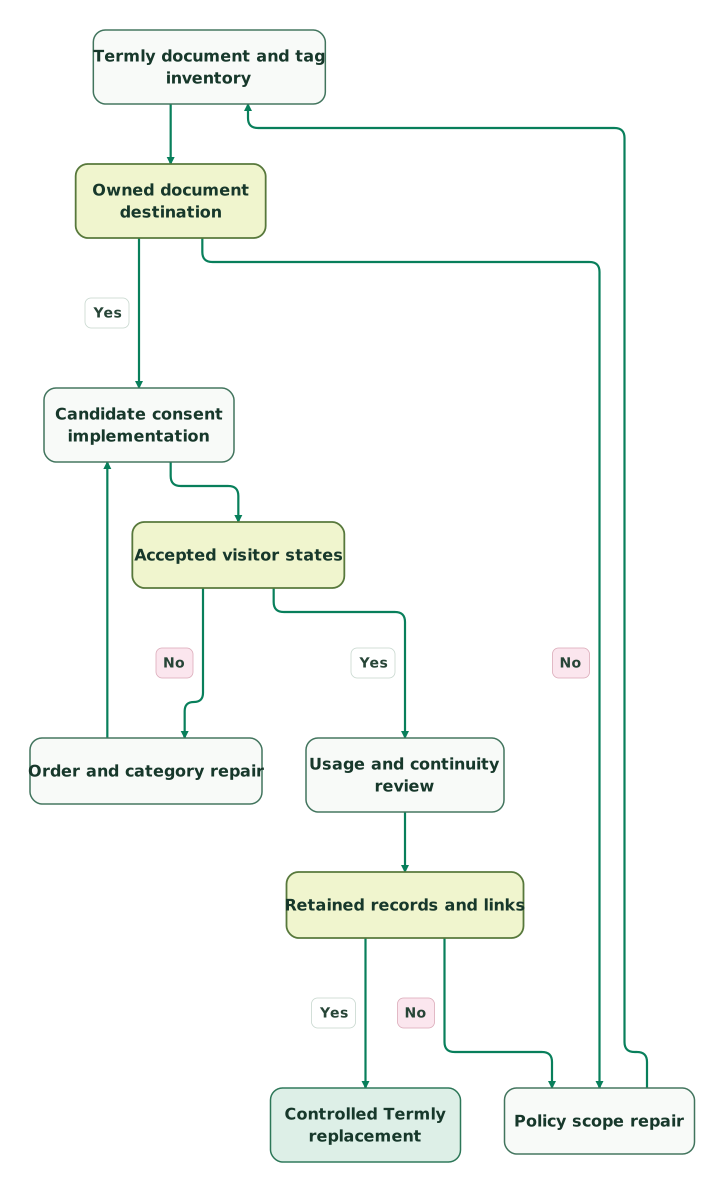
Read diagram as text
- Termly document and tag inventory to Owned document destination.
- Owned document destination to Policy scope repair: No.
- Policy scope repair to Termly document and tag inventory.
- Owned document destination to Candidate consent implementation: Yes.
- Candidate consent implementation to Accepted visitor states.
- Accepted visitor states to Order and category repair: No.
- Order and category repair to Candidate consent implementation.
- Accepted visitor states to Usage and continuity review: Yes.
- Usage and continuity review to Retained records and links.
- Retained records and links to Policy scope repair: No.
- Retained records and links to Controlled Termly replacement: Yes
Keep the old configuration available for recovery while the new one is validated. Avoid leaving two active banner controllers to compete over the same state. The handover should identify the remaining script, maintained document links, consent-record owner and the point at which the old subscription can be cancelled.
Best fit by website model
| Company size or model | Best fit | Runner-up | Reason |
|---|---|---|---|
| Small business replacing policies and consent together | iubenda qualified package | Retained Termly scope | Document and language requirements drive the package |
| High-traffic site with a bounded page inventory | Cookiebot | CookieYes | Subpage-based billing deserves a comparison |
| Agency with clearly separated small domains | CookieYes | Cookiebot | Domain, scan and traffic allowances can be modeled explicitly |
| Business with working Termly controls and a small cost concern | Retain or adjust Termly | Qualified alternative | Transition work may outweigh a modest subscription saving |
Termly replacement checklist
- Every existing policy and embedded link has a maintained destination.
- Required clauses, languages and Terms and Conditions are included.
- URLs, scan pages, pageviews and banner views remain distinct budget inputs.
- Free-plan thresholds and paid overage behavior are understood.
- Initial, rejected, partial, returning and withdrawn states pass the agreed checks.
- Google Consent Mode and third-party script controls are verified separately.
- Historical records and the treatment of existing preferences are approved.
- One banner controller, an operating owner and a recovery path remain after cutover.
Use the consent debugging skill to organize the evidence. A replacement is ready when the document and technical owners can explain both the visitor-facing result and the resulting tag behavior.
Keep reading
Browse all Tracking & Attribution guides
 Tracking & Attribution
Cookiebot alternatives for consent management and tag control
Compare Cookiebot alternatives by domain, scan and traffic limits. Review CookieYes, Termly and OneTrust with costs, consent-state tests and migration checks.
Jafrin Akter AloLast updated 11 min read
 Tracking & Attribution
OneTrust Competitors: Five Alternatives by Consent and Privacy Scope
Compare OneTrust competitors for consent and privacy operations. Review Cookiebot, Didomi, Osano, Ketch and TrustArc, pricing units, migration and acceptance checks.
Jafrin Akter AloLast updated 12 min read
 Tracking & Attribution
5 Cookiebot Implementation Mistakes and How to Fix Them
Diagnose late consent defaults, missing updates, duplicate Cookiebot installs and unmanaged embeds. Use six concrete journeys to verify actual tag behaviour.
Jafrin Akter AloLast updated 10 min read
Analytics & tracking
See the implementation scope, deliverables and acceptance checks.
Questions people ask
Can a Termly banner replacement leave policy work unfinished?
A banner replacement can leave policy work unfinished when the old subscription also supplies documents, languages or updates. Inventory every embedded policy and footer link before cancelling it. Assign each document a maintained destination and an owner. Then test the actual links after the consent change so a technically working banner does not conceal an unavailable or incomplete policy.
Does iubenda's fourteen-day offer mean no payment is required?
iubenda describes its paid fourteen-day offer as a refund window after purchase or renewal. That should not be treated as a no-payment trial. Its separate Free plan has limited document scope and a 5,000-pageview monthly ceiling. Confirm the selected route and billing terms before evaluating the package, especially when the trial site needs paid documents or language options.
Can a 300-page website fit a traffic-limited consent plan?
A 300-page website can fit a traffic-limited consent plan when both the scan allowance and monthly pageviews are sufficient. CookieYes Basic's published scan allowance covers 600 pages, while pageviews above its included quantity add cost. Count the two dimensions separately. A site with few pages can still generate substantial traffic, and a large page inventory can exceed scanning scope at low traffic.
Does a denied Google consent state require every network request to disappear?
A denied Google consent state does not mean every network request disappears under every implementation. Advanced Consent Mode can send measurements without cookies while consent is denied, whereas basic mode blocks the relevant Google tags. Judge observed traffic against the approved mode, consent values and storage behavior. Other vendors' scripts need their own controls and should be checked separately.
Can a free iubenda banner continue after its monthly pageview limit?
The free iubenda banner does not continue through paid overage after its monthly pageview limit. Its Free-plan documentation says the banner is disabled for the month once the 5,000-pageview threshold is reached, and extra usage is unavailable on Free. Monitor the actual count and choose an appropriate plan before relying on the banner for a higher-traffic site.
Sources

Written by
Jafrin Akter AloData Engineer and Co-founder at Martechdevs and Growth and Analytics Partners
Jafrin writes practical guides to marketing technology, customer data, analytics and AI workflows. Martechdevs is a Growth and Analytics Partners company.