
Salesforce Mailchimp Integration: Setup, Mapping and Subscription Controls
A Salesforce Mailchimp integration needs separate rules for customer identity, field updates and permission to send. For a new connection, use the current Beaufort 12 package route, confirm the selected audience and test exclusions before scheduling imports. A successful sync should preserve the correct customer relationship and subscription state, including when a record is updated or processed again.
On this page
Integration Routes
Identify the installed package and the job it needs to perform before following setup instructions.
| Situation | Starting route | Main check | Acceptance result |
|---|---|---|---|
| New Salesforce connection | Current Beaufort 12 integration | Editions, access and audience scope | Approved records in the intended audience |
| Legacy Mailchimp package | Package inventory and migration plan | Publisher, queries and active syncs | Controlled replacement without competing writers |
| Salesforce audience creation | Data Wizard with a filtered source | Identity and subscription eligibility | Correct new members and preserved exclusions |
| Existing member updates | Directional field mappings | Field authority and user access | Intended values without repeated overwrites |
Mailchimp's legacy setup article explicitly applies to integrations installed before 1 May 2024. It sends newer installations to the Salesforce Integration by Beaufort 12 listing. Do not apply the legacy package's screens or behavior to a new install. Mailchimp's connector guidance.
Before changing an existing connection, inspect Setup, Installed Packages and the package publisher. Record the active jobs, audience IDs, field mappings and owners. Similar product names can conceal separate packages with different settings.
If the project includes identity cleanup, subscription rules and connected workflows, CRM and lifecycle implementation can define the complete data path. The connector should implement an agreed customer process, including the cases that must remain excluded.

Prerequisites and Cost
Beaufort's setup guide lists support for all Mailchimp plans and Salesforce Professional, Enterprise, Performance and Unlimited editions, with installation routes for production, sandbox and developer orgs. Its current setup flow installs the package, connects Mailchimp and prepares the Contact and Lead page layouts. Connector setup.
Use an approved Mailchimp account with at least Manager access for the connection. Salesforce users also need the relevant package permissions and access to the standard objects and fields they use. Package permission sets do not grant all required access to standard Salesforce objects. Beaufort user security.
The published Premium entry band is US$25 per month for 0 to 10,000 active audience memberships. The same address in two audiences counts twice; unsubscribed, hard-bounced and archived members are excluded from the connector's active count. Mailchimp and Salesforce subscriptions are separate. The production evaluation is a fully featured 14-day trial. Connector pricing.
For a hypothetical account with 7,000 active memberships in one audience and 2,000 in another, the connector count is 9,000. If 1,000 addresses appear in both, the distinct address count is 8,000, but the connector still counts 9,000 memberships. At the published entry rate, twelve unchanged monthly charges total $300. This is a connector subtotal, excluding the two platforms and implementation work.
Confirm the selected band at the current active count and billing anniversary. A cleanup plan should preserve subscription history and customer requirements; the connector's billing definition is not a rule for deciding whom the business may contact.
Package and Account Setup
Environment Selection
- Identify the Salesforce org and Mailchimp account for the pilot.
- Use the provider's correct installation route for that environment.
- Review package access with the Salesforce administrator.
- Connect the approved Mailchimp account.
- Verify the returned Salesforce org and connected account before enabling outbound work.
Use a separate Mailchimp test account for sandbox rehearsal. Beaufort warns that a sandbox connected to a live Mailchimp account can change live subscribers through mappings, the Data Wizard or Flow actions. A Salesforce sandbox alone does not isolate the external marketing account. Sandbox connection guidance.
The provider's pricing and setup pages give different sandbox trial durations. Confirm the available test period for the chosen installation rather than assuming an indefinite sandbox trial. The consistent production trial term above is a separate offer. Pricing terms, setup terms.
If a refreshed sandbox contains a copied production connection, have the administrator clear it using the provider's sandbox-specific procedure before reconnecting. Treat connection reset as a separate change: it can remove integration data inside the org. Do not use a production reset as routine troubleshooting.
Initial Sync and User Access
The first primary sync brings Mailchimp audience and member data into package objects in Salesforce and links members to existing contacts or leads using the configured matching behavior. Salesforce-to-Mailchimp imports and mappings are additional configuration choices. Initial connection behavior.
Inspect one expected member in Salesforce and confirm the related Contact or Lead. An audience member appearing in a package list does not by itself establish a correct customer association.
Assign access according to the operator's job. Someone reading campaign context needs a different scope from the person configuring imports. Test with the actual user who runs the job. Beaufort distinguishes the Data Wizard's Run As user, the background Sync User and the current user triggering Salesforce-to-Mailchimp mappings. Execution identities.
For field-access diagnosis, the Salesforce field permissions guide explains how to separate a missing grant from a missing field or record. Avoid giving every operator administrator access merely to make a test pass.
Identity and Field Mapping
Write the matching contract before enabling record creation. Name the Salesforce object, its identifier, the email field used for matching and the destination audience ID. Include how a person appearing as both a Lead and a Contact should be handled.
Use the Salesforce ID converter when reconciling exported record identifiers, while preserving the original record and audience references. An email address can change, so keep enough evidence to distinguish a rename from a new person.
| Data | Preferred authority | Direction | Acceptance case |
|---|---|---|---|
| Customer identifier | CRM or agreed identity system | Into the integration model | Correct existing record association |
| Company or lifecycle context | Defined Salesforce source | Salesforce to Mailchimp | Correct value on the selected member |
| Audience subscription status | Audience preference process | Into Salesforce visibility | Unsubscribe remains visible and effective |
| Campaign activity | Mailchimp | Mailchimp to Salesforce | Correct campaign and member association |
| Operator-owned field | Named business team | Deliberately restricted | No unintended reverse overwrite |
Beaufort's Salesforce-to-Mailchimp field mappings update existing members; they do not create new audience members. The Data Wizard can create and update members and has its own mapping configuration. Two-way mapping also has no built-in conflict-resolution policy, so define field ownership and timing explicitly. Field mappings.
Start with a few fields whose meaning is clear. An account lookup displayed as a company name in Salesforce may carry an ID underneath. Inspect the value arriving in Mailchimp instead of assuming the visible Salesforce label will be transferred.
For any reverse mapping, define whether it may update existing Salesforce records or only initialize newly created ones. The CRM property ownership guide provides a practical contract for source authority, blanks and stale writes. A blanket two-way setting cannot settle those decisions.
Subscription Controls
The critical creation boundary is the Data Wizard's input population. Beaufort states that it does not check Salesforce's standard Email Opt Out field before creating new subscribers. Exclude opted-out records in the source. Existing unsubscribed members are not resubscribed by the wizard. Email opt-out behavior.
Define affirmative eligibility for the specific audience and communication purpose. The absence of an opt-out flag is only one condition; it is not evidence that every CRM record belongs in a marketing audience.
Mailchimp audiences retain independent membership states. Beaufort's optional standard Salesforce Email Opt Out update checks the box when all related members are unsubscribed and clears it when any related member becomes subscribed. That aggregation can be unsuitable for a business-wide suppression policy. Preserve audience-specific status and decide how the global policy is enforced. Audience and standard-field behavior.
Do not assume manually checking the Salesforce standard field unsubscribes every Mailchimp audience. Build and verify the intended outbound suppression process. Give one team authority over that policy so another workflow cannot silently reverse it.
For new members, the Data Wizard uses Subscribed status unless the audience's double opt-in behavior requires Pending status and confirmation. Confirm the audience setting before the pilot; a pending contact should not be treated as an already subscribed recipient. Data Wizard member creation.
Pilot Population Example
Consider six hypothetical Salesforce records for one test audience. Eligible means the business has approved that record for the intended communication. The email labels below are descriptive, not addresses to send to.
| Record | Eligible | Salesforce opt-out | Existing audience status | |
|---|---|---|---|---|
| P1 | Address A | Yes | False | Absent |
| P2 | Address B | Yes | False | Unsubscribed |
| P3 | Address C | Yes | True | Absent |
| P4 | Address D | No | False | Absent |
| P5 | Empty | Yes | False | Absent |
| P6 | Address F | Yes | False | Subscribed |
The source rule is: eligible, opt-out false and a populated email. It selects P1, P2 and P6. P3, P4 and P5 must remain outside the import. The audience-state check then expects P2 to remain unsubscribed.
Assume double opt-in is off for this controlled example and the new subscription is permitted. The first import should create P1, preserve P2's unsubscribe and retain P6's subscribed state. There are two subscribed members among these six test identities after the run. A repeated import should create no additional members.
Use this example as an acceptance contract, adapting it to the actual permission policy. If double opt-in is on, P1's expected state changes to Pending until the approved confirmation process completes. Keep that branch explicit instead of labeling every new member a failure for not being subscribed immediately.
Inspect the member's audience, related Salesforce record and relevant mapped values after the run. Then change one allowed field on P6 and repeat the selected update path. Verify that the correct member changes and the excluded records remain excluded.
Import Schedule and Error Review
- Select the audience and create a Data Wizard job.
- Choose the reviewed report, list view, query or campaign source.
- Confirm the source includes the email and fields needed for mapping.
- Set the wizard's own mappings and membership options.
- Run the small pilot and inspect its results.
- Enable a schedule only after exclusions, statuses and repeat behavior pass.
Beaufort supports those source types, with tabular reports among the options. Report-based wizard sources cannot exceed 50,000 rows; larger work needs a suitably scoped source or another supported route. The wizard does not overwrite existing information with blank values. Data Wizard configuration and limits.
Keep the source report under change control. A colleague removing an eligibility filter to answer a reporting question could change the next scheduled import's population. Use a dedicated source with an owner and a clear description of its integration role.
| Symptom | First check | Evidence | Repair |
|---|---|---|---|
| Member missing from Salesforce contact | Matching field and actual email | Member and Contact/Lead identifiers | Correct the intended matching policy |
| Field absent from wizard mapping | Source columns and Run As access | Report or query output | Add the approved field and recheck mappings |
| Repeated field overwrite | Both mapping directions | Source values and update order | Assign one authority for that property |
| Unexpected new subscriber | Source eligibility and opt-out filter | Selected record IDs | Contain the job and repair the source |
| Existing unsubscribe unchanged | Existing audience status | Member status before and after | Preserve suppression; investigate separately if a valid change is required |
Keep subscription changes separate from ordinary data retries. A failed name update does not justify a resubscribe action. For a large backlog, repair the cause, retry a small affected set and reconcile each resulting member before widening the run.
Legacy Migration
The Beaufort package is a separate installation, not an in-place upgrade of the legacy Mailchimp package. Its migration guidance includes an optional transfer of old queries into the Data Wizard. Treat transferred queries as source logic to review, especially their audience and exclusion conditions. Migration guide.
Plan which connector owns each direction during the transition. Preserve the old configuration and a reconciliation sample, then validate the replacement's relationships and subscription outcomes. Avoid leaving both packages writing the same population while trying to diagnose a difference.
Retire the old route only after the replacement handles the approved workflow and its operating owner can explain the error process. Package installation is an early milestone; accepted customer and audience behavior completes the migration.
Integration Acceptance Flow
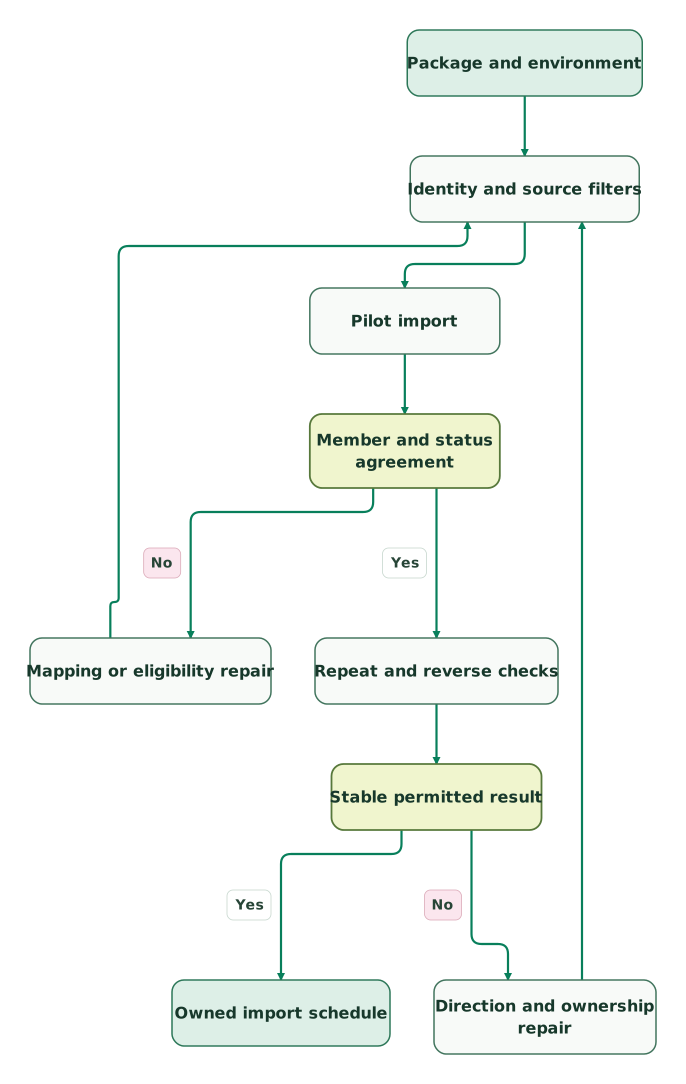
Read diagram as text
- Package and environment to Identity and source filters.
- Identity and source filters to Pilot import.
- Pilot import to Member and status agreement.
- Member and status agreement to Mapping or eligibility repair: No.
- Mapping or eligibility repair to Identity and source filters.
- Member and status agreement to Repeat and reverse checks: Yes.
- Repeat and reverse checks to Stable permitted result.
- Stable permitted result to Direction and ownership repair: No.
- Direction and ownership repair to Identity and source filters.
- Stable permitted result to Owned import schedule: Yes
Both repair branches return to the source and identity checks. That keeps subscription eligibility in the next test, even when the immediate symptom appears to be a field-mapping problem.
Integration Checklist
- The package publisher and current installation route are identified.
- The pilot org and external test account are separated from live marketing work.
- Connection, Run As and Sync User permissions match their jobs.
- Audience IDs and Salesforce relationships are recorded.
- Source filters enforce eligibility, opt-outs and required identity fields.
- Existing unsubscribed members retain their status.
- Double opt-in produces the expected pending or subscribed result.
- Field ownership and reverse mappings prevent unintended overwrites.
- Repeated imports do not create additional members in the pilot.
- Scheduled sources, errors and preference changes have named owners.
Use the CRM data hygiene audit skill before expanding the population. Resolve identity and source-quality findings before they become a recurring audience problem.
Keep reading
Browse all CRM & Lifecycle guides
 CRM & Lifecycle
CRM Property Ownership: Stop Integrations Overwriting Good Data
Stop CRM integrations overwriting useful data with property-level ownership, explicit blank rules and stable matching. Includes a renewal-field contract and tests.
Jafrin Akter AloLast updated 10 min read
 CRM & Lifecycle
Salesforce Field Permissions: 6 Checks for Missing or Exposed Data
Find missing or exposed Salesforce fields with six checks for user grants, layouts, reports, connector discovery and version-specific Apex access.
Jafrin Akter AloLast updated 12 min read
 CRM & Lifecycle
Salesforce Lead Conversion: Field Mapping, Campaigns and Duplicate Checks
Map Salesforce Lead fields, preserve campaign and click context, avoid duplicate Accounts, and verify conversion results and reporting with local examples.
Jafrin Akter AloLast updated 16 min read
CRM & marketing automation
See the implementation scope, deliverables and acceptance checks.
Questions people ask
Does installing the Salesforce Mailchimp package automatically create every CRM contact as a subscriber?
Installation and connection do not define a complete outbound subscription policy. Configure the intended Salesforce-to-Mailchimp source and review its filters before importing records. The first acceptance check should identify exactly which records may become new members and which must remain excluded. Keep audience creation separate from reading Mailchimp activity inside Salesforce, because those jobs have different consequences.
Can the standard Salesforce Email Opt Out field replace audience-specific preferences?
A single field cannot express every combination of audience membership and communication purpose. Preserve the audience-specific states and define how the business-wide suppression policy relates to them. Test a person subscribed to one audience and unsubscribed from another. The Salesforce summary field should have an agreed meaning that downstream workflows understand, rather than becoming an ambiguous substitute for the underlying preferences.
Is a Salesforce sandbox enough to protect live Mailchimp subscribers during testing?
No. The external account connected to the sandbox matters. Beaufort warns that sandbox mappings, imports and Flow actions can change a live Mailchimp account. Use a separate test account and inspect copied connections after a sandbox refresh. Confirm the environment and account pair before running a pilot, particularly when moving between rehearsal and production. Sandbox guidance.
Why can a Mailchimp member appear in Salesforce without the expected Contact relationship?
The package can hold audience-member data while the intended CRM match remains unresolved. Compare the email used by the member with the configured matching fields and the actual Contact or Lead. Check the sync identity's access before changing the rule. Preserve both identifiers in the investigation so a repair does not accidentally associate the member with a different person.
What should happen before a legacy Mailchimp query becomes a scheduled Data Wizard import?
Review its audience, selected fields, eligibility conditions and handling of opted-out records. Reconcile a small population before scheduling it, then test a second run and an excluded record. A transferred query carries old assumptions as well as useful logic. Assign an owner who can maintain the source when Salesforce fields, lifecycle definitions or the audience policy change.
Sources

Written by
Jafrin Akter AloData Engineer and Co-founder at Martechdevs and Growth and Analytics Partners
Jafrin writes practical guides to marketing technology, customer data, analytics and AI workflows. Martechdevs is a Growth and Analytics Partners company.