
Martech Migration Checklist: 7 Checks Before You Switch CRM, Analytics or Tracking
A martech migration checklist has seven checks: name the reports that must stay trustworthy, freeze the rules behind them, keep a baseline of old data, set tolerances, test the fields and journeys that carry attribution, run the old and new paths side by side, and switch only when the evidence holds. Use it when you move a CRM, analytics tool, tag setup, CDP or lifecycle platform. Matching headline totals is not enough: missing leads and misclassified channels can cancel each other out while changing your next budget decision.
On this page
What should you check before switching tools?
Work through these seven reporting checks before approving the switch:
- Name the critical reports and their owners.
- Freeze the outcome and attribution rules.
- Preserve readable history and a reproducible baseline.
- Set record-level and reporting tolerances.
- Test the fields and journeys that carry attribution.
- Run both paths with controlled production writes.
- Approve cutover, recovery and retirement from evidence.
Checks 1 to 3 support the audit and mapping phases; checks 4 to 6 guide building and testing; check 7 governs cutover and retirement. Copy the cutover checklist when you need the acceptance gates in one place.
The expensive failure is a report that still loads and looks plausible. A new form accepts the demo request but drops the paid-click identifier. A CRM import preserves the contact but overwrites its original source. A dashboard shows the same revenue while attaching it to a different month. Nobody gets an error message, yet the migration has changed what leadership believes.
Start with the decisions that need continuity. For event definitions, use the tracking plan template. For moving event history itself, use the Mixpanel and Amplitude migration guide. This checklist covers the evidence required to trust attribution across a CRM, analytics, tagging, CDP, lifecycle or website change. If you would rather hand the inventory, parallel run and cutover to a team, see our martech integration service.
Which parts of a stack change can alter attribution?
Any change to collection, identity, business records or reporting can alter attribution. Map the affected input before assuming that copying a dashboard will preserve its meaning.
| Migration | Attribution input at risk | Acceptance evidence |
|---|---|---|
| CRM replacement | Original source, lead and deal IDs, contact associations, stage history | The same accepted leads and opportunities retain their relationships and source evidence |
| Analytics tool or GA4 property | Event triggers, identities, model settings, available history | A defined event produces the expected record and report under the saved settings |
| Browser tags to server-side delivery | Destination ownership, click IDs, event IDs, consent state | Each intended destination receives the permitted event once |
| CDP or reverse ETL replacement | Identity mapping, audience eligibility, field ownership | Correct records and removals reach the destination without changing protected source fields |
| Lifecycle platform replacement | Message-link parameters, conversion events, suppression | Test messages retain campaign context and respect the approved sending rules |
| Consent platform replacement | Default state, updates, revocation and regional behavior | Collection changes only when the approved policy says it should |
| Website, form host or domain change | Redirects, campaign parameters, cross-domain identity | The acquisition context survives the actual route to the completed outcome |
The CRM move also needs record-level migration controls; see the Salesforce to HubSpot checklist. If several systems change together, attribution and tracking implementation should have one accountable owner across those boundaries.
Where does reporting fit in the full migration plan?
Reporting is one acceptance workstream inside the larger migration. Keep these phases visible even when one person owns several of them:
- Agree the scope, business owner and reason for the change.
- Inventory data, reports, integrations and active automations.
- Map fields, identities, permissions and consent requirements.
- Build the new collection, delivery and reporting paths.
- Rehearse representative journeys and failure recovery.
- Run comparable reporting with controlled production writes.
- Approve cutover, rollback conditions and operational ownership.
- Monitor the new system before retiring the old one.
The seven reporting checks below supply the evidence for that approval. They do not replace deliverability, access-control or customer-workflow testing elsewhere in the migration.
1. Which reports must remain trustworthy?
Prioritize reports by the consequence of a wrong decision. An ad-bidding feed, board revenue report or sales compensation calculation deserves stricter controls than an exploratory dashboard.
Create a register that connects a report to its owner, decision, source and reporting deadline. Keep the metric definition in a metric contract, so reviewers can distinguish a changed business rule from a broken pipeline.
| Report and decision | Accountable reviewer | Business anchor | Comparison unit and deadline |
|---|---|---|---|
| Paid acquisition report used to move budget | Growth lead | Accepted demo-request records | Request ID and campaign; complete before the budget review |
| Pipeline by acquisition source | RevOps lead | CRM opportunities and associated contacts | Opportunity ID, stage and currency; agreed CRM refresh |
| Revenue by channel | Finance and analytics leads | Agreed order, invoice or recognized-revenue ledger | Transaction ID and revenue basis; finance close schedule |
| Audience used for follow-up | Lifecycle lead | Eligibility and suppression records | Customer ID and membership change; before the next activation |
Name the outcome precisely. A generate_lead event, a submitted form, an accepted demo request and a sales-qualified lead are different units. Finance may need recognized revenue while marketing needs booked order value. Preserve both definitions when both decisions matter.
Snapshot the old result and the query or report configuration that produced it. Saving a screenshot alone cannot show which records were included or reproduce the calculation later.
2. Which reporting rules need to be frozen?
Freeze the definition of each outcome, its identity key and the attribution settings before comparing systems. Record intentional changes separately so a migration repair cannot quietly become a measurement redesign.
Capture the event trigger, counting rule, attribution model, eligible channels, lookback window, interaction-date versus conversion-date reporting, timezone, currency conversion, refunds, exclusions, deduplication keys and CRM source precedence. Save the report's dimension scope too: first-user acquisition, session acquisition and event attribution answer different questions.
For the instrumentation contract, the tracking plan builder skill can document the frozen triggers, identifiers, destination mappings and acceptance cases before either implementation changes.
Three settings deserve particular care:
| Setting | What a change affects | Migration control |
|---|---|---|
| GA4 reporting attribution model | Historical and future reports using compatible event-scoped traffic dimensions; user- and session-scoped dimensions are unaffected | Export the old view before changing the model and label the new calculation |
| GA4 key-event lookback window | Attribution going forward | Record the effective change and compare equivalent eligible periods |
| Google Ads conversion window | Conversions recorded going forward; increasing it does not recover conversions previously missed outside the shorter window | Preserve each action's window and inspect conversion-date coverage |
These behaviors are specified in GA4 attribution settings and Google Ads conversion windows. A historical chart can change even when the migration moved every underlying record successfully.
Keep acquisition context distinct from record creation context. A contact created by an import should not automatically acquire “import” as the business's original acquisition source. Preserve the raw source value, the mapped reporting value and the rule that connects them. Where the target's built-in property has different semantics, use an explicit mapped field instead of forcing equivalence.
3. What history and baseline should you preserve?
Preserve readable historical reports and the underlying records you can legitimately retain before removing access or changing settings. Inventory the earliest available period, granularity and export limitations for each source.
Take recent complete reporting periods and relevant seasonal comparators. Export channel-level totals alongside transaction or opportunity records where available. Store the filters, extraction time and latest complete processing boundary with each snapshot. A frozen old report must be compared with the same historical population, not today's continually changing source.
For GA4, separate three kinds of history:
- Aggregated reports: useful for preserving the previously reported business view.
- Exploration data: constrained by retention. Standard properties generally offer two or fourteen months; the retention setting affects explorations and funnel reports rather than standard aggregated reports. Increasing retention cannot restore already deleted data. Large-property restrictions can shorten availability. Google Analytics data retention.
- Native BigQuery event exports: preserve the actual tables and verify their coverage. Google says exported Analytics data cannot be re-exported. Standard daily export has a one-million-event limit; streaming has different limits and completeness behavior. BigQuery Export.
Enable and verify the required export before relying on it as your migration archive. Linking GA4 to BigQuery starts an export process; it is not evidence that all earlier periods are available. Inspect the tables and dates you actually have. Set up BigQuery Export.
Do not confuse native event export with the Google Analytics connector in BigQuery Data Transfer Service. The connector retrieves reporting data through the Data API. Google limits its backfills to the most recent 37 months and warns that requests for older periods can overwrite existing partitions with incomplete results. Copy valuable history before any destructive backfill and validate a separate destination first. Data Transfer Service change log.
GA4 interface totals can also include processing or modeling absent from raw export data. That is a reason to document the comparison boundary, not to “fix” the warehouse until it matches a differently defined report. Google's explanation of UI and BigQuery differences.
4. How do you set tolerances without hiding broken data?
Set tolerances by the type of comparison and the business consequence. Week-to-week sales volatility does not justify losing records when two systems process the same completed population.
Use two separate checks. Record reconciliation asks whether the same eligible outcomes, values and associations survived. Reporting reconciliation asks why those outcomes receive different timing or credit. Passing the second cannot excuse failure in the first.
| Comparison | Suitable acceptance rule | What blocks approval |
|---|---|---|
| Same eligible completed request IDs | No unexplained missing, extra or duplicate IDs | Missing records hidden inside a percentage allowance |
| Money under an identical currency and revenue definition | Exact minor-unit reconciliation, except a separately specified rounding rule | Offsetting positive and negative errors or unknown currency conversion |
| Same population, different channel classification | Explain changed assignments with retained source evidence | A small total gap hiding a large channel shift |
| Recent data with different processing delays | Compare after the agreed completeness boundary; track late arrivals separately | Calling an unprocessed record permanently missing or letting backlog grow indefinitely |
| Deliberately different attribution models | Explain the model difference and the decisions each view supports | Treating modeled credit as a record-transfer checksum |
For revenue, record both the signed difference and the sum of absolute record-level differences. An extra USD 500 on one order and a missing USD 500 on another produce a zero net gap and USD 1,000 of absolute error. Total equality alone would miss both defects.
For sparse channels, show the count beside the rate. One missing conversion out of five is 20%; that percentage has a different operating meaning from two thousand missing out of ten thousand. Approve any accepted exception by reason, affected records, owner and resolution condition. Never add an unexplained “other” bucket merely to balance the report.
5. Which fields and journeys should the migration test?
Test the identifiers and transformations that carry attribution through real customer journeys. A successful CSV import does not prove the next live request will preserve those fields.
| Input | Mapping rule to record | Test that exposes a failure |
|---|---|---|
| Original and latest acquisition source | Separate write ownership and overwrite policy | Import an existing contact, then submit a new campaign visit |
| Lead, contact, account and opportunity IDs | Stable crosswalk with merge handling | Follow two contacts into one account and one opportunity |
| Campaign parameters and click identifiers | Preserve required values through redirects and forms | Open the real paid landing route, follow redirects and complete the form |
| Event or transaction ID | One occurrence retains one deduplication identity | Retry the same delivery, then send a genuinely different occurrence |
| Consent and suppression | Preserve the approved state and permitted use | Deny, accept, revoke and revisit across the relevant domains |
| Lifecycle and revenue timestamps | Retain original occurrence time separately from import time | Import an old outcome and verify that it stays in the correct reporting period |
When a CRM merges contacts, compare channel shares using the same outcome IDs and attribution rules, rather than the number of surviving contact records. Preserve the old-to-new identity crosswalk and check every relevant association. A valid merge can reduce contact count without removing a demo request or opportunity; investigate reassigned outcomes separately.
Google Ads requires the gclid parameter to survive redirects to the final landing page. Test that route rather than only checking whether auto-tagging is enabled. Google Ads auto-tagging.
GA4 cross-domain measurement passes identity through _gl, with the same web-stream tag ID on the participating domains. Verify the actual decorated navigation and completed journey; a referral exclusion by itself is not proof that identity survives. Keep this separate from your UTM naming rules. GA4 cross-domain setup.
Include the awkward routes: embedded forms, external booking pages, payment redirects, repeat submissions, offline updates, returning users and changed consent. Keep test traffic identifiable and excluded from commercial reporting through the established test procedure. Do not invent a paid click or restore an identifier that the visitor's consent or browser behavior legitimately withheld.
6. How should old and new reporting run in parallel?
Run both measurement paths against comparable outcomes while explicitly controlling which path can affect production. Observation, ad bidding, audience activation and customer messaging need separate owners and switches.
In Google Ads, secondary conversion actions normally support observation rather than bidding. A secondary action inside a custom goal can still be used for bidding. Inspect the effective campaign goals before treating a migration destination as harmless. Also segment comparison reports by action so duplicate observations do not inflate an aggregated total. Google Ads primary and secondary actions.
Do not send two independent copies of the same conversion into one production action and assume the platform will deduplicate them. Either use a genuinely isolated comparison destination or prove the documented deduplication contract for that specific destination. Parallel analytics collection does not authorize two welcome emails, two CRM updates or two audience syncs.
For purchase migrations, the purchase reconciliation skill can compare each measurement path with the same eligible order population and classify missing, duplicate, mismatched and late records.
Choose the observation period from your own outcome delays and operating cycles. Cover a full weekly pattern and allow the selected lead or order cohort to mature through its agreed reporting deadline. A four-week run can validate demo capture while remaining too short to validate a six-month sales cycle. Keep a separate closed-won checkpoint instead of claiming every downstream outcome has passed. Restrict decisions that depend on the unvalidated revenue report until its own acceptance evidence is available.
Budget for overlap, exports, storage, implementation and support. For Mixpanel accounts on ingestion-time billing, historical events count in the month they are processed; legacy timestamp-billed accounts behave differently. Check the account's billing mode before scheduling a large import. Mixpanel pricing mechanics.
A copyable comparison contract
This YAML is a planning template for one hypothetical demo-request migration, not vendor configuration. Replace the fields and deadlines with your actual metric contract. The zero unexplained-record rule concerns the same completed, eligible population after all approved exclusions.
report: accepted_demo_requests_by_channel
grain: one_accepted_request
identity: request_id
time_basis: accepted_at
timezone: UTC
population: same_eligible_requests_on_both_paths
comparison:
  wait_for: both_paths_complete_through_the_agreed_cutoff
  unexplained_missing_ids: 0
  unexplained_extra_ids: 0
  duplicate_ids: 0
  source_assignment_changes: explain_each_changed_record
production:
  bidding_writer: old_path_until_approved_cutover
  new_path: isolated_observation_only
  customer_messages: one_authorized_sender
rollback:
  preserve: new_records_and_changes_since_cutover
  replay: only_eligible_unprocessed_occurrences
  decision_owner: named_migration_owner
The contract makes a review actionable: a result either meets a named requirement or leaves a specific unresolved difference. Attach the actual extraction queries, consent cases and production-goal evidence to it.
What can a small total difference hide in a CRM migration?
A small difference in total leads can conceal a much larger change in channel credit. The following hypothetical example compares the same four-week population after a CRM and form-host change.
The preceding twelve-week baseline contained 1,200 GA4 lead events, 1,140 accepted CRM demo requests and 60 closed-won opportunities. Those are separate units, not three counts that must match. Weekly demo volume varied by about 3%, which describes demand variation. It does not establish an acceptable migration loss rate.
| Check | Old path | New path before repair | Meaning |
|---|---|---|---|
| Accepted demo requests | 380 | 372 | Eight requests absent from the new report |
| Paid-search requests | 144 | 115 | Twenty-nine fewer requests attributed to paid search |
| Paid-search share | 37.89% | 30.91% | A 6.98 percentage-point difference |
The total shortfall is 8 / 380 × 100 = 2.11%. A blanket 3% tolerance would pass it. The channel calculation is different: (144 / 380 − 115 / 372) × 100 = 6.98 percentage points. Neither figure identifies the cause by itself.
Record-level checks find eight eligible requests stuck in a failed sync. All eight were paid-search requests. After replaying them once, the new report has 380 requests and 123 attributed to paid search. A redirect test then reproduces loss of gclid; eighteen affected records have retained, permitted source evidence that supports correcting their classification. That brings paid-search credit to 141, or 37.11%.
Approval still waits. Three request IDs remain unexplained even though the rounded share now looks close. The team resolves those against the original evidence and reruns the comparison: 380 accepted requests, 144 paid-search assignments, no unexplained missing or duplicate IDs. The migration owner approves demo reporting; the longer closed-won check remains open.
If source evidence had not survived, the team could fix future collection but could not truthfully reconstruct those historical assignments. The report would need a stated coverage break, an approved use limitation and a fresh observation period. Guessing the missing channel from the old percentage would manufacture evidence.
7. What evidence allows cutover and retirement?
Cut over only when the accountable owners accept the reconciled outcome and can recover safely from a failure. A rollback must preserve the changes made after launch; restoring an old snapshot alone can discard legitimate new business activity.
Use the martech QA checklist to retain the accepted journeys, failure cases and recovery evidence for cutover.
Capture the post-cutover delta, resolve identifiers and replay only changes the restored system has not processed. Include messages, consent updates and external actions in reconciliation: restoring a database does not undo an email or conversion upload. Rehearse that recovery before the migration becomes the production route.
Use these gates for the reporting workstream:
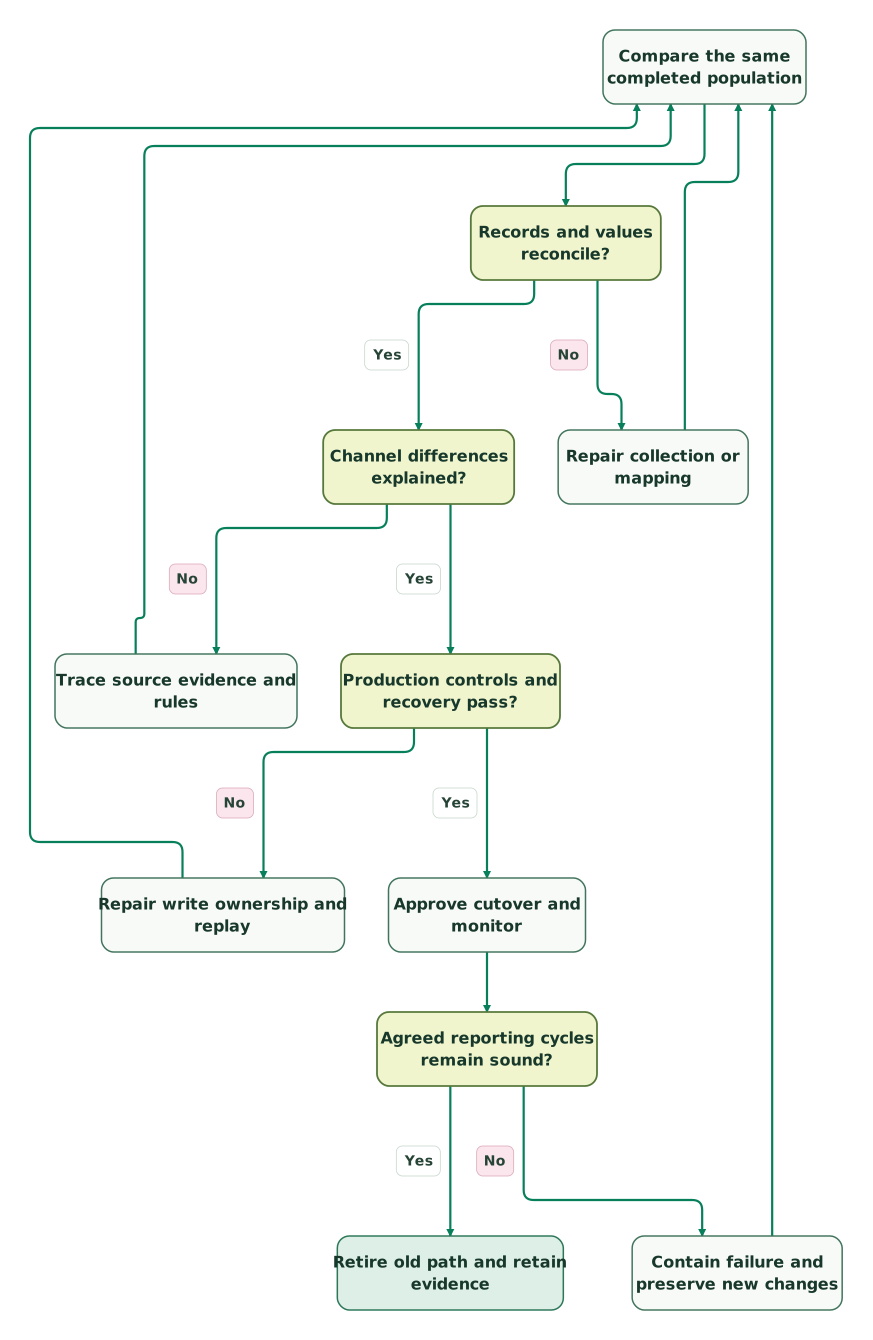
Read diagram as text
- Compare the same completed population to Records and values reconcile?.
- Records and values reconcile? to Repair collection or mapping: No.
- Repair collection or mapping to Compare the same completed population.
- Records and values reconcile? to Channel differences explained?: Yes.
- Channel differences explained? to Trace source evidence and rules: No.
- Trace source evidence and rules to Compare the same completed population.
- Channel differences explained? to Production controls and recovery pass?: Yes.
- Production controls and recovery pass? to Repair write ownership and replay: No.
- Repair write ownership and replay to Compare the same completed population.
- Production controls and recovery pass? to Approve cutover and monitor: Yes.
- Approve cutover and monitor to Agreed reporting cycles remain sound?.
- Agreed reporting cycles remain sound? to Contain failure and preserve new changes: No.
- Contain failure and preserve new changes to Compare the same completed population.
- Agreed reporting cycles remain sound? to Retire old path and retain evidence: Yes
The diagram deliberately returns a repair to the comparison. A changed mapping, replay or restored route can affect both totals and attribution, so earlier evidence must be rerun where affected.
What must the cutover checklist confirm?
- Every decision-critical report has a named owner, definition and source anchor.
- Historical exports, configuration and comparison queries are readable by the receiving team.
- The same completed population has no unexplained missing, extra or duplicate records.
- Revenue differences and channel reassignments have record-level explanations.
- Required consent, redirect, repeat-delivery and cross-domain journeys pass.
- One authorized path controls each production conversion, customer message and activation.
- Recovery preserves post-cutover changes and has a tested replay boundary.
- Remaining long-cycle outcomes have explicit later acceptance checkpoints.
- Dashboards mark the switch and any intentional definition break.
- Operational owners accept monitoring, escalation and the old-system retirement conditions.
Keep the old reporting route read-only for the agreed retention period where the product and contract permit it. Stop active duplicate collection when it is no longer required. Export before cancellation, remove obsolete scheduled jobs and credentials, and verify that no remaining report depends on the retired system. If people or agencies also change, complete the separate martech handover.
Which warning signs should you monitor after the switch?
Monitor missing outcomes, changed classification, processing delays and production side effects through the first two agreed reporting cycles. Use daily checks for operational problems and the normal close process for finance or longer-lag outcomes.
| Symptom | Likely investigation | Evidence that closes it |
|---|---|---|
| Leads stay steady but paid share falls | Redirects, source-field overwrite or channel mapping | Matched request IDs with preserved acquisition evidence |
| Conversions jump after dual running | Duplicate delivery or two production actions | Destination-level occurrence counts and effective goal settings |
| Historical channels change overnight | Reporting-model or dimension-scope change | Saved settings and a reproducible comparison under each definition |
| Month-end revenue moves between periods | Timezone, occurrence/import timestamp or refund-date rule | Transaction-level period assignment under the approved contract |
| Today's new report is always lower | Queue backlog or incomplete processing window | Both paths complete through the same boundary, with measured lag |
| Opted-out records enter an audience | Consent mapping, stale state or deletion/removal behavior | Denial and revocation tests that remove the record from permitted activation |
Route alerts to someone who can contain the affected action. A broken reporting refresh may require pausing budget changes; a consent or duplicate-send problem may require stopping the destination immediately. Tie the response to the decision at risk rather than treating every deviation as the same severity.
At Martechdevs, we plan collection, identity, reporting and activation as connected implementation work. Bring the reports you must preserve, the planned switch and one unexplained discrepancy to the $99 martech audit. The useful outcome is a scoped acceptance plan with named evidence and owners.
Keep reading
Browse all Tracking & Attribution guides
 Martech Strategy
Martech QA Checklist: 12 Tests Before a Launch
Test a martech launch across tracking, CRM, warehouse and messaging. Use twelve cases, real-user UAT, record-level reconciliation and versioned sign-off.
Jafrin Akter AloLast updated 14 min read
 Martech Strategy
Martech Handover Checklist: Transfer Control Without Breaking the Work
Hand over tracking, CRM, warehouse and automation safely. Map runtime identities, transfer control and prove workflows still run after old access is removed.
Jafrin Akter AloLast updated 16 min read
 Tracking & Attribution
Automated Tracking QA: Test the Plan, the Payload and the Request
Build automated tracking QA with Playwright, data-layer and request checks, consent cases, mutation tests and a CI gate that catches broken events before release.
Jafrin Akter AloLast updated 11 min read
Martech integration
See the implementation scope, deliverables and acceptance checks.
Questions people ask
What does technology migration mean in marketing?
It means moving a marketing workflow, its data or its delivery path from one system to another. That might involve a CRM, analytics property, tagging setup, CDP or messaging platform. A usable migration preserves the identities, permissions and business definitions behind the workflow, with an explicit decision about which system becomes authoritative and when the old path can stop.
What skills does a martech or data migration need?
The work needs business-definition ownership, data mapping and reconciliation, integration engineering, and knowledge of the destination’s permissions and operating controls. Marketing or RevOps must also validate the customer journey and the reports used for decisions. One person can cover several roles, but name who can approve definitions, stop a faulty production action and recover the workflow.
How long should the old and new tools run side by side?
Run them until the selected outcome has passed its agreed completeness boundary and reconciliation checks across the relevant operating cycle. There is no universal number of days. Demo requests can be validated before long-cycle revenue is ready. Keep separate approval checkpoints, account for late-arriving data and allow overlap costs in the plan rather than ending the comparison on an arbitrary calendar date.
Does keeping the old subscription preserve a usable attribution baseline?
Only if the required reports, settings and underlying evidence remain accessible and unchanged. A live old dashboard may keep recalculating as records or attribution settings change. Save reproducible snapshots and exports before cutover, confirm what remains available after cancellation or downgrade, and assign an archive owner. Retaining the subscription alone does not freeze the numbers leadership previously used.
Should the new platform copy a known error in the old report?
No. Preserve the old result as historical evidence, then document the corrected definition and its effect. If the old report double-counted renewals, reproducing that error makes the migration look consistent while keeping the business decision wrong. Reconcile the underlying records, approve the correction with the report owner, and label the break in the trend rather than silently rewriting the past.
Sources
- Google Analytics: Select attribution settings
- Google Ads: About conversion windows
- Google Analytics: Data retention
- Google Analytics: BigQuery Export
- Google Analytics: Set up BigQuery Export
- Google Cloud: BigQuery Data Transfer Service change log
- Google Analytics: Bridge the gap between the UI and BigQuery export
- Google Ads: About auto-tagging
- Google Analytics: Set up cross-domain measurement
- Google Ads: About primary and secondary conversion actions
- Mixpanel: Pricing

Written by
Jafrin Akter AloData Engineer and Co-founder at Martechdevs and Growth and Analytics Partners
Jafrin writes practical guides to marketing technology, customer data, analytics and AI workflows. Martechdevs is a Growth and Analytics Partners company.