
Intercom vs Pendo: Support, Product Tours, Analytics and Cost
Choose Intercom when the main job is answering customers, managing support conversations and guiding users from those conversations. Choose Pendo when product teams need to understand behavior, diagnose adoption gaps and deliver in-app guidance. Use both when those jobs have separate owners and budgets. Compare the actual customer journey before comparing prices: an onboarding popup, a support inbox and a retention analysis solve different problems.
On this page
What is the difference between Intercom and Pendo?
Intercom organizes customer service around conversations, an inbox, tickets and Fin AI Agent. Pendo organizes product improvement around behavior analysis and in-app guidance. Both can put messages into a product, but the buying decision depends on what happens before and after that message: a service response, an adoption intervention or a measured product change.
| Your immediate problem | Start with | What must work before expanding |
|---|---|---|
| Customers cannot get an answer or reach the right support owner | Intercom | Routing, knowledge, handoff and a measurable resolution |
| People sign up but fail to complete an important product task | Pendo | Reliable behavior data, relevant guidance and task completion |
| A few desktop onboarding instructions are missing from an existing Intercom setup | Intercom's tour option | Eligibility, reliable targeting and outcome tracking |
| Product and support both need improvement | Separate evaluation for each job; possibly both | Shared identity, distinct owners and controlled message frequency |
| The app already has analytics, guidance and a functioning helpdesk | Improve the existing workflow first | Evidence of the gap another subscription would actually close |
Intercom's published plans include its helpdesk capabilities. Pendo's getting-started guide describes an installation that supplies analytics and guidance. Neither purchase substitutes for deciding which customer action matters.
For a support leader, that action might be a correctly resolved billing question. For a product manager, it might be an administrator connecting a data source and inviting a colleague. A tour can help with the second action; a support conversation can rescue it. Measuring both as “engagement” hides whether the customer succeeded.
Our product analytics implementation service covers the tracking and measurement underneath that decision. If your comparison is really about replacing the support queue, read Intercom vs Zendesk alongside this guide.
Which is better for product tours and in-app onboarding?
Start with Intercom tours for a focused desktop workflow when your team already uses Intercom. Evaluate Pendo when guidance needs to follow product behavior and sit beside product analysis across supported applications. Device support is an early elimination test: Intercom explicitly excludes mobile web and mobile apps from Product Tours, so check your target experience before building anything.
Intercom's Product Tours FAQ makes that mobile restriction explicit. Intercom offers Mobile Carousels as a separate format; its tour overview points mobile onboarding there. A carousel and a pointer attached to an application control should have different acceptance tests.
Pendo supports analytics and guidance across web and mobile offerings, but confirm your application framework, SDK version, subscription and required guide type in the evaluation. “Supports mobile” is too broad a requirement when the actual job involves a particular screen, navigation pattern or embedded web view.
Use the same exercise in each candidate:
- Select one task with a clear finish, such as creating the first shared dashboard.
- Target people who can perform that task and have not already completed it.
- Start guidance at the relevant screen, after the interface is ready.
- Let the customer dismiss it and continue working.
- Trigger the completion event from successful application behavior.
- Change a target control, sign out, and return with another account to test failure behavior.
Intercom recommends stable data-intercom-target selectors when pointer targeting becomes unreliable. Its FAQ also says tour content needs manual translation through duplicated tours, even when navigation buttons follow configured Messenger languages. Include your actual translated UI in the acceptance exercise rather than judging the editor alone.
A walkthrough that points to a disabled button has failed even if every message renders. Decide whether a person lacks permission, data or prerequisites before showing the instruction. That often removes more friction than adding another step.
How do Intercom and Pendo compare on analytics?
Pendo is the stronger starting point for product behavior questions: where users go, where they stop, which features they adopt and whether they return. Intercom measures service operations and outbound interactions, including tour performance. Keep the distinction between completing a message and completing a valuable product task, and choose the reporting system that can prove the latter.
Pendo's behavior reports include paths, workflows, funnels and retention. These answer different questions: a funnel checks a specified sequence; a path explores what people actually do around an event; retention checks return behavior. Choose the question before selecting the chart.
Intercom's tour reporting shows step views and completion, with goals and follow-up actions. The documentation warns that editing a tour resets step-view counts, while version history lets you inspect previous versions. Save the version identifier with any evaluation result so a redesigned tour does not silently change the comparison.
Tour statistics and billing use different counters. Intercom says restarted or snoozed tours do not add another view in tour statistics, while its add-on can bill repeated presentations. Reconcile the invoice against Messages Sent rather than the tour-view chart.
| Measurement | What it answers | What it cannot establish alone |
|---|---|---|
| Tour shown | Did the guidance reach the eligible customer? | Whether they understood it |
| Tour completed | Did they reach the last step? | Whether the product task succeeded |
| Successful task event | Did the application accept the intended action? | Whether the tour caused it |
| Return use | Did the customer repeat the valuable behavior? | Whether support effort stayed acceptable |
| Support demand after onboarding | Did people still need help? | Whether fewer requests reflect success or silent abandonment |
For a hypothetical onboarding test, assign 400 eligible accounts to each of two groups. Suppose 120 comparison accounts and 148 guided accounts complete the task within seven days. That is 30% versus 37%, a difference of 7 percentage points and 28 additional completed accounts in the guided group. It is an observed difference, not proof of a durable lift. Check assignment, uncertainty, account size and whether both groups had the same opportunity to act.
Count at the level where the outcome happens. If one administrator completes setup for an entire company, account-level assignment prevents colleagues in the same company receiving conflicting experiences. Our SaaS activation metrics guide helps define the success event before you buy the delivery tool.
How much do Intercom and Pendo cost?
Intercom combines support seats with optional engagement and AI usage charges. Pendo prices its paid platform by monthly active users and purchased capabilities, with quotes for Base, Core and Ultimate. Compare a complete workload: the people operating support, the users receiving guidance, billable presentations, AI outcomes and the product analysis you need. A low entry price is only useful when it covers that workload.
What should go into the Intercom estimate?
Intercom's annual-billing pricing page lists Advanced at $85 and Expert at $132 per full seat per month. Essential shows a $19 new-customer offer against a $29 reference price. Confirm the offer and renewal terms in your order. These are seat prices; they do not make every channel, add-on or Fin outcome unlimited.
For advanced outbound formats, Proactive Support Plus adds $99 monthly, including 500 Messages Sent. Posts, tours, surveys, mobile push and carousels contribute to that meter. A displayed tour counts even when the user does not take it, and repeated presentations can count again. Chats, banners and tooltips already included with core plans have a different charging treatment.
The following is a hypothetical monthly-equivalent budget in USD before taxes. It assumes three Advanced full seats on annual billing and 2,500 total billable presentations across the add-on's channels.
| Component | Calculation | Monthly equivalent |
|---|---|---|
| Advanced seats | 3 × $85 | $255 |
| Proactive Support Plus | Base subscription | $99 |
| First 500 presentations | Included | $0 |
| Presentations 501 to 1,000 | 500 × $0.07 | $35 |
| Presentations 1,001 to 2,000 | 1,000 × $0.06 | $60 |
| Presentations 2,001 to 2,500 | 500 × $0.05 | $25 |
| Seat and engagement subtotal | $255 + $99 + $35 + $60 + $25 | $474 |
The progressive rates come from Intercom's add-on schedule linked above. Fin, paid messaging channels and other purchases sit outside this subtotal. Reconcile the same quantities against the quote; don't multiply every message by the last tier's price. See the full Intercom pricing guide for the remaining meters.
What should go into the Pendo estimate?
Pendo's current plan comparison lists Base with analytics and guides, Core adding Session Replay, and Ultimate adding capabilities including sentiment, orchestration, Listen and Data Sync. Paid prices require a quote. Request the relevant MAU allowance, features, support, onboarding and renewal terms together.
Pendo Free is separately listed for up to 500 MAUs, and a 30-day platform trial provides broader temporary access. Novus is a different free open-beta offering with no MAU limit during that beta. Its beta allowance does not make the paid Pendo platform unlimited or establish its future price.
Ask the vendor to state which MAU model your contract uses. Pendo's MAU documentation distinguishes application-level counting from legacy subscription-level counting: a person active in two applications can contribute to both app counts. Have the quote reconcile your cross-app users. Include Resource Center and support integrations, the next volume band and renewal terms before approving a discount.
For an existing Intercom customer, compare Pendo's incremental price against the specific analytics and guidance gap. For a Pendo customer without a helpdesk, include a functioning support operation in both options. Charging one option for support while leaving it out of the other produces a misleading “winner”.
Can you use Intercom and Pendo together?
Yes. Use Pendo to understand product behavior and guide customers through product work, while Intercom owns support conversations and escalation. The combination earns its cost when product and support act on shared context. Assign one owner to each message and outcome, because installing both scripts does not create a shared contact policy or a synchronized customer record.
There are two distinct integration jobs:
| Job | Connection | What still needs your design |
|---|---|---|
| Open support from inside product help | Intercom Chat in Pendo Resource Center | Launcher behavior, availability, support ownership and audience |
| Give an assistant product usage context | Pendo data exposed through Intercom's supported connectors | Customer identity, allowed fields, freshness and failure behavior |
Pendo's Intercom Chat integration embeds chat in the Resource Center. It requires admin permissions, an active integration on the subscription, a published Resource Center and web SDK 2.93.2 or newer. Ask Pendo to confirm the commercial entitlement. This connection replaces the separate Intercom launch badge when configured and published correctly.
Intercom's Pendo integration page separately describes Fin Data connector templates and MCP access for Operator and Copilot; the Copilot route is marked closed beta. Live Data connectors require JWT or email OTP authentication, and full connector testing happens in production rather than test workspaces. Plan an approved, narrowly scoped production test with controlled records.
These are separate access paths. A chat launcher integration does not automatically supply product history to Fin. A data connector does not automatically synchronize message eligibility, guide history, consent or support status in both systems.
Start with a small context contract: current account, plan, enabled modules, last successful task and a freshness timestamp. Avoid sending raw browsing history simply because it is available. If a lookup fails or the account does not match, keep ordinary support available and withhold the unverified contextual answer.
How should you connect the tools without breaking identity?
Choose a stable customer identifier and account identifier first, then make the two tools resolve the same authenticated person and organization. Keep application membership separate from email address. Test account switching, logout and newly invited users before enabling guidance or personalized support, because the wrong identity can produce both misleading analytics and messages intended for another customer.
Pendo's identity guidance says Visitor and Account IDs are case-sensitive and should remain stable. Changing an ID creates a new record with separate history; automatic guidance and onboarding checklists can start again. A visitor can belong to multiple accounts, which makes the currently selected organization important.
Use this implementation order:
- Document the application's durable user and account identifiers in your tracking plan.
- Decide how the tools receive account membership and role changes, and what happens when the customer switches organizations.
- Install the SDKs through your normal release process with the approved collection settings.
- For the Resource Center route, follow Pendo's documented script order: Intercom below the Pendo script in the page header.
- Add and publish the Resource Center chat module only after the underlying chat connection works.
- Inspect the actual customer record in each tool for a controlled account before activating an audience.
- Remove access and test the same paths again to prove that permission changes take effect.
Pendo's integration guide warns that installing the Intercom snippet without publishing the chat module leaves Intercom's own launcher visible. Diagnose that condition before adding custom CSS to hide a “duplicate” badge; hiding it can conceal an incomplete integration.
Maintain a small test matrix covering a new administrator, an existing member, a user with two accounts, a signed-out visitor and a deactivated user. For each, record the expected account, guidance eligibility and support experience. This gives engineers and customer teams the same pass/fail definition.
How do you prevent duplicate messages and unwanted data collection?
Give the combined setup one message policy, including eligibility, priority, suppression and ownership. Each platform's controls govern its own delivery, so neither should be assumed to know what the other just displayed. Connect collection and targeting to your approved privacy choices, and test those choices before launch as well as after a customer changes them.
Pendo's guide throttling operates per application for automatic overlay guides. It does not throttle across applications, and individual guides can bypass the interval. Embedded guides use a different model. Intercom's message rules support audience and event-based delivery, with different behavior for fixed and dynamic audiences.
Write an explicit rule for each journey:
| Situation | Delivery policy to implement | Owner |
|---|---|---|
| Customer is resolving a payment or access issue | Suppress promotional onboarding until the blocking issue is resolved | Support operations |
| Customer has already completed setup | Exclude them from the setup guide | Product operations |
| Two tools want to announce the same feature | Choose one delivery system and suppress the other campaign | Lifecycle owner |
| Customer dismisses a nonessential walkthrough | Respect the agreed cooldown rather than immediately trying another channel | Product owner |
| Identity or account context is uncertain | Hold personalized content and retain a basic help route | Engineering |
Those are policy recommendations to implement and test, not built-in cross-tool guarantees. If neither platform can enforce the shared rule directly, maintain an authoritative eligibility field or choose a single platform to deliver that journey.
Pendo's data collection guidance explains that visitor identifiers need not contain personal details, while captured page text can still expose information shown in the UI. Session Replay has client-side masking and blocking controls. Review URLs, metadata and rendered text as well as input fields. Sending an opaque ID does not make every other captured field anonymous.
Use the organization's approved consent and retention requirements to configure both installations. Confirm that withdrawing a choice stops the intended collection and delivery, and that deletion requests reach both tools and any copied warehouse data. The customer preference centre guide covers how to maintain those choices across destinations.
How should you test the choice before signing a larger contract?
Run one complete customer workflow, including a realistic failure, through the selected stack. Measure task success, support demand and operating effort against a defined baseline. Expand only when identity, targeting, measurement and ownership pass together. A polished demo or high tour completion rate leaves the most expensive implementation questions unanswered.
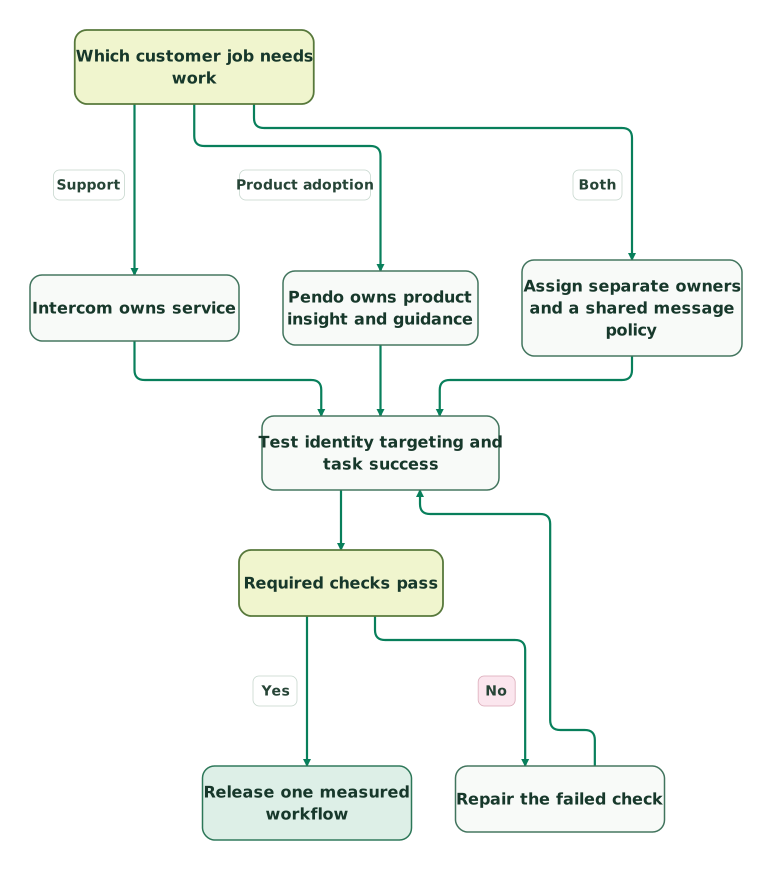
Read diagram as text
- Which customer job needs work to Intercom owns service: Support.
- Which customer job needs work to Pendo owns product insight and guidance: Product adoption.
- Which customer job needs work to Assign separate owners and a shared message policy: Both.
- Intercom owns service to Test identity targeting and task success.
- Pendo owns product insight and guidance to Test identity targeting and task success.
- Assign separate owners and a shared message policy to Test identity targeting and task success.
- Test identity targeting and task success to Required checks pass.
- Required checks pass to Repair the failed check: No.
- Repair the failed check to Test identity targeting and task success.
- Required checks pass to Release one measured workflow: Yes
Budget for the work after launch. Someone must maintain selectors when the interface changes, retire obsolete messages, reconcile identity, review eligibility and explain the report. Assign that ownership before approving a second tool.
Use a written acceptance checklist:
Checklist
- The primary job and successful application action are defined.
- The target device, framework and language pass the walkthrough.
- Visitor and account IDs match the application and remain correct after account switching.
- Existing customers who completed the task do not receive introductory guidance again.
- Dismissal and suppression rules work across the selected delivery paths.
- A failed data lookup keeps ordinary support available without exposing another account's context.
- Message presentation counts reconcile with the proposed bill.
- Task completion can be distinguished from tour completion.
- The renewal quote covers expected MAUs, seats, integrations and peak usage.
- A named owner can pause guidance, repair configuration and roll back the release.
If the unresolved problem is simply an unclear screen or missing permission, fix the application before covering it with guidance. If customers still need service, keep the help route visible while improving onboarding. At Martechdevs, we connect support automation and product data around these operating rules. The $99 martech audit includes a written assessment and a one-hour specialist call to identify the next useful change.
Keep reading
Browse all Product Analytics guides
 Product Analytics
Best Product Analytics Tools for Startups: 7 Options Compared by the Job They Do
Compare GA4, Mixpanel, Amplitude, PostHog, Heap, Pendo and Statsig on free tiers, experiments, server-side events, raw data export and warehouse options.
Jafrin Akter AloLast updated 27 min read
 CRM & Lifecycle
Intercom Implementation Mistakes: Identity, Inbox and Automation
Fix Intercom identity, account context, inbox ownership and Fin handovers with a practical launch scenario and release acceptance checklist.
Jafrin Akter AloLast updated 12 min read
 Product Analytics
North star, activation and retention metrics for SaaS
Choose SaaS metrics that represent customer value. Define activation and retention, avoid misleading cohorts and test improvements with worked examples.
Jafrin Akter AloLast updated 13 min read
Product analytics
See the implementation scope, deliverables and acceptance checks.
Questions people ask
Does Pendo replace a support helpdesk?
Pendo can help customers learn a product and give teams evidence about friction, but choosing it does not provide a plan for queue ownership, replies and escalation. Keep a helpdesk for those jobs. Pendo's Resource Center can open Intercom chat, letting guidance and support share an entry point while retaining separate operating responsibilities.
Do you need Proactive Support Plus for every Intercom message?
No. Intercom includes chats, banners and tooltips with its core plans, while advanced outbound formats use Proactive Support Plus and its Messages Sent meter. Its pricing FAQ explains separate charges for email campaigns and other paid channels. Specify the format and volume before pricing a journey, because “in-app messaging” can describe several differently billed experiences.
Can you use Pendo Free instead of buying Intercom tours?
You can evaluate Pendo Free for an eligible small product, but compare the work it adds as well as the subscription saving. You still need installation, stable identity, measurement and someone to maintain guides. Confirm the current free-plan allowance and required features, and keep the existing helpdesk if customers still need conversational support.
Will moving to Pendo preserve Intercom tour history?
Treat history, eligibility and content as separate migration items. Rebuilding a guide does not carry over the customer's earlier receipts or completion state automatically. Export the records you need, map users and accounts, and decide which prior completions should suppress new guidance. Keep the old version's results for comparison before retiring its delivery rules.
Which outcome should a founder review after rollout?
Review whether more eligible customers complete the valuable task, how quickly they reach it, and how much help they still need afterward. Add the recurring tool and operating costs. Tour views and support activity help diagnose the result, but the decision to expand should rest on customer success and an affordable, maintainable workflow.
Sources
- Intercom: Plans and pricing
- Pendo: Plans and pricing
- Pendo: Get started with Pendo
- Intercom: Product Tours FAQs
- Intercom: Product Tours explained
- Pendo: Understand user behavior with reports
- Intercom: See how your Product Tours are performing
- Intercom: Proactive Support Plus add-on
- Pendo: Integrate Intercom Chat with Pendo
- Intercom: Pendo integration
- Pendo: Choose IDs and metadata
- Pendo: Order and throttle your guides
- Intercom: Message rules
- Pendo: Data collection and compliance
- Pendo: Monthly active users
- Intercom: Pricing FAQs

Written by
Jafrin Akter AloData Engineer and Co-founder at Martechdevs and Growth and Analytics Partners
Jafrin writes practical guides to marketing technology, customer data, analytics and AI workflows. Martechdevs is a Growth and Analytics Partners company.