
HubSpot Credits: Prices, Included Allowances and Spend Limits
HubSpot Credits pay for specified AI and automation actions, with additional credits priced at $0.01 each or $10 for 1,000. On standard Hub-based pricing, Starter includes 500 monthly credits and most Professional products include 3,000; a worked 5,000-credit Professional month needs $20 in additional capacity, while a 30,000-credit month needs $270. Those are credit charges only: seats, product subscriptions and marketing contacts remain separate. HubSpot credit pricing, included allowances.
On this page
What are you billed for with HubSpot Credits?
HubSpot Credits measure specific billable actions, such as a resolved text conversation, a recommended prospect or an AI-generated response for a CRM record. Each action has its own credit rate. First identify your contract model: standard Hub-based subscriptions and flexible seats-and-credits plans have different allowances and some different billable activities. Product catalogue.
A credit is a billing unit, not one message, one contact or one AI request across every feature. These standard-plan examples translate the most useful units into USD at $0.01 per additional credit. Included credits can cover some or all of the consumption.
| Feature | What triggers the charge | Credits | Additional-credit value |
|---|---|---|---|
| Customer agent, text | A qualifying conversation resolution | 50 | $0.50 |
| Prospecting agent | Outreach recommended for one lead | 100 | $1.00 |
| Data agent | One prompt response for one record | 10 | $0.10 |
| AI workflow action | One execution of an AI action | 10 | $0.10 |
| Content agent, beta | One piece of content generated | 1,000 | $10.00 |
Sources: credit rate sheet, Data Agent rate, Prospecting Agent billing explanation. Feature availability still depends on your subscription and account; a credit balance alone does not unlock every feature.
Our CRM and lifecycle implementation service maps the workflow and expected outcome before enabling consumption. Use the full HubSpot pricing guide for the product, seat and contact costs around these credit charges.

How many credits come with each standard HubSpot plan?
Most standard products include 500 credits on Starter, 3,000 on Professional and 5,000 on Enterprise. Data Hub and the Customer Platform bundle include 500, 5,000 and 10,000 respectively. The account receives the highest applicable allowance; buying several Hubs does not add their included allowances together. Included-credit rules.
| Standard subscription family | Starter | Professional | Enterprise |
|---|---|---|---|
| Smart CRM, Marketing, Sales, Service, Content or Revenue, where offered | 500 | 3,000 | 5,000 |
| Data Hub or Customer Platform | 500 | 5,000 | 10,000 |
For example, Marketing Professional plus Sales Enterprise provides the applicable 5,000-credit allowance, rather than 8,000. Buying another user seat does not multiply that account allowance.
How is flexible seats-and-credits pricing different?
The flexible-pricing supplement lists 5,000, 10,000 and 15,000 included credits for Starter, Professional and Enterprise. It also meters activities such as eligible email sends and ordinary workflow actions, with its own rates and capacity packs. Standard-plan estimates should therefore be rebuilt before being used for that contract model.
The supplement can show regional currency pricing. Use the currency and rates on your own order; do not silently turn its euro amounts into US dollar prices. The worked examples below apply only to the standard Hub-based USD model.
What will HubSpot Credits cost a company like yours?
Calculate the number of billable actions, multiply each by its rate, then subtract the account's included allowance. Company size is context; workflow volume drives this part of the bill. These worked examples assume the named features are available in the selected subscription and show additional credit capacity separately from the base HubSpot subscription.
USD list-price examples per month, excluding tax, seats, product fees, onboarding and other service charges. Additional capacity is purchased in 1,000-credit packs at $10 each. Capacity-pack pricing.
| Company situation | Monthly action assumptions | Total credits | Included allowance | Additional packs/month |
|---|---|---|---|---|
| Five-person startup on Starter | 20 Data Agent prompt responses × 10 | 200 | 500 | $0 |
| 20-person SaaS on Sales Professional | 50 recommended prospects × 100 | 5,000 | 3,000 | $20 |
| 80-person SaaS on Service Professional | 500 text resolutions × 50; 500 record responses × 10 | 30,000 | 3,000 | $270 |
| 300-person business on Service Enterprise | 2,000 text resolutions × 50; 200 recommended prospects × 100 | 120,000 | 5,000 | $1,150 |
| Data team on Data Hub Enterprise | 40,000 record prompt responses × 10 | 400,000 | 10,000 | $3,900 |
These examples isolate stable monthly capacity. For the Service Professional row: (500 × 50) + (500 × 10) = 30,000 credits. Subtract 3,000 included credits, then buy 27 packs for $270. If only 400 conversations actually meet the billable-resolution definition, the forecast changes; total incoming tickets cannot substitute for resolved conversations.
For the Data Hub example, distinguish 40,000 records from 40,000 prompt responses. Three prompts applied to 40,000 records create 120,000 responses if each produces a result, giving 1.2 million credits under the cited 10-credit rate. Data Agent's billing event.
What makes a HubSpot Credits bill jump?
The largest risks are broad workflow enrollment, repeated per-record AI work, growing resolution volumes and a billing setting that raises committed capacity. Inspect the action count behind the credit total. A feature that looks inexpensive per action becomes costly when it runs across the whole CRM or repeats more often than intended.
The most useful checks are specific:
- Prospecting: budget recommended leads. Creating a play is not the same unit as receiving a recommended lead. HubSpot's prospecting explanation.
- Data Agent: count prompt responses per record, including planned reruns. Preview the records affected before applying a prompt broadly. Data Agent.
- Recurring features: identify whether the charge repeats monthly while enabled. The catalogue separates per-action and recurring outputs. Rate-sheet definitions.
- Voice and messaging: include any separate telephony or message service charges rather than treating credits as the complete communication bill. Additional service charges.
What exactly counts as a Customer Agent resolution?
For a text conversation, HubSpot counts a qualifying Customer Agent reply containing a content source or an action when no qualifying visitor-initiated handoff occurs within 72 hours of the last visitor response. Lead qualification can also count immediately, including qualified, partially qualified or not-qualified outcomes. Resolution definition.
A manual assignment to an employee, including assignment through a workflow, does not by itself qualify as the visitor-initiated handoff that prevents a resolution charge. Build your estimate from the resolution report and the documented handoff rules. Also measure whether the customer actually completed the task; a billable outcome and a satisfactory business outcome are different measurements.
Multiple messages in one open conversation do not automatically create multiple charges. A later reopened conversation can produce another billable resolution. That makes a mature cohort of conversations more useful for forecasting than today's incoming message count.
Do more seats or more usage increase the credit cost?
Seats provide access, while billable actions consume the account's shared credit pool. Adding seats can increase activity, but it does not multiply the standard included allowance. Paid-seat and Partner-seat users can use credits; Free and View-Only users cannot. Check both seat eligibility and feature entitlement before planning a rollout. Credit access requirements.
This creates two distinct budget questions. How many people need the paid product capabilities? How much work will those people and their automations trigger? A small team running a large enrichment workflow can use more credits than a large team doing mostly manual CRM work.
For outcome measurement, calculate incremental cost per accepted output. In a hypothetical batch, 100 Data Agent responses consume 1,000 credits, worth $10 at the additional-credit rate. If 80 pass the team's acceptance criteria, the credit cost is $0.125 per accepted response, before review time and subscription costs. This lets you compare a workflow change on useful output rather than raw activity.
Should you use included credits, capacity packs or pay-as-you-go?
Use included credits for a bounded pilot, committed capacity for a measured recurring workload and pay-as-you-go for permitted variation above purchased capacity. On standard plans, overages become available after purchasing additional credits. Confirm your account's current overage setting; it may automatically add capacity for the remaining contract term. Billing choices.
| Situation | Sensible starting choice | Boundary to confirm |
|---|---|---|
| Small pilot within included credits | Included allowance only | Features pause when the allowance runs out |
| Stable recurring workload | Capacity matched to observed demand | Purchased capacity remains through the commitment term |
| Seasonal or uncertain spike | Small necessary capacity plus pay-as-you-go | Approved maximum monthly credit limit |
| Workflow cannot pause safely | Budgeted capacity plus a fallback process | Who handles work when any limit is reached? |
For a worked seasonal example, assume 3,000 included credits plus one $10 pack, giving 4,000 monthly credits. The month uses 6,500 credits, and an administrator has deliberately raised the maximum monthly limit to at least 6,500.
- With pay-as-you-go, the 2,500 excess credits cost $25. Including the existing pack, that month's additional-credit charge is $35.
- With automatic capacity upgrades, the account needs 7,000 total credits. Four paid packs cost $40 monthly for the remaining term.
- If next month's usage falls to 2,000, the original pay-as-you-go configuration still carries its $10 pack; the automatically upgraded configuration carries $40 unless a permitted contract change applies.
These are calculations from the published billing rules, not claims that every account has the same default setting. Check the timing of any setting change before relying on it for the current cycle.
How do you keep HubSpot Credit spending under control?
Set the account's maximum monthly credits, give individual tools appropriate limits and inspect usage by feature. Assign an owner to each consumption source and decide what happens when it pauses. A feature limit restricts how much that tool can use; it does not reserve part of the shared pool for that tool. Spend controls.
- Open Account & Billing → HubSpot Credits and record the included allowance, purchased capacity and reset date.
- Inspect Overage setting and choose the approved behavior.
- Set Maximum monthly credits deliberately. After additional capacity is purchased, the default maximum is 50% above total monthly credits.
- Set limits for each credit-consuming tool, keeping the account-wide maximum in view.
- Review Usage & Limits → HubSpot Credits → Manage usage by feature to reconcile activity with the forecast.
- Test the fallback when a feature pauses before expanding the workflow.
The default 50% buffer means 4,000 total monthly credits can permit up to 6,000, not 6,500. The seasonal example above therefore requires an explicit higher limit. A planned budget must reflect the configured maximum and the chosen billing mode, rather than just the number of purchased packs.
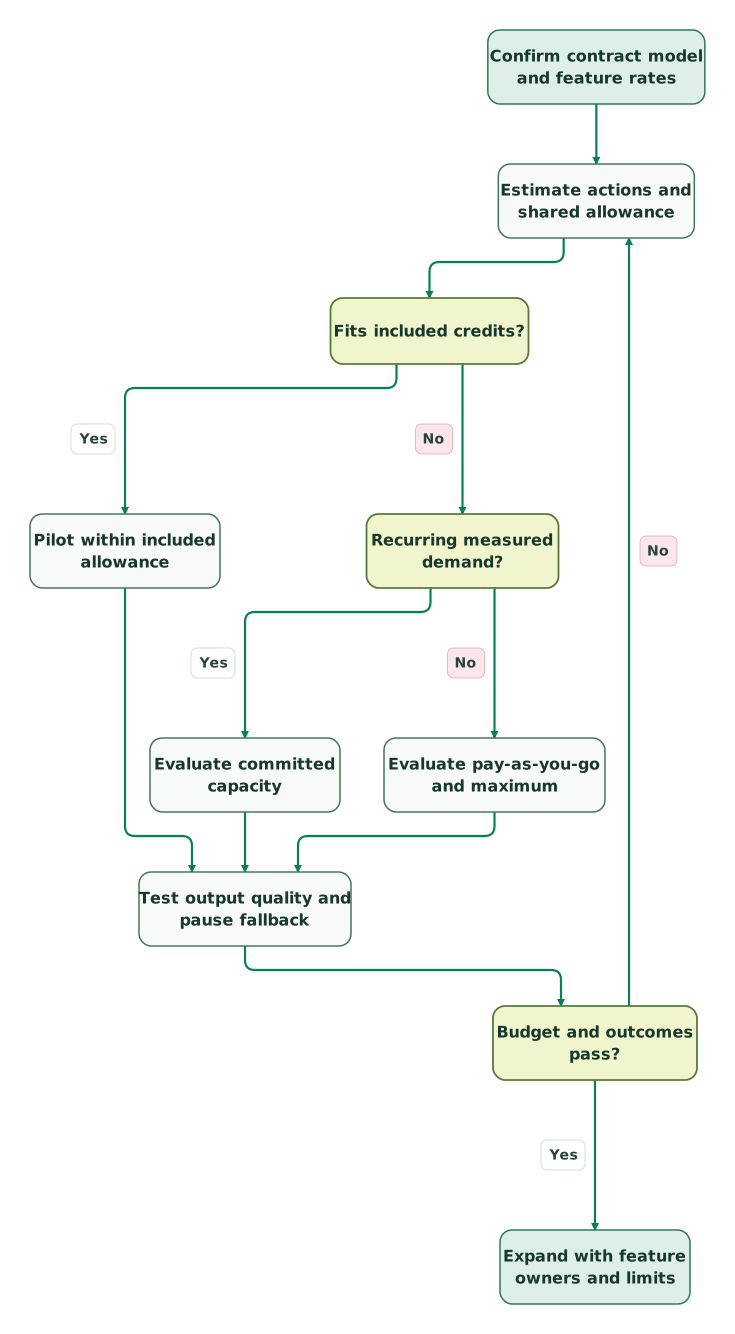
Use a small pilot to confirm the action count and acceptance criteria, then make the expansion decision:
Read diagram as text
- Confirm contract model and feature rates to Estimate actions and shared allowance.
- Estimate actions and shared allowance to Fits included credits?.
- Fits included credits? to Pilot within included allowance: Yes.
- Fits included credits? to Recurring measured demand?: No.
- Recurring measured demand? to Evaluate committed capacity: Yes.
- Recurring measured demand? to Evaluate pay-as-you-go and maximum: No.
- Pilot within included allowance to Test output quality and pause fallback.
- Evaluate committed capacity to Test output quality and pause fallback.
- Evaluate pay-as-you-go and maximum to Test output quality and pause fallback.
- Test output quality and pause fallback to Budget and outcomes pass?.
- Budget and outcomes pass? to Expand with feature owners and limits: Yes.
- Budget and outcomes pass? to Estimate actions and shared allowance: No
What should you watch for in the credit contract?
Confirm the subscription model, included allowance, action rates, purchased capacity, overage behavior and renewal terms together. Standard capacity packs increase monthly capacity for the remaining commitment term and generally cannot be reduced until that term ends. Unused credits expire at the monthly reset; they do not become a reserve for a future campaign. Credit billing terms.
For standard pay-as-you-go, excess use is invoiced monthly in arrears in ten-credit increments, rounded down according to the current help article. A billing-mode change can take effect next usage period if credits have already been used in the current one. Record the effective change date in your internal budget.
For year-two planning, price the continuing capacity and base subscription after any promotion expires. HubSpot for Startups offers eligible businesses software benefits, but do not apply a headline software discount to credits without confirmation that those credit purchases qualify. The free CRM and an included paid-plan credit allowance are also separate offers.
How do you read the HubSpot Credits rate sheet?
Match the exact feature and action to your contract's rate sheet, then multiply by successful billable events or recurring units as defined there. An AI action, an ordinary workflow action and a dataset use can have different rates. Keep beta labels and product eligibility beside any feature you plan to budget.
For standard plans, Data Studio dataset use has different rates by primary-source row count: 25 credits below 500,000 rows, 75 for 500,000 to five million, and 200 above five million. A dataset used in a report does not consume credits under that rate-sheet line. Standard Data Studio rates.
The flexible-pricing supplement uses different rates for some of those activities. Never combine its larger included allowances with the standard plan's lower rate for a specific action to produce an artificial estimate.
A working budget needs these columns: feature, billable unit, expected units, credits per unit, total credits, owner and maximum permitted use. Add the product/seat subtotal separately. When a vendor changes a rate, that structure makes the effect visible without rebuilding the entire commercial model.
What should you confirm before expanding credit-based workflows?
Confirm the measured action count, useful-output rate, monthly maximum and fallback process before widening eligibility. Every feature draws from shared capacity, so the support and sales owners need a joint operating budget. The first rollout should expose whether the workflow produces useful results at the expected rate and stops or hands over safely.
Checklist
- The order's standard or flexible pricing model is identified.
- Included credits are counted once at the correct account allowance.
- Each workflow has a billable-unit forecast and an output-quality check.
- Purchased capacity, overage mode and the maximum monthly limit are approved.
- Feature owners know that limits do not reserve credits.
- Paused features have a tested operational fallback.
Use the HubSpot implementation plan skill to document the rollout. The HubSpot cost calculator helps assemble the surrounding seat and contact budget; enter credit charges separately where the calculator does not model your workflow. Compare the broader capabilities in HubSpot AI, and use our HubSpot implementation service when the budget needs to become a working system.
Keep reading
Browse all CRM & Lifecycle guides
 CRM & Lifecycle
HubSpot Pricing: Seat Prices, Marketing Contacts, Credits and Onboarding
HubSpot is free for 2 users. Starter seats list at $20 and Professional at $50–$100. Add tiered marketing contacts and $1,500–$7,000 onboarding.
Jafrin Akter AloLast updated 26 min read
 Martech AI
HubSpot AI in 2026: Breeze, Agent Hub, credits and what to implement first
Understand HubSpot Agent Hub, Breeze, AI agents and credit costs. Use worked budgets and acceptance tests to choose a useful first implementation.
Jafrin Akter AloLast updated 10 min read
 CRM & Lifecycle
HubSpot implementation: a phased plan, template and launch checklist
Implement HubSpot in five phases: scope, data model, migration, integrations and launch. Includes a plan template, a worked example and a go-live checklist.
Jafrin Akter AloLast updated 22 min read
CRM & marketing automation
See the implementation scope, deliverables and acceptance checks.
Questions people ask
Does each paid HubSpot seat receive its own credit allowance?
The standard included allowance applies at account level according to the applicable subscription, rather than once per seat. Multiple products also do not stack their included amounts: HubSpot grants the highest applicable allowance. Calculate paid access and shared consumption separately, then forecast the extra activity a larger team is likely to generate. Included-credit rules.
Can unused HubSpot Credits be saved for Black Friday?
Unused HubSpot Credits expire at the monthly reset and do not roll over. Plan a seasonal campaign from that month's included allowance, purchased capacity and permitted overages. Check the actual usage-period reset date, since it follows the account's usage cycle and should not be assumed to match the first day of the calendar month. Reset rules.
Does a Customer Agent message always cost 50 credits?
A single message is not the billing event. The standard text rate applies to a qualifying resolution, with specific rules for the agent's reply, visitor-initiated handoff and lead qualification. Multiple messages in an open conversation do not automatically create extra charges, while a reopened conversation can later produce another resolution. Customer Agent billing.
Will a limit reserve credits for the support team?
A feature-level limit caps what that feature may consume; it does not reserve credits from the shared balance. Another enabled tool can use the pool first. Review the combined forecast, set limits across participating tools and define the support handoff when credits run out, rather than treating the feature cap as a guaranteed allocation. Feature-limit behavior.
Are HubSpot Credits the same as marketing contacts?
On standard Hub-based pricing, marketing-contact capacity and HubSpot Credits are separate billing components. Credits fund listed actions; the Marketing Hub contact tier follows its own rules. Flexible seats-and-credits contracts change that packaging, so identify the contract before building a comparison and avoid applying standard contact tiers to a flexible model. Standard catalogue, flexible supplement.
Sources

Written by
Jafrin Akter AloData Engineer and Co-founder at Martechdevs and Growth and Analytics Partners
Jafrin writes practical guides to marketing technology, customer data, analytics and AI workflows. Martechdevs is a Growth and Analytics Partners company.