
Help Scout Alternatives: Five Options for Inboxes, Routing and Scale
Choose Front for a more structured shared-inbox operation, Missive for collaborative email work, Freshdesk for ticket-oriented support, Zendesk for broader service operations, and Intercom for in-product conversations. First compare those options with the Help Scout plan that solves your actual problem. A useful replacement must improve ownership, reporting or customer handling while preserving conversation history and private internal context.
On this page
Help Scout alternative shortlist
Prices are USD per paid user or agent/month on annual billing, before tax, AI usage, channels and migration.
| Alternative | Starting plan | Working fit | Important limit |
|---|---|---|---|
| Front | Starter $25; Professional $65 | Shared inboxes with stronger operating boundaries | Starter has one channel type and a ten-seat cap |
| Missive | Starter $14; Productive $24 | Email collaboration with tasks and connected workflows | Starter is capped at five users; API and integrations require Productive or above |
| Freshdesk | Growth $19; Pro $55 | A defined ticket queue and escalation process | Omni is a separate package for broader channel scope |
| Zendesk | Support Team $19; Suite Team $55 | Service operations spanning several channels and teams | A complete Suite requirement may need a higher edition or add-ons |
| Intercom | Advanced $85 plus Fin usage | Support inside a software product | Workflows, usage meters and historical transfer need separate planning |
Sources: Front pricing, Missive pricing, Freshdesk pricing, Zendesk pricing and Intercom pricing.
Help Scout retention criteria
Keep Help Scout when it can meet the requirement through a sensible plan or configuration change. Annual pricing is $25 per user/month for Standard, $45 for Plus and $75 for Pro. Standard supports up to twenty-five users, Plus up to fifty, and Pro has a ten-user minimum. Plus adds advanced workflows and round-robin routing; Pro adds controls including SSO/SAML. Help Scout pricing and plan limits.
For example, a team missing its owner assignment rules should test those rules in a suitable configuration before scheduling a migration. A team missing an exportable report should identify the required fields, time grain and API access first. A different interface does not settle either issue. Our customer support automation service can scope the historical transfer, connected data and operating rules the replacement needs.
Help Scout's API boundary is particularly useful for this decision. Standard allows up to 200 calls per minute but excludes reporting endpoints. Plus permits up to 400 and Pro up to 800 with all endpoints. Free has no API or integrations access. A request for a reporting connector can therefore be a plan question rather than a replacement requirement. Help Scout API access.
Five Help Scout competitors
Front
Front is a candidate when several teams need a shared communication workspace with more explicit separation and automation. Starter is $25 per seat/month annually, capped at ten seats and one channel type. Professional is $65 with up to fifty seats, multiple channel types, up to five workspaces, SSO and SCIM. Enterprise is $105 with broader controls and unlimited rules. Front plan comparison.
Channel count and channel type are separate limits. Front allows ten channels per Starter license, thirty per Professional license and fifty per Enterprise license across shared and individual channels. Each teammate can connect at most ten individual channels. Count connected mailboxes and other channels before signing. Front channel limits.
- Best for: Teams coordinating customer communication across several operating groups.
- Pros: A defined workspace model and explicit channel allowances.
- Cons: Professional can be the real entry point when several channel types or more than ten users are required.
- Free plan and startup offer: A trial is available. Use the required recurring edition in the budget and record negotiated offers separately.
- Choose it if: A pilot improves ownership and handoffs without creating unnecessary rules.
- Skip it if: The team expects Starter's price while needing Professional's channels or capacity.
Front recommends migration partners for Help Scout history. Its own free importer is not actively maintained and excludes notes and comments. If internal discussion is operationally important, require a partner or custom route that preserves it. Front's Help Scout import guidance.
Missive
Missive suits teams whose work revolves around shared email, internal discussion and tasks. Annual Starter pricing is $14 per user/month for up to five users. Productive is $24 for up to fifty, and Business is $36 with unlimited users. Productive introduces rules, external integrations and API access; Business adds SAML SSO and IP restrictions. Missive plans.
The API ownership model deserves attention. Missive tokens are personal and can access the accounts available to their owner, including shared accounts. A request filter selects the account being queried; it does not change the token's underlying permission boundary. Use a suitably restricted identity and record who maintains the connection. Missive API authentication.
- Best for: Small and midsize teams combining customer email with collaborative work.
- Pros: A relatively low paid starting point and a direct route to connected workflows.
- Cons: Required reporting filters or access controls can move the purchase to Business.
- Free plan and startup offer: A thirty-day Productive trial is available without a card; it should be tested against the intended final plan.
- Choose it if: The team needs collaborative communication more than a complex service-management structure.
- Skip it if: A trial success depends on capabilities that disappear on the cheaper selected plan.
Missive's analytics API supports Productive and Business, but filtering by team, user, label or account requires Business. Test the exact reporting query used by management before declaring the cheaper tier sufficient. Missive analytics API.
Freshdesk
Freshdesk fits teams that want to organize support around tickets, statuses and a defined escalation process. Growth is $19 per agent/month annually. Pro at $55 adds capabilities including custom dashboards, multiple SLA policies and more advanced routing. Compare the target process with the chosen tier. Freshdesk pricing.
Separate the standalone product from Freshdesk Omni. Omni Growth begins at $29 per agent/month annually for broader channel handling. This distinction matters when a Help Scout team wants to add channels and assumes every Freshdesk price includes the same scope. Freshdesk Omni pricing.
- Best for: Teams moving toward a more formal support queue.
- Pros: A clear ticketing baseline and higher editions for operating requirements.
- Cons: A change in conversation model requires status, ownership and reporting decisions.
- Free plan and startup offer: Validate the chosen paid edition in a trial; separate introductory concessions from the renewal quote.
- Choose it if: Ticket ownership and escalation improve under the target process.
- Skip it if: You would recreate a simple email workflow with a larger administration burden.
Our Zendesk versus Freshdesk guide helps when these two ticket-oriented products reach the final shortlist.
Zendesk
Zendesk is a candidate when a growing operation needs broader service processes and several channels. Support Team is $19 per agent/month annually for email ticketing. Suite Team is $55 and adds capabilities such as messaging, live chat, telephony and a knowledge base. Zendesk pricing.
A historical import has reporting consequences. Zendesk supports ticket and comment timestamps through its Ticket Import API, but warns that its metrics and SLAs are unreliable for imported tickets. Tag imported history and keep it out of native operational metrics. Preserve the Help Scout historical baseline separately. Zendesk ticket import behavior.
- Best for: A service organization with a clear need beyond the shared inbox.
- Pros: A documented import API and broad service-product scope.
- Cons: Migration and administration can be substantial relative to a small team's needs.
- Free plan and startup offer: Trial the required configuration and obtain any special commercial terms in writing.
- Choose it if: Necessary channel, access and operating requirements justify the full configuration.
- Skip it if: A lower Support Team headline price is being used to justify a much broader Suite purchase.
Intercom
Intercom fits a software company that wants support close to the product experience and has a defined role for automated conversations. Advanced includes multiple team inboxes and workflow automation at $85 per seat/month in the annual view. Expert adds requirements such as SLAs and SSO at $132. Fin usage starts at $0.99 per outcome. Intercom plans.
Budget outcomes according to the billing definition. Fin can charge when the customer confirms resolution, stops requesting help after its answer, or a Procedure completes, including a handoff. Define your own customer-success measure alongside that commercial meter.
- Best for: SaaS teams connecting in-product conversations, context and automated support.
- Pros: Support workflows can operate within the customer's product journey.
- Cons: Seat costs, AI usage and paid channels need separate budgets.
- Free plan and startup offer: Intercom offers a trial and a separate startup application. Approved eligibility and duration belong beside the discounted quote.
- Choose it if: Product and support owners can maintain customer context and escalation behavior together.
- Skip it if: You only need a cheaper shared email inbox.
Use our Intercom alternatives guide for a wider product-support decision.
Best fit by team scenario
| Team situation | First candidate | Runner-up | Decisive trial task |
|---|---|---|---|
| Four-person email collaboration team | Missive | Help Scout retention | Shared ownership, internal discussion and a reopened thread |
| Fifteen-person team across email and messaging | Front Professional | Help Scout Plus | Correct routing and permissions across channel types |
| Support team needing a formal ticket process | Freshdesk | Zendesk | Status transitions, business hours and escalation |
| Larger service operation with specialized groups | Zendesk | Front | Cross-team handoff with an accountable owner |
| SaaS company adding in-product automation | Intercom | Help Scout retention | Context-aware handoff with a clear unresolved state |
A trial should include an agent, a support lead and an integration owner. Each sees a different failure: confusing daily work, an unusable report or a connection that cannot be maintained safely.
Worked subscription and switching costs
This hypothetical fifteen-user team requires paid access for everyone. Annual commitments are shown before AI, channels, migration and onboarding; the rows are candidate configurations rather than equal feature bundles.
| Configuration | Monthly equivalent | Annual subscription |
|---|---|---|
| Help Scout Standard | $375 | $4,500 |
| Help Scout Plus | $675 | $8,100 |
| Missive Productive | $360 | $4,320 |
| Missive Business | $540 | $6,480 |
| Front Professional | $975 | $11,700 |
| Freshdesk Growth | $285 | $3,420 |
| Zendesk Suite Team | $825 | $9,900 |
| Intercom Advanced | $1,275 | $15,300 |
Front Starter and Missive Starter are excluded because their seat caps are below fifteen. This avoids pricing a configuration the example team cannot buy.
If the team can move from Help Scout Plus to Missive Productive while preserving its requirements, the annual subscription difference is $3,780. With an assumed $2,000 migration and $100/month of extra integration maintenance, annual net savings become $2,580 and simple payback is about 9.3 months.
If filtered analytics require Missive Business, the same comparison produces only $1,620 annual subscription savings. Subtract the assumed $1,200 maintenance and net savings become $420. The same $2,000 move then takes about 57.1 months to repay. One edition boundary changes the decision more than the lowest advertised price.
Add usage after resolving the required tier. For example, 800 chargeable Fin outcomes at $0.99 add $792 to the Intercom row, producing $2,067 for that month before other channel charges. Use observed eligible volume and a trial result, rather than an assumed universal AI success rate.
Help Scout export and migration boundaries
A reporting export is insufficient for a full Help Scout move. Its CSV or XLSX report exports exclude conversation thread contents. Conversation, customer and user data are available through the Inbox API, while knowledge-base articles use the Docs API. A requested customer-name and email CSV also excludes conversation history. Help Scout data export options.
Build an inventory by data type and destination behavior:
| Data or behavior | Required destination evidence | Failure signal |
|---|---|---|
| Customer identity | Correct customer on each sampled conversation | Threads split across duplicate profiles |
| Public messages | Correct order, author and visibility | Missing replies or altered chronology |
| Internal notes | Preserved private access | Internal context missing or exposed |
| Attachments | Successful download from destination | Source-only links or inaccessible files |
| Open work | Owner, status and next action retained | Unassigned or silently closed requests |
| Docs content | Articles, images and useful public addresses retained | Broken links from existing customer messages |
| Reporting | Definitions and historical baseline documented | Apparent improvement caused by a changed denominator |
For a Front move, explicitly reject the built-in importer when missing notes and comments would break the requirement. For other destinations, obtain an object-level mapping and sample result. A vendor logo on an importer does not establish complete fidelity.
Keep the source account active until historical access, the final delta transfer and new customer replies pass acceptance. Removing the old mailbox connection too early can strand a reply to an existing thread.
Replacement decision workflow
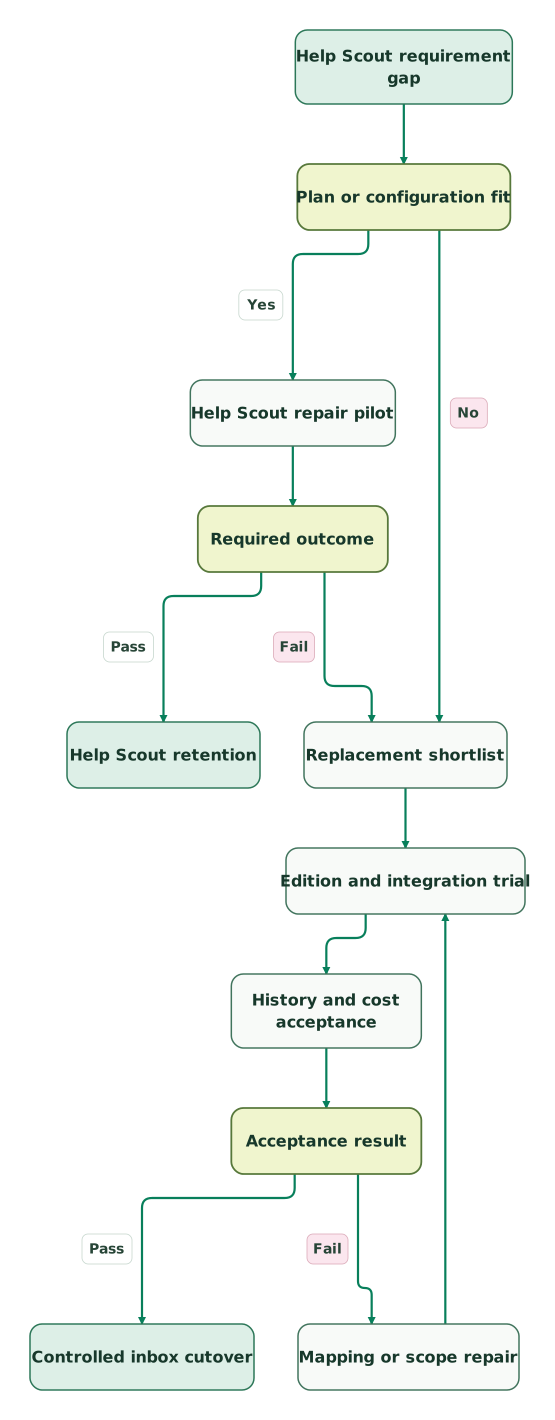
Read diagram as text
- Help Scout requirement gap to Plan or configuration fit.
- Plan or configuration fit to Help Scout repair pilot: Yes.
- Plan or configuration fit to Replacement shortlist: No.
- Help Scout repair pilot to Required outcome.
- Required outcome to Help Scout retention: Pass.
- Required outcome to Replacement shortlist: Fail.
- Replacement shortlist to Edition and integration trial.
- Edition and integration trial to History and cost acceptance.
- History and cost acceptance to Acceptance result.
- Acceptance result to Mapping or scope repair: Fail.
- Mapping or scope repair to Edition and integration trial.
- Acceptance result to Controlled inbox cutover: Pass
The failed branch returns to configuration and scope. Repeating the same import without addressing its exclusions will reproduce the same incomplete result.
Replacement checklist
- Main reason for leaving expressed as a measurable workflow requirement.
- Help Scout repair or upgrade priced alongside the replacement.
- Seat count, channel types, rules, API access and reporting filters checked in the chosen edition.
- Personal and shared inbox access reviewed with the integration owner.
- Private notes, attachments and open work included in a representative migration sample.
- Knowledge-base transfer and public redirects assigned separately.
- Saved replies, business hours and escalation behavior rebuilt where required.
- Ordinary and peak AI or channel usage added to the subscription quote.
- New email, old-thread reply, duplicate contact and failed integration tested.
- Source retention, rollback and final acceptance owned by named people.
Use the CRM audit skill to inspect connected-system ownership. Our support customer context guide covers the data agents need at the moment of a handoff. Customer support automation implementation can help when the replacement requires historical migration, identity mapping and maintained integrations.
Keep reading
Browse all CRM & Lifecycle guides
 CRM & Lifecycle
Zendesk vs Freshdesk: Compare the Right Plans, AI Bill and Renewal Cost
Zendesk vs Freshdesk pricing: both start at $19 per agent, but Freshdesk tops out at $89 and Zendesk Suite Professional at $115. Compare plans, AI and costs.
Jafrin Akter AloLast updated 23 min read
 CRM & Lifecycle
Intercom Alternatives: Choose Around the Work You Need to Keep
Compare Zendesk, Help Scout, Freshdesk, HubSpot and Gorgias around support jobs, AI evaluation, migration work and real operating cost.
Jafrin Akter AloLast updated 13 min read
 CRM & Lifecycle
Support AI Pricing: Compare the Unit You Pay For
Compare Fin, Zendesk, Freddy, HubSpot and Agentforce billing units, allowances and worked costs, including the human work left after AI support.
Jafrin Akter AloLast updated 15 min read
Customer support automation
See the implementation scope, deliverables and acceptance checks.
Questions people ask
Which Help Scout alternative is closest to collaborative email?
Missive is a useful first candidate when the team wants shared email, internal collaboration and tasks. Front is another candidate when separate operating groups, more channel types or explicit workspace boundaries matter. Trial the same handoff and reopened conversation in each product. Compare the edition that supports the real team size, required integrations and management reporting.
Can a Help Scout report export preserve all customer messages?
Help Scout's report exports exclude conversation thread contents, so they cannot serve as a complete message-history archive. Use the Inbox API for conversation data and the Docs API for knowledge-base content. Confirm attachments, internal notes, authors and timestamps in the destination sample. Keep reporting exports as a historical measurement baseline alongside the fuller operational transfer.
Does Front's Help Scout importer include internal notes?
Front's own Help Scout importer excludes notes and comments and is no longer actively maintained. Front recommends migration partners instead. If internal discussion records decisions or promised customer actions, include them as a required acceptance item in the partner or custom scope. Check several real examples before assuming that an imported message count represents complete history.
Is Missive Starter suitable for a fifteen-person Help Scout team?
Missive Starter is capped at five users, so a fifteen-person team needs Productive or Business. Productive also provides API access, integrations and automation. Business becomes relevant for requirements such as SSO, IP restrictions and filtered analytics API reports. Price the required configuration before calculating savings, because a plan change can substantially lengthen migration payback.
When should a team upgrade Help Scout instead of migrating?
An upgrade is worth testing when the missing requirement is available in a higher Help Scout edition and the team already works well in the product. Reporting API access, routing, workflow complexity or security may create that situation. Compare the upgrade with the replacement's full subscription, migration, training and maintenance cost, then choose the option that passes the same operational tests.
Sources

Written by
Jafrin Akter AloData Engineer and Co-founder at Martechdevs and Growth and Analytics Partners
Jafrin writes practical guides to marketing technology, customer data, analytics and AI workflows. Martechdevs is a Growth and Analytics Partners company.