
Google Search Console MCP Server: Setup and 7 Checks Before You Trust It
A Google Search Console MCP server lets an AI assistant retrieve search performance and indexing information through callable tools. The useful result is a decision you can trace to the right property, query, page and reporting period. Start with read-only access, then verify the returned data before asking the assistant which titles to change or which articles to write.
On this page
What does a Google Search Console MCP connection actually do?
A Search Console MCP connection translates the assistant's tool calls into Search Console API requests and returns the results for analysis. Google supplies the API; the MCP server's maintainer determines the tools, defaults, authentication flow and response formatting. Those choices affect what the assistant can see and what it might conclude.
Use the introductory workflow to set up Claude Code for marketing work before connecting the Search Console task.
The marketing analytics MCP guide covers choosing between direct platform access, reporting connectors and a warehouse. Search Console needs its own checks because a query list, a page list and a query-by-page report answer different questions. You cannot infer the page that earned an impression by joining two unrelated top-ten lists.
Google maintains a catalog of its official MCP servers. Establish the publisher of the specific server you select; a Google product name in a repository title does not establish Google ownership. The local example below uses the independently maintained open-gsc-mcp project, which identifies itself as unofficial.
At Martechdevs, our custom martech AI agent implementation starts with a defined reporting question and a result that an operator can reconcile. For Search Console, that means proving the connection on one known property before turning a generated opportunity list into an editorial backlog. If you want the server, access and first reports set up for your team, see our Claude Code and MCP setup.
| Reader's question | Evidence to retrieve | Decision it supports |
|---|---|---|
| Which page serves this search intent? | Query and page in the same result row | Improve the existing page or identify a real coverage gap |
| Did organic performance fall? | Matched periods with the same search type and filters | Separate a broad decline from a segment-specific change |
| What does Google know about this URL? | URL Inspection for that URL and property | Investigate indexing, canonical or crawl evidence |
| Can we defend the board-report total? | A reconciled aggregate with its request parameters | Report a consistent measure before explaining its detail |
How do you connect a local server with read-only access?
Connect the local server with a Google identity that can access the intended property, a narrow OAuth grant and write tools disabled. Check the grant and the tool list separately: disabling a visible action does not necessarily reduce an already-issued credential's authority.
Google's Search Console API uses OAuth authorization. Its webmasters.readonly scope permits reading; webmasters permits reading and writing. A standalone API key does not replace authorization to private Search Console data. Google authorization reference
1. Prepare the Google project and identity
Enable the Search Console API in the Google Cloud project you will own after setup. Configure the OAuth application, choose a Desktop app client and save its downloaded client JSON outside the website repository. Use the Google account that actually has Search Console access. Creating a Cloud project does not grant that account access to a Search Console property. Google's desktop OAuth guide explains the client setup and consent flow.
For a company deployment, record the project owner, credential custodian and offboarding process. Keep the account's property access limited to the reporting scope. Read-only access still allows data to leave the source through the assistant and its connected services; decide where retrieved queries and URLs may be retained.
2. Pin the server version and request a read-only login
This example uses open-gsc-mcp 1.4.0. Install uv using Astral's installation instructions, then run this command in a terminal. Replace the path with the actual Desktop client JSON location.
uvx open-gsc-mcp@1.4.0 auth login --read-only \
  --client-file /absolute/path/to/client_secret.json
The --read-only argument changes the requested Google scope. The server's login command supports this explicitly. Keep the version pinned until you have reviewed and accepted an upgrade. Do not authorize an unfamiliar OAuth app merely because a tutorial says to dismiss a warning; check the app, account and requested access first.
3. Disable write tools in the MCP client
Add this entry to a client that supports an mcpServers configuration. Use the absolute path returned by which uvx on macOS or Linux, or where uvx on Windows. Merge the entry into the existing configuration rather than replacing other servers.
{
  "mcpServers": {
    "search-console": {
      "command": "/absolute/path/to/uvx",
      "args": ["open-gsc-mcp@1.4.0"],
      "env": {
        "GSC_ENABLE_WRITES": "0"
      }
    }
  }
}
This setting removes the server's change-making tools. It does not revoke a broader token obtained previously. The authentication implementation accepts existing tokens with either Search Console scope. If you previously granted write access, revoke that app's old grant and create a fresh read-only login; verify the result instead of assuming that the new setting narrowed the token.
Keep credentials and cached tokens out of prompts, Git and screenshots. A service account is another authentication route, but it needs its own property access and credential lifecycle. Do not switch authentication methods to conceal an unresolved permissions problem.
4. Confirm the tools and exact property
Restart the MCP connection and call list_sites. Select the exact returned site_url. For example, sc-domain:example.com identifies a Domain property, while https://www.example.com/ identifies a URL-prefix property. Google's Sites list method returns the properties and associated permission levels available to the authorized identity.
If the property is missing, stop. Check the signed-in account and the property's Users and permissions settings. Editing the hostname in a prompt cannot grant access. If both property types exist, record which one the report uses and keep it consistent across comparisons.
Which seven checks make the answers reliable?
Reliable Search Console MCP answers preserve access, property, time, dimensions, coverage, arithmetic and the difference between observation and action. Run these seven checks on a known example before accepting a recurring report.
1. Does the credential match the intended access?
Verify that the connection uses the intended Google identity and that its grant is read-only. Also verify that change-making tools are absent from the exposed tool list. These checks catch different mistakes. The MCP security checklist explains how to extend that boundary to the rest of the assistant's tools.
2. Is the exact property preserved?
Require the assistant to repeat the selected property in the result. Test a known page from that property before requesting a portfolio-wide report. Keep staging domains, subdomains and URL-prefix boundaries explicit in the reporting specification. An answer from the wrong property can be internally consistent and still be useless to the decision.
3. Are the date range and data state explicit?
Search Analytics dates use Pacific Time and include both endpoints. Request data_state: "final" for a stable comparison; recent all or hourly results can include incomplete data. Google's query reference defines these parameters and the incomplete-data metadata.
Use equal-length periods with comparable weekday coverage. Keep a launch week separate from a fully operating week. If the requested final days have no rows yet, report that absence and choose an available period deliberately. Do not silently substitute an older period or describe unfinished data as a traffic collapse.
4. Do the dimensions answer the actual question?
Request query and page together when choosing a destination to improve. Add a country or device dimension when that distinction changes the decision, rather than asking for every possible breakdown by default. Keep the raw response beside the recommendation so a reviewer can inspect the association.
For the server above, the following is an example argument object for query_search_analytics. It describes an illustrative two-week window; replace it with the finalized dates and exact property you want to analyze. It is an MCP tool argument, not a JSON file that configures the server.
{
  "site_url": "sc-domain:example.com",
  "start_date": "2026-10-01",
  "end_date": "2026-10-14",
  "dimensions": ["query", "page"],
  "search_type": "web",
  "data_state": "final",
  "aggregation_type": "auto",
  "row_limit": 25000,
  "start_row": 0
}
The project's query tool implementation defines these names. Other MCP servers may use different argument names, string-encoded dimensions or narrower tool limits. Inspect their actual tool schema before reusing the example.
5. How much of the available data was returned?
Paginate the selected request and record how many rows were returned, including the terminal response. Search Analytics exposes top rows and has a maximum of 50,000 rows per day per search type. Requesting 25,000 rows at a time does not remove the underlying ceiling. Google recommends daily extraction for repeated reporting. Google data extraction guidance
Rows are returned in click order for ordinary non-date queries. Sorting the retrieved rows by impressions produces an impression ranking within that retrieved set. It does not prove that you found every high-impression, zero-click opportunity on the property. Narrow the relevant page or query slice when appropriate, and keep the remaining coverage limitation with the result.
6. Are totals and rates being combined correctly?
Calculate a subtotal's CTR from its summed clicks and impressions. Do not average the CTR percentages of differently sized rows. Google's Performance report overview defines CTR as clicks divided by impressions.
The following hypothetical rows belong to one retrieved query-page dataset, with the same period, filters and aggregation. They illustrate the arithmetic only.
| Observed row | Clicks | Impressions | Row CTR |
|---|---|---|---|
| Query-page pair A | 10 | 100 | 10.00% |
| Query-page pair B | 50 | 10,000 | 0.50% |
| Retrieved-set subtotal | 60 | 10,100 | 0.5941% |
The simple average of the two row CTRs is 5.25%, which overstates this subtotal. The correct calculation is 60 / 10100 × 100. More decimal places cannot repair the wrong denominator.
Use this helper only on non-overlapping rows from the same request scope. Each input needs its complete dimension key. Repeated keys are rejected so a retried response cannot quietly double the subtotal.
from decimal import Decimal, InvalidOperation

def observed_ctr(rows):
    clicks = Decimal(0)
    impressions = Decimal(0)
    seen = set()
    key_width = None
    for row in rows:
        if not isinstance(row["keys"], (list, tuple)) or not all(
            isinstance(value, str) for value in row["keys"]
        ):
            raise ValueError("Keys must be an ordered list of strings")
        key = tuple(row["keys"])
        if key_width is None:
            key_width = len(key)
        elif len(key) != key_width:
            raise ValueError("Mixed dimension widths")
        if key in seen:
            raise ValueError("Repeated dimension key")
        seen.add(key)
        try:
            c = Decimal(str(row["clicks"]))
            i = Decimal(str(row["impressions"]))
        except (InvalidOperation, ValueError):
            raise ValueError("Invalid count") from None
        if not c.is_finite() or not i.is_finite() or min(c, i) < 0:
            raise ValueError("Counts must be finite and nonnegative")
        if c != c.to_integral_value() or i != i.to_integral_value():
            raise ValueError("Counts must be whole numbers")
        if c > i:
            raise ValueError("Clicks exceed impressions; check the row scope")
        clicks += c
        impressions += i
    return {
        "observed_clicks": clicks,
        "observed_impressions": impressions,
        "observed_ctr": clicks / impressions if impressions else None,
    }
This returns a fraction, so multiply observed_ctr by 100 for a percentage. A zero-impression set returns None, not an invented 0% performance result. Normalize your MCP server's named fields into this input shape before using the helper.
Keep this subtotal separate from the property's total. Google counts results differently when aggregating by property and by page. Two URLs from one property can contribute differently to those views. Google aggregation explanation Reconcile like with like, and preserve the reported aggregation type in stored extracts.
7. Does the recommendation follow from the evidence?
Treat a low-CTR row as a candidate for investigation. Inspect its intent, current title, landing-page answer, device mix and search-result context before preparing an exact SEO title or link proposal. A low position, navigational query or result that answers the question without a click can change the interpretation. A tool-generated priority score is an operating rule, not proof of recoverable traffic.
Google generates title links from several signals and may display wording other than your title element. Keep the title concise and descriptive, then allow for recrawling and reprocessing when evaluating a change. Google title-link guidance Do not promise that adding a number to every headline will lift CTR.
How should the assistant produce a useful opportunity list?
Ask the assistant for query-page evidence and a bounded editorial decision, with unavailable information called out explicitly. The output should identify what to inspect next, not issue blanket rewrite instructions for every low percentage.
Use a prompt such as this after selecting the property and date range:
Use the selected Search Console property and finalized reporting window.
Retrieve query-page pairs and preserve the request and raw rows.
Record pagination, aggregation and any coverage limits.
Group potential improvements by landing page.
For each candidate, show the actual query, clicks, impressions and CTR,
then explain what the existing page would need to answer better.
Separate title mismatch, content gap and unresolved evidence.
If query-page pairs are unavailable, stop the page-level recommendation.
Propose changes for review; do not edit or publish the website.
For a hypothetical tools article, a query about an API error and a page about general pricing may indicate the wrong destination. A new troubleshooting guide could be justified. If the same query already lands on a strong troubleshooting page, inspect the missing error variant or unclear title first. Creating another page without resolving that overlap can divide the work across two weaker destinations.
Record a small experiment: candidate page, target query group, current copy, proposed copy, reason, approval and measurement window. Keep other major changes visible in the log. Compare the same segments afterward and describe the observed change without claiming that the title alone caused it. The AI agent approval workflow keeps the proposed edit separate from publication authority.
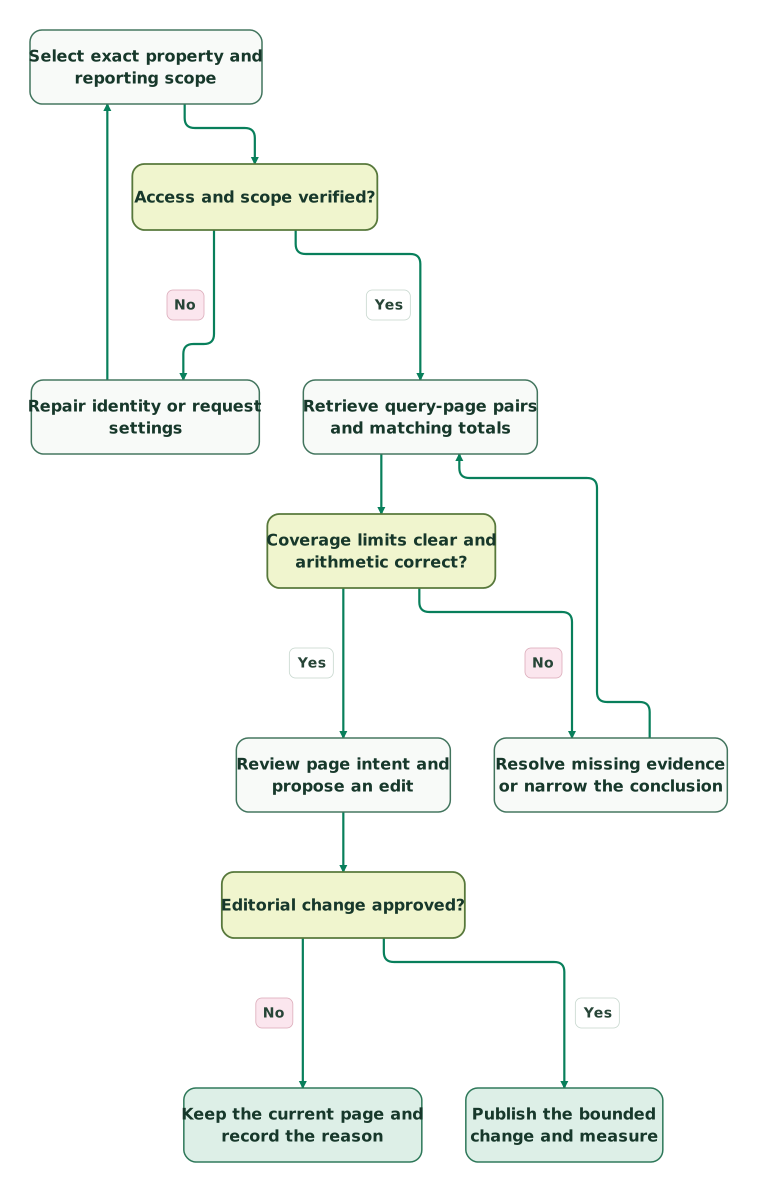
Read diagram as text
- Select exact property and reporting scope to Access and scope verified?.
- Access and scope verified? to Repair identity or request settings: No.
- Repair identity or request settings to Select exact property and reporting scope.
- Access and scope verified? to Retrieve query-page pairs and matching totals: Yes.
- Retrieve query-page pairs and matching totals to Coverage limits clear and arithmetic correct?.
- Coverage limits clear and arithmetic correct? to Resolve missing evidence or narrow the conclusion: No.
- Resolve missing evidence or narrow the conclusion to Retrieve query-page pairs and matching totals.
- Coverage limits clear and arithmetic correct? to Review page intent and propose an edit: Yes.
- Review page intent and propose an edit to Editorial change approved?.
- Editorial change approved? to Keep the current page and record the reason: No.
- Editorial change approved? to Publish the bounded change and measure: Yes
Why do Search Console MCP results disagree or fail?
Most useful investigations start by comparing the actual request, returned rows and calculation with the expected report. Separate an authentication failure from a valid response whose scope or interpretation is wrong.
| Symptom | First check | Corrective action | Evidence to retain |
|---|---|---|---|
| Property missing or access denied | Identity and property permission | Correct access, then list properties again | Exact property and permission result |
| Empty recent period | Finalized data availability and filters | Inspect date-only availability; retry a known period | Requested and actually available dates |
| Unexpectedly short result | Tool row limit and pagination | Continue the same request from its next offset | Page counts and terminal response |
| Chart total differs from query rows | Aggregation and omitted queries | Compare equivalent aggregates; explain the gap | Request, response aggregation and subtotal |
| CTR jumps after a merge | Averaged percentages or duplicated rows | Recompute from counts with complete keys | Original rows and calculation |
| Quota error | Repeated expensive queries | Cache completed extracts and reduce repeated scans | Failed request and retry schedule |
Google distinguishes request-rate limits from query-load limits. Wide date ranges and query/page groupings can consume more load, and repeating the same historical request wastes that capacity. Use bounded retries and a stored extract for repeated analysis instead of letting an agent loop on the same failing request. Google API quotas
What can URL Inspection prove, and when do you need a warehouse?
URL Inspection shows Google's indexed view; it does not perform a live indexability test of the current page. Use it to establish what Google recorded, then inspect the deployed page separately when checking a recent fix. Google's URL Inspection API reference makes that distinction explicit.
Keep the scope narrow. Inspect a representative affected URL before running an entire sitemap through the API. The documented per-property inspection allowance is 2,000 requests per day and 600 per minute. Inspection quota A large audit needs saved progress and a quota budget shared with other users of that property.
Move repeated historical reporting into a warehouse when the team needs persistent extracts, reproducible joins or a stable dataset for several consumers. Search Console's BigQuery bulk export starts with the export day's data; it does not automatically backfill the period before setup. It also needs a Cloud project with billing and brings storage/query costs. Google bulk-export setup Plan historical retrieval separately.
The BigQuery MCP guide explains how an assistant can query a controlled warehouse model. Keep the assistant on an approved reporting view and retain the meaning of each Search Console metric. Moving rows to BigQuery does not turn query-level data into complete query coverage or make search clicks equivalent to analytics sessions.
What should pass before this becomes a recurring workflow?
A recurring Search Console MCP workflow should reproduce a known result, identify missing evidence and stop before unauthorized changes. Complete the checklist with one real property and one deliberately failing case before relying on its weekly output.
Checklist
- The exact property and permitted reader identity are recorded.
- The Google grant is read-only and write tools are disabled.
- Reporting dates, search type, filters and data state are explicit.
- A query-page pair is verified against the corresponding report slice.
- Pagination and underlying coverage limits remain visible.
- CTR is recomputed from counts; duplicate response rows fail validation.
- A missing property or unavailable period produces a useful failure.
- Editorial recommendations have a reviewer and a separate publication step.
- Credentials, extracts and connection ownership have a handover plan.
At Martechdevs, we can scope the Search Console reporting connection and its acceptance checks around the decisions your team needs to make. The $99 martech audit is useful when the bigger question is which data sources and permissions the assistant should have in the first place.
Keep reading
 Martech AI
MCP security checklist for marketing and RevOps teams
Review an MCP connection before sharing business data. Check identity, permissions, prompt injection, data exposure, write approvals and recovery.
Jafrin Akter AloLast updated 10 min read
 Martech AI
MCP vs API vs Zapier: How Marketing Ops Should Choose
Choose APIs, MCP, Zapier or scripts for marketing ops. Compare workflow fit, task costs, retries, duplicate handling and the judgment each job actually needs.
Jafrin Akter AloLast updated 11 min read
 Martech AI
Google Ads MCP server: setup, access changes and useful reporting workflows
Set up Google's read-only Ads MCP server using current Cloud project access. Includes reporting prompts, a GAQL example and campaign validation checks.
Jafrin Akter AloLast updated 10 min read
AI readiness score
Check your tracking, data, context and access before connecting an agent.
Questions people ask
Does read-only Search Console access stop an assistant from publishing titles?
Read-only Search Console access restricts that Google connection. It does not restrict a separate CMS, Git or deployment tool attached to the assistant. Keep publication permissions separate, require review of the proposed text and verify the allowed tool set for the whole workflow. A reporting credential alone is not a website-change approval mechanism.
Can I share one Search Console MCP login across agency clients?
Use separate authorized connections and clear client boundaries instead of treating a shared personal login as the integration design. Record which identity can reach each property, where its tokens live and how access is removed when an engagement ends. Test that the assistant cannot retrieve another client's property through the connection intended for this one.
Can an MCP server recover anonymized Google search queries?
An MCP server cannot recover query text that Search Console does not expose. Google withholds anonymized queries for privacy, and query-level tables can exclude that traffic even when broader totals include it. Explain the missing detail rather than inventing keywords to balance a report. Google's performance-data explanation
Should a weekly board report use direct MCP queries or a saved dataset?
Use a saved, reconciled dataset when the board report must be reproducible after the meeting. Direct MCP queries are useful for investigation, but record the exact inputs and results before turning them into a recurring number. The assistant can explain a controlled extract while the reporting owner retains its definitions, refresh rules and acceptance checks.
Why can a successful MCP request still produce a bad SEO recommendation?
A successful request proves that the tool returned a response, not that the response answers the business question. The assistant may use the wrong property, omit pagination, combine incompatible aggregates or infer a landing page from unpaired lists. Require the row-level evidence behind the recommendation and a clear explanation of what remains unknown before changing content.
Sources
- Google: Official MCP server catalog
- Moein Saharkhiz: Google Search Console MCP server
- Google: Authorize Search Console API requests
- Google: OAuth for desktop apps
- PyPI: open-gsc-mcp 1.4.0
- open-gsc-mcp: Login and command-line controls
- open-gsc-mcp: Authentication and token handling
- Google: Sites list method
- Google: Search Analytics query reference
- open-gsc-mcp: Search Analytics tool
- Google: Getting performance data
- Google: Performance report overview
- Google: Performance data aggregation
- Google: Title links in Search
- Google: Search Console API quotas
- Google: URL Inspection API
- Google: Start a bulk data export
- Google: Performance-data filtering and limits
- Astral: Install uv

Written by
Jafrin Akter AloData Engineer and Co-founder at Martechdevs and Growth and Analytics Partners
Jafrin writes practical guides to marketing technology, customer data, analytics and AI workflows. Martechdevs is a Growth and Analytics Partners company.