
GA4 Audit Checklist: Collection, Configuration and Reconciliation
A GA4 audit should establish whether the property measures the business outcomes you use to make decisions. Start with the property and journey, trace the collected events, then reconcile the result with an independent record. Matching a headline total is insufficient when duplicates can hide missing outcomes. This checklist connects configuration findings to concrete repairs and repeatable acceptance evidence.
On this page
GA4 audit coverage
| Area | Evidence | Typical failure | Acceptance condition |
|---|---|---|---|
| Property and streams | Property ID, stream IDs, domains and owners | Correct events reach the wrong property | Intended journeys and destinations |
| Collection | Event names, parameters and timing | Attempt counted as completed outcome | Accepted action with complete values |
| Business reconciliation | Eligible orders or leads and observation records | Missing outcomes offset by duplicates | Explained identity-level differences |
| Acquisition | Campaign links, cross-domain path and referrals | Checkout interrupts the measured journey | Source and journey continuity |
| Configuration | Key events, filters and retention | Exclusion activated without a test | Documented settings and effect |
| Privacy and reporting | Consent states, data fields and quality indicators | Debug success mistaken for complete reporting | Appropriate collection and understood report boundaries |
Choose the decisions the audit needs to protect. For ecommerce, that may be order and revenue reporting. For a lead business, it may be accepted form submissions and later CRM qualification. Different systems can own those outcomes, so list the authoritative record before comparing numbers.
Our GA4 implementation service covers the collection and reporting repairs that follow this review. A useful scope names the broken journey, affected reports and acceptance tests rather than promising to make every dashboard number identical.
Baseline and access scope
Record the account, numeric property ID, web or app streams, measurement destinations, key domains and responsible owners. Include the tags or application integrations that send events. A copied property name is weak evidence because names can resemble one another; keep identifiers in the audit record.
Separate inspection from changes. Review effective access before assigning repairs, and request the permissions required for the specific setting. For example, Google's internal-traffic workflow requires Editor access at property level. Do not hand every reviewer administrative access simply to simplify the audit. Internal traffic configuration.
Write down the reporting time zone, currency basis, date range and reporting identity used for comparisons. Google specifically calls out time-zone and reporting-identity differences when reconciling Analytics with BigQuery. Align the query's time boundaries with the property rather than assuming a UTC day and a local reporting day contain the same events. Analytics and BigQuery comparison.
Capture current settings before editing them. Keep the observed state, proposed repair, owner and expected effect separately. This prevents an audit from becoming a sequence of undocumented configuration changes that are difficult to evaluate afterward.
Business outcome and event contract
Pick a small set of high-value journeys and define the accepted result. For an order, distinguish order creation, payment authorization, capture and refund. For a lead, distinguish an attempted form submission, accepted submission, CRM record creation and sales qualification. One event cannot stand in for every stage without an explicit definition.
Use Google's recommended events where their meanings fit, and send the prescribed parameters. Additional custom events should resolve a specific reporting need. An event called purchase with incomplete ecommerce context is not equivalent to a complete order record merely because its name is recognized. GA4 recommended events.
For each important event, document the producer, success condition, required fields, identity and duplicate policy. Include the expected behavior for a failed action. The tracking plan guide provides the wider contract; the audit checks whether the current implementation follows it.
Inspect field values at the time the event is sent. Confirm currency codes, numeric types, item context and stable transaction IDs where applicable. A variable that becomes correct after the event is sent cannot repair the earlier payload. Keep a raw observation of the outgoing event alongside the later destination result.
Controlled journey validation
Run a compact, repeatable test set before interpreting aggregate reports:
- Start from a known campaign or direct entry path.
- Record the device state, consent choice and intended destination.
- Complete the accepted action and inspect its event values.
- Repeat the journey with invalid input or a rejected action.
- Test reload, retry and navigation paths that could repeat the event.
- Compare the destination observation with the authoritative outcome.
DebugView is useful for examining a development device's events and properties. Prefer enabling it for the device under review. If debug_mode was added explicitly, remove the parameter to disable it; setting it to false does not disable debug mode. DebugView and Realtime provide limited attribution analysis, so use Acquisition reports for attribution checks. Google DebugView guidance.
Do not interpret an absent debug event without checking the test's consent state and privacy controls. Conversely, one visible event does not prove every visitor path works. Retain the path and conditions that produced the observation.
For campaign tests, use the UTM checker to inspect the exact URL values. Keep a consistent campaign case and naming scheme in the sample. A malformed input should be fixed at the source, rather than hidden by a report-specific grouping rule.
Reconciliation beyond matching totals
Consider a hypothetical audit of 100 eligible orders, each worth USD 50. The authoritative order total is USD 5,000. A collection log contains 100 purchase messages worth USD 5,000, which initially appears to match.
The log actually contains only 98 unique order IDs. Two of those orders each appear twice, and two expected orders are absent. This example concerns a collection log before destination processing; it does not assume that GA4 will report every repeated message as another purchase.
| Measure | Authoritative orders | Collection log | Difference |
|---|---|---|---|
| Rows or messages | 100 orders | 100 messages | 0 at this different grain |
| Unique order IDs | 100 IDs | 98 IDs | 2 missing IDs |
| Naive sum of amounts | USD 5,000 | USD 5,000 | USD 0 |
| Amount across distinct observed orders | USD 5,000 | USD 4,900 | USD 100 missing |
| Repeated messages beyond the first per order | 0 messages | 2 messages | 2 extra messages |
Unique-order coverage is 98 ÷ 100 = 98%. Missing-order share is 2 ÷ 100 = 2%. The two extra USD 50 messages exactly offset the two absent USD 50 orders in the naive sum. A total-only check therefore misses both defects.
Reconcile sets of eligible IDs, then compare values for matched IDs. Reject conflicting amounts for the same order until the version, refund or adjustment rule is clear. Selecting the first amount arbitrarily can turn a delivery problem into a financial reporting error.
GA4 supports purchase deduplication using transaction IDs. Google requires a unique value per transaction and warns against empty strings or reusing the same value for different transactions. Test the actual producer and identity context; do not rely on the destination to repair every duplicate source path. Transaction IDs and duplicate purchases.
The eligible population also matters. A payment ledger can include orders outside the tagged website, a different currency or a period excluded from the sample. Establish the shared population first. A documented coverage gap is more useful than an invented expectation of universal equality between systems.
Acquisition and cross-domain continuity
Trace the real route from arrival to outcome, including payment and authentication redirects. Cross-domain measurement passes identity information through the _gl linker parameter for configured journeys. A redirect can remove that parameter before the destination uses it. Check the full navigation path rather than only the domain list in the interface. Cross-domain measurement.
Test a direct visit to the destination as well as a visit that crosses domains. Record whether the necessary pages carry the intended tag and whether the transition preserves the expected journey. Avoid treating a successful link click as proof that the final application state retained the same measurement context.
Review unwanted referrals separately. That setting identifies domains whose traffic should not be treated as referrals and adds ignore_referrer where the rule matches. It does not remove all events from that domain or replace the cross-domain setup. A payment provider on the list is not proof that the checkout journey is measured correctly. Google tag settings.
For paid-media comparisons, retain each system's conversion definition and attribution window in the evidence. Different attribution methods can assign credit differently even when the underlying business outcome is the same. Diagnose the collection chain before changing attribution settings to force a visual match.
Key events, filters and retention
Review which events are marked as key events, why they matter and how they are counted. Once per event counts repeated occurrences, while Once per session counts only one key event in that session. Counting-method changes affect future key events rather than rewriting past data. A lower count after a setting change can therefore be a definition change, not a collection failure. Key event counting methods.
Do not activate an exclusion simply because it is named “internal.” Google's Testing state identifies matching traffic with the Test data filter name dimension. Active exclusions permanently prevent matching incoming data from being processed, including availability in Analytics and BigQuery. Validate the population in Testing before activation, and use report filters when the requirement is only to hide data in a report. Internal traffic filters.
Review retention against the analyses the team needs. Google's retention setting affects user-level and event-level data used in explorations and funnel reports; it does not remove the same history from standard aggregated reports. Increasing retention does not restore data already deleted. Do not diagnose an older exploration's missing rows as proof that standard reports also lost their history. Data retention.
Keep a change record for each setting with the effective point and expected reporting effect. Preserve enough context that an analyst comparing periods can distinguish a real behavioral change from a measurement-definition change.
Consent, personal data and reporting limits
Review consent through actual visitor states, including the initial state and later changes. A banner appearance alone does not show what the tags did. In GTM, built-in consent checks and additional firing requirements have different effects; inspect the configured destination behavior and test the resulting requests. Tag Manager consent support.
Inspect ordinary analytics payloads and URLs for email addresses, phone numbers and free-form personal data. Google's PII guidance specifically includes URL paths, query parameters and page titles. Treat a parameter removal rule as one layer of protection, then check the event producer so unintended data does not continue spreading to other destinations. Analytics PII guidance.
Reporting limitations need their own finding type. A data threshold can withhold detail to protect user privacy, and the data quality indicator explains when thresholding applies. Thresholds are system defined. The absence of a small audience row is not sufficient evidence of a broken tag. Google data thresholds.
Sampling and the (other) row are different issues. Google can use aggregate or more granular tables depending on the request; table limits can group less common dimension values or lead to sampling. Record the report, dimensions, date range and quality indicator before comparing it with an export. Analytics storage and display.
Repair priorities and acceptance loop
Give each finding an owner, an affected decision, a reproducible case and a proposed acceptance test. A missing purchase value deserves a different repair from an expected threshold in a demographic report. Separate collection defects, configuration choices, interpretation errors and unresolved evidence.
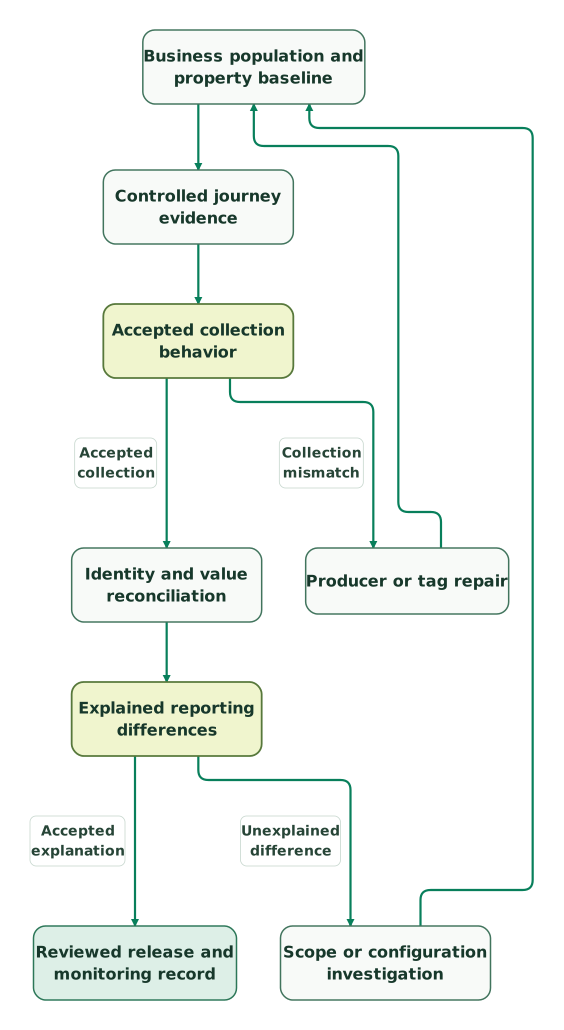
Read diagram as text
- Business population and property baseline to Controlled journey evidence.
- Controlled journey evidence to Accepted collection behavior.
- Accepted collection behavior to Producer or tag repair: Collection mismatch.
- Producer or tag repair to Business population and property baseline.
- Accepted collection behavior to Identity and value reconciliation: Accepted collection.
- Identity and value reconciliation to Explained reporting differences.
- Explained reporting differences to Scope or configuration investigation: Unexplained difference.
- Scope or configuration investigation to Business population and property baseline.
- Explained reporting differences to Reviewed release and monitoring record: Accepted explanation
A repair is ready when the original failure and neighboring cases pass. Keep any permanent data loss or unrecoverable historical gap explicit in the handoff. Future correctness should not be presented as a rewrite of past collection.
GA4 audit checklist
- Property, streams, destinations and responsible owners recorded.
- Business outcomes and eligible comparison population defined.
- Required event values checked at the sending point.
- Successful, rejected and repeated journeys tested.
- Unique IDs and values reconciled before headline totals.
- Campaign paths, cross-domain links and referral rules reviewed.
- Key event counting, filter state and retention effects documented.
- Consent behavior and ordinary analytics data fields inspected.
- Reporting identity, dates and data quality indicators retained.
- Repairs assigned and verified against the original failure case.
The GA4 audit skill helps organize the review evidence. For a container-level problem, the GTM audit guide follows the tag and release dependencies in more detail. For reporting discrepancies involving exports, continue with the GA4 BigQuery export guide.
Keep reading
Browse all Tracking & Attribution guides
 Tracking & Attribution
Tracking Plan: Free Template, Examples by Business Type and How to Build One
A tracking plan defines each event: when it fires, its properties, IDs, owner and tools. Get a free two-tab template, six examples and an approval checklist.
Jafrin Akter AloLast updated 42 min read
 Data Warehouse
GA4 BigQuery export: setup, costs, limits and ten starter queries
Set up and validate GA4's BigQuery export. Use ten SQL examples to inspect events, sessions, acquisition, purchases, funnel steps and missing identifiers.
Jafrin Akter AloLast updated 9 min read
 Tracking & Attribution
GA4 data thresholds and sampling: why numbers are hidden and what to do
Separate GA4 privacy thresholds, sampling, (other) rows and retention limits. Choose the right fix, preserve valid comparisons and know when BigQuery helps.
Jafrin Akter AloLast updated 13 min read
GA4 consulting
See the implementation scope, deliverables and acceptance checks.
Questions people ask
Can matching order totals still hide a GA4 collection problem?
Yes. Repeated messages can offset missing orders, especially when the amounts are similar. Reconcile eligible order IDs and matched values before trusting a total. Keep collection-log observations separate from GA4's processed purchases because destination deduplication can change the result. Also document exclusions, currencies and time boundaries so the two systems describe the same business population.
Should an internal traffic filter be activated during the audit?
Only after its matching population has been validated and the responsible owner accepts the exclusion. Testing identifies matches without making the exclusion permanent. An active exclude filter prevents matching incoming data from being processed, so disabling it later does not restore the excluded history. Use a report-level filter when the requirement is only a different report view.
Does a longer retention period recover an old exploration?
It can preserve still-available data for longer, but it cannot restore data that Analytics already deleted. Retention also has a different scope from standard aggregated reports. Confirm the exploration's date range and required user-level or event-level history before changing the setting. Keep the effective change in the audit record so future comparisons have the correct context.
Is DebugView a reliable place to validate campaign attribution?
DebugView is useful for event and parameter inspection, but it performs limited attribution analysis. Use Acquisition reports for attribution checks and retain the exact campaign URL and journey conditions. First verify collection and destination targeting, then compare reporting definitions. A visible debug event alone does not establish that campaign credit, later processing and every visitor path are correct.
What distinguishes a GA4 audit finding from an unexplained discrepancy?
A finding has a defined expected result, reproducible evidence, an affected decision and a responsible owner. An unexplained discrepancy still needs investigation into scope, identity, timing, configuration or reporting limits. Keep that uncertainty visible rather than labelling every difference a tracking defect. Closure requires a verified repair or a supported explanation that the reporting owner can use.
Sources
- Google: Filter out internal traffic
- Google: Compare Analytics reports and BigQuery data
- Google: GA4 recommended events
- Google: Monitor events in DebugView
- Google: Transaction IDs and duplicate purchases
- Google: Cross-domain measurement
- Google: Configure Google tag settings
- Google: Key event counting methods
- Google: Data retention
- Google: Tag Manager consent support
- Google: Avoid sending personally identifiable information
- Google: Data thresholds
- Google: Analytics storage and display

Written by
Jafrin Akter AloData Engineer and Co-founder at Martechdevs and Growth and Analytics Partners
Jafrin writes practical guides to marketing technology, customer data, analytics and AI workflows. Martechdevs is a Growth and Analytics Partners company.